ECO mode Lexus GS200t 2016 s Manual PDF
[x] Cancel search | Manufacturer: LEXUS, Model Year: 2016, Model line: GS200t, Model: Lexus GS200t 2016Pages: 668, PDF Size: 177.56 MB
Page 549 of 668
5497-2. Steps to take in an emergency
7
When trouble arises
GS350_200t_GS F_OM_OM30E87E_(EE)
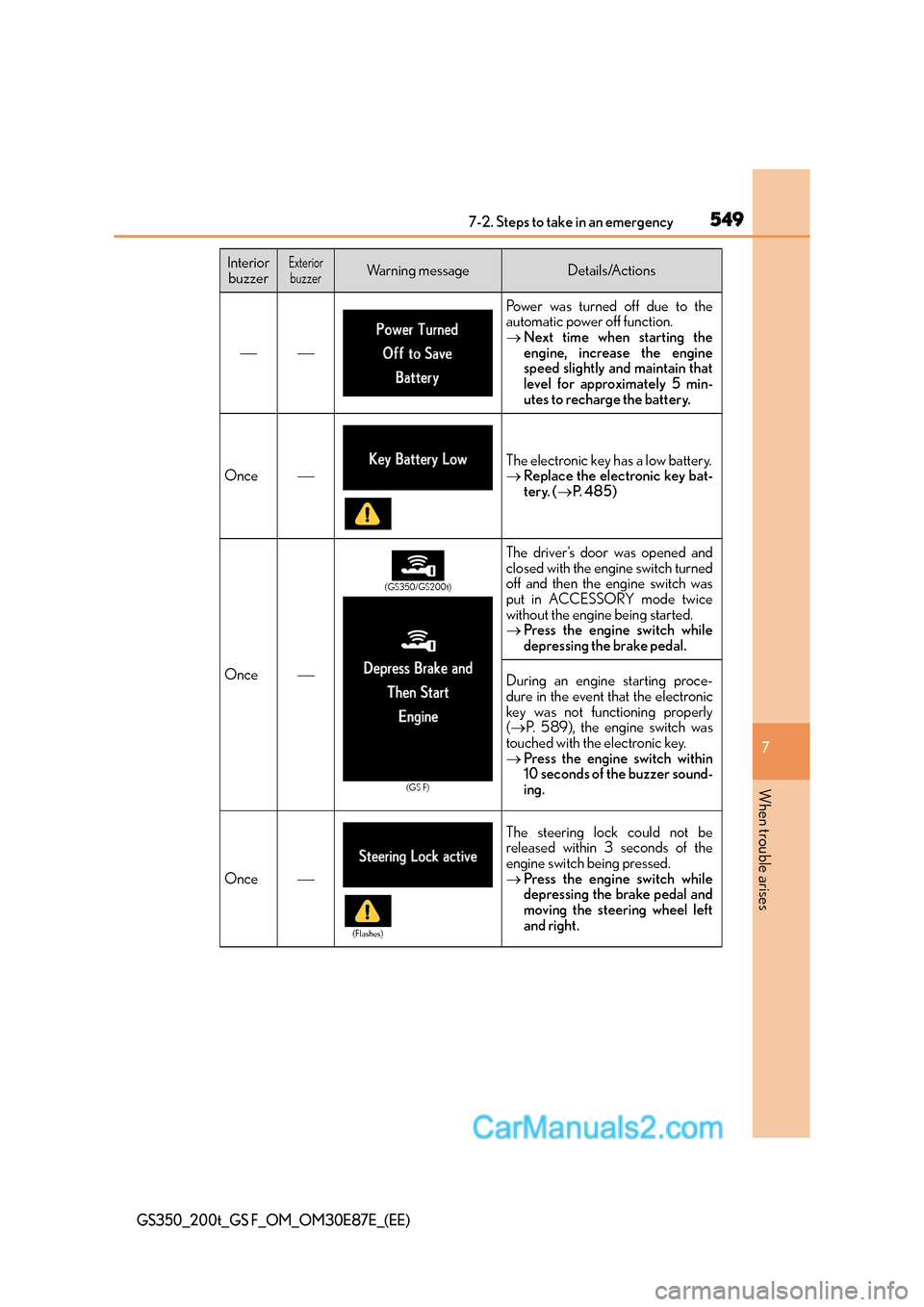
Power was turned off due to the
automatic power off function.
→Next time when starting the
engine, increase the engine
speed slightly and maintain that
level for approximately 5 min-
utes to recharge the battery.
OnceThe electronic key has a low battery.
→Replace the electronic key bat-
tery. ( →P. 4 8 5 )
Once
The driver’s door was opened and
closed with the engine switch turned
off and then the engine switch was
put in ACCESSORY mode twice
without the engine being started.
→ Press the engine switch while
depressing the brake pedal.
During an engine starting proce-
dure in the event that the electronic
key was not functioning properly
(→ P. 589), the engine switch was
touched with the electronic key.
→ Press the engine switch within
10 seconds of the buzzer sound-
ing.
Once
The steering lock could not be
released within 3 seconds of the
engine switch being pressed.
→Press the engine switch while
depressing the brake pedal and
moving the steering wheel left
and right.
Interior
buzzerExteriorbuzzerWarning messageDetails/Actions
(GS350/GS200t)
(GS F)
(Flashes)
Page 584 of 668
5847-2. Steps to take in an emergency
GS350_200t_GS F_OM_OM30E87E_(EE)
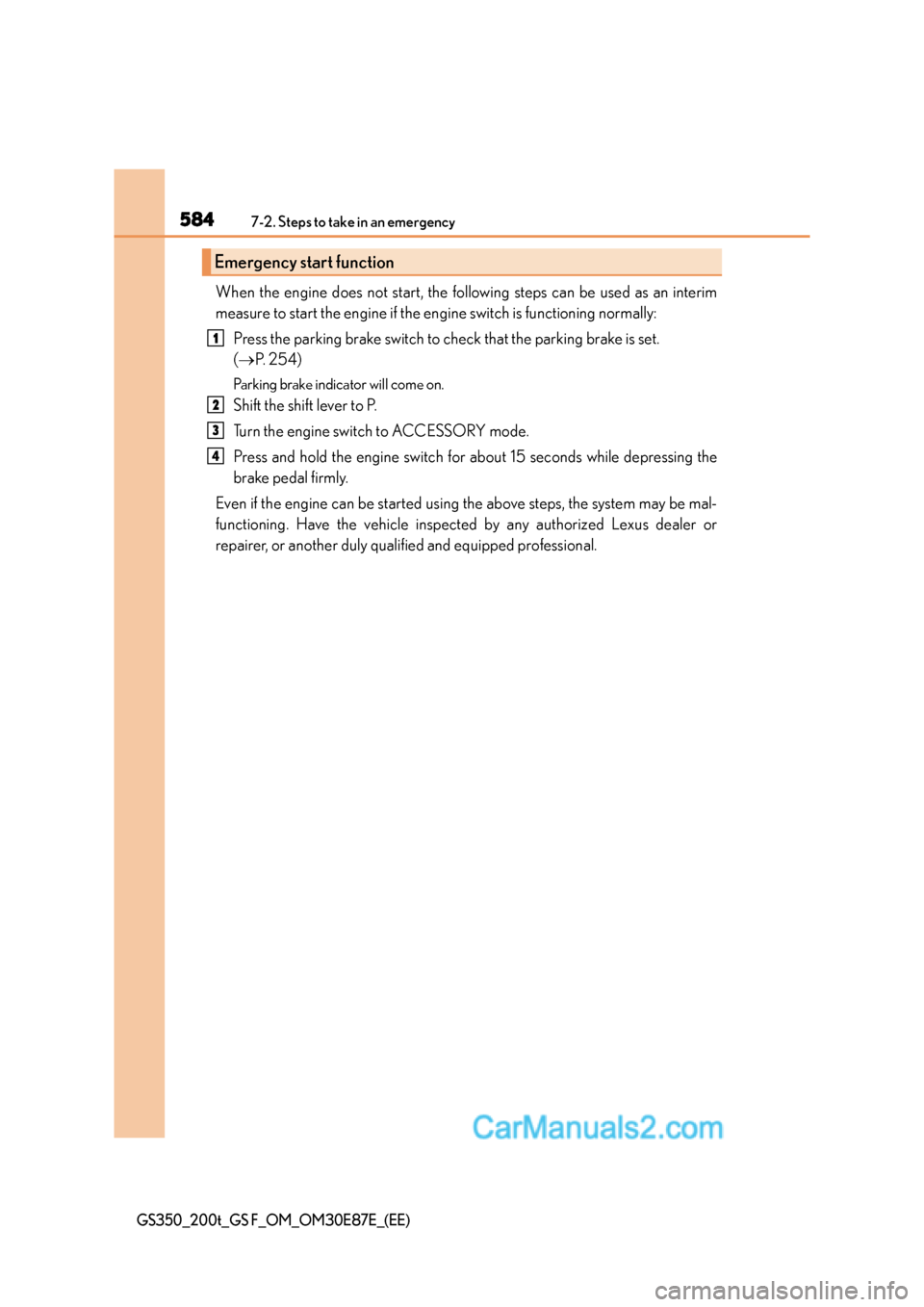
When the engine does not start, the following steps can be used as an interim
measure to start the engine if the engine switch is functioning normally:Press the parking brake switch to check that the parking brake is set.
(→ P. 2 5 4 )
Parking brake indicator will come on.
Shift the shift lever to P.
Turn the engine switch to ACCESSORY mode.
Press and hold the engine switch for about 15 seconds while depressing the
brake pedal firmly.
Even if the engine can be started using the above steps, the system may be mal-
functioning. Have the vehicle inspected by any authorized Lexus dealer or
repairer, or another duly qualified and equipped professional.
Emergency start function
1
2
3
4
Page 589 of 668
5897-2. Steps to take in an emergency
7
When trouble arises
GS350_200t_GS F_OM_OM30E87E_(EE)
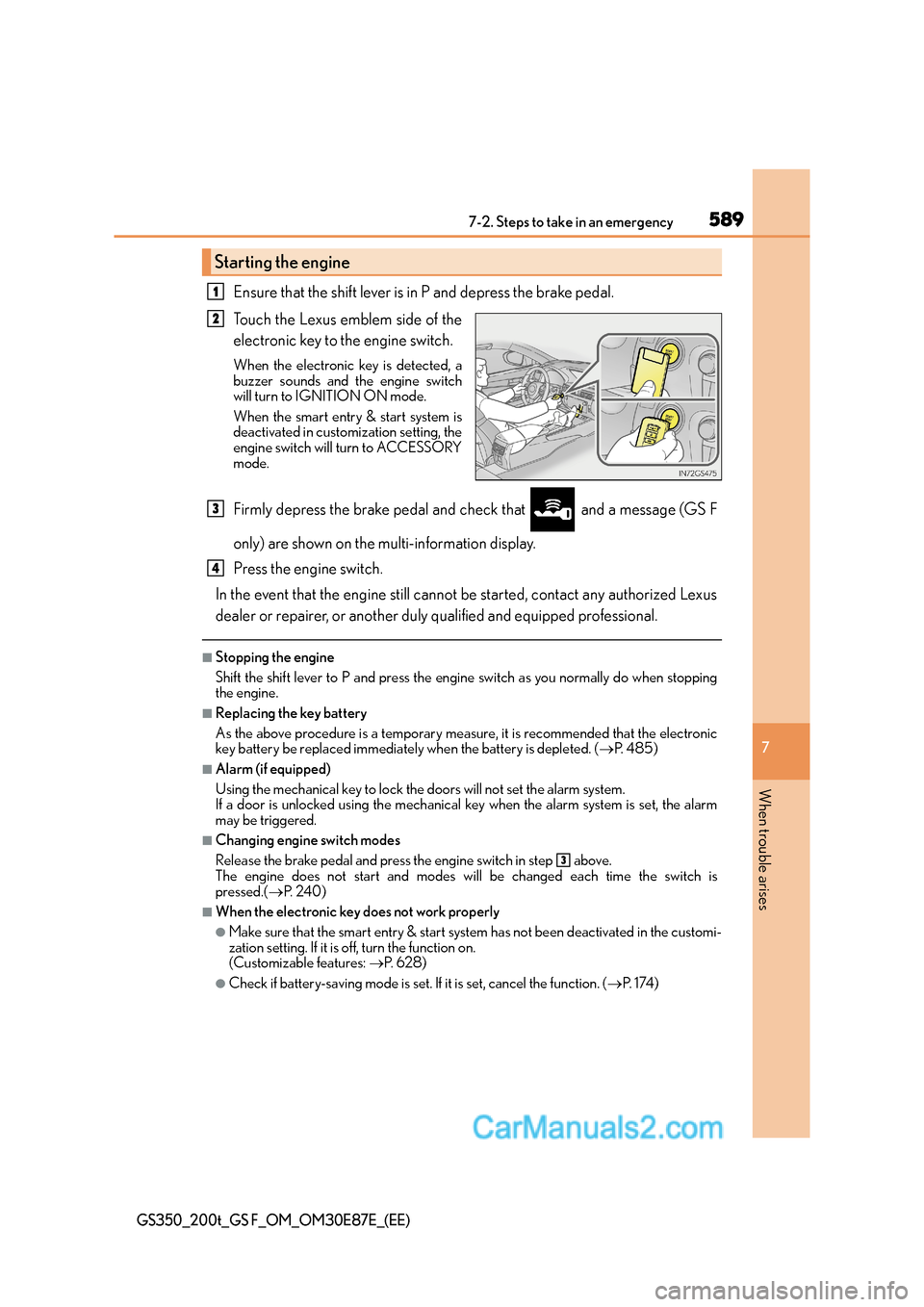
Ensure that the shift lever is in P and depress the brake pedal.
Touch the Lexus emblem side of the
electronic key to the engine switch.
When the electronic key is detected, a
buzzer sounds and the engine switch
will turn to IGNITION ON mode.
When the smart entry & start system is
deactivated in customization setting, the
engine switch will turn to ACCESSORY
mode.
Firmly depress the brake pedal and check that and a message (GS F
only) are shown on the multi-information display.
Press the engine switch.
In the event that the engine still cannot be started, contact any authorized Lexus
dealer or repairer, or another duly qualified and equipped professional.
■Stopping the engine
Shift the shift lever to P and press the engine switch as you normally do when stopping
the engine.
■Replacing the key battery
As the above procedure is a temporary measure, it is recommended that the electronic
key battery be replaced immediately when the battery is depleted. ( →P. 4 8 5 )
■Alarm (if equipped)
Using the mechanical key to lock the doors will not set the alarm system.
If a door is unlocked using the mechanical key when the alarm system is set, the alarm
may be triggered.
■Changing engine switch modes
Release the brake pedal and press the engine switch in step above.
The engine does not start and modes w ill be changed each time the switch is
pressed.( →P. 2 4 0 )
■When the electronic key does not work properly
●Make sure that the smart entry & start syst em has not been deactivated in the customi-
zation setting. If it is off, turn the function on.
(Customizable features: →P. 6 2 8 )
●Check if battery-saving mode is set. If it is set, cancel the function. (→P. 1 74 )
Starting the engine
1
2
3
4
3
Page 593 of 668
5937-2. Steps to take in an emergency
7
When trouble arises
GS350_200t_GS F_OM_OM30E87E_(EE)
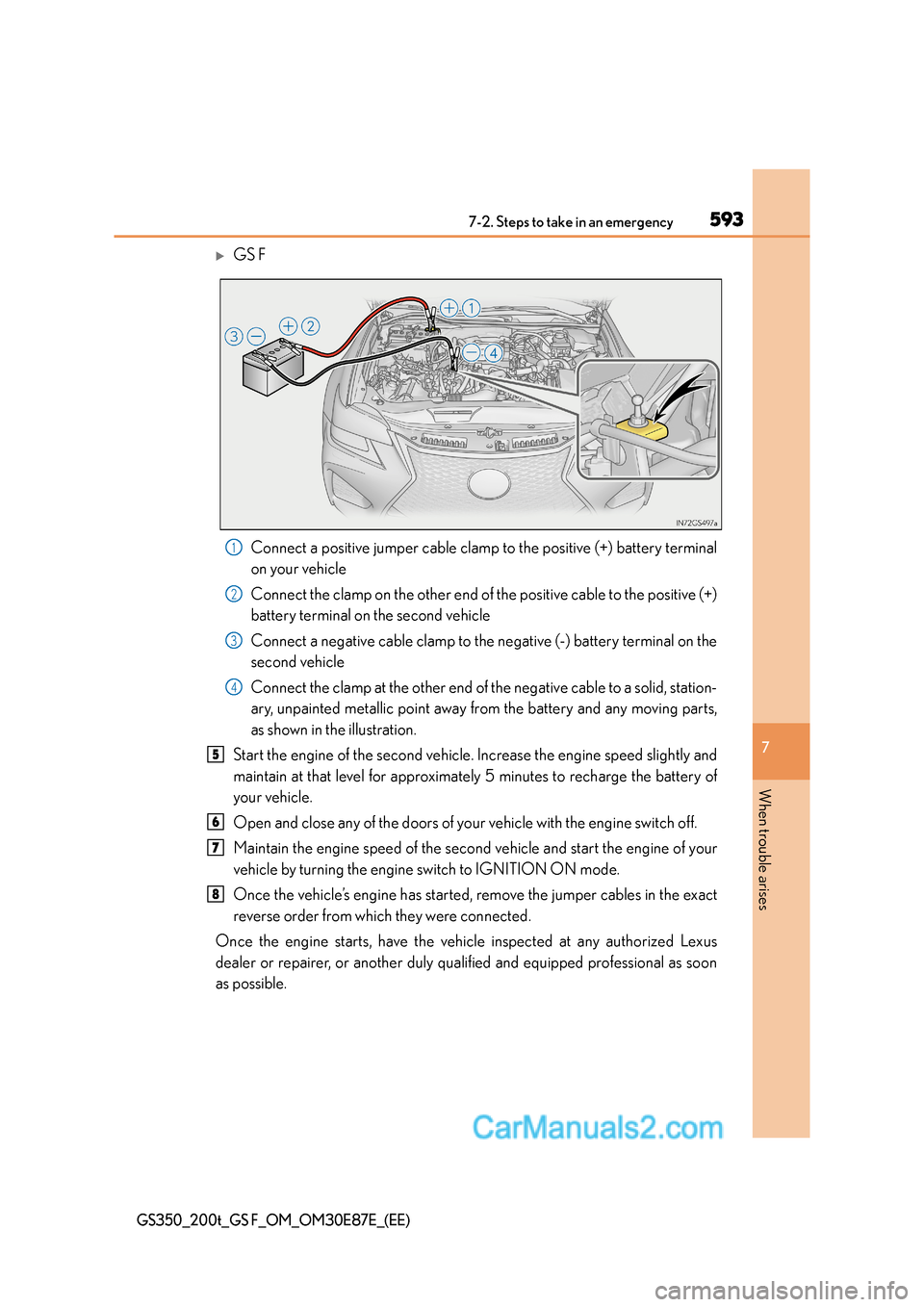
XGS FConnect a positive jumper cable clamp to the positive (+) battery terminal
on your vehicle
Connect the clamp on the other end of the positive cable to the positive (+)
battery terminal on the second vehicle
Connect a negative cable clamp to the negative (-) battery terminal on the
second vehicle
Connect the clamp at the other end of the negative cable to a solid, station-
ary, unpainted metallic point away fr om the battery and any moving parts,
as shown in the illustration.
Start the engine of the second vehicle. Increase the engine speed slightly and
maintain at that level for approximately 5 minutes to recharge the battery of
your vehicle.
Open and close any of the doors of your vehicle with the engine switch off.
Maintain the engine speed of the second vehicle and start the engine of your
vehicle by turning the engine switch to IGNITION ON mode.
Once the vehicle’s engine has started, remove the jumper cables in the exact
reverse order from which they were connected.
Once the engine starts, have the vehicle inspected at any authorized Lexus
dealer or repairer, or another duly qualified and equipped professional as soon
as possible.
1
2
3
4
5
6
7
8
Page 594 of 668
5947-2. Steps to take in an emergency
GS350_200t_GS F_OM_OM30E87E_(EE)
■Starting the engine when the battery is discharged
The engine cannot be started by push-starting.
■To prevent battery discharge
●Turn off the headlights and the audio system while the engine is off.
●Turn off any unnecessary electrical components when the vehicle is running at a low
speed for an extended period, such as in heavy traffic.
■Charging the battery
The electricity stored in the battery will discharge gradually even when the vehicle is not
in use, due to natural discharge and the draining effects of certain electrical appliances. If
the vehicle is left for a long time, the battery may discharge, and the engine may be
unable to start. (The battery recharges automatically during driving.)
■When recharging or replacing the battery
●In some cases, it may not be possible to un lock the doors using the smart entry & start
system when the battery is discharged. Use the wireless remote control or the mechan-
ical key to lock or unlock the doors.
●The engine may not start on the first attempt after the battery has recharged but will
start normally after the second attempt. This is not a malfunction.
●The engine switch mode is memorized by the vehicle. When the battery is recon-
nected, the system will return to the mode it was in before the battery was discharged.
Before disconnecting the battery, turn the engine switch off.
If you are unsure what mode the engine switch was in before the battery discharged, be
especially careful when reconnecting the battery.
Page 630 of 668
6308-2. Customization
GS350_200t_GS F_OM_OM30E87E_(EE)
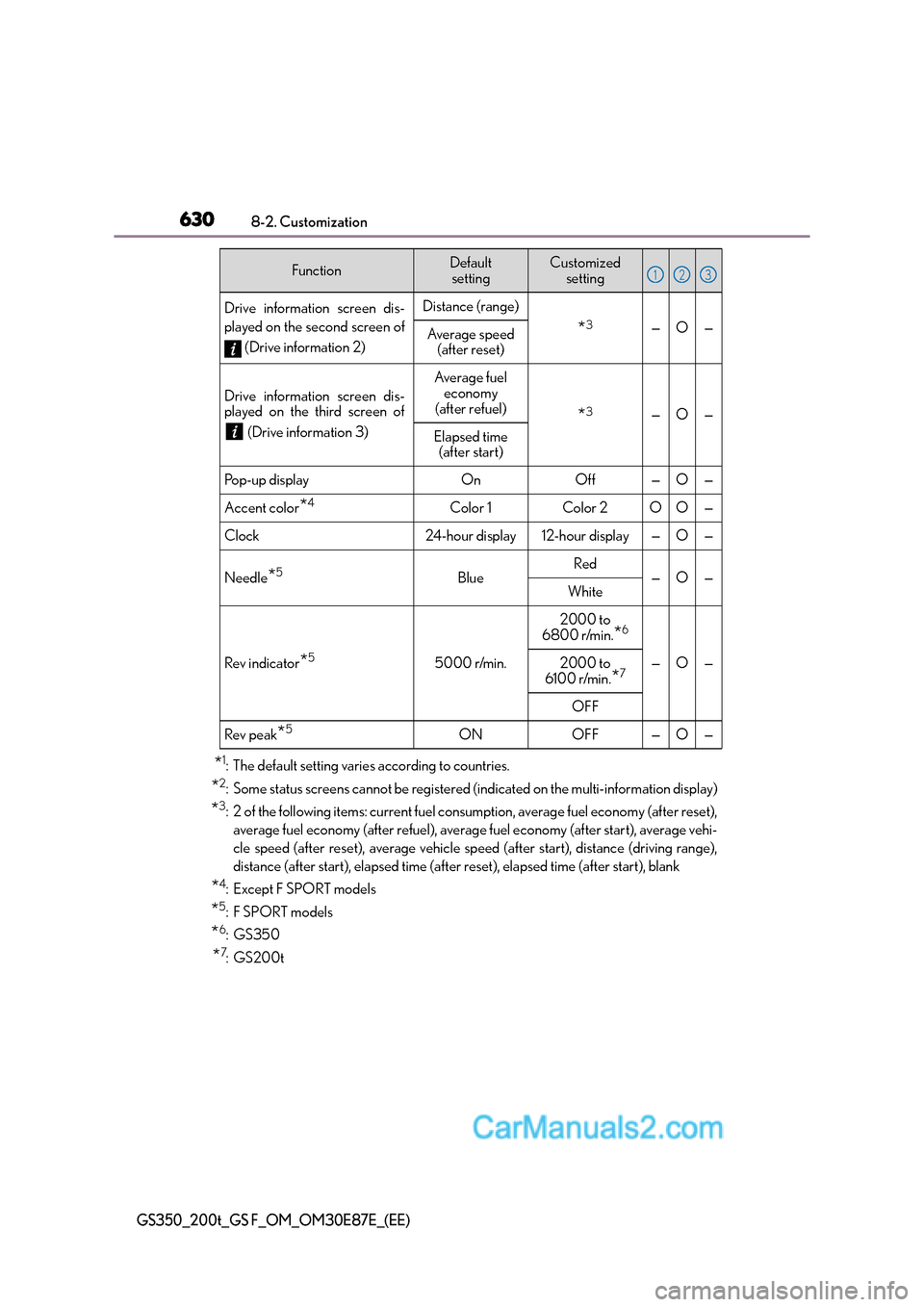
*1: The default setting varies according to countries.
*2: Some status screens cannot be registered (indicated on the multi-information display)
*3: 2 of the following items: current fuel consumption, average fuel economy (after reset),
average fuel economy (after refuel), average fuel economy (after start), average vehi-
cle speed (after reset), average vehicle speed (after start), distance (driving range),
distance (after start), elapsed time (after reset), elapsed time (after start), blank
*4:Except F SPORT models
*5:F SPORT models
*6:GS350
*7:GS200t
Drive information screen dis-
played on the second screen of
(Drive information 2)Distance (range)
*3—O—Average speed (after reset)
Drive information screen dis-
played on the third screen of
(Drive information 3)
Average fuel economy
(after refuel)
*3—O—
Elapsed time (after start)
Pop-up displayOnOff—O—
Accent color*4Color 1Color 2OO—
Clock24-h our display12-hour display—O—
Needle*5BlueRed—O—White
Rev indicator*55000 r/min.
2000 to
6800 r/min.
*6
—O—2000 to
6100 r/min.*7
OFF
Rev peak*5ONOFF—O—
FunctionDefault settingCustomized setting123
Page 637 of 668
637
8
8-2. Customization
Vehicle specifications
GS350_200t_GS F_OM_OM30E87E_(EE)
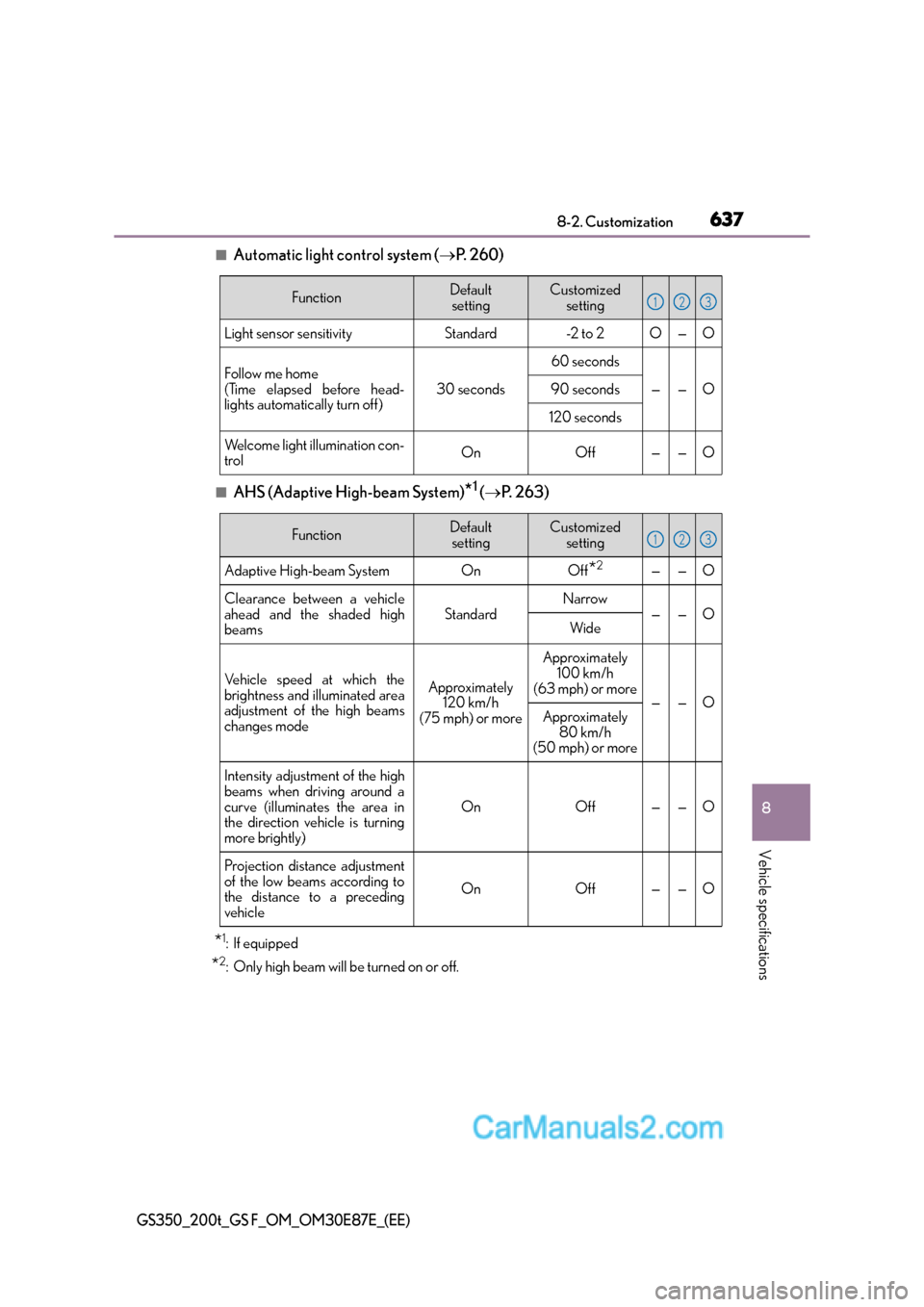
■Automatic light control system (
→P. 2 6 0 )
■AHS (Adaptive High-beam System)*1 (→ P. 2 6 3 )
*1: If equipped
*2: Only high beam will be turned on or off.
FunctionDefault
settingCustomized setting
Light sensor sensitivityStandard-2 to 2O—O
Follow me home
(Time elapsed before head-
lights automatically turn off)
30 seconds
60 seconds
——O90 seconds
120 seconds
Welcome light illumination con-
trolOnOff——O
123
FunctionDefault
settingCustomized setting
Adaptive High-beam SystemOnOff*2——O
Clearance between a vehicle
ahead and the shaded high
beamsStandardNarrow——OWide
Vehicle speed at which the
brightness and illuminated area
adjustment of the high beams
changes modeApproximately 120 km/h
(75 mph) or more
Approximately 100 km/h
(63 mph) or more
——OApproximately
80 km/h
(50 mph) or more
Intensity adjustment of the high
beams when driving around a
curve (illuminates the area in
the direction vehicle is turning
more brightly)
OnOff——O
Projection distance adjustment
of the low beams according to
the distance to a preceding
vehicle
OnOff——O
123
Page 638 of 668
6388-2. Customization
GS350_200t_GS F_OM_OM30E87E_(EE)
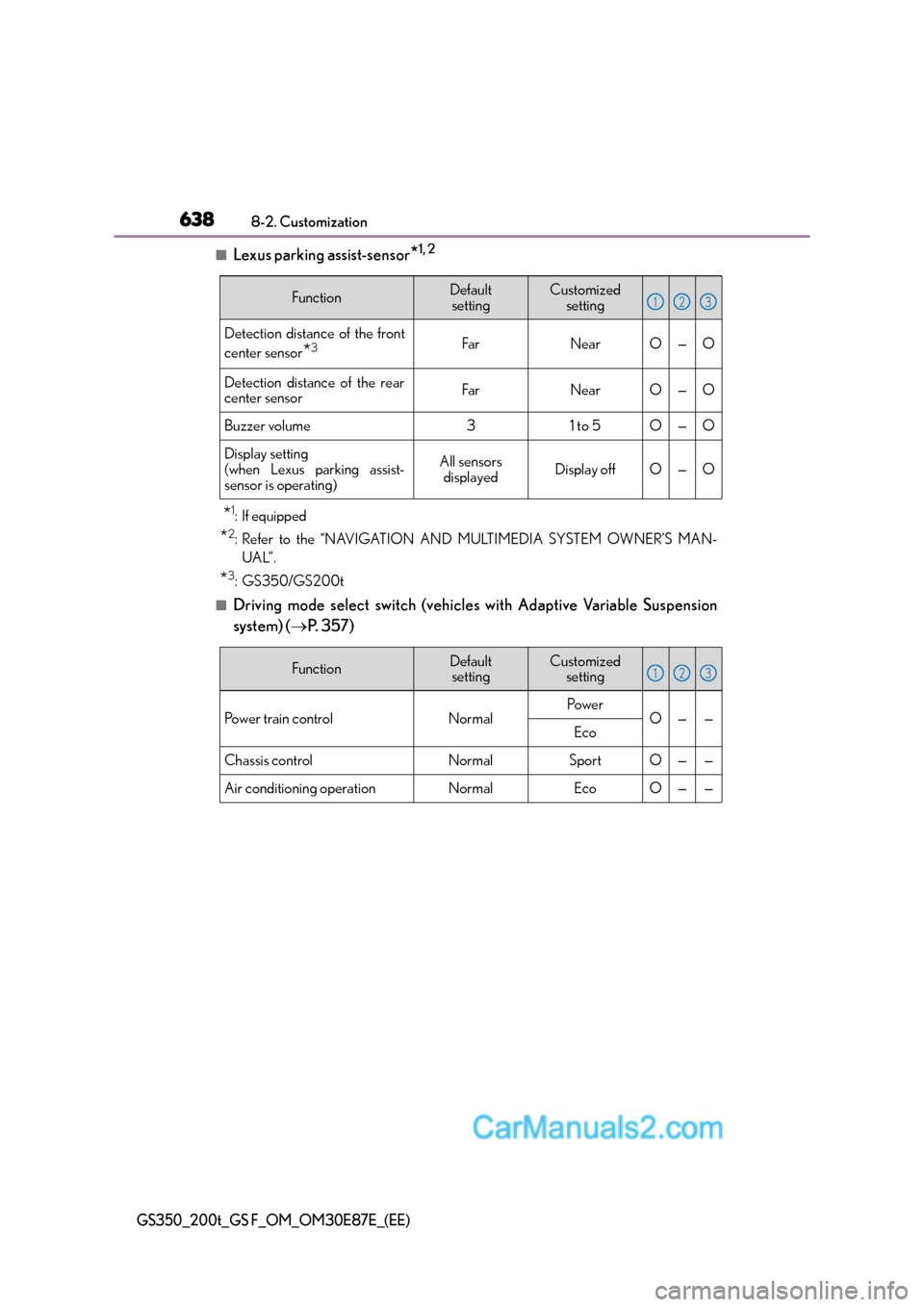
■Lexus parking assist-sensor*1, 2
*1:If equipped
*2: Refer to the “NAVIGATION AND MULTIMEDIA SYSTEM OWNER’S MAN-UAL”.
*3: GS350/GS200t
■Driving mode select switch (vehicles with Adaptive Variable Suspension
system) ( →P. 3 5 7 )
FunctionDefault
settingCustomized setting
Detection distance of the front
center sensor
*3FarNearO—O
Detection distance of the rear
center sensorFarNearO—O
Buzzer volume31 to 5O—O
Display setting
(when Lexus parking assist-
sensor is operating)All sensors displayedDisplay offO—O
123
FunctionDefaultsettingCustomized setting
Po w e r t r a i n c o n t r o lNormalPo w e rO——Eco
Chassis controlNormalSportO——
Air conditioning operationNormalEcoO——
123
Page 642 of 668
6428-2. Customization
GS350_200t_GS F_OM_OM30E87E_(EE)
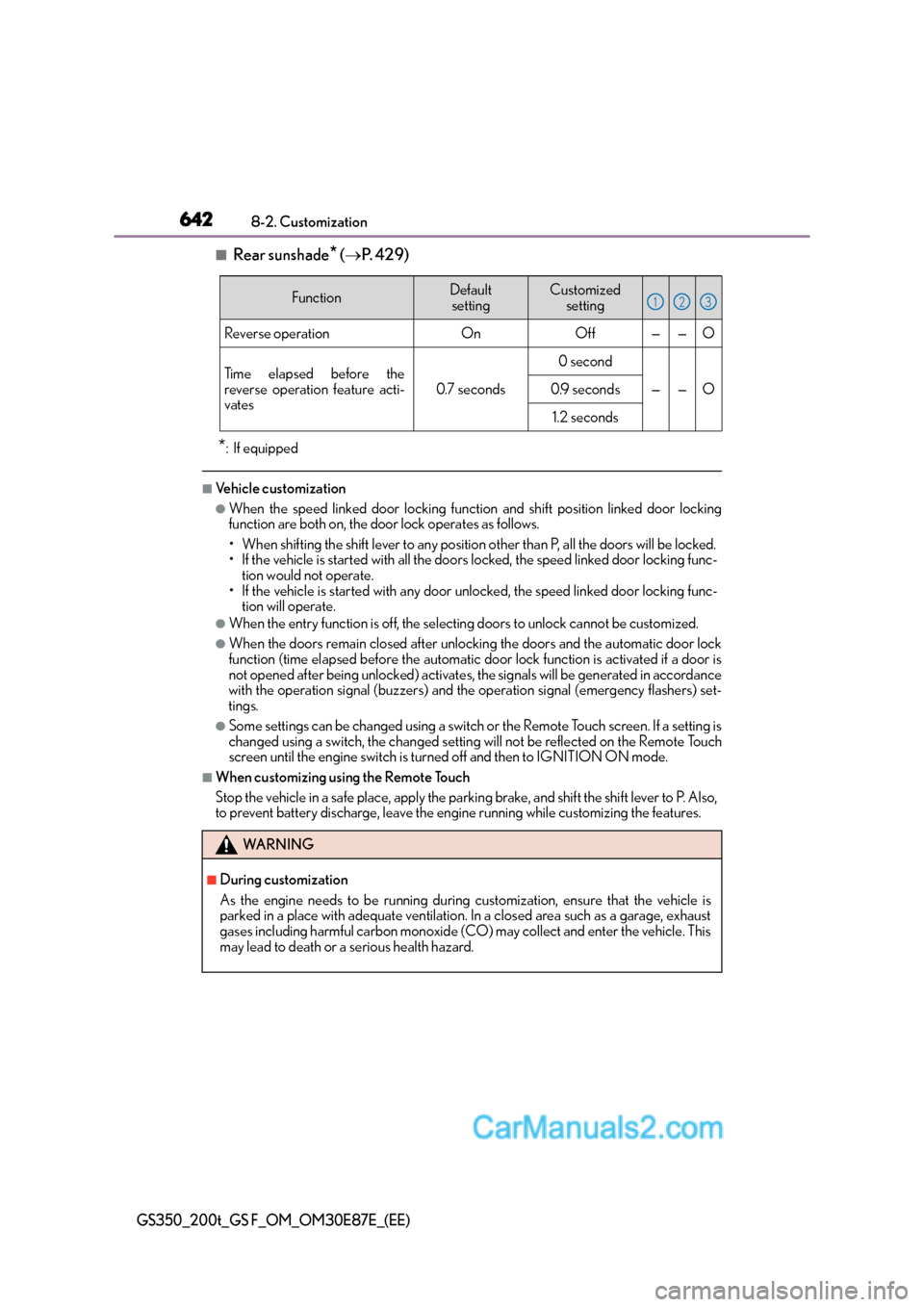
■Rear sunshade* (→ P. 4 2 9 )
*: If equipped
■Vehicle customization
●When the speed linked door locking function and shift position linked door locking
function are both on, the door lock operates as follows.
• When shifting the shift lever to any position other than P, all the doors will be locked.
• If the vehicle is started with all the door s locked, the speed linked door locking func-
tion would not operate.
• If the vehicle is started with any door unlocked, the speed linked door locking func- tion will operate.
●When the entry function is off, the select ing doors to unlock cannot be customized.
●When the doors remain closed after unlocking the doors and the automatic door lock
function (time elapsed before the automatic d oor lock function is activated if a door is
not opened after being unlock ed) activates, the signals will be generated in accordance
with the operation signal (buzzers) and the operation signal (emergency flashers) set-
tings.
●Some settings can be changed using a switch or the Remote Touch screen. If a setting is
changed using a switch , the changed setting will not be reflected on the Remote Touch
screen until the engine switch is turn ed off and then to IGNITION ON mode.
■When customizing using the Remote Touch
Stop the vehicle in a safe place, apply the parking brake, and shift the shift lever to P. Also,
to prevent battery discharge, leave the engine running while customizing the features.
FunctionDefault
settingCustomized setting
Reverse operationOnOff——O
Time elapsed before the
reverse operation feature acti-
vates
0.7 seconds
0 second
——O0.9 seconds
1.2 seconds
WA R N I N G
■During customization
As the engine needs to be running during customization, ensure that the vehicle is
parked in a place with adequate ventilation. In a closed area such as a garage, exhaust
gases including harmful carbon monoxide (CO) may collect and enter the vehicle. This
may lead to death or a serious health hazard.
123
Page 654 of 668
654Alphabetical index
GS350_200t_GS F_OM_OM30E87E_(EE)
Double locking system ........................... 91
Drive info 1/Drive info 2/Drive info 3 ................................. 126, 138Drive information ...................... 122, 130
Resetting........................................ 122, 130
Drive-start control...................... 223, 251
Driver’s seat position memory ......... 198 Driving position memory ................ 199
Memory recall function ................... 201
Power easy access system ............ 198
Driving ....................................................... 222 Break-in tips ......................................... 224
Correct driving posture .................... 44
Driving mode select switch ..........356
Procedures ........................................... 222
Winter drive tips.................................382
Dynamic radar cruise control........... 341 Function ....................................................341
Warning message.............................. 518
Dynamic radar cruise control with
full-speed range ................................. 329Function .................................................. 329
Warning message.............................. 518
DVD player
*
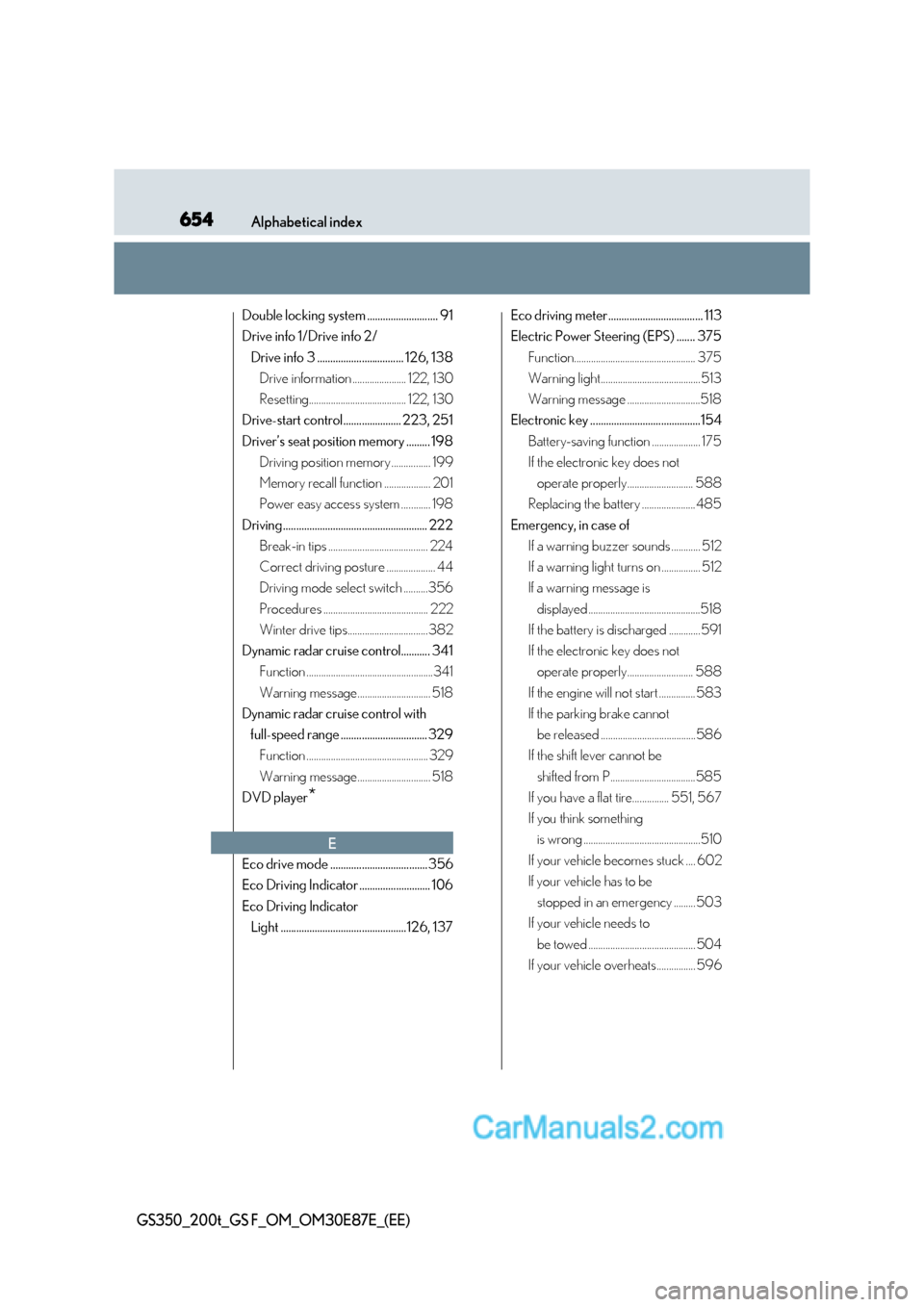
Eco drive mode .....................................356
Eco Driving Indicator ........................... 106
Eco Driving Indicator Light ................................................126, 137 Eco driving meter .................................... 113
Electric Power Steering (EPS) ....... 375
Function.................................................. 375
Warning light......................................... 513
Warning message ..............................518
Electronic key ..........................................154
Battery-saving function .................... 175
If the electronic key does not operate properly........................... 588
Replacing the battery ...................... 485
Emergency, in case of If a warning buzzer sounds ............ 512
If a warning light turns on ................ 512
If a warning message is
displayed ..............................................518
If the battery is discharged .............591
If the electronic key does not operate properly........................... 588
If the engine will not start ............... 583
If the parking brake cannot be released .......................................586
If the shift lever cannot be
shifted from P...................................585
If you have a flat tire............... 551, 567
If you think something is wrong ................................................510
If your vehicle becomes stuck .... 602
If your vehicle has to be stopped in an emergency ......... 503
If your vehicle needs to
be towed ............................................ 504
If your vehicle overheats................ 596
E