key battery Lexus GS250 2012 User Guide
[x] Cancel search | Manufacturer: LEXUS, Model Year: 2012, Model line: GS250, Model: Lexus GS250 2012Pages: 914, PDF Size: 53.04 MB
Page 145 of 914
1423-2. Opening, closing and locking the doors and trunk
GS350/250_EE (OM30C36E)
Door lock buzzer
If an attempt to lock the doors is made when a door is not fully closed, a
buzzer sounds continuously for 5 seconds. Fully close the door to stop the
buzzer, and lock the vehicle once more.
Security feature
P. 1 2 3
Alarm (if equipped)
Using the wireless remote control to lock the doors will set the alarm system.
(P. 86)
Conditions affecting operation
P. 1 3 0
If the wireless remote control does not operate properly
Locking and unlocking the doors and opening the trunk: Use the mechanical
key.
(P. 821)
Electronic key battery depletion
P. 1 3 4
When the electronic key battery is fully depleted
P. 6 9 5
Confirmation of the registered key number
The number of keys already registered to the vehicle can be confirmed. Ask
any authorized Lexus dealer or repairer, or another duly qualified and
equipped professional for details.
Customization
Settings (e.g. wireless remote control system) can be changed.
(Customizable features: P. 855)
Page 184 of 914
1803-5. Opening, closing the windows and moon roof
GS350/250_EE (OM30C36E)
Door lock linked window operation
The power windows can be opened and closed using the mechanical key.*
(P. 821)
The power windows can be opened and closed using the wireless remote
control.
* (P. 141)
*: These settings must be customized at any authorized Lexus dealer or
repairer, or another duly qualified and equipped professional.
When the battery is disconnected
The window lock switch is disabled. If necessary, press the window lock
switch after reconnecting the battery.
Power windows open warning buzzer
The buzzer sounds and a message is shown on the multi-information display
in the instrument cluster when the engine switch is turned off and the driver’s
door is opened with the power windows open.
Customization
Settings (e.g. linked door lock operation) can be changed.
(Customizable features: P. 855)
CAUTION
Observe the following precautions.
Failure to do so may result in death or serious injury.
Closing the windows
Check to make sure that all passengers do not have any part of their body
in a position where it could be caught when a window is being operated.
Do not allow children to operate the power windows.
Closing a power window on someone can cause serious injury, and in
some instances, even death.
Jam protection function
Never use any part of your body to intentionally activate the jam protec-
tion function.
The jam protection function may not work if something gets caught just
before the window fully closes.
Page 217 of 914
2114-2. Driving procedures
4
Driving
GS350/250_EE (OM30C36E)
Auto power off function
If the vehicle is left in ACCESSORY mode for more than 20 minutes or
IGNITION ON mode (the engine is not running) for more than an hour with
the shift lever in P, the engine switch will automatically turn off. However,
this function cannot entirely prevent battery discharge. Do not leave the vehi-
cle with the engine switch in ACCESSORY or IGNITION ON mode for long
periods of time when the engine is not running.
Electronic key battery depletion
P. 1 3 4
Conditions affecting operation
P. 1 3 0
Notes for the entry function
P. 1 3 1
If the engine does not start
The engine immobilizer system may not have been deactivated. (P. 8 0 )
Contact any authorized Lexus dealer or repairer, or another duly qualified
and equipped professional.
Check that the shift lever is securely set in P. The engine may not start if the
shift lever is displaced out of P. “Shift to P position to Start” will be dis-
played on the multi-information display.
Steering lock
After turning the engine switch off and opening and closing the doors, the
steering wheel will be locked due to the steering lock function. Operating the
engine switch again automatically cancels the steering lock.
Page 218 of 914
2124-2. Driving procedures
GS350/250_EE (OM30C36E)
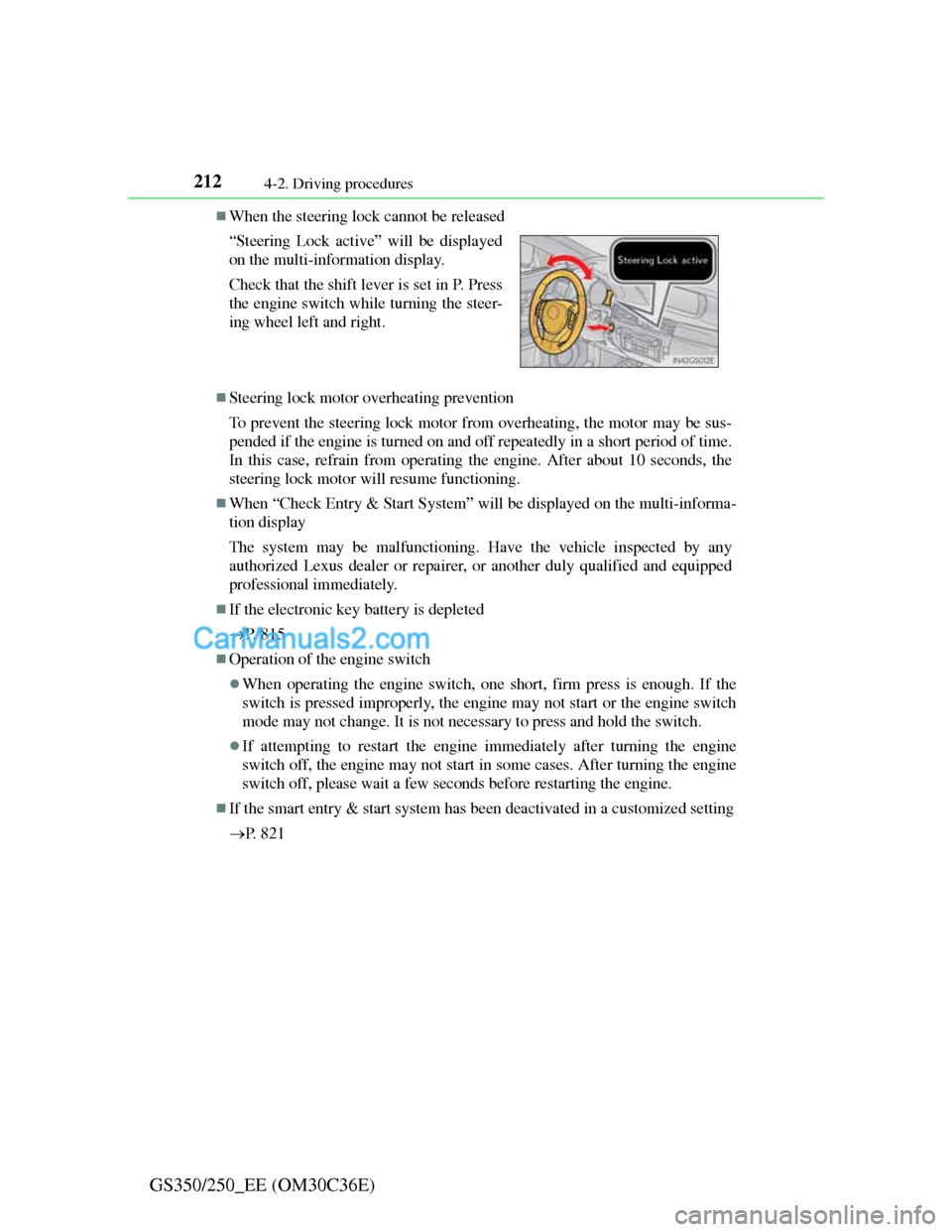
When the steering lock cannot be released
Steering lock motor overheating prevention
To prevent the steering lock motor from overheating, the motor may be sus-
pended if the engine is turned on and off repeatedly in a short period of time.
In this case, refrain from operating the engine. After about 10 seconds, the
steering lock motor will resume functioning.
When “Check Entry & Start System” will be displayed on the multi-informa-
tion display
The system may be malfunctioning. Have the vehicle inspected by any
authorized Lexus dealer or repairer, or another duly qualified and equipped
professional immediately.
If the electronic key battery is depleted
P. 8 1 5
Operation of the engine switch
When operating the engine switch, one short, firm press is enough. If the
switch is pressed improperly, the engine may not start or the engine switch
mode may not change. It is not necessary to press and hold the switch.
If attempting to restart the engine immediately after turning the engine
switch off, the engine may not start in some cases. After turning the engine
switch off, please wait a few seconds before restarting the engine.
If the smart entry & start system has been deactivated in a customized setting
P. 8 2 1 “Steering Lock active” will be displayed
on the multi-information display.
Check that the shift lever is set in P. Press
the engine switch while turning the steer-
ing wheel left and right.
Page 631 of 914
6135-5. Using the interior lights
5
Interior features
GS350/250_EE (OM30C36E)
Illuminated entry system
The lights automatically turn on/off according to engine switch mode, the
presence of the electronic key, whether the doors are locked/unlocked, and
whether the doors are opened/closed.
To prevent battery discharge
If the interior lights remain on when the engine switch is turned off, the lights
will go off automatically after 20 minutes.
Customization
Setting (e.g. the time elapsed before lights turn off) can be changed.
(Customizable features: P. 855)
NOTICE
To prevent battery discharge
Do not leave the lights on longer than necessary when the engine is not run-
ning.
Page 661 of 914
643
6Maintenance and care
GS350/250_EE (OM30C36E)
6-1. Maintenance and care
Cleaning and protecting
the vehicle exterior ......... 644
Cleaning and protecting
the vehicle interior .......... 648
6-2. Maintenance
Maintenance
requirements ................... 651
6-3. Do-it-yourself maintenance
Do-it-yourself service
precautions...................... 654
Hood ................................. 657
Positioning a floor jack ..... 658
Engine compartment ......... 660
Tires .................................. 672
Tire inflation pressure ....... 689
Wheels .............................. 691
Air conditioning filter ....... 693
Electronic key battery ....... 695
Checking and replacing
fuses ................................ 698
Light bulbs ........................ 720
Page 663 of 914
6456-1. Maintenance and care
6
Maintenance and care
GS350/250_EE (OM30C36E)
When using a car wash
If the door handle becomes wet while the electronic key is within the effec-
tive range, the door may lock and unlock repeatedly. In that case, follow the
following correction procedures to wash the vehicle:
Place the key in a position 2 m (6 ft.) or more separate from the vehicle
while the vehicle is being washed. (Take care to ensure that the key is not
stolen.)
Set the electronic key to battery-saving mode to disable the smart entry &
start system. (P. 1 2 9 )
Aluminum wheels
Remove any dirt immediately by using a neutral detergent. Do not use hard
brushes or abrasive cleaners. Do not use strong or harsh chemical cleaners.
Use the same mild detergent and wax as used on the paint.
Do not use detergent on the wheels when they are hot, for example after
driving for long distance in the hot weather.
Wash detergent from the wheels immediately after use.
Bumpers
Do not scrub with abrasive cleaners.
Front side windows water-repellent coating
The following precautions can extend the effectiveness of the water-repel-
lent coating.
• Remove any dirt, etc. from the front side windows regularly.
• Do not allow dirt and dust to accumulate on the windows for a long
period.
Clean the windows with a soft, damp cloth as soon as possible.
• Do not use wax or glass cleaners that contain abrasives when cleaning
the windows.
• Do not use any metallic objects to remove condensation build up.
When the water-repellent performance has become insufficient, the coating
can be repaired. Contact any authorized Lexus dealer or repairer, or another
duly qualified and equipped professional.
Outside rear view mirror rain-clearing coating (if equipped)
Observe the following precautions in order to retain the rain-clearing proper-
ties of the mirrors:
Clean the mirrors using a car shampoo or glass cleaner that does not contain
silicone or an abrasive compound, and rinse thoroughly with water.
Allow the mirrors to be exposed to direct sunlight for 1 to 2 days.
Page 687 of 914
669 6-3. Do-it-yourself maintenance
6
Maintenance and care
GS350/250_EE (OM30C36E)
Before recharging
When recharging, the battery produces hydrogen gas which is flammable and
explosive. Therefore, observe the following before recharging:
If recharging with the battery installed on the vehicle, be sure to disconnect
the ground cable.
Make sure the power switch on the charger is off when connecting and dis-
connecting the charger cables to the battery.
After recharging/reconnecting the battery
The engine may not start. Follow the procedure below to initialize the sys-
tem.
Shift the shift lever to P.
Open and close any of the doors.
Restart the engine.
Unlocking the doors using the smart entry & start system may not be possi-
ble immediately after reconnecting the battery. If this happens, use the wire-
less remote control or the mechanical key to lock/unlock the doors.
Start the engine with the engine switch in ACCESSORY mode. The engine
may not start with the engine switch turned off. However, the engine will
operate normally from the second attempt.
The engine switch mode is recorded by the vehicle. If the battery is recon-
nected, the vehicle will return the engine switch mode to the status it was in
before the battery was disconnected. Make sure to turn off the engine before
disconnect the battery. Take extra care when connecting the battery if the
engine switch mode prior to discharge is unknown.
If the system will not start even after multiple attempts, contact any autho-
rized Lexus dealer or repairer, or another duly qualified and equipped profes-
sional.
1
2
3
Page 715 of 914
697 6-3. Do-it-yourself maintenance
6
Maintenance and care
GS350/250_EE (OM30C36E)
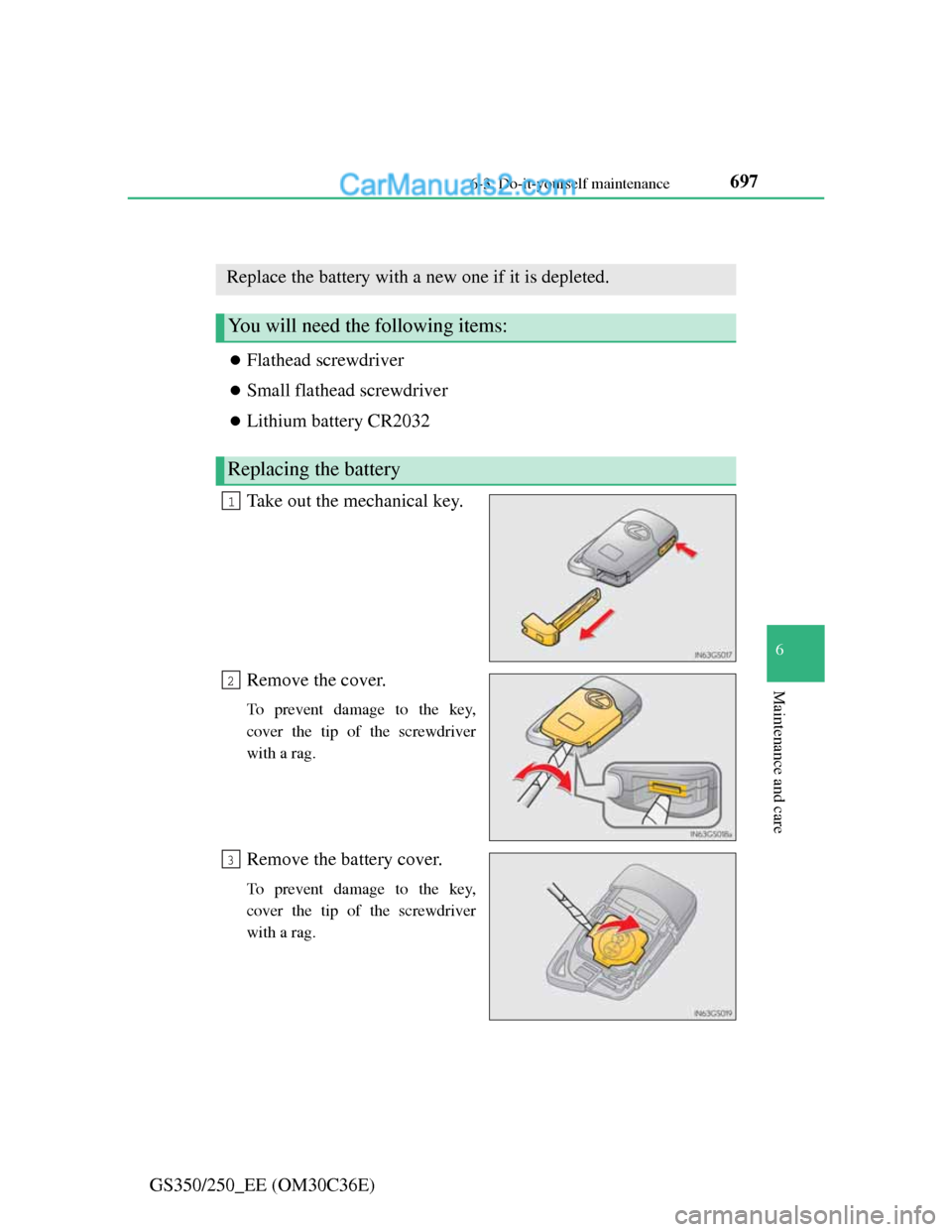
Electronic key battery
Flathead screwdriver
Small flathead screwdriver
Lithium battery CR2032
Take out the mechanical key.
Remove the cover.
To prevent damage to the key,
cover the tip of the screwdriver
with a rag.
Remove the battery cover.
To prevent damage to the key,
cover the tip of the screwdriver
with a rag.
Replace the battery with a new one if it is depleted.
You will need the following items:
Replacing the battery
1
2
3
Page 716 of 914
6986-3. Do-it-yourself maintenance
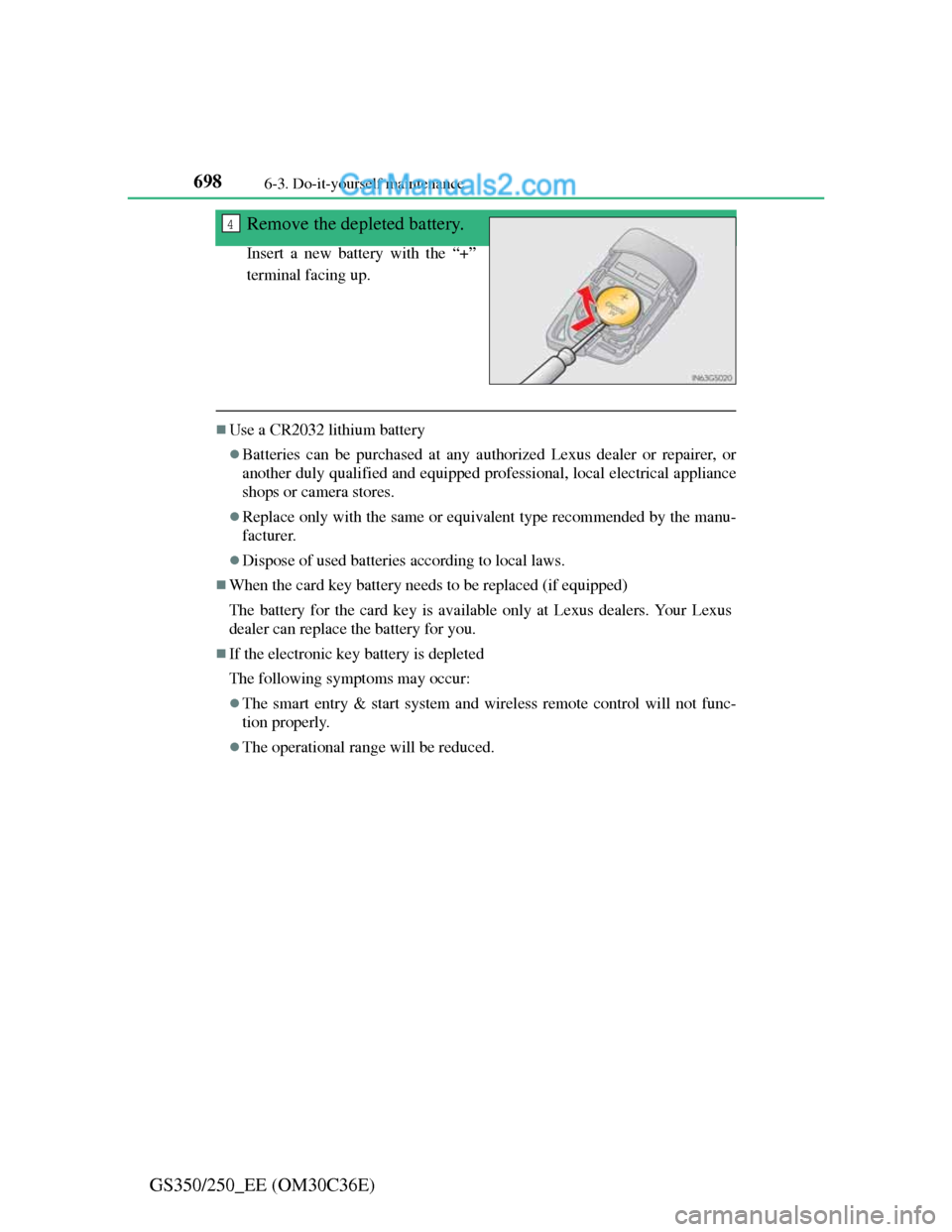
GS350/250_EE (OM30C36E)Remove the depleted battery.
Insert a new battery with the “+”
terminal facing up.
Use a CR2032 lithium battery
Batteries can be purchased at any authorized Lexus dealer or repairer, or
another duly qualified and equipped professional, local electrical appliance
shops or camera stores.
Replace only with the same or equivalent type recommended by the manu-
facturer.
Dispose of used batteries according to local laws.
When the card key battery needs to be replaced (if equipped)
The battery for the card key is available only at Lexus dealers. Your Lexus
dealer can replace the battery for you.
If the electronic key battery is depleted
The following symptoms may occur:
The smart entry & start system and wireless remote control will not func-
tion properly.
The operational range will be reduced.
4