park assist Lexus GS250 2012 Owner's Guide
[x] Cancel search | Manufacturer: LEXUS, Model Year: 2012, Model line: GS250, Model: Lexus GS250 2012Pages: 914, PDF Size: 53.04 MB
Page 311 of 914
3044-5. Using the driving support
GS350/250_EE (OM30C36E)Once the vehicle width extension guide lines and the parking
space lines are parallel, straighten the steering wheel and back
up slowly until the vehicle has completely entered the parking
space.
Stop the vehicle in an appropriate place, and finish parking.
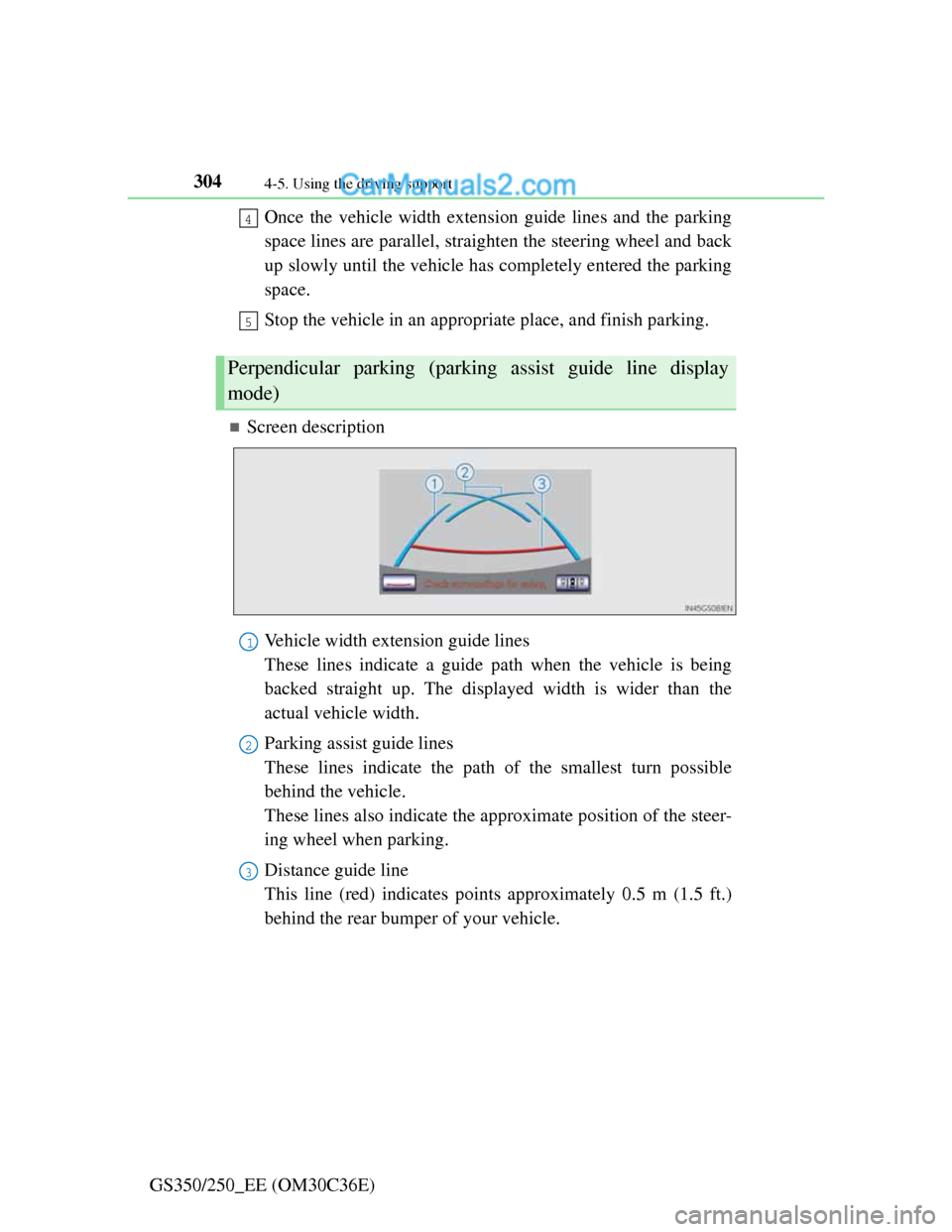
Screen description
Vehicle width extension guide lines
These lines indicate a guide path when the vehicle is being
backed straight up. The displayed width is wider than the
actual vehicle width.
Parking assist guide lines
These lines indicate the path of the smallest turn possible
behind the vehicle.
These lines also indicate the approximate position of the steer-
ing wheel when parking.
Distance guide line
This line (red) indicates points approximately 0.5 m (1.5 ft.)
behind the rear bumper of your vehicle.
Perpendicular parking (parking assist guide line display
mode)
4
5
1
2
3
Page 312 of 914
3054-5. Using the driving support
4
Driving
GS350/250_EE (OM30C36E)
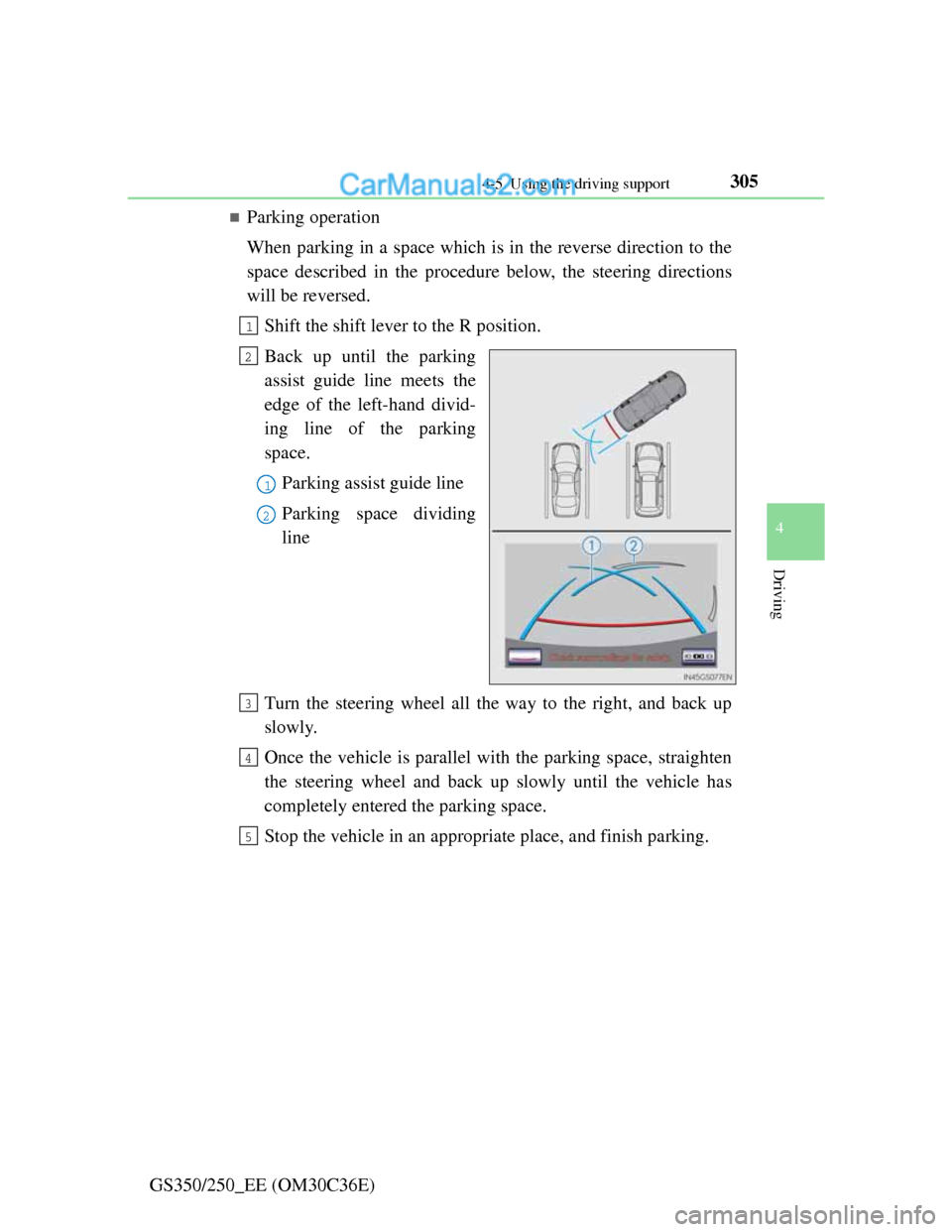
Parking operation
When parking in a space which is in the reverse direction to the
space described in the procedure below, the steering directions
will be reversed.
Shift the shift lever to the R position.
Back up until the parking
assist guide line meets the
edge of the left-hand divid-
ing line of the parking
space.
Parking assist guide line
Parking space dividing
line
Turn the steering wheel all the way to the right, and back up
slowly.
Once the vehicle is parallel with the parking space, straighten
the steering wheel and back up slowly until the vehicle has
completely entered the parking space.
Stop the vehicle in an appropriate place, and finish parking.
1
2
1
2
3
4
5
Page 314 of 914
3074-5. Using the driving support
4
Driving
GS350/250_EE (OM30C36E)Keeping the steering wheel in that position, check your sur-
roundings visually and using mirrors, and back up using the
distance guide lines etc. as a reference (Step in “Parking
operation”).
When the vehicle is approximately in the desired parking loca-
tion, parallel parking assist is complete (Step in “Parking
operation”).
Parking operation
The following example describes the procedure for pulling into a
parking space on the right. For pulling into a parking space on
the left, substitute left for right and vice versa in all steps.
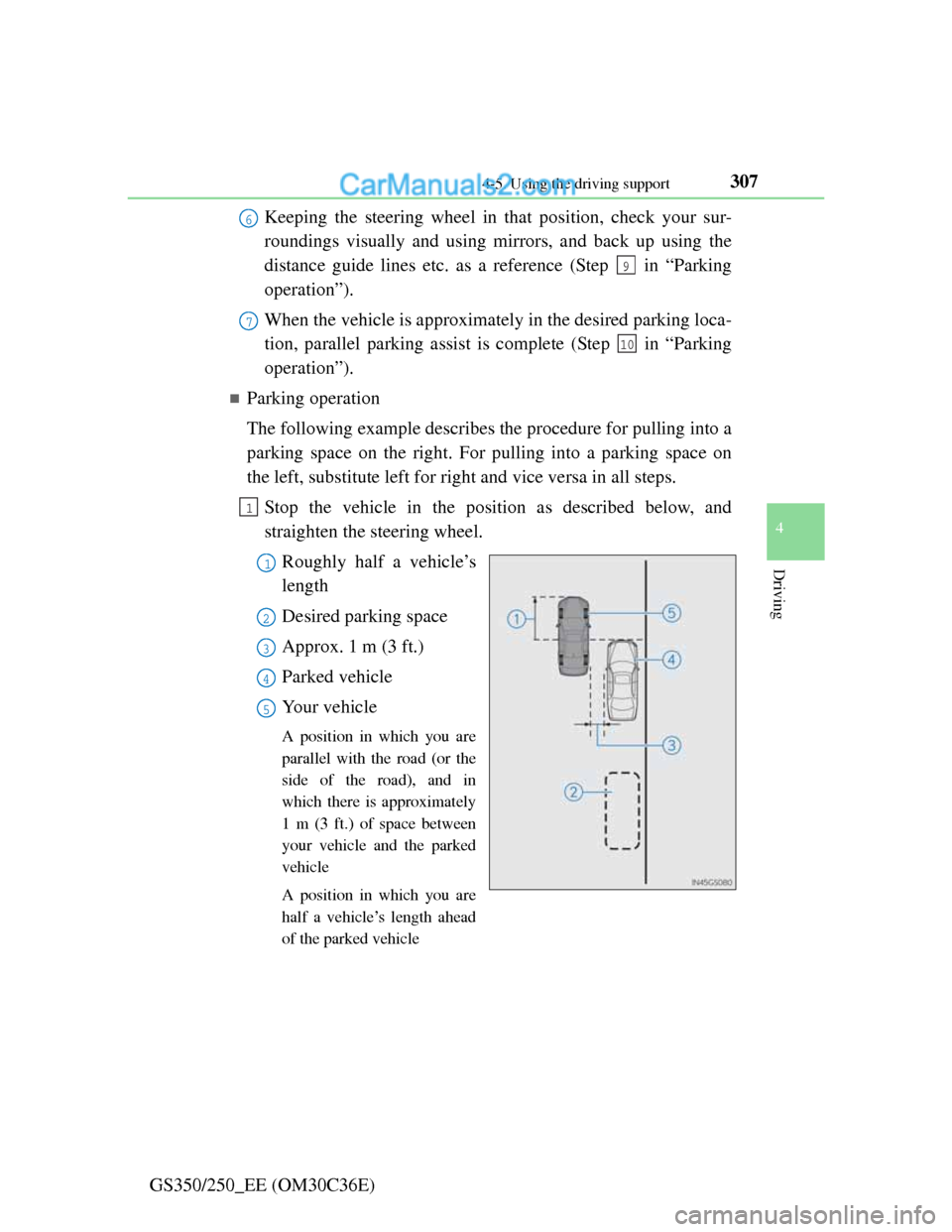
Stop the vehicle in the position as described below, and
straighten the steering wheel.
Roughly half a vehicle’s
length
Desired parking space
Approx. 1 m (3 ft.)
Parked vehicle
Your vehicle
A position in which you are
parallel with the road (or the
side of the road), and in
which there is approximately
1 m (3 ft.) of space between
your vehicle and the parked
vehicle
A position in which you are
half a vehicle’s length ahead
of the parked vehicle
6
9
7
10
1
1
2
3
4
5
Page 316 of 914
3094-5. Using the driving support
4
Driving
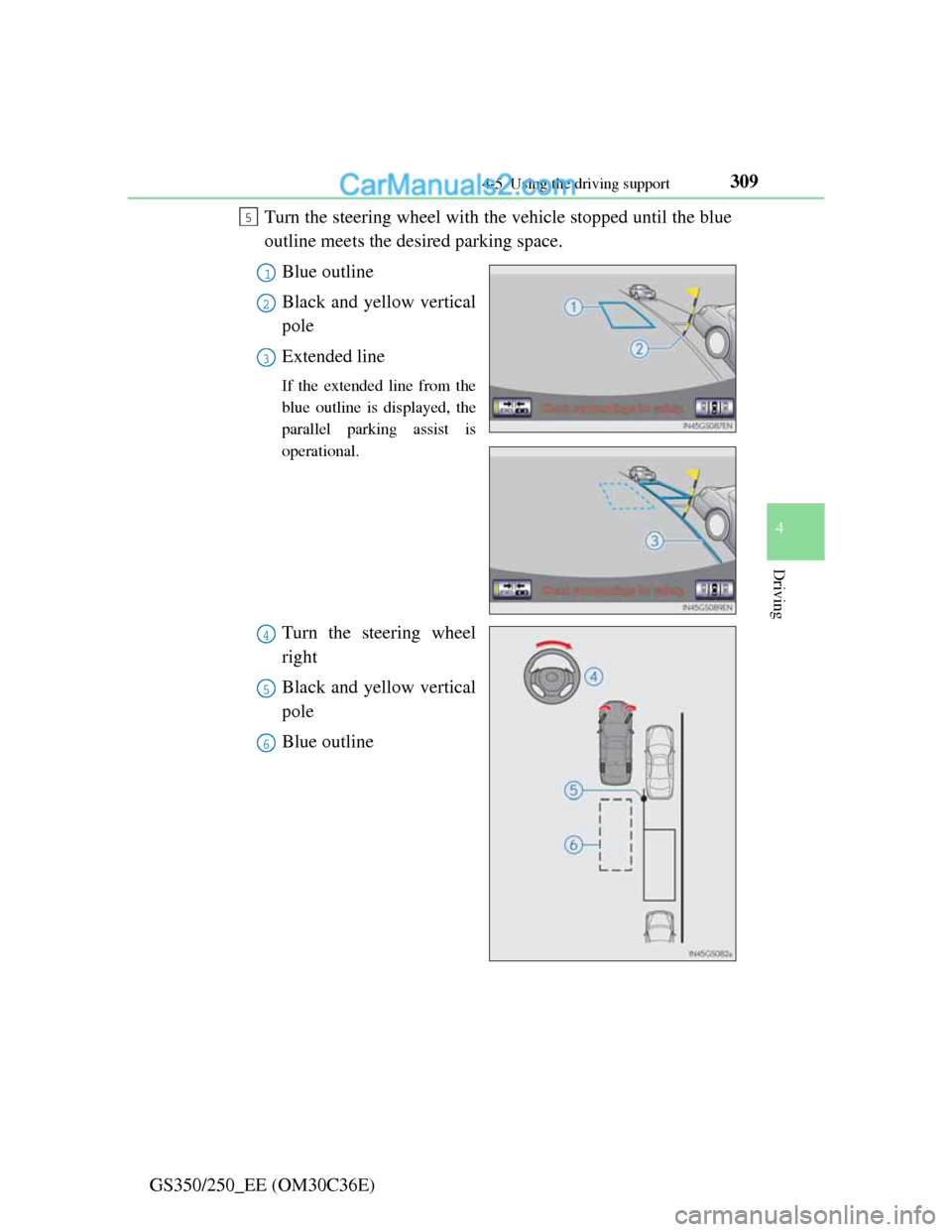
GS350/250_EE (OM30C36E)Turn the steering wheel with the vehicle stopped until the blue
outline meets the desired parking space.
Blue outline
Black and yellow vertical
pole
Extended line
If the extended line from the
blue outline is displayed, the
parallel parking assist is
operational.
Turn the steering wheel
right
Black and yellow vertical
pole
Blue outline
5
1
2
3
4
5
6
Page 317 of 914
3104-5. Using the driving support
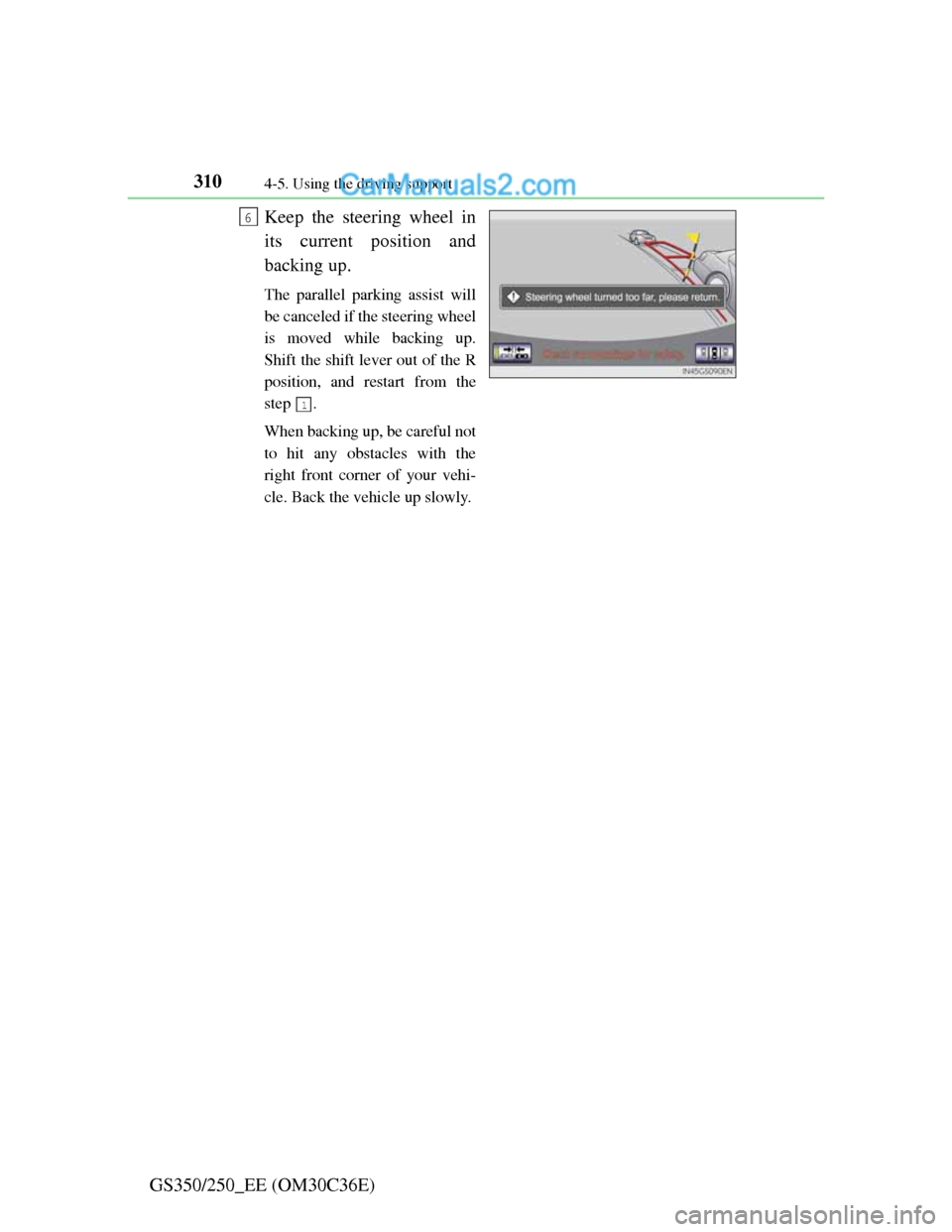
GS350/250_EE (OM30C36E)Keep the steering wheel in
its current position and
backing up.
The parallel parking assist will
be canceled if the steering wheel
is moved while backing up.
Shift the shift lever out of the R
position, and restart from the
step .
When backing up, be careful not
to hit any obstacles with the
right front corner of your vehi-
cle. Back the vehicle up slowly.
6
1
Page 318 of 914
3114-5. Using the driving support
4
Driving
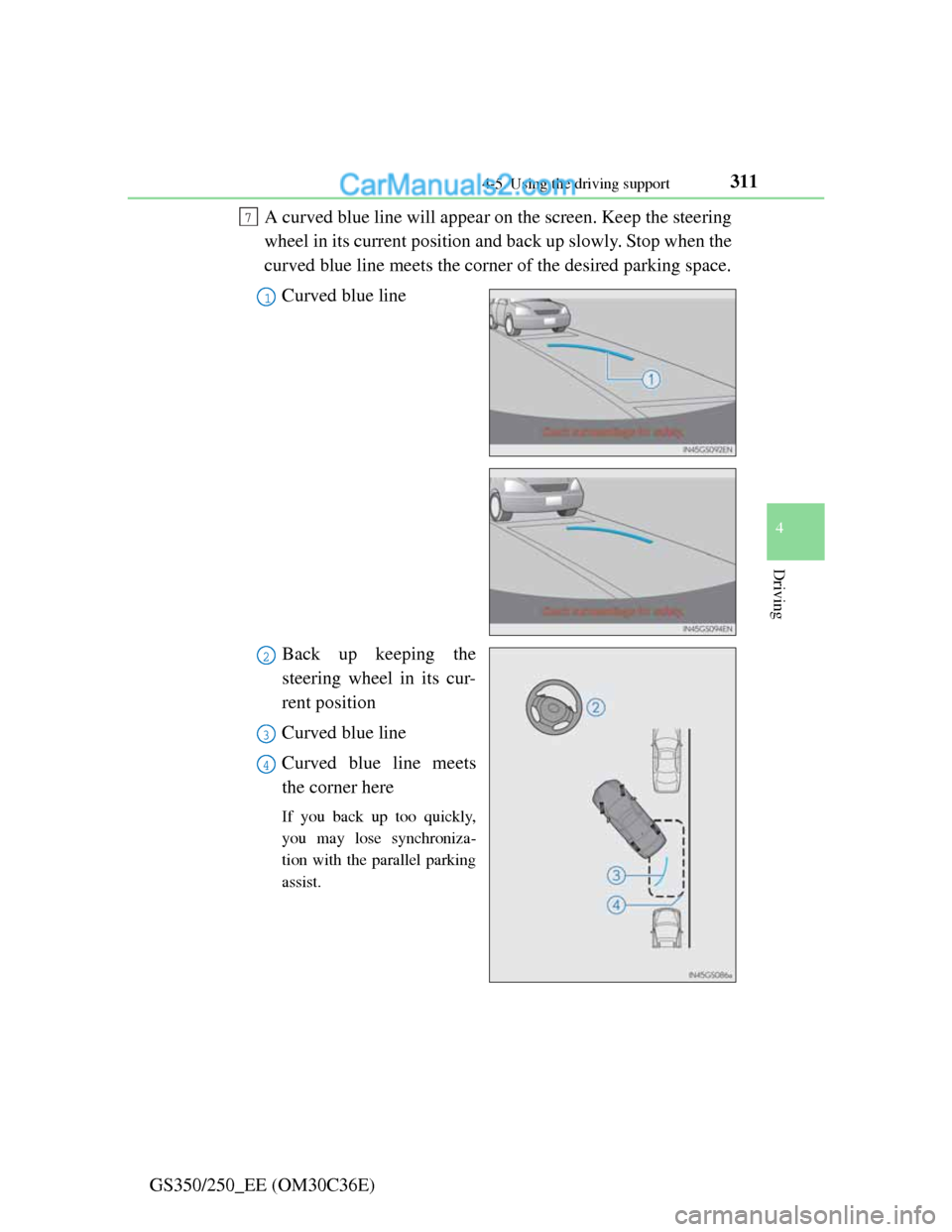
GS350/250_EE (OM30C36E)A curved blue line will appear on the screen. Keep the steering
wheel in its current position and back up slowly. Stop when the
curved blue line meets the corner of the desired parking space.
Curved blue line
Back up keeping the
steering wheel in its cur-
rent position
Curved blue line
Curved blue line meets
the corner here
If you back up too quickly,
you may lose synchroniza-
tion with the parallel parking
assist.
7
1
2
3
4
Page 319 of 914
3124-5. Using the driving support
GS350/250_EE (OM30C36E)Leaving the vehicle stopped, turn the steering wheel all the
way to the left.
Be sure to turn the steering wheel only when the vehicle is stopped.
When the screen changes, keep the steering wheel in its cur-
rent position and back up.
When backing up, be careful not to hit any obstacles with the right front
corner of your vehicle. Back the vehicle up slowly.
When the vehicle is parallel with the road or the shoulder,
straighten the steering wheel.
Check your surroundings visually and with the mirrors, then
back up using the distance guide lines as a reference, and stop.
When the vehicle is approximately in the desired parking location, the
parallel parking assist is complete.
Parallel parking assist mode information
• There is a possibility that parallel parking guidance may not be
given when backing up at a very slow speed.
• If the trunk is opened, the parallel parking assist will be inter-
rupted by a message being displayed on the screen. Stop the
vehicle, shift the shift lever out of the R position, and restart
the operation from the step .
Canceling parallel parking assist
Select .
Vehicles with Lexus parking assist-sensor
If Lexus parking assist-sensor detects an object while you
attempt to park in a parking space on the left, the black and yel-
low vertical pole could be obscured by Lexus parking assist-sen-
sor display. In this event, turn Lexus parking assist-sensor switch
off (P. 285), and operate the vehicle while checking the safety
of the surrounding area direct visually and with mirror. After the
operation, turn the switch on.
8
9
10
1
Page 320 of 914
3134-5. Using the driving support
4
Driving
GS350/250_EE (OM30C36E)
If the message “Steering wheel turned too far, please return.” is
displayed
The steering wheel has been turned too far, and the system can-
not function. Return the steering wheel to its original position.
If the message is displayed before the outline is positioned over
the desired parking space, it is likely that the vehicle is too far
away from the shoulder. Check that there is a gap of approxi-
mately 1 m (3 ft.) between your vehicle and the parked vehicle.
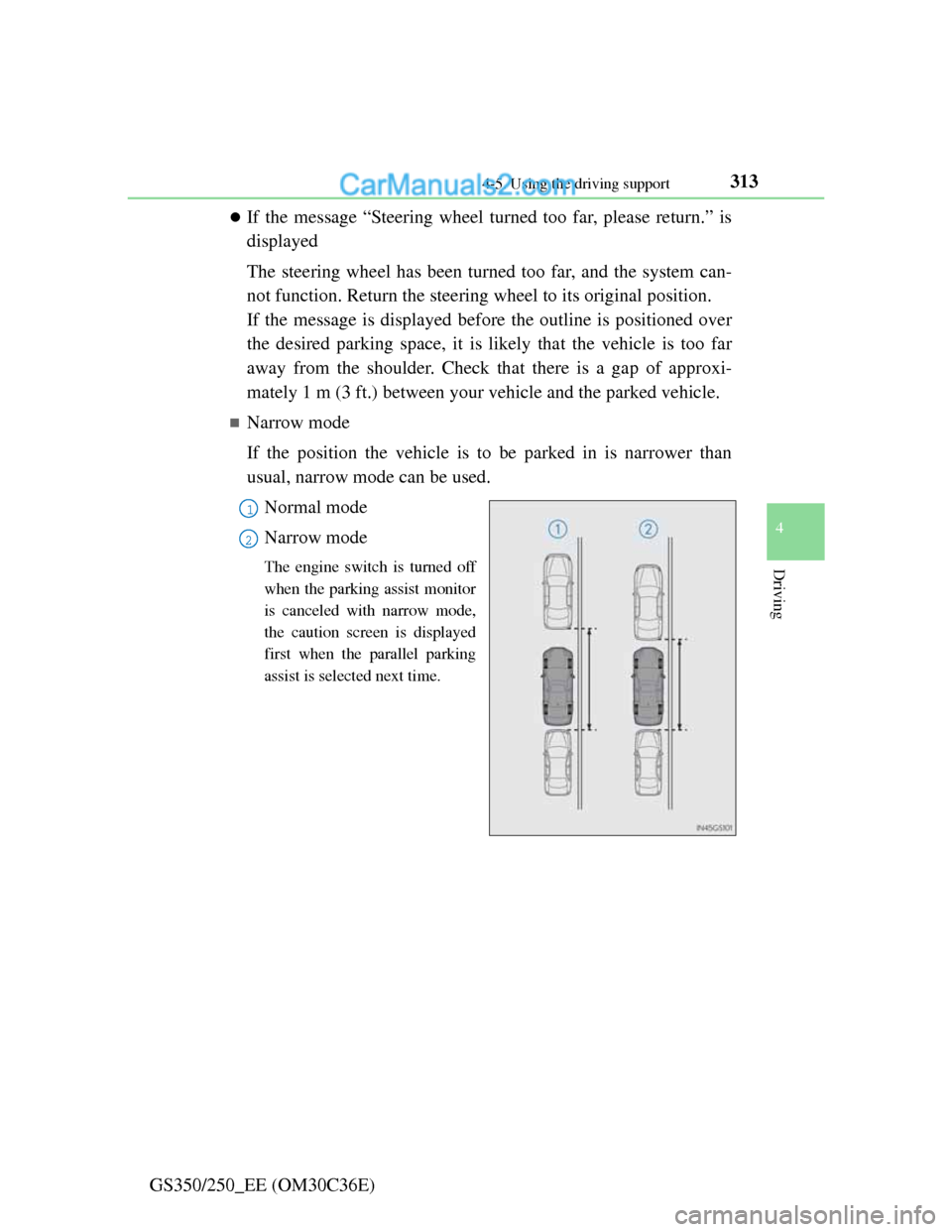
Narrow mode
If the position the vehicle is to be parked in is narrower than
usual, narrow mode can be used.
Normal mode
Narrow mode
The engine switch is turned off
when the parking assist monitor
is canceled with narrow mode,
the caution screen is displayed
first when the parallel parking
assist is selected next time.
1
2
Page 321 of 914
3144-5. Using the driving support
GS350/250_EE (OM30C36E)
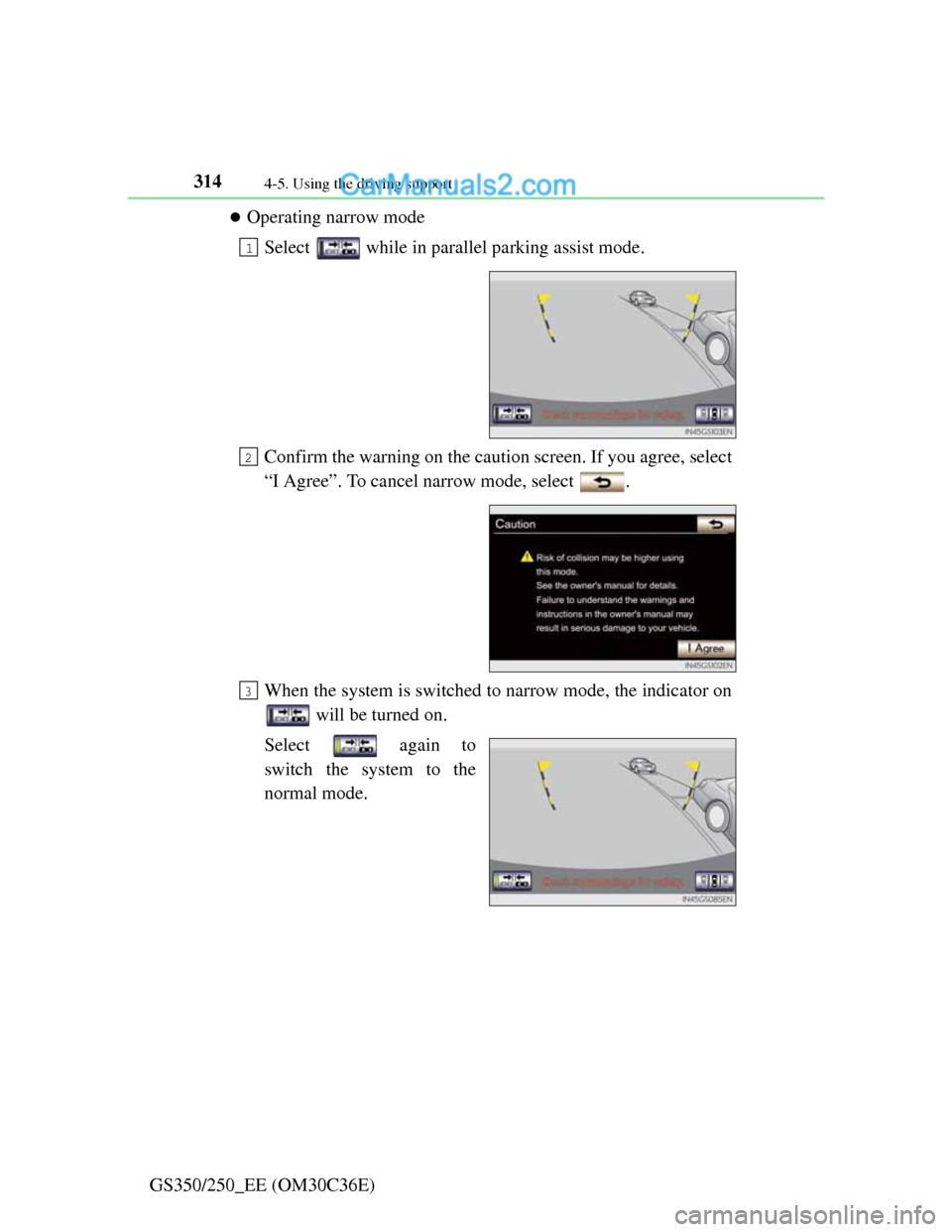
Operating narrow mode
Select while in parallel parking assist mode.
Confirm the warning on the caution screen. If you agree, select
“I Agree”. To cancel narrow mode, select .
When the system is switched to narrow mode, the indicator on
will be turned on.
Select again to
switch the system to the
normal mode.
1
2
3
Page 322 of 914
3154-5. Using the driving support
4
Driving
GS350/250_EE (OM30C36E)
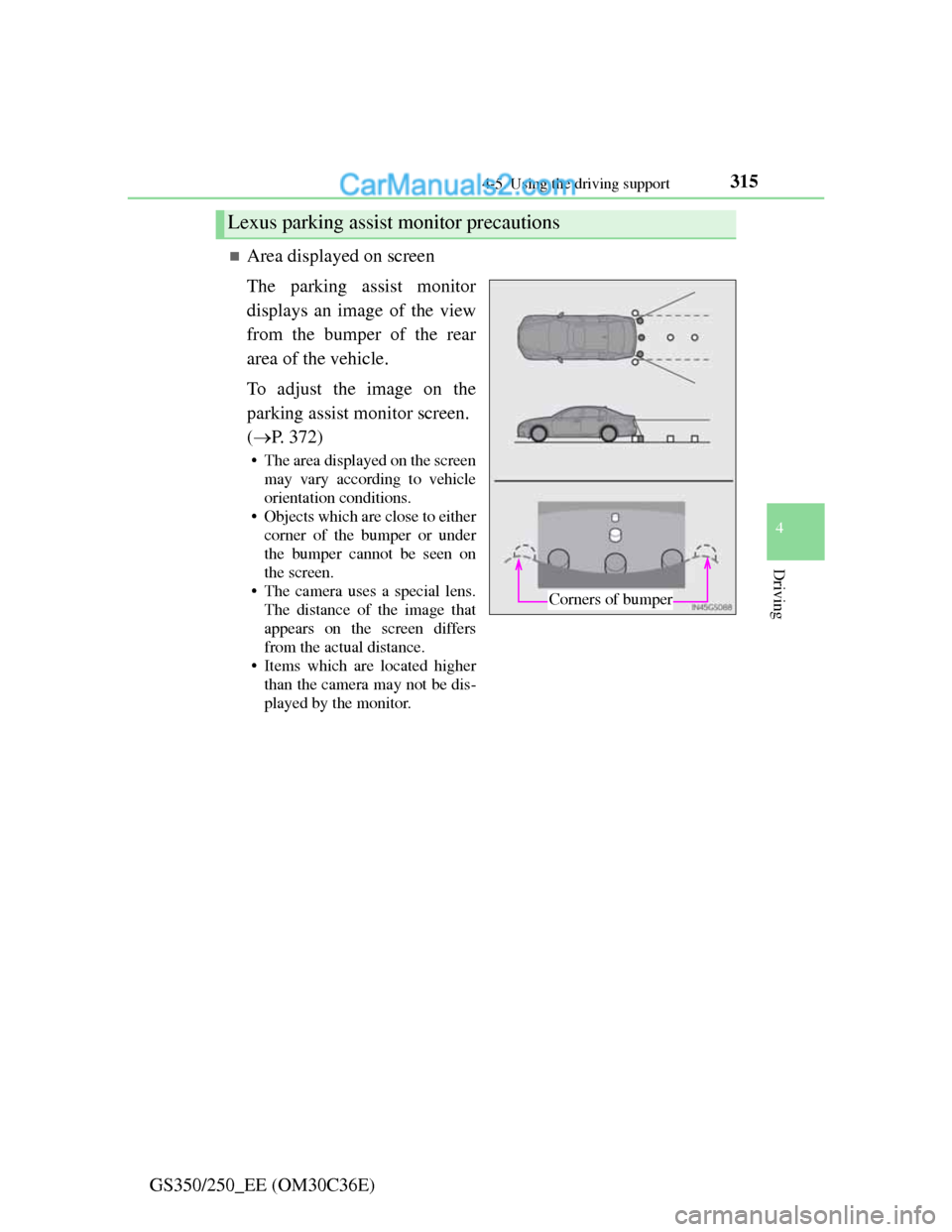
Area displayed on screen
The parking assist monitor
displays an image of the view
from the bumper of the rear
area of the vehicle.
To adjust the image on the
parking assist monitor screen.
(P. 372)
• The area displayed on the screen
may vary according to vehicle
orientation conditions.
• Objects which are close to either
corner of the bumper or under
the bumper cannot be seen on
the screen.
• The camera uses a special lens.
The distance of the image that
appears on the screen differs
from the actual distance.
• Items which are located higher
than the camera may not be dis-
played by the monitor.
Lexus parking assist monitor precautions
Corners of bumper