ECU Lexus GS250 2012 Workshop Manual
[x] Cancel search | Manufacturer: LEXUS, Model Year: 2012, Model line: GS250, Model: Lexus GS250 2012Pages: 914, PDF Size: 53.04 MB
Page 237 of 914
2304-3. Operating the lights and wipers
GS350/250_EE (OM30C36E)AFS (Adaptive Front-lighting System) secures excellent visibility
at intersections and on curves by automatically adjusting the direc-
tion of the light axis of the headlights according to vehicle speed
and the degree of the tire’s angle as controlled by steering input.
AFS operates at speeds of 10 km/h (6 mph) or higher.
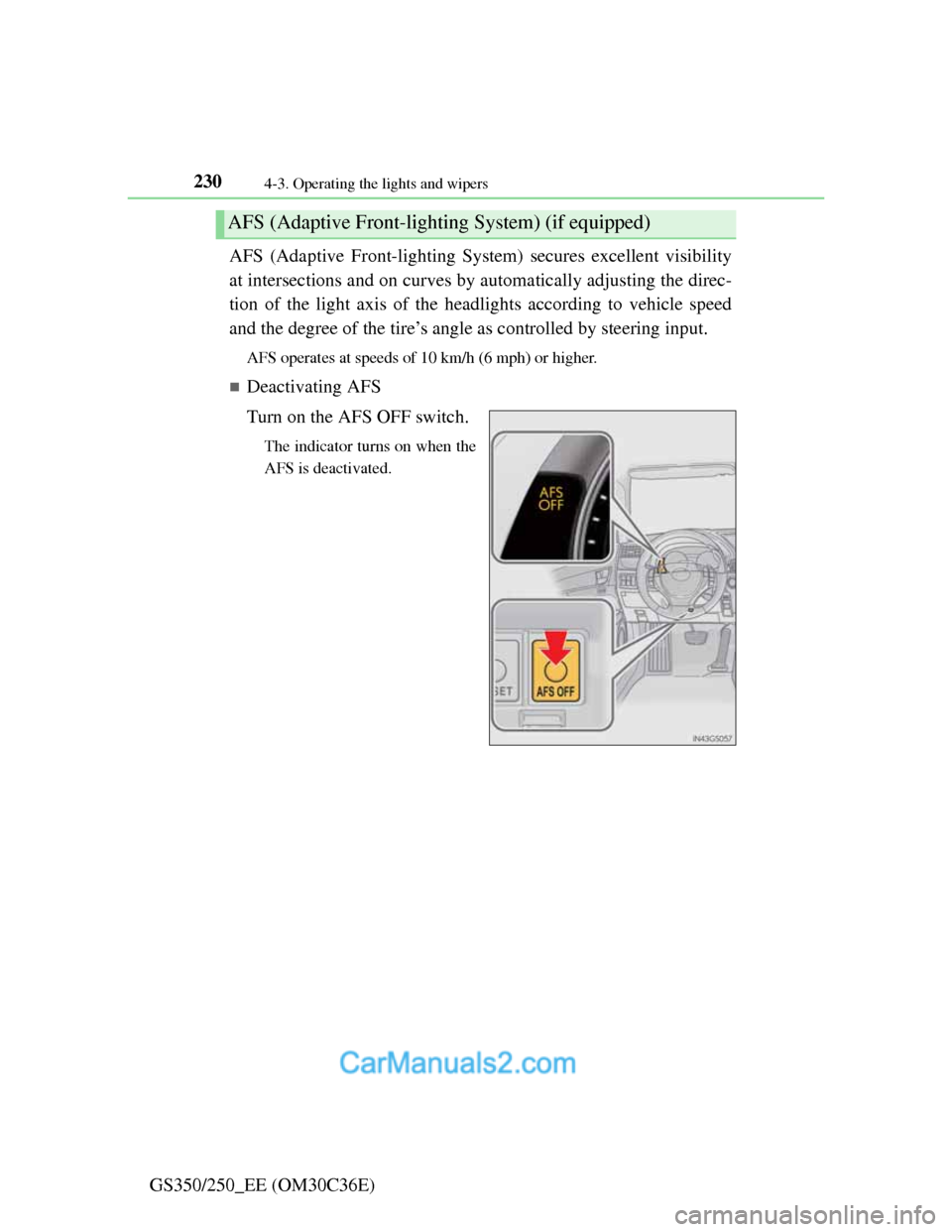
Deactivating AFS
Turn on the AFS OFF switch.
The indicator turns on when the
AFS is deactivated.
AFS (Adaptive Front-lighting System) (if equipped)
Page 246 of 914
239
4 4-3. Operating the lights and wipers
Driving
GS350/250_EE (OM30C36E)
Fog light switch
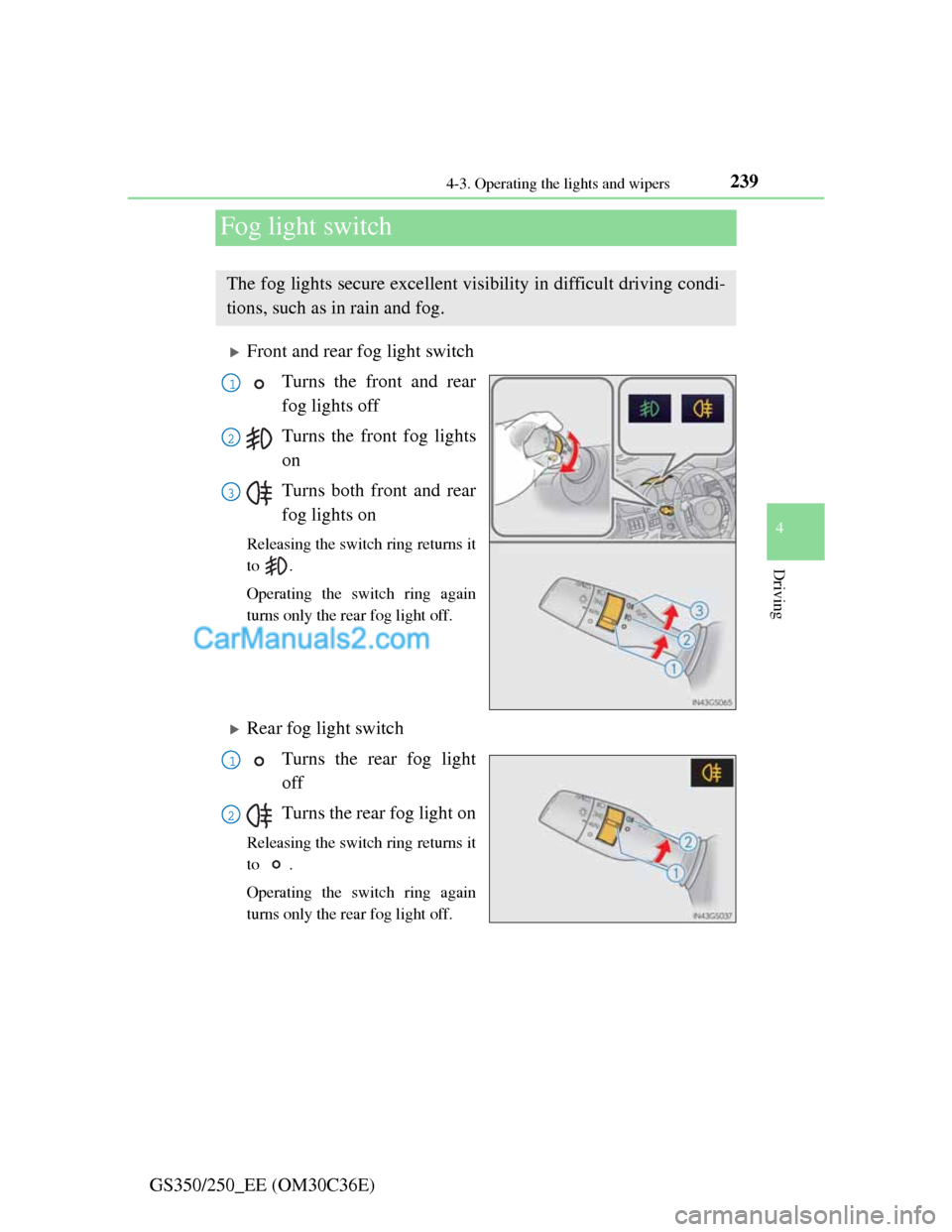
Front and rear fog light switch
Turns the front and rear
fog lights off
Turns the front fog lights
on
Turns both front and rear
fog lights on
Releasing the switch ring returns it
to .
Operating the switch ring again
turns only the rear fog light off.
Rear fog light switch
Turns the rear fog light
off
Turns the rear fog light on
Releasing the switch ring returns it
to .
Operating the switch ring again
turns only the rear fog light off.
The fog lights secure excellent visibility in difficult driving condi-
tions, such as in rain and fog.
1
2
3
1
2
Page 257 of 914
2504-4. Refueling
GS350/250_EE (OM30C36E)
CAUTION
When refueling the vehicle
Observe the following precautions while refueling the vehicle. Failure to do
so may result in death or serious injury.
After exiting the vehicle and before opening the fuel door, touch an
unpainted metal surface to discharge any static electricity. It is important
to discharge static electricity before refueling because sparks resulting
from static electricity can cause fuel vapors to ignite while refueling.
Always hold the grips on the fuel tank cap and turn it slowly to remove it.
A whooshing sound may be heard when the fuel tank cap is loosened.
Wait until the sound cannot be heard before fully removing the cap. In hot
weather, pressurized fuel may spray out the filler neck and cause injury.
Do not allow anyone that has not discharged static electricity from their
body to come close to an open fuel tank.
Do not inhale vaporized fuel.
Fuel contains substances that are harmful if inhaled.
Do not smoke while refueling the vehicle.
Doing so may cause the fuel to ignite and cause a fire.
Do not return to the vehicle or touch any person or object that is statically
charged.
This may cause static electricity to build up, resulting in a possible igni-
tion hazard.
When refueling
Observe the following precautions to prevent fuel overflowing from the
fuel tank:
Securely insert the fuel nozzle into the fuel filler neck.
Stop filling the tank after the fuel nozzle automatically clicks off.
Do not top off the fuel tank.
NOTICE
Refueling
Do not spill fuel during refueling.
Doing so may damage the vehicle, such as causing the emission control
system to operate abnormally or damaging fuel system components or the
vehicle’s painted surface.
Page 364 of 914

3574-5. Using the driving support
4
Driving
GS350/250_EE (OM30C36E)
Conditions under which the Blind Spot Monitor system may not function cor-
rectly
The Blind Spot Monitor system may not detect vehicles correctly in the fol-
lowing conditions:
• During bad weather such as heavy rain, fog, snow etc.
• When ice or mud etc. is attached to the rear bumper
• When driving on a road surface that is wet due to rain, standing water
etc.
• When there is a significant difference in speed between your vehicle and
the vehicle that enters the detection area
• When a vehicle is in the detection area from a stop and remains in the
detection area as your vehicle accelerates
• When driving up or down consecutive steep inclines, such as hills, a dip
in the road etc.
• When multiple vehicles approach with only a small gap between each
vehicle
• When vehicle lanes are wide, and the vehicle in the next lane is too far
away from your vehicle
• When the vehicle that enters the detection area is traveling at about the
same speed as your vehicle
• When there is a significant difference in height between your vehicle and
the vehicle that enters the detection area
• Directly after the BSM switch is set to on
• When your vehicle is towing a trailer
Instances of the Blind Spot Monitor unnecessarily detecting a vehicle and/
or object may increase under the following conditions:
• When there is only a short distance between your vehicle and a guardrail,
wall etc.
• When there is only a short distance between your vehicle and a following
vehicle
• When vehicle lanes are narrow and a vehicle driving 2 lanes across from
your vehicle enters the detection area
The outside rear view mirror indicators visibility
When under strong sunlight, the outside rear view mirror indicator may be
difficult to see.
When there is a malfunction in the system
If a system malfunction is detected due to any of the following reasons,
warning messages will be displayed: (P. 762, 768)
There is a malfunction with the sensors
The sensors have become dirty
Page 418 of 914
4085-1. Remote Touch screen
GS350/250_EE (OM30C36E)
Speech command system
Commands that are not displayed in the “Shortcuts” screen can be operated
from the “Main menu” screen.
If the system does not respond or the confirmation screen does not disap-
pear, press and try again.
Speech guidance can be canceled by setting voice prompts to off. Use this
setting when it is desirable to say a command immediately after pressing
and hearing a beep.
If a speech command cannot be recognized
If a speech command cannot be recognized within 6 seconds, voice guid-
ance will say “Pardon?” (“Command not recognized.” will be displayed on
the screen) and speech command reception will restart.
If a speech command cannot be recognized 2 consecutive times, the speech
command guidance system will say “Paused. To restart voice recognition,
push the talk switch. To cancel voice recognition, push and hold the talk
switch.” Voice recognition will then be suspended. Select “Cancel” or “Go
back”, or press .
When selecting “Voice Prompts”
The voice recognition prompt can be set to on or off. This setting can also
be changed on the “Voice settings” screen. (P. 398)
Voice recognition will be temporarily suspended. Press again.
Page 572 of 914
5575-4. Using the hands-free phone system (for cellular phone)
5
Interior features
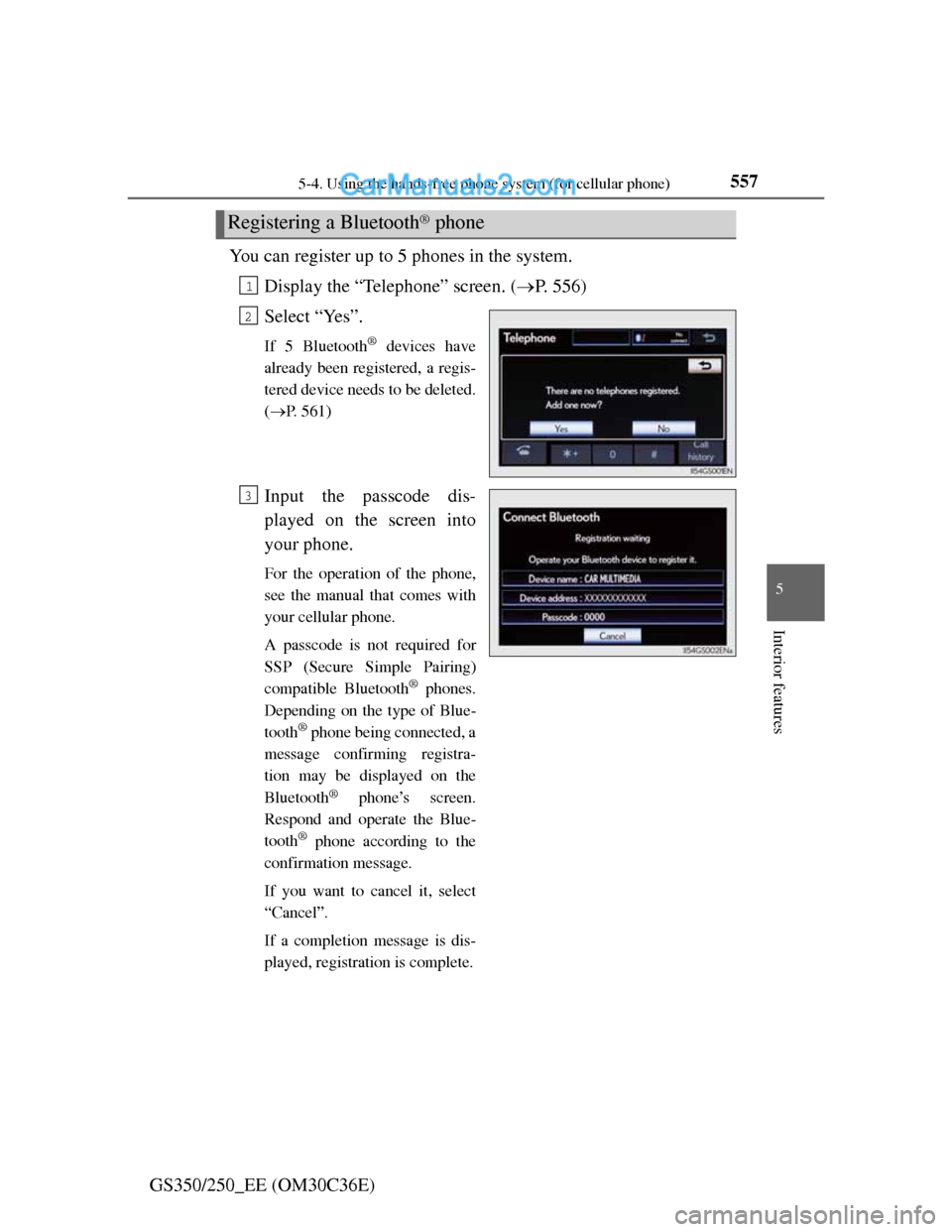
GS350/250_EE (OM30C36E)You can register up to 5 phones in the system.
Display the “Telephone” screen. (P. 556)
Select “Yes”.
If 5 Bluetooth® devices have
already been registered, a regis-
tered device needs to be deleted.
(P. 561)
Input the passcode dis-
played on the screen into
your phone.
For the operation of the phone,
see the manual that comes with
your cellular phone.
A passcode is not required for
SSP (Secure Simple Pairing)
compatible Bluetooth
® phones.
Depending on the type of Blue-
tooth
® phone being connected, a
message confirming registra-
tion may be displayed on the
Bluetooth
® phone’s screen.
Respond and operate the Blue-
tooth
® phone according to the
confirmation message.
If you want to cancel it, select
“Cancel”.
If a completion message is dis-
played, registration is complete.
Registering a Bluetooth® phone
1
2
3
Page 618 of 914
6035-4. Using the hands-free phone system (for cellular phone)
5
Interior features
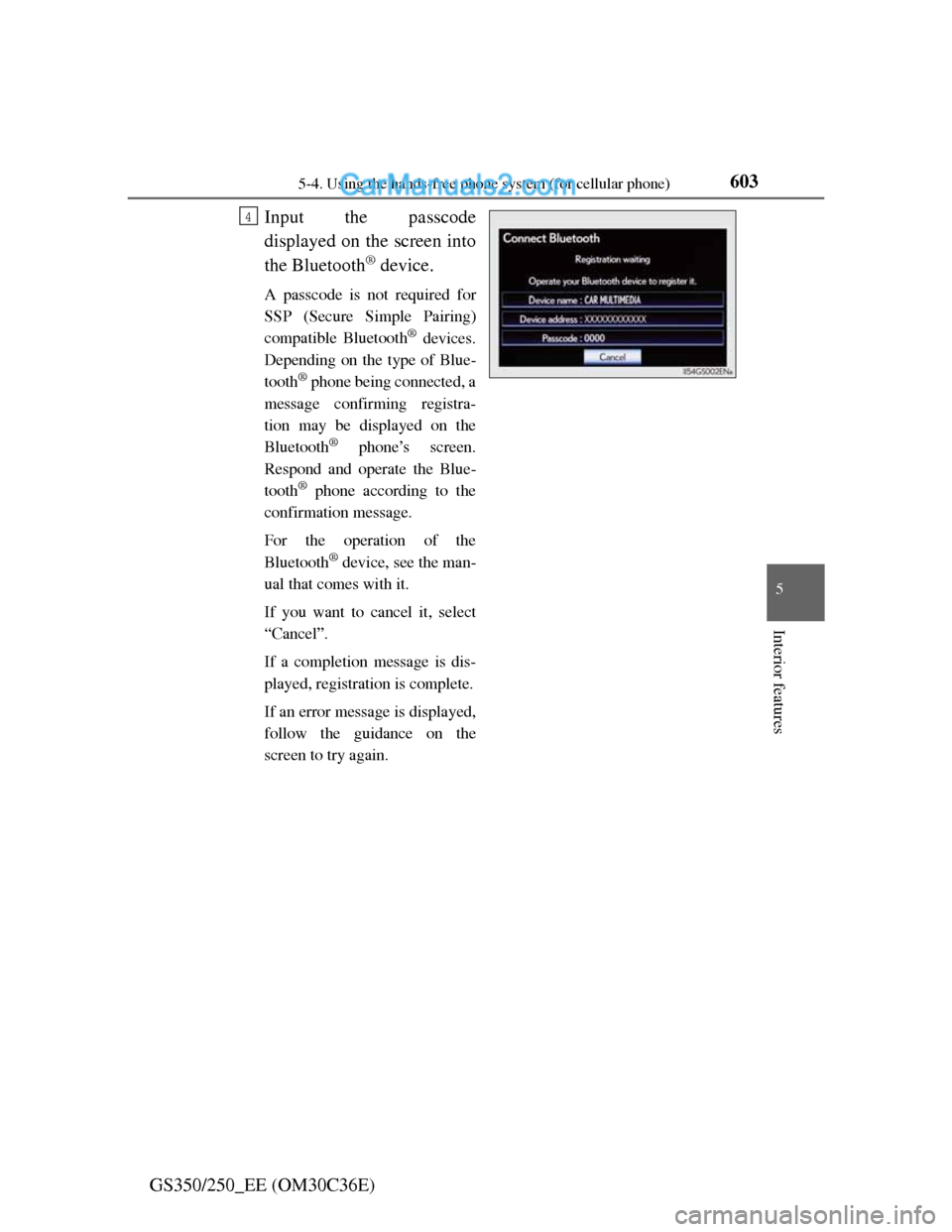
GS350/250_EE (OM30C36E)Input the passcode
displayed on the screen into
the Bluetooth
® device.
A passcode is not required for
SSP (Secure Simple Pairing)
compatible Bluetooth
® devices.
Depending on the type of Blue-
tooth
® phone being connected, a
message confirming registra-
tion may be displayed on the
Bluetooth
® phone’s screen.
Respond and operate the Blue-
tooth
® phone according to the
confirmation message.
For the operation of the
Bluetooth
® device, see the man-
ual that comes with it.
If you want to cancel it, select
“Cancel”.
If a completion message is dis-
played, registration is complete.
If an error message is displayed,
follow the guidance on the
screen to try again.
4
Page 622 of 914
6075-4. Using the hands-free phone system (for cellular phone)
5
Interior features
GS350/250_EE (OM30C36E)
Editing the “Device name”
If you change a device name, the name registered in your cellular phone is
not changed.
About “Device address”
The address peculiar to the system. It cannot be changed. If you have regis-
tered two Bluetooth
® phones with the same device name and you cannot dis-
tinguish one from the other, refer to this address.
“My telephone no.”:
The phone number of the Bluetooth
® phone is displayed on the screen.
Depending on the type of phone, the phone number may not be displayed.
“Profiles”:
The compatibility profile of the Bluetooth
® device is displayed on the screen.
“Connect portable player from”:
There are 2 portable player connection settings available; “Vehicle” and
“Portable Player”.
When you delete a Bluetooth® phone
The phonebook data will be deleted at the same time.
Page 625 of 914
6105-4. Using the hands-free phone system (for cellular phone)
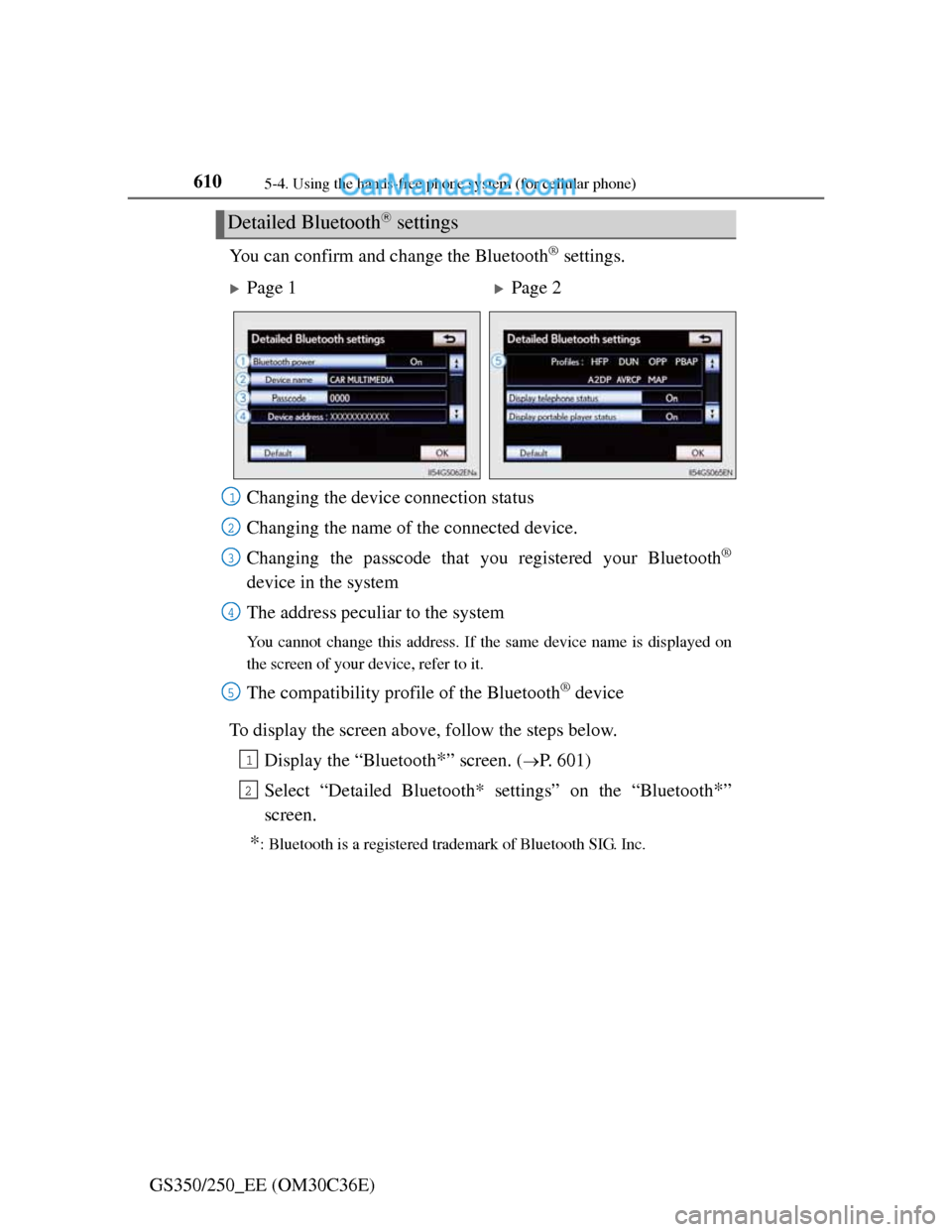
GS350/250_EE (OM30C36E)You can confirm and change the Bluetooth
® settings.
To display the screen above, follow the steps below.
Display the “Bluetooth
*” screen. (P. 601)
Select “Detailed Bluetooth* settings” on the “Bluetooth
*”
screen.
*: Bluetooth is a registered trademark of Bluetooth SIG. Inc.
Detailed Bluetooth settings
Page 1Page 2
Changing the device connection status
Changing the name of the connected device.
Changing the passcode that you registered your Bluetooth
®
device in the system
The address peculiar to the system
You cannot change this address. If the same device name is displayed on
the screen of your device, refer to it.
The compatibility profile of the Bluetooth® device
1
2
3
4
5
1
2
Page 639 of 914
621
5 5-6. Using the storage features
Interior features
GS350/250_EE (OM30C36E)
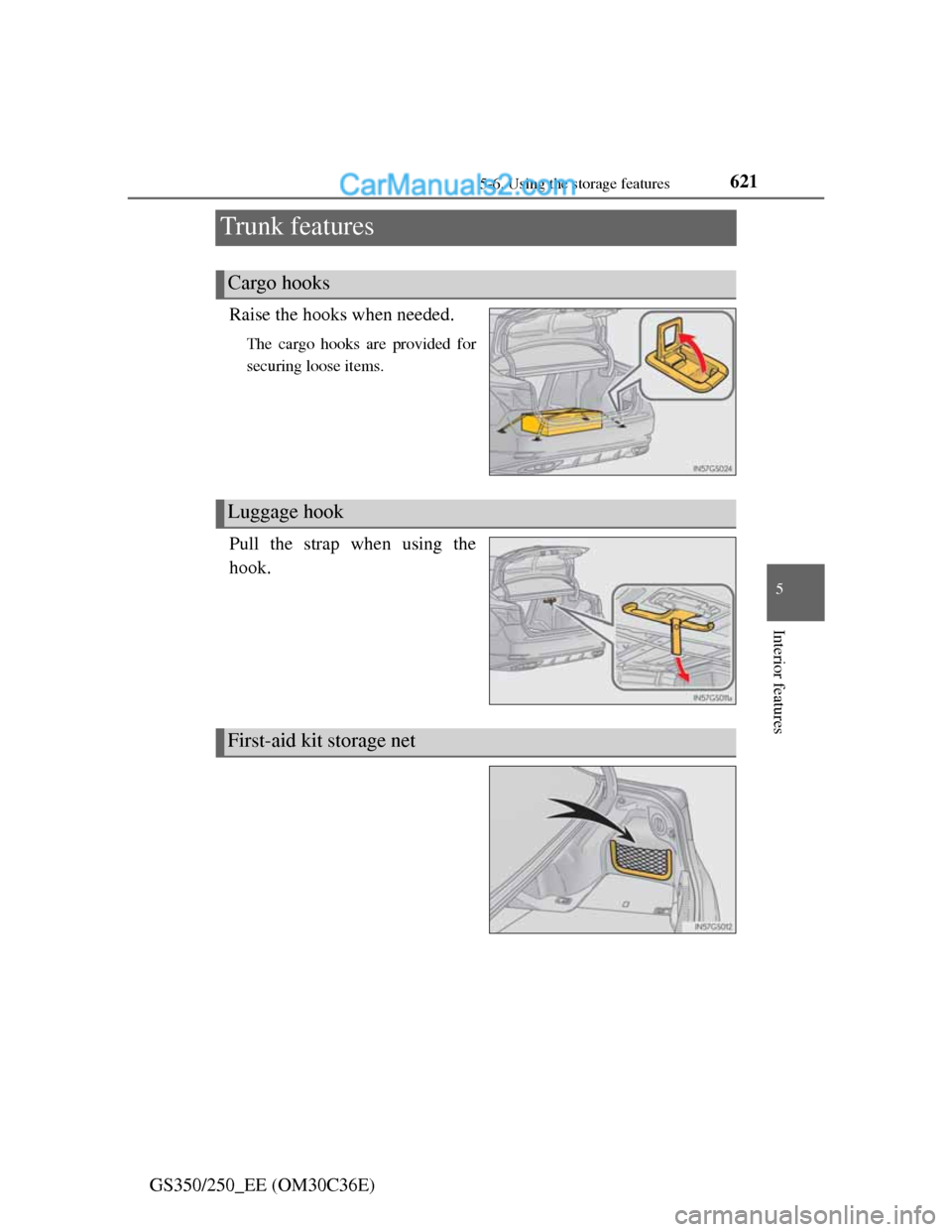
Trunk features
Raise the hooks when needed.
The cargo hooks are provided for
securing loose items.
Pull the strap when using the
hook.
Cargo hooks
Luggage hook
First-aid kit storage net