engine Lexus GS250 2014 Owner's Manual
[x] Cancel search | Manufacturer: LEXUS, Model Year: 2014, Model line: GS250, Model: Lexus GS250 2014Pages: 688, PDF Size: 152.64 MB
Page 353 of 688
3534-5. Using the driving support systems
4
Driving
GS350_250_OM_OM30E16E_(EE)
■Conditions under which the Rear Crossing Traffic Alert function will not detect a
vehicle
The Rear Crossing Traffic Alert function is not designed to detect the following types
of vehicles and/or objects.
●Small motorcycles, bicycles, pedestrians etc.*
●Vehicles approaching from directly behind
●Guardrails, walls, signs, parked vehicles and similar stationary objects*
●Vehicles moving away from your vehicle
●Vehicles approaching from the parking spaces next to your vehicle*
●Vehicles backing up in the parking space next to your vehicle*
*
: Depending on conditions, detection of a vehicle and/or object may occur.
■Conditions under which the Rear Crossing Traffic Alert function may not function
correctly
The Rear Crossing Traffic Alert function may not detect vehicles correctly in the fol-
lowing conditions:
●During bad weather such as heavy rain, fog, snow etc.
●When ice or mud etc. is attached to the rear bumper
●When multiple vehicles approach continuously
●Shallow angle parking
●When a vehicle is approaching at high speed
●When parking on a steep incline, such as hills, a dip in the road etc.
●Directly after the BSM main switch is set to on
●When your vehicle is towing a trailer
●When items such as a bicycle carrier are installed on the rear of the vehicle
●Directly after the engine is started with the BSM main switch on
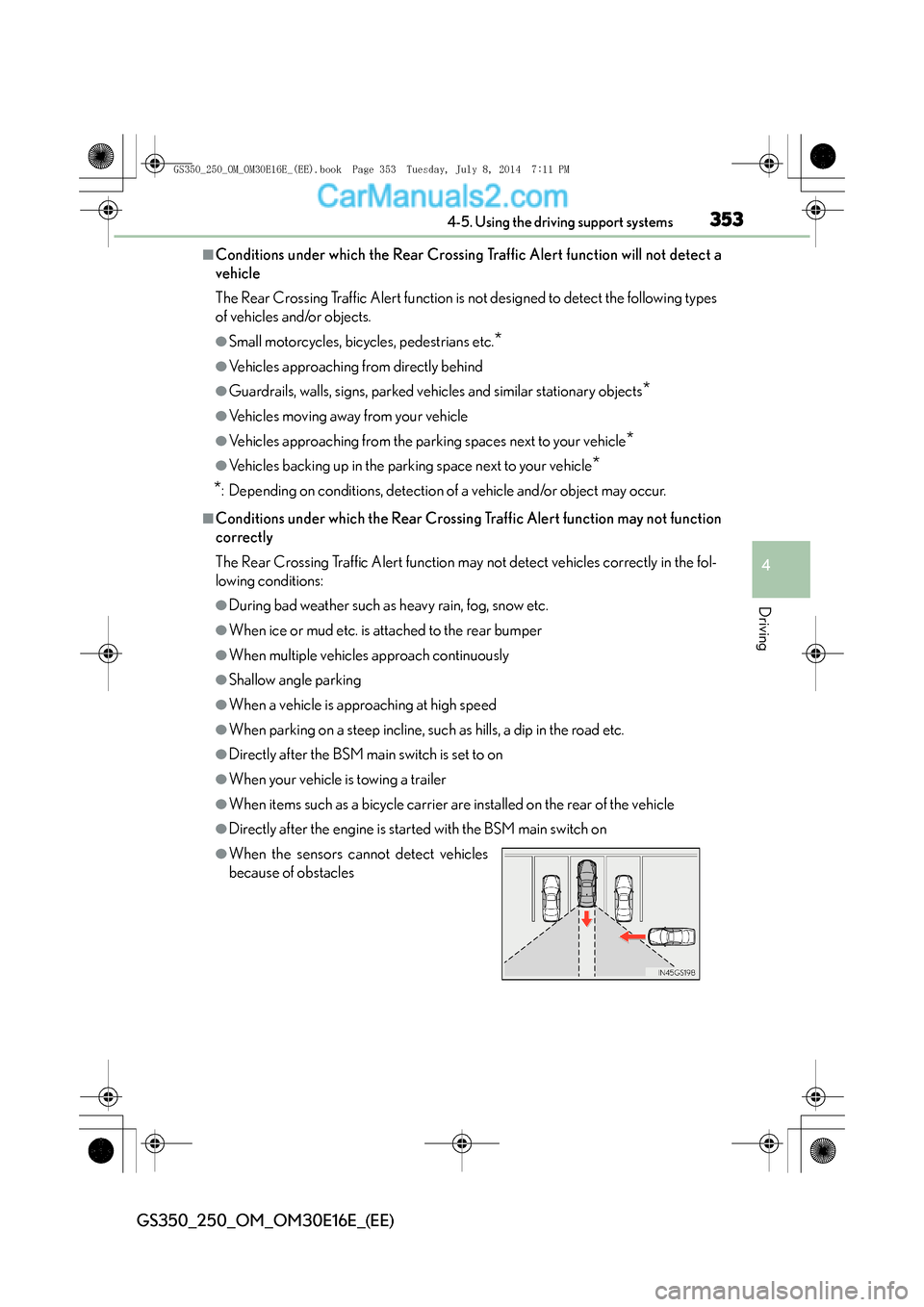
●When the sensors cannot detect vehicles
because of obstacles
GS350_250_OM_OM30E16E_(EE).book Page 353 Tuesday, July 8, 201 4 7:11 PM
Page 354 of 688
3544-6. Driving tips
GS350_250_OM_OM30E16E_(EE)
Winter driving tips
●Use fluids that are appropriate to the prevailing outside temperatures.
• Engine oil
• Engine coolant
• Washer fluid
●Have a service technician inspect the condition of the battery.
●Have the vehicle fitted with four snow tires or purchase a set of tire
chains for the rear tires.
*
Ensure that all tires are the specified size and brand, and that chains match the
size of the tires.
*: Tire chains cannot be mounted on vehicles with front and rear tires of differing
sizes.
Carry out the necessary preparations and inspections before driving
the vehicle in winter. Always drive the vehicle in a manner appropriate
to the prevailing weather conditions.
Preparation for winter
GS350_250_OM_OM30E16E_(EE).book Page 354 Tuesday, July 8, 201 4 7:11 PM
Page 358 of 688
3584-6. Driving tips
GS350_250_OM_OM30E16E_(EE)
CAUTION
■Driving with snow tires
Observe the following precautions to reduce the risk of accidents.
Failure to do so may result in a loss of vehicle control and cause death or serious
injury.
●Use tires of the specified size.
●Maintain the recommended level of air pressure.
●Do not drive at speeds in excess of the speed limit or the speed limit specified for
the snow tires being used.
●Use snow tires on all, not just some wheels.
●Do not use LKA (Lane-Keeping Assist) system.
■Driving with tire chains (vehicles with front and rear tires of the same size)
Observe the following precautions to reduce the risk of accidents.
Failure to do so may result in the vehicle being unable to be driven safely, and may
cause death or serious injury.
●Do not drive in excess of the speed limit specified for the tire chains being used,
or 50 km/h (30 mph), whichever is lower.
●Avoid driving on bumpy road surfaces or over potholes.
●Avoid sudden acceleration, abrupt steering, sudden braking and shifting opera-
tions that causes sudden engine braking.
●Slow down sufficiently before entering a curve to ensure that vehicle control is
maintained.
●Do not use LKA (Lane-Keeping Assist) system.
GS350_250_OM_OM30E16E_(EE).book Page 358 Tuesday, July 8, 2014 7:11 PM
Page 364 of 688
3645-1. Remote Touch screen
GS350_250_OM_OM30E16E_(EE)
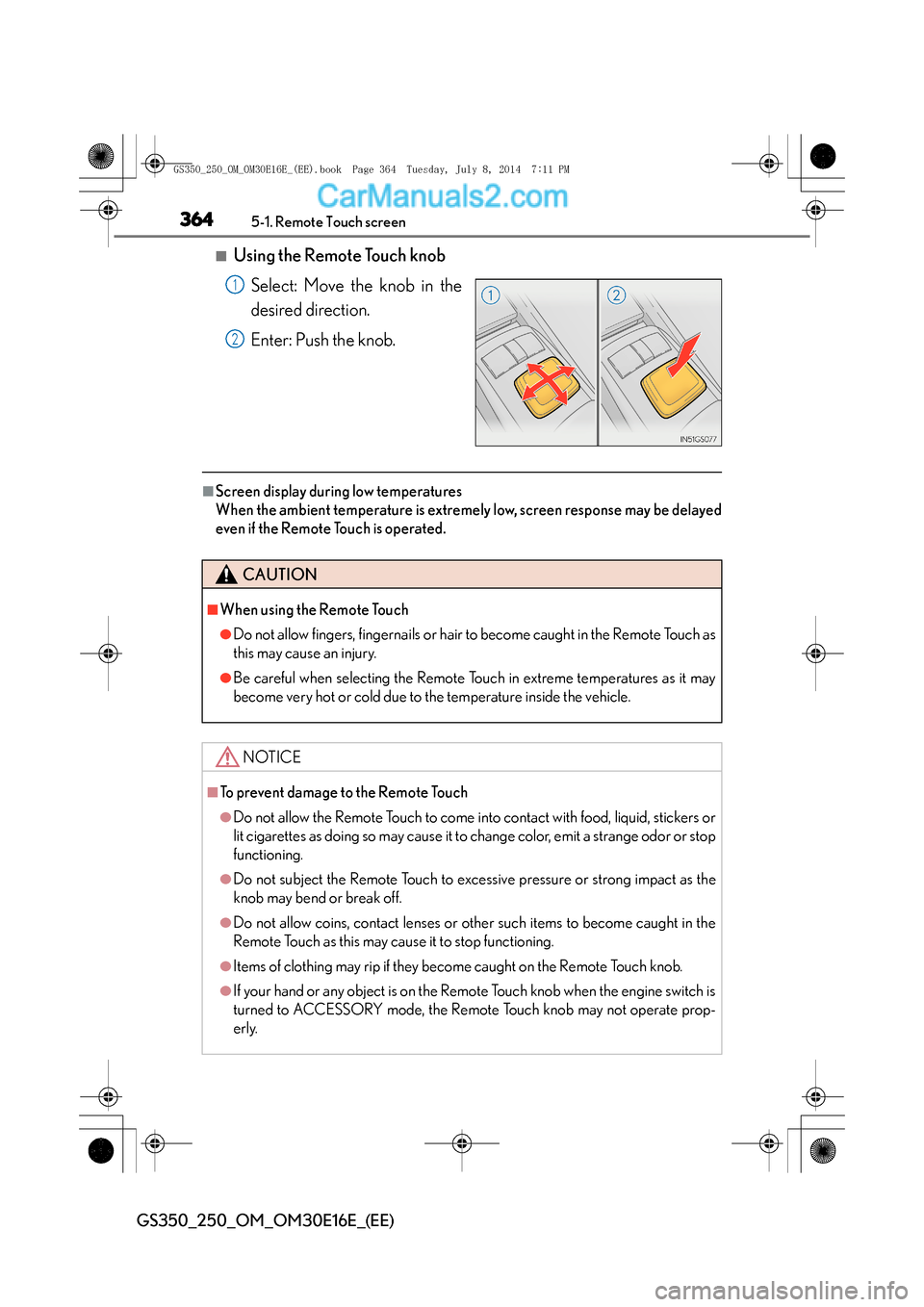
■Using the Remote Touch knobSelect: Move the knob in the
desired direction.
Enter: Push the knob.
■Screen display during low temperatures
When the ambient temperature is extremely low, screen response may be delayed
even if the Remote Touch is operated.
1
2
CAUTION
■When using the Remote Touch
●Do not allow fingers, fingernails or hair to become caught in the Remote Touch as
this may cause an injury.
●Be careful when selecting the Remote Touch in extreme temperatures as it may
become very hot or cold due to the temperature inside the vehicle.
NOTICE
■To prevent damage to the Remote Touch
●Do not allow the Remote Touch to come into contact with food, liquid, stickers or
lit cigarettes as doing so may cause it to change color, emit a strange odor or stop
functioning.
●Do not subject the Remote Touch to excessive pressure or strong impact as the
knob may bend or break off.
●Do not allow coins, contact lenses or other such items to become caught in the
Remote Touch as this may cause it to stop functioning.
●Items of clothing may rip if they become caught on the Remote Touch knob.
●If your hand or any object is on the Remote Touch knob when the engine switch is
turned to ACCESSORY mode, the Remote Touch knob may not operate prop-
erly.
GS350_250_OM_OM30E16E_(EE).book Page 364 Tuesday, July 8, 201 4 7:11 PM
Page 386 of 688
3865-2. Using the air conditioning system and defogger
GS350_250_OM_OM30E16E_(EE)
■Registering air conditioning settings to electronic keys
●Unlocking the vehicle using an electronic key and turning the engine switch to
IGNITION ON mode will recall that key’s registered air conditioning settings.
●When the engine switch is turned off, the current air conditioning settings will auto-
matically be registered to the electronic key that was used to unlock the vehicle.
The system may not operate correctly if more than one electronic key is in the vicinity
or if the smart entry & start system is used to unlock a passenger door.
Settings for the electronic key and the corresponding door can be changed. Contact
any authorized Lexus dealer or repairer, or another duly qualified and equipped pro-
fessional.
■Using automatic mode
●Fan speed is adjusted automatically according to the temperature setting and the
ambient conditions.
Therefore, the fan may stop for a while until warm or cool air is ready to flow imme-
diately after is pressed.
●Cool air may blow around the upper body even when the heater is on due to sun-
light.
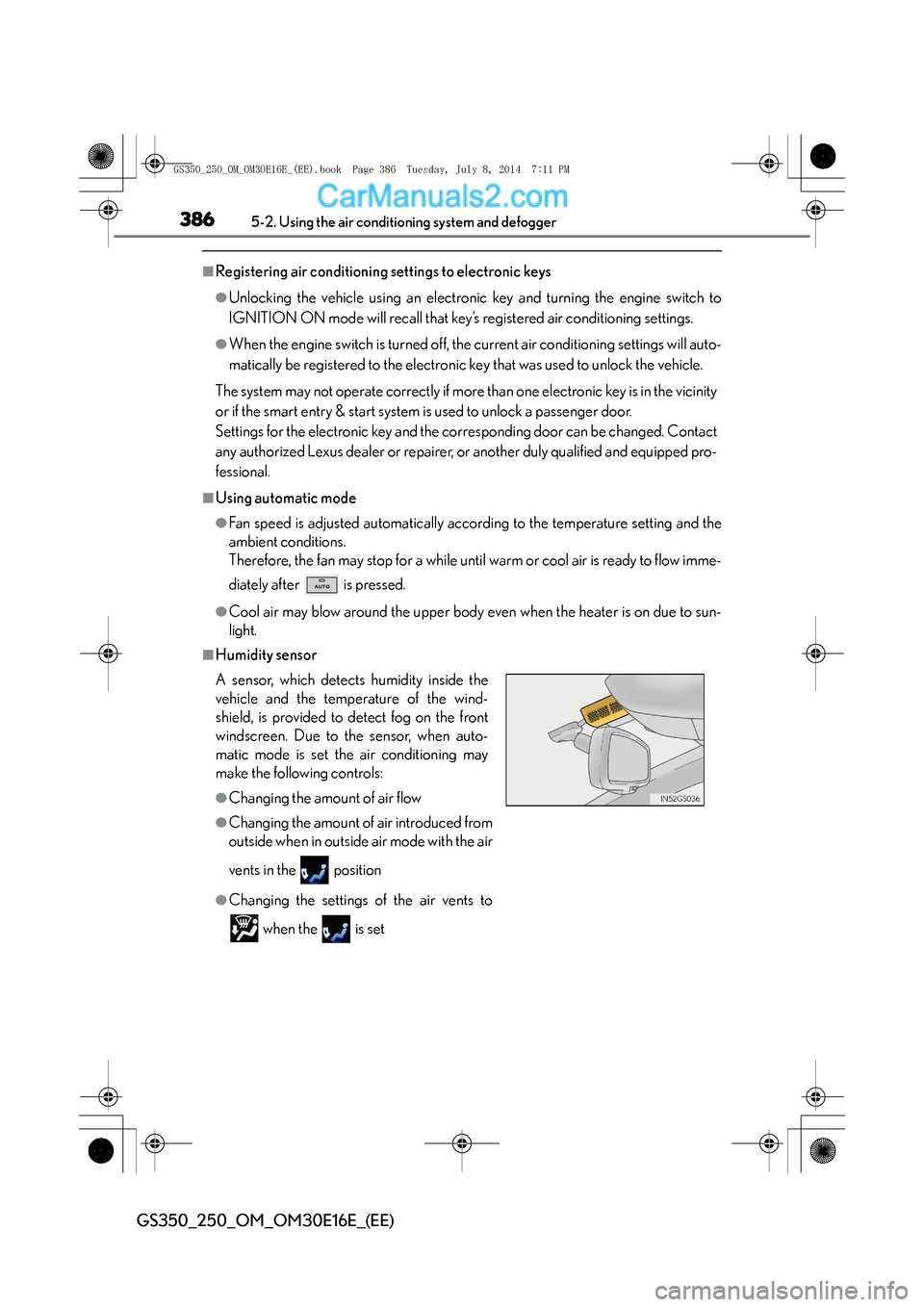
■Humidity sensor
A sensor, which detects humidity inside the
vehicle and the temperature of the wind-
shield, is provided to detect fog on the front
windscreen. Due to the sensor, when auto-
matic mode is set the air conditioning may
make the following controls:
●Changing the amount of air flow
●Changing the amount of air introduced from
outside when in outside air mode with the air
vents in the position
●Changing the settings of the air vents to
when the is set
GS350_250_OM_OM30E16E_(EE).book Page 386 Tuesday, July 8, 201 4 7:11 PM
Page 388 of 688
3885-2. Using the air conditioning system and defogger
GS350_250_OM_OM30E16E_(EE)
■Operation of the air conditioning system in Eco drive mode
In the Eco drive mode, the air conditioning system is controlled as follows to priori-
tize fuel efficiency:
●Engine speed and compressor operation controlled to restrict heating/cooling
capacity
●Fan speed restricted when automatic mode is selected
To improve air conditioning performance, perform the following operations:
●Adjust the fan speed
●Turn off Eco drive mode
■When the S-FLOW mode operates
If air flows to the driver’s seat only, the temperature setting for the front passenger’s
seat is not displayed.
■When the outside temperature falls to nearly 0 °C (32 °F)
The dehumidification function may not operate even when “A/C” on the option con-
trol screen is selected.
■Ventilation and air conditioning odors
●To let fresh air in, set the air conditioning system to the outside air mode.
●During use, various odors from inside and outside the vehicle may enter into and
accumulate in the air conditioning system. This may then cause odor to be emitted
from the vents.
●To reduce potential odors from occurring:
• It is recommended that the air conditioning system be set to outside air mode prior to turning the vehicle off.
• The start timing of the blower may be delayed for a short period of time immedi- ately after the air conditioning system is started in automatic mode.
GS350_250_OM_OM30E16E_(EE).book Page 388 Tuesday, July 8, 201 4 7:11 PM
Page 390 of 688
3905-2. Using the air conditioning system and defogger
GS350_250_OM_OM30E16E_(EE)
CAUTION
■To prevent the windshield from fogging up
Do not use
during cool air operation in extremely humid weather. The differ-
ence between the temperature of the outside air and that of the windshield can
cause the outer surface of the windshield to fog up, blocking your vision.
■nanoe generator
Do not disassemble or repair the generator because it contains high voltage parts.
Contact any authorized Lexus dealer or repairer, or another duly qualified and
equipped professional if the generator needs repair.
NOTICE
■To prevent battery discharge
Do not leave the air conditioning system on longer than necessary when the
engine is stopped.
■Humidity sensor
Follow these points to avoid damaging the sensor:
●Do not disassemble the sensor
●Do not spray the glass cleaner on the sensor or subject it to strong impacts
●Do not stick anything on the sensor
■To prevent damage to the nanoe
Do not insert anything into the driver’s side vent, attach anything to it, or use sprays
around the driver’s side vent. These things may cause the generator not to work
properly.
GS350_250_OM_OM30E16E_(EE).book Page 390 Tuesday, July 8, 201 4 7:11 PM
Page 395 of 688
3955-2. Using the air conditioning system and defogger
5
Interior features
GS350_250_OM_OM30E16E_(EE)
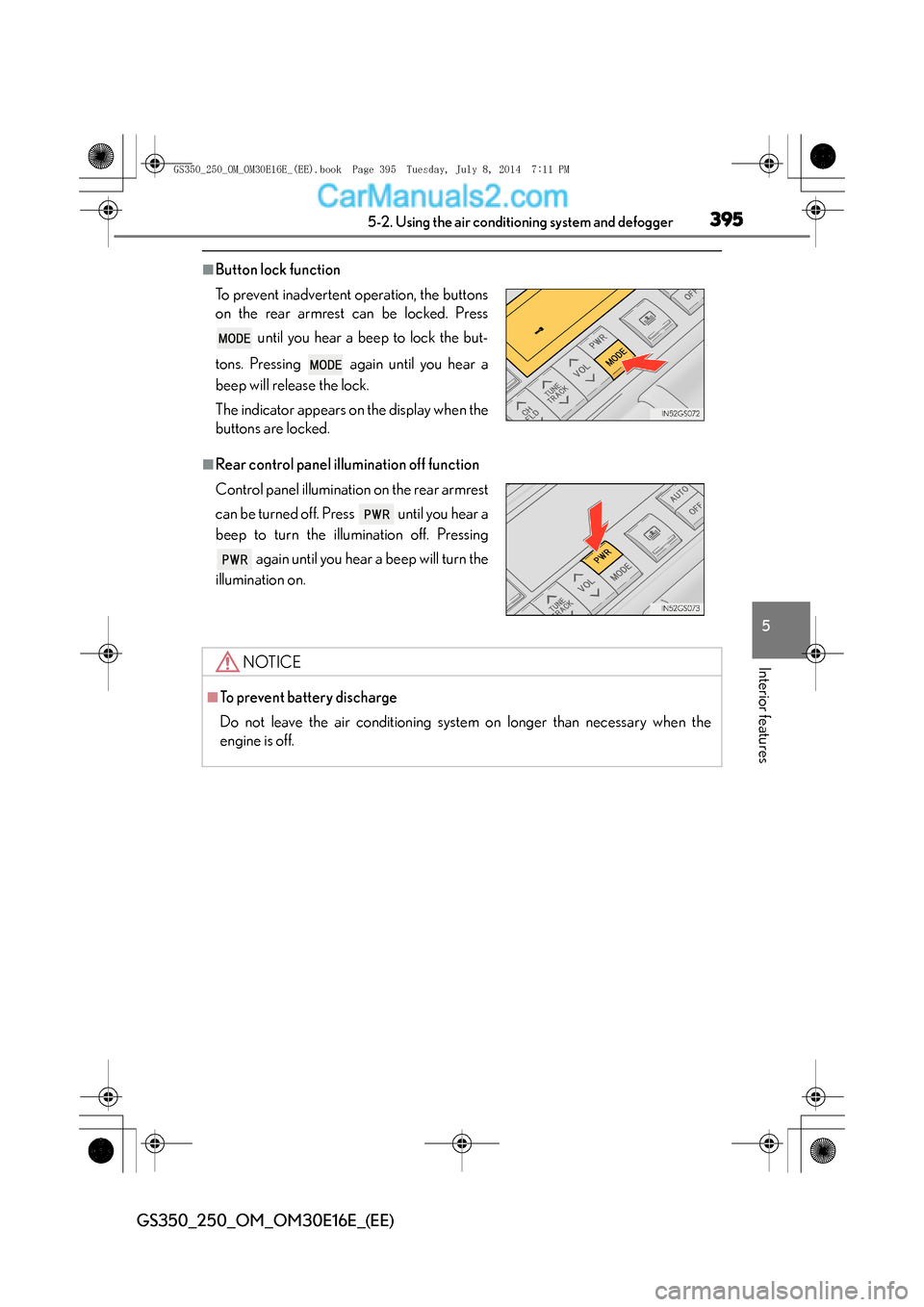
■Button lock function
■Rear control panel illumination off function To prevent inadvertent operation, the buttons
on the rear armrest can be locked. Press until you hear a beep to lock the but-
tons. Pressing again until you hear a
beep will release the lock.
The indicator appears on the display when the
buttons are locked.
Control panel illumination on the rear armrest
can be turned off. Press until you hear a
beep to turn the illumination off. Pressing again until you hear a beep will turn the
illumination on.
NOTICE
■To prevent battery discharge
Do not leave the air conditioning system on longer than necessary when the
engine is off.
GS350_250_OM_OM30E16E_(EE).book Page 395 Tuesday, July 8, 201 4 7:11 PM
Page 396 of 688
3965-2. Using the air conditioning system and defogger
GS350_250_OM_OM30E16E_(EE)
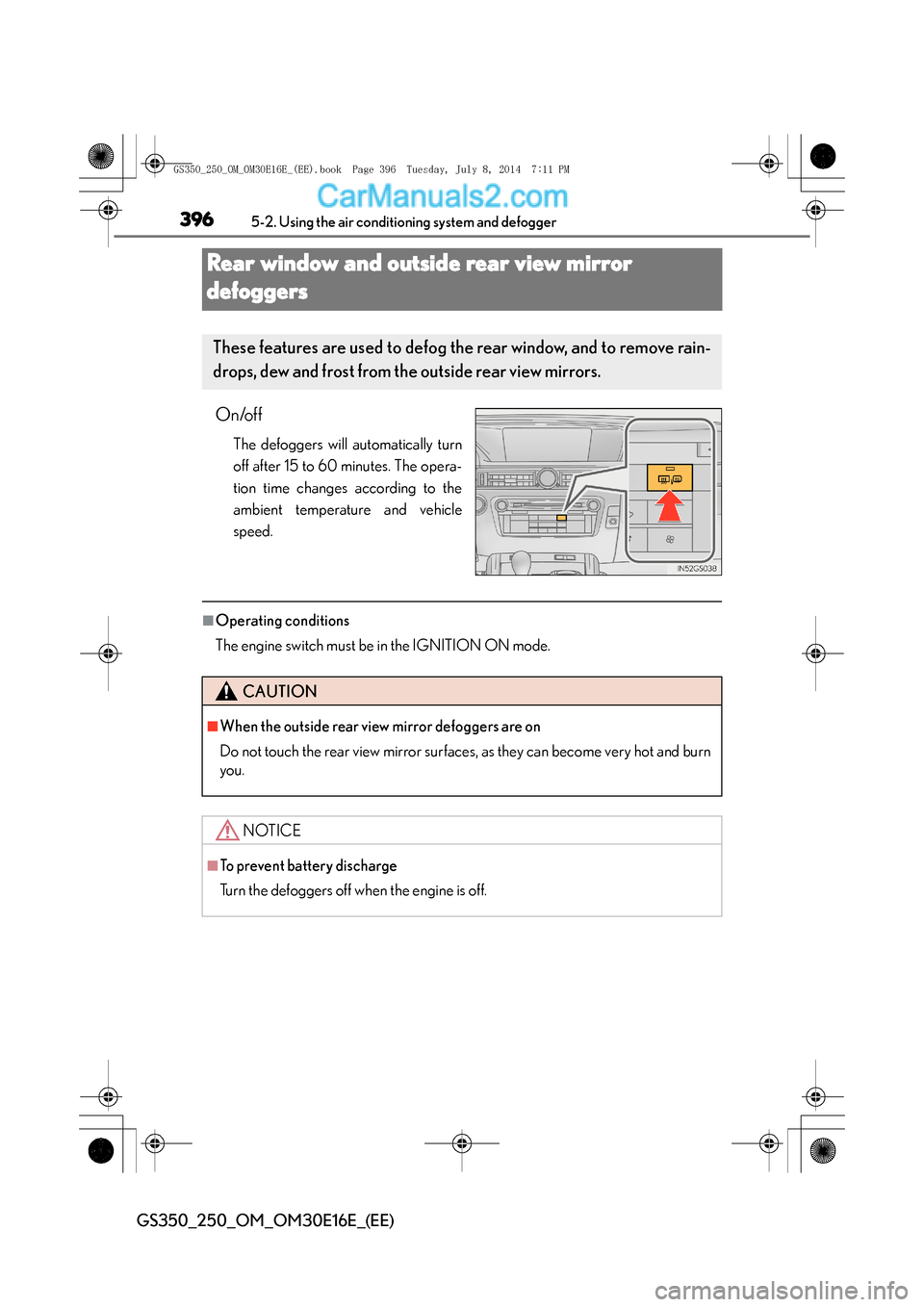
Rear window and outside rear view mirror
defoggers
On/off
The defoggers will automatically turn
off after 15 to 60 minutes. The opera-
tion time changes according to the
ambient temperature and vehicle
speed.
■Operating conditions
The engine switch must be in the IGNITION ON mode.
These features are used to defog th e rear window, and to remove rain-
drops, dew and frost from the outside rear view mirrors.
CAUTION
■When the outside rear view mirror defoggers are on
Do not touch the rear view mirror surfaces, as they can become very hot and burn
you.
NOTICE
■To prevent battery discharge
Turn the defoggers off when the engine is off.
GS350_250_OM_OM30E16E_(EE).book Page 396 Tuesday, July 8, 201 4 7:11 PM
Page 398 of 688
3985-2. Using the air conditioning system and defogger
GS350_250_OM_OM30E16E_(EE)
■Operating conditions
The engine switch must be in the IGNITION ON mode.
CAUTION
■When the windshield wiper de-icer is on
Do not touch the glass at the lower part of the windshield or to the side of the front
pillars as the surfaces can become very hot and burn you.
GS350_250_OM_OM30E16E_(EE).book Page 398 Tuesday, July 8, 201 4 7:11 PM