air condition Lexus GS250 2014 User Guide
[x] Cancel search | Manufacturer: LEXUS, Model Year: 2014, Model line: GS250, Model: Lexus GS250 2014Pages: 688, PDF Size: 152.64 MB
Page 235 of 688
2354-1. Before driving
4
Driving
GS350_250_OM_OM30E16E_(EE)
■If the engine overheats
Towing a loaded trailer up a long, steep incline in temperatures exceed-
ing 30°C (85 °F) may result in the engine overheating. If the engine
coolant temperature gauge indicates that the engine is overheating,
turn the air conditioning off immediately, leave the road and stop the
vehicle in a safe place. ( →P. 625)
■When parking the vehicle
Always place wheel chocks under the wheels of both the vehicle and
trailer. Firmly set the parking brake and shift the shift lever to P.
CAUTION
Follow all the instructions described in this section. Failure to do so could cause an
accident resulting in death or serious injury.
■Trailer towing precautions
When towing, make sure that none of the weight limits are exceeded. ( →P. 2 2 8 )
■To avoid accident or injury
●Do not tow a trailer when the compact spare tire is installed on your vehicle.
●Do not tow a trailer when the tire installed is repaired with the emergency tire
puncture repair kit.
●Do not use cruise control (if equipped) or dynamic radar cruise control (if
equipped) when trailer towing.
■Vehicle speed in towing
Observe the legal maximum speeds for trailer towing.
■Before descending hills or long declines
Reduce speed and downshift. However, never downshift suddenly while descend-
ing steep or long downhill grades.
■Operation of the brake pedal
Do not hold the brake pedal depressed often or for long periods of time.
Doing so may result in the brake overheating or reduce braking effects.
GS350_250_OM_OM30E16E_(EE).book Page 235 Tuesday, July 8, 201 4 7:11 PM
Page 240 of 688
2404-2. Driving procedures
GS350_250_OM_OM30E16E_(EE)
■Auto power off function
If the vehicle is left in ACCESSORY mode for more than 20 minutes or IGNITION
ON mode (the engine is not running) for more than an hour with the shift lever in P,
the engine switch will automatically turn off. However, this function cannot entirely
prevent battery discharge. Do not leave the vehicle with the engine switch in
ACCESSORY or IGNITION ON mode for long periods of time when the engine is
not running.
■Electronic key battery depletion
→P. 1 3 8
■Conditions affecting operation
→P. 1 3 4
■Notes for the push-start function
→P. 1 3 7
■If the engine does not start
●The engine immobilizer system may not have been deactivated. ( →P. 8 0 )
Contact any authorized Lexus dealer or repairer, or another duly qualified and
equipped professional.
●Check that the shift lever is securely set in P. The engine may not start if the shift
lever is displaced out of P. “Shift to P position to Start” will be displayed on the multi-
information display.
■Steering lock
After turning the engine switch off and opening and closing the doors, the steering
wheel will be locked due to the steering lock function. Operating the engine switch
again automatically cancels the steering lock.
GS350_250_OM_OM30E16E_(EE).book Page 240 Tuesday, July 8, 201 4 7:11 PM
Page 319 of 688
3194-5. Using the driving support systems
4
Driving
GS350_250_OM_OM30E16E_(EE)
■Operation of the air conditioning system in Eco drive mode
Eco drive mode controls the heating/cooling operations and fan speed of the air
conditioning system to enhance fuel efficiency (→P. 371). To improve air condition-
ing performance, adjust the fan sp eed or turn off Eco drive mode.
■Automatic operation of the seat heater during Eco drive mode
Eco drive mode controls the heating operation and fan speed of the air conditioning
system to enhance fuel efficiency. If the driving mode select switch is switched to Eco
drive mode in cold temperatures, the seat heater will be automatically operated to
assist heating performance.
■Sport mode automatic deactivation
Sport mode is automatically deactivated if th e engine switch is turned off after driv-
ing in sport mode.
GS350_250_OM_OM30E16E_(EE).book Page 319 Tuesday, July 8, 201 4 7:11 PM
Page 324 of 688
3244-5. Using the driving support systems
GS350_250_OM_OM30E16E_(EE)
■When the message is displayed on the multi-information display showing that TRC
has been disabled even if the VSC OFF switch has not been pressed
TRC cannot be operated. Contact any authorized Lexus dealer or repairer, or
another duly qualified and equipped professional.
■Sounds and vibrations caused by the ABS, brake assist, VSC and TRC systems
●A sound may be heard from the engine compartment when the engine is started or
just after the vehicle begins to move. This sound does not indicate that a malfunc-
tion has occurred in any of these systems.
●Any of the following conditions may occur when the above systems are operating.
None of these indicates that a malfunction has occurred.
• Vibrations may be felt through the vehicle body and steering.
• A motor sound may be heard after the vehicle comes to a stop.
• The brake pedal may pulsate slightly after the ABS is activated.
• The brake pedal may move down slightly after the ABS is activated.
■EPS operation sound
When the steering wheel is operated, a motor sound (whirring sound) may be heard.
This does not indicate a malfunction.
■Reactivation of the TRC/VSC systems
Even after the TRC/VSC systems have been turned off, turning the engine off and
then on again will automatically reactivate the TRC/VSC systems.
GS350_250_OM_OM30E16E_(EE).book Page 324 Tuesday, July 8, 201 4 7:11 PM
Page 338 of 688
3384-5. Using the driving support systems
GS350_250_OM_OM30E16E_(EE)
CAUTION
■Limitations of the pre-crash safety system
Do not overly rely on the pre-crash safety system. Always drive safely, taking care
to observe your surroundings and checking for any obstacles or other road haz-
ards.
Failure to do so may cause an accident resulting in death or serious injury.
■Handling the radar sensor
Observe the following to ensure the pre-crash safety system can function effec-
tively. Otherwise, the system may not function correctly and could result in an acci-
dent.
●Keep the sensor and grille cover clean at all times.
Clean the sensor and grille cover with a soft cloth so you do not mark or damage
them.
●Do not subject the sensor or surrounding area to a strong impact.
If the sensor moves even slightly off position, the system may become inaccurate
or malfunction. If the sensor or surrounding area is subject to a strong impact,
always have the area inspected and adjusted by any authorized Lexus dealer or
repairer, or another duly qualified and equipped professional.
●Do not disassemble the sensor.
●Do not attach accessories or stickers to the sensor, grille cover or surrounding
area.
●Do not modify or paint the sensor and grille cover.
●Do not replace them with non-genuine parts.
■Determining the direction the driver is facing and whether the driver’s eyes are
open or closed
The direction the driver is facing and whether the driver’s eyes are open or closed
may not be determined correctly if the following conditions exist:
●There is an object between the driver monitor sensor and the driver’s face, such
as when the sensor is blocked.
●A part of the driver’s face is covered.
●The sensor or the driver’s face is exposed to intense light such as sunlight.
●The driving posture is improper.
GS350_250_OM_OM30E16E_(EE).book Page 338 Tuesday, July 8, 201 4 7:11 PM
Page 355 of 688

3554-6. Driving tips
4
Driving
GS350_250_OM_OM30E16E_(EE)
Perform the following according to the driving conditions:
●Do not try to forcibly open a window or move a wiper that is frozen.
Pour warm water over the frozen area to melt the ice. Wipe away the
water immediately to prevent it from freezing.
●To ensure proper operation of the climate control system fan, remove
any snow that has accumulated on the air inlet vents in front of the wind-
shield.
●Check for and remove any excess ice or snow that may have accumu-
lated on the exterior lights, vehicle’s roof, chassis, around the tires or on
the brakes.
●Remove any snow or mud from the bottom of your shoes before getting
in the vehicle.
Accelerate the vehicle slowly, keep a safe distance between you and the
vehicle ahead, and drive at a reduced speed suitable to road conditions.
Park the vehicle and move the shift lever to P without setting the parking
brake. The parking brake may freeze up, preventing it from being
released. If necessary, block the wheels to prevent inadvertent sliding or
creeping.
Before driving the vehicle
When driving the vehicle
When parking the vehicle
GS350_250_OM_OM30E16E_(EE).book Page 355 Tuesday, July 8, 201 4 7:11 PM
Page 361 of 688
361
5Interior features
GS350_250_OM_OM30E16E_(EE)
5-1. Remote Touch screenRemote Touch/12.3-inch display...................... 362
5-2. Using the air conditioning system and defogger
Front automatic air conditioning system ...........371
Rear air conditioning system .......... 391
Rear window and outside rear view mirror defoggers ..........396
Windshield wiper de-icer ....... 397
5-3. Using the interior lights Interior lights list..........................399
• Interior light ........................... 400
• Personal lights....................... 400 5-4. Using the storage features
List of storage features ............ 402• Glove box ............................... 404
• Console box...........................405
• Cup holders ...........................406
• Auxiliary boxes .....................408
Trunk features ..............................409
5-5. Other interior features Sun visors and vanity mirrors ..............................412
Clock ................................................413
Ashtrays ...........................................414
Power outlets ................................ 415
Heated steering wheel .............. 417
Seat heaters/ seat ventilators .......................... 419
Armrest .......................................... 426
Rear sunshade/ rear door sunshades ...............427
Trunk storage extension ..........430
Coat hooks .................................... 431
Assist grips.................................... 432
Utility hook ................................... 433
Sec_05TOC.fm Page 361 Friday, July 11, 2014 7:00 PM
Page 365 of 688
3655-1. Remote Touch screen
5
Interior features
GS350_250_OM_OM30E16E_(EE)
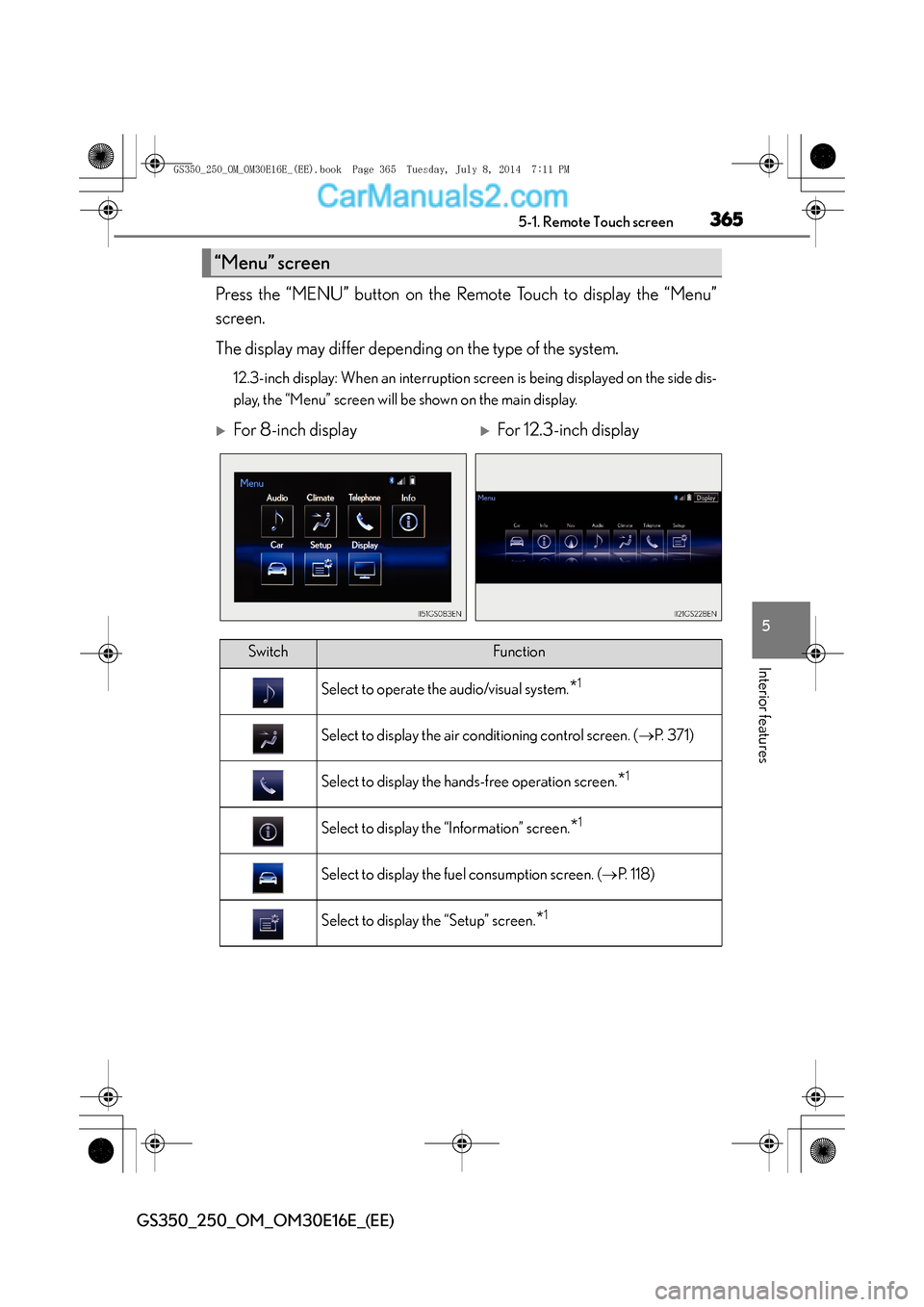
Press the “MENU” button on the Remote Touch to display the “Menu”
screen.
The display may differ depending on the type of the system.
12.3-inch display: When an interruption screen is being displayed on the side dis-
play, the “Menu” screen will be shown on the main display.
“Menu” screen
XFor 8-inch displayXFor 12.3-inch display
SwitchFunction
Select to operate the audio/visual system.*1
Select to display the air conditioning control screen. (→P. 3 7 1 )
Select to display the hands-free operation screen.*1
Select to display the “Information” screen.*1
Select to display the fuel consumption screen. ( →P. 118)
Select to display the “Setup” screen.*1
GS350_250_OM_OM30E16E_(EE).book Page 365 Tuesday, July 8, 201 4 7:11 PM
Page 368 of 688
3685-1. Remote Touch screen
GS350_250_OM_OM30E16E_(EE)
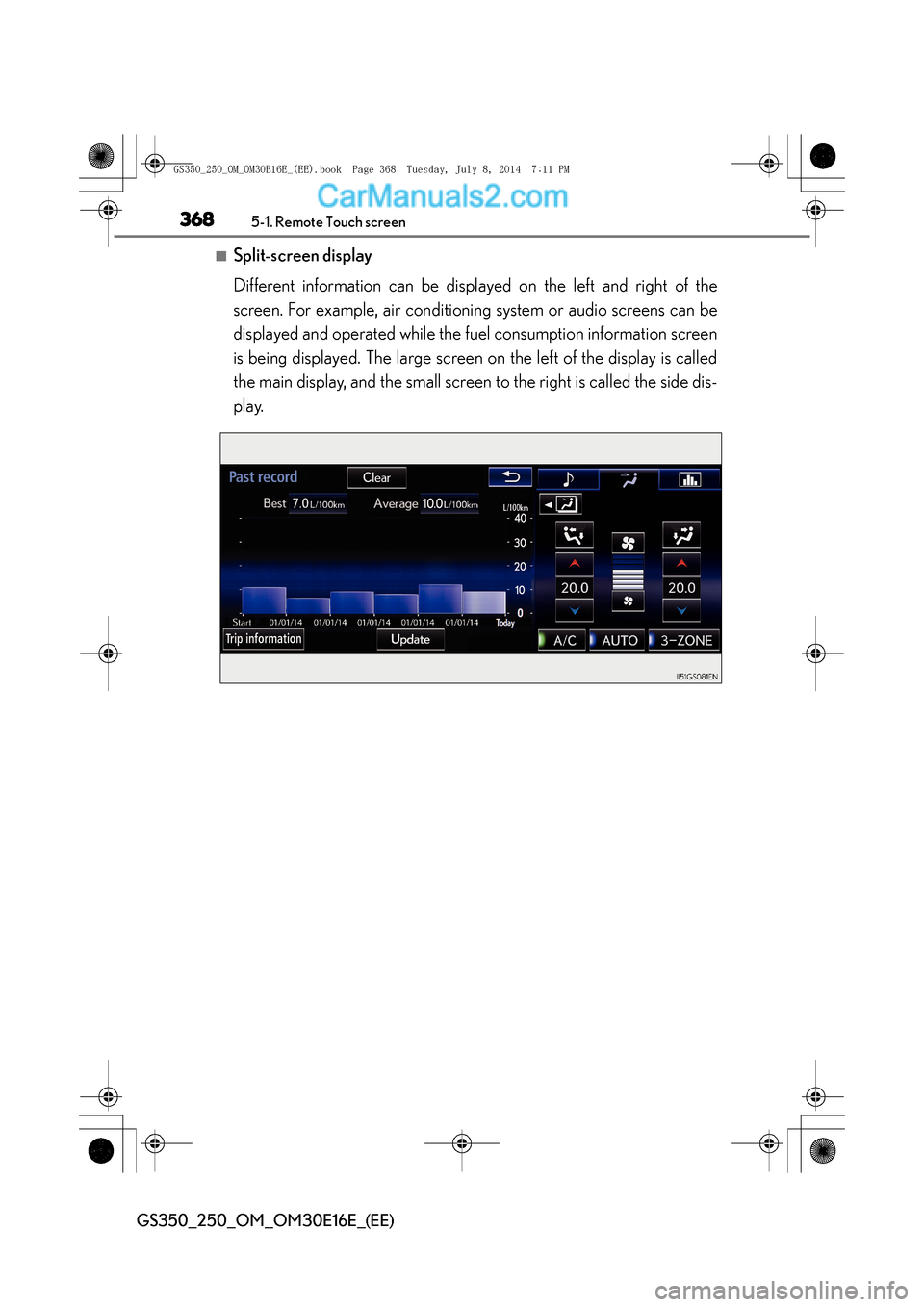
■Split-screen display
Different information can be displayed on the left and right of the
screen. For example, air conditioning system or audio screens can be
displayed and operated while the fuel consumption information screen
is being displayed. The large screen on the left of the display is called
the main display, and the small screen to the right is called the side dis-
play.
GS350_250_OM_OM30E16E_(EE).book Page 368 Tuesday, July 8, 2014 7:11 PM
Page 369 of 688
3695-1. Remote Touch screen
5
Interior features
GS350_250_OM_OM30E16E_(EE)
For details of the functions and operation of the main display, refer to the
respective section.
■Selecting the operation screen
When selecting the side display, move the Remote Touch knob to the
right until is displayed at the boundary between the main display
and the side display, and then move it further to the right. When select-
ing the main display, move the Remote Touch knob to the left until is
displayed at the boundary between the main display and the side dis-
play, and then move it further to the left.
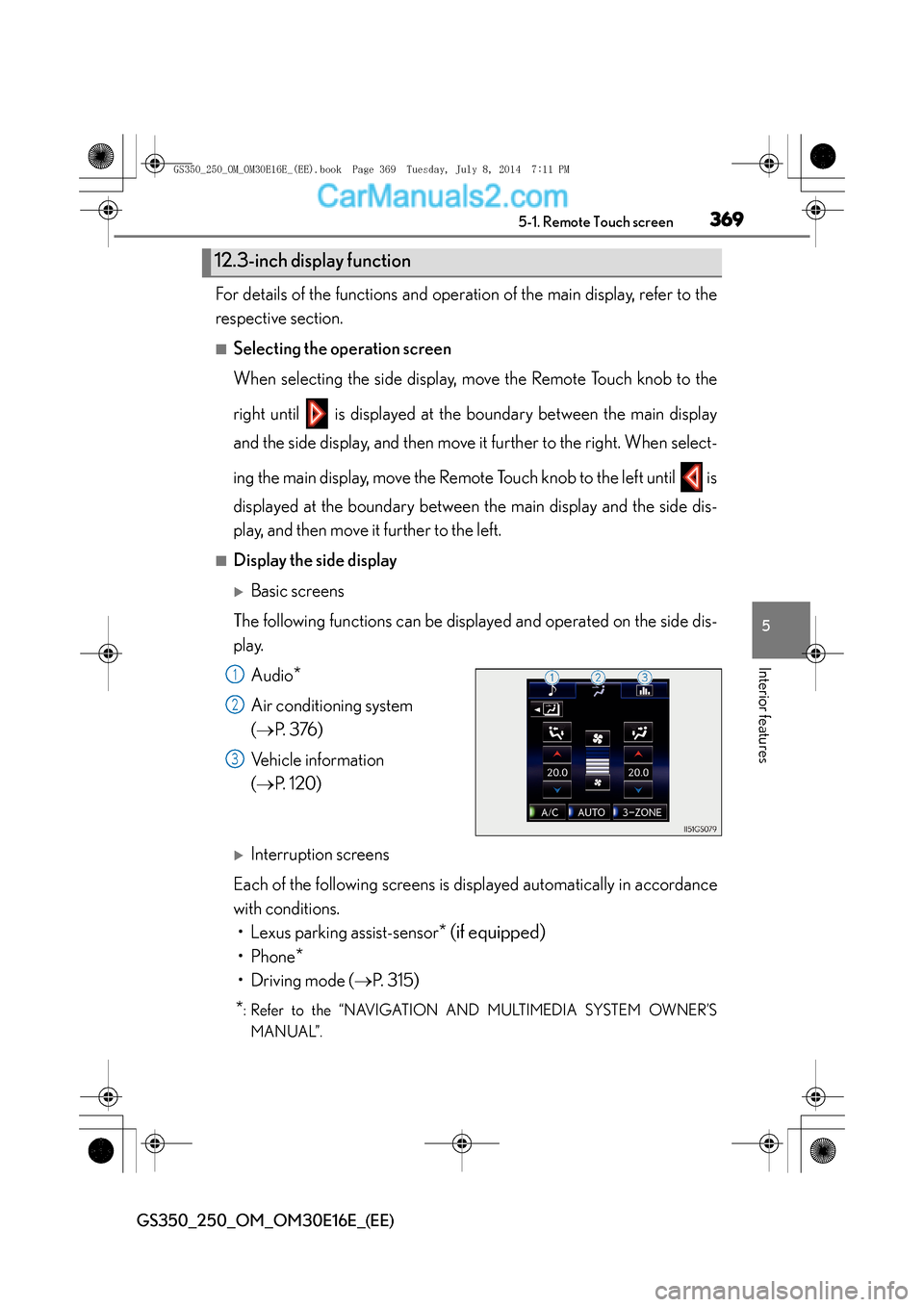
■Display the side display
XBasic screens
The following functions can be displayed and operated on the side dis-
play. Audio
*
Air conditioning system
(→ P. 3 76 )
Vehicle information
( → P. 1 2 0 )
XInterruption screens
Each of the following screens is displayed automatically in accordance
with conditions. • Lexus parking assist-sensor
* (if equipped)
•Phone*
• Driving mode ( →P. 315)
*: Refer to the “NAVIGATION AND MULTIMEDIA SYSTEM OWNER’S
MANUAL”.
12.3-inch display function
1
2
3
GS350_250_OM_OM30E16E_(EE).book Page 369 Tuesday, July 8, 201 4 7:11 PM