fuel Lexus GS250 2014 Owner's Guide
[x] Cancel search | Manufacturer: LEXUS, Model Year: 2014, Model line: GS250, Model: Lexus GS250 2014Pages: 688, PDF Size: 152.64 MB
Page 250 of 688
2504-2. Driving procedures
GS350_250_OM_OM30E16E_(EE)
The Gear Shift Indicator display is a guide to help the driver achieve
improved fuel economy and reduced exhaust emissions within limits of
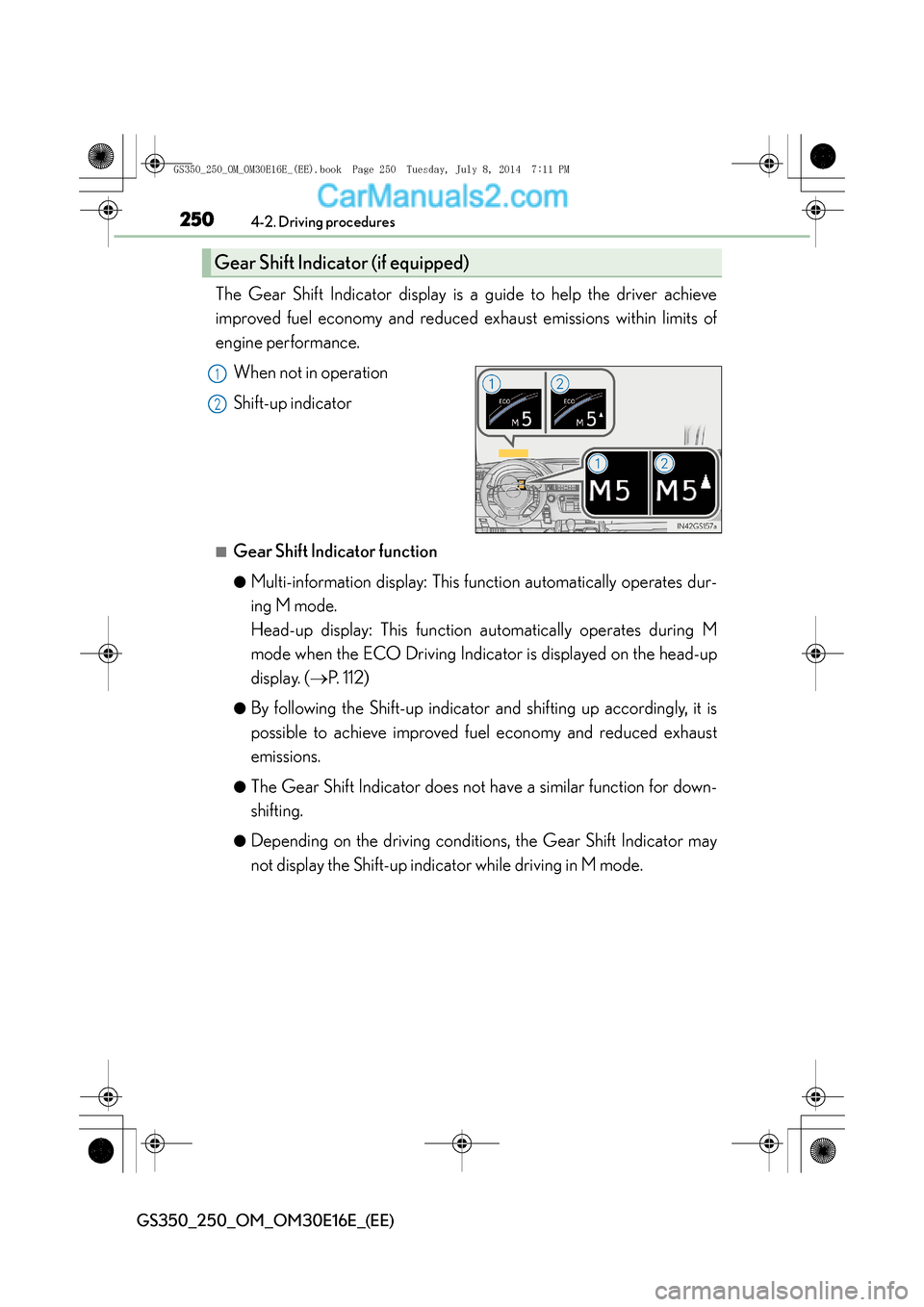
engine performance.When not in operation
Shift-up indicator
■Gear Shift Indicator function
●Multi-information display: This function automatically operates dur-
ing M mode.
Head-up display: This function automatically operates during M
mode when the ECO Driving Indicator is displayed on the head-up
display. ( →P. 112)
●By following the Shift-up indicator and shifting up accordingly, it is
possible to achieve improved fuel economy and reduced exhaust
emissions.
●The Gear Shift Indicator does not have a similar function for down-
shifting.
●Depending on the driving conditions, the Gear Shift Indicator may
not display the Shift-up indicator while driving in M mode.
Gear Shift Indicator (if equipped)
1
2
GS350_250_OM_OM30E16E_(EE).book Page 250 Tuesday, July 8, 201 4 7:11 PM
Page 280 of 688
2804-4. Refueling
GS350_250_OM_OM30E16E_(EE)
Opening the fuel tank cap
●Close all the doors and windows, and turn the engine switch off.
●Confirm the type of fuel.
■Fuel types
EU area:
Unleaded gasoline conforming to European standard EN228, Research Octane
Number of 95 or higher
Except EU area:
Unleaded gasoline, Research Octane Number of 95 or higher
■Use of ethanol blended gasoline in a gasoline engine
Lexus allows the use of ethanol blended gasoline where the ethanol content is up to
10%. Make sure that the ethanol blended gasoline to be used has a Research
Octane Number that follows the above.
Perform the following steps to open the fuel tank cap:
Before refueling the vehicle
GS350_250_OM_OM30E16E_(EE).book Page 280 Tuesday, July 8, 201 4 7:11 PM
Page 281 of 688
2814-4. Refueling
4
Driving
GS350_250_OM_OM30E16E_(EE)
CAUTION
■When refueling the vehicle
Observe the following precautions while refueling the vehicle. Failure to do so may
result in death or serious injury.
●After exiting the vehicle and before opening the fuel door, touch an unpainted
metal surface to discharge any static electricity. It is important to discharge static
electricity before refueling because sparks resulting from static electricity can
cause fuel vapors to ignite while refueling.
●Always hold the grips on the fuel tank cap and turn it slowly to remove it.
A whooshing sound may be heard when the fuel tank cap is loosened. Wait until
the sound cannot be heard before fully removing the cap. In hot weather, pressur-
ized fuel may spray out the filler neck and cause injury.
●Do not allow anyone that has not discharged static electricity from their body to
come close to an open fuel tank.
●Do not inhale vaporized fuel.
Fuel contains substances that are harmful if inhaled.
●Do not smoke while refueling the vehicle.
Doing so may cause the fuel to ignite and cause a fire.
●Do not return to the vehicle or touch any person or object that is statically
charged.
This may cause static electricity to build up, resulting in a possible ignition hazard.
■When refueling
Observe the following precautions to prevent fuel overflowing from the fuel tank:
●Securely insert the fuel nozzle into the fuel filler neck.
●Stop filling the tank after the fuel nozzle automatically clicks off.
●Do not top off the fuel tank.
NOTICE
■Refueling
Do not spill fuel during refueling.
Doing so may damage the vehicle, such as causing the emission control system to
operate abnormally or damaging fuel system components or the vehicle’s painted
surface.
GS350_250_OM_OM30E16E_(EE).book Page 281 Tuesday, July 8, 2014 7:11 PM
Page 282 of 688
2824-4. Refueling
GS350_250_OM_OM30E16E_(EE)
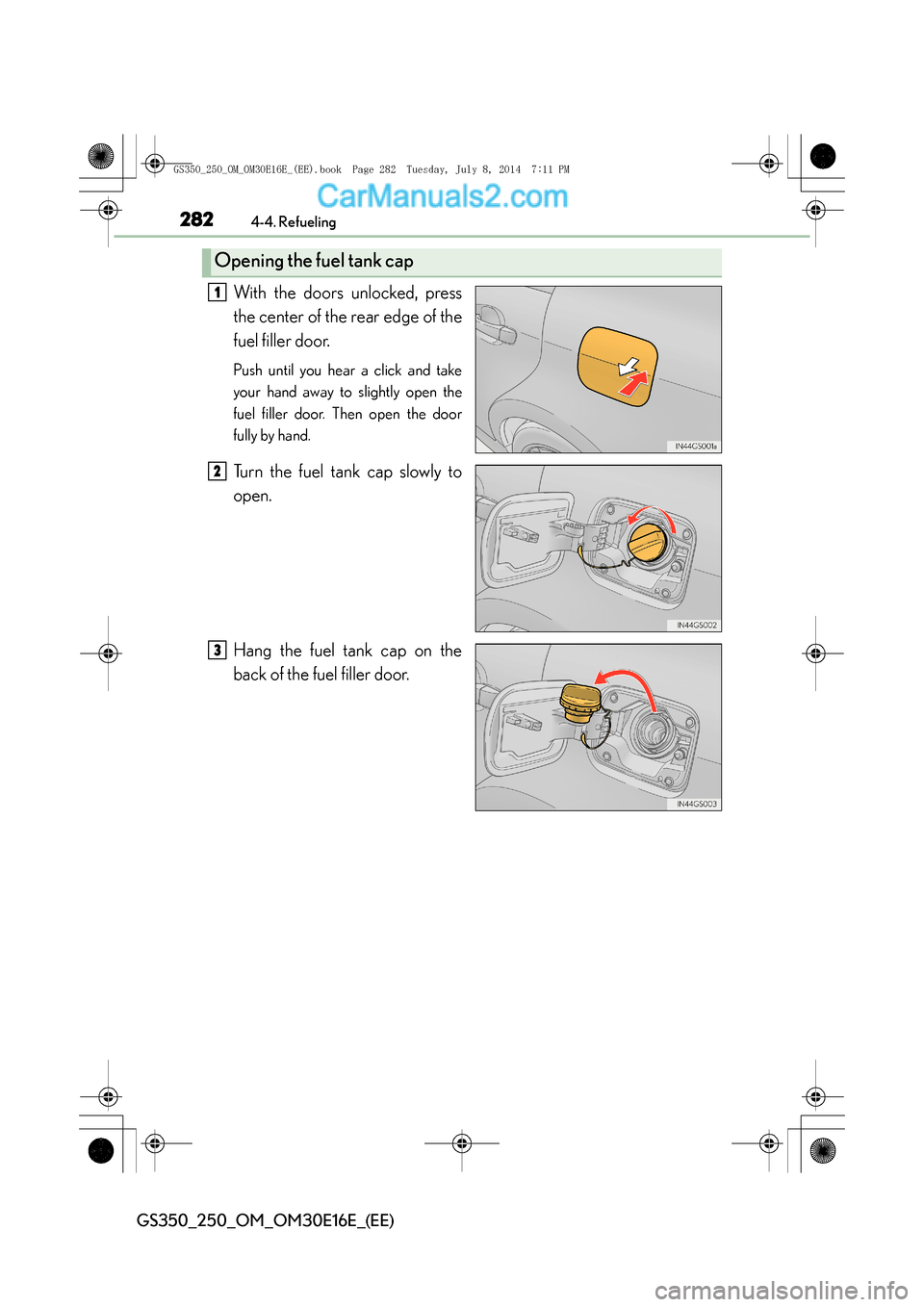
With the doors unlocked, press
the center of the rear edge of the
fuel filler door.
Push until you hear a click and take
your hand away to slightly open the
fuel filler door. Then open the door
fully by hand.
Turn the fuel tank cap slowly to
open.
Hang the fuel tank cap on the
back of the fuel filler door.
Opening the fuel tank cap
1
2
3
GS350_250_OM_OM30E16E_(EE).book Page 282 Tuesday, July 8, 2014 7:11 PM
Page 283 of 688
2834-4. Refueling
4
Driving
GS350_250_OM_OM30E16E_(EE)
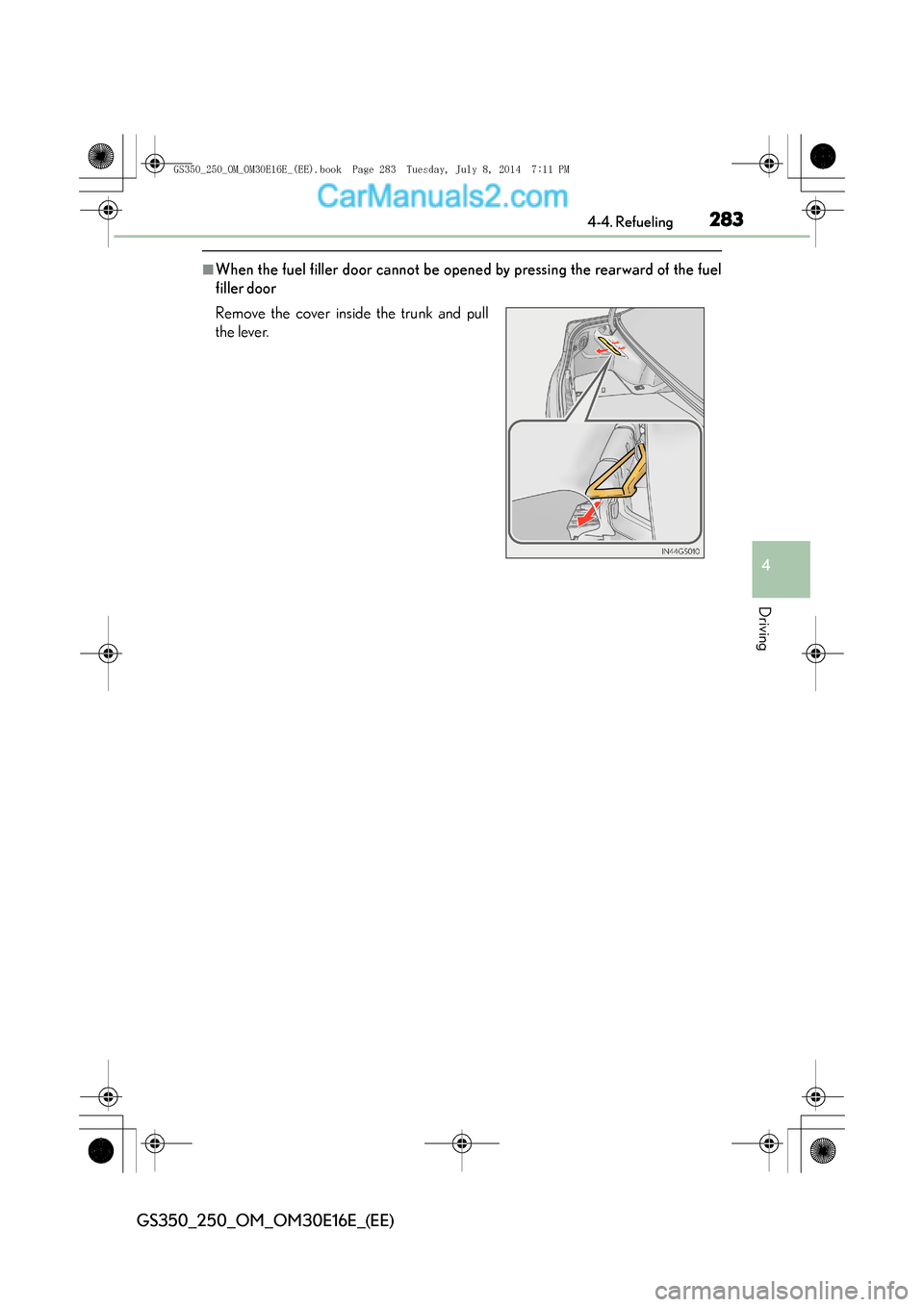
■When the fuel filler door cannot be opened by pressing the rearward of the fuel
filler door
Remove the cover inside the trunk and pull
the lever.
GS350_250_OM_OM30E16E_(EE).book Page 283 Tuesday, July 8, 2014 7:11 PM
Page 284 of 688
2844-4. Refueling
GS350_250_OM_OM30E16E_(EE)
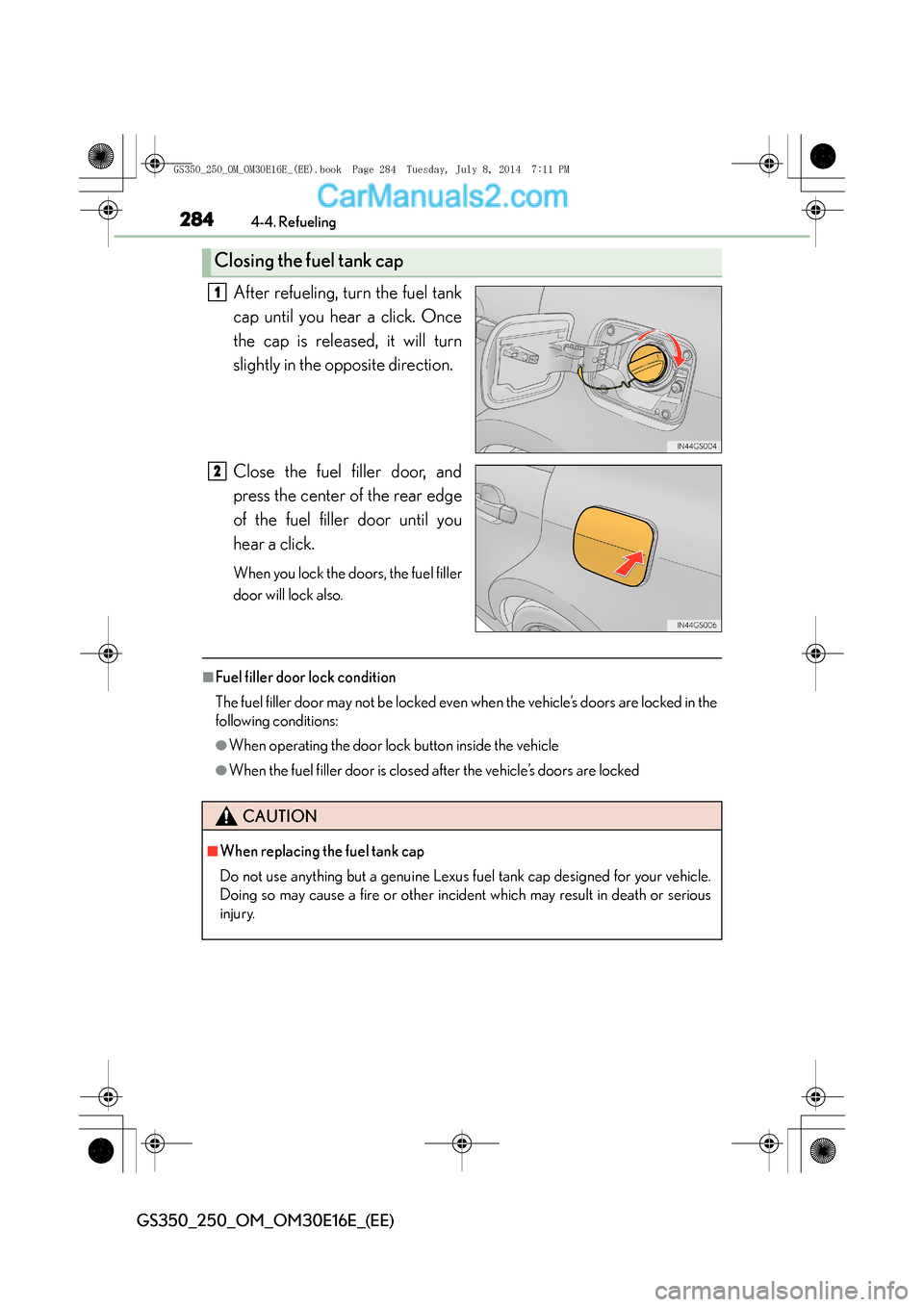
After refueling, turn the fuel tank
cap until you hear a click. Once
the cap is released, it will turn
slightly in the opposite direction.
Close the fuel filler door, and
press the center of the rear edge
of the fuel filler door until you
hear a click.
When you lock the doors, the fuel filler
door will lock also.
■Fuel filler door lock condition
The fuel filler door may not be locked even when the vehicle’s doors are locked in the
following conditions:
●When operating the door lock button inside the vehicle
●When the fuel filler door is closed after the vehicle’s doors are locked
Closing the fuel tank cap
1
2
CAUTION
■When replacing the fuel tank cap
Do not use anything but a genuine Lexus fuel tank cap designed for your vehicle.
Doing so may cause a fire or other incident which may result in death or serious
injury.
GS350_250_OM_OM30E16E_(EE).book Page 284 Tuesday, July 8, 2014 7:11 PM
Page 315 of 688
315
4
4-5. Using the driving support systems
Driving
GS350_250_OM_OM30E16E_(EE)
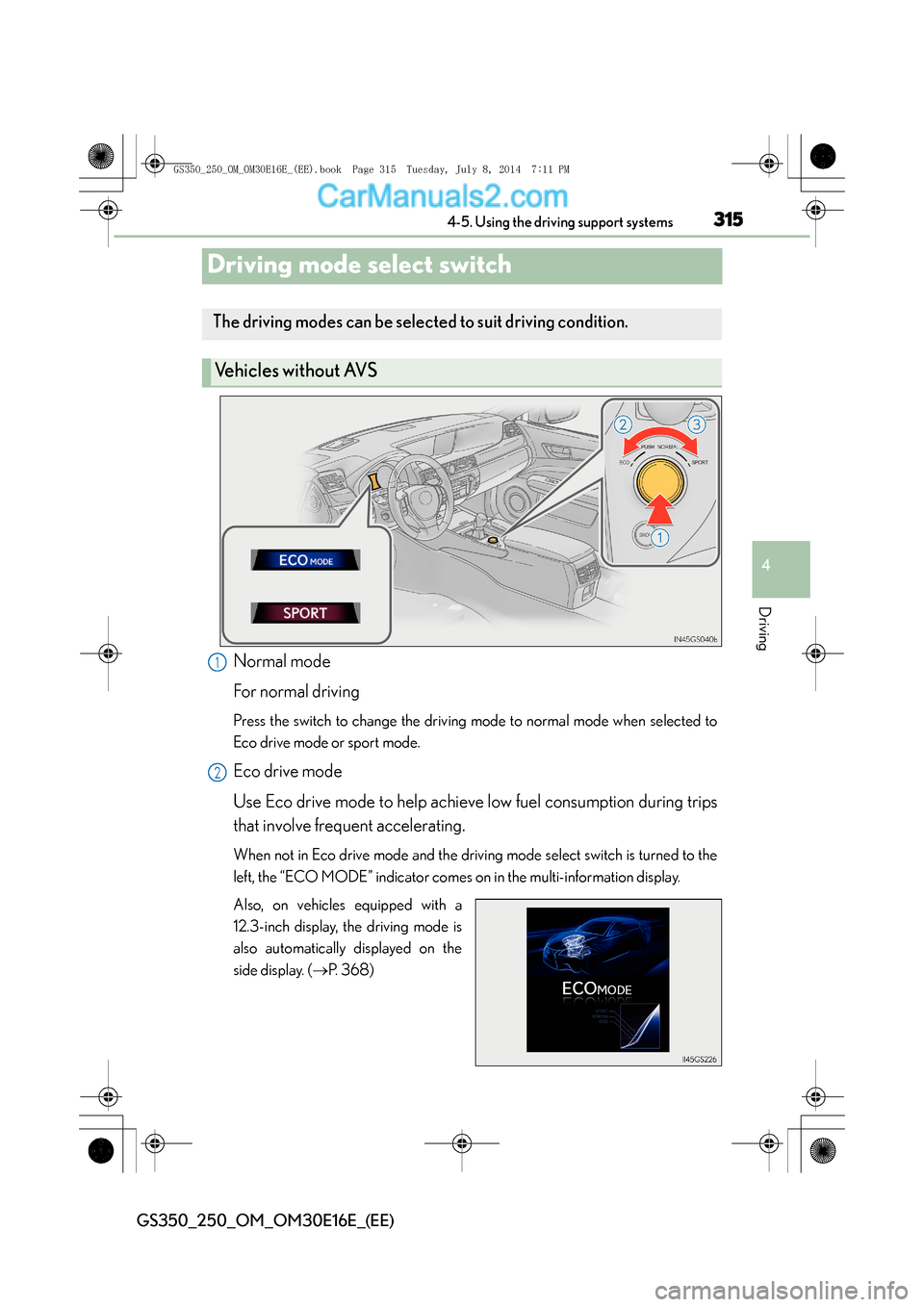
Driving mode select switch
Normal mode
For normal driving
Press the switch to change the driving mode to normal mode when selected to
Eco drive mode or sport mode.
Eco drive mode
Use Eco drive mode to help achieve low fuel consumption during trips
that involve frequent accelerating.
When not in Eco drive mode and the driving mode select switch is turned to the
left, the “ECO MODE” indicator comes on in the multi-information display.
Also, on vehicles equipped with a
12.3-inch display, the driving mode is
also automatically displayed on the
side display. (
→P. 3 6 8 )
The driving modes can be selected to suit driving condition.
Ve h i c l e s w i t h o u t AV S
1
2
GS350_250_OM_OM30E16E_(EE).book Page 315 Tuesday, July 8, 201 4 7:11 PM
Page 317 of 688
3174-5. Using the driving support systems
4
Driving
GS350_250_OM_OM30E16E_(EE)
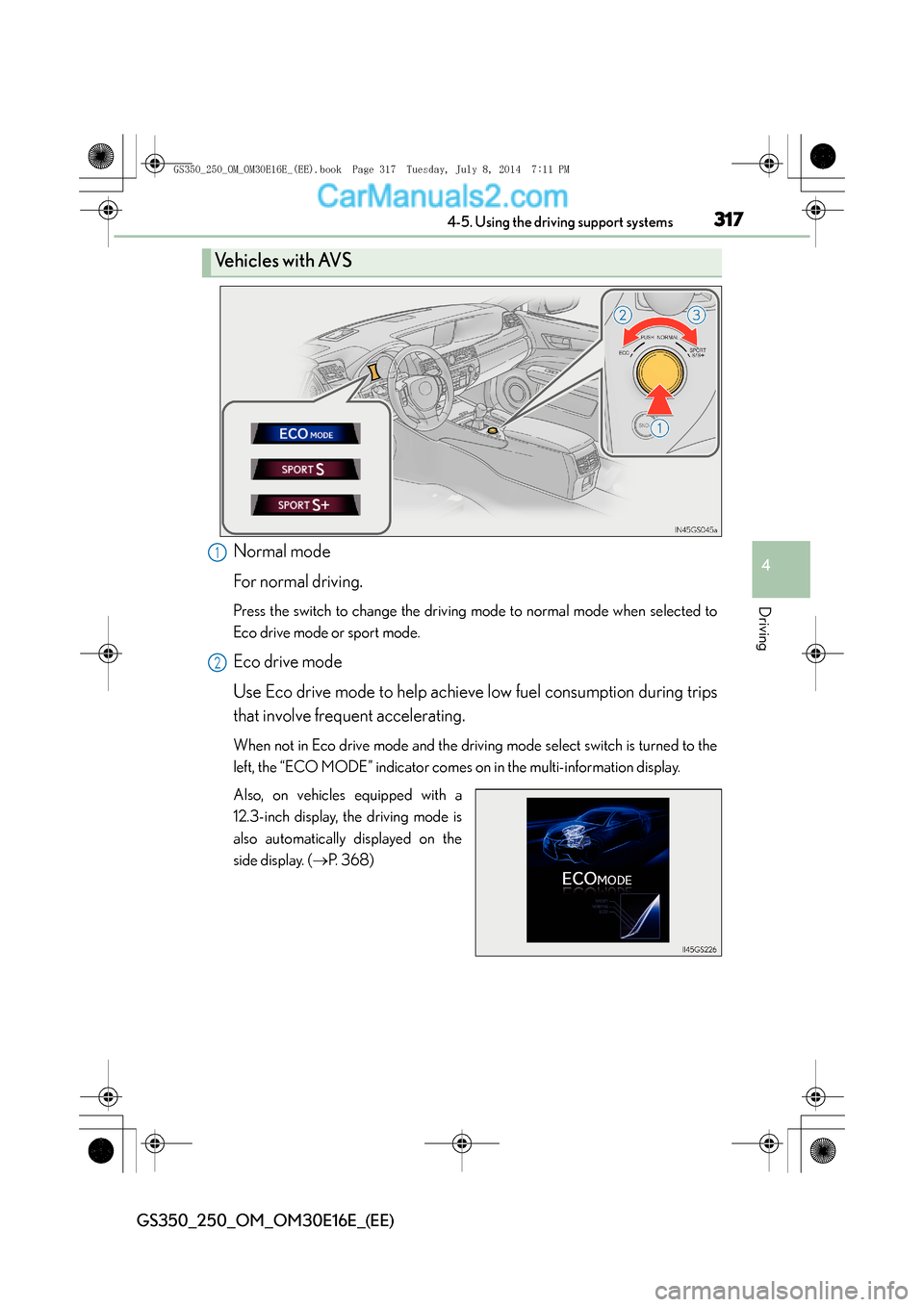
Normal mode
For normal driving.
Press the switch to change the driving mode to normal mode when selected to
Eco drive mode or sport mode.
Eco drive mode
Use Eco drive mode to help achieve low fuel consumption during trips
that involve frequent accelerating.
When not in Eco drive mode and the driving mode select switch is turned to the
left, the “ECO MODE” indicator comes on in the multi-information display.
Also, on vehicles equipped with a
12.3-inch display, the driving mode is
also automatically displayed on the
side display. (→P. 3 6 8 )
Ve h i c l e s w i t h AV S
1
2
GS350_250_OM_OM30E16E_(EE).book Page 317 Tuesday, July 8, 201 4 7:11 PM
Page 319 of 688
3194-5. Using the driving support systems
4
Driving
GS350_250_OM_OM30E16E_(EE)
■Operation of the air conditioning system in Eco drive mode
Eco drive mode controls the heating/cooling operations and fan speed of the air
conditioning system to enhance fuel efficiency (→P. 371). To improve air condition-
ing performance, adjust the fan sp eed or turn off Eco drive mode.
■Automatic operation of the seat heater during Eco drive mode
Eco drive mode controls the heating operation and fan speed of the air conditioning
system to enhance fuel efficiency. If the driving mode select switch is switched to Eco
drive mode in cold temperatures, the seat heater will be automatically operated to
assist heating performance.
■Sport mode automatic deactivation
Sport mode is automatically deactivated if th e engine switch is turned off after driv-
ing in sport mode.
GS350_250_OM_OM30E16E_(EE).book Page 319 Tuesday, July 8, 201 4 7:11 PM
Page 365 of 688
3655-1. Remote Touch screen
5
Interior features
GS350_250_OM_OM30E16E_(EE)
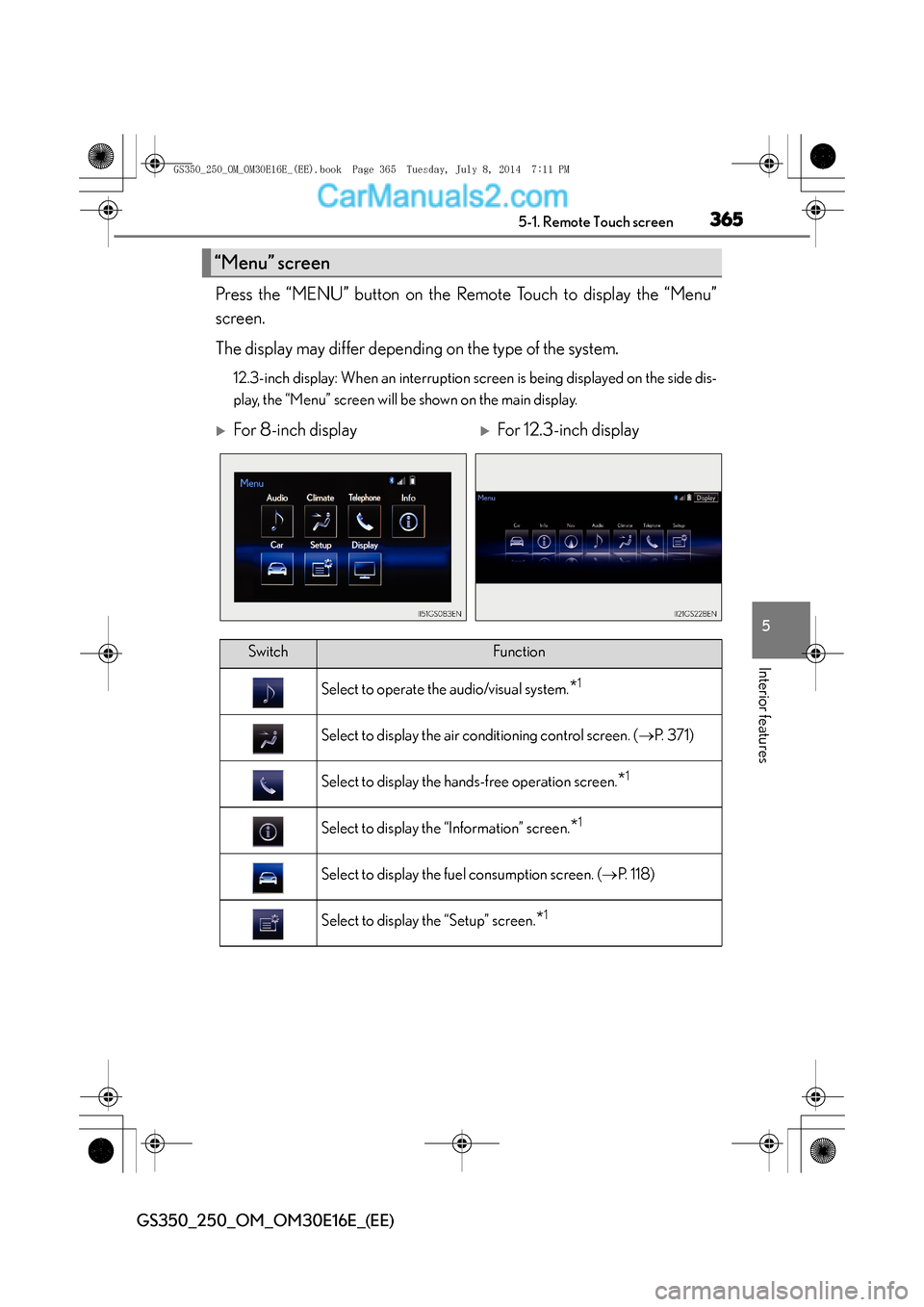
Press the “MENU” button on the Remote Touch to display the “Menu”
screen.
The display may differ depending on the type of the system.
12.3-inch display: When an interruption screen is being displayed on the side dis-
play, the “Menu” screen will be shown on the main display.
“Menu” screen
XFor 8-inch displayXFor 12.3-inch display
SwitchFunction
Select to operate the audio/visual system.*1
Select to display the air conditioning control screen. (→P. 3 7 1 )
Select to display the hands-free operation screen.*1
Select to display the “Information” screen.*1
Select to display the fuel consumption screen. ( →P. 118)
Select to display the “Setup” screen.*1
GS350_250_OM_OM30E16E_(EE).book Page 365 Tuesday, July 8, 201 4 7:11 PM