seats Lexus GS250 2014 Owner's Guide
[x] Cancel search | Manufacturer: LEXUS, Model Year: 2014, Model line: GS250, Model: Lexus GS250 2014Pages: 688, PDF Size: 152.64 MB
Page 194 of 688
1943-3. Adjusting the seats
GS350_250_OM_OM30E16E_(EE)
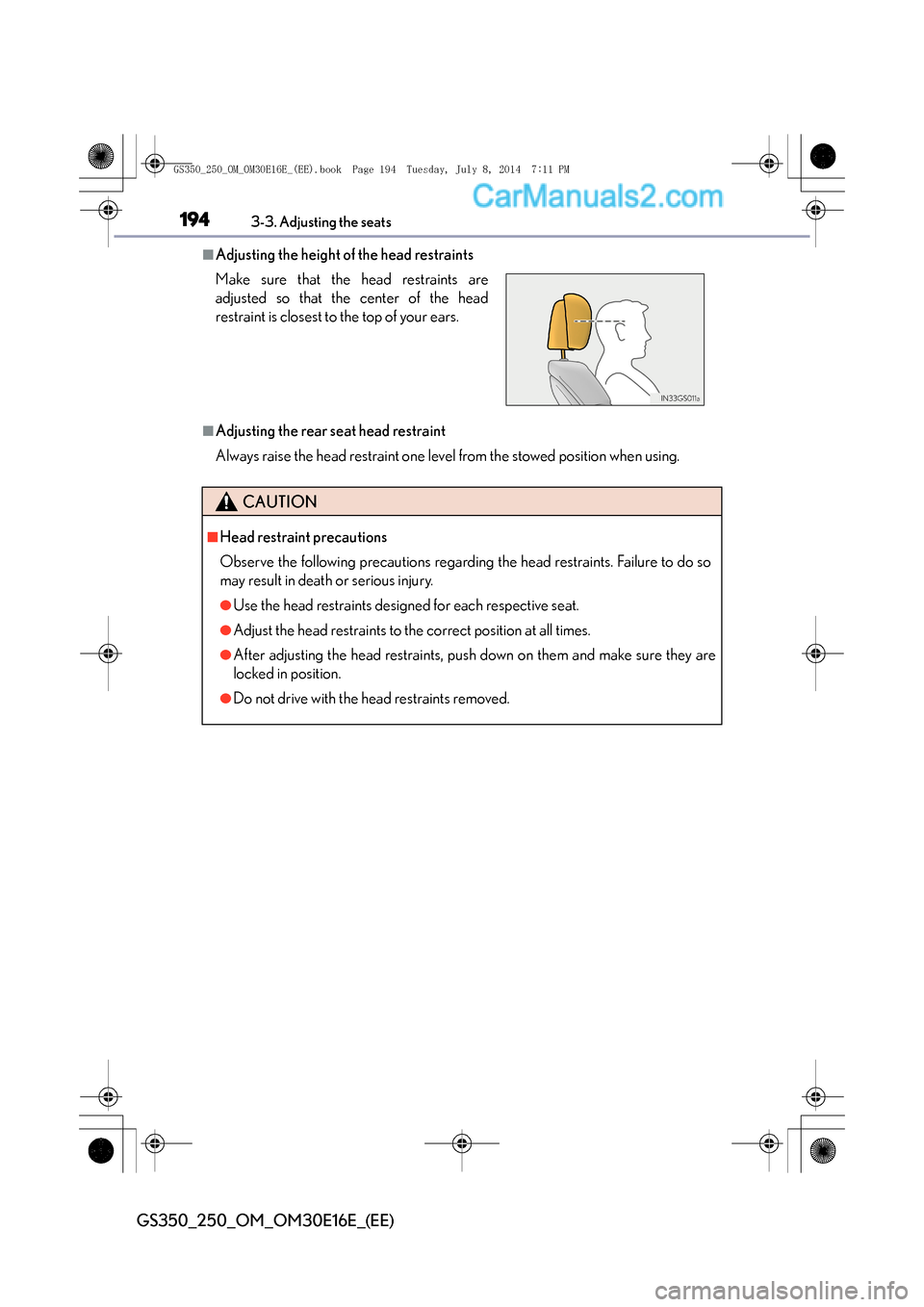
■Adjusting the height of the head restraints
■Adjusting the rear seat head restraint
Always raise the head restraint one level from the stowed position when using. Make sure that the head restraints are
adjusted so that the center of the head
restraint is closest to the top of your ears.
CAUTION
■Head restraint precautions
Observe the following precautions regarding the head restraints. Failure to do so
may result in death or serious injury.
●Use the head restraints designed for each respective seat.
●Adjust the head restraints to the correct position at all times.
●After adjusting the head restraints, push down on them and make sure they are
locked in position.
●Do not drive with the head restraints removed.
GS350_250_OM_OM30E16E_(EE).book Page 194 Tuesday, July 8, 2014 7:11 PM
Page 225 of 688
225
4
4-1. Before driving
Driving
GS350_250_OM_OM30E16E_(EE)
Cargo and luggage
Take notice of the following information about storage precautions,
cargo capacity and load:
CAUTION
■Things that must not be carried in the trunk
The following things may cause a fire if loaded in the trunk:
●Receptacles containing gasoline
●Aerosol cans
■Storage precautions
Observe the following precautions.
Failure to do so may prevent the pedals from being depressed properly, may block
the driver’s vision, or may result in items hitting the driver or passengers, possibly
causing an accident.
●Stow cargo and luggage in the trunk whenever possible.
●Do not place cargo or luggage in
or on the following locations.
• At the feet of the driver
• On the front passenger or rear seats (when stacking items)
• On the package tray
• On the instrument panel
• On the dashboard
• In front of the Remote Touch screen
●Secure all items in the occupant compartment.
■Load and distribution
●Do not overload your vehicle.
●Do not apply loads unevenly.
Improper loading may cause deterioration of steering or braking control which
may cause death or serious injury.
GS350_250_OM_OM30E16E_(EE).book Page 225 Tuesday, July 8, 201 4 7:11 PM
Page 375 of 688
3755-2. Using the air conditioning system and defogger
5
Interior features
GS350_250_OM_OM30E16E_(EE)
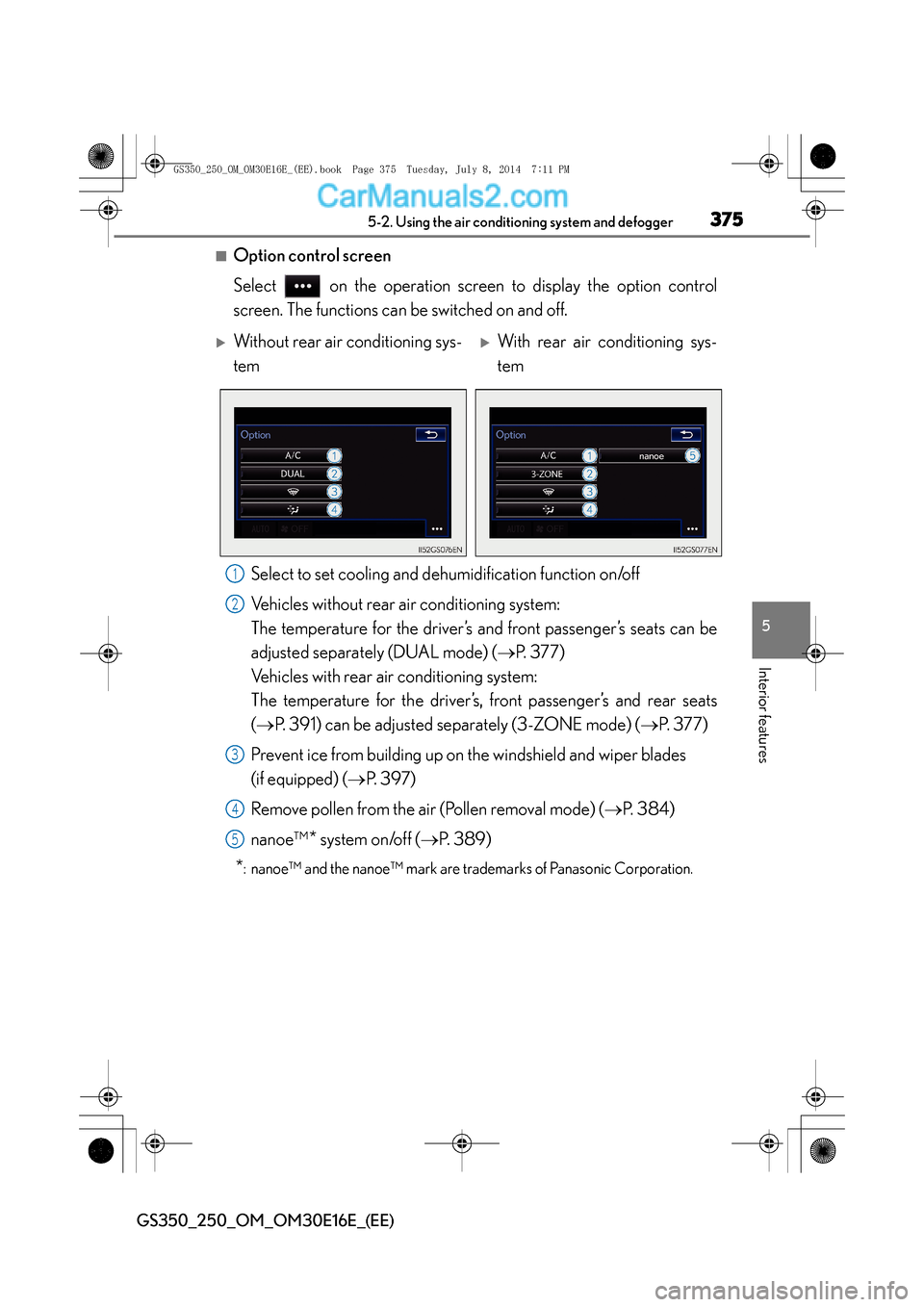
■Option control screen
Select on the operation screen to display the option control
screen. The functions can be switched on and off.Select to set cooling and dehumidification function on/off
Vehicles without rear air conditioning system:
The temperature for the driver’s and front passenger’s seats can be
adjusted separate ly (DUAL mode) ( →P. 3 7 7 )
Vehicles with rear air conditioning system:
The temperature for the driver’s, front passenger’s and rear seats
( → P. 391) can be adjusted separately (3-ZONE mode) ( →P. 377)
Prevent ice from building up on the windshield and wiper blades
(if equipped) ( →P. 397)
Remove pollen from the air (Pollen removal mode) ( →P. 384)
nanoe™
* system on/off ( →P. 389)
*: nanoe™ and the nanoe™ mark are trademarks of Panasonic Corporation.
XWithout rear air conditioning sys-
temXWith rear air conditioning sys-
tem
1
2
3
4
5
GS350_250_OM_OM30E16E_(EE).book Page 375 Tuesday, July 8, 201 4 7:11 PM
Page 377 of 688
3775-2. Using the air conditioning system and defogger
5
Interior features
GS350_250_OM_OM30E16E_(EE)
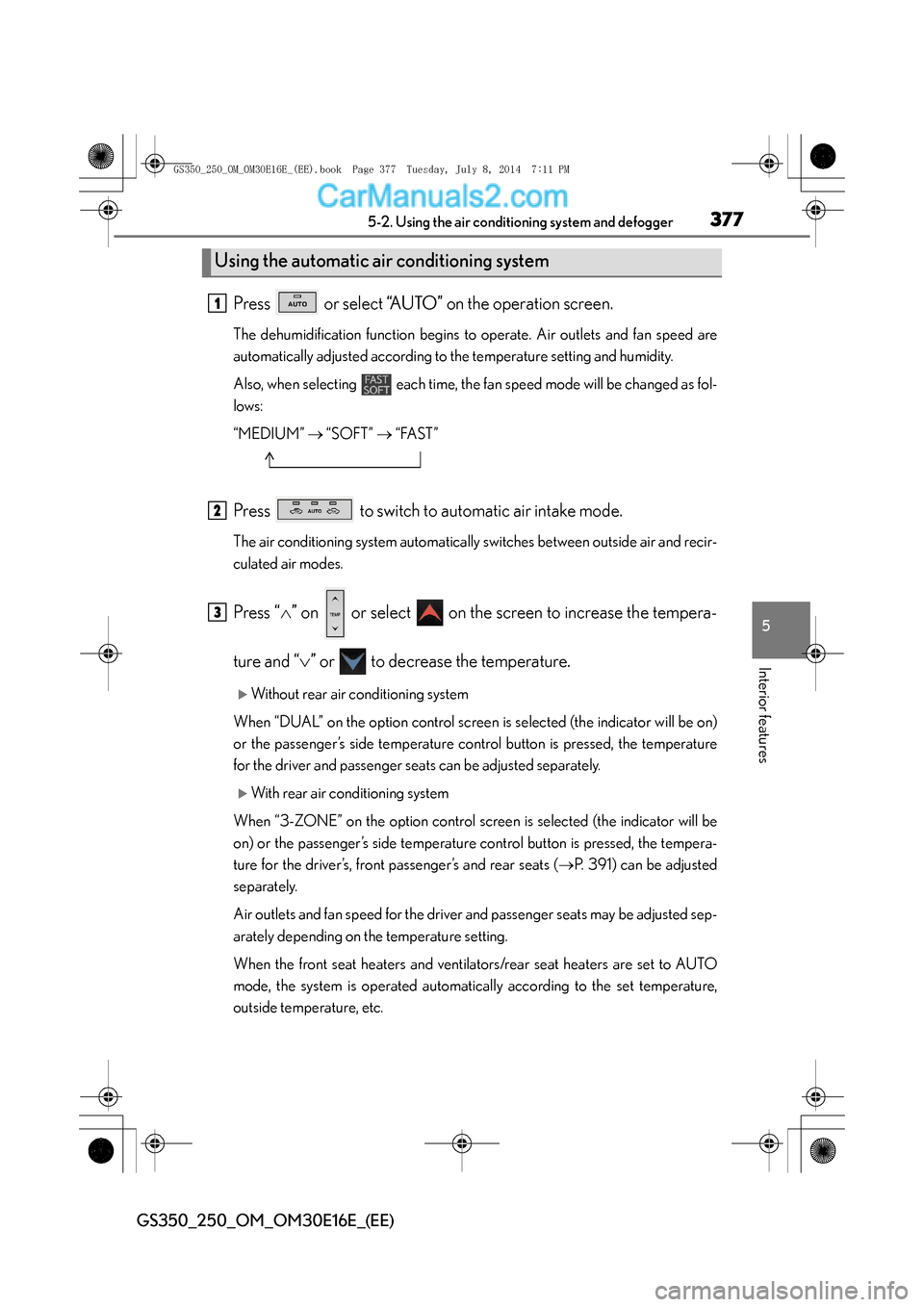
Press or select “AUTO” on the operation screen.
The dehumidification function begins to operate. Air outlets and fan speed are
automatically adjusted according to the temperature setting and humidity.
Also, when selecting each time, the fan speed mode will be changed as fol-
lows:
“MEDIUM” → “SOFT” → “FAST”
Press to switch to automatic air intake mode.
The air conditioning system automatically switches between outside air and recir-
culated air modes.
Press “ ∧” on or select on the screen to increase the tempera-
ture and “ ∨” or to decrease the temperature.
XWithout rear air conditioning system
When “DUAL” on the option control screen is selected (the indicator will be on)
or the passenger’s side temperature control button is pressed, the temperature
for the driver and passenger seats can be adjusted separately.
XWith rear air conditioning system
When “3-ZONE” on the option control screen is selected (the indicator will be
on) or the passenger’s side temperature control button is pressed, the tempera-
ture for the driver’s, front passenger’s and rear seats ( →P. 391) can be adjusted
separately.
Air outlets and fan speed for the driver and passenger seats may be adjusted sep-
arately depending on the temperature setting.
When the front seat heaters and ventilators/rear seat heaters are set to AUTO
mode, the system is operated automatically according to the set temperature,
outside temperature, etc.
Using the automatic air conditioning system
1
2
3
GS350_250_OM_OM30E16E_(EE).book Page 377 Tuesday, July 8, 201 4 7:11 PM
Page 378 of 688
3785-2. Using the air conditioning system and defogger
GS350_250_OM_OM30E16E_(EE)
■Automatic mode indicator
If the fan speed setting or air flow modes are operated, the automatic mode indi-
cator goes off. However, automatic mode for functions other than that operated
are maintained.
XWithout rear air conditioning system
To adjust the fan speed, press or select on the screen to
increase and press or select to decrease.
Press or select “OFF” on the operation screen to turn the fan off.
To adjust the temperature setting, press “ ∧” on or select on the
screen to increase the temperature and “ ∨” or to decrease the
temperature.
When “DUAL” on the option control screen is selected (the indicator will be on)
or the passenger’s side temperature control button is pressed, the temperature
for the driver and passenger seats can be adjusted separately.
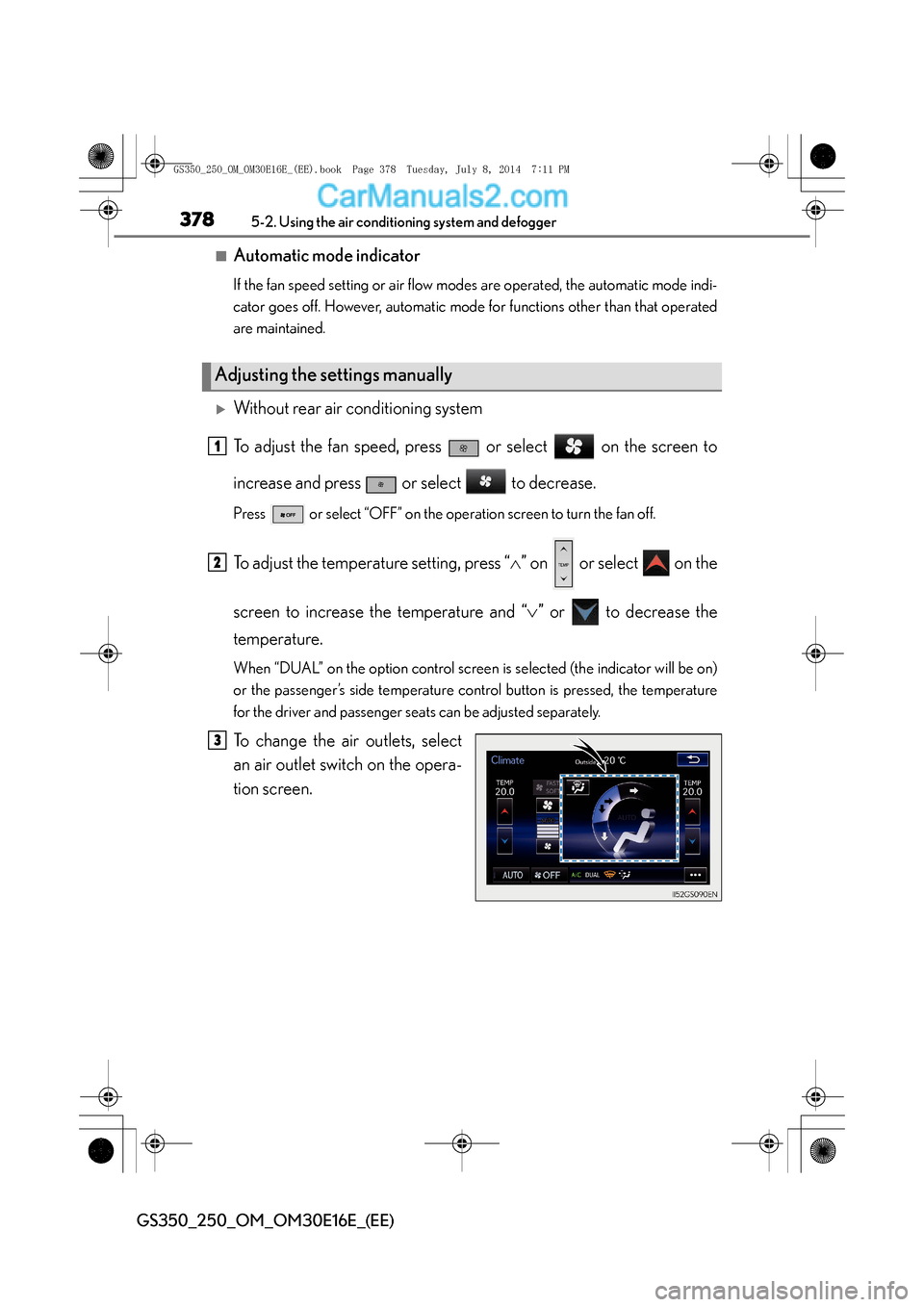
To change the air outlets, select
an air outlet switch on the opera-
tion screen.
Adjusting the settings manually
1
2
3
GS350_250_OM_OM30E16E_(EE).book Page 378 Tuesday, July 8, 201 4 7:11 PM
Page 379 of 688
3795-2. Using the air conditioning system and defogger
5
Interior features
GS350_250_OM_OM30E16E_(EE)
XWith rear air conditioning system
To adjust the fan speed, press or select on the screen to
increase and press or select to decrease.
Press or select “OFF” on the operation screen to turn the fan off.
To adjust the temperature setting, press “∧” on or select on the
screen to increase the temperature and “ ∨” or to decrease the
temperature.
When “3-ZONE” on the option control screen is selected (the indicator will be
on) or the passenger’s side temperature control button is pressed, the tempera-
ture for the driver’s, front passenger’s and rear seats ( →P. 391) can be adjusted
separately.
The air conditioning system switches be tween individual and simultaneous modes
each time 3-ZONE is selected.
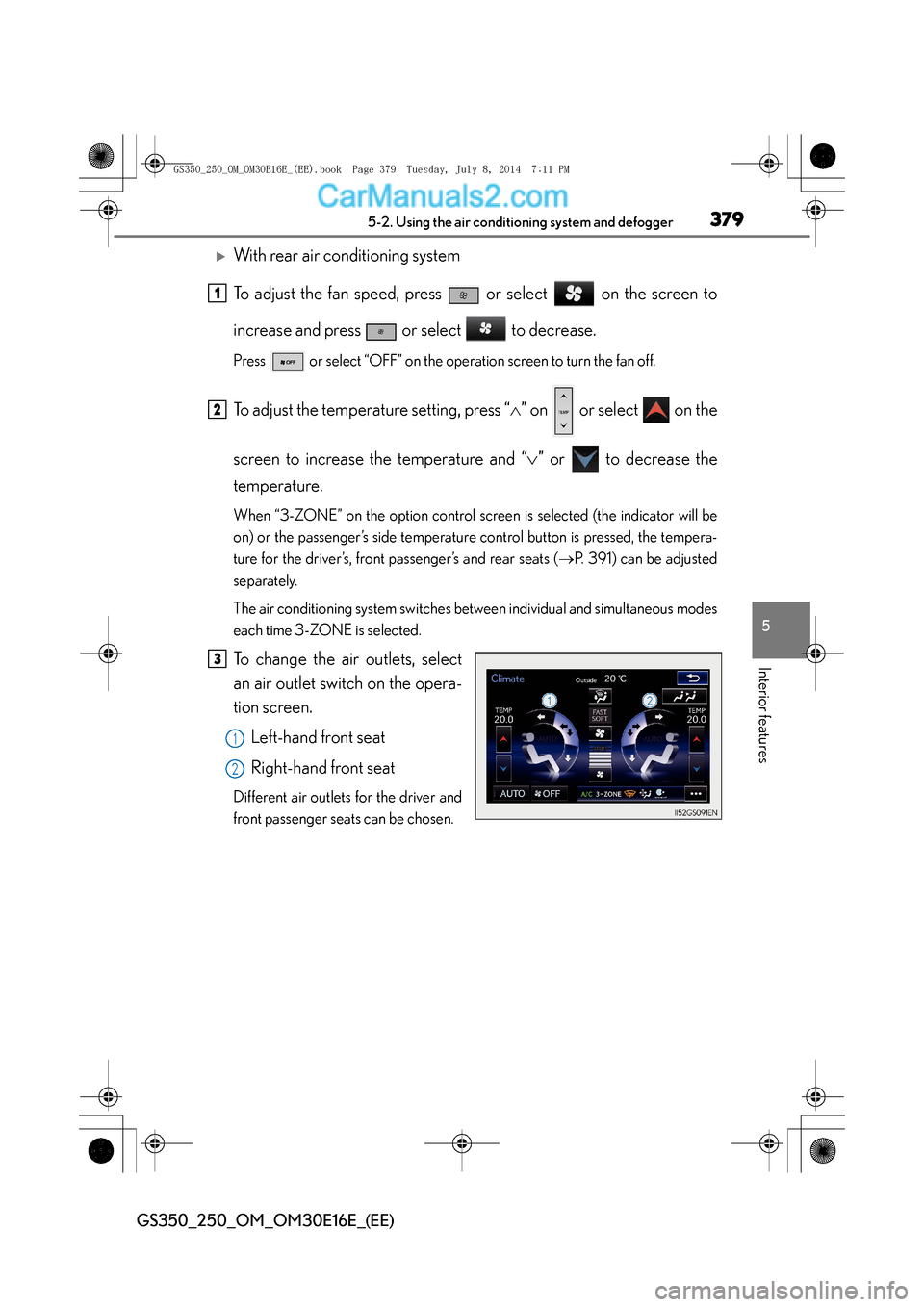
To change the air outlets, select
an air outlet switch on the opera-
tion screen.
Left-hand front seat
Right-hand front seat
Different air outlets for the driver and
front passenger seats can be chosen.
1
2
3
1
2
GS350_250_OM_OM30E16E_(EE).book Page 379 Tuesday, July 8, 201 4 7:11 PM
Page 384 of 688
3845-2. Using the air conditioning system and defogger
GS350_250_OM_OM30E16E_(EE)
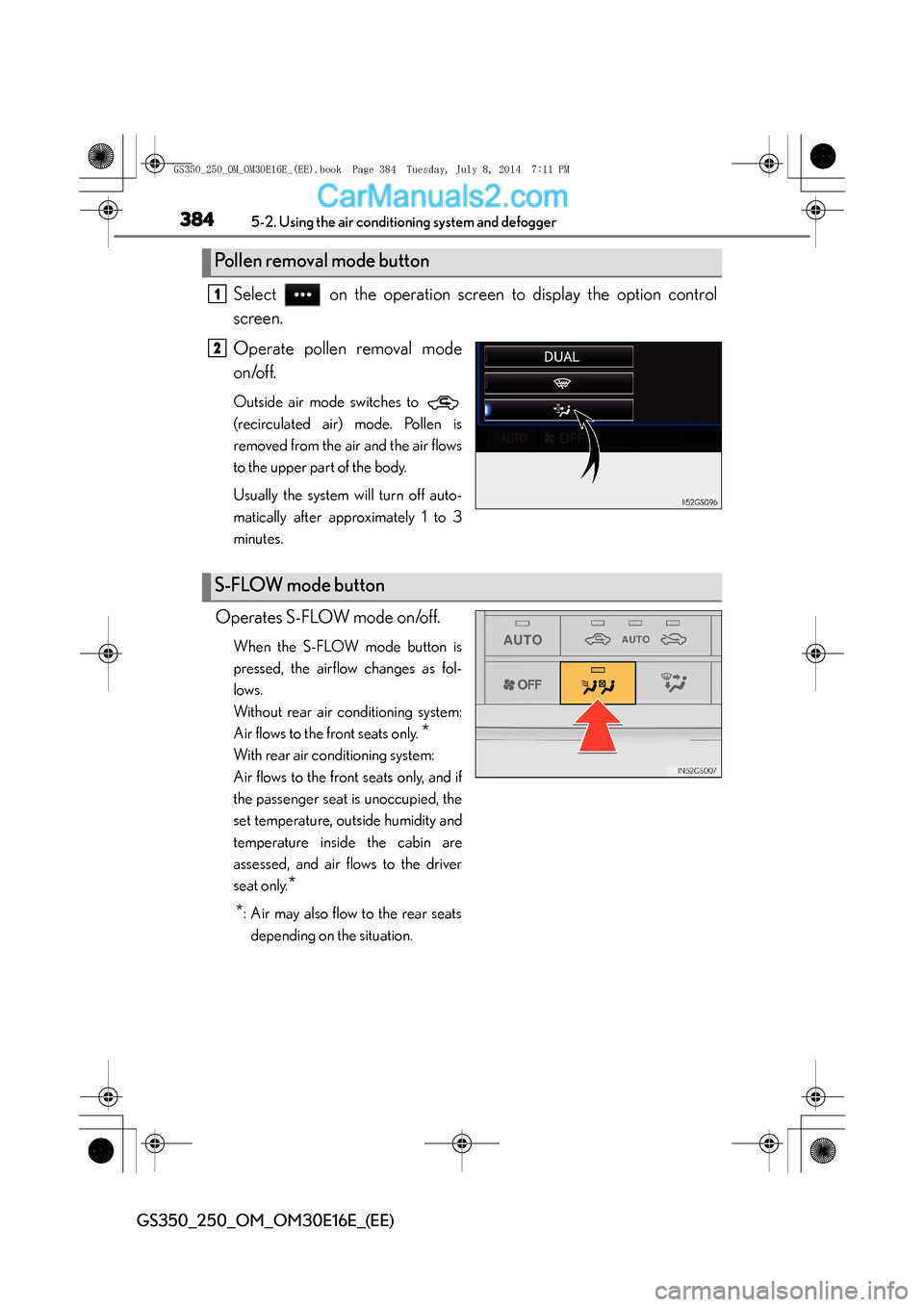
Select on the operation screen to display the option control
screen.
Operate pollen removal mode
on/off.
Outside air mode switches to
(recirculated air) mode. Pollen is
removed from the air and the air flows
to the upper part of the body.
Usually the system will turn off auto-
matically after approximately 1 to 3
minutes.
Operates S-FLOW mode on/off.
When the S-FLOW mode button is
pressed, the airflow changes as fol-
lows.
Without rear air conditioning system:
Air flows to the front seats only.
*
With rear air conditioning system:
Air flows to the front seats only, and if
the passenger seat is unoccupied, the
set temperature, outside humidity and
temperature inside the cabin are
assessed, and air flows to the driver
seat only.
*
*
: Air may also flow to the rear seats depending on the situation.
Pollen removal mode button
1
2
S-FLOW mode button
GS350_250_OM_OM30E16E_(EE).book Page 384 Tuesday, July 8, 201 4 7:11 PM
Page 419 of 688
419
5
5-5. Other interior features
Interior features
GS350_250_OM_OM30E16E_(EE)
Seat heaters∗/seat ventilators∗
∗: If equipped
The seat can be warmed and air from
the seat can improve ventilation.
Front seat heaters and ventilators (if equipped)/rear seat heaters
(if equipped)
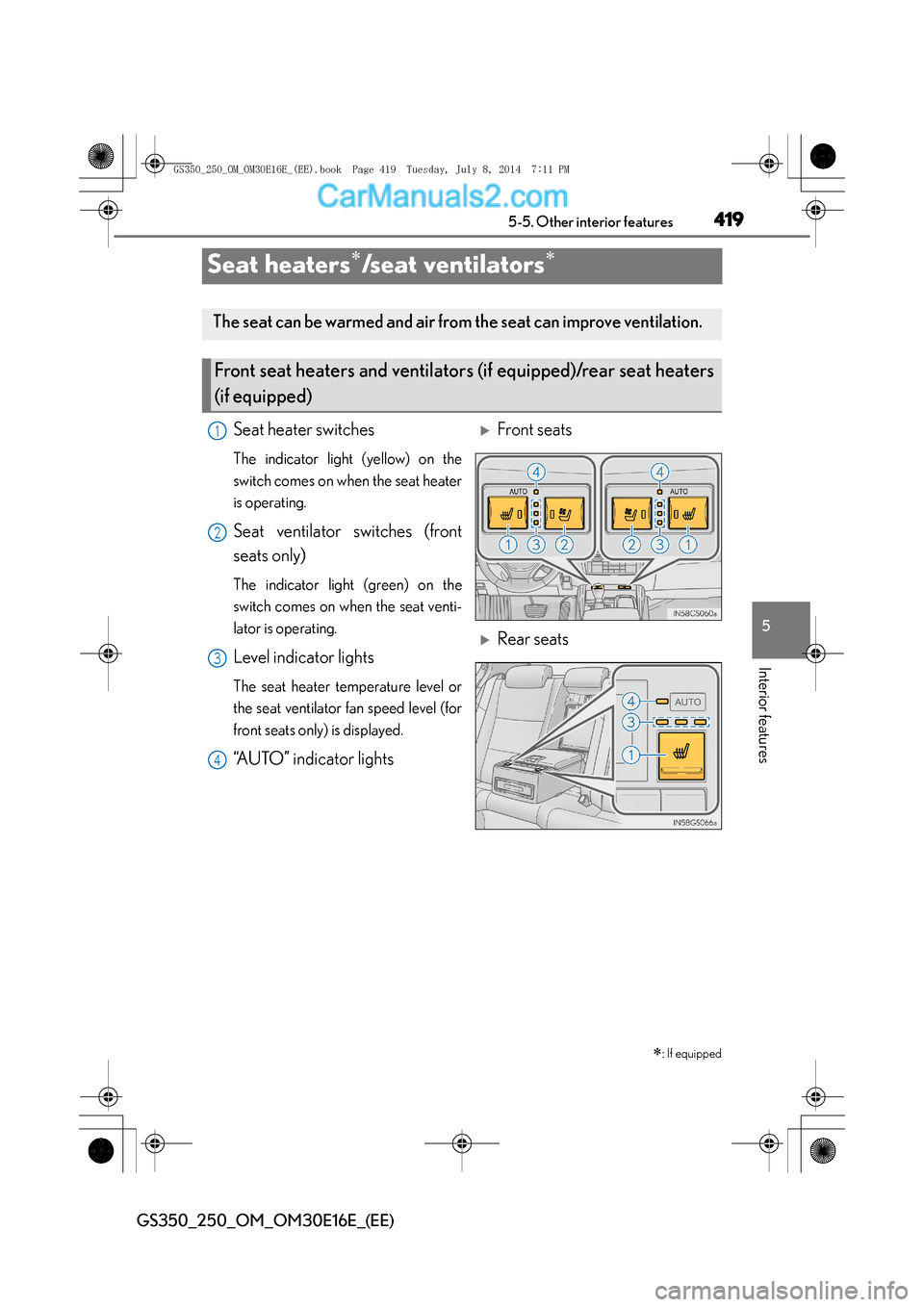
Seat heater switches
The indicator light (yellow) on the
switch comes on when the seat heater
is operating.
Seat ventilator switches (front
seats only)
The indicator light (green) on the
switch comes on when the seat venti-
lator is operating.
Level indicator lights
The seat heater temperature level or
the seat ventilator fan speed level (for
front seats only) is displayed.
“AUTO” indicator lights
XFront seats
XRear seats
1
2
3
4
GS350_250_OM_OM30E16E_(EE).book Page 419 Tuesday, July 8, 201 4 7:11 PM
Page 427 of 688
427
5
5-5. Other interior features
Interior features
GS350_250_OM_OM30E16E_(EE)
Rear sunshade∗/rear door sunshades∗
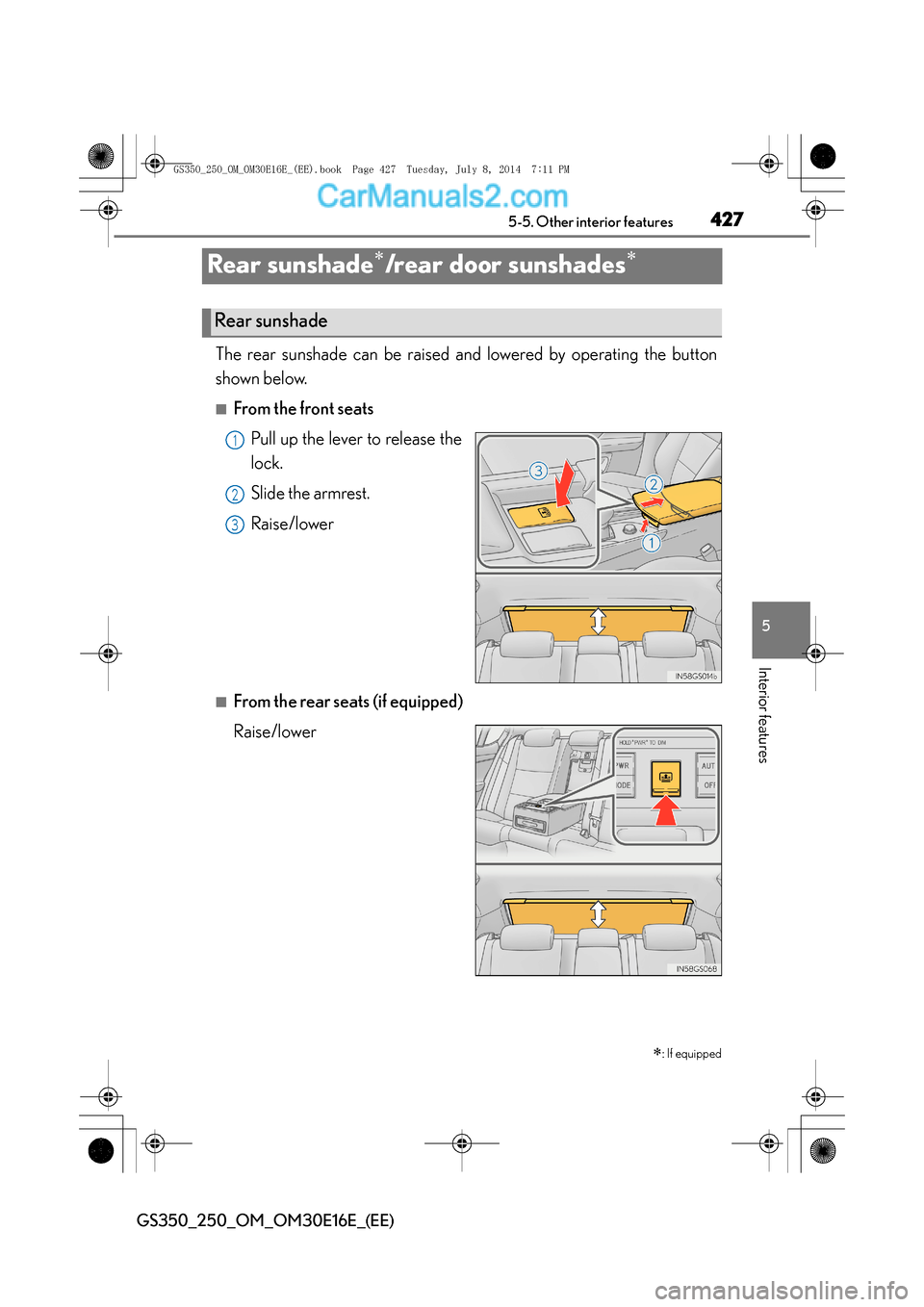
The rear sunshade can be raised and lowered by operating the button
shown below.
■From the front seats
Pull up the lever to release the
lock.
Slide the armrest.
Raise/lower
■From the rear seats (if equipped)
Raise/lower
∗
: If equipped
Rear sunshade
1
2
13
GS350_250_OM_OM30E16E_(EE).book Page 427 Tuesday, July 8, 201 4 7:11 PM
Page 442 of 688
4426-1. Maintenance and care
GS350_250_OM_OM30E16E_(EE)
NOTICE
■Cleaning detergents
●Do not use the following types of detergent, as they may discolor the vehicle inte-
rior or cause streaks or damage to painted surfaces:
• Non-seat portions: Organic substances such as benzene or gasoline, alkalineor acidic solutions, dye, and bleach
• Seats: Alkaline or acidic solutions, such as thinner, benzene, and alcohol
●Do not use polish wax or polish cleaner. The instrument panel’s or other interior
part’s painted surface may be damaged.
■Preventing damage to leather surfaces
Observe the following precautions to avoid damage to and deterioration of
leather surfaces:
●Remove any dust or dirt from leather surfaces immediately.
●Do not expose the vehicle to direct sunlight for extended periods of time. Park
the vehicle in the shade, especially during summer.
●Do not place items made of vinyl, plastic, or containing wax on the upholstery, as
they may stick to the leather surface if the vehicle interior heats up significantly.
■Water on the floor
Do not wash the vehicle floor with water.
Vehicle systems such as the audio system may be damaged if water comes into
contact with electrical components such as the audio system above or under the
floor of the vehicle. Water may also cause the body to rust.
GS350_250_OM_OM30E16E_(EE).book Page 442 Tuesday, July 8, 201 4 7:11 PM