light Lexus GS300 2018 Owner's Manuals
[x] Cancel search | Manufacturer: LEXUS, Model Year: 2018, Model line: GS300, Model: Lexus GS300 2018Pages: 602, PDF Size: 13.37 MB
Page 295 of 602
GS350_300_GS F_OM_OM30G34U_(U)
2934-5. Using the driving support systems
4
Driving
■Sounds and vibrations caused by the ABS, brake assist, VSC, TRAC, Hill-start assist
control and VGRS systems
●A sound may be heard from the engine compartment when the brake pedal is
depressed repeatedly, when the engine is started or just after the vehicle begins to
move. This sound does not indicate that a malfunction has occurred in any of these sys-
tems.
●Any of the following conditions may occur when the above systems are operating.
None of these indicates that a malfunction has occurred.
• Vibrations may be felt through the vehicle body and steering.
• A motor sound may be heard afte r the vehicle comes to a stop.
• The brake pedal may pulsate slig htly after the ABS is activated.
• The brake pedal may move down s lightly after the ABS is activated.
■EPS, VGRS and DRS operation sound
When the steering wheel is operated, a motor sound (whirring sound) may be heard.
This does not indicate a malfunction.
■Automatic reactivation of TRAC and VSC systems
After turning the TRAC and VSC systems off, the systems will be automatically re-
enabled in the following situations:
●When the engine swit ch is turned off
●If only the TRAC system is turned off, the TRAC will turn on when vehicle speed
increases
If both TRAC and VSC systems are turned off, automatic re-enabling will not occur
when vehicle speed increases.
■Reduced effectiveness of the EPS system
The effectiveness of the EPS system is reduced to prevent the system from overheating
when there is frequent steering input over an extended period of time. The steering
wheel may feel heavy as a result . Should this occur, refrain from excessive steering input
or stop the vehicle and turn the engine off. The EPS system should return to normal
within 10 minutes.
■Operating conditions of hill-start assist control
When the following four conditions are met, the hill-start assist control will operate;
●The shift lever is in a position other than N or P (when starting off forward/backward on
an upward incline).
●The vehicle is stopped.
●The accelerator pedal is not depressed.
●The parking brake is not engaged.
■Automatic system cancelation of hill-start assist control
The hill-start assist control will be cancel ed in any of the following situations;
●The shift lever is shifted to N or P.
●The accelerator pedal is depressed.
●The parking brake is engaged.
●Approximately 2 seconds elapse after the brake pedal is released.
Page 296 of 602
294
GS350_300_GS F_OM_OM30G34U_(U)4-5. Using the driving support systems
WARNING
■The ABS does not operate effectively when
●The limits of tire gripping performance have been exceeded. (such as excessively
worn tires on a snow covered road).
●The vehicle hydroplanes while driving at
high speed on wet or slick roads.
■Stopping distance when the ABS is operating may exceed that of normal conditions
The ABS is not designed to shorten the vehi cle’s stopping distance. Always maintain a
safe distance from the vehicle in front of you, especially in the following situations:
●When driving on dirt, grav el or snow-covered roads
●When driving with tire chains
●When driving over bumps in the road
●When driving over roads with potholes or uneven surfaces
■TRAC may not operate effectively when
Directional control and power may not be achievable wh ile driving on slippery road
surfaces, even if the TRAC system is operating.
Drive the vehicle carefully in conditions where stability and power may be lost.
■Hill-start assist control does not operate effectively when
●Do not overly rely on the hill-start assist control. The hill-start assist control may not
operate effectively on steep inclines and roads covered with ice.
●Unlike the parking brake, hill-start assist co ntrol is not intended to hold the vehicle
stationary for an exte nded period of time. Do not atte mpt to use hill-start assist con-
trol to hold the vehicle on an incline, as doing so may lead to an accident.
■When the VSC is activated
The slip indicator light flashes. Always drive carefully. Reckless driving may cause an
accident. Exercise particular care when the indicator light flashes.
Page 299 of 602
GS350_300_GS F_OM_OM30G34U_(U)
2974-6. Driving tips
4
Driving
Perform the following according to the driving conditions:
●Do not try to forcibly open a window or move a wiper that is frozen. Pour
warm water over the frozen area to me lt the ice. Wipe away the water imme-
diately to prevent it from freezing.
●To ensure proper operation of the c limate control system fan, remove any
snow that has accumulated on the air inlet vents in front of the windshield.
●Check for and remove any excess ice or snow that may have accumulated on
the exterior lights, vehicle’s roof, chassi s, around the tires or on the brakes.
●Remove any snow or mud from the bottom of your shoes before getting in the
vehicle.
Accelerate the vehicle slowly, keep a sa fe distance between you and the vehicle
ahead, and drive at a reduced spee d suitable to road conditions.
●Park the vehicle and move the shift lever to P without setting the parking
brake. The parking brake may freeze up, preventing it from being released. If
the vehicle is parked without setting the parking brake, make sure to block the
wheels.
Failure to do so may be dangerous because it may cause the vehicle to move
unexpectedly, possibly leading to an accident.
●If the vehicle is parked without setting the parking brake, confirm that the shift
lever cannot be moved out of P
*.
*: The shift lever will be locked if it is attempted to be shifted from P to any other position
without depressing the brake pedal. If the sh ift lever can be shifted from P, there may
be a problem with the shift lock system. Have the vehicle inspected by your Lexus
dealer immediately.
Before driving the vehicle
When driving the vehicle
When parking the vehicle
Page 303 of 602
301
GS350_300_GS F_OM_OM30G34U_(U)
5Interior features
5-1. Remote Touch screenRemote Touch/12.3-inch display ......................................... 302
5-2. Using the air conditioning system and defogger
Front automatic air conditio ning system ........ 308
Rear air conditioning system ........................................... 319
Heated steering wheel/ seat heaters/seat
ventilators ...................................322
5-3. Using the interior lights Interior lights list.......................... 327• Interior lights ......................... 328
• Personal lights ...................... 328 5-4. Using the storage features
List of storage features ............330
• Glove box ................................ 331
• Console box............................ 331
• Cup holders ........................... 332
• Auxiliary boxes ..................... 333
Trunk features ............................. 334
5-5. Using the other interior features
Other interior features ............338 • Sun visors ................................338
• Vanity mirrors .......................338
• Clock ........................................ 339
• Ashtrays ................................... 339
• Power outlets.........................340
• Armrest ....................................340
•Rear sunshade/rear door sunshades............ 341
•Trunk storage
extension ................................. 343
• Coat hooks ............................. 344
• Assist grips.............................. 344
Garage door opener ............... 345
LEXUS Enform Safety Connect ...................................... 352
Page 318 of 602
316
GS350_300_GS F_OM_OM30G34U_(U)5-2. Using the air conditio
ning system and defogger
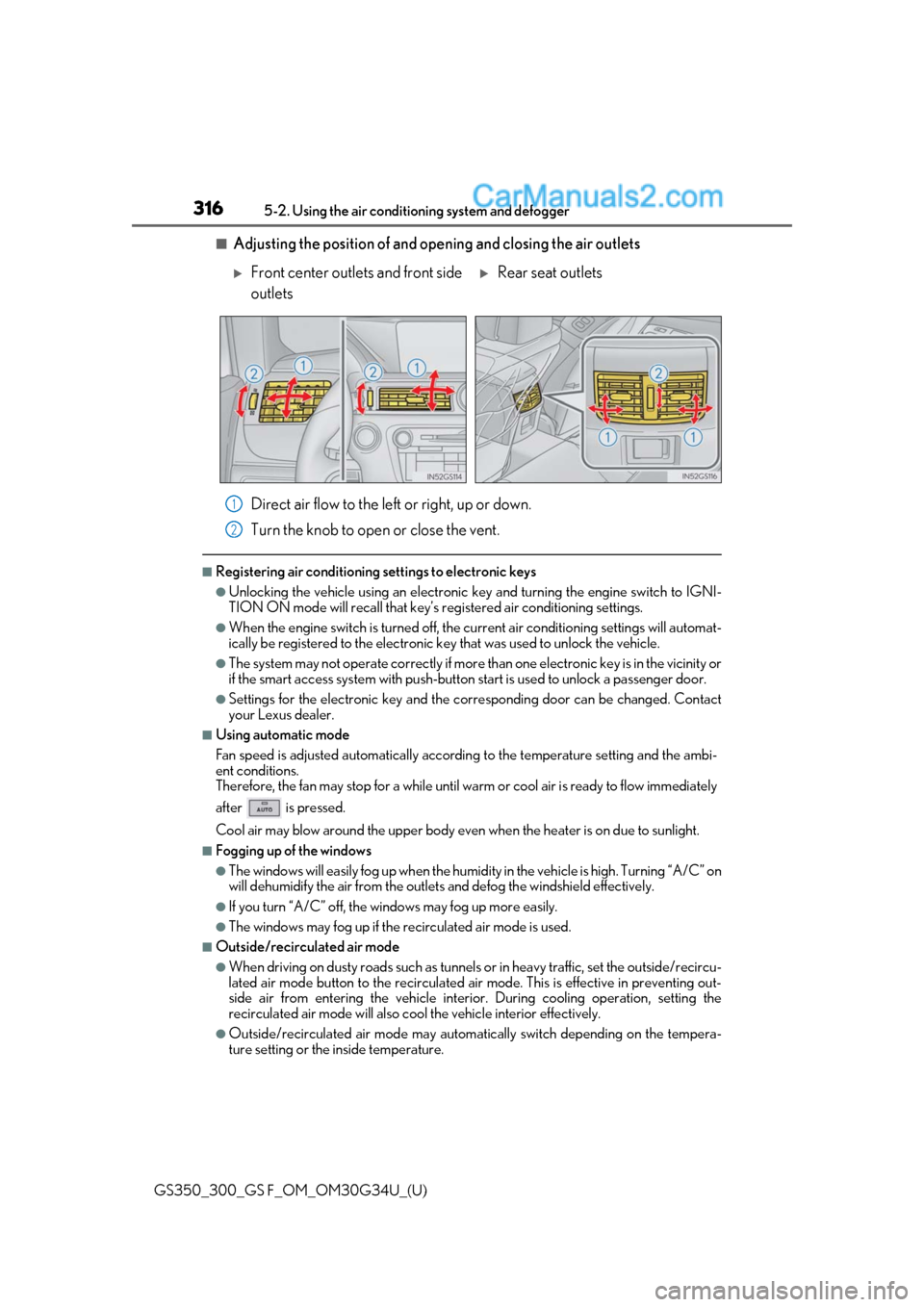
■Adjusting the position of and opening and closing the air outlets
Direct air flow to the left or right, up or down.
Turn the knob to open or close the vent.
■Registering air conditioning settings to electronic keys
●Unlocking the vehicle using an electronic ke y and turning the engine switch to IGNI-
TION ON mode will recall that key’s re gistered air conditioning settings.
●When the engine switch is turned off, the current air conditioning settings will automat-
ically be registered to the electronic key that was used to unlock the vehicle.
●The system may not operate correctly if more th an one electronic key is in the vicinity or
if the smart access system with push-button start is used to unlock a passenger door.
●Settings for the electronic key and the corresponding door can be changed. Contact
your Lexus dealer.
■Using automatic mode
Fan speed is adjusted automatically accordin g to the temperature setting and the ambi-
ent conditions.
Therefore, the fan may stop for a while until warm or cool air is ready to flow immediately
after is pressed.
Cool air may blow around the upper body even when the heater is on due to sunlight.
■Fogging up of the windows
●The windows will easily fog up when the humidi ty in the vehicle is high. Turning “A/C” on
will dehumidify the air from the outlets and defog the windshield effectively.
●If you turn “A/C” off, the windows may fog up more easily.
●The windows may fog up if the recirculated air mode is used.
■Outside/recirculated air mode
●When driving on dusty roads such as tunnels or in heavy traffic, set the outside/recircu-
lated air mode button to the recirculated air mode. This is effective in preventing out-
side air from enteri ng the vehicle interior. During cooling operation, setting the
recirculated air mode will also cool the vehicle interior effectively.
●Outside/recirculated air mode may automa tically switch depending on the tempera-
ture setting or the inside temperature.
Front center outlets and front side
outletsRear seat outlets
1
2
Page 324 of 602
322
GS350_300_GS F_OM_OM30G34U_(U)5-2. Using the air conditio
ning system and defogger
Heated steering wheel∗/seat heaters∗/seat ventilators∗
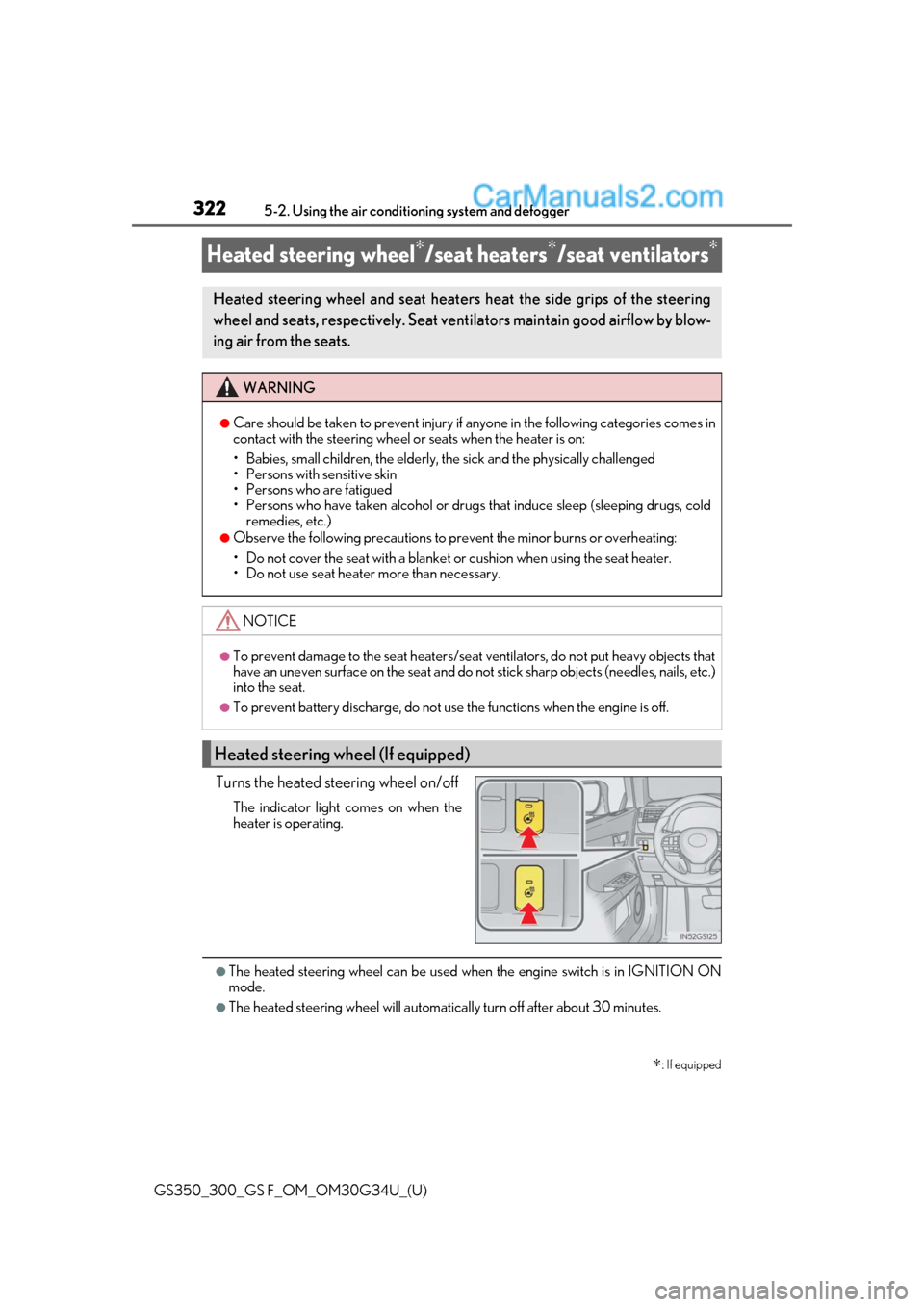
Turns the heated steering wheel on/off
The indicator light comes on when the
heater is operating.
●The heated steering wheel can be used when the engine switch is in IGNITION ON
mode.
●The heated steering wheel will automati cally turn off after about 30 minutes.
∗: If equipped
Heated steering wheel and seat heaters heat the side grips of the steering
wheel and seats, respectively. Seat ventilators maintain good airflow by blow-
ing air from the seats.
WARNING
●Care should be taken to prevent injury if anyone in the following categories comes in
contact with the steering wheel or seats when the heater is on:
• Babies, small children, the elderly, the sick and the physically challenged
• Persons with sensitive skin
• Persons who are fatigued
• Persons who have taken alcohol or drugs that induce sleep (sleeping drugs, cold
remedies, etc.)
●Observe the following precautions to pr event the minor burns or overheating:
• Do not cover the seat with a blanket or cushion when using the seat heater.
• Do not use seat heater more than necessary.
NOTICE
●To prevent damage to the seat heaters/seat ventilators, do not put heavy objects that
have an uneven surface on the seat and do not stick sharp objects (needles, nails, etc.)
into the seat.
●To prevent battery discharge, do not us e the functions when the engine is off.
Heated steering wheel (If equipped)
Page 325 of 602
GS350_300_GS F_OM_OM30G34U_(U)
3235-2. Using the air conditioning system and defogger
5
Interior features
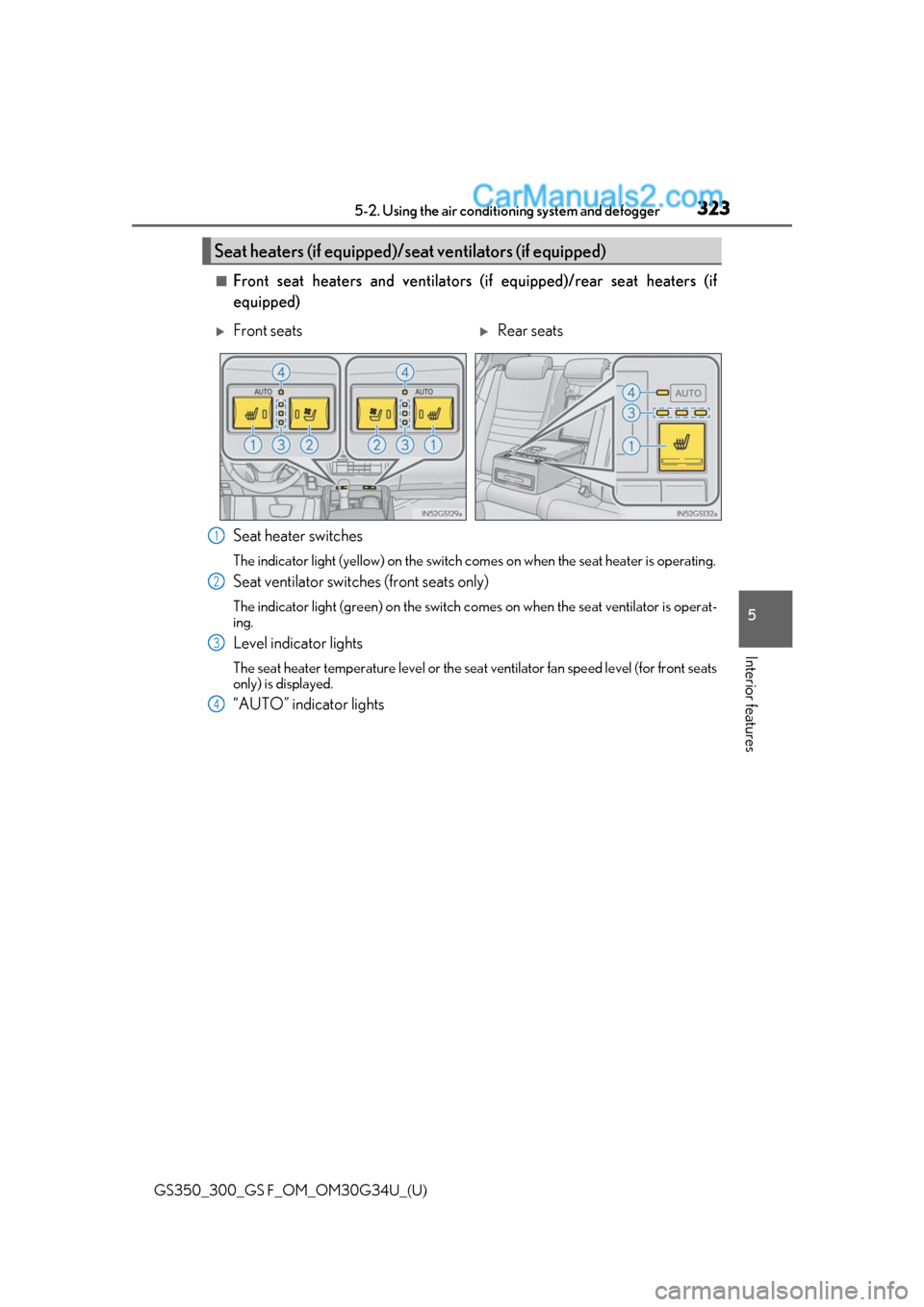
■Front seat heaters and ventilators (if equipped)/rear seat heaters (if
equipped)
Seat heater switches
The indicator light (yellow) on the switch comes on when the seat heater is operating.
Seat ventilator switches (front seats only)
The indicator light (green) on the switch co mes on when the seat ventilator is operat-
ing.
Level indicator lights
The seat heater temperature level or the seat ventilator fan speed level (for front seats
only) is displayed.
“AUTO” indicator lights
Seat heaters (if equipped)/seat ventilators (if equipped)
Front seatsRear seats
1
2
3
4
Page 326 of 602
324
GS350_300_GS F_OM_OM30G34U_(U)5-2. Using the air conditio
ning system and defogger
●Modes and indicators
The mode can be changed by pressing the switch.
*: When automatic mode is selected, the leve l automatically changes depending on the
air conditioning settings.
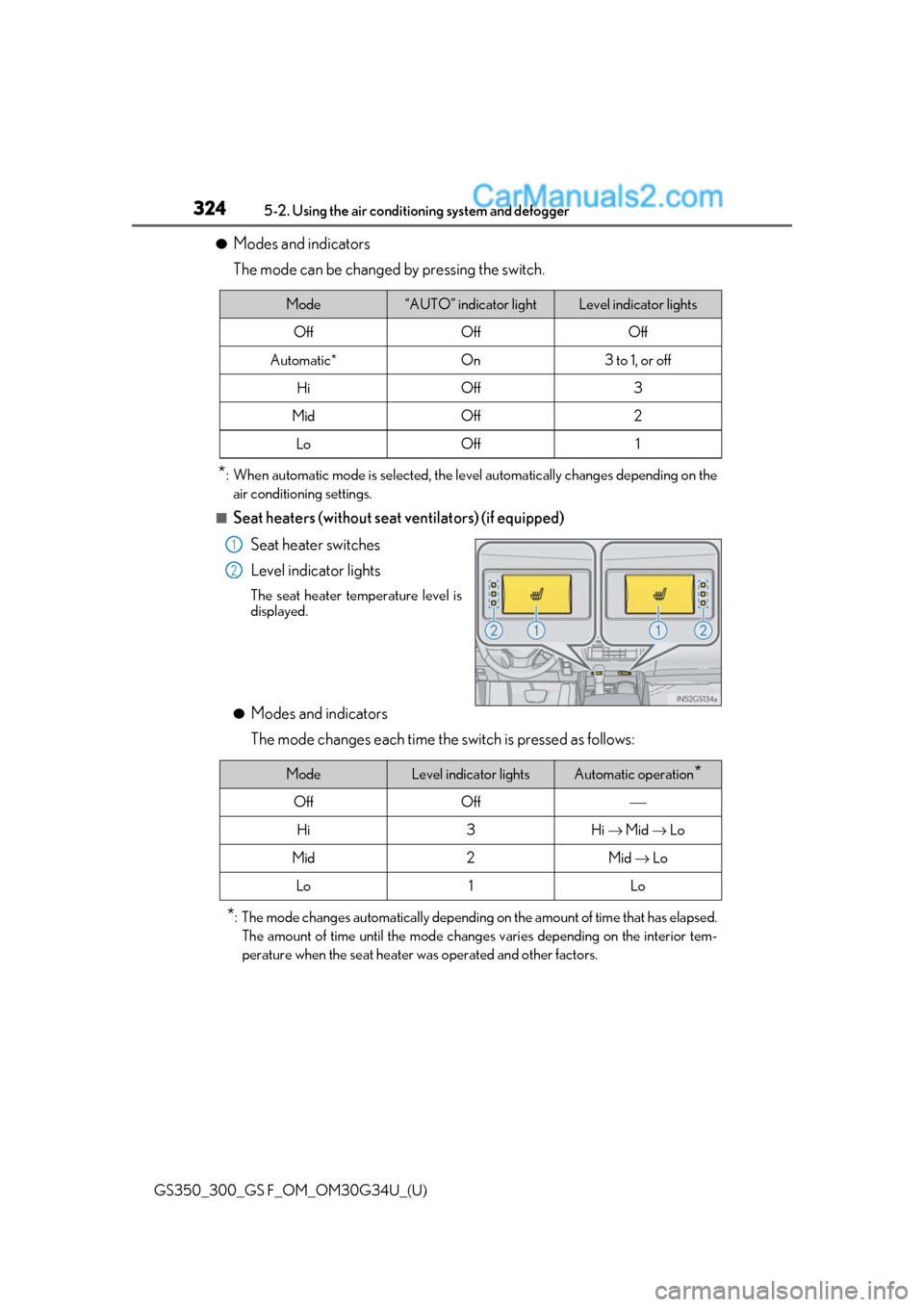
■Seat heaters (without seat ventilators) (if equipped)
Seat heater switches
Level indicator lights
The seat heater temperature level is
displayed.
●Modes and indicators
The mode changes each time the switch is pressed as follows:
*: The mode changes automatically depending on the amount of time that has elapsed.
The amount of time until the mode changes varies depending on the interior tem-
perature when the seat heater was operated and other factors.
Mode“AUTO” indicator lightLevel indicator lights
OffOffOff
Automatic*On3 to 1, or off
HiOff3
MidOff2
LoOff1
1
2
ModeLevel indicator lightsAutomatic operation*
OffOff⎯
Hi3Hi → Mid → Lo
Mid2Mid → Lo
Lo1Lo
Page 327 of 602
GS350_300_GS F_OM_OM30G34U_(U)
3255-2. Using the air conditioning system and defogger
5
Interior features
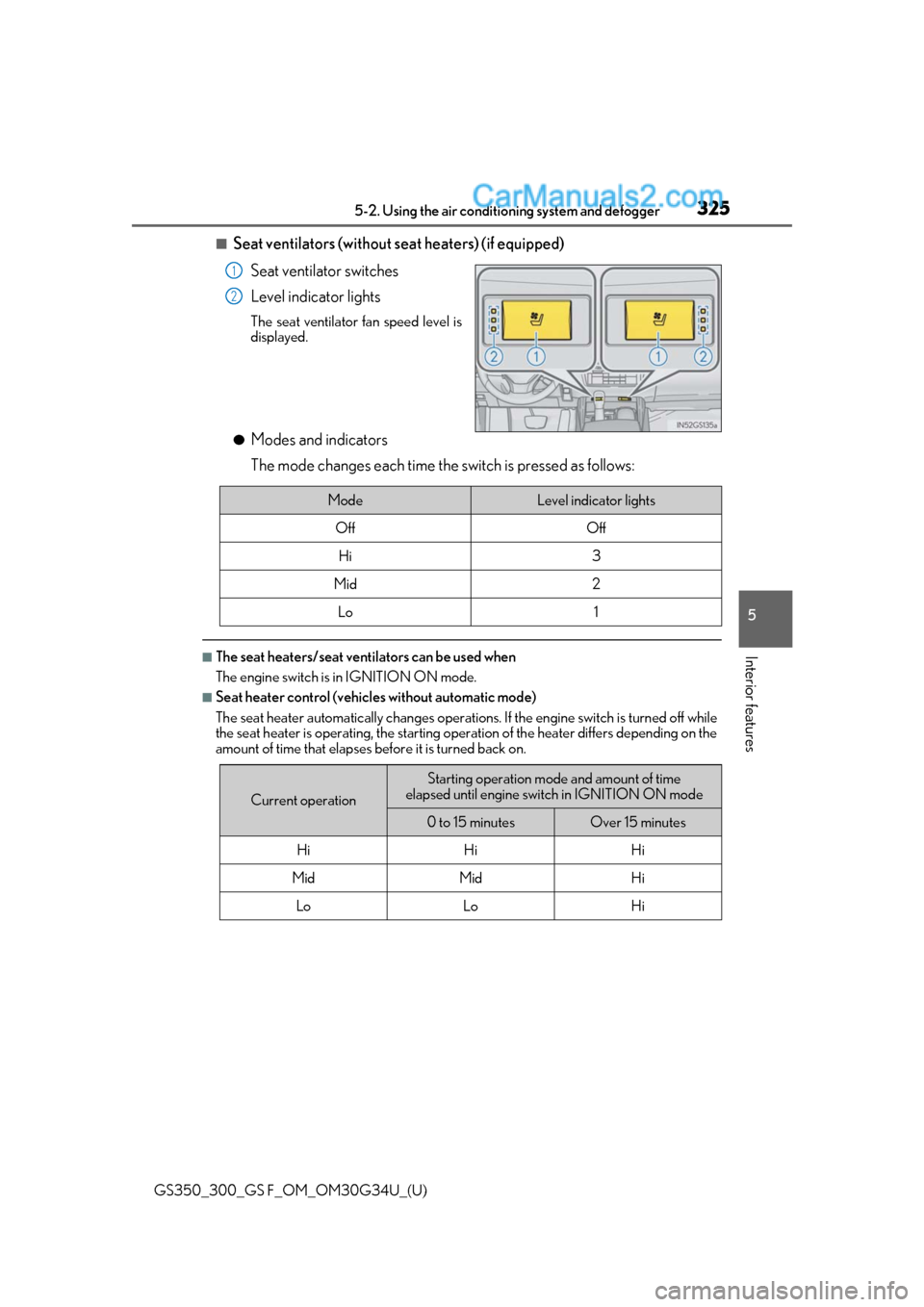
■Seat ventilators (without seat heaters) (if equipped)
Seat ventilator switches
Level indicator lights
The seat ventilator fan speed level is
displayed.
●Modes and indicators
The mode changes each time the switch is pressed as follows:
■The seat heaters/seat vent ilators can be used when
The engine switch is in IGNITION ON mode.
■Seat heater control (vehicles without automatic mode)
The seat heater automatically changes operations. If the engine switch is turned off while
the seat heater is operating, the starting operation of the heater differs depending on the
amount of time that elapses be fore it is turned back on.
1
2
ModeLevel indicator lights
OffOff
Hi3
Mid2
Lo1
Current operation
Starting operation mode and amount of time
elapsed until engine switch in IGNITION ON mode
0 to 15 minutesOver 15 minutes
HiHiHi
MidMidHi
LoLoHi
Page 329 of 602
327
GS350_300_GS F_OM_OM30G34U_(U)5-3. Using the interior lights
5
Interior features
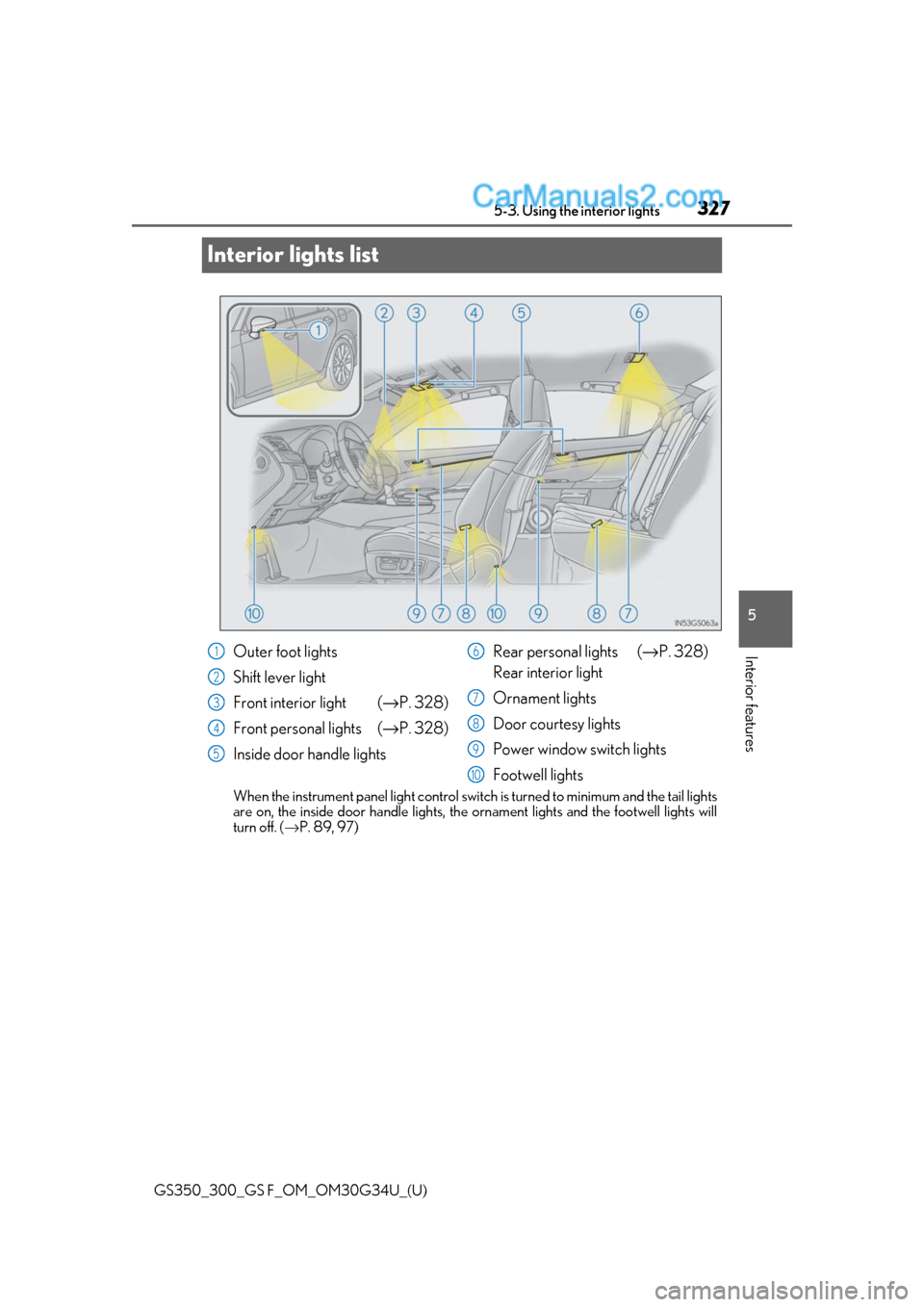
Interior lights list
When the instrument panel light control switch
is turned to minimum and the tail lights
are on, the inside door handle lights, th e ornament lights and the footwell lights will
turn off. ( →P. 89, 97)
Outer foot lights
Shift lever light
Front interior light ( →P. 328)
Front personal lights ( →P. 328)
Inside door handle lights Rear personal lights (
→P. 328)
Rear interior light
Ornament lights
Door courtesy lights
Power window switch lights
Footwell lights1
2
3
4
5
6
7
8
9
10