reset Lexus GS300 2018 s User Guide
[x] Cancel search | Manufacturer: LEXUS, Model Year: 2018, Model line: GS300, Model: Lexus GS300 2018Pages: 602, PDF Size: 13.37 MB
Page 109 of 602
GS350_300_GS F_OM_OM30G34U_(U)
1092. Instrument cluster
2
Instrument cluster
Settings display
Select to change the meter display settings. (→P. 548)
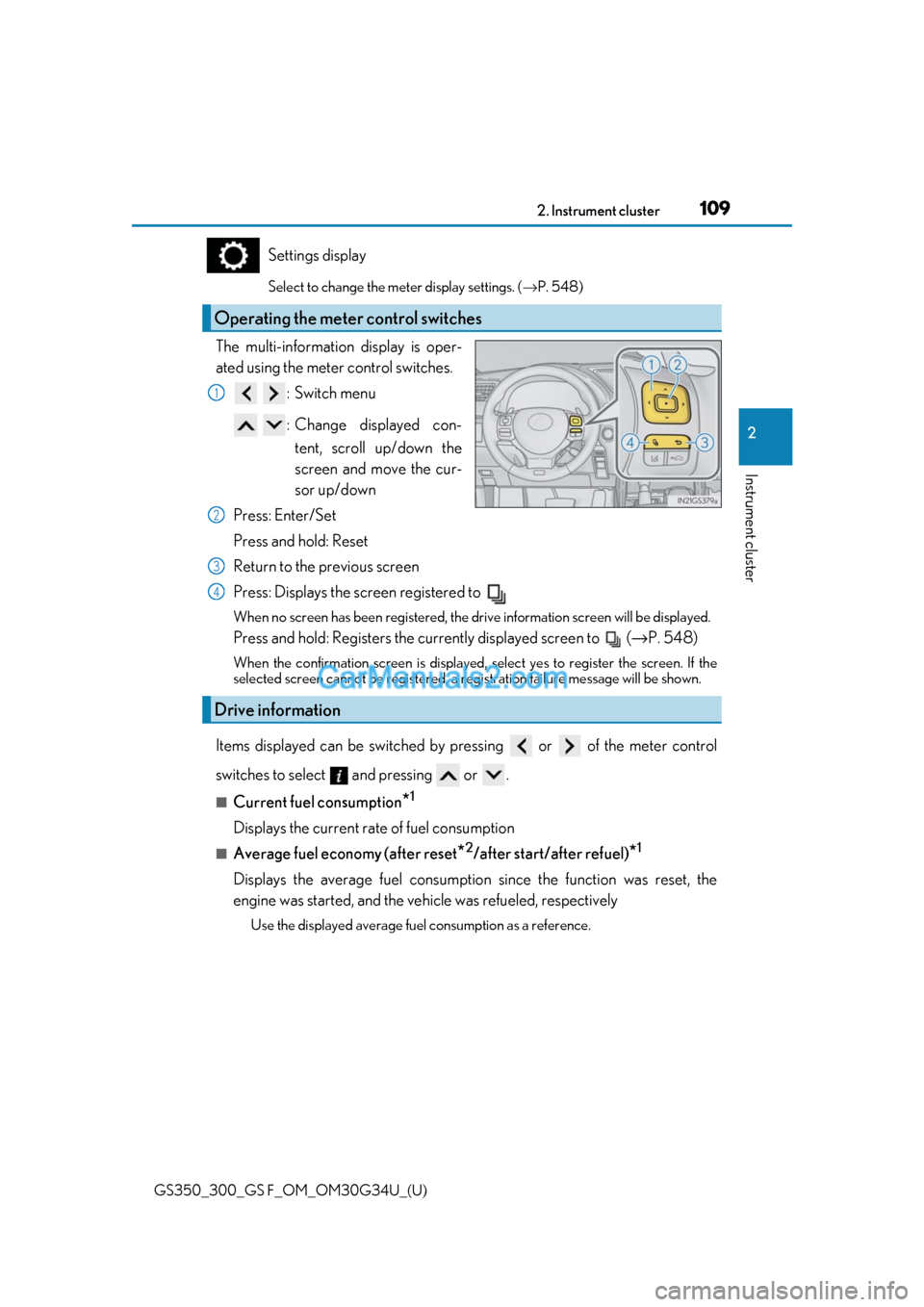
The multi-information display is oper-
ated using the meter control switches.
:Switch menu
: Change displayed con-tent, scroll up/down the
screen and move the cur-
sor up/down
Press: Enter/Set
Press and hold: Reset
Return to the previous screen
Press: Displays the screen registered to
When no screen has been registered, the dr ive information screen will be displayed.
Press and hold: Registers the currently displayed screen to ( →P. 548)
When the confirmation screen is displayed, select yes to register the screen. If the
selected screen cannot be registered, a re gistration failure message will be shown.
Items displayed can be switched by pr essing or of the meter control
switches to select and pressing or .
■Current fuel consumption*1
Displays the current rate of fuel consumption
■Average fuel economy (after reset*2/after start/after refuel)*1
Displays the average fuel consumption since the function was reset, the
engine was started, and the vehicle was refueled, respectively
Use the displayed average fuel consumption as a reference.
Operating the meter control switches
1
2
Drive information
3
4
Page 110 of 602
110
GS350_300_GS F_OM_OM30G34U_(U)2. Instrument cluster
■Average speed (after reset*2/after start)*1
Displays the average vehicle speed since the function was reset and the
engine was started, respectively
■Elapsed time (after reset*2/after start)*1
Displays the elapsed time since the function was reset and the engine was
started, respectively
■Distance (range/after start)*1
Displays the estimated maximum distance
that can be driven with the quantity
of fuel remaining and the distance driv en after the engine was started respec-
tively.
• This distance is computed based on your average fuel consumption. As a result, the actual distance that can be driv en may differ from that displayed.
• When only a small amount of fuel is added to the tank, the display may not be
updated.
When refueling, turn the engine switch off. If the vehicle is refueled without turning
the engine switch off, the display may not be updated.
■Tire inflation pressure
Displays inflation pressure of each tire.
The inflation pressure of the spare tire will not be displayed.
■Gear positions
Displays the current gear position when the shift lever is in D or M.
■LKA (Lane-Keeping Assist) vehicl e sway warning (if equipped)
→ P. 249
■Display off
A blank screen is displayed
*1: Displayed when the item is se t in “Drive Info 1”, “Drive Info 2” or “Drive Info 3”.
( → P. 548)
*2: The function can be reset by pressing th e of the meter control switches for longer
than 1 second when the item to reset is displayed.
If there is more than one item that can be reset, the item selection screen will appear.
Page 111 of 602
GS350_300_GS F_OM_OM30G34U_(U)
1112. Instrument cluster
2
Instrument cluster
■Lap timer
Measures and displays current lap time and previous lap times
●Reading the display
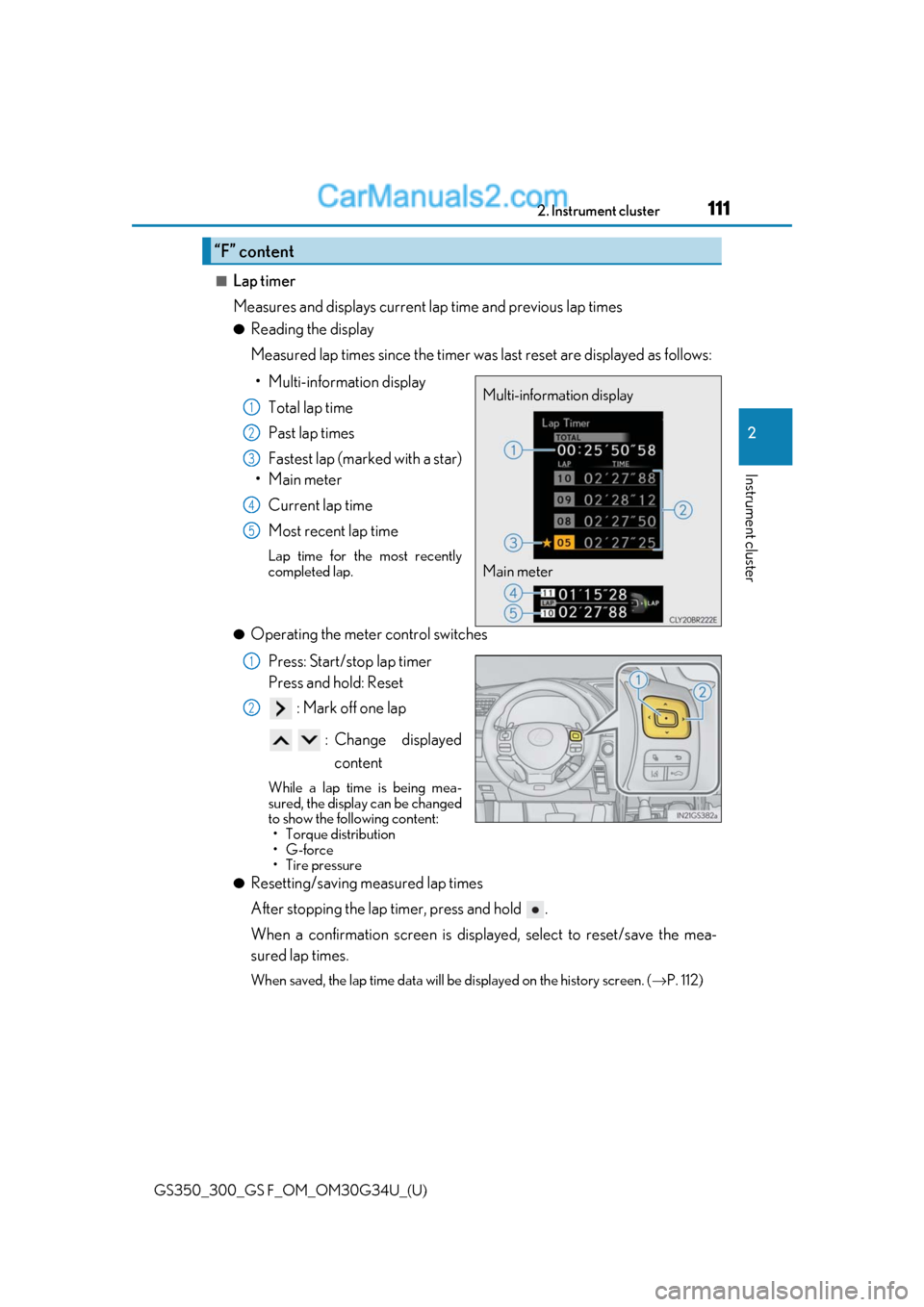
Measured lap times since the timer was last reset are displayed as follows:
• Multi-information display Total lap time
Past lap times
Fastest lap (marked with a star)
•Main meter
Current lap time
Most recent lap time
Lap time for the most recently
completed lap.
●Operating the meter control switches
Press: Start/stop lap timer
Press and hold: Reset : Mark off one lap
: Change displayed content
While a lap time is being mea-
sured, the display can be changed
to show the following content:• Torque distribution
•G-force
• Tire pressure
●Resetting/saving measured lap times
After stopping the lap timer, press and hold .
When a confirmation screen is displa yed, select to reset/save the mea-
sured lap times.
When saved, the lap time data will be displayed on the history screen. ( →P. 112)
“F” content
Multi-information display
Main meter1
2
3
4
5
1
2
Page 114 of 602
114
GS350_300_GS F_OM_OM30G34U_(U)2. Instrument cluster
■G-force
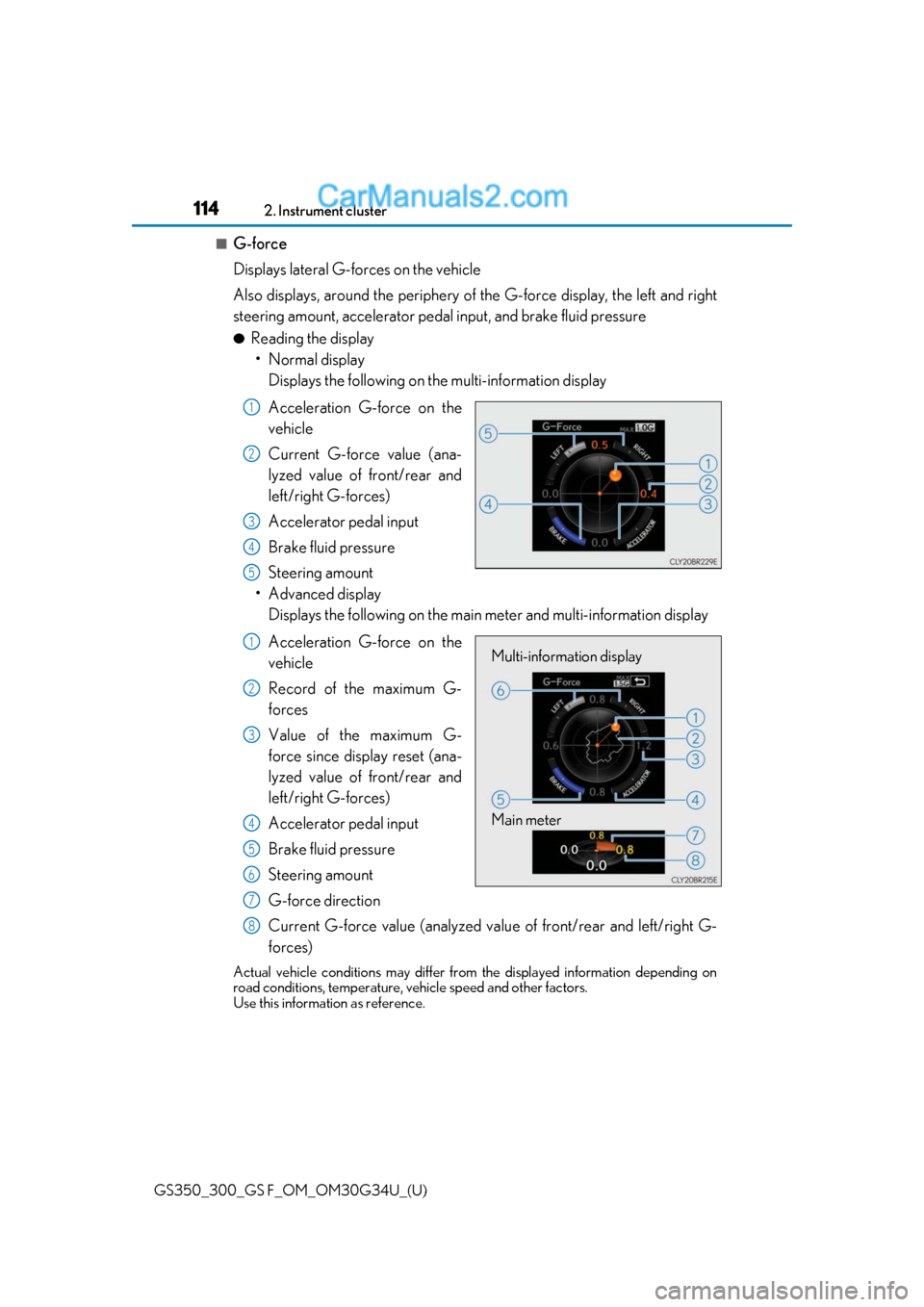
Displays lateral G-forces on the vehicle
Also displays, around the periphery of
the G-force display, the left and right
steering amount, accelerator pedal input, and brake fluid pressure
●Reading the display • Normal display Displays the following on the multi-information display
Acceleration G-force on the
vehicle
Current G-force value (ana-
lyzed value of front/rear and
left/right G-forces)
Accelerator pedal input
Brake fluid pressure
Steering amount
• Advanced display Displays the following on the main meter and multi-information display
Acceleration G-force on the
vehicle
Record of the maximum G-
forces
Value of the maximum G-
force since display reset (ana-
lyzed value of front/rear and
left/right G-forces)
Accelerator pedal input
Brake fluid pressure
Steering amount
G-force direction
Current G-force value (analyzed valu e of front/rear and left/right G-
forces)
Actual vehicle conditions may differ fr om the displayed information depending on
road conditions, temperature, vehicle speed and other factors.
Use this informat ion as reference.
1
2
3
4
5
Multi-information display
Main meter1
2
3
4
5
6
7
8
Page 115 of 602
GS350_300_GS F_OM_OM30G34U_(U)
1152. Instrument cluster
2
Instrument cluster
●Switching the display
To switch to advanced display, press .
To return to normal display, press .
●Resetting the record of maximum G-forces
With the record of maximum G-forces displayed, press and hold to
reset the display.
●Peak hold function (advanced display only)
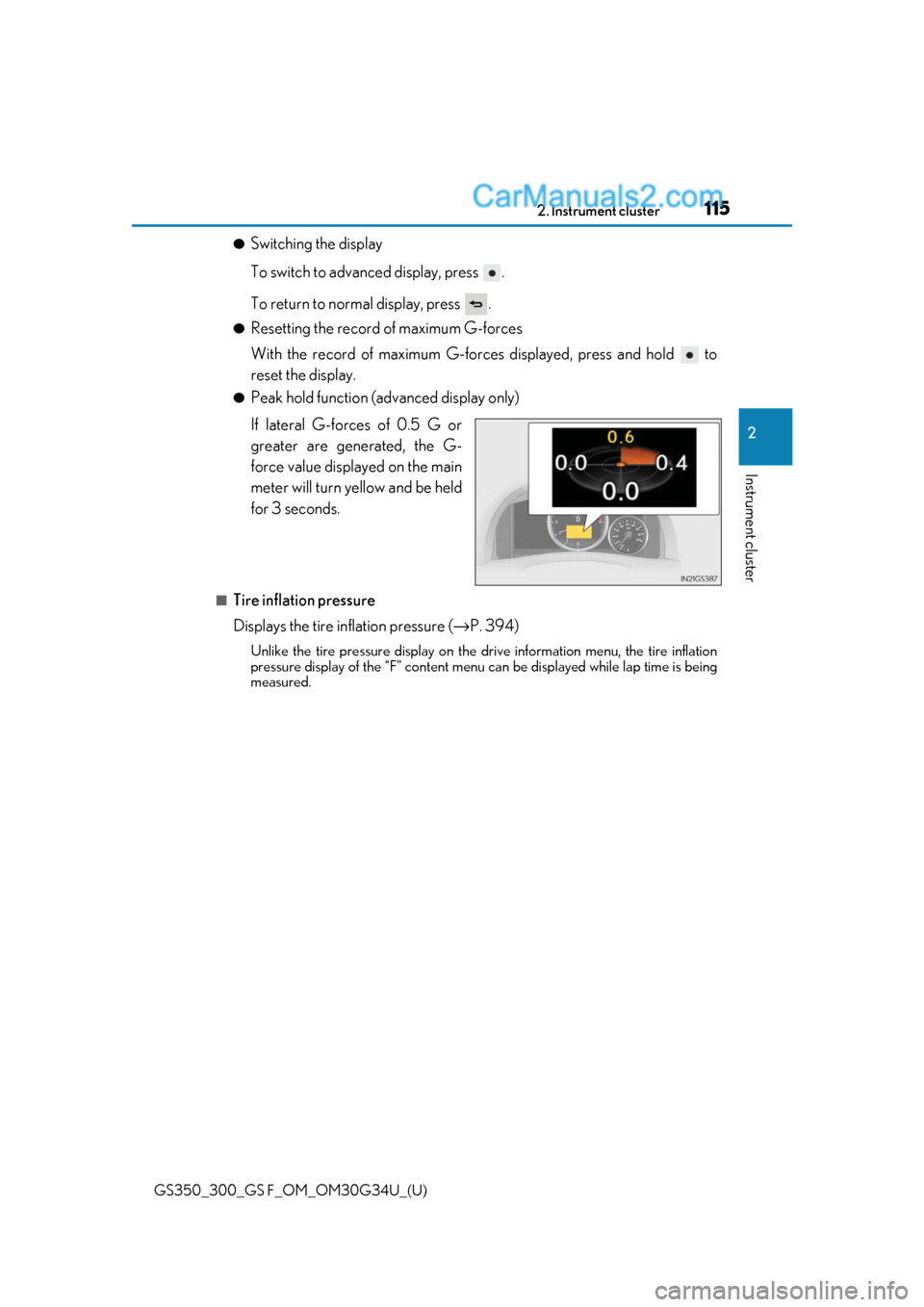
If lateral G-forces of 0.5 G or
greater are generated, the G-
force value displayed on the main
meter will turn yellow and be held
for 3 seconds.
■Tire inflation pressure
Displays the tire inflation pressure ( →P. 394)
Unlike the tire pressure display on the drive information menu, the tire inflation
pressure display of the “F” content menu can be displayed while lap time is being
measured.
Page 118 of 602
118
GS350_300_GS F_OM_OM30G34U_(U)2. Instrument cluster
■Start-up display
When the engine is started, the name of the
vehicle is displayed on the multi-information
display.
While the start-up display is being displaye d, the meter display cannot be changed even
if the drive mode is changed. When the start- up display is finished, the meter display for
the currently selected mode will be displayed.
■Torque distribution display
Torque distribution may not be displayed correctly in some cases, such as when the vehi-
cle passes over road expansion joints.
■G-force display
●The G-force values may not be zero even when the vehicle is parked, such as when it is
parked on an incline.
●The steering amount, accelerator pedal input, and brake fluid pressure displays are dis-
abled until the engine has warmed up (the variable red zone of the tachometer has
retracted to 7300 rpm).
After the engine has warmed up, these displays will be enabled.
●Depending on the vehicle usage conditions, the brake fluid pressure display may not
reach its maximum reading even though the brake pedal is fully depressed.
●If a battery terminal is disconnected and reconnected, the steering amount display may
be disabled temporarily. Afte r driving the vehicle for a while , the display will be enabled.
■Suspension of the settings display
In the following situations, op eration of the settings display will be temporarily sus-
pended.
●When a warning message appears on the multi-information display
●When the vehicle begins to move
■Tire inflation pressure
●It may take a few minutes to display the tire inflation pressure after the engine switch is
turned to IGNITION ON mode. It may also take a few minutes to display the tire infla-
tion pressure after inflation pressure has been adjusted.
●“---” may be displayed if the tire position information cannot be determined due to
unfavorable radio wave conditions.
●Tire inflation pressure changes with temperat ure. The displayed values may also be dif-
ferent from the values measured using a tire pressure gauge.
■When disconnecting and reconnecting battery terminals
The following information data will be reset:
●Lap timer: Measured lap times, history
●G-force: Record of the maximum G-forces
■Using the lap timer
If the engine is stopped while a lap is being timed, the lap timer will stop and the lap time
up to that point will be recorded.
■Liquid crystal display
→ P. 98
Page 126 of 602
126
GS350_300_GS F_OM_OM30G34U_(U)2. Instrument cluster
■Head-up display
●The head-up display may seem dark and hard
to see when viewed through sunglasses,
especially polarized sunglasses.
Adjust the brightness of the head-up display or remove your sunglasses.
●When the head-up display is turned off, it will remain off even if the engine switch is
turned to IGNITION ON mode after th e engine switch has been turned off.
●The startup image will be displayed on the he ad-up display after the engine switch has
been turned to IGNITION ON mode while the head-up display switch is set to on.
■Head-up rev indicator
●The head-up display is linked to the rev indicator in the meter.
●Whether or not to display the rev indicator in the head-up display, as well as display tim-
ing, can be changed through the settings for the rev indicator in the meter. (→P. 117)
■When the battery is disconnected
The customize settings of the head-up display will be reset.
■Head-up display automatic position adjustment
If the display position is recorded into memory, the head-up display will be automatically
adjusted to the desired position. ( →P. 160)
WARNING
■Before using the head-up display
Check that the position and brightness of th e head-up display image does not interfere
with safe driving. Incorrect adjustment of the image’s position or brightness may
obstruct the driver’s view and lead to an a ccident, resulting in death or serious injury.
NOTICE
■To prevent damage to components
●Do not touch the inside of the head-up disp lay projector or thrust sharp edges or the
like into the projector.
Doing so could cause mechanical malfunctions.
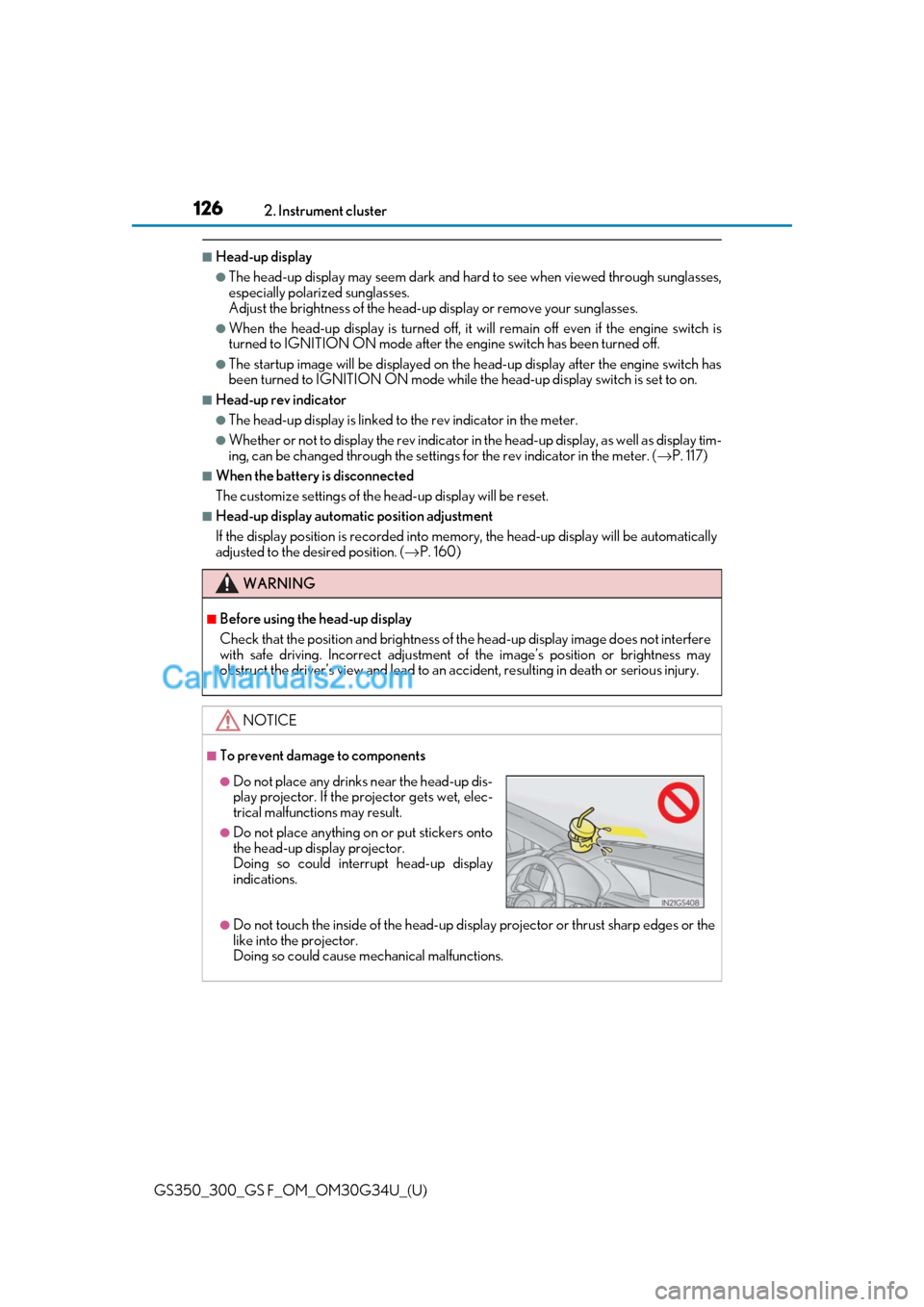
●Do not place any drinks near the head-up dis-
play projector. If the projector gets wet, elec-
trical malfunctions may result.
●Do not place anything on or put stickers onto
the head-up display projector.
Doing so could interrupt head-up display
indications.
Page 128 of 602
128
GS350_300_GS F_OM_OM30G34U_(U)2. Instrument cluster
Press the “MENU” button on the Remote
Touch, then select on the “Menu”
screen, and then select “Fuel Consumption”.
■Trip information
If the “Past Record” screen is displayed, select “Trip Information”.
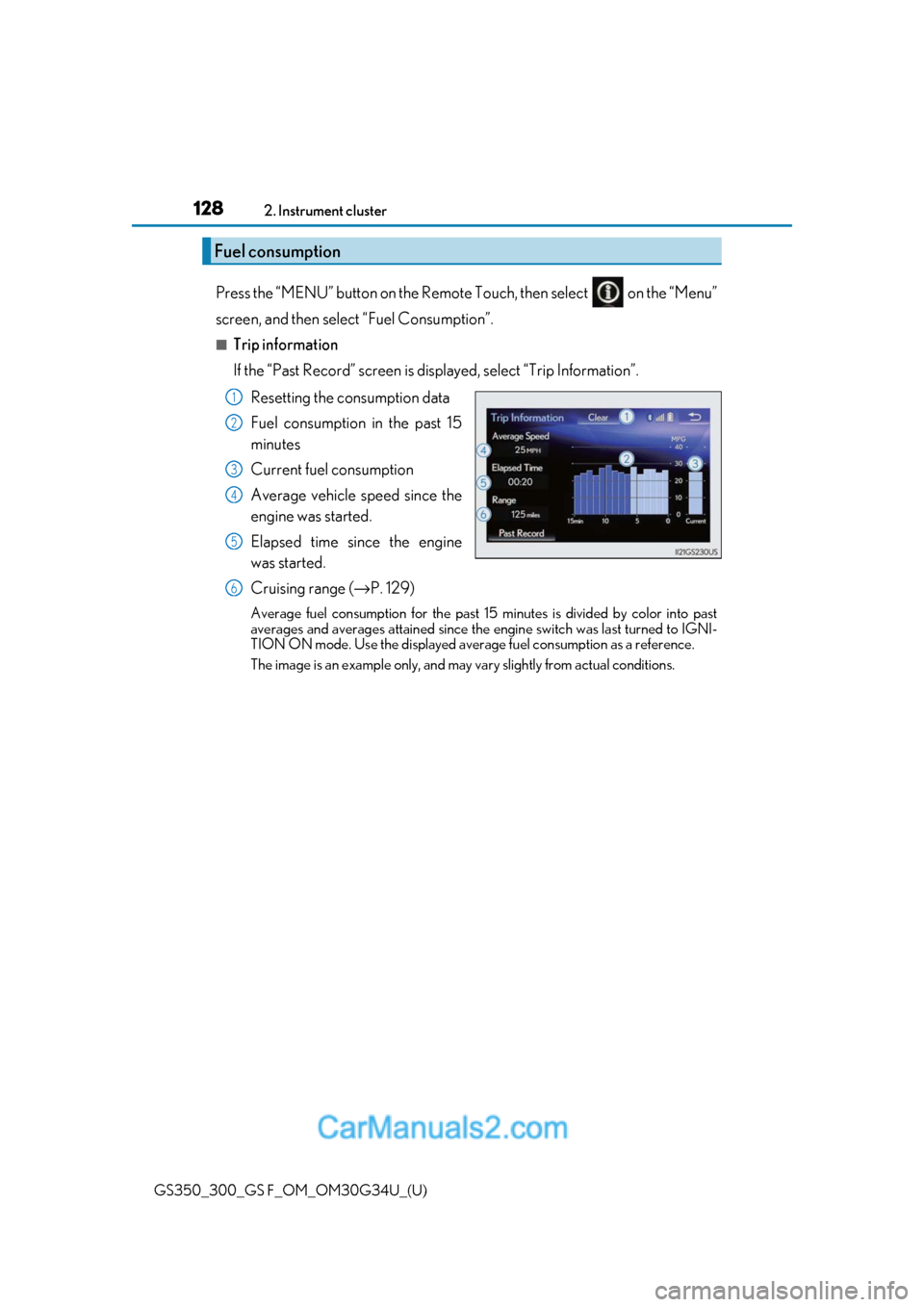
Resetting the consumption data
Fuel consumption in the past 15
minutes
Current fuel consumption
Average vehicle speed since the
engine was started.
Elapsed time since the engine
was started.
Cruising range (→ P. 129)
Average fuel consumption for the past 15 minutes is divided by color into past
averages and averages attained since the engine switch was last turned to IGNI-
TION ON mode. Use the displayed average fuel consumption as a reference.
The image is an example only, and may va ry slightly from actual conditions.
Fuel consumption
1
2
3
4
5
6
Page 129 of 602
GS350_300_GS F_OM_OM30G34U_(U)
1292. Instrument cluster
2
Instrument cluster
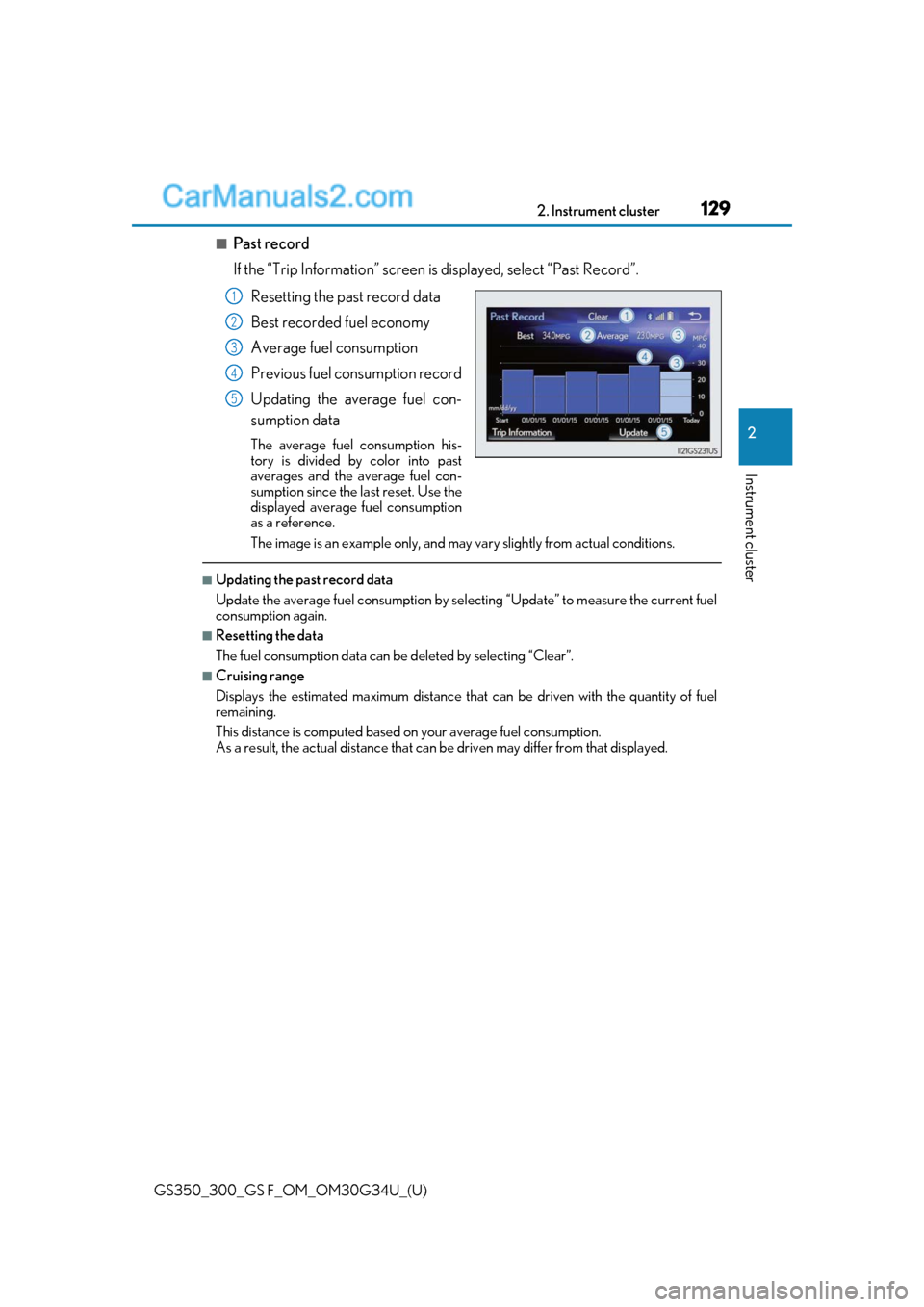
■Past record
If the “Trip Information” screen is displayed, select “Past Record”.
Resetting the past record data
Best recorded fuel economy
Average fuel consumption
Previous fuel consumption record
Updating the average fuel con-
sumption data
The average fuel consumption his-
tory is divided by color into past
averages and the average fuel con-
sumption since the last reset. Use the
displayed average fuel consumption
as a reference.
The image is an example only, and may va ry slightly from actual conditions.
■Updating the past record data
Update the average fuel consumption by selecting “Update” to measure the current fuel
consumption again.
■Resetting the data
The fuel consumption data can be deleted by selecting “Clear”.
■Cruising range
Displays the estimated maximum distance that can be driven with the quantity of fuel
remaining.
This distance is computed based on your average fuel consumption.
As a result, the actual distance that can be driven may differ from that displayed.
1
2
3
4
5
Page 163 of 602
GS350_300_GS F_OM_OM30G34U_(U)
1613-3. Adjusting the seats
3
Operation of each component
Your preferred driving position (the position of the driver’s seat, steering wheel,
outside rear view mirrors and HUD [head-up display] [if equipped]) can be
recorded and recalled by pressing a button.
Three different driving positions can be recorded into memory.
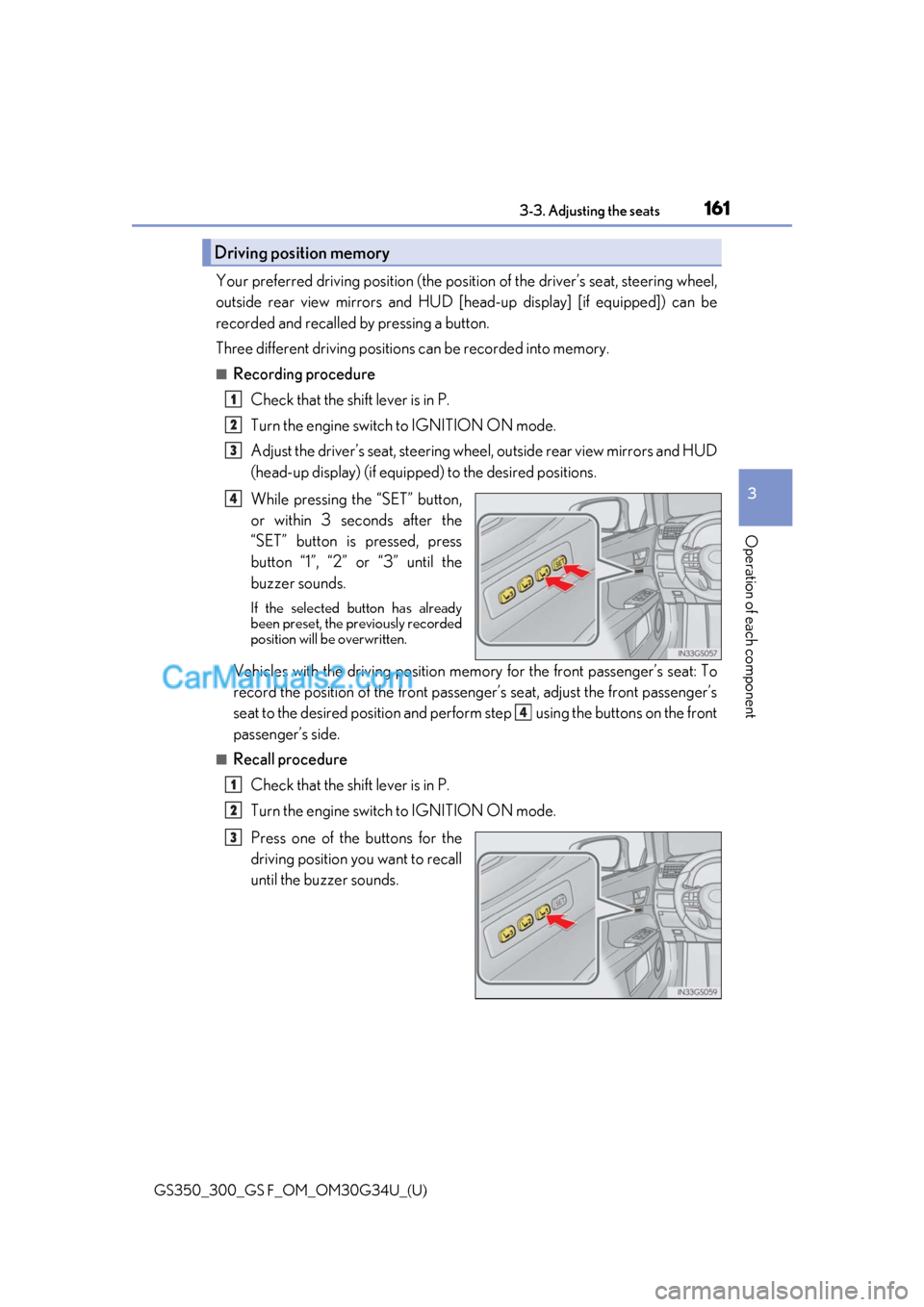
■Recording procedure
Check that the shift lever is in P.
Turn the engine switch to IGNITION ON mode.
Adjust the driver’s seat, steering wh eel, outside rear view mirrors and HUD
(head-up display) (if equipped) to the desired positions.
While pressing the “SET” button,
or within 3 seconds after the
“SET” button is pressed, press
button “1”, “2” or “3” until the
buzzer sounds.
If the selected button has already
been preset, the previously recorded
position will be overwritten.
Vehicles with the driving position me mory for the front passenger’s seat: To
record the position of the front passenger’s seat, adjust the front passenger’s
seat to the desired position and perfor m step using the buttons on the front
passenger’s side.
■Recall procedure
Check that the shift lever is in P.
Turn the engine switch to IGNITION ON mode.
Press one of the buttons for the
driving position you want to recall
until the buzzer sounds.
Driving position memory
1
2
3
4
4
1
2
3