air condition Lexus GS300 2019 User Guide
[x] Cancel search | Manufacturer: LEXUS, Model Year: 2019, Model line: GS300, Model: Lexus GS300 2019Pages: 604, PDF Size: 14.6 MB
Page 282 of 604
282
GS350_300_OM_OM30G96U_(U)4-5. Using the driving support systems
GS350/GS300 (vehicles with Adapti
ve Variable Suspension system)
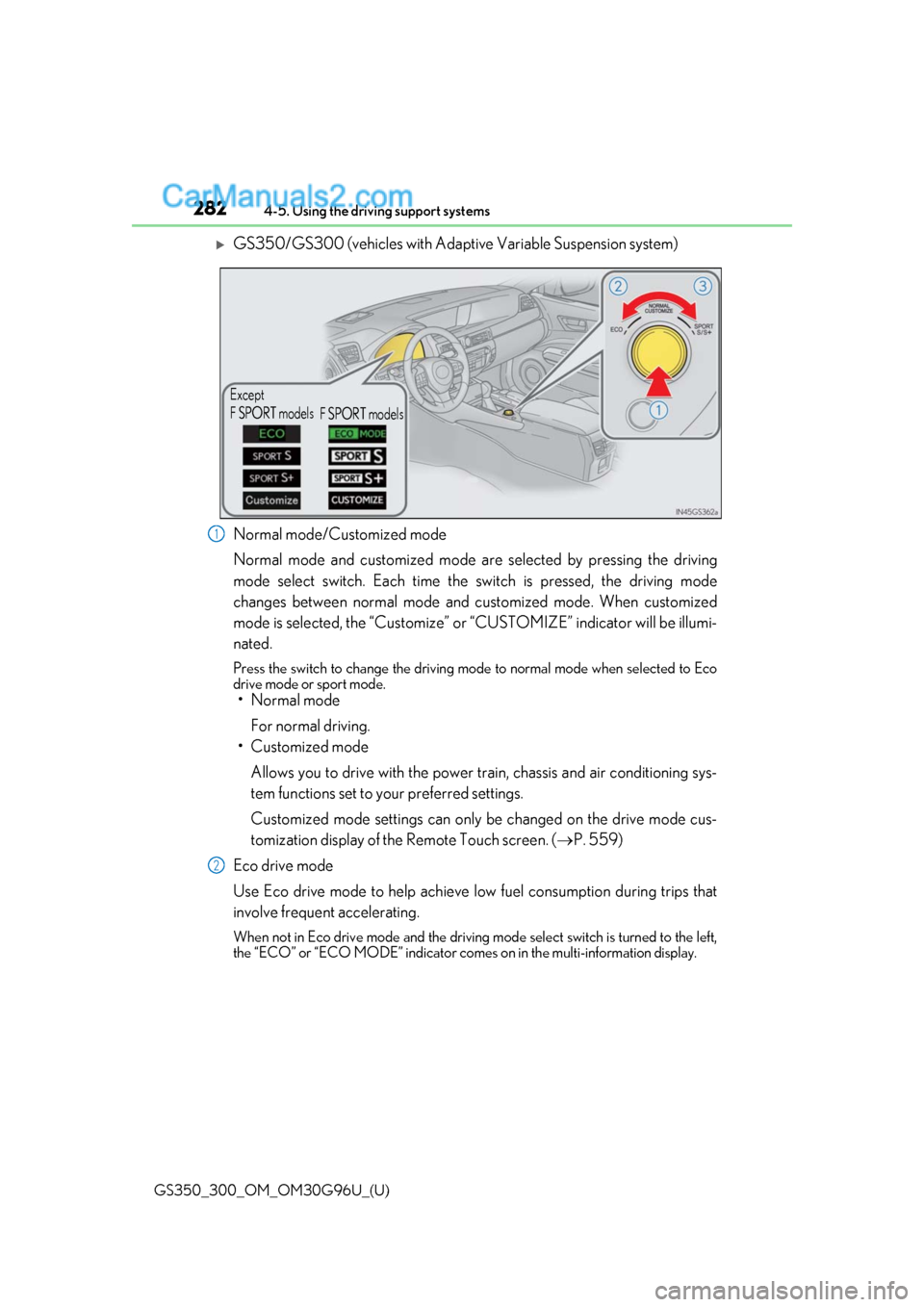
Normal mode/Customized mode
Normal mode and customized mode ar e selected by pressing the driving
mode select switch. Each time the switch is pressed, the driving mode
changes between normal mode and customized mode. When customized
mode is selected, the “Customize” or “CUSTOMIZE” indicator will be illumi-
nated.
Press the switch to change the driving mode to normal mode when selected to Eco
drive mode or sport mode.
• Normal mode
For normal driving.
• Customized mode
Allows you to drive with the power train, chassis and air conditioning sys-
tem functions set to your preferred settings.
Customized mode settings can only be changed on the drive mode cus-
tomization display of the Remote Touch screen. ( P. 559)
Eco drive mode
Use Eco drive mode to help achieve low fuel consumption during trips that
involve frequent accelerating.
When not in Eco drive mode and the driving mode select switch is turned to the left,
the “ECO” or “ECO MODE” indicator come s on in the multi-information display.
Except
F SPORT models
F SPORT models
1
2
Page 284 of 604
284
GS350_300_OM_OM30G96U_(U)4-5. Using the driving support systems
GS F
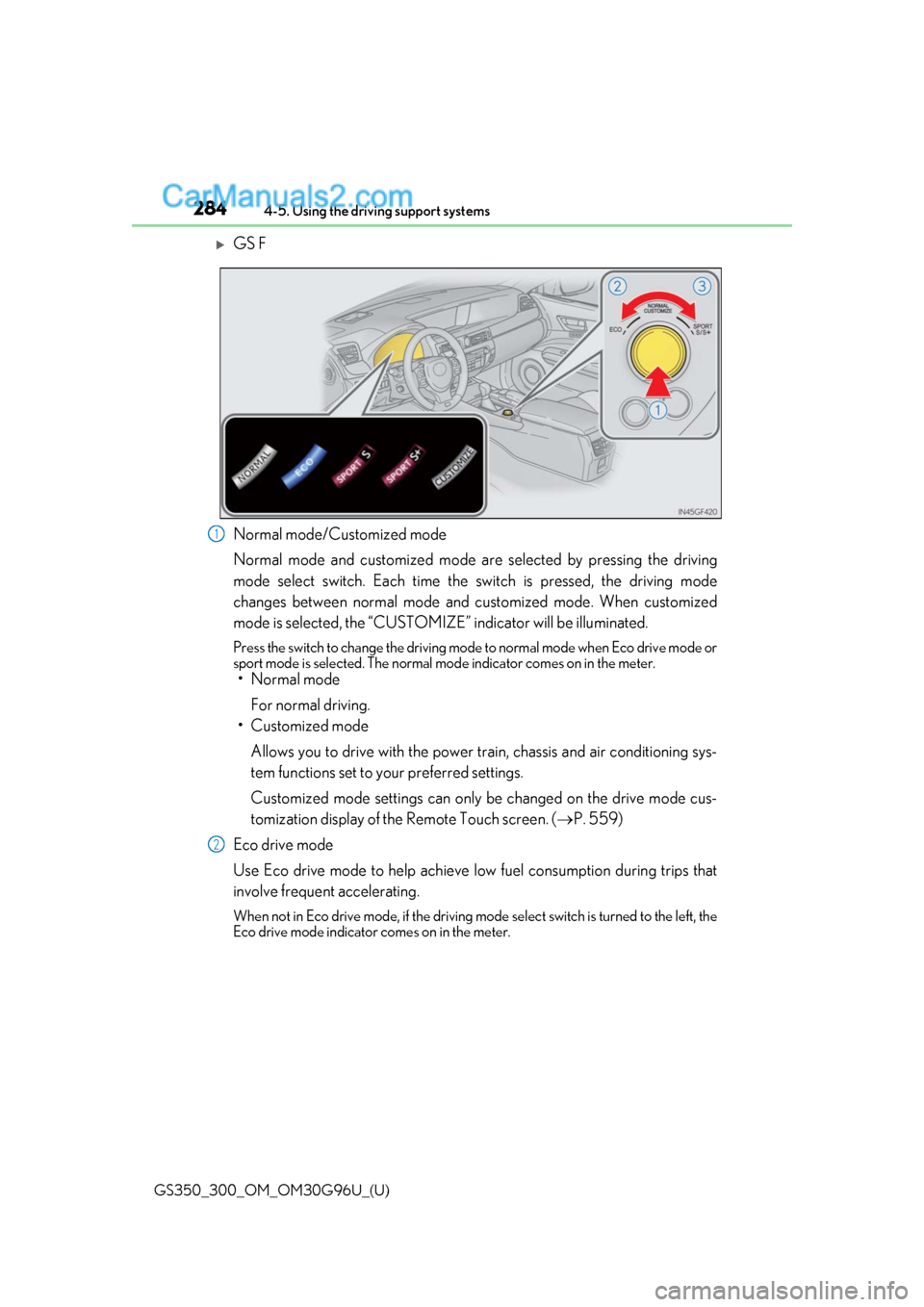
Normal mode/Customized mode
Normal mode and customized mode ar
e selected by pressing the driving
mode select switch. Each time the switch is pressed, the driving mode
changes between normal mode and customized mode. When customized
mode is selected, the “CUSTOMIZE” indicator will be illuminated.
Press the switch to change the driving mode to normal mode when Eco drive mode or
sport mode is selected. The normal mo de indicator comes on in the meter.
• Normal mode
For normal driving.
• Customized mode
Allows you to drive with the power train, chassis and air conditioning sys-
tem functions set to your preferred settings.
Customized mode settings can only be changed on the drive mode cus-
tomization display of the Remote Touch screen. ( P. 559)
Eco drive mode
Use Eco drive mode to help achieve low fuel consumption during trips that
involve frequent accelerating.
When not in Eco drive mode, if the driving mode select switch is turned to the left, the
Eco drive mode indicator comes on in the meter.
1
2
Page 285 of 604
GS350_300_OM_OM30G96U_(U)
2854-5. Using the driving support systems
4
Driving
Sport mode•SPORT S mode
Assists acceleration response by co ntrolling the transmission and engine.
When not in SPORT S mode, if the driving mode select switch is turned to the
right, the “SPORT S” indicator comes on in the meter.
•SPORT S+ mode
Provides earlier downshift timing than SPORT S mode in order to maintain
a high engine speed and provides faster gear changes. This mode also
changes the steering feel, suspension control and VDIM control, making it
suitable for powerful sporty driving.
When in SPORT S mode, if the driving mode select switch is turned to the right,
the “SPORT S+” indicator comes on in the meter.
■Operation of the air conditioning system in Eco drive mode
Eco drive mode controls the heating/cooling operations and fan speed of the air condi-
tioning system to enhance fuel efficiency. To improve air conditioning performance, per-
form the following operations:
●Turn off eco air conditioning mode ( P. 318)
●Adjust the fan speed ( P. 317)
●Turn off Eco drive mode
■Automatic operation of the seat heater during Eco drive mode
Eco drive mode controls the heating operatio n and fan speed of the air conditioning sys-
tem to enhance fuel efficiency. If the driving mode select switch is switched to Eco drive
mode in cold temperatures, the seat heater will be automatically operated to assist heat-
ing performance.
■Automatic deactivation of sport mode and customized mode
If the engine switch is turned off after dr iving in sport mode or customized mode, the
drive mode will be changed to normal mode.
■Driving mode pop-up display (12.3-inch display only)
When the driving mode is changed, the sele cted driving mode will be temporarily dis-
played on the side display. ( P. 314)
3
Page 305 of 604
GS350_300_OM_OM30G96U_(U)
3054-6. Driving tips
4
Driving
Perform the following according to the driving conditions:
●Do not try to forcibly open a window or move a wiper that is frozen. Pour
warm water over the frozen area to me lt the ice. Wipe away the water imme-
diately to prevent it from freezing.
●To ensure proper operation of the c limate control system fan, remove any
snow that has accumulated on the air inlet vents in front of the windshield.
●Check for and remove any excess ice or snow that may have accumulated on
the exterior lights, vehicle’s roof, chassi s, around the tires or on the brakes.
●Remove any snow or mud from the bottom of your shoes before getting in the
vehicle.
Accelerate the vehicle slowly, keep a sa fe distance between you and the vehicle
ahead, and drive at a reduced spee d suitable to road conditions.
●Park the vehicle and move the shift lever to P without setting the parking
brake. The parking brake may freeze up, preventing it from being released. If
the vehicle is parked without setting the parking brake, make sure to block the
wheels.
Failure to do so may be dangerous because it may cause the vehicle to move
unexpectedly, possibly leading to an accident.
●If the vehicle is parked without setting the parking brake, confirm that the shift
lever cannot be moved out of P
*.
*: The shift lever will be locked if it is attempted to be shifted from P to any other position
without depressing the brake pedal. If the sh ift lever can be shifted from P, there may
be a problem with the shift lock system. Have the vehicle inspected by your Lexus
dealer immediately.
Before driving the vehicle
When driving the vehicle
When parking the vehicle
Page 309 of 604
309
GS350_300_OM_OM30G96U_(U)
5Interior features
5-1. Remote Touch screenRemote Touch/12.3-inch display ........................................... 310
5-2. Using the air conditioning system and defogger
Front automatic air conditio ning system .......... 316
Rear air conditioning system .......................................... 327
Heated steering wheel/ seat heaters/seat
ventilators .................................. 330 5-3. Using the interior lights
Interior lights list .........................335• Interior lights .......................... 336
• Personal lights ....................... 336
5-4. Using the storage features List of storage features ............338
• Glove box ............................... 339
• Console box........................... 339
• Cup holders ...........................340
• Auxiliary boxes ...................... 341
Trunk features ............................. 342
5-5. Using the other interior features
Other interior features ............ 344 • Sun visors ................................ 344
• Vanity mirrors ....................... 344
• Clock ........................................ 345
• Ashtrays ................................... 345
• Power outlets......................... 346
• Armrest .................................... 346
•Rear sunshade/rear door sunshades........... 347
•Trunk storage
extension ................................. 349
• Coat hooks .............................350
• Assist grips..............................350
Garage door op ener ................ 351
Page 313 of 604
GS350_300_OM_OM30G96U_(U)
3135-1. Remote Touch screen
5
Interior features
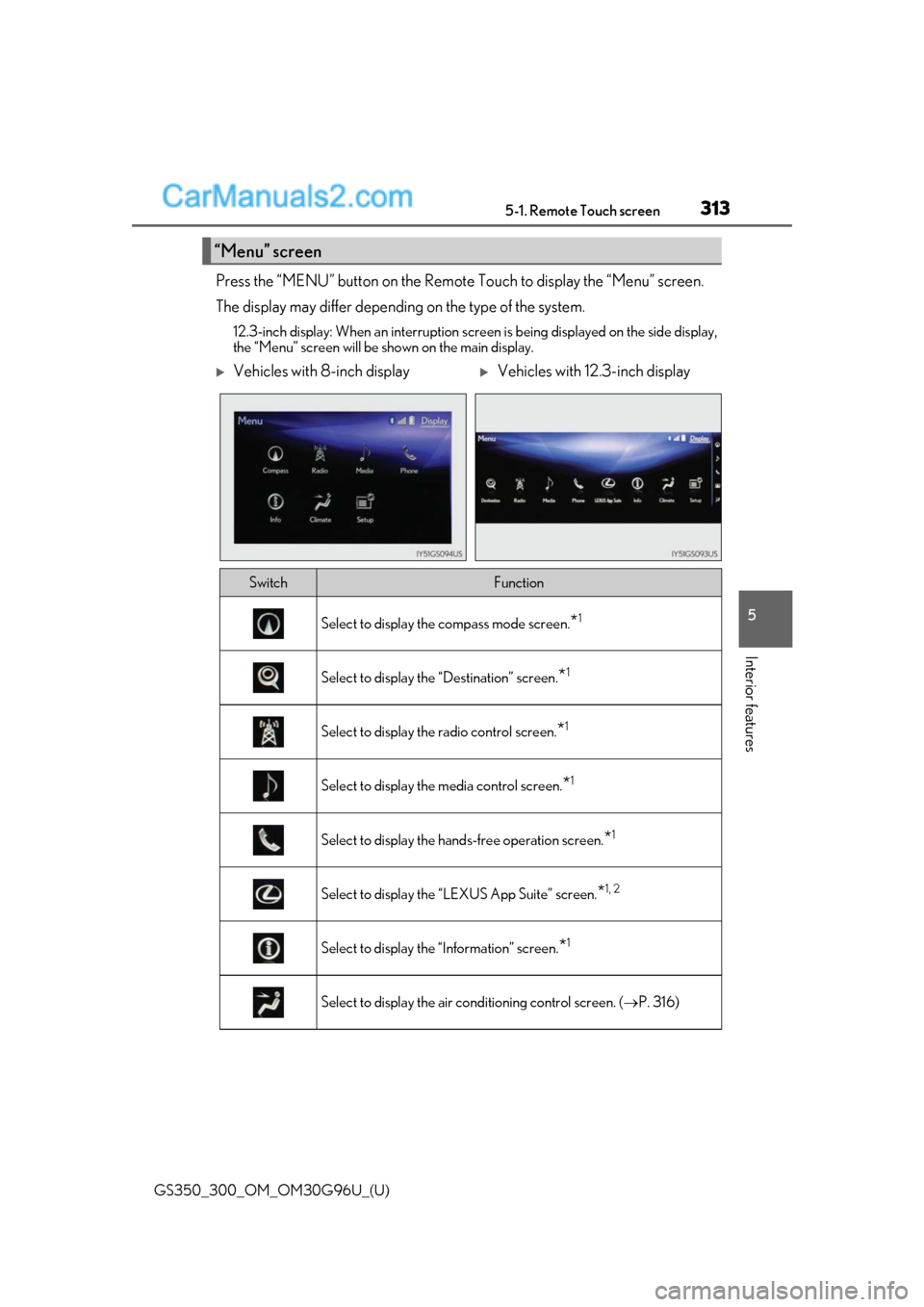
Press the “MENU” button on the Remote Touch to display the “Menu” screen.
The display may differ depending on the type of the system.
12.3-inch display: When an interruption screen is being displayed on the side display,
the “Menu” screen will be shown on the main display.
“Menu” screen
Vehicles with 8-inch displayVehicles with 12.3-inch display
SwitchFunction
Select to display the compass mode screen.*1
Select to display the “Destination” screen.*1
Select to display the radio control screen.*1
Select to display the media control screen.*1
Select to display the hand s-free operation screen.*1
Select to display the “LEXUS App Suite” screen.*1, 2
Select to display the “Information” screen.*1
Select to display the air conditioning control screen. ( P. 316)
Page 314 of 604
3145-1. Remote Touch screen
GS350_300_OM_OM30G96U_(U)
*1: Refer to the “NAVIGATION AND MULTIMEDIA SYSTEM OWNER’S MANUAL”.
*2: If equipped
■Full screen display
The following functions can be displayed full screen:
*: Refer to the “NAVIGATION AND MULTIMEDIA SYSTEM OWNER’S MAN- UAL”.
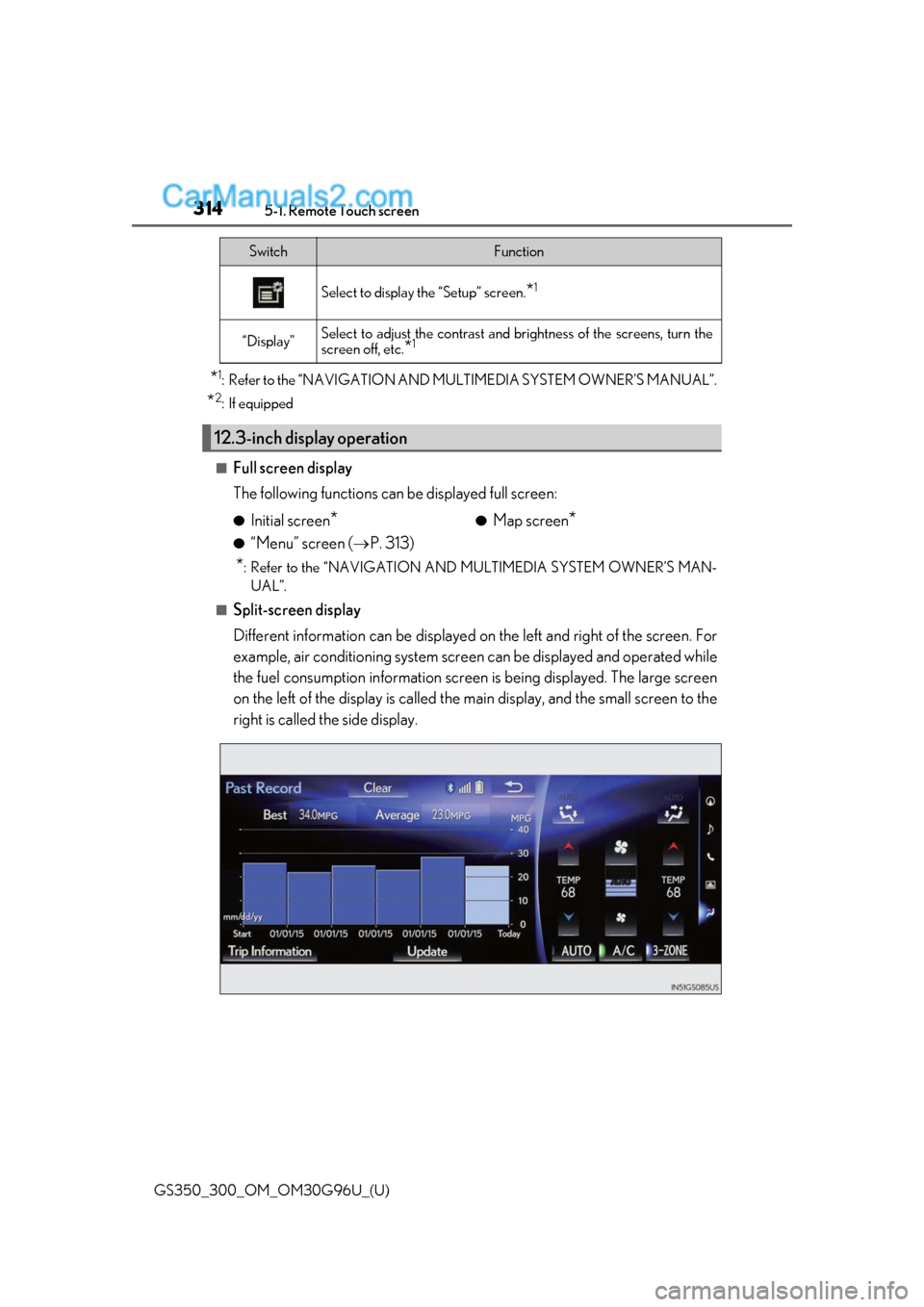
■Split-screen display
Different information can be displayed on the left and right of the screen. For
example, air conditioning system scre en can be displayed and operated while
the fuel consumption information screen is being displayed. The large screen
on the left of the display is called the main display, and the small screen to the
right is called the side display.
Select to display the “Setup” screen.*1
“Display”Select to adjust the contrast and brightness of the screens, turn the
screen off, etc.
*1
12.3-inch display operation
SwitchFunction
●Initial screen*
●“Menu” screen ( P. 313)
●Map screen*
Page 315 of 604
GS350_300_OM_OM30G96U_(U)
3155-1. Remote Touch screen
5
Interior features
For details of the functions and operation of the main display, refer to the respec-
tive section.
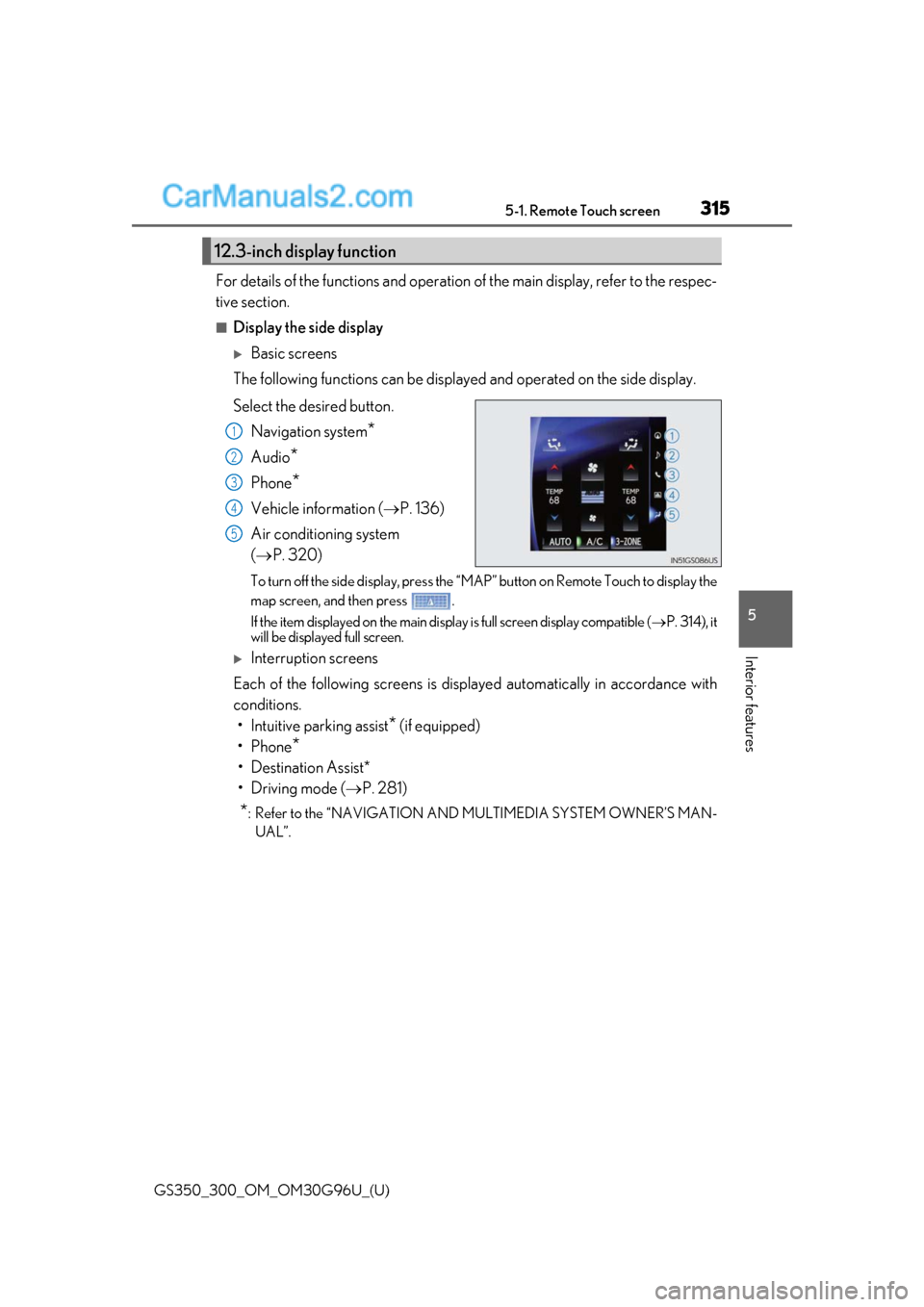
■Display the side display
Basic screens
The following functions can be displaye d and operated on the side display.
Select the desired button. Navigation system
*
Audio*
Phone*
Vehicle information ( P. 136)
Air conditioning system
( P. 320)
To turn off the side display, press the “MAP” button on Remote Touch to display the
map screen, and then press .
If the item displayed on the main display is full screen display compatible ( P. 314), it
will be displayed full screen.
Interruption screens
Each of the following screens is displayed automatically in accordance with
conditions. • Intuitive parking assist
* (if equipped)
•Phone
*
• Destination Assist*
•Driving mode ( P. 281)
*: Refer to the “NAVIGATION AND MULTIMEDIA SYSTEM OWNER’S MAN-
UAL”.
12.3-inch display function
1
2
3
4
5
Page 316 of 604
316
GS350_300_OM_OM30G96U_(U)5-2. Using the air conditio
ning system and defogger
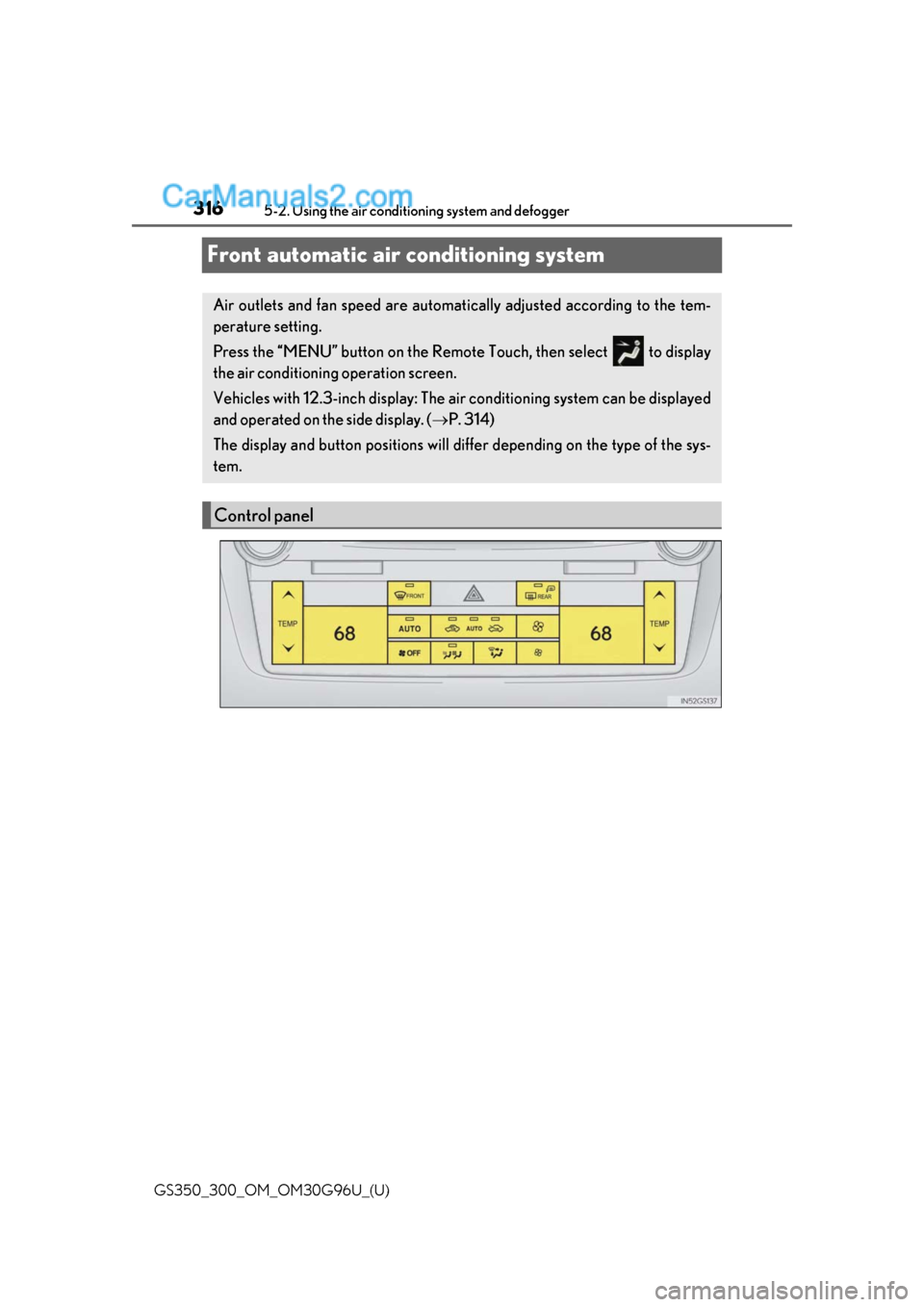
Front automatic air conditioning system
Air outlets and fan speed are automati cally adjusted according to the tem-
perature setting.
Press the “MENU” button on the Remote Touch, then select to display
the air conditioning operation screen.
Vehicles with 12.3-inch display: The ai r conditioning system can be displayed
and operated on the side display. ( P. 314)
The display and button positions will diffe r depending on the type of the sys-
tem.
Control panel
Page 317 of 604
GS350_300_OM_OM30G96U_(U)
3175-2. Using the air conditioning system and defogger
5
Interior features
■Adjusting the temperature setting
Press “” on to increase the temperature and “ ” to decrease the tem-
perature.
If the indicator is turned off, the system will blow ambient temperature air or
heated air.
Without rear air conditioning system
When “DUAL” on the control screen is selected or the passenger’s side tem-
perature control button is pressed, th e temperature for the driver and passen-
ger seats can be adjusted separately.
With rear air conditioning system
When “3-ZONE” on the control screen is selected or the passenger’s side
temperature control button is pressed, the temperature for the driver’s, front
passenger’s and rear seats ( P. 327) can be adjusted separately.
The air conditioning system switches between individual and simultaneous
modes each time 3-ZONE is selected.
■Adjusting the fan speed setting
Press to increase the fan speed and to decrease the fan speed.
Press the “OFF” button to turn the fan off.
■Change the airflow mode
To change the air outlets, press .
The air outlets used are switched each time the button is pressed. ( P. 318)
■S-FLOW mode
Press .
When is pressed, the airflow changes as follows.
Without rear air conditioning system : Air flows to the front seats only.
*
With rear air conditioning system:
Air flows to the front seats only, and if the passenger seat is unoccupied, the set
temperature, outside humidity and temper ature inside the cabin are assessed, and
air flows to the driver seat only.
*
*
: Air may also flow to the rear seats depending on the situation.
■Other functions
●Switching between outside air and recirculated air modes (P. 322)
●Defogging the windshield (P. 322)
●Defogging the rear window and outside rear view mirrors (P. 322)