brake Lexus GS300h 2013 Owners Manual
[x] Cancel search | Manufacturer: LEXUS, Model Year: 2013, Model line: GS300h, Model: Lexus GS300h 2013Pages: 1014
Page 866 of 1014
8397-2. Steps to take in an emergency
7
When trouble arises
GS450h_300h_OM_OM30D53E_(EE)
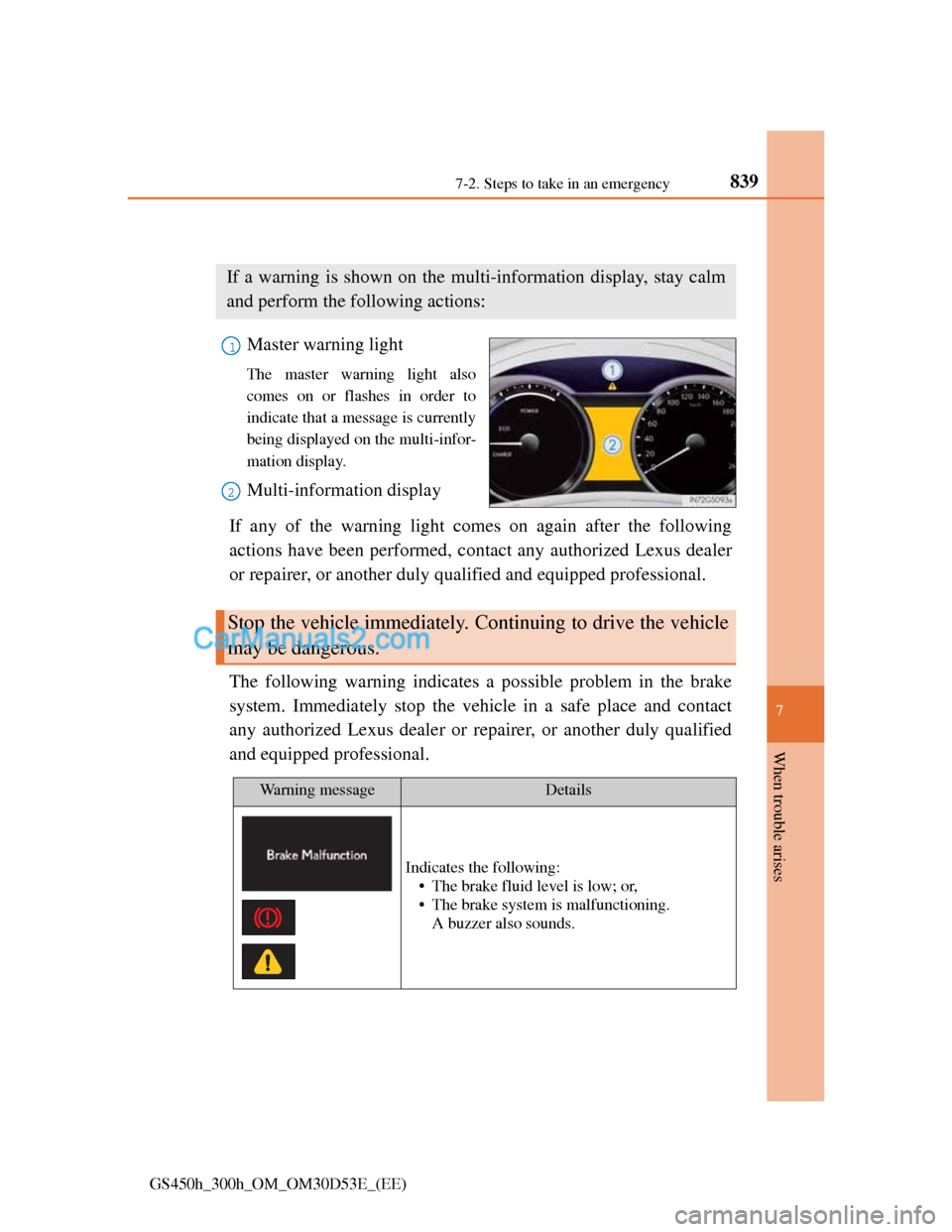
If a warning message is displayed
Master warning light
The master warning light also
comes on or flashes in order to
indicate that a message is currently
being displayed on the multi-infor-
mation display.
Multi-information display
If any of the warning light comes on again after the following
actions have been performed, contact any authorized Lexus dealer
or repairer, or another duly qualified and equipped professional.
The following warning indicates a possible problem in the brake
system. Immediately stop the vehicle in a safe place and contact
any authorized Lexus dealer or repairer, or another duly qualified
and equipped professional.
If a warning is shown on the multi-information display, stay calm
and perform the following actions:
1
2
Stop the vehicle immediately. Continuing to drive the vehicle
may be dangerous.
Wa r n i n g m e s s a g eDetails
Indicates the following:
• The brake fluid level is low; or,
• The brake system is malfunctioning.
A buzzer also sounds.
Page 867 of 1014
8407-2. Steps to take in an emergency
GS450h_300h_OM_OM30D53E_(EE)
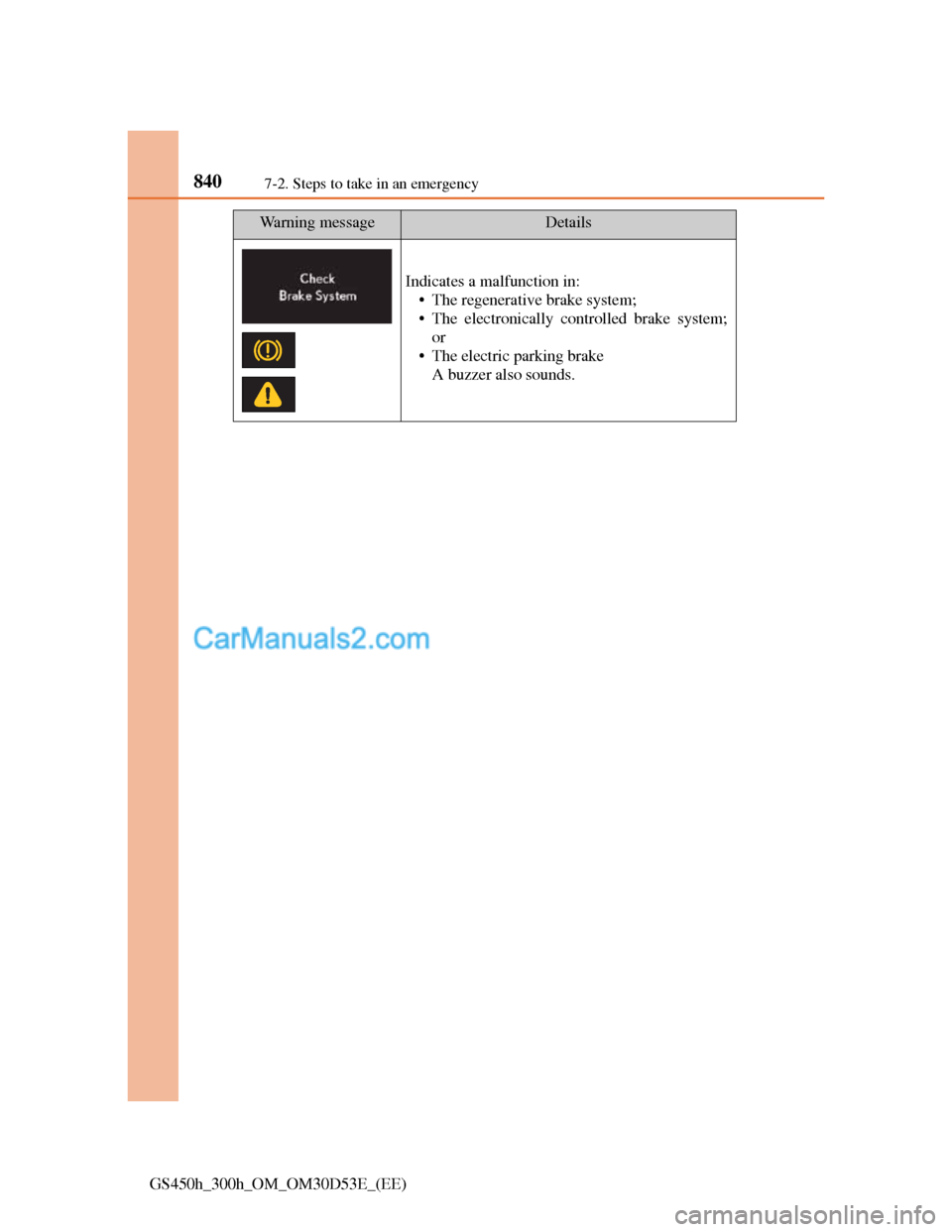
Indicates a malfunction in:
• The regenerative brake system;
• The electronically controlled brake system;
or
• The electric parking brake
A buzzer also sounds.
Wa r n i n g m e s s a g eDetails
Page 870 of 1014
8437-2. Steps to take in an emergency
7
When trouble arises
GS450h_300h_OM_OM30D53E_(EE)
(If equipped)
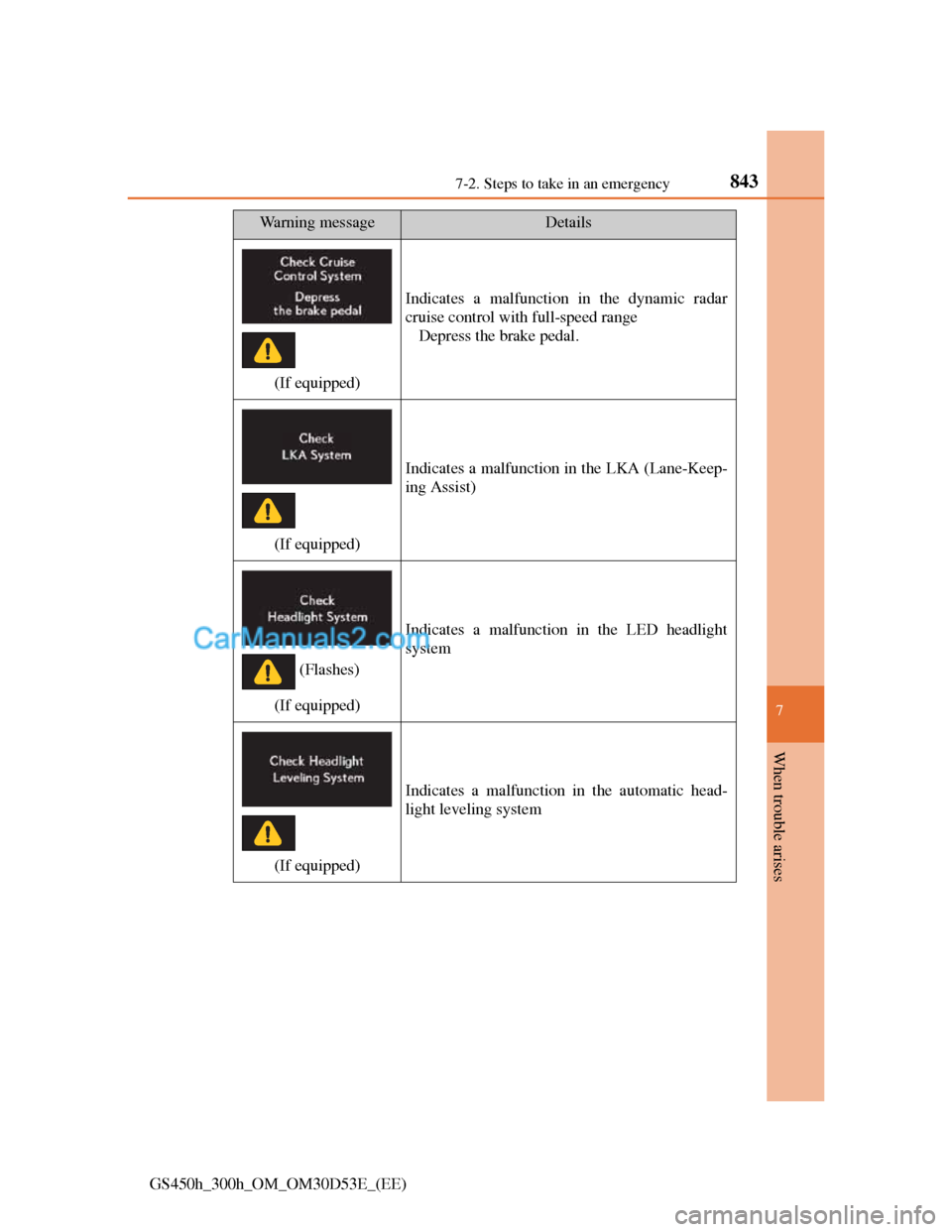
Indicates a malfunction in the dynamic radar
cruise control with full-speed range
Depress the brake pedal.
(If equipped)
Indicates a malfunction in the LKA (Lane-Keep-
ing Assist)
(If equipped)
Indicates a malfunction in the LED headlight
system
(If equipped)
Indicates a malfunction in the automatic head-
light leveling system
Wa r n i n g m e s s a g eDetails
(Flashes)
Page 871 of 1014
8447-2. Steps to take in an emergency
GS450h_300h_OM_OM30D53E_(EE)
(If equipped)
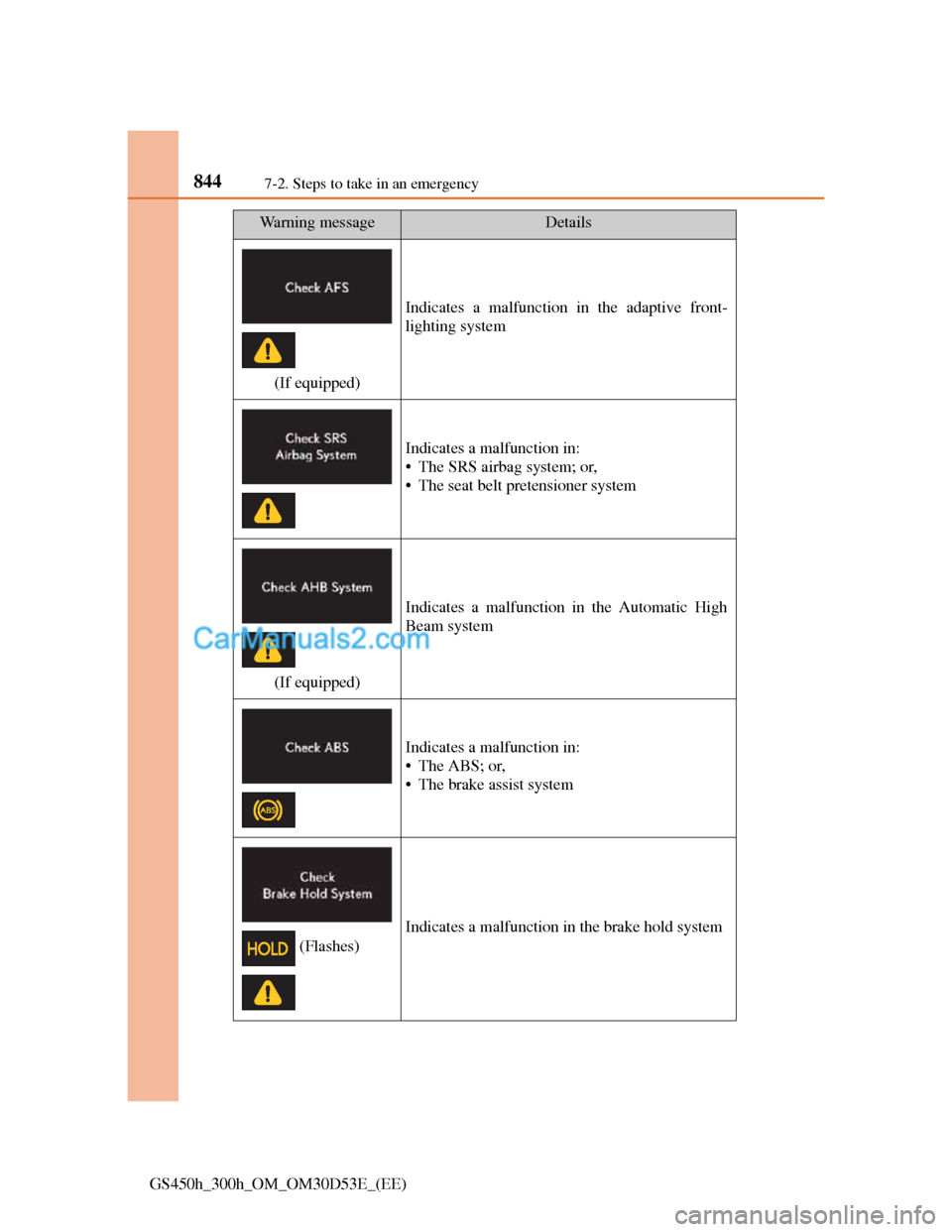
Indicates a malfunction in the adaptive front-
lighting system
Indicates a malfunction in:
• The SRS airbag system; or,
• The seat belt pretensioner system
(If equipped)
Indicates a malfunction in the Automatic High
Beam system
Indicates a malfunction in:
•The ABS; or,
• The brake assist system
Indicates a malfunction in the brake hold system
Wa r n i n g m e s s a g eDetails
(Flashes)
Page 872 of 1014
8457-2. Steps to take in an emergency
7
When trouble arises
GS450h_300h_OM_OM30D53E_(EE)
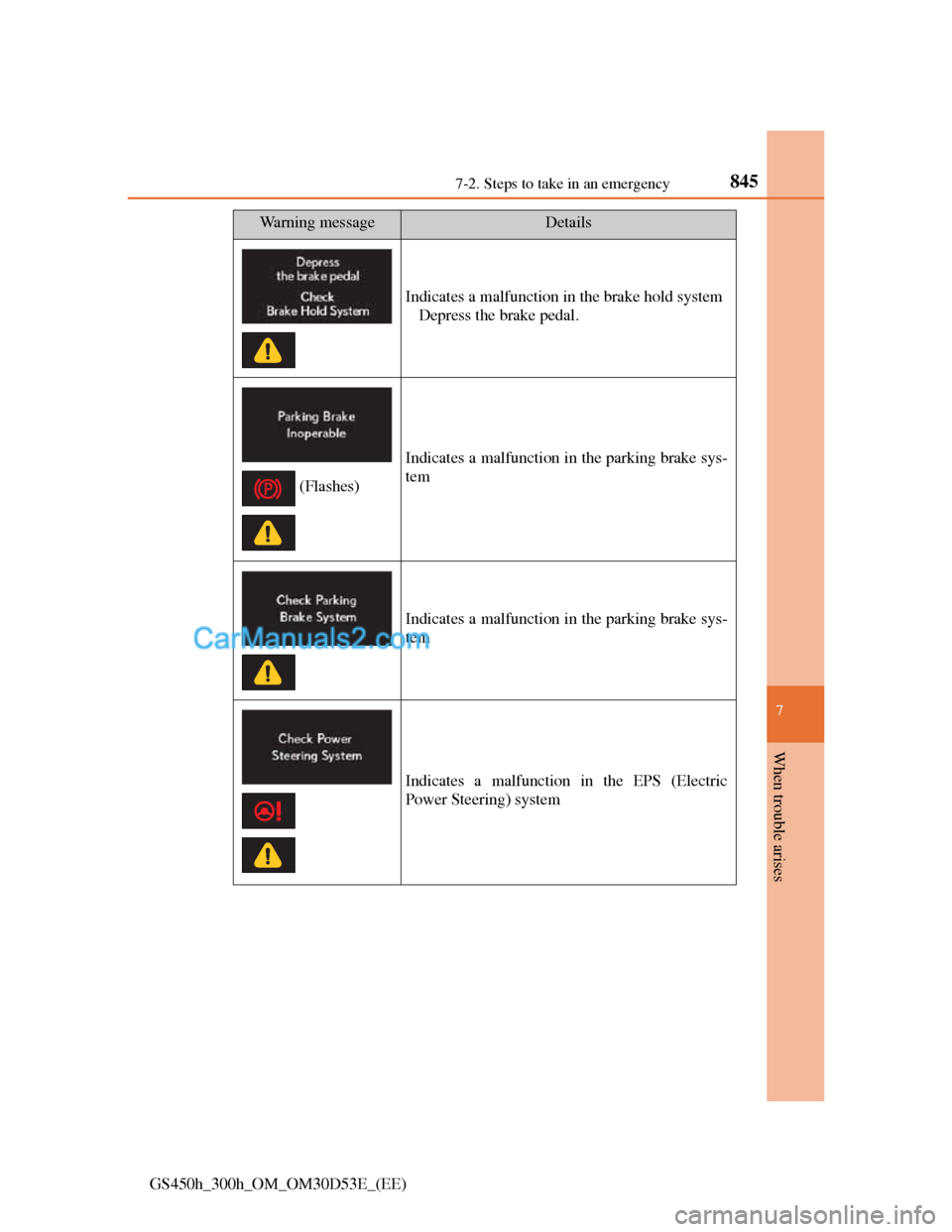
Indicates a malfunction in the brake hold system
Depress the brake pedal.
Indicates a malfunction in the parking brake sys-
tem
Indicates a malfunction in the parking brake sys-
tem
Indicates a malfunction in the EPS (Electric
Power Steering) system
Wa r n i n g m e s s a g eDetails
(Flashes)
Page 877 of 1014
8507-2. Steps to take in an emergency
GS450h_300h_OM_OM30D53E_(EE)
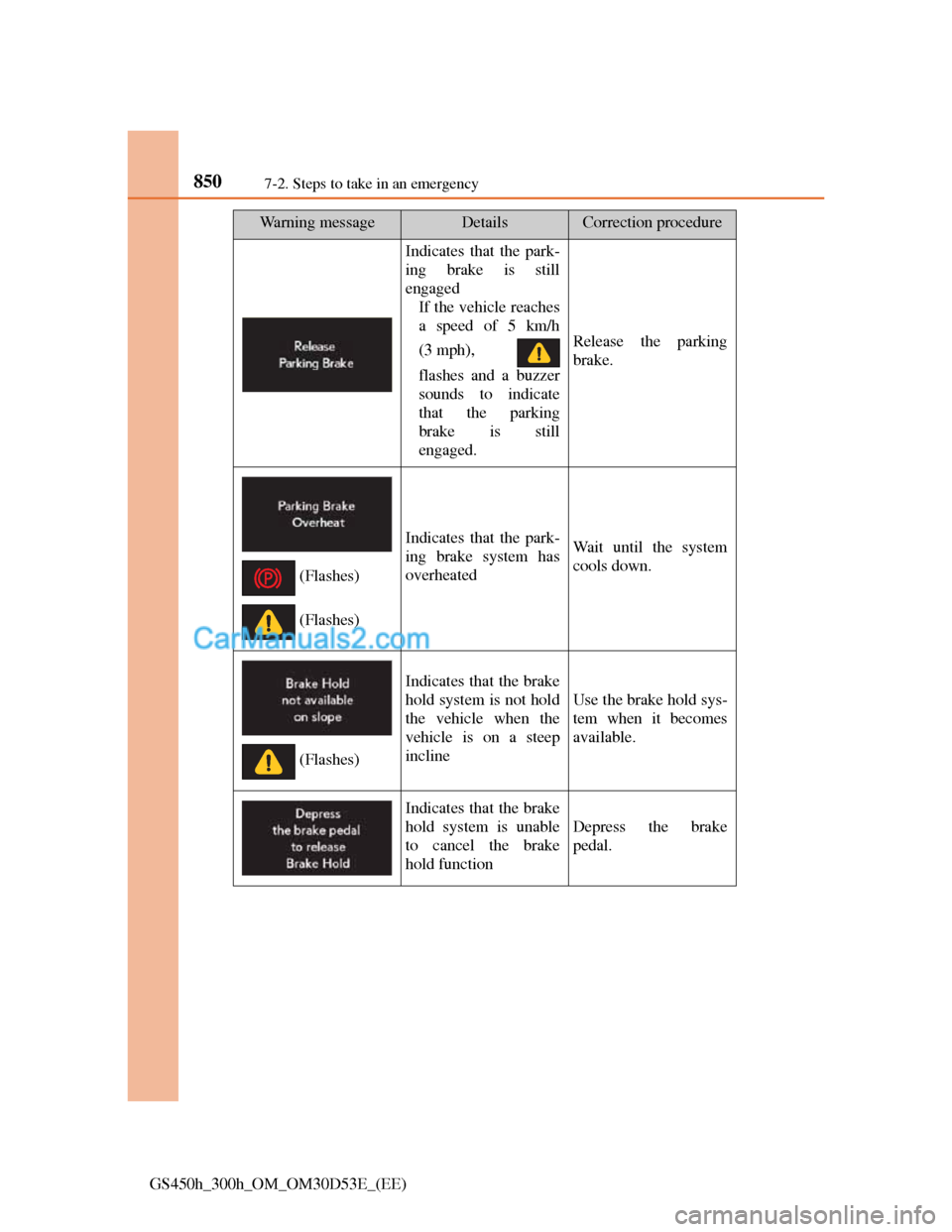
Indicates that the park-
ing brake is still
engaged
If the vehicle reaches
a speed of 5 km/h
(3 mph),
flashes and a buzzer
sounds to indicate
that the parking
brake is still
engaged.
Release the parking
brake.
Indicates that the park-
ing brake system has
overheatedWait until the system
cools down.
Indicates that the brake
hold system is not hold
the vehicle when the
vehicle is on a steep
incline
Use the brake hold sys-
tem when it becomes
available.
Indicates that the brake
hold system is unable
to cancel the brake
hold function
Depress the brake
pedal.
Wa r n i n g m e s s a g eDetailsCorrection procedure
(Flashes)
(Flashes)
(Flashes)
Page 878 of 1014
8517-2. Steps to take in an emergency
7
When trouble arises
GS450h_300h_OM_OM30D53E_(EE)
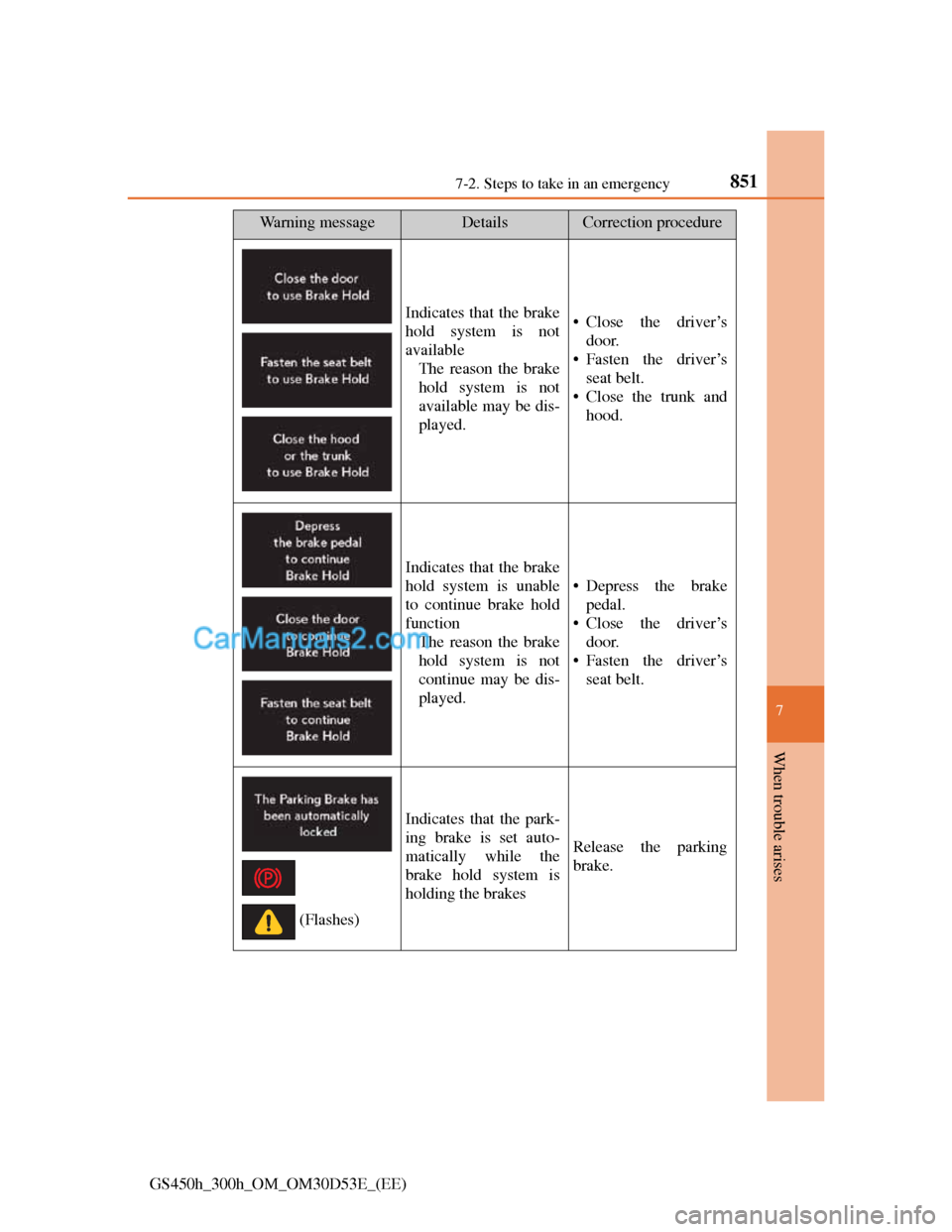
Indicates that the brake
hold system is not
available
The reason the brake
hold system is not
available may be dis-
played.• Close the driver’s
door.
• Fasten the driver’s
seat belt.
• Close the trunk and
hood.
Indicates that the brake
hold system is unable
to continue brake hold
function
The reason the brake
hold system is not
continue may be dis-
played.
• Depress the brake
pedal.
• Close the driver’s
door.
• Fasten the driver’s
seat belt.
Indicates that the park-
ing brake is set auto-
matically while the
brake hold system is
holding the brakes
Release the parking
brake.
Wa r n i n g m e s s a g eDetailsCorrection procedure
(Flashes)
Page 881 of 1014
8547-2. Steps to take in an emergency
GS450h_300h_OM_OM30D53E_(EE)
Wa r n i n g m e s s a g eDetailsCorrection procedure
(If equipped)
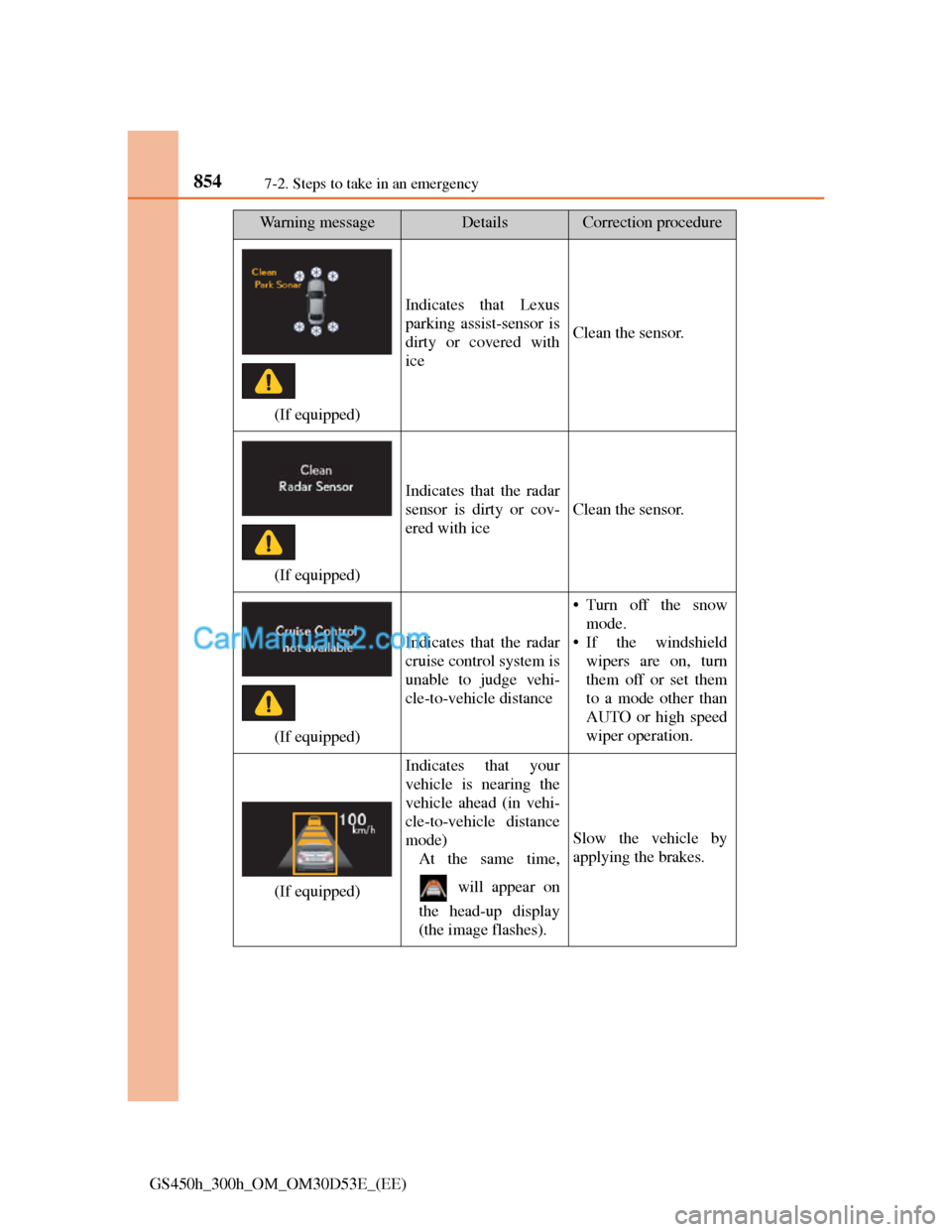
Indicates that Lexus
parking assist-sensor is
dirty or covered with
ice
Clean the sensor.
(If equipped)
Indicates that the radar
sensor is dirty or cov-
ered with ice
Clean the sensor.
(If equipped)
Indicates that the radar
cruise control system is
unable to judge vehi-
cle-to-vehicle distance
• Turn off the snow
mode.
• If the windshield
wipers are on, turn
them off or set them
to a mode other than
AUTO or high speed
wiper operation.
(If equipped)
Indicates that your
vehicle is nearing the
vehicle ahead (in vehi-
cle-to-vehicle distance
mode)
At the same time,
will appear on
the head-up display
(the image flashes).
Slow the vehicle by
applying the brakes.
Page 882 of 1014
8557-2. Steps to take in an emergency
7
When trouble arises
GS450h_300h_OM_OM30D53E_(EE)
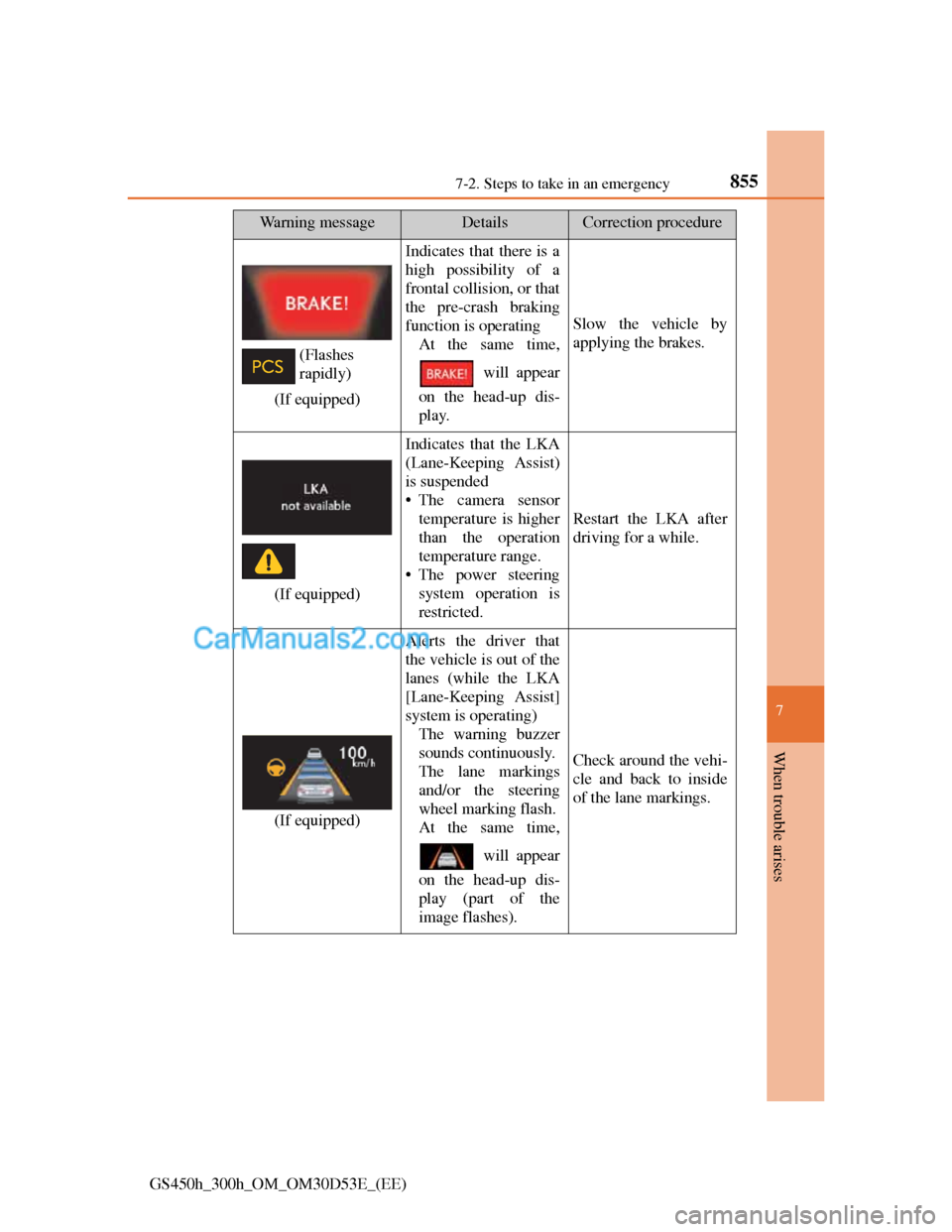
(If equipped)
Indicates that there is a
high possibility of a
frontal collision, or that
the pre-crash braking
function is operating
At the same time,
will appear
on the head-up dis-
play.
Slow the vehicle by
applying the brakes.
(If equipped)
Indicates that the LKA
(Lane-Keeping Assist)
is suspended
• The camera sensor
temperature is higher
than the operation
temperature range.
• The power steering
system operation is
restricted.
Restart the LKA after
driving for a while.
(If equipped)
Alerts the driver that
the vehicle is out of the
lanes (while the LKA
[Lane-Keeping Assist]
system is operating)
The warning buzzer
sounds continuously.
The lane markings
and/or the steering
wheel marking flash.
At the same time,
will appear
on the head-up dis-
play (part of the
image flashes).
Check around the vehi-
cle and back to inside
of the lane markings.
Wa r n i n g m e s s a g eDetailsCorrection procedure
(Flashes
rapidly)
Page 886 of 1014
8597-2. Steps to take in an emergency
7
When trouble arises
GS450h_300h_OM_OM30D53E_(EE)
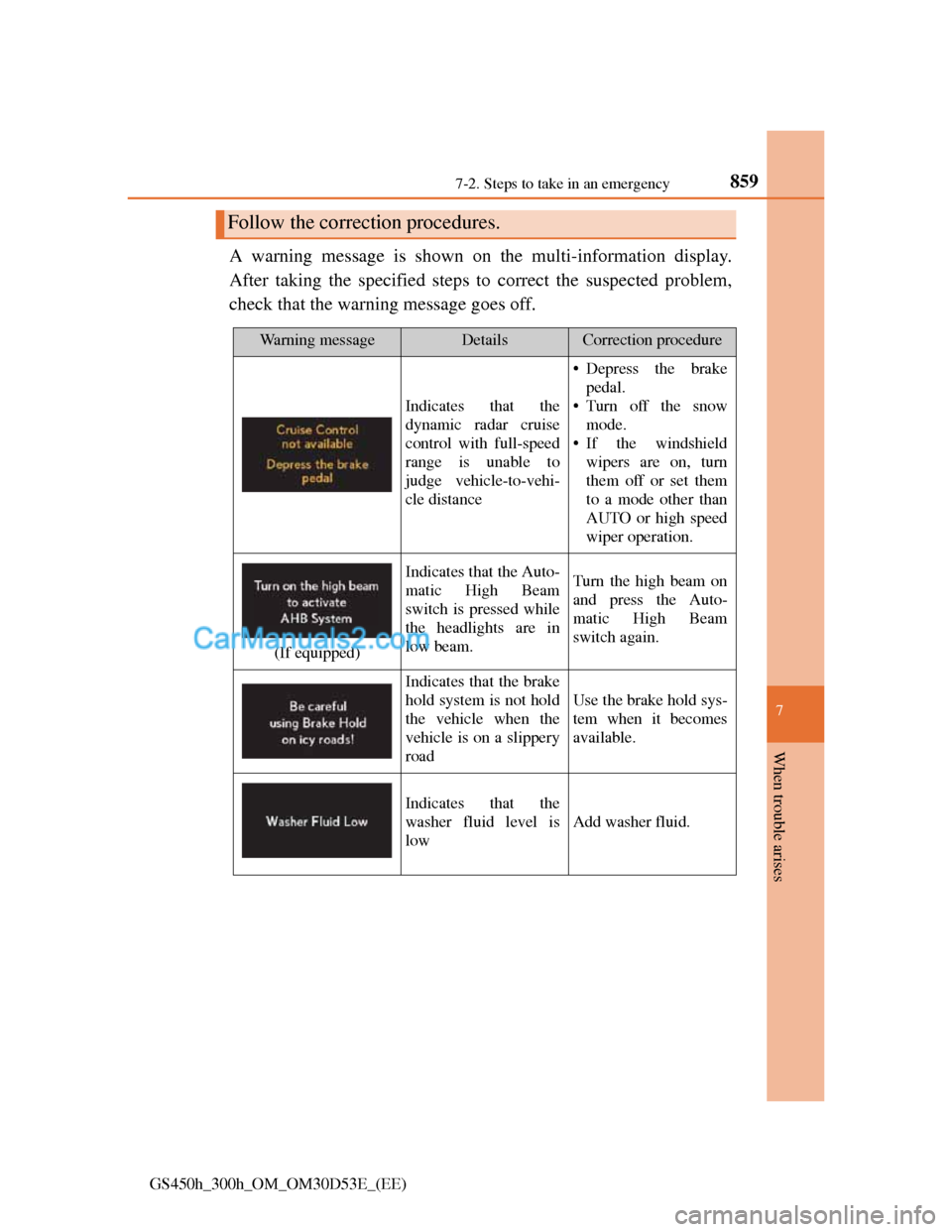
A warning message is shown on the multi-information display.
After taking the specified steps to correct the suspected problem,
check that the warning message goes off.
Follow the correction procedures.
Wa r n i n g m e s s a g eDetailsCorrection procedure
Indicates that the
dynamic radar cruise
control with full-speed
range is unable to
judge vehicle-to-vehi-
cle distance
• Depress the brake
pedal.
• Turn off the snow
mode.
• If the windshield
wipers are on, turn
them off or set them
to a mode other than
AUTO or high speed
wiper operation.
(If equipped)
Indicates that the Auto-
matic High Beam
switch is pressed while
the headlights are in
low beam.Turn the high beam on
and press the Auto-
matic High Beam
switch again.
Indicates that the brake
hold system is not hold
the vehicle when the
vehicle is on a slippery
road
Use the brake hold sys-
tem when it becomes
available.
Indicates that the
washer fluid level is
low
Add washer fluid.