ESP Lexus GS300h 2013 User Guide
[x] Cancel search | Manufacturer: LEXUS, Model Year: 2013, Model line: GS300h, Model: Lexus GS300h 2013Pages: 1014
Page 209 of 1014
2083-3. Adjusting the seats
GS450h_300h_OM_OM30D53E_(EE)
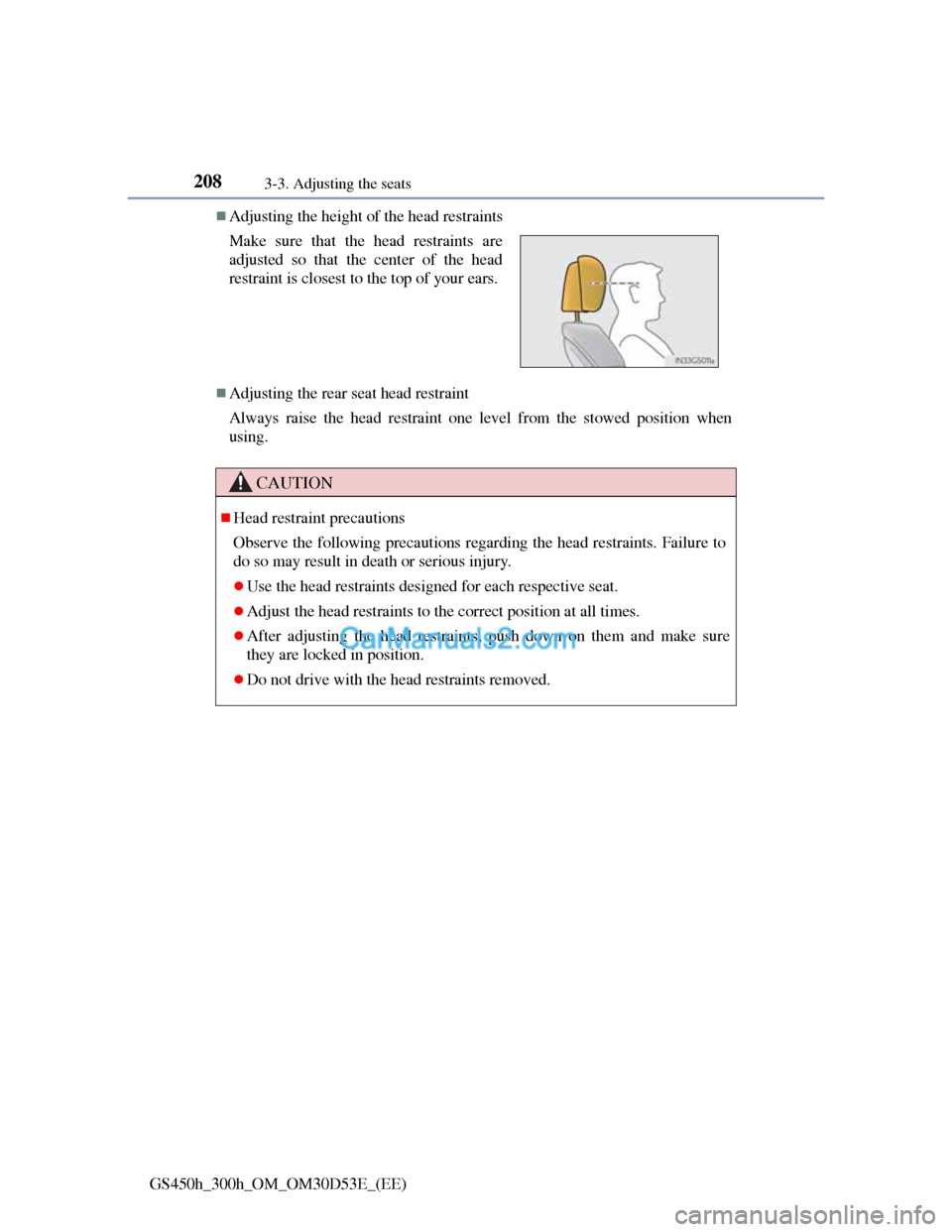
Adjusting the height of the head restraints
Adjusting the rear seat head restraint
Always raise the head restraint one level from the stowed position when
using. Make sure that the head restraints are
adjusted so that the center of the head
restraint is closest to the top of your ears.
CAUTION
Head restraint precautions
Observe the following precautions regarding the head restraints. Failure to
do so may result in death or serious injury.
Use the head restraints designed for each respective seat.
Adjust the head restraints to the correct position at all times.
After adjusting the head restraints, push down on them and make sure
they are locked in position.
Do not drive with the head restraints removed.
Page 212 of 1014
2093-4. Adjusting the steering wheel and mirrors
3
Operation of each component
GS450h_300h_OM_OM30D53E_(EE)
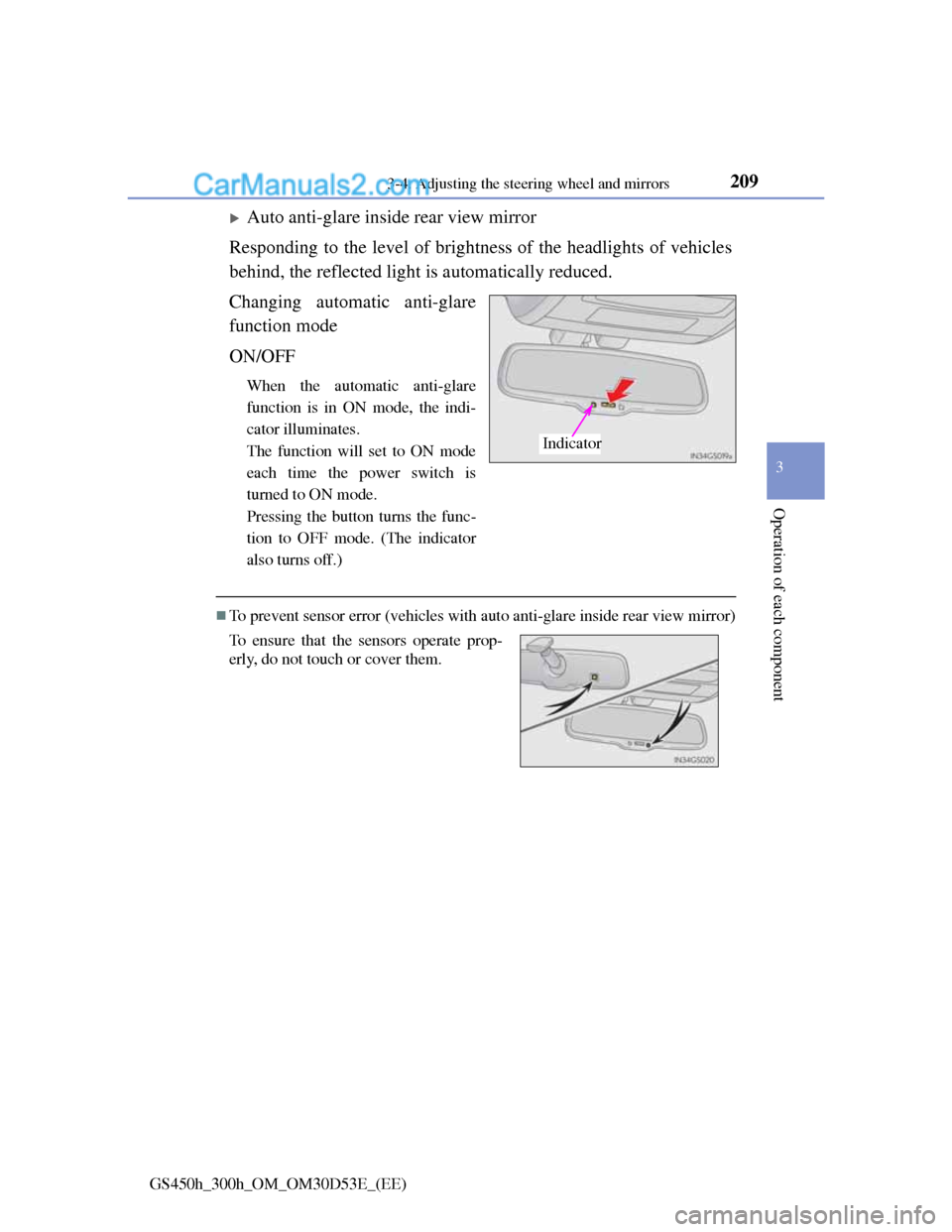
Auto anti-glare inside rear view mirror
Responding to the level of brightness of the headlights of vehicles
behind, the reflected light is automatically reduced.
Changing automatic anti-glare
function mode
ON/OFF
When the automatic anti-glare
function is in ON mode, the indi-
cator illuminates.
The function will set to ON mode
each time the power switch is
turned to ON mode.
Pressing the button turns the func-
tion to OFF mode. (The indicator
also turns off.)
To prevent sensor error (vehicles with auto anti-glare inside rear view mirror)
Indicator
To ensure that the sensors operate prop-
erly, do not touch or cover them.
Page 229 of 1014
2264-1. Before driving
GS450h_300h_OM_OM30D53E_(EE)
Make sure that the parking brake is set and shift the shift lever to
D.
Gently depress the accelerator pedal.
Release the parking brake.
When starting off on a uphill
The brake hold is available. (P. 269)
Driving in the rain
Drive carefully when it is raining, because visibility will be reduced, the
windows may become fogged-up, and the road will be slippery.
Drive carefully when it starts to rain, because the road surface will be espe-
cially slippery.
Refrain from high speeds when driving on an expressway in the rain,
because there may be a layer of water between the tires and the road sur-
face, preventing the steering and brakes from operating properly.
Breaking in your new Lexus
To extend the life of the vehicle, observing the following precautions is rec-
ommended:
For the first 300 km (186 miles):
Avoid sudden stops.
For the first 800 km (500 miles):
Do not tow a trailer.
For the first 1000 km (621 miles):
• Do not drive at extremely high speeds.
• Avoid sudden acceleration.
• Do not drive continuously in low gears.
• Do not drive at a constant speed for extended periods.
Starting off on a steep uphill
1
2
3
Page 231 of 1014
2284-1. Before driving
GS450h_300h_OM_OM30D53E_(EE)
CAUTION
Observe the following precautions.
Failure to do so may result in death or serious injury.
When starting the vehicle
Always keep your foot on the brake pedal while stopped with the hybrid
system operating. This prevents the vehicle from creeping.
When driving the vehicle
Do not drive if you are unfamiliar with the location of the brake and accel-
erator pedals to avoid depressing the wrong pedal.
• Accidentally depressing the accelerator pedal instead of the brake pedal
will result in sudden acceleration that may lead to an accident.
• When backing up, you may twist your body around, leading to a diffi-
culty in operating the pedals. Make sure to operate the pedals properly.
• Make sure to keep a correct driving posture even when moving the
vehicle only slightly. This allows you to depress the brake and acceler-
ator pedals properly.
• Depress the brake pedal using your right foot. Depressing the brake
pedal using your left foot may delay response in an emergency, result-
ing in an accident.
The driver should pay extra attention to pedestrians when the vehicle is
powered only by the electric motor (traction motor). Because there is no
engine noise, the pedestrians may misjudge the vehicle’s movement.
Do not drive the vehicle over or stop the vehicle near flammable materi-
als.
The exhaust system and exhaust gases can be extremely hot. These hot
parts may cause a fire if there is any flammable material nearby.
Page 248 of 1014
2454-1. Before driving
4
Driving
GS450h_300h_OM_OM30D53E_(EE)
Increasing vehicle-to-vehicle distance
At a speed of 10 km/h (6 mph), the distance to the vehicle run-
ning ahead of you should be equivalent to or greater than the
combined length of your vehicle and trailer. Avoid sudden brak-
ing that may cause skidding. Otherwise, the vehicle may spin out
of control. This is especially true when driving on wet or slippery
road surfaces.
Sudden acceleration/steering input/cornering
Executing sharp turns when towing may result in the trailer col-
liding with your vehicle. Decelerate well in advance when
approaching turns and take them slowly and carefully to avoid
sudden braking.
Important points regarding turning
The wheels of the trailer will travel closer to the inside of the
curve than the wheels of the vehicle. To make allowance for this,
take the turns wider than you would normally do.
Important points regarding stability
Vehicle movement resulting from uneven road surfaces and
strong crosswinds will affect handling. The vehicle may also be
rocked by passing buses or large trucks. Frequently check behind
when moving alongside such vehicles. As soon as such vehicle
movement occurs, immediately start to decelerate smoothly by
slowly applying the brakes. Always steer the vehicle straight
ahead while braking.
Passing other vehicles
Consider the total combined length of your vehicle and trailer
and ensure that the vehicle-to-vehicle distance is sufficient
before executing lane changes.
Transmission information
Page 316 of 1014

3054-5. Using the driving support system
4
Driving
GS450h_300h_OM_OM30D53E_(EE)
Pressing the button changes the
vehicle-to-vehicle distance as
follows:
Long
Medium
Short
The vehicle-to-vehicle distance is
set automatically to long mode
when the power switch is turned to
ON mode.
If a vehicle is running ahead of
you, the preceding vehicle mark
will also be displayed.
Select a distance from the table below. Note that the distances
shown correspond to a vehicle speed of 80 km/h (50 mph). Vehicle-
to-vehicle distance increases/decreases in accordance with vehicle
speed.
Changing the vehicle-to-vehicle distance
Preceding
vehicle
1
2
3
Vehicle-to-vehicle distance settings
Distance optionsVehicle-to-vehicle distance
LongApproximately 50 m (160 ft.)
MediumApproximately 40 m (130 ft.)
ShortApproximately 30 m (100 ft.)
Page 333 of 1014
3224-5. Using the driving support system
GS450h_300h_OM_OM30D53E_(EE)
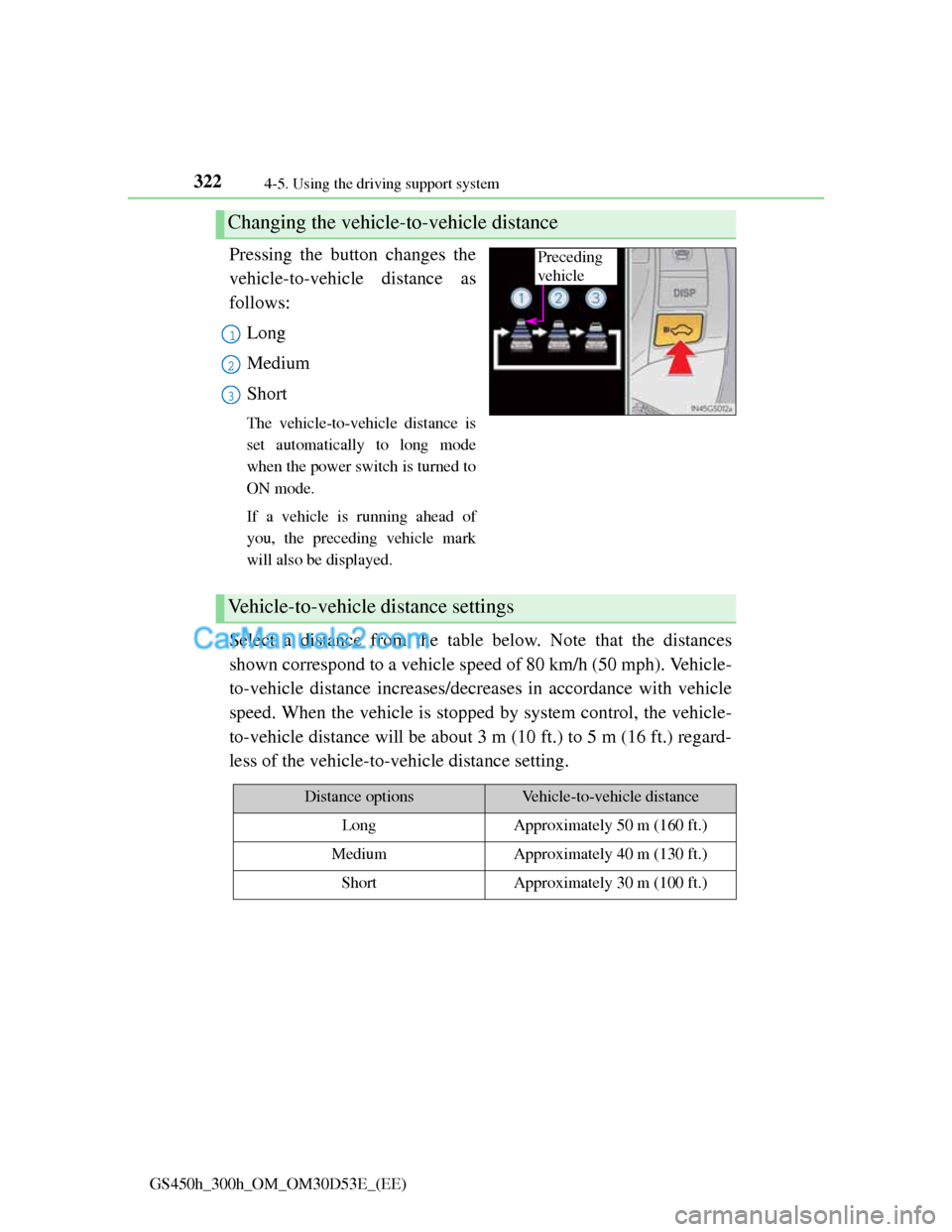
Pressing the button changes the
vehicle-to-vehicle distance as
follows:
Long
Medium
Short
The vehicle-to-vehicle distance is
set automatically to long mode
when the power switch is turned to
ON mode.
If a vehicle is running ahead of
you, the preceding vehicle mark
will also be displayed.
Select a distance from the table below. Note that the distances
shown correspond to a vehicle speed of 80 km/h (50 mph). Vehicle-
to-vehicle distance increases/decreases in accordance with vehicle
speed. When the vehicle is stopped by system control, the vehicle-
to-vehicle distance will be about 3 m (10 ft.) to 5 m (16 ft.) regard-
less of the vehicle-to-vehicle distance setting.
Changing the vehicle-to-vehicle distance
Preceding
vehicle
1
2
3
Vehicle-to-vehicle distance settings
Distance optionsVehicle-to-vehicle distance
LongApproximately 50 m (160 ft.)
MediumApproximately 40 m (130 ft.)
ShortApproximately 30 m (100 ft.)
Page 336 of 1014
3254-5. Using the driving support system
4
Driving
GS450h_300h_OM_OM30D53E_(EE)
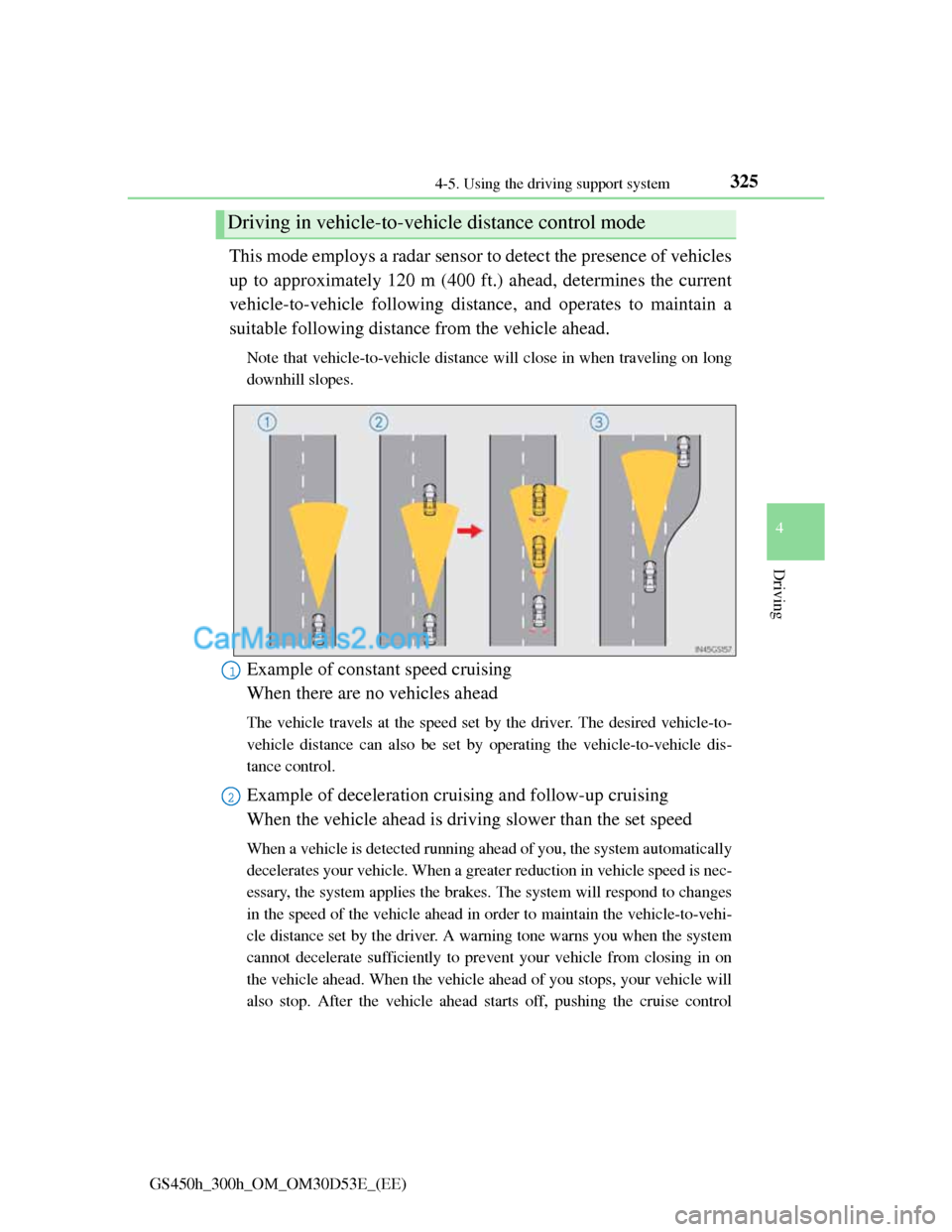
This mode employs a radar sensor to detect the presence of vehicles
up to approximately 120 m (400 ft.) ahead, determines the current
vehicle-to-vehicle following distance, and operates to maintain a
suitable following distance from the vehicle ahead.
Note that vehicle-to-vehicle distance will close in when traveling on long
downhill slopes.
Example of constant speed cruising
When there are no vehicles ahead
The vehicle travels at the speed set by the driver. The desired vehicle-to-
vehicle distance can also be set by operating the vehicle-to-vehicle dis-
tance control.
Example of deceleration cruising and follow-up cruising
When the vehicle ahead is driving slower than the set speed
When a vehicle is detected running ahead of you, the system automatically
decelerates your vehicle. When a greater reduction in vehicle speed is nec-
essary, the system applies the brakes. The system will respond to changes
in the speed of the vehicle ahead in order to maintain the vehicle-to-vehi-
cle distance set by the driver. A warning tone warns you when the system
cannot decelerate sufficiently to prevent your vehicle from closing in on
the vehicle ahead. When the vehicle ahead of you stops, your vehicle will
also stop. After the vehicle ahead starts off, pushing the cruise control
Driving in vehicle-to-vehicle distance control mode
1
2
Page 356 of 1014
345
4 4-5. Using the driving support system
Driving
GS450h_300h_OM_OM30D53E_(EE)
When driving on roads that are branching or merging
When driving on a road surface that is wet due to rain, previous rainfall,
standing water, etc.
When the vehicle experiences strong up-and-down motion such as when
driving on an extremely rough road or on a seam in the pavement
When headlight brightness at nighttime is reduced due to dirt on the lenses,
or when the headlights are misaligned
When driving with a strong crosswind
When driving on winding roads or roads that are uneven
When driving on rough or unpaved roads
When changing the tires
Depending on the tires used, sufficient performance may not be maintain-
able.
Warning messages for LKA
Warning messages are used to indicate a system malfunction or to inform the
driver of the need for caution while driving. (P. 842, 854)
CAUTION
Before using the LKA system
Do not rely solely on the LKA system. The LKA system does not drive the
vehicle automatically, nor does it reduce the amount of care you need to
take. As such, the driver must always assume full responsibility for under-
standing his/her surroundings, for operating the steering wheel to correct
the driving line, and for driving safely.
Inappropriate or negligent driving could lead to an accident.
To avoid operating the LKA by mistake
Switch the LKA off using the “LKA” switch when not in use.
Page 366 of 1014
3554-5. Using the driving support system
4
Driving
GS450h_300h_OM_OM30D53E_(EE)
Buzzer operation and distance to an obstacle
A buzzer sounds when the sensors are operating.
The buzzer beeps faster as the vehicle approaches an obstacle.
When the vehicle comes within the following distance of the
obstacle, the buzzer sounds continuously:
• Front center sensors: Approximately 30 cm (1.0 ft.)
• Corner sensors: Approximately 30 cm (1.0 ft.)
• Rear center sensors: Approximately 35 cm (1.1 ft.)
When 2 or more obstacles are detected simultaneously, the
buzzer system responds to the nearest obstacle. If one or both
come within the above distances, the beep will repeat a long
tone, followed by fast beeps.
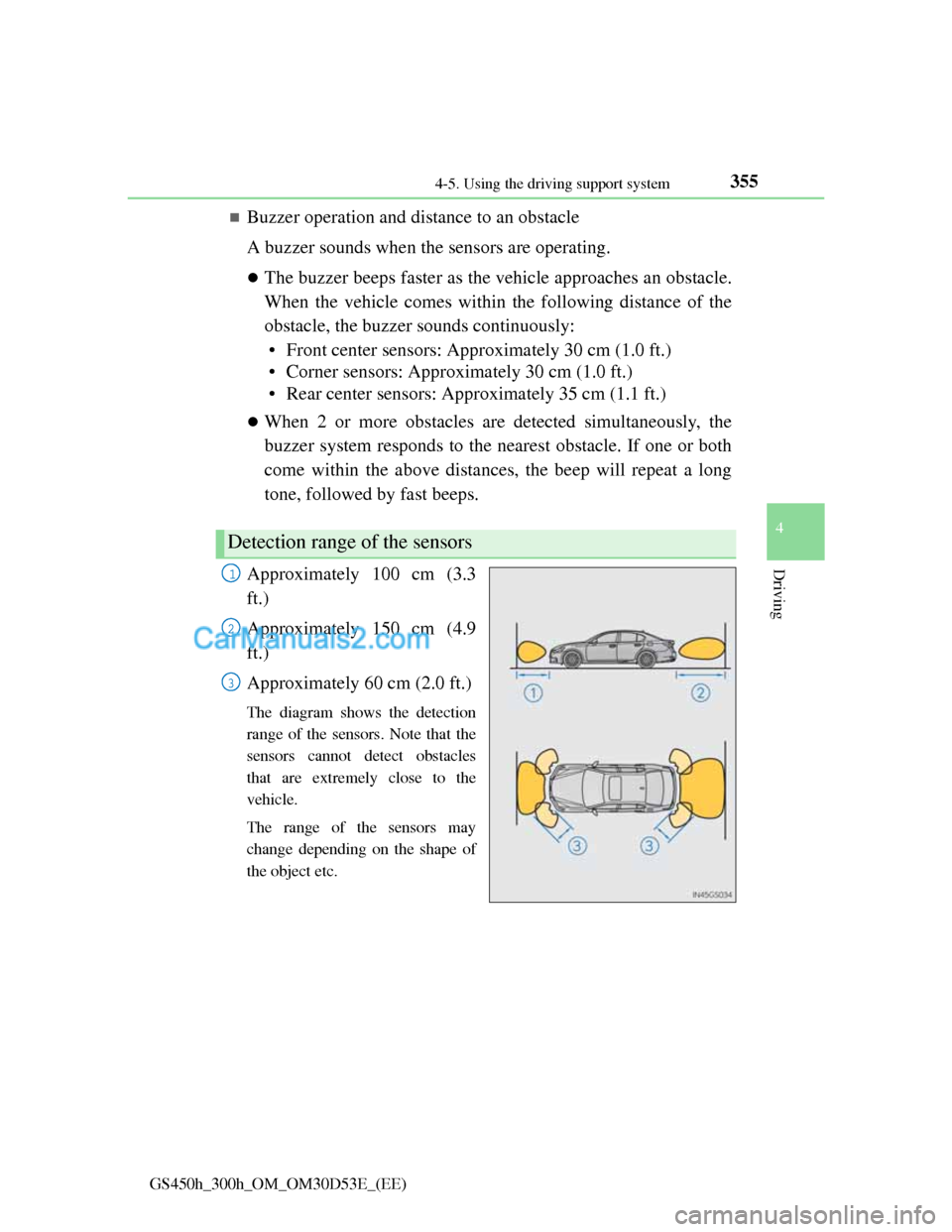
Approximately 100 cm (3.3
ft.)
Approximately 150 cm (4.9
ft.)
Approximately 60 cm (2.0 ft.)
The diagram shows the detection
range of the sensors. Note that the
sensors cannot detect obstacles
that are extremely close to the
vehicle.
The range of the sensors may
change depending on the shape of
the object etc.
Detection range of the sensors
1
2
3