alarm Lexus GS300h 2013 User Guide
[x] Cancel search | Manufacturer: LEXUS, Model Year: 2013, Model line: GS300h, Model: Lexus GS300h 2013Pages: 1014
Page 153 of 1014
1523-2. Opening, closing and locking the doors and trunk
GS450h_300h_OM_OM30D53E_(EE)
Note for locking the doors (vehicles with entry function)
Touching the door lock sensor while wearing gloves may delay or prevent
lock operation. Remove the gloves and touch the lock sensor again.
If the door handle becomes wet while the electronic key is within the effec-
tive range, the door may lock and unlock repeatedly. In that case, follow the
following correction procedures to wash the vehicle:
• Place the electronic key in a location 2 m (6 ft.) or more away from the
vehicle. (Take care to ensure that the key is not stolen.)
• Set the electronic key to battery-saving mode to disable the smart entry
& start system. (P. 149)
If the electronic key is inside the vehicle and a door handle becomes wet
during a car wash, a message may be shown on the multi-information dis-
play and a buzzer will sound outside the vehicle. To turn off the alarm, lock
all the doors.
The lock sensor may not work properly if it comes into contact with ice,
snow, mud, etc. Clean the lock sensor and attempt to operate it again, or use
the lock sensor on the lower part of the door handle.
Fingernails may scrape against the door during operation of the door han-
dle. Be careful not to injure fingernails or damage the surface of the door.
Note for the unlocking function (vehicles with entry function)
A sudden approach to the effective range or door handle may prevent the
doors from being unlocked. In this case, return the door handle to the origi-
nal position and check that the doors unlock before pulling the door handle
again.
Gripping the door handle when wearing a glove may not unlock the door.
If the door handle becomes wet while the electronic key is within the effec-
tive range, the door may lock and unlock repeatedly. In that case, follow the
following correction procedures to wash the vehicle:
• Place the electronic key in a location 2 m (6 ft.) or more away from the
vehicle. (Take care to ensure that the key is not stolen.)
• Set the electronic key to battery-saving mode to disable the smart entry
& start system. (P. 149)
If there is another electronic key in the detection area, it may take slightly
longer to unlock the doors after the door handle is gripped.
Fingernails may scrape against the door during operation of the door han-
dle. Be careful not to injure fingernails or damage the surface of the door.
Page 154 of 1014
1533-2. Opening, closing and locking the doors and trunk
3
Operation of each component
GS450h_300h_OM_OM30D53E_(EE)
Note for the push-start function
Even when the electronic key is within the effective range (detection areas),
the system may not operate properly when the electronic key is on the
instrument panel, rear package tray or floor, or in the door pockets or glove
box when the hybrid system is started or power switch modes are changed.
Even if the electronic key is not inside the vehicle, it may be possible to
start the hybrid system if the electronic key is near the window.
When the vehicle is not driven for extended periods
Vehicles with entry function: To prevent theft of the vehicle, do not leave
the electronic key within 2 m (6 ft.) of the vehicle.
The smart entry & start system can be deactivated in advance. (P. 942)
Alarm (if equipped)
Using the smart entry & start system to lock the doors will set the alarm sys-
tem.
(P. 97)
To operate the system properly
Make sure to carry the electronic key when operating the system. Do not get
the electronic key too close to the vehicle when operating the system from
the outside of the vehicle.
Depending on the position and holding condition of the electronic key, the
key may not be detected correctly and the system may not operate properly.
(The alarm may go off accidentally, or the door lock prevention function
may not operate.)
Do not leave the electronic key inside the luggage compartment.
The key confinement prevention function may not operate, depending on
the location of the key (close to a spare tire [if equipped], the inside edge of
the luggage compartment), conditions (inside a metal bag, close to metallic
objects) and the radio waves in the surrounding area. (P. 189)
If the smart entry & start system does not operate properly
Locking and unlocking the doors and opening the trunk: Use the mechani-
cal key.
(P. 908)
Starting the hybrid system: P. 9 0 9
Page 155 of 1014
1543-2. Opening, closing and locking the doors and trunk
GS450h_300h_OM_OM30D53E_(EE)
Electronic key battery depletion
The standard battery life is 1 to 2 years. (The card key battery life is about a
year and a half.)
If the battery becomes low, an alarm will sound in the cabin when the
hybrid system stops. (P. 867)
As the electronic key always receives radio waves, the battery will become
depleted even if the electronic key is not used. The following symptoms
indicate that the electronic key battery may be depleted. Replace the battery
when necessary. (P. 777)
• The smart entry & start system or the wireless remote control does not
operate.
• The detection area becomes smaller.
• The LED indicator on the key surface does not turn on.
To avoid serious deterioration, do not leave the electronic key within 1 m (3
ft.) of the following electrical appliances that produce a magnetic field:
•TVs
• Personal computers
• Cellular phones, cordless phones and battery chargers
• Recharging cellular phones or cordless phones
•Table lamps
• Induction cookers
When the electronic key battery is fully depleted
P. 7 7 7
Customization
Settings (e. g. smart entry & start system) can be changed.
(Customizable features: P. 942)
If the smart entry & start system has been deactivated in a customized setting
Locking and unlocking the doors and opening the trunk:
Use the wireless remote control or mechanical key. (P. 168, 908)
Starting the hybrid system and changing power switch modes:P. 9 0 9
Stopping the hybrid system: P. 2 4 7
Page 170 of 1014
1693-2. Opening, closing and locking the doors and trunk
3
Operation of each component
GS450h_300h_OM_OM30D53E_(EE)
Door lock buzzer
If an attempt to lock the doors is made when a door is not fully closed, a
buzzer sounds continuously for 5 seconds. Fully close the door to stop the
buzzer, and lock the vehicle once more.
Security feature
P. 1 4 3
Alarm (if equipped)
Using the wireless remote control to lock the doors will set the alarm system.
(P. 97)
Conditions affecting operation
P. 1 5 0
If the wireless remote control does not operate properly
Locking and unlocking the doors and opening the trunk: Use the mechanical
key.
(P. 908)
Electronic key battery depletion
P. 1 5 4
When the electronic key battery is fully depleted
P. 7 7 7
Confirmation of the registered key number
The number of keys already registered to the vehicle can be confirmed. Ask
any authorized Lexus dealer or repairer, or another duly qualified and
equipped professional for details.
Customization
Settings (e.g. wireless remote control system) can be changed.
(Customizable features: P. 942)
Page 190 of 1014
1893-2. Opening, closing and locking the doors and trunk
3
Operation of each component
GS450h_300h_OM_OM30D53E_(EE)
Trunk light
The trunk light turns on when the trunk is opened.
Trunk easy closer (vehicles with power trunk lid)
In the event that the trunk lid is left slightly open, the trunk easy closer will
automatically close it to the fully closed position.
Function to prevent the trunk being locked with the electronic key inside
When all doors are being locked, closing the trunk lid with the electronic
key left inside the trunk will sound an alarm.
In this case, the trunk lid can be opened pressing the trunk release button on
the trunk lid.
Even when the spare electronic key is put in the trunk with all the doors
locked, the key confinement prevention function can be activated so the
trunk can be opened. In order to prevent theft, take all electronic keys with
you when leaving the vehicle.
Even when the electronic key is put in the trunk with all the doors are
locked, the key may not be detected depending on the places and the sur-
rounding radio wave conditions. In this case, the key confinement preven-
tion function cannot be activated, causing the doors to lock when the trunk
is closed. Make sure to check where the key is before closing the trunk.
The key confinement prevention function cannot be activated if any one of
the doors is unlocked. In this case, open the trunk using the trunk opener.
Overload protection function (vehicles with power trunk lid)
The trunk lid will not operate when excessive load is present on the top of the
trunk lid.
Fall-down protection function (vehicles with power trunk lid)
While the trunk lid is opening automatically, applying excessive force to it
will stop the opening operation to prevent the trunk lid from rapidly falling
down.
Page 428 of 1014
4174-5. Using the driving support system
4
Driving
GS450h_300h_OM_OM30D53E_(EE)
CAUTION
Cautions regarding the assist contents of the system
By means of alarms and brake control, the pre-crash safety system is
intended to assist the driver in avoiding collisions through the process of
LOOK-JUDGE-ACT. There are limits to the degree of assistance the sys-
tem can provide, so please keep in mind the following important points.
Assisting the driver in watching the road
The pre-crash safety system is only able to detect obstacles directly in
front of the vehicle, and only within a limited range. It is not a mechanism
that allows careless or inattentive driving, and it is not a system that can
assist the driver in low-visibility conditions. It is still necessary for the
driver to pay close attention to the vehicle’s surroundings.
Assisting the driver in making correct judgment
When attempting to estimate the possibility of a collision, the only data
available to the pre-crash safety system is that from obstacles it has
detected directly in front of the vehicle. Therefore, it is absolutely neces-
sary for the driver to remain vigilant and to determine whether or not there
is a possibility of collision in any given situation.
Assisting the driver in taking action
The pre-crash safety system’s braking assist feature is designed to help
reduce the severity of a collision, and so only acts when the system has
judged that a collision is unavoidable. This system by itself is not capable
of automatically avoiding a collision or bringing the vehicle to a stop
safely. For this reason, when encountering a dangerous situation the driver
must take direct and immediate action in order to ensure the safety of all
involved.
NOTICE
Precautions for cleaning the driver monitor sensor
Gently wipe the sensor with a soft cloth to prevent damage.
Wipe any excess dirt with a cloth dampened with neutral detergent, all liq-
uids having been wringed out of the cloth. After that, wipe again with a
dry cloth.
Do not use benzene, thinner, glass cleaners, wax, etc.
Page 939 of 1014
9127-2. Steps to take in an emergency
GS450h_300h_OM_OM30D53E_(EE)
Stopping the hybrid system
Shift the shift lever to P and press the power switch as you normally do when
stopping the hybrid system.
Replacing the key battery
As the above procedure is a temporary measure, it is recommended that the
electronic key battery be replaced immediately when the battery is depleted.
(P. 779)
Alarm (if equipped)
Using the mechanical key to lock the doors will not set the alarm system.
If a door is unlocked using the mechanical key when the alarm system is set,
the alarm may be triggered.
Changing power switch modes
Release the brake pedal and press the power switch in step above.
The hybrid system does not start and modes will be changed each time the
switch is pressed.(P. 247)
When the electronic key does not work properly
Make sure that the smart entry & start system has not been deactivated in
the customization setting. If it is off, turn the function on.
(Customizable features: P. 942)
Check if battery-saving mode is set. If it is set, cancel the function. (P.
149)
3
Page 942 of 1014
915
7 7-2. Steps to take in an emergency
When trouble arises
GS450h_300h_OM_OM30D53E_(EE)
When recharging or replacing the 12-volt battery
For vehicles with an alarm: make sure that the key is not inside the vehicle
when recharging or replacing the 12-volt battery. The key may be locked in
the vehicle if the alarm is activated. (P. 99)
In some cases, it may not be possible to unlock the doors using the smart
entry & start system when the 12-volt battery is discharged. Use the wire-
less remote control or the mechanical key to lock or unlock the doors.
The hybrid system may not start on the first attempt after the 12-volt battery
has recharged but will start normally after the second attempt. This is not a
malfunction.
The power switch mode is memorized by the vehicle. When the 12-volt bat-
tery is reconnected, the system will return to the mode it was in before the
12-volt battery was discharged. Before disconnecting the 12-volt battery,
turn the power switch off.
If you are unsure what mode the power switch was in before the 12-volt
battery discharged, be especially careful when reconnecting the 12-volt bat-
tery.
CAUTION
Avoiding 12-volt battery fires or explosions
Observe the following precautions to prevent accidentally igniting the
flammable gas that may be emitted from the 12-volt battery:
Make sure each jumper cable is connected to the correct terminal and that
it is not unintentionally in contact with any other than the intended termi-
nal.
Do not allow the other end of the jumper cable connected to the “+” termi-
nal to come into contact with any other parts or metal surfaces in the area,
such as brackets or unpainted metal.
Do not allow the + and - clamps of the jumper cables to come into contact
with each other.
Do not smoke, use matches, cigarette lighters or allow open flame near the
12-volt battery.
Page 975 of 1014
943
8 8-2. Customization
Vehicle specifications
GS450h_300h_OM_OM30D53E_(EE)
Vehicles with a navigation system:
Refer to “Navigation System Owner’s Manual”.
Changing by using the “DISP” button
P. 1 1 8
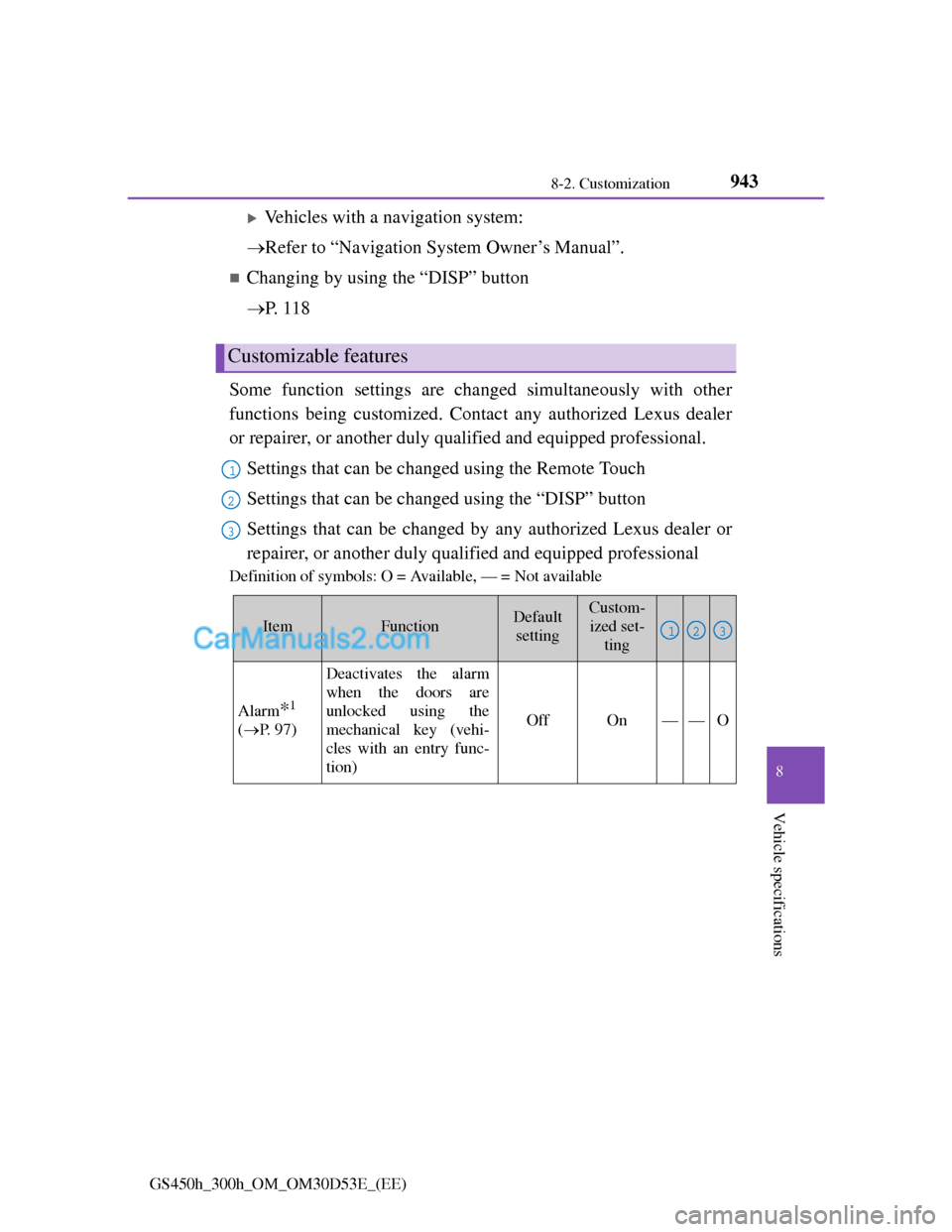
Some function settings are changed simultaneously with other
functions being customized. Contact any authorized Lexus dealer
or repairer, or another duly qualified and equipped professional.
Settings that can be changed using the Remote Touch
Settings that can be changed using the “DISP” button
Settings that can be changed by any authorized Lexus dealer or
repairer, or another duly qualified and equipped professional
Definition of symbols: O = Available, — = Not available
Customizable features
1
2
3
ItemFunctionDefault
settingCustom-
ized set-
ting
Alarm*1
(P. 9 7 )
Deactivates the alarm
when the doors are
unlocked using the
mechanical key (vehi-
cles with an entry func-
tion)
OffOn——O
123
Page 992 of 1014
960What to do if... (Troubleshooting)
GS450h_300h_OM_OM30D53E_(EE)
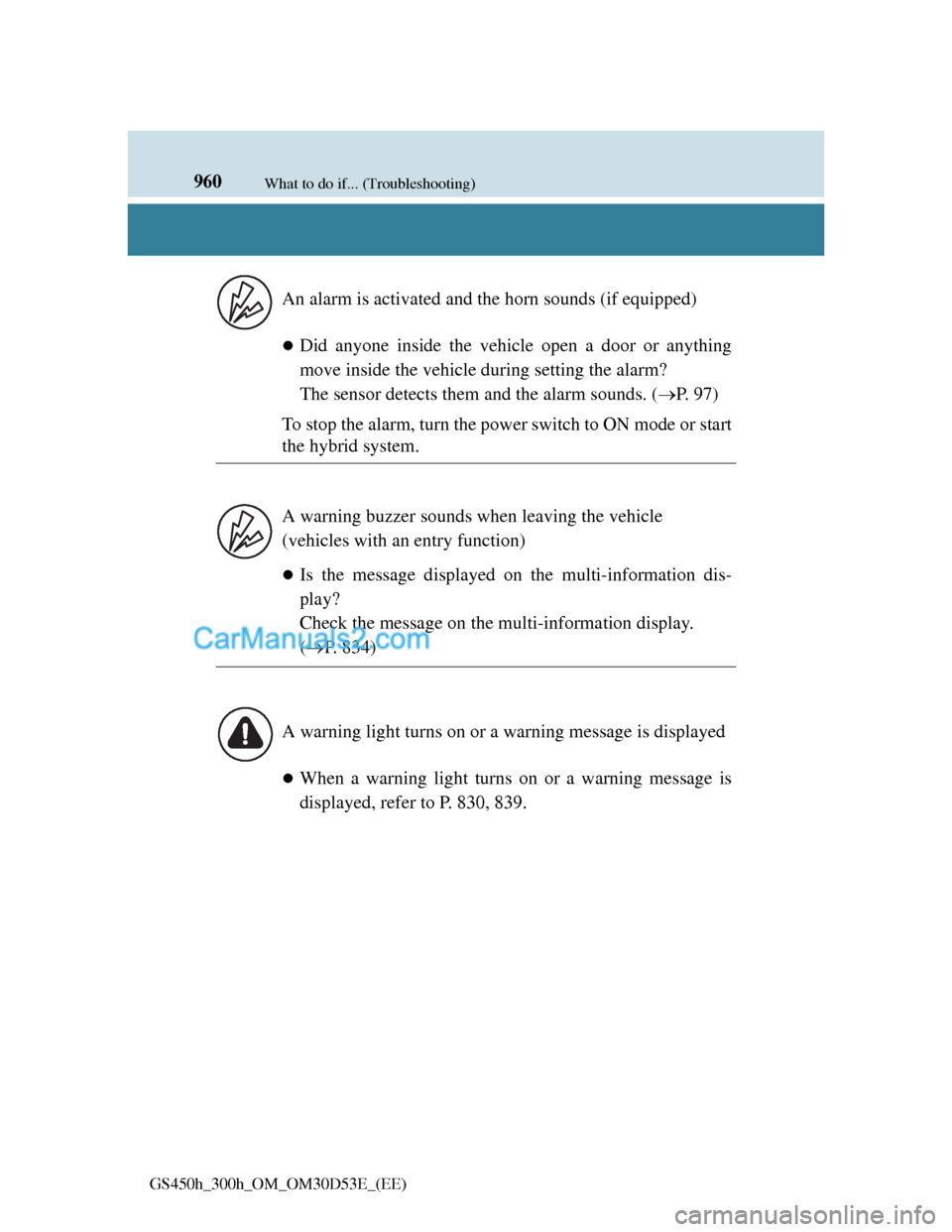
Did anyone inside the vehicle open a door or anything
move inside the vehicle during setting the alarm?
The sensor detects them and the alarm sounds. (P. 97)
To stop the alarm, turn the power switch to ON mode or start
the hybrid system.
Is the message displayed on the multi-information dis-
play?
Check the message on the multi-information display.
(P. 834)
When a warning light turns on or a warning message is
displayed, refer to P. 830, 839. An alarm is activated and the horn sounds (if equipped)
A warning buzzer sounds when leaving the vehicle
(vehicles with an entry function)
A warning light turns on or a warning message is displayed