battery Lexus GS300h 2013 User Guide
[x] Cancel search | Manufacturer: LEXUS, Model Year: 2013, Model line: GS300h, Model: Lexus GS300h 2013Pages: 1014
Page 100 of 1014
991-3. Theft deterrent system
1
GS450h_300h_OM_OM30D53E_(EE)
For safety and security
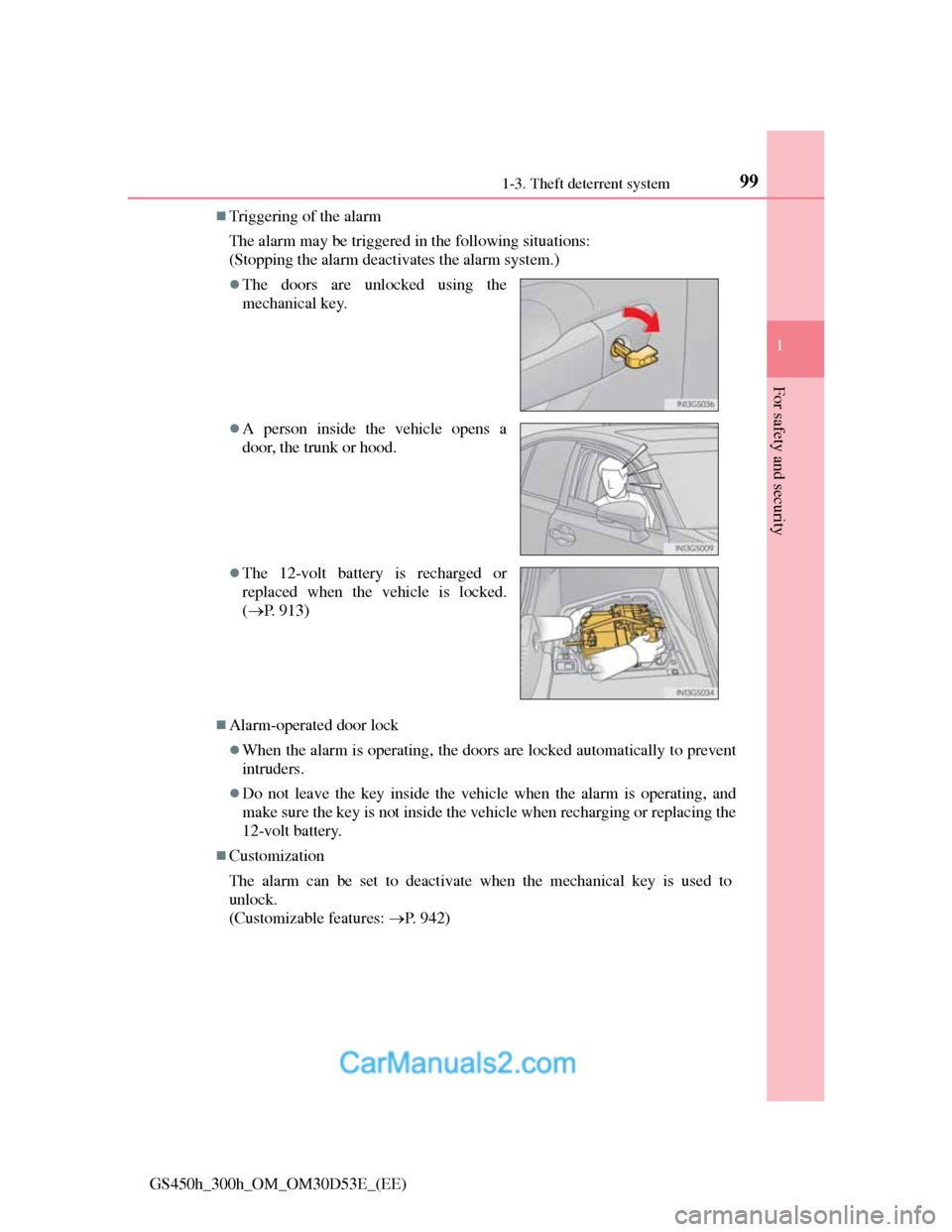
Triggering of the alarm
The alarm may be triggered in the following situations:
(Stopping the alarm deactivates the alarm system.)
Alarm-operated door lock
When the alarm is operating, the doors are locked automatically to prevent
intruders.
Do not leave the key inside the vehicle when the alarm is operating, and
make sure the key is not inside the vehicle when recharging or replacing the
12-volt battery.
Customization
The alarm can be set to deactivate when the mechanical key is used to
unlock.
(Customizable features: P. 942)
The doors are unlocked using the
mechanical key.
A person inside the vehicle opens a
door, the trunk or hood.
The 12-volt battery is recharged or
replaced when the vehicle is locked.
(P. 913)
Page 113 of 1014

1122. Instrument cluster
GS450h_300h_OM_OM30D53E_(EE)
The meters and display illuminate when
The power switch is in ON mode.
Instrument panel brightness adjustment
The instrument panel brightness levels when the tail lights are on and off can
be adjusted individually. However, when the surroundings are bright (day-
time, etc.), turning on the tail lights will not change the instrument panel
brightness.
Limitation of brightness adjustment
The brightness of the instrument panel lights is automatically adjusted based
on the light sensor detecting how bright the surroundings are. However, if the
instrument panel brightness has been manually set to either the brightest or
darkest setting, the automatic adjustment will not be performed.
Hybrid System Indicator
Hybrid System Indicator is displayed when the driving mode is other than
the sport mode.
By keeping the indicator needle within Eco area, more Eco-friendly driving
can be achieved.
Charge area indicates regeneration* status. Regenerated energy will be
used to charge the battery.
*: When used in this manual, “regeneration” refers to the conversion of
energy created by the movement of the vehicle into electrical energy. Charge area
Shows regenerative charging.
Hybrid Eco area
Shows that gasoline engine power is
not being used very often.
The gasoline engine will automatically
stop and restart under various condi-
tions.
Eco area
Shows that the vehicle is being driven
in an Eco-friendly manner.
Power area
Shows that an Eco-friendly driving
range is being exceeded (during full
power driving etc.)
1
2
3
4
Page 122 of 1014
1212. Instrument cluster
2
Instrument cluster
GS450h_300h_OM_OM30D53E_(EE)
CAUTION
The information display at low temperatures
Allow the interior of the vehicle to warm up before using the liquid crystal
information display. At extremely low temperatures, the information dis-
play monitor may respond slowly, and display changes may be delayed.
For example, there is a lag between the driver’s shifting and the new gear
number appearing on the display. This lag could cause the driver to down-
shift again, causing rapid and excessive engine braking and possibly an
accident resulting in death or injury.
Cautions during setting up the display
As the hybrid system needs to be operating during setting up the display,
ensure that the vehicle is parked in a place with adequate ventilation. In a
closed area such as a garage, exhaust gases including harmful carbon mon-
oxide (CO) may collect and enter the vehicle. This may lead to death or a
serious health hazard.
NOTICE
During setting up the display
To prevent 12-volt battery discharge, ensure that the hybrid system is oper-
ating while setting up the display features.
Page 130 of 1014
1292. Instrument cluster
2
Instrument cluster
GS450h_300h_OM_OM30D53E_(EE)
Head-up display
The head-up display may seem dark and hard to see when viewed through
sunglasses, especially polarized sunglasses.
Adjust the brightness of the head-up display or remove your sunglasses.
When the head-up display is turned off, it will remain off even if the power
switch is turned to ON mode after the power switch has been turned off.
The startup image will be displayed on the head-up display after the power
switch has been turned to ON mode while the head-up display switch is set
to on.
When the 12-volt battery is disconnected
The customize settings of the head-up display will be reset.
CAUTION
Before using the head-up display
Check that the position and brightness of the head-up display image does
not interfere with safe driving. Incorrect adjustment of the image’s position
or brightness may obstruct the driver’s view and lead to an accident, result-
ing in death or serious injury.
NOTICE
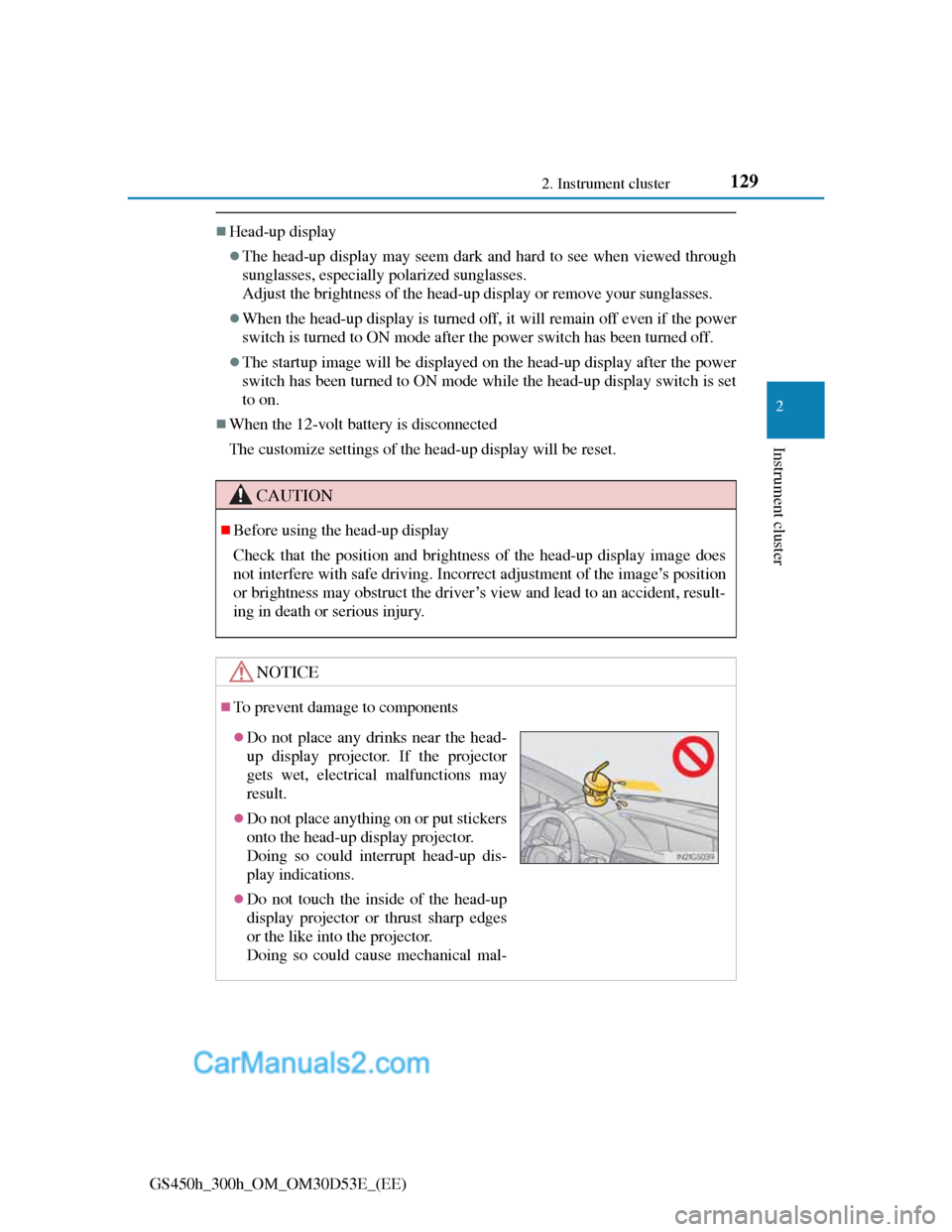
To prevent damage to components
Do not place any drinks near the head-
up display projector. If the projector
gets wet, electrical malfunctions may
result.
Do not place anything on or put stickers
onto the head-up display projector.
Doing so could interrupt head-up dis-
play indications.
Do not touch the inside of the head-up
display projector or thrust sharp edges
or the like into the projector.
Doing so could cause mechanical mal-
Page 133 of 1014
1322. Instrument cluster
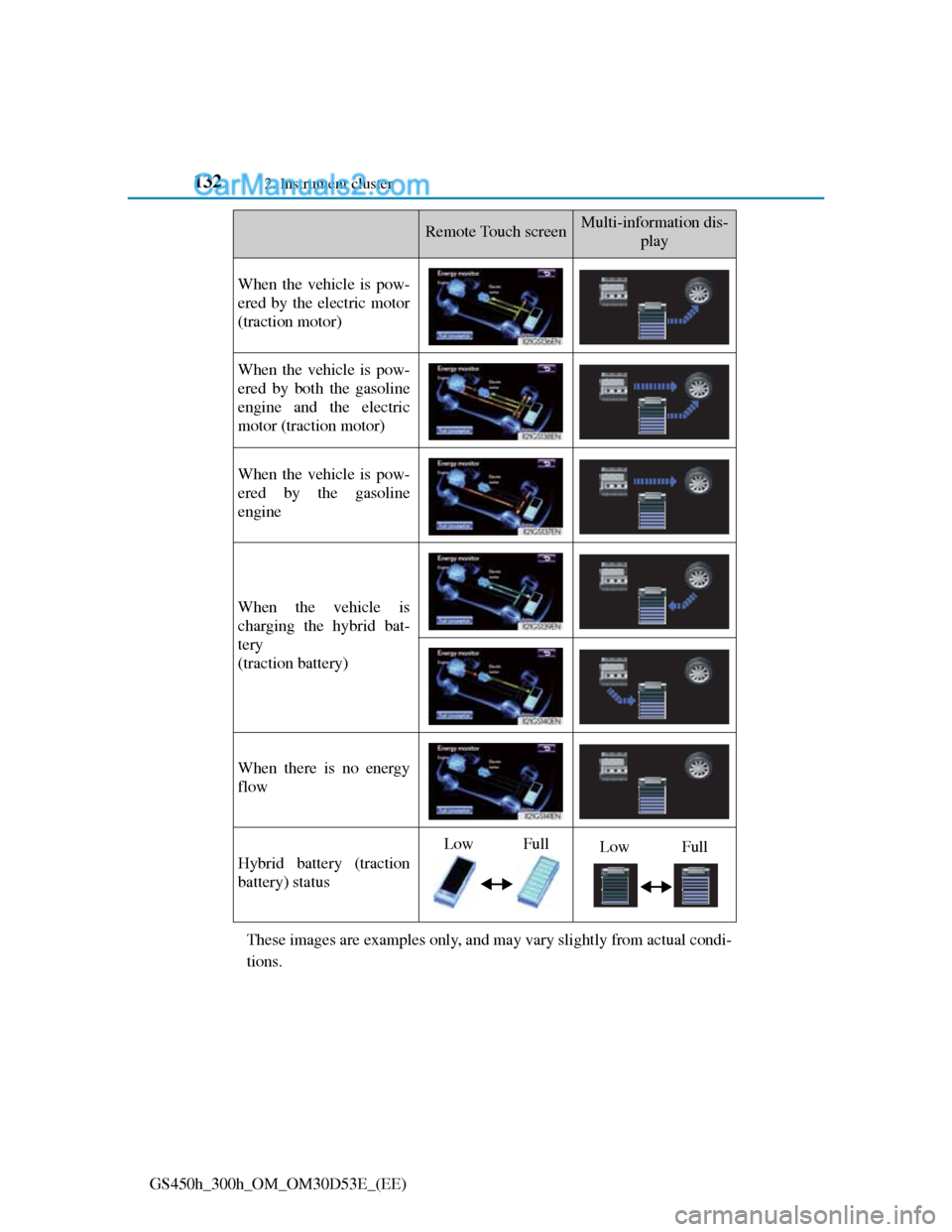
GS450h_300h_OM_OM30D53E_(EE)These images are examples only, and may vary slightly from actual condi-
tions.
Remote Touch screenMulti-information dis-
play
When the vehicle is pow-
ered by the electric motor
(traction motor)
When the vehicle is pow-
ered by both the gasoline
engine and the electric
motor (traction motor)
When the vehicle is pow-
ered by the gasoline
engine
When the vehicle is
charging the hybrid bat-
tery
(traction battery)
When there is no energy
flow
Hybrid battery (traction
battery) status
LowFullLowFull
Page 140 of 1014
1393-1. Key Information
3
Operation of each component
GS450h_300h_OM_OM30D53E_(EE)
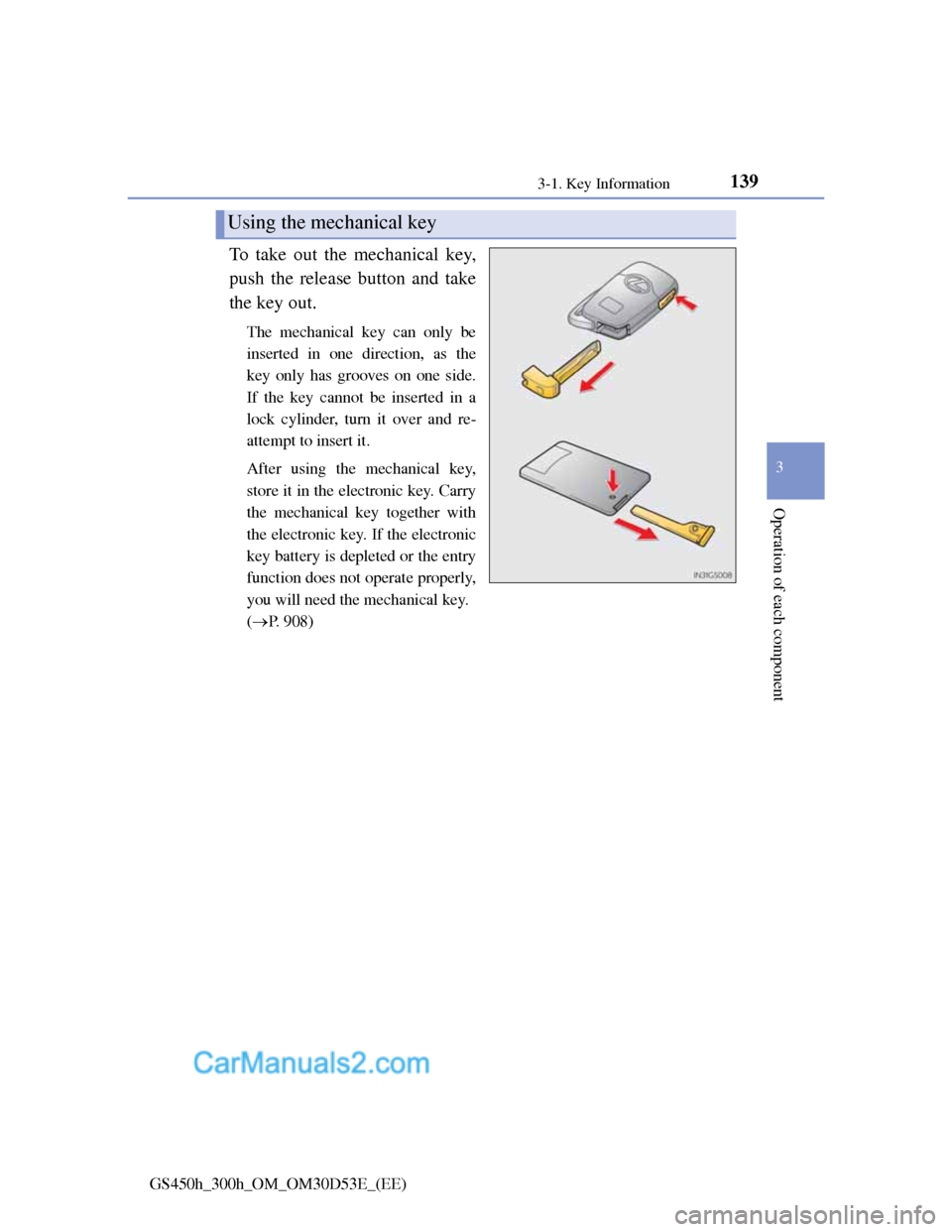
To take out the mechanical key,
push the release button and take
the key out.
The mechanical key can only be
inserted in one direction, as the
key only has grooves on one side.
If the key cannot be inserted in a
lock cylinder, turn it over and re-
attempt to insert it.
After using the mechanical key,
store it in the electronic key. Carry
the mechanical key together with
the electronic key. If the electronic
key battery is depleted or the entry
function does not operate properly,
you will need the mechanical key.
(P. 908)
Using the mechanical key
Page 141 of 1014
1403-1. Key Information
GS450h_300h_OM_OM30D53E_(EE)
Card key (if equipped)
The card key is not waterproof.
The mechanical key that is stored inside the card key should be used only if
a problem arises, such as when the card key does not operate properly.
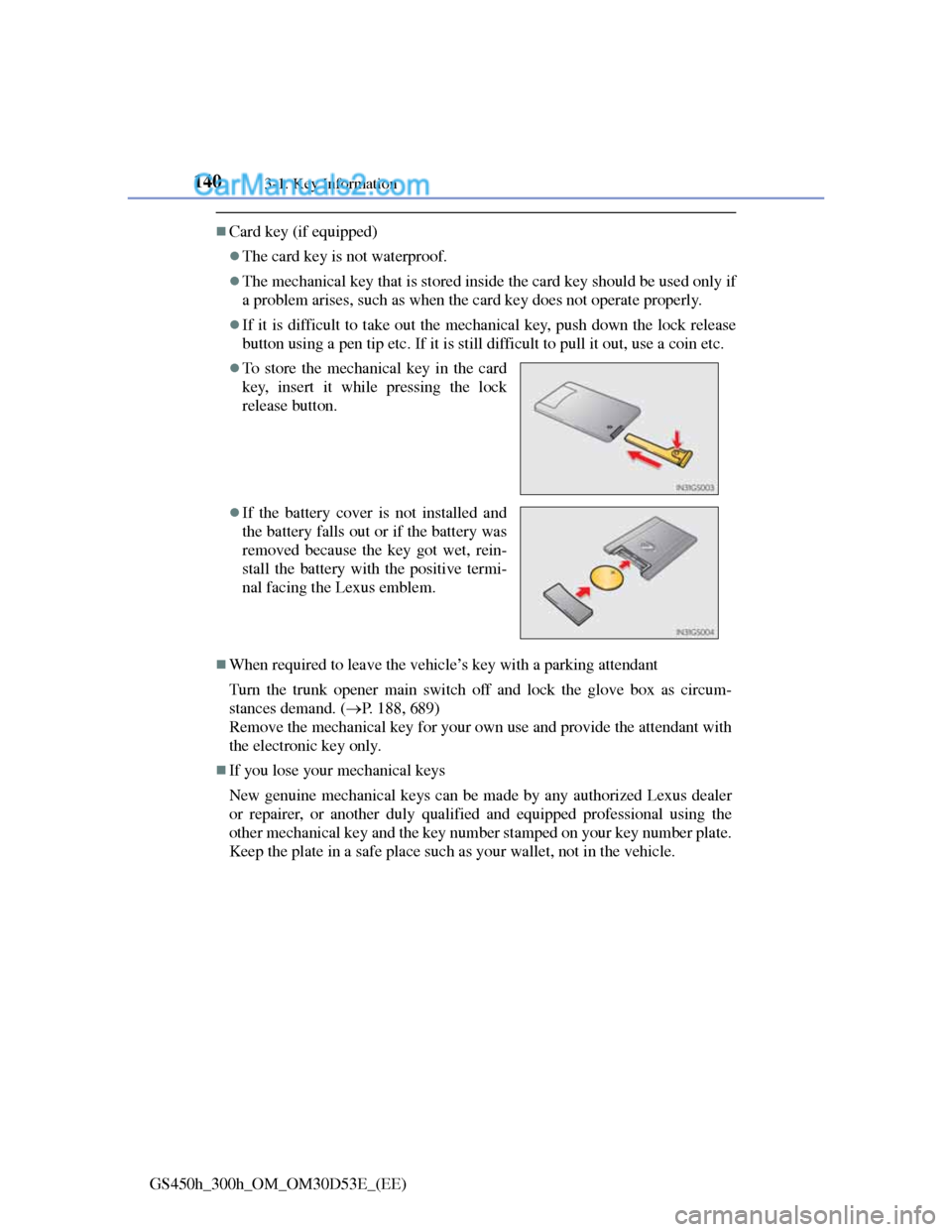
If it is difficult to take out the mechanical key, push down the lock release
button using a pen tip etc. If it is still difficult to pull it out, use a coin etc.
When required to leave the vehicle’s key with a parking attendant
Turn the trunk opener main switch off and lock the glove box as circum-
stances demand. (P. 188, 689)
Remove the mechanical key for your own use and provide the attendant with
the electronic key only.
If you lose your mechanical keys
New genuine mechanical keys can be made by any authorized Lexus dealer
or repairer, or another duly qualified and equipped professional using the
other mechanical key and the key number stamped on your key number plate.
Keep the plate in a safe place such as your wallet, not in the vehicle.
To store the mechanical key in the card
key, insert it while pressing the lock
release button.
If the battery cover is not installed and
the battery falls out or if the battery was
removed because the key got wet, rein-
stall the battery with the positive termi-
nal facing the Lexus emblem.
Page 143 of 1014
1423-1. Key Information
GS450h_300h_OM_OM30D53E_(EE)
NOTICE
When an electronic key is lost
If the electronic key remains lost, the risk of vehicle theft increases signifi-
cantly. Visit any authorized Lexus dealer or repairer, or another duly quali-
fied and equipped professional immediately with all remaining electronic
keys and the card key that was provided with your vehicle.
Handling the card key
Do not apply excess force when inserting the mechanical key into the card
key. Doing so may damage the card key.
If the battery or card key terminals get wet, the battery may corrode.
If the key is dropped into water, or if drinking water etc. is spilled on the
key, immediately remove the battery cover and wipe the battery and ter-
minals. (To remove the battery cover, lightly grasp and pull it.) If the bat-
tery is corroded, have any authorized Lexus dealer or repairer, or another
duly qualified and equipped professional replace the battery.
Do not crush the battery cover or use a screwdriver to remove the battery
cover. Forcibly removing the battery cover may bend or damage the key.
If the battery cover is frequently removed, the battery cover may become
loose.
When installing the battery, make sure to check the direction of the bat-
tery.
Installing the battery in the wrong direction may cause the battery to
deplete rapidly.
The surface of the card key may be damaged, or its coating may peel off
in the following situations:
• The card key is carried together with hard objects, such as coins and
keys.
• The card key is scraped with a sharp object, such as the tip of a
mechanical pencil.
• The surface of the card key is wiped with thinner or benzene.
Page 150 of 1014
1493-2. Opening, closing and locking the doors and trunk
3
Operation of each component
GS450h_300h_OM_OM30D53E_(EE)
Battery-saving function (vehicles with entry function)
The battery-saving function will be activated in order to prevent the elec-
tronic key battery and the 12-volt battery from being discharged while the
vehicle is not in operation for a long time.
In the following situations, the smart entry & start system may take some
time to unlock the doors.
• The electronic key has been left in an area of approximately 2 m (6 ft.) of
the outside of the vehicle for 10 minutes or longer.
• The smart entry & start system has not been used for 5 days or longer.
If the smart entry & start system has not been used for 14 days or longer, the
doors cannot be unlocked at any doors except the driver’s door. In this case,
take hold of the driver’s door handle, or use the wireless remote control or
the mechanical key, to unlock the doors.
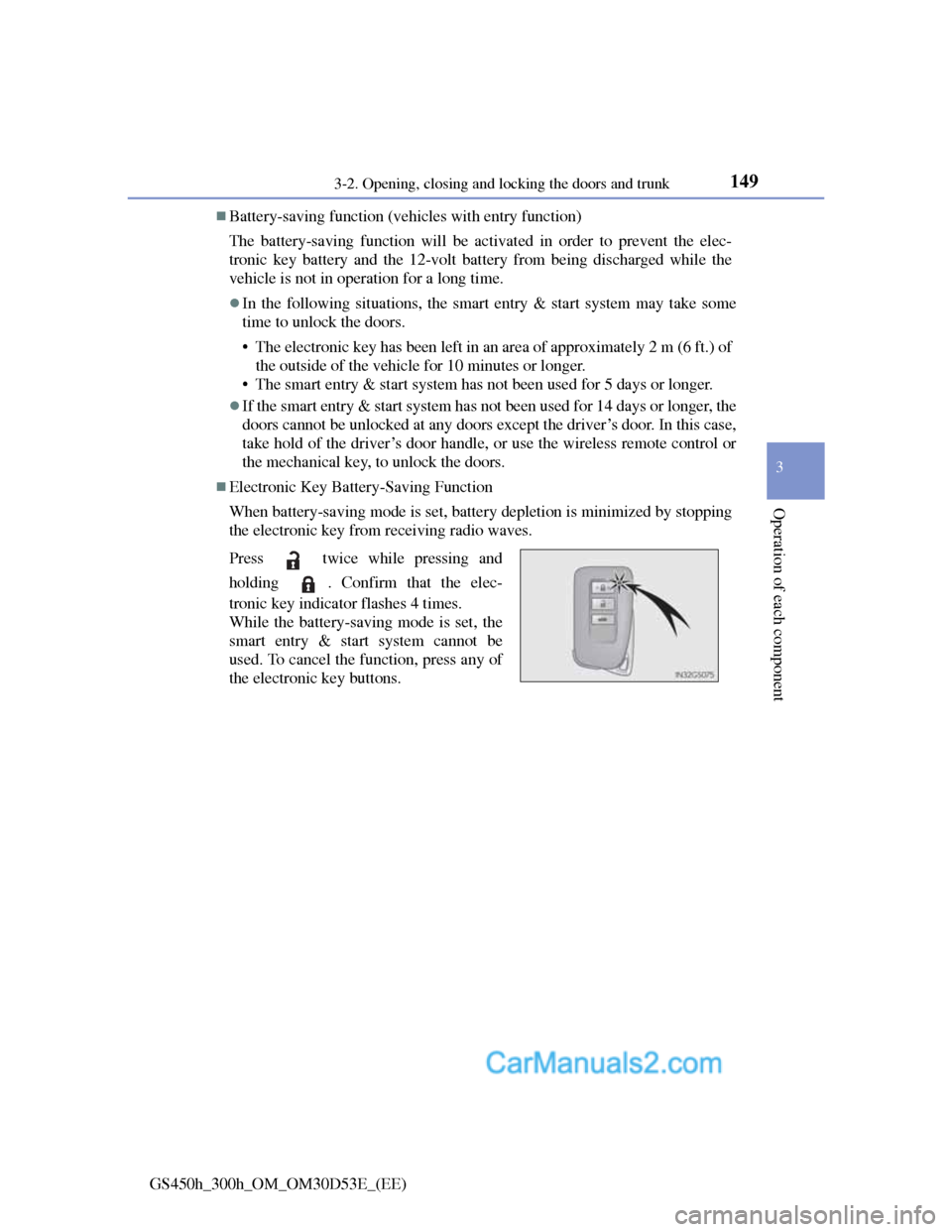
Electronic Key Battery-Saving Function
When battery-saving mode is set, battery depletion is minimized by stopping
the electronic key from receiving radio waves.
Press twice while pressing and
holding . Confirm that the elec-
tronic key indicator flashes 4 times.
While the battery-saving mode is set, the
smart entry & start system cannot be
used. To cancel the function, press any of
the electronic key buttons.
Page 151 of 1014
1503-2. Opening, closing and locking the doors and trunk
GS450h_300h_OM_OM30D53E_(EE)
Conditions affecting operation
The smart entry & start system uses weak radio waves. In the following situ-
ations, the communication between the electronic key and the vehicle may be
affected, preventing the smart entry & start system, wireless remote control
and immobilizer system from operating properly. (Ways of coping: P. 908)
When the electronic key battery is depleted
Near a TV tower, electric power plant, gas station, radio station, large dis-
play, airport or other facility that generates strong radio waves or electrical
noise
When carrying a portable radio, cellular phone, cordless phone or other
wireless communication device
When the electronic key is in contact with, or is covered by the following
metallic objects
• Cards to which aluminum foil is attached
• Cigarette boxes that have aluminum foil inside
• Metallic wallets or bags
• Coins
• Hand warmers made of metal
• Media such as CDs and DVDs
When other wireless keys (that emit radio waves) are being used nearby
When carrying the electronic key together with the following devices that
emit radio waves
• Another vehicle’s electronic key or a wireless key that emits radio waves
• Personal computers or personal digital assistants (PDAs)
• Digital audio players
• Portable game systems
If window tint with a metallic content or metallic objects are attached to the
rear window