key Lexus GS300h 2013 User Guide
[x] Cancel search | Manufacturer: LEXUS, Model Year: 2013, Model line: GS300h, Model: Lexus GS300h 2013Pages: 1014
Page 100 of 1014
991-3. Theft deterrent system
1
GS450h_300h_OM_OM30D53E_(EE)
For safety and security
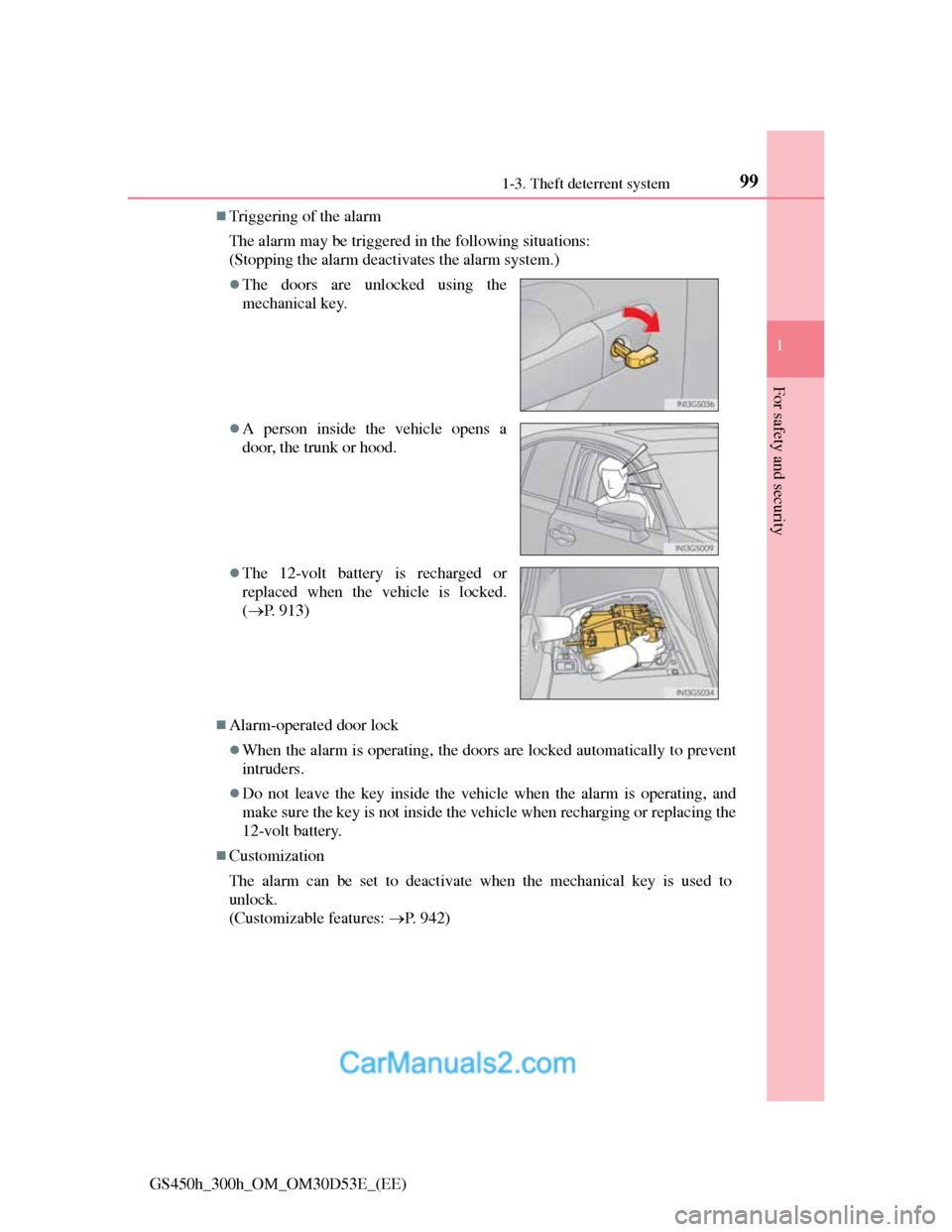
Triggering of the alarm
The alarm may be triggered in the following situations:
(Stopping the alarm deactivates the alarm system.)
Alarm-operated door lock
When the alarm is operating, the doors are locked automatically to prevent
intruders.
Do not leave the key inside the vehicle when the alarm is operating, and
make sure the key is not inside the vehicle when recharging or replacing the
12-volt battery.
Customization
The alarm can be set to deactivate when the mechanical key is used to
unlock.
(Customizable features: P. 942)
The doors are unlocked using the
mechanical key.
A person inside the vehicle opens a
door, the trunk or hood.
The 12-volt battery is recharged or
replaced when the vehicle is locked.
(P. 913)
Page 102 of 1014

1011-3. Theft deterrent system
1
GS450h_300h_OM_OM30D53E_(EE)
For safety and security
Canceling and automatic re-enabling of the intrusion sensor and tilt sensor
The alarm will still be set even when the intrusion sensor and tilt sensor are
canceled.
After the intrusion sensor and tilt sensor are canceled, pressing the power
switch or unlocking the doors using the entry function, wireless remote con-
trol or mechanical key will re-enable the intrusion sensor and tilt sensor.
The intrusion sensor and tilt sensor will automatically be re-enabled when
the alarm system is deactivated.
Intrusion sensor detection considerations
The sensor may trigger the alarm in the following situations:
Places with extreme vibrations or noises, or situations in which the vehicle
is subject to repeated impacts or vibrations:
• When parked in a parking garage
• When the vehicle is transported by a ferry, trailer, train, etc.
• When ice adhering to the vehicle is removed
• When the vehicle is in an automatic or high-pressure car wash
• When in a hail or lightning storm
A window or the moon roof is open.
In this case, the sensor may detect the
following:
• Wind or the movement of objects
such as leaves and insects inside the
vehicle
• Ultrasonic waves emitted from
devices such as the intrusion sensors
of other vehicles
• The movement of people outside the
vehicle
Unstable items, such as dangling acces-
sories or clothes hanging on the coat
hooks, are in the vehicle.
Page 138 of 1014

137
3
Operation of
each component
GS450h_300h_OM_OM30D53E_(EE)3-1. Key information
Keys .................................. 138
3-2. Opening, closing and locking
the doors and trunk
Smart entry & start system 143
Wireless remote control .... 168
Doors ................................ 183
Trunk................................. 187
3-3. Adjusting the seats
Front seats ......................... 194
Driving position memory.. 198
Head restraints .................. 204
3-4. Adjusting the steering wheel
and mirrors
Steering wheel .................. 207
Inside rear view mirror ..... 208
Outside rear view mirrors ..211
3-5. Opening, closing the windows
and moon roof
Power windows................. 215
Moon roof ......................... 218
Page 139 of 1014
1383-1. Key Information
GS450h_300h_OM_OM30D53E_(EE)
Keys
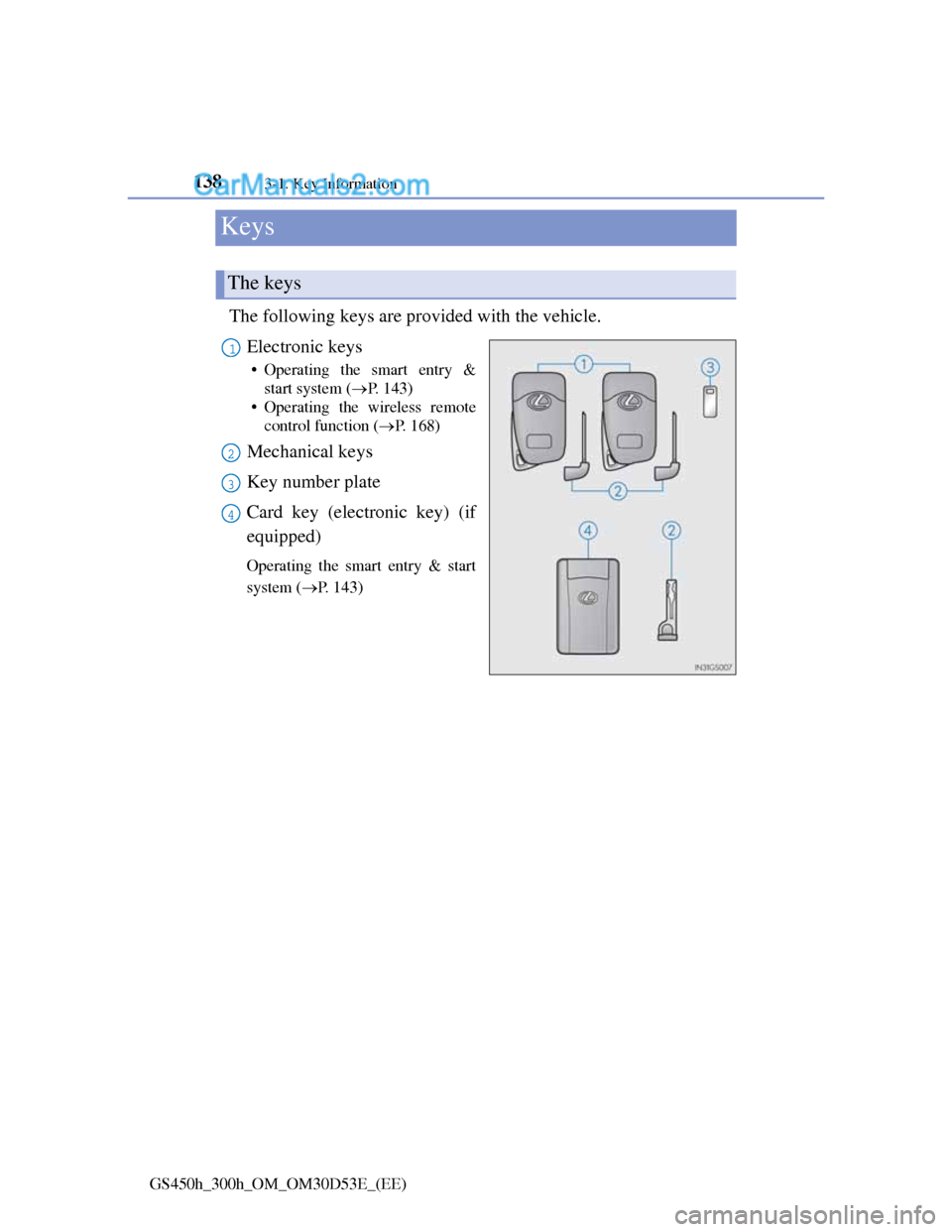
The following keys are provided with the vehicle.
Electronic keys
• Operating the smart entry &
start system (P. 143)
• Operating the wireless remote
control function (P. 1 6 8 )
Mechanical keys
Key number plate
Card key (electronic key) (if
equipped)
Operating the smart entry & start
system (P. 143)
The keys
1
2
3
4
Page 140 of 1014
1393-1. Key Information
3
Operation of each component
GS450h_300h_OM_OM30D53E_(EE)
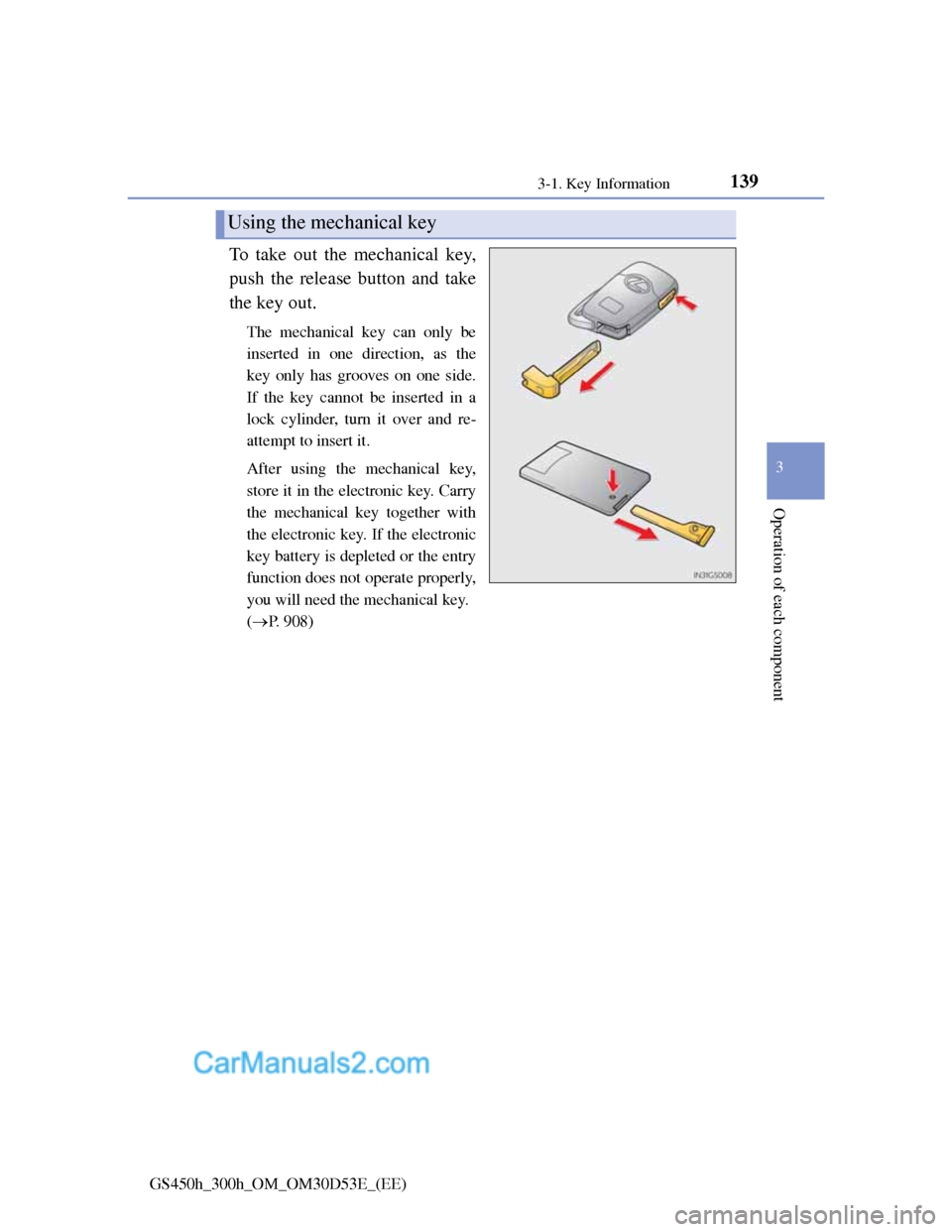
To take out the mechanical key,
push the release button and take
the key out.
The mechanical key can only be
inserted in one direction, as the
key only has grooves on one side.
If the key cannot be inserted in a
lock cylinder, turn it over and re-
attempt to insert it.
After using the mechanical key,
store it in the electronic key. Carry
the mechanical key together with
the electronic key. If the electronic
key battery is depleted or the entry
function does not operate properly,
you will need the mechanical key.
(P. 908)
Using the mechanical key
Page 141 of 1014
1403-1. Key Information
GS450h_300h_OM_OM30D53E_(EE)
Card key (if equipped)
The card key is not waterproof.
The mechanical key that is stored inside the card key should be used only if
a problem arises, such as when the card key does not operate properly.
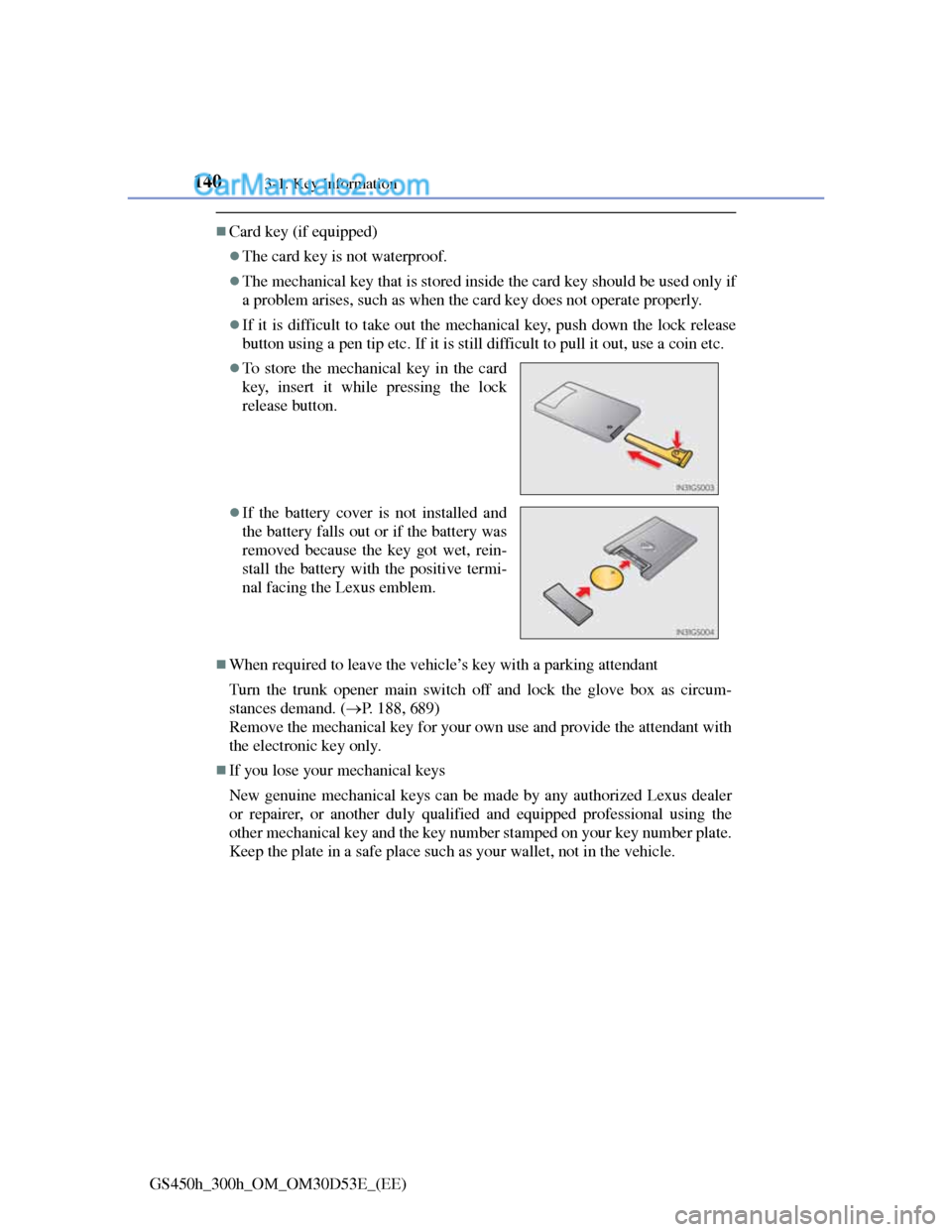
If it is difficult to take out the mechanical key, push down the lock release
button using a pen tip etc. If it is still difficult to pull it out, use a coin etc.
When required to leave the vehicle’s key with a parking attendant
Turn the trunk opener main switch off and lock the glove box as circum-
stances demand. (P. 188, 689)
Remove the mechanical key for your own use and provide the attendant with
the electronic key only.
If you lose your mechanical keys
New genuine mechanical keys can be made by any authorized Lexus dealer
or repairer, or another duly qualified and equipped professional using the
other mechanical key and the key number stamped on your key number plate.
Keep the plate in a safe place such as your wallet, not in the vehicle.
To store the mechanical key in the card
key, insert it while pressing the lock
release button.
If the battery cover is not installed and
the battery falls out or if the battery was
removed because the key got wet, rein-
stall the battery with the positive termi-
nal facing the Lexus emblem.
Page 142 of 1014
1413-1. Key Information
3
Operation of each component
GS450h_300h_OM_OM30D53E_(EE)
When riding in an aircraft
When bringing an electronic key onto an aircraft, make sure you do not press
any buttons on the electronic key while inside the aircraft cabin. If you are
carrying an electronic key in your bag etc., ensure that the buttons are not
likely to be pressed accidentally. Pressing a button may cause the electronic
key to emit radio waves that could interfere with the operation of the aircraft.
NOTICE
To prevent key damage
Do not drop the keys, subject them to strong shocks or bend them.
Do not expose the keys to high temperatures for long periods of time.
Do not get the keys wet or wash them in an ultrasonic washer etc.
Do not attach metallic or magnetic materials to the keys or place the keys
close to such materials.
Do not disassemble the keys.
Do not attach a sticker or anything else to the surface of the electronic key.
Do not place the keys near objects that produce magnetic fields, such as
TVs, audio systems and induction cookers, or medical electrical equip-
ment, such as low-frequency therapy equipment.
Carrying the electronic key on your person
Carry the electronic key 10 cm (3.9 in.) or more away from electric appli-
ances that are turned on. Radio waves emitted from electric appliances
within 10 cm (3.9 in.) of the electronic key may interfere with the key,
causing the key to not function properly.
In case of a smart entry & start system malfunction or other key-related
problems
Take your vehicle with all the electronic keys provided with your vehicle,
including the card key, to any authorized Lexus dealer or repairer, or
another duly qualified and equipped professional.
Page 143 of 1014
1423-1. Key Information
GS450h_300h_OM_OM30D53E_(EE)
NOTICE
When an electronic key is lost
If the electronic key remains lost, the risk of vehicle theft increases signifi-
cantly. Visit any authorized Lexus dealer or repairer, or another duly quali-
fied and equipped professional immediately with all remaining electronic
keys and the card key that was provided with your vehicle.
Handling the card key
Do not apply excess force when inserting the mechanical key into the card
key. Doing so may damage the card key.
If the battery or card key terminals get wet, the battery may corrode.
If the key is dropped into water, or if drinking water etc. is spilled on the
key, immediately remove the battery cover and wipe the battery and ter-
minals. (To remove the battery cover, lightly grasp and pull it.) If the bat-
tery is corroded, have any authorized Lexus dealer or repairer, or another
duly qualified and equipped professional replace the battery.
Do not crush the battery cover or use a screwdriver to remove the battery
cover. Forcibly removing the battery cover may bend or damage the key.
If the battery cover is frequently removed, the battery cover may become
loose.
When installing the battery, make sure to check the direction of the bat-
tery.
Installing the battery in the wrong direction may cause the battery to
deplete rapidly.
The surface of the card key may be damaged, or its coating may peel off
in the following situations:
• The card key is carried together with hard objects, such as coins and
keys.
• The card key is scraped with a sharp object, such as the tip of a
mechanical pencil.
• The surface of the card key is wiped with thinner or benzene.
Page 144 of 1014
143
3 3-2. Opening, closing and locking the doors and trunk
Operation of each component
GS450h_300h_OM_OM30D53E_(EE)
Smart entry & start system
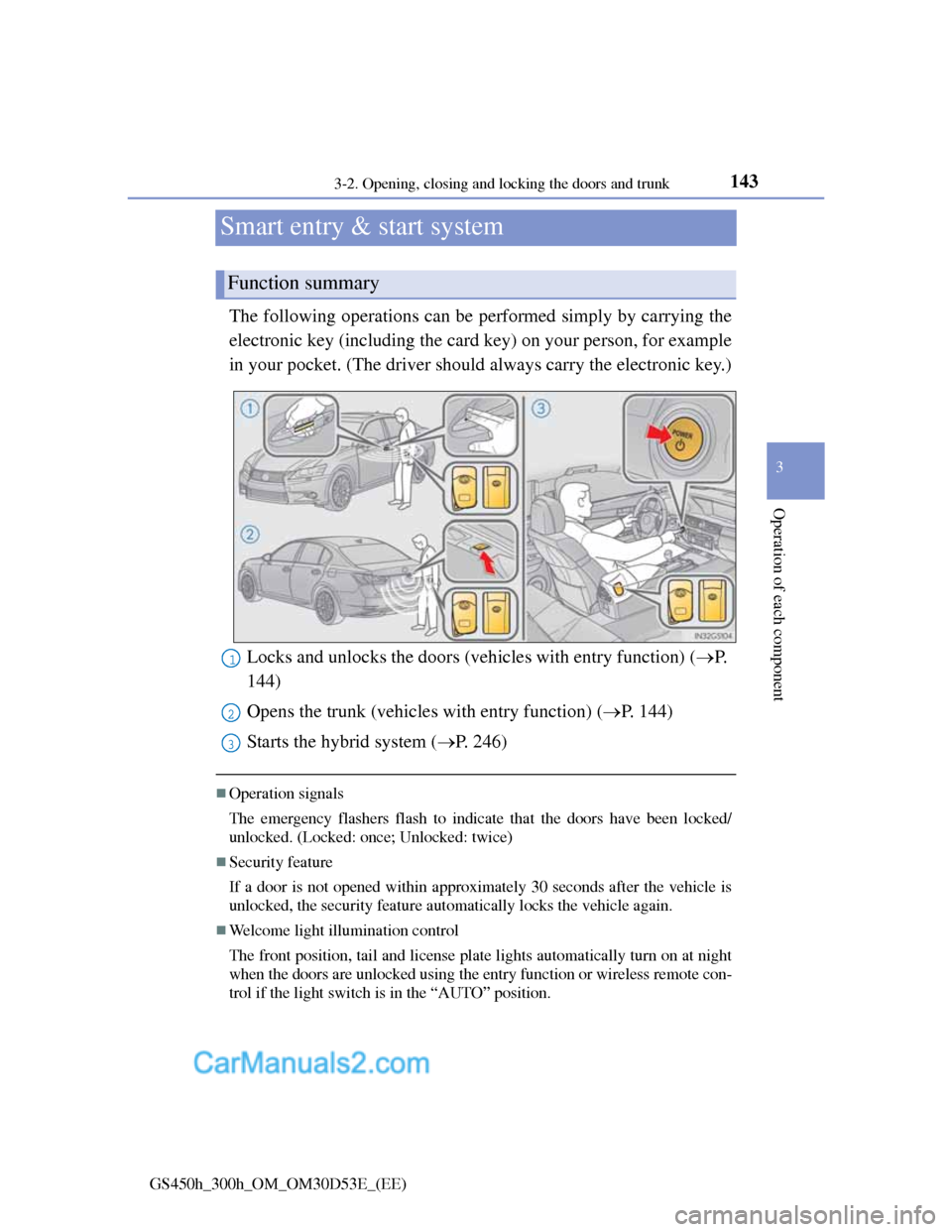
The following operations can be performed simply by carrying the
electronic key (including the card key) on your person, for example
in your pocket. (The driver should always carry the electronic key.)
Operation signals
The emergency flashers flash to indicate that the doors have been locked/
unlocked. (Locked: once; Unlocked: twice)
Security feature
If a door is not opened within approximately 30 seconds after the vehicle is
unlocked, the security feature automatically locks the vehicle again.
Welcome light illumination control
The front position, tail and license plate lights automatically turn on at night
when the doors are unlocked using the entry function or wireless remote con-
trol if the light switch is in the “AUTO” position.
Function summary
Locks and unlocks the doors (vehicles with entry function) (P.
144)
Opens the trunk (vehicles with entry function) (P. 144)
Starts the hybrid system (P. 246)1
2
3
Page 147 of 1014
1463-2. Opening, closing and locking the doors and trunk
GS450h_300h_OM_OM30D53E_(EE)
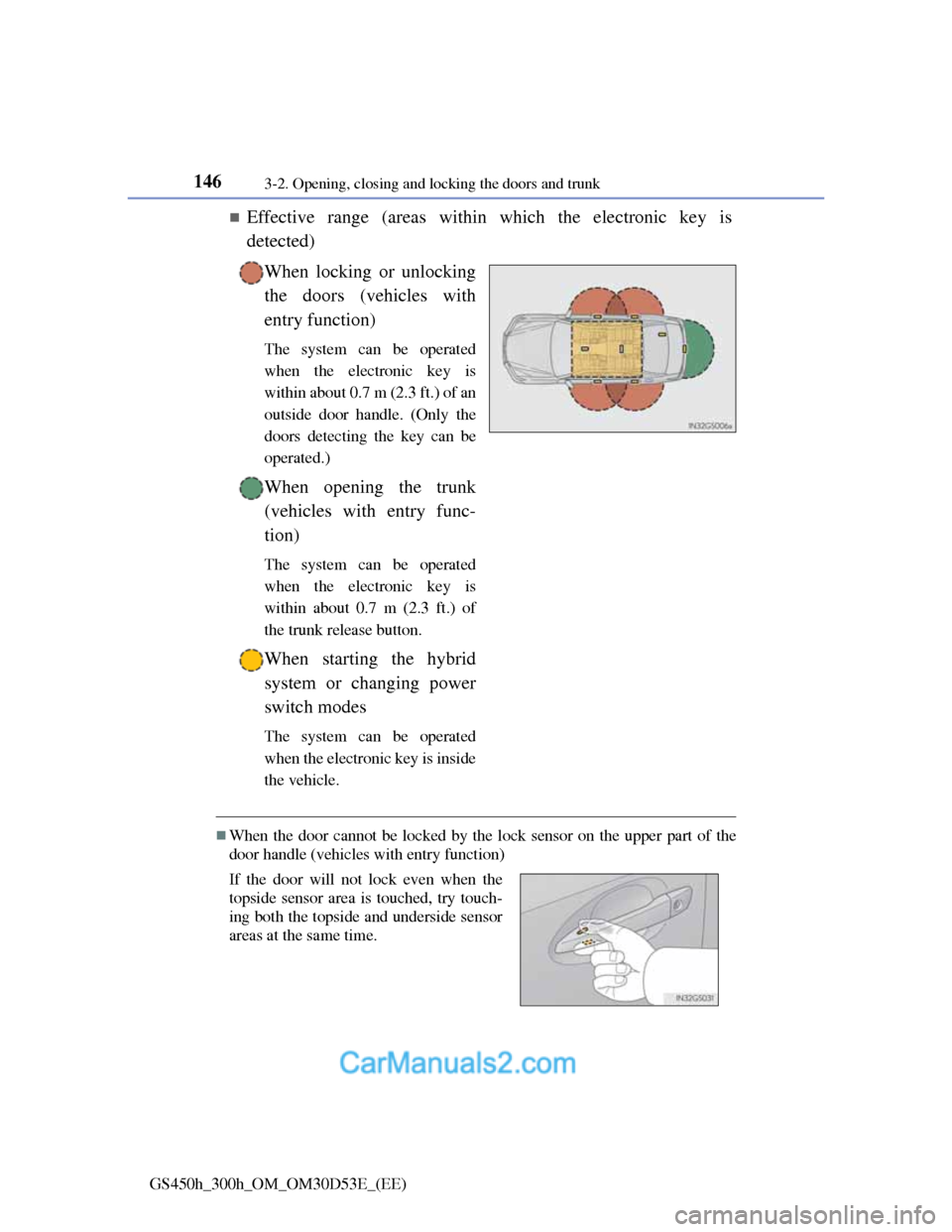
Effective range (areas within which the electronic key is
detected)
When locking or unlocking
the doors (vehicles with
entry function)
The system can be operated
when the electronic key is
within about 0.7 m (2.3 ft.) of an
outside door handle. (Only the
doors detecting the key can be
operated.)
When opening the trunk
(vehicles with entry func-
tion)
The system can be operated
when the electronic key is
within about 0.7 m (2.3 ft.) of
the trunk release button.
When starting the hybrid
system or changing power
switch modes
The system can be operated
when the electronic key is inside
the vehicle.
When the door cannot be locked by the lock sensor on the upper part of the
door handle (vehicles with entry function)
If the door will not lock even when the
topside sensor area is touched, try touch-
ing both the topside and underside sensor
areas at the same time.