remote start Lexus GS300h 2013 User Guide
[x] Cancel search | Manufacturer: LEXUS, Model Year: 2013, Model line: GS300h, Model: Lexus GS300h 2013Pages: 1014
Page 475 of 1014
4585-1. Remote Touch screen
GS450h_300h_OM_OM30D53E_(EE)
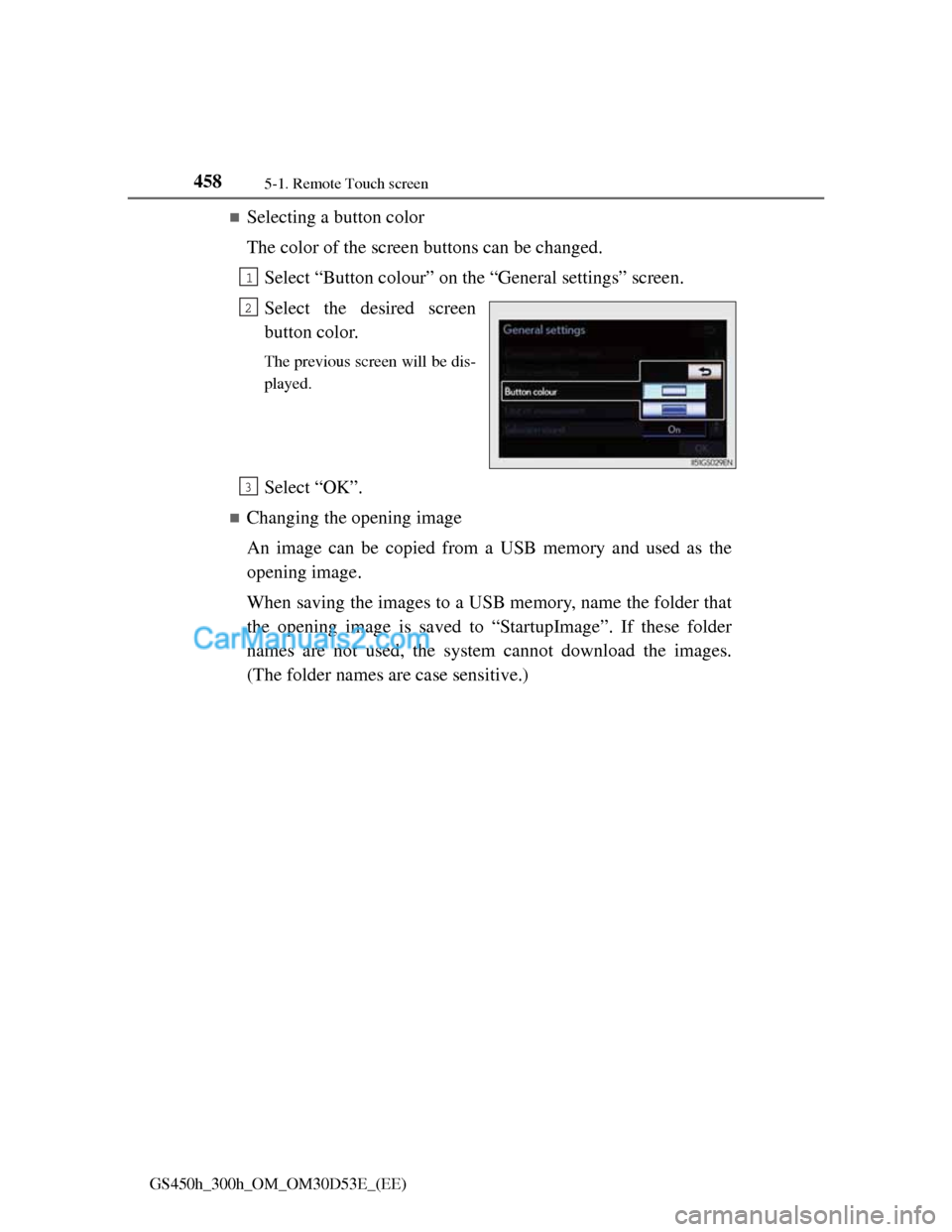
Selecting a button color
The color of the screen buttons can be changed.
Select “Button colour” on the “General settings” screen.
Select the desired screen
button color.
The previous screen will be dis-
played.
Select “OK”.
Changing the opening image
An image can be copied from a USB memory and used as the
opening image.
When saving the images to a USB memory, name the folder that
the opening image is saved to “StartupImage”. If these folder
names are not used, the system cannot download the images.
(The folder names are case sensitive.)
1
2
3
Page 483 of 1014
4665-1. Remote Touch screen
GS450h_300h_OM_OM30D53E_(EE)
About startup or screen off images
The images file extension is JPG or JPEG.
The images file name, including the file extension, can be up to 32 charac-
ters.
Image files of 10 MB or less can be saved.
Up to 3 images can be downloaded.
Page 494 of 1014
4775-1. Remote Touch screen
5
Interior features
GS450h_300h_OM_OM30D53E_(EE)
Speech command system
Commands that are not displayed in the “Shortcuts” screen can be operated
from the “Main menu” screen.
If the system does not respond or the confirmation screen does not disap-
pear, press and try again.
Speech guidance can be canceled by setting voice prompts to off. Use this
setting when it is desirable to say a command immediately after pressing
and hearing a beep.
If a speech command cannot be recognized
If a speech command cannot be recognized within 6 seconds, voice guid-
ance will say “Pardon?” (“Command not recognized.” will be displayed on
the screen) and speech command reception will restart.
If a speech command cannot be recognized 2 consecutive times, the speech
command guidance system will say “Paused. To restart voice recognition,
push the talk switch. To cancel voice recognition, push and hold the talk
switch.” Then voice recognition will be suspended.
When selecting “Voice Prompts”
The voice recognition prompt can be set to on or off. This setting can also
be changed on the “Voice settings” screen. (P. 467)
Voice recognition will be temporarily suspended. Press again.
Page 550 of 1014
5305-3. Using the audio system
GS450h_300h_OM_OM30D53E_(EE)
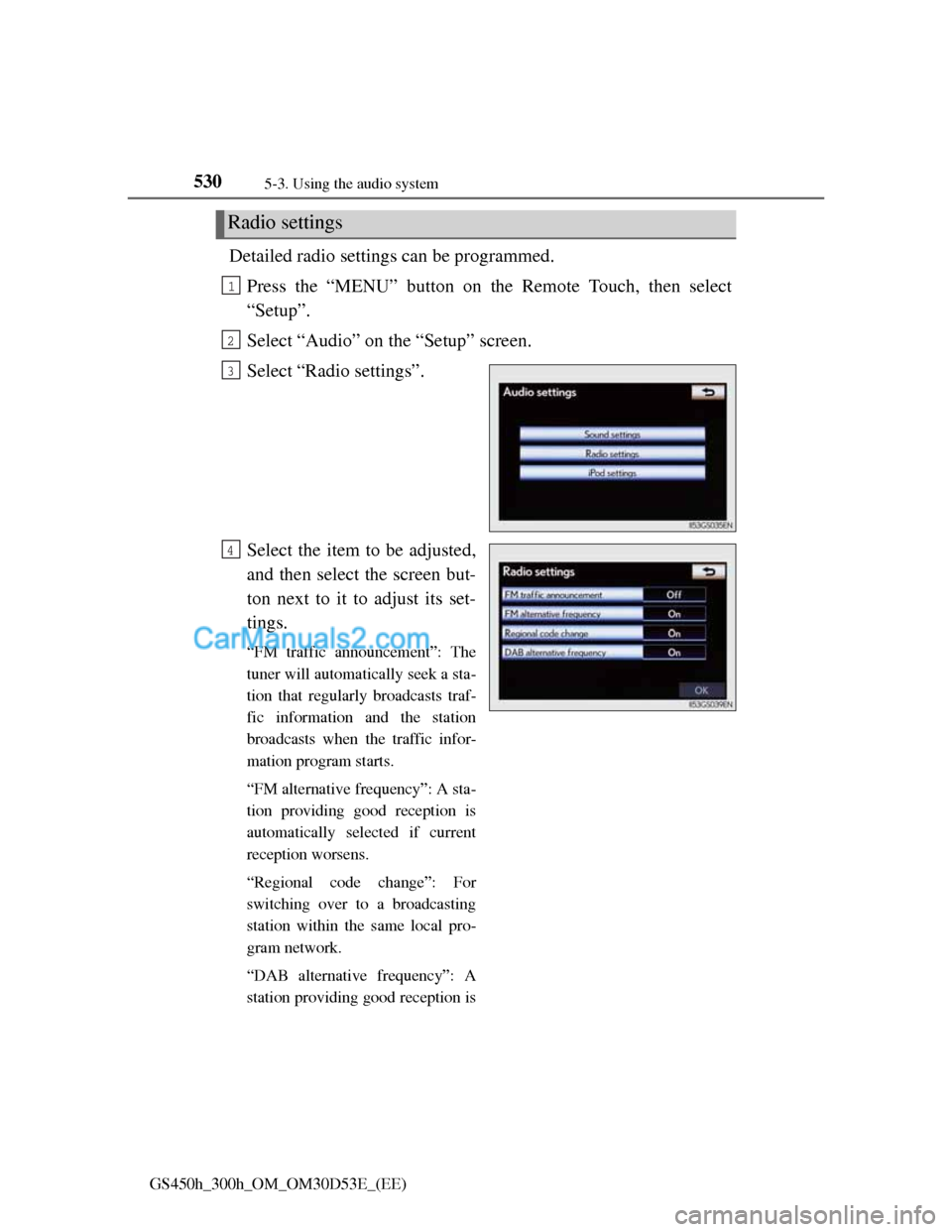
Detailed radio settings can be programmed.
Press the “MENU” button on the Remote Touch, then select
“Setup”.
Select “Audio” on the “Setup” screen.
Select “Radio settings”.
Select the item to be adjusted,
and then select the screen but-
ton next to it to adjust its set-
tings.
“FM traffic announcement”: The
tuner will automatically seek a sta-
tion that regularly broadcasts traf-
fic information and the station
broadcasts when the traffic infor-
mation program starts.
“FM alternative frequency”: A sta-
tion providing good reception is
automatically selected if current
reception worsens.
“Regional code change”: For
switching over to a broadcasting
station within the same local pro-
gram network.
“DAB alternative frequency”: A
station providing good reception is
Radio settings
1
2
3
4
Page 775 of 1014
751 6-3. Do-it-yourself maintenance
6
Maintenance and care
GS450h_300h_OM_OM30D53E_(EE)
Before recharging
When recharging, the 12-volt battery produces hydrogen gas which is flam-
mable and explosive. Therefore, observe the following precautions before
recharging:
If recharging with the 12-volt battery installed on the vehicle, be sure to dis-
connect the ground cable.
Make sure the power switch on the charger is off when connecting and dis-
connecting the charger cables to the 12-volt battery.
After recharging/reconnecting the 12-volt battery
The hybrid system may not start. Follow the procedure below to initialize
the system.
Shift the shift lever to P.
Open and close any of the doors.
Restart the hybrid system.
Unlocking the doors using the smart entry & start system may not be possi-
ble immediately after reconnecting the 12-volt battery. If this happens, use
the wireless remote control or the mechanical key to lock/unlock the doors.
Start the hybrid system with the power switch in ACCESSORY mode. The
hybrid system may not start with the power switch turned off. However, the
hybrid system will operate normally from the second attempt.
The power switch mode is recorded by the vehicle. If the 12-volt battery is
reconnected, the vehicle will return the power switch mode to the status it
was in before the 12-volt battery was disconnected. Make sure to turn off
the power switch before disconnect the 12-volt battery. Take extra care
when connecting the 12-volt battery if the power switch mode prior to dis-
charge is unknown.
If the system will not start even after multiple attempts at all methods above,
contact any authorized Lexus dealer or repairer, or another duly qualified and
equipped professional.
1
2
3
Page 804 of 1014
7806-3. Do-it-yourself maintenance
GS450h_300h_OM_OM30D53E_(EE)
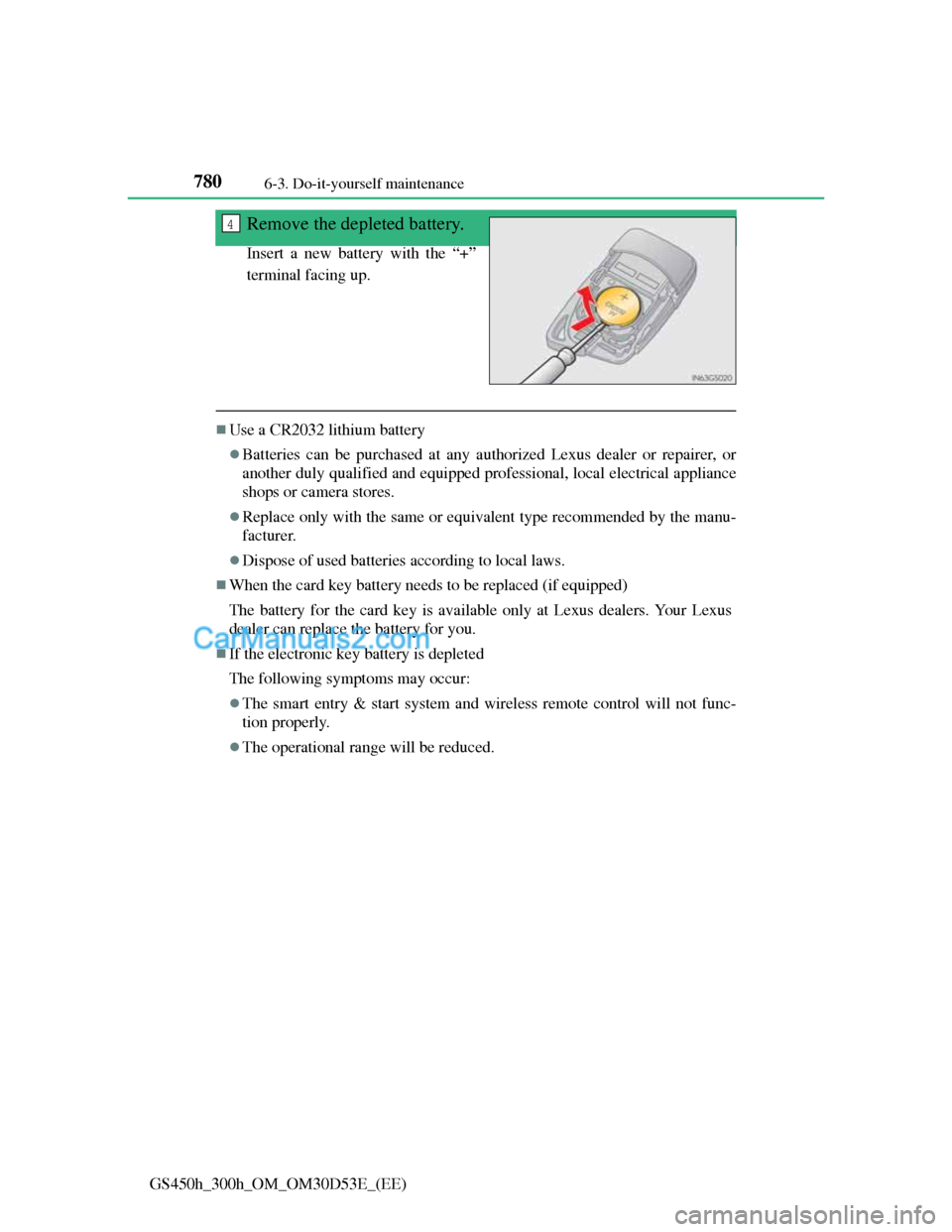
Remove the depleted battery.
Insert a new battery with the “+”
terminal facing up.
Use a CR2032 lithium battery
Batteries can be purchased at any authorized Lexus dealer or repairer, or
another duly qualified and equipped professional, local electrical appliance
shops or camera stores.
Replace only with the same or equivalent type recommended by the manu-
facturer.
Dispose of used batteries according to local laws.
When the card key battery needs to be replaced (if equipped)
The battery for the card key is available only at Lexus dealers. Your Lexus
dealer can replace the battery for you.
If the electronic key battery is depleted
The following symptoms may occur:
The smart entry & start system and wireless remote control will not func-
tion properly.
The operational range will be reduced.
4
Page 812 of 1014
7886-3. Do-it-yourself maintenance
GS450h_300h_OM_OM30D53E_(EE)
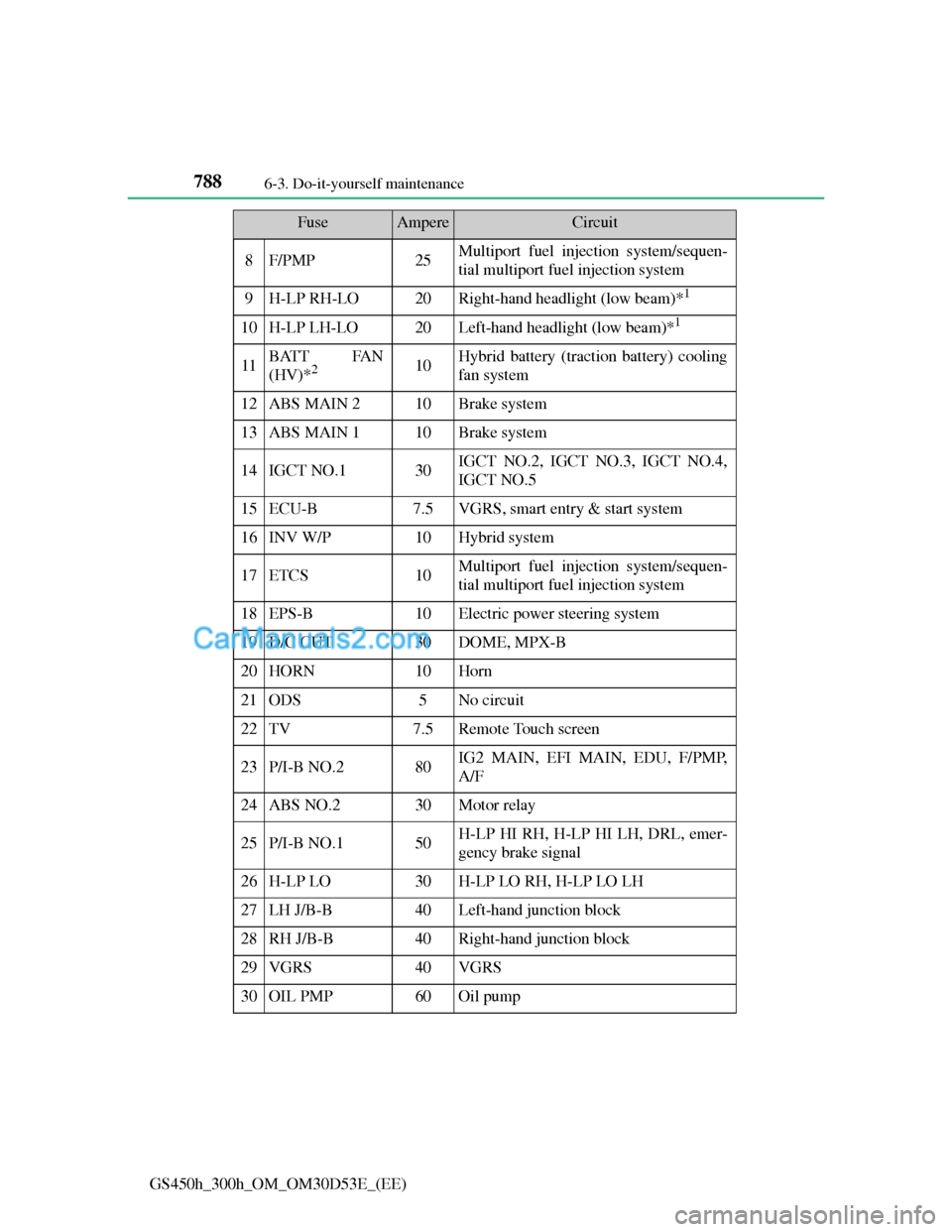
8F/PMP25Multiport fuel injection system/sequen-
tial multiport fuel injection system
9H-LP RH-LO20Right-hand headlight (low beam)*1
10H-LP LH-LO20Left-hand headlight (low beam)*1
11BATT FAN
(HV)*210Hybrid battery (traction battery) cooling
fan system
12ABS MAIN 210Brake system
13ABS MAIN 110Brake system
14IGCT NO.130IGCT NO.2, IGCT NO.3, IGCT NO.4,
IGCT NO.5
15ECU-B7.5VGRS, smart entry & start system
16INV W/P10Hybrid system
17ETCS10Multiport fuel injection system/sequen-
tial multiport fuel injection system
18EPS-B10Electric power steering system
19D/C CUT30DOME, MPX-B
20HORN10Horn
21ODS5No circuit
22TV7.5Remote Touch screen
23P/I-B NO.280IG2 MAIN, EFI MAIN, EDU, F/PMP,
A/F
24ABS NO.230Motor relay
25P/I-B NO.150H-LP HI RH, H-LP HI LH, DRL, emer-
gency brake signal
26H-LP LO30H-LP LO RH, H-LP LO LH
27LH J/B-B40Left-hand junction block
28RH J/B-B40Right-hand junction block
29VGRS40VGRS
30OIL PMP60Oil pump
FuseAmpereCircuit
Page 937 of 1014
9107-2. Steps to take in an emergency
GS450h_300h_OM_OM30D53E_(EE)
If the electronic key does not operate properly
Doors
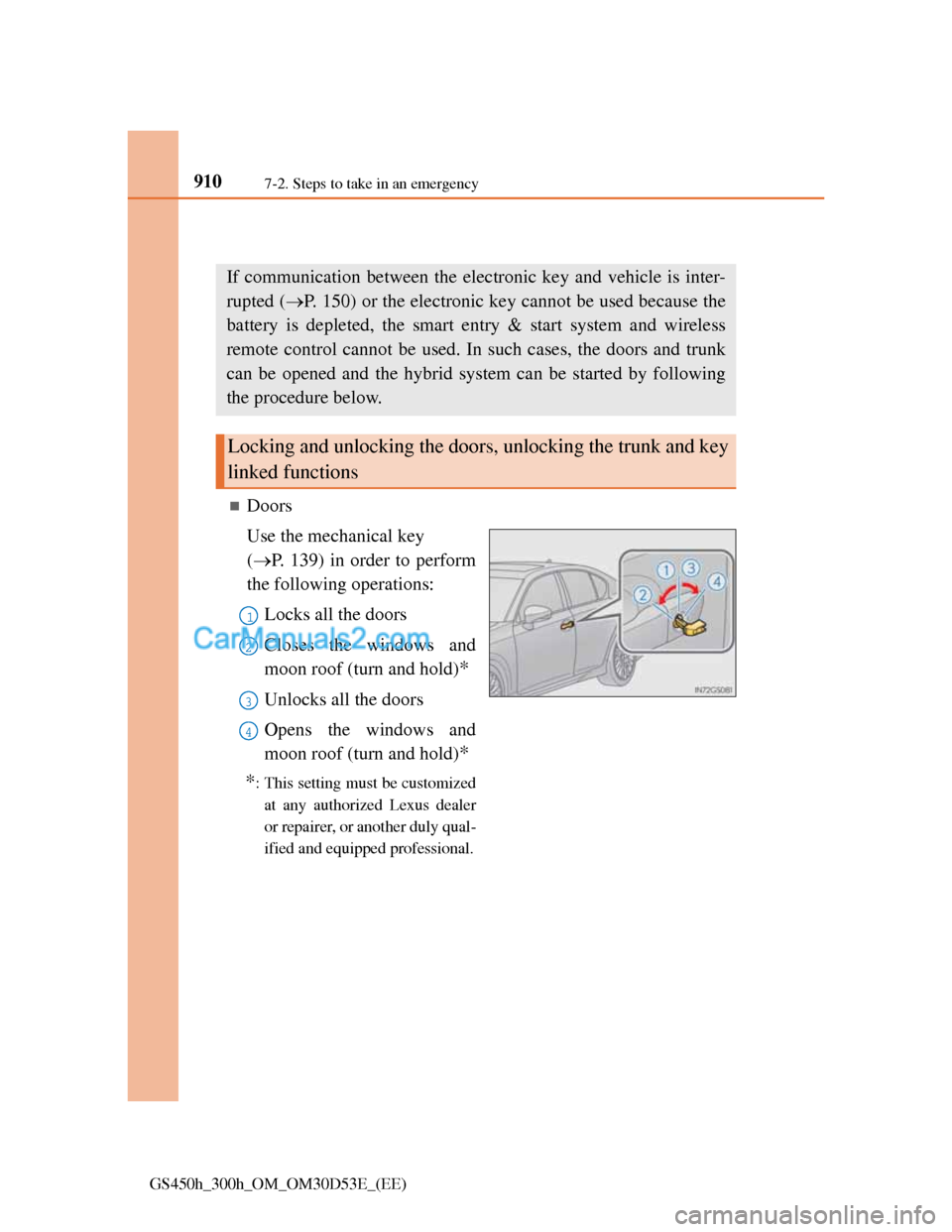
Use the mechanical key
(P. 139) in order to perform
the following operations:
Locks all the doors
Closes the windows and
moon roof (turn and hold)
*
Unlocks all the doors
Opens the windows and
moon roof (turn and hold)
*
*
: This setting must be customized
at any authorized Lexus dealer
or repairer, or another duly qual-
ified and equipped professional.
If communication between the electronic key and vehicle is inter-
rupted (P. 150) or the electronic key cannot be used because the
battery is depleted, the smart entry & start system and wireless
remote control cannot be used. In such cases, the doors and trunk
can be opened and the hybrid system can be started by following
the procedure below.
Locking and unlocking the doors, unlocking the trunk and key
linked functions
1
2
3
4
Page 942 of 1014
915
7 7-2. Steps to take in an emergency
When trouble arises
GS450h_300h_OM_OM30D53E_(EE)
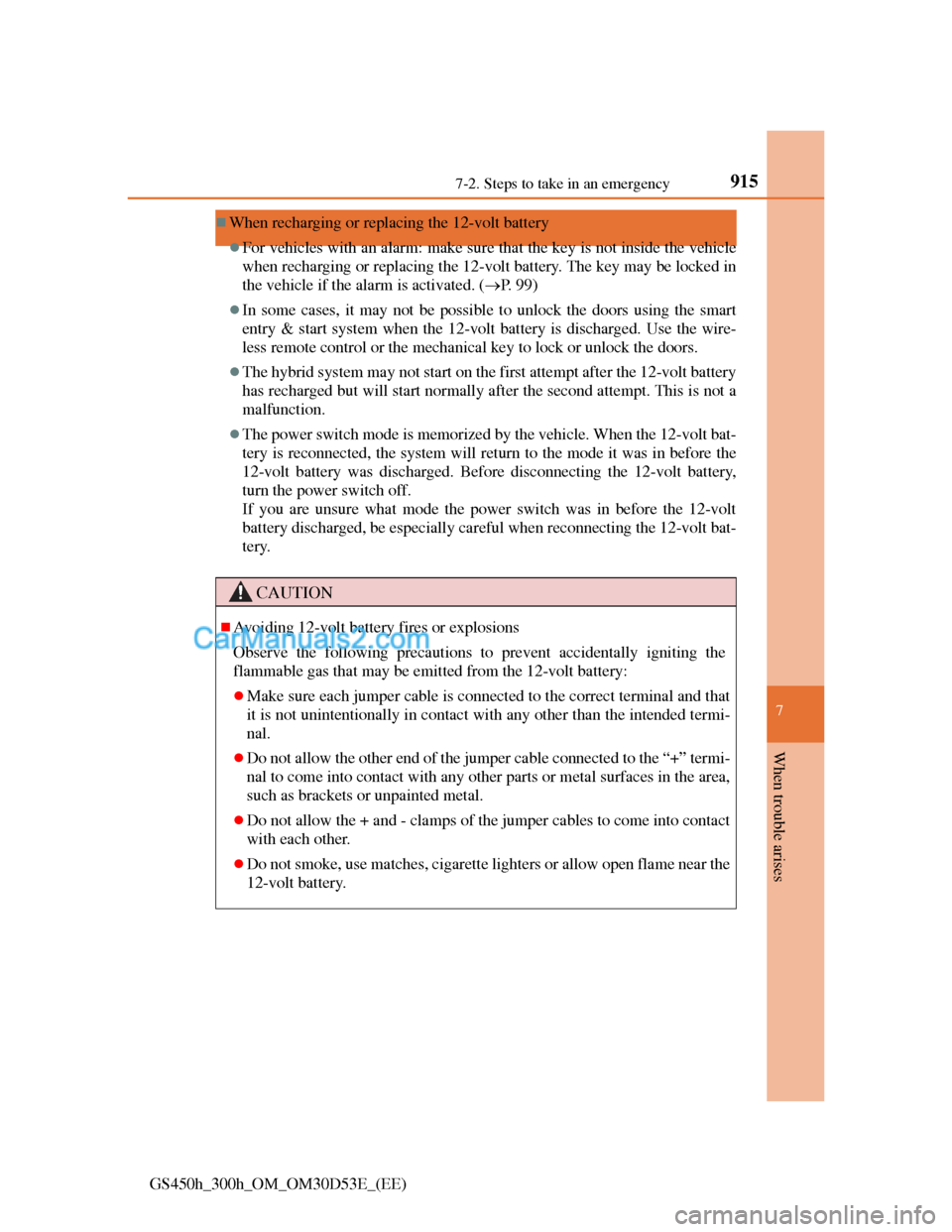
When recharging or replacing the 12-volt battery
For vehicles with an alarm: make sure that the key is not inside the vehicle
when recharging or replacing the 12-volt battery. The key may be locked in
the vehicle if the alarm is activated. (P. 99)
In some cases, it may not be possible to unlock the doors using the smart
entry & start system when the 12-volt battery is discharged. Use the wire-
less remote control or the mechanical key to lock or unlock the doors.
The hybrid system may not start on the first attempt after the 12-volt battery
has recharged but will start normally after the second attempt. This is not a
malfunction.
The power switch mode is memorized by the vehicle. When the 12-volt bat-
tery is reconnected, the system will return to the mode it was in before the
12-volt battery was discharged. Before disconnecting the 12-volt battery,
turn the power switch off.
If you are unsure what mode the power switch was in before the 12-volt
battery discharged, be especially careful when reconnecting the 12-volt bat-
tery.
CAUTION
Avoiding 12-volt battery fires or explosions
Observe the following precautions to prevent accidentally igniting the
flammable gas that may be emitted from the 12-volt battery:
Make sure each jumper cable is connected to the correct terminal and that
it is not unintentionally in contact with any other than the intended termi-
nal.
Do not allow the other end of the jumper cable connected to the “+” termi-
nal to come into contact with any other parts or metal surfaces in the area,
such as brackets or unpainted metal.
Do not allow the + and - clamps of the jumper cables to come into contact
with each other.
Do not smoke, use matches, cigarette lighters or allow open flame near the
12-volt battery.
Page 978 of 1014
9468-2. Customization
GS450h_300h_OM_OM30D53E_(EE)
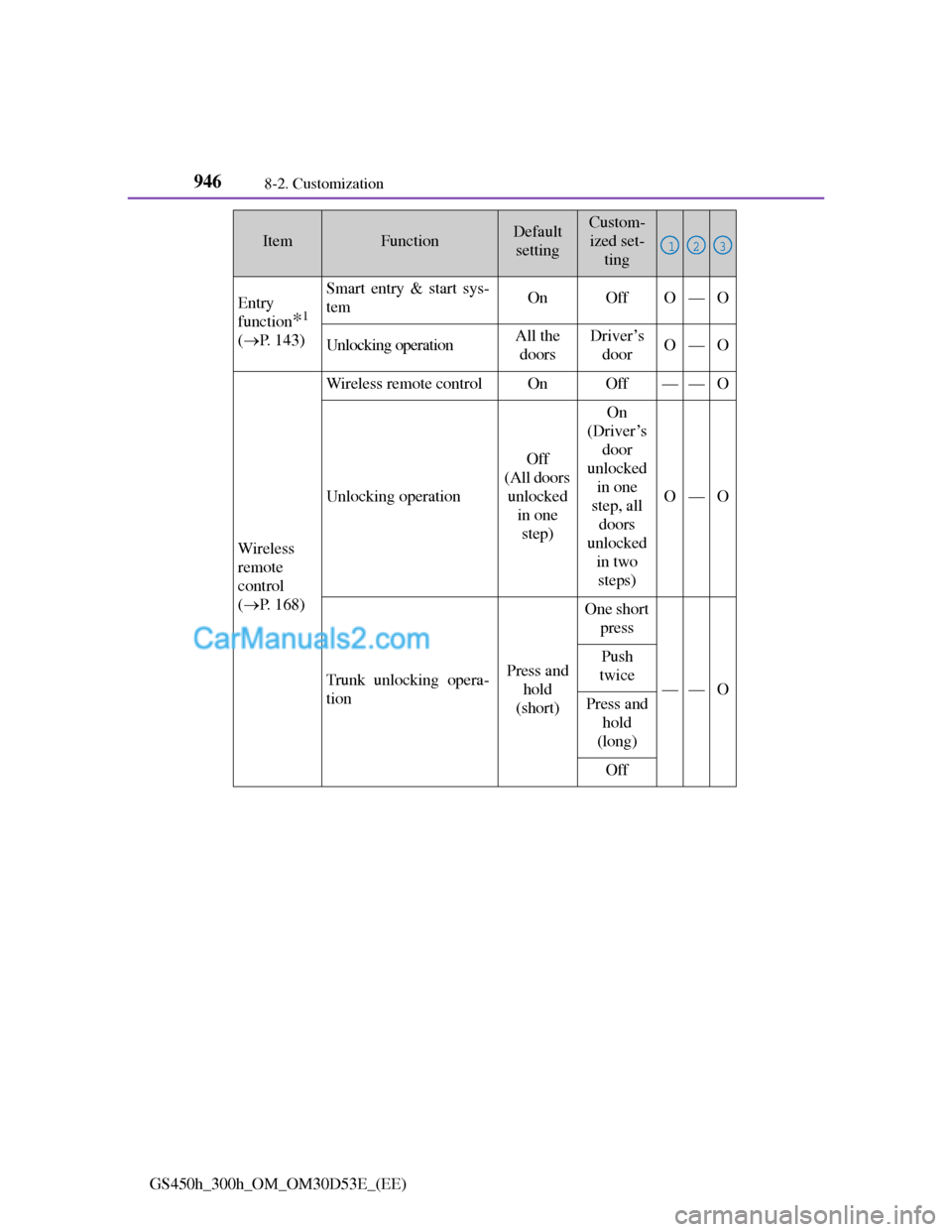
Entry
function
*1
(P. 143)
Smart entry & start sys-
temOnOffO—O
Unlocking operationAll the
doorsDriver’s
doorO—O
Wireless
remote
control
(P. 168)
Wireless remote controlOnOff——O
Unlocking operation
Off
(All doors
unlocked
in one
step)
On
(Driver’s
door
unlocked
in one
step, all
doors
unlocked
in two
steps)
O—O
Trunk unlocking opera-
tionPress and
hold
(short)
One short
press
——O
Push
twice
Press and
hold
(long)
Off
ItemFunctionDefault
settingCustom-
ized set-
ting
123