reset Lexus GS300h 2013 User Guide
[x] Cancel search | Manufacturer: LEXUS, Model Year: 2013, Model line: GS300h, Model: Lexus GS300h 2013Pages: 1014
Page 137 of 1014
1362. Instrument cluster
GS450h_300h_OM_OM30D53E_(EE)
Updating the past record data
Update the average fuel consumption by selecting “Update” to measure the
current fuel consumption again.
Resetting the data
The fuel consumption data can be deleted by selecting “Clear”.
Cruising range
Displays the estimated maximum distance that can be driven with the quan-
tity of fuel remaining.
This distance is computed based on your average fuel consumption.
As a result, the actual distance that can be driven may differ from that dis-
played.
Page 201 of 1014
2003-3. Adjusting the seats
GS450h_300h_OM_OM30D53E_(EE)
If the front passenger’s door is opened while the vehicle is
stopped, the adjusted lumbar support, ottoman (if equipped), etc.
will return to its original position.
Operation of the power easy access system
When exiting the vehicle, the power easy access system may not operate if
the seat is already close to the rearmost position, etc.
Customization
The seat movement amount settings of the power easy access system can be
customized. (Customizable features: P. 942)
Your preferred driving position (the position of the driver’s seat,
steering wheel and outside rear view mirrors) can be recorded and
recalled by pressing a button.
Three different driving positions can be recorded into memory.
Recording procedure
Check that the shift lever is in P.
Turn the power switch to ON mode.
Adjust the driver’s seat, steering wheel, and outside rear view
mirrors to the desired positions.
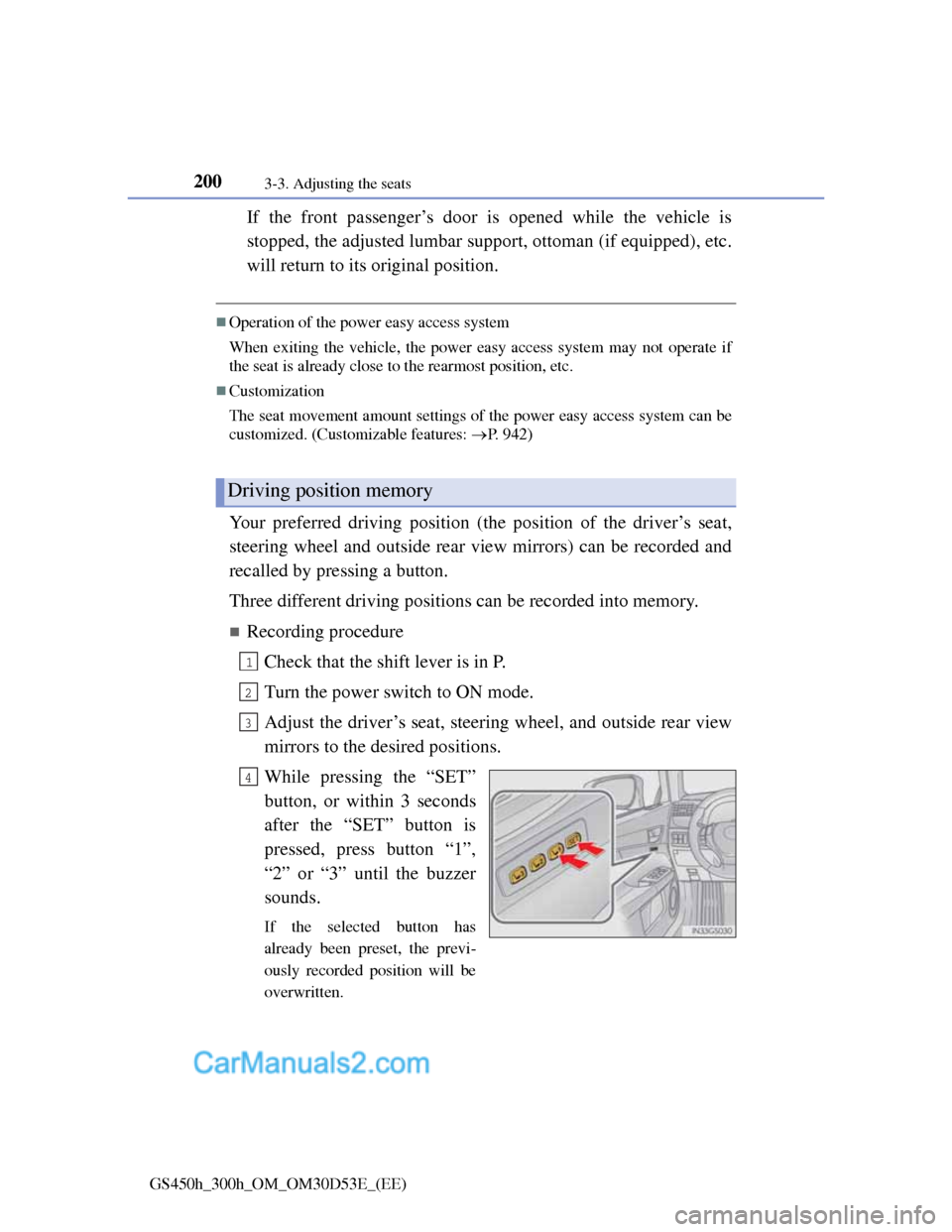
While pressing the “SET”
button, or within 3 seconds
after the “SET” button is
pressed, press button “1”,
“2” or “3” until the buzzer
sounds.
If the selected button has
already been preset, the previ-
ously recorded position will be
overwritten.
Driving position memory
1
2
3
4
Page 311 of 1014
3004-5. Using the driving support system
GS450h_300h_OM_OM30D53E_(EE)
Cruise control can be set when
The shift lever is in D or range 4 or higher of S has been selected.
Range 4 or higher of D has been selected by using the paddle shift.
Vehicle speed is above approximately 40 km/h (25 mph).
Accelerating after setting the vehicle speed
The vehicle can be accelerated normally. After acceleration, the set speed
resumes.
Even without canceling the cruise control, the set speed can be increased by
first accelerating the vehicle to the desired speed and then pushing the lever
down to set the new speed.
Automatic cruise control cancelation
Cruise control will stop maintaining the vehicle speed in any of the following
situations.
Actual vehicle speed falls more than approximately 16 km/h (10 mph)
below the preset vehicle speed.
At this time, the memorized set speed is not retained.
Actual vehicle speed is below approximately 40 km/h (25 mph).
VSC is activated.
TRC is activated for a period of time.
When the VSC or TRC system is turned off by pressing the VSC OFF
switch.
If the warning message for the cruise control is shown on the multi-informa-
tion display
Press the “ON/OFF” button once to deactivate the system, and then press the
button again to reactivate the system.
If the cruise control speed cannot be set or if the cruise control cancels imme-
diately after being activated, there may be a malfunction in the cruise control
system. Have the vehicle inspected by any authorized Lexus dealer or
repairer, or another duly qualified and equipped professional.
Page 548 of 1014
5285-3. Using the audio system
GS450h_300h_OM_OM30D53E_(EE)
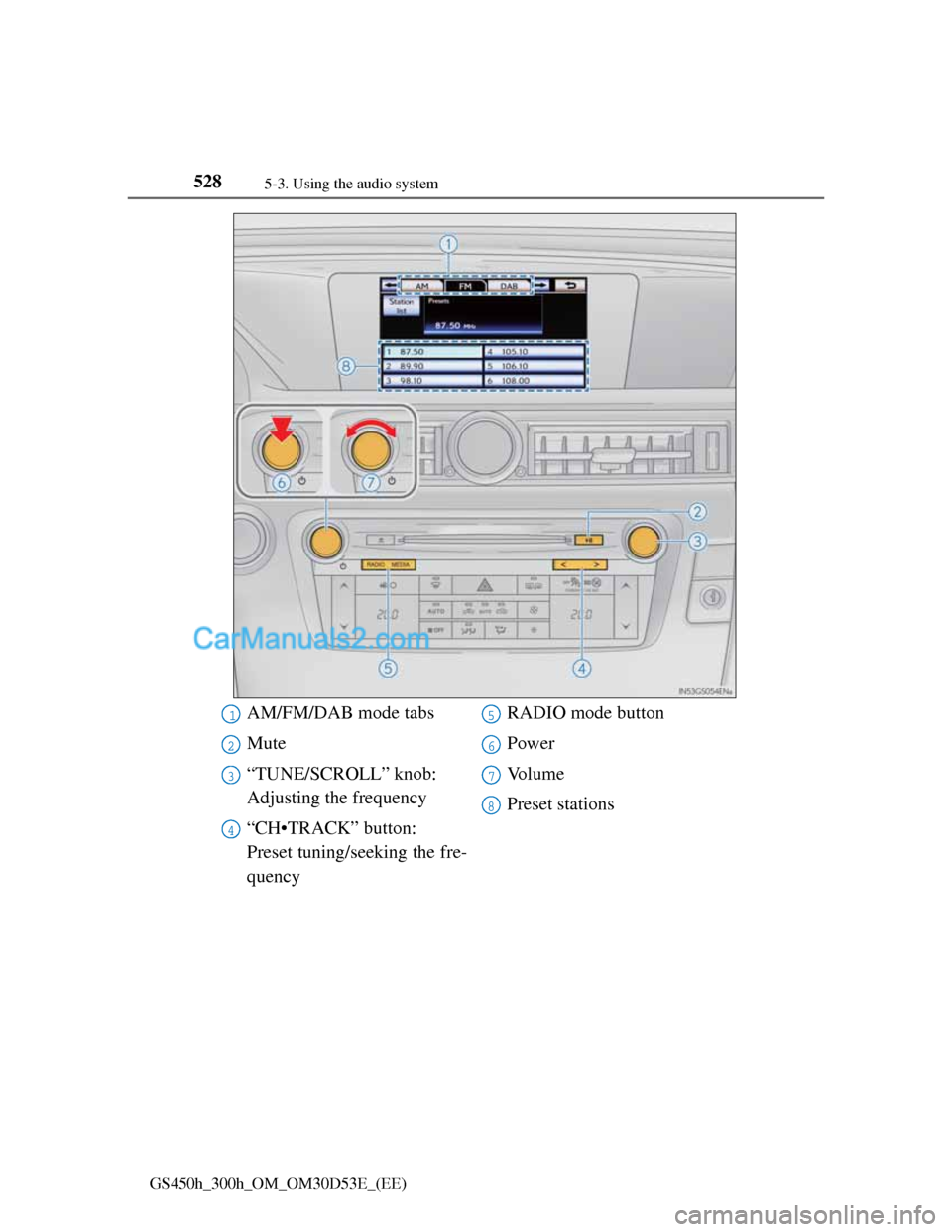
AM/FM/DAB mode tabs
Mute
“TUNE/SCROLL” knob:
Adjusting the frequency
“CH•TRACK” button:
Preset tuning/seeking the fre-
quencyRADIO mode button
Power
Vo l u m e
Preset stations1
2
3
4
5
6
7
8
Page 549 of 1014
5295-3. Using the audio system
5
Interior features
GS450h_300h_OM_OM30D53E_(EE)
Seek tuning
Press and hold “<” or “>” on the “CH•TRACK” button.
Manual tuning
Turn the “TUNE/SCROLL” knob.
Preset stations
Select the desired preset stations (1 - 6).
Press “<” or “>” on the “CH•TRACK” button.
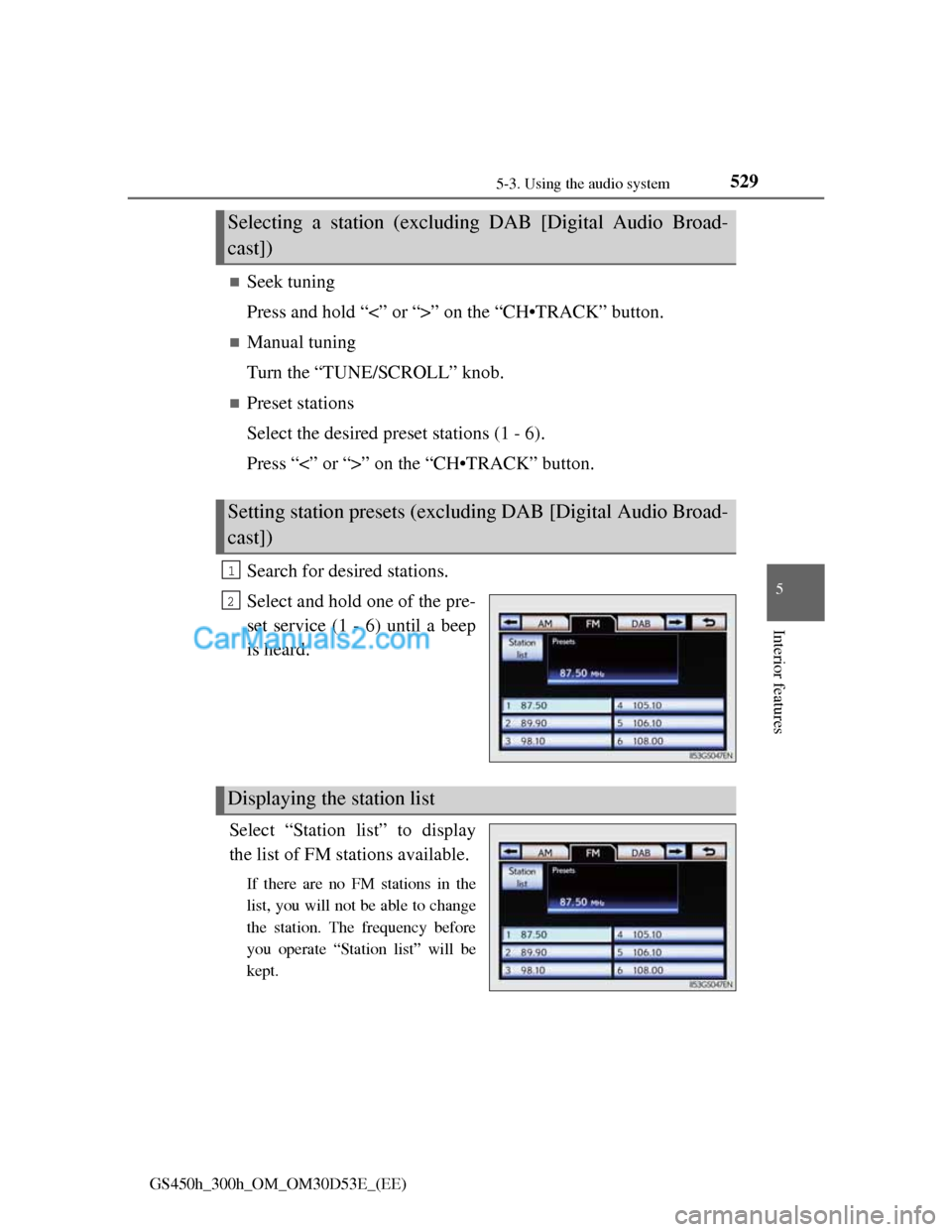
Search for desired stations.
Select and hold one of the pre-
set service (1 - 6) until a beep
is heard.
Select “Station list” to display
the list of FM stations available.
If there are no FM stations in the
list, you will not be able to change
the station. The frequency before
you operate “Station list” will be
kept.
Selecting a station (excluding DAB [Digital Audio Broad-
cast])
Setting station presets (excluding DAB [Digital Audio Broad-
cast])
1
2
Displaying the station list
Page 552 of 1014
5325-3. Using the audio system
GS450h_300h_OM_OM30D53E_(EE)
Listening to stations of the same network
FM alternative frequency:The station among those of the same
network with strong reception is
selected. FM alternative frequency on/
off (P. 530)
Regional code change: The station among those of the same net-
work with strong reception and broad-
casting the same program is selected.
Regional code change on/off (P. 530)
FM Traffic announcement
The system automatically switches to traffic information when a
broadcast with a traffic information signal is received.
“TP” (Traffic program) will appear on the screen. The station returns to
the previous one when the traffic information ends.
FM Traffic announcement on/off (P. 530)
Selecting a channel
Press “<” or “>” on “CH•TRACK” button or select or
on the screen.
Selecting a service
Manual tuning
Turn the “TUNE/SCROLL” knob.
Service list
Select one of the displayed services on the service list screen.
Preset stations
Select the desired preset stations (1 - 6).
RDS (Radio Data System)
DAB (Digital Audio Broadcast)
Page 553 of 1014
5335-3. Using the audio system
5
Interior features
GS450h_300h_OM_OM30D53E_(EE)
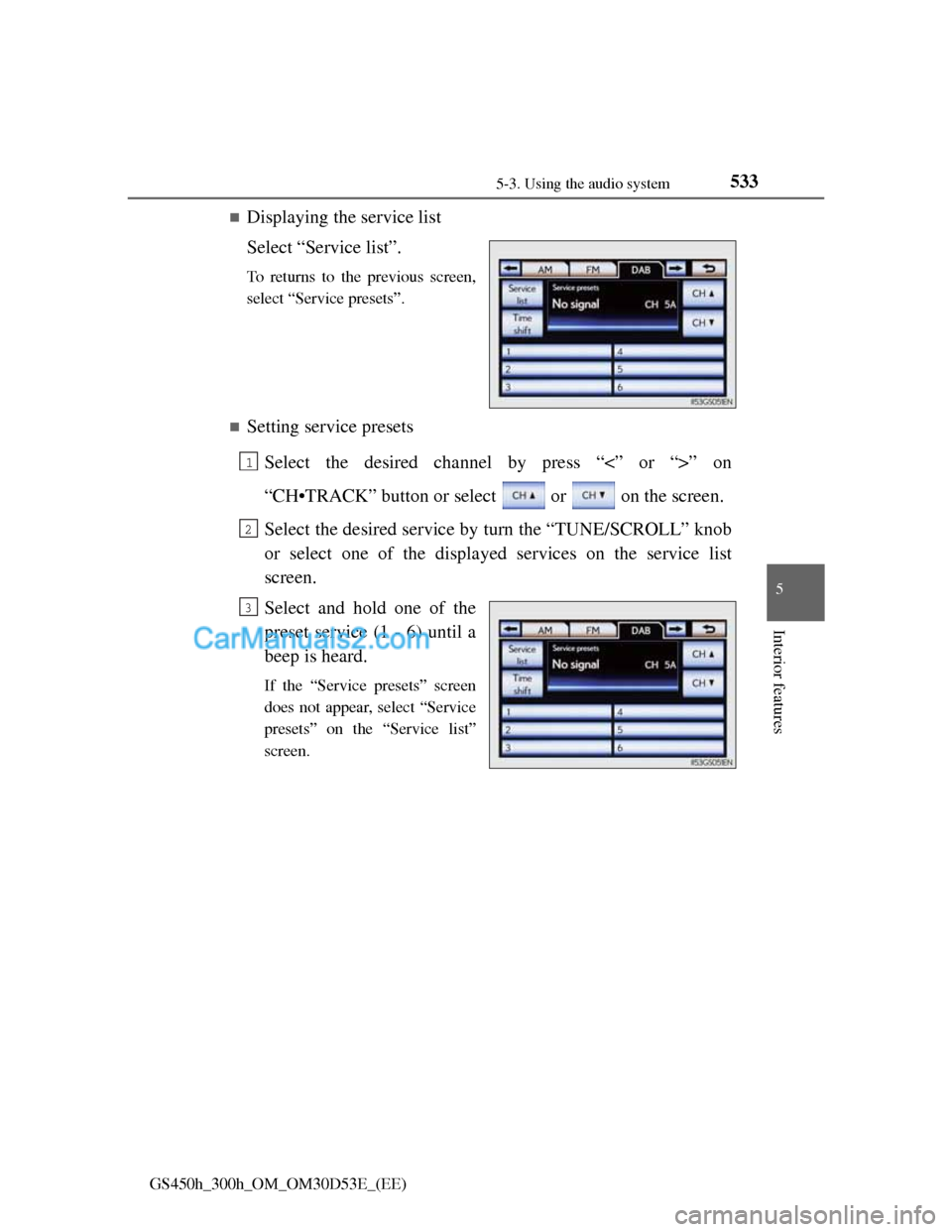
Displaying the service list
Select “Service list”.
To returns to the previous screen,
select “Service presets”.
Setting service presets
Select the desired channel by press “<” or “>” on
“CH•TRACK” button or select or on the screen.
Select the desired service by turn the “TUNE/SCROLL” knob
or select one of the displayed services on the service list
screen.
Select and hold one of the
preset service (1 - 6) until a
beep is heard.
If the “Service presets” screen
does not appear, select “Service
presets” on the “Service list”
screen.
1
2
3
Page 555 of 1014
5355-3. Using the audio system
5
Interior features
GS450h_300h_OM_OM30D53E_(EE)
Press .
Press the button again to turn the system back on.
If you select
The display returns to the previous screen.
EON (Enhanced Other Network) system (for traffic announcement function)
If the RDS station (with EON data) you are listening to is not broadcasting a
traffic information program and the audio system is in the TA (Traffic
announcement) mode, the radio will be switched automatically to a station
broadcasting a traffic information program in the EON AF list when traffic
information begins.
When listening to a disc
When the traffic information program starts, the disc playback mode is inter-
rupted and the traffic information is automatically broadcasted. When the
program ends, the initial operation resumes.
When the 12-volt battery is disconnected
All preset stations are erased.
Reception sensitivity
Maintaining perfect radio reception at all times is difficult due to the contin-
ually changing position of the antenna, differences in signal strength and
surrounding objects, such as trains, transmitters, etc.
The radio antenna is mounted inside the rear window. To maintain clear
radio reception, do not attach metallic window tinting or other metallic
objects to the antenna wire mounted inside the rear window.
About Time shift
The times at which playback is possible depend on the bit rate of the DAB
station to be recorded, the amount of DAB unit memory, and the time at
which reception of the broadcast began.
Silencing the sound
Page 562 of 1014

5425-3. Using the audio system
GS450h_300h_OM_OM30D53E_(EE)
Audio CD
Select “RAND” on the screen.
“RAND” appears on the screen.
To cancel, select “RAND”
again.
MP3/WMA disc
Playing files from a particular folder in random order
Each time “RAND” is selected, the mode changes as follows:
random (1 folder random) folder random (1 disc random)
off
Playing all the files on a disc in random order
Select “RAND” repeatedly until “FLD.RAND” appears on the
screen.
To cancel, select “RAND” again.
When a file is skipped or the system is inoperative, select “RAND”
to reset.
Random playback
Page 626 of 1014
6065-3. Using the audio system
GS450h_300h_OM_OM30D53E_(EE)
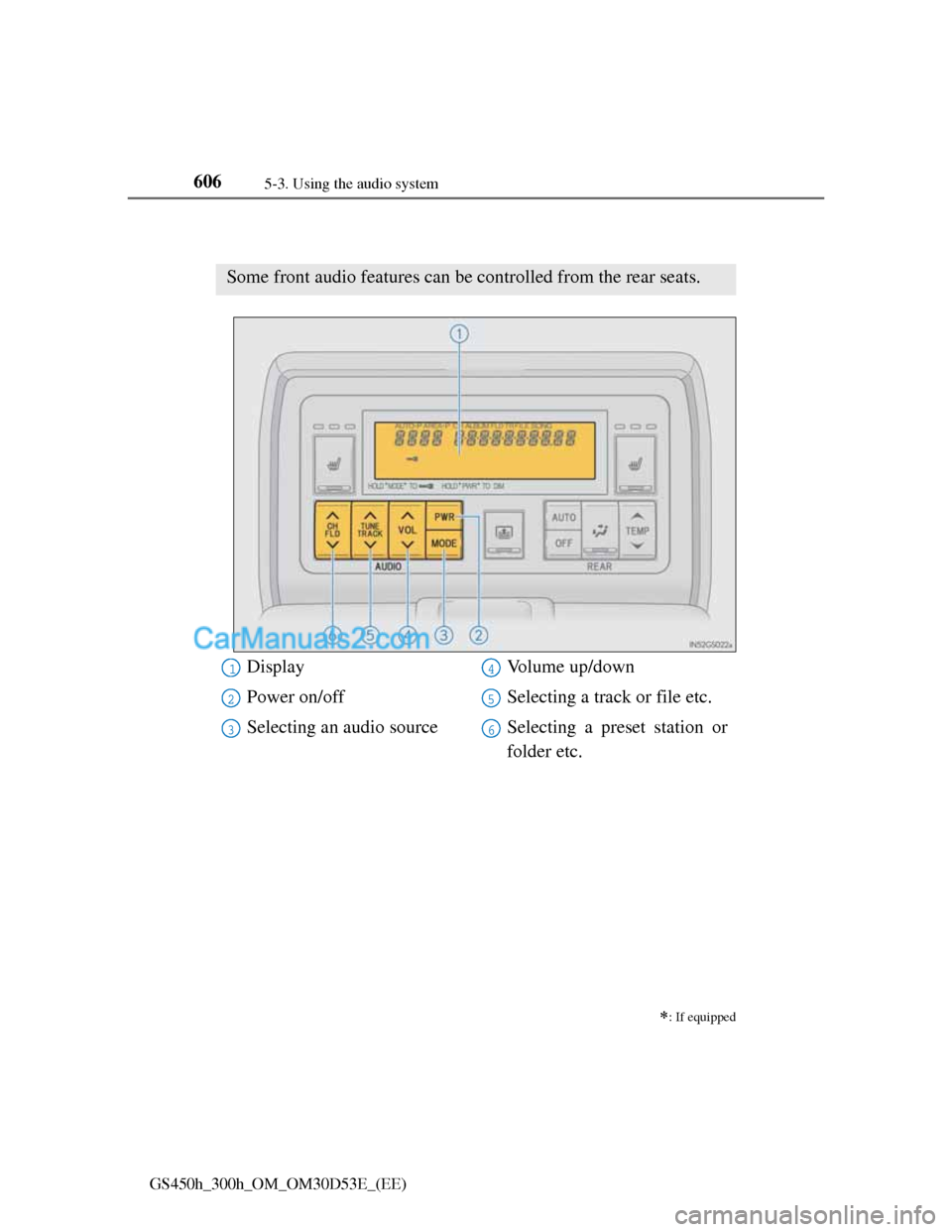
Using the rear seat audio controls
: If equipped
Some front audio features can be controlled from the rear seats.
Display
Power on/off
Selecting an audio sourceVolume up/down
Selecting a track or file etc.
Selecting a preset station or
folder etc.1
2
3
4
5
6