belt Lexus GS300h 2013 Owner's Guide
[x] Cancel search | Manufacturer: LEXUS, Model Year: 2013, Model line: GS300h, Model: Lexus GS300h 2013Pages: 1014
Page 76 of 1014
761-1. For safe use
GS450h_300h_OM_OM30D53E_(EE)
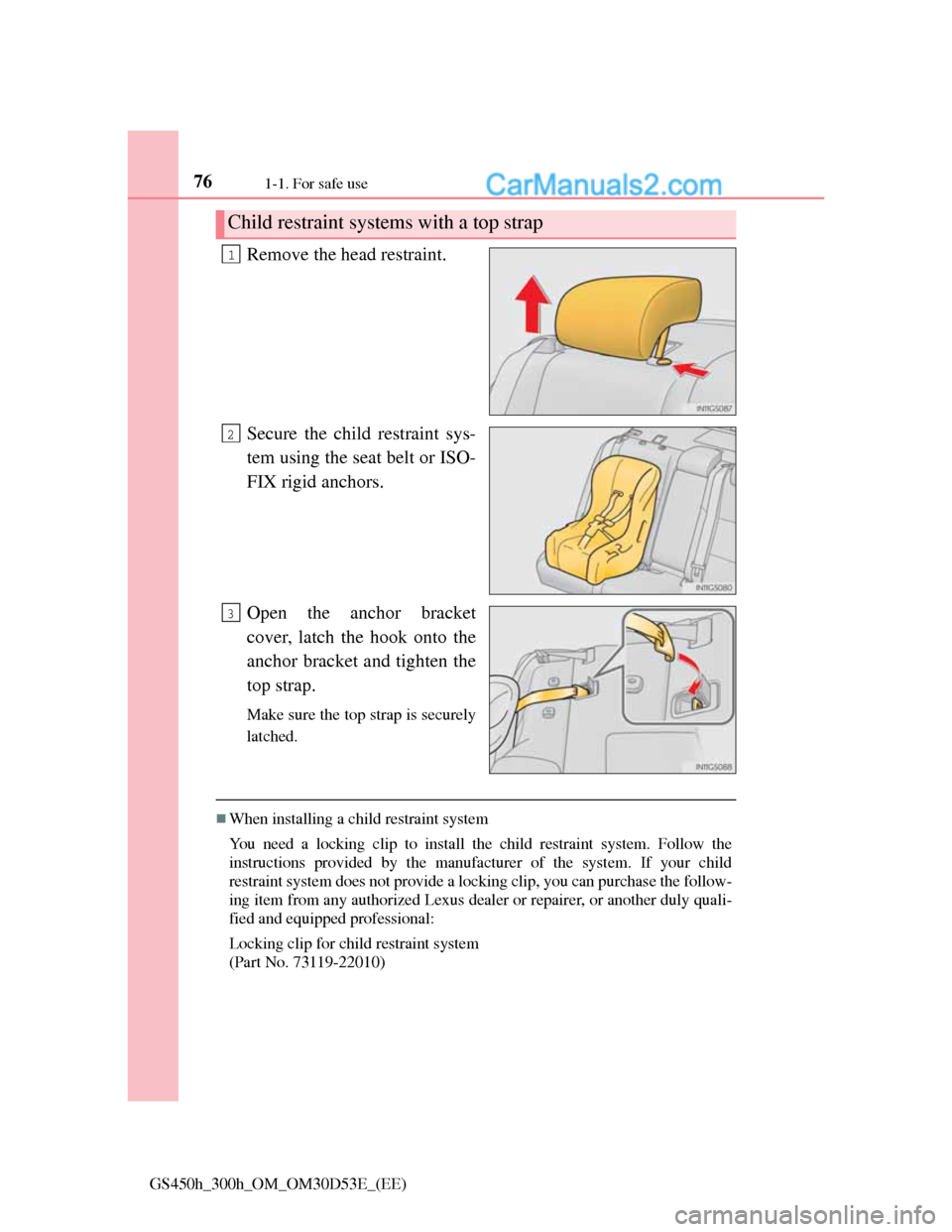
Remove the head restraint.
Secure the child restraint sys-
tem using the seat belt or ISO-
FIX rigid anchors.
Open the anchor bracket
cover, latch the hook onto the
anchor bracket and tighten the
top strap.
Make sure the top strap is securely
latched.
When installing a child restraint system
You need a locking clip to install the child restraint system. Follow the
instructions provided by the manufacturer of the system. If your child
restraint system does not provide a locking clip, you can purchase the follow-
ing item from any authorized Lexus dealer or repairer, or another duly quali-
fied and equipped professional:
Locking clip for child restraint system
(Part No. 73119-22010)
Child restraint systems with a top strap
1
2
3
Page 79 of 1014
791-1. For safe use
1
GS450h_300h_OM_OM30D53E_(EE)
For safety and security
CAUTION
When installing a child restraint system
If child restraint system regulations exist in the country where you reside,
please contact any authorized Lexus dealer or repairer, or another duly
qualified and equipped professional for the child restraint system installa-
tion.
When a junior seat is installed, always ensure that the shoulder belt is
positioned across the center of the child’s shoulder. The belt should be
kept away from the child’s neck, but not so that it could fall off the child’s
shoulder. Failing to do so may result in death or serious injury in the event
of sudden braking, sudden swerving or an accident.
Ensure that the belt and plate are securely locked and the seat belt is not
twisted.
Shake the child restraint system left and right, and forward and backward
to ensure that it has been securely installed.
After securing a child restraint system, never adjust the seat.
Follow all installation instructions provided by the child restraint system
manufacturer.
To correctly attach a child restraint system to the anchors
When using the lower anchors, be sure that there are no foreign objects
around the anchors and that the seat belt is not caught behind the child
restraint system. Make sure the child restraint system is securely attached,
or it may cause death or serious injury to the child or other passengers in
the event of sudden braking, sudden swerving or an accident.
Page 107 of 1014

1062. Instrument cluster
GS450h_300h_OM_OM30D53E_(EE)
*1: These lights turn on when the power switch is turned to ON mode to indi-
cate that a system check is being performed. They will turn off after the
hybrid system is on, or after a few seconds. There may be a malfunction in
a system if the lights do not come on, or turn off. Have the vehicle
inspected by any authorized Lexus dealer or repairer, or another duly qual-
ified and equipped professional.
*2: The light flashes to indicate a malfunction.
The indicators inform the driver of the operating state of the vehi-
cle’s various systems.
Open door warning light
(P. 833)*1Master warning light
(P. 833)
Low fuel level warning
light (P. 8 3 3 )
*1
(if
equipped)
Tire pressure warning
light
(P. 834)
Seat belt reminder light
(P. 833)
Indicators
Turn signal indicator
(P. 264)
(if
equipped)
Automatic High Beam
indicator (P. 277)
Tail light indicator
(P. 272)
(if
equipped)
Front fog light indicator
(P. 283)
Headlight high beam
indicator (P. 272)Rear fog light indicator
(P. 283)
Page 197 of 1014
1963-3. Adjusting the seats
GS450h_300h_OM_OM30D53E_(EE)
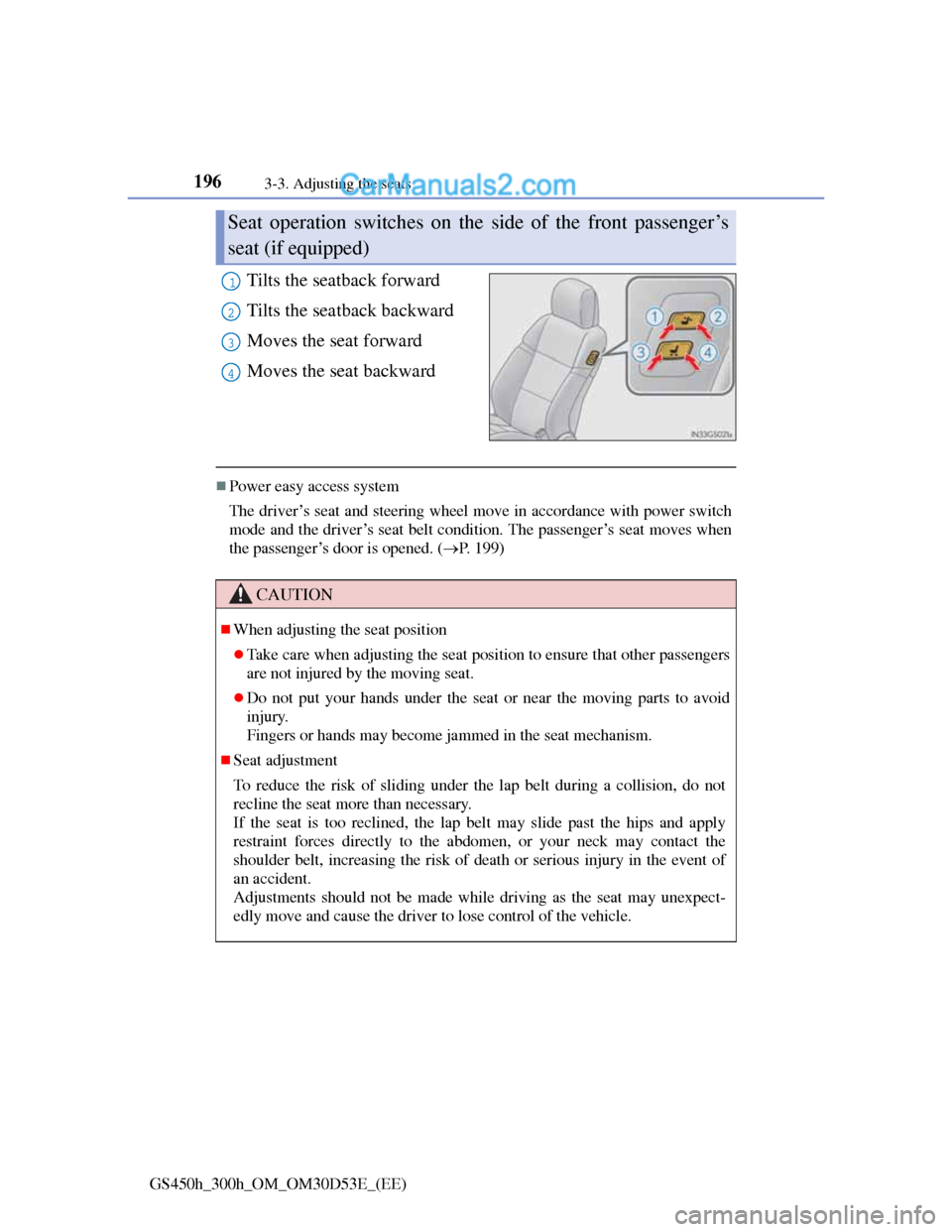
Tilts the seatback forward
Tilts the seatback backward
Moves the seat forward
Moves the seat backward
Power easy access system
The driver’s seat and steering wheel move in accordance with power switch
mode and the driver’s seat belt condition. The passenger’s seat moves when
the passenger’s door is opened. (P. 199)
Seat operation switches on the side of the front passenger’s
seat (if equipped)
1
2
3
4
CAUTION
When adjusting the seat position
Take care when adjusting the seat position to ensure that other passengers
are not injured by the moving seat.
Do not put your hands under the seat or near the moving parts to avoid
injury.
Fingers or hands may become jammed in the seat mechanism.
Seat adjustment
To reduce the risk of sliding under the lap belt during a collision, do not
recline the seat more than necessary.
If the seat is too reclined, the lap belt may slide past the hips and apply
restraint forces directly to the abdomen, or your neck may contact the
shoulder belt, increasing the risk of death or serious injury in the event of
an accident.
Adjustments should not be made while driving as the seat may unexpect-
edly move and cause the driver to lose control of the vehicle.
Page 198 of 1014
1973-3. Adjusting the seats
3
Operation of each component
GS450h_300h_OM_OM30D53E_(EE)
CAUTION
Operating the front passenger’s seat from the driver’s seat (if equipped)
Do not operate the front passenger’s seat when a passenger is seated in it. In
addition, do not let anyone sit down in the front passenger’s seat while the
seat is being operated. The front passenger may catch their legs between the
instrument panel and seat, resulting in injury.
When adjusting the seat positions or the ottoman (if equipped)
Make sure to leave enough space around the feet so they do not get stuck.
When using the ottoman (if equipped)
Do not operate the ottoman when the vehicle is moving.
Failure to do so may cause death or serious injury in the event of sudden
braking or a collision.
Do not sit on the ottoman of the passenger seat.
Doing so may cause seat belts to be worn improperly, which may lead to
serious injury or death in the event of sudden braking or a collision.
Do not step on the ottoman.
Doing so could damage the ottoman, or could cause you to seriously
injure yourself by falling over.
Stow the ottoman when you get in or out of the vehicle or when the otto-
man is not in use to avoid stumbling over it.
Do not allow anyone to put their hands or feet under the passenger seat
when stowing the ottoman.
Page 200 of 1014
1993-3. Adjusting the seats
3
Operation of each component
GS450h_300h_OM_OM30D53E_(EE)
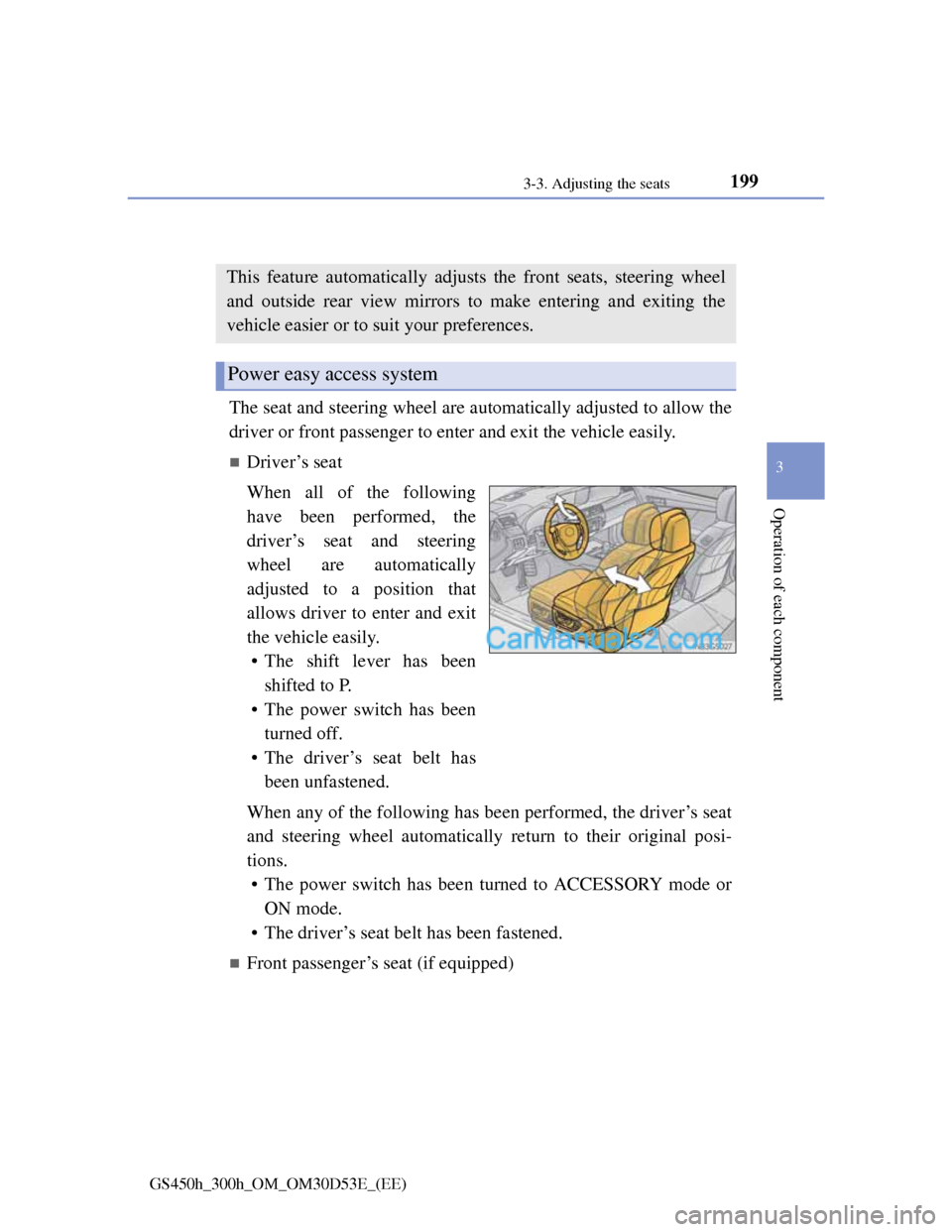
Driving position memory
The seat and steering wheel are automatically adjusted to allow the
driver or front passenger to enter and exit the vehicle easily.
Driver’s seat
When all of the following
have been performed, the
driver’s seat and steering
wheel are automatically
adjusted to a position that
allows driver to enter and exit
the vehicle easily.
• The shift lever has been
shifted to P.
• The power switch has been
turned off.
• The driver’s seat belt has
been unfastened.
When any of the following has been performed, the driver’s seat
and steering wheel automatically return to their original posi-
tions.
• The power switch has been turned to ACCESSORY mode or
ON mode.
• The driver’s seat belt has been fastened.
Front passenger’s seat (if equipped)
This feature automatically adjusts the front seats, steering wheel
and outside rear view mirrors to make entering and exiting the
vehicle easier or to suit your preferences.
Power easy access system
Page 205 of 1014
2043-3. Adjusting the seats
GS450h_300h_OM_OM30D53E_(EE)
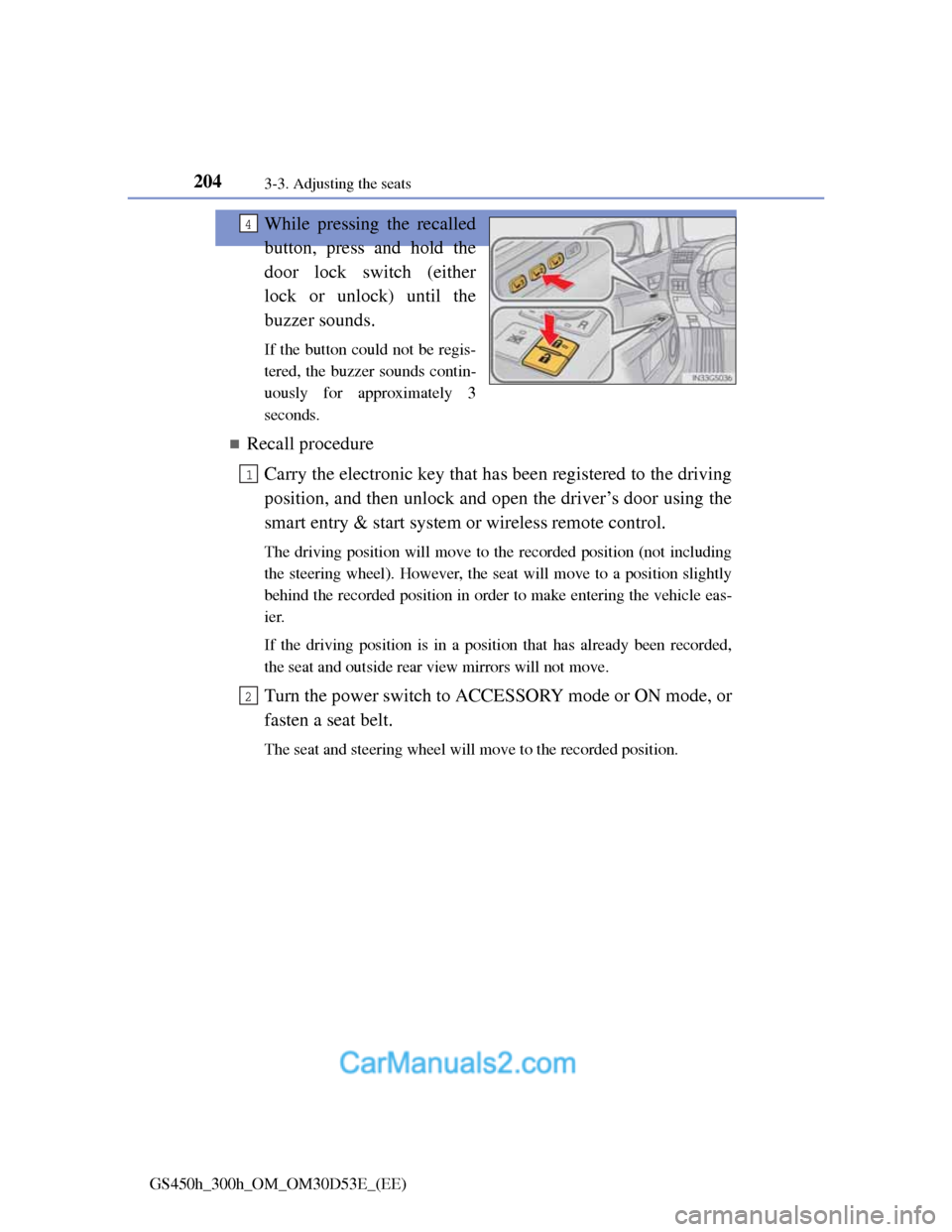
While pressing the recalled
button, press and hold the
door lock switch (either
lock or unlock) until the
buzzer sounds.
If the button could not be regis-
tered, the buzzer sounds contin-
uously for approximately 3
seconds.
Recall procedure
Carry the electronic key that has been registered to the driving
position, and then unlock and open the driver’s door using the
smart entry & start system or wireless remote control.
The driving position will move to the recorded position (not including
the steering wheel). However, the seat will move to a position slightly
behind the recorded position in order to make entering the vehicle eas-
ier.
If the driving position is in a position that has already been recorded,
the seat and outside rear view mirrors will not move.
Turn the power switch to ACCESSORY mode or ON mode, or
fasten a seat belt.
The seat and steering wheel will move to the recorded position.
4
1
2
Page 210 of 1014
207
3 3-4. Adjusting the steering wheel and mirrors
Operation of each component
GS450h_300h_OM_OM30D53E_(EE)
Steering wheel
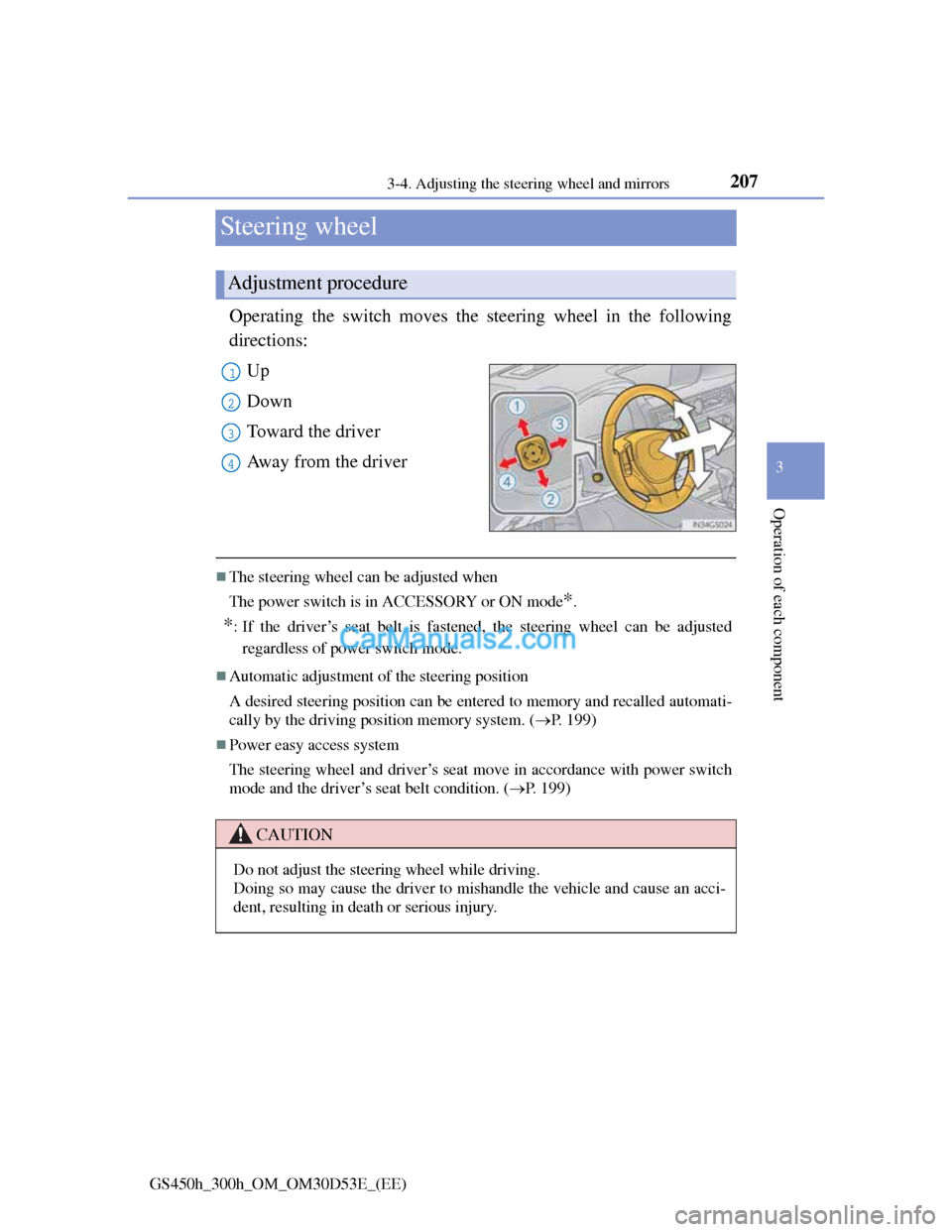
Operating the switch moves the steering wheel in the following
directions:
Up
Down
Toward the driver
Away from the driver
The steering wheel can be adjusted when
The power switch is in ACCESSORY or ON mode
*.
*: If the driver’s seat belt is fastened, the steering wheel can be adjusted
regardless of power switch mode.
Automatic adjustment of the steering position
A desired steering position can be entered to memory and recalled automati-
cally by the driving position memory system. (P. 199)
Power easy access system
The steering wheel and driver’s seat move in accordance with power switch
mode and the driver’s seat belt condition. (P. 199)
Adjustment procedure
1
2
3
4
CAUTION
Do not adjust the steering wheel while driving.
Doing so may cause the driver to mishandle the vehicle and cause an acci-
dent, resulting in death or serious injury.
Page 278 of 1014
2724-2. Driving procedures
GS450h_300h_OM_OM30D53E_(EE)
Brake Hold
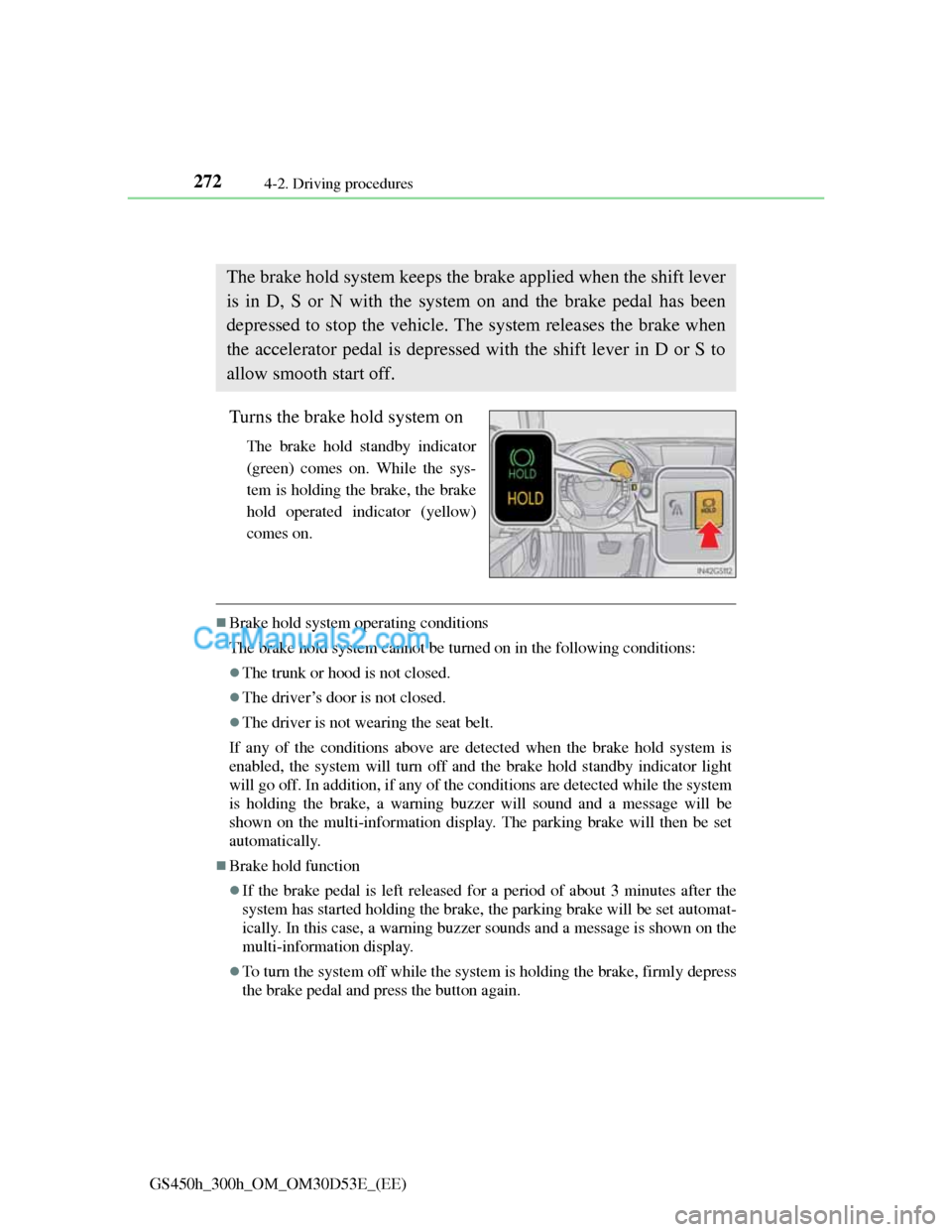
Turns the brake hold system on
The brake hold standby indicator
(green) comes on. While the sys-
tem is holding the brake, the brake
hold operated indicator (yellow)
comes on.
Brake hold system operating conditions
The brake hold system cannot be turned on in the following conditions:
The trunk or hood is not closed.
The driver’s door is not closed.
The driver is not wearing the seat belt.
If any of the conditions above are detected when the brake hold system is
enabled, the system will turn off and the brake hold standby indicator light
will go off. In addition, if any of the conditions are detected while the system
is holding the brake, a warning buzzer will sound and a message will be
shown on the multi-information display. The parking brake will then be set
automatically.
Brake hold function
If the brake pedal is left released for a period of about 3 minutes after the
system has started holding the brake, the parking brake will be set automat-
ically. In this case, a warning buzzer sounds and a message is shown on the
multi-information display.
To turn the system off while the system is holding the brake, firmly depress
the brake pedal and press the button again.
The brake hold system keeps the brake applied when the shift lever
is in D, S or N with the system on and the brake pedal has been
depressed to stop the vehicle. The system releases the brake when
the accelerator pedal is depressed with the shift lever in D or S to
allow smooth start off.
Page 340 of 1014
3294-5. Using the driving support system
4
Driving
GS450h_300h_OM_OM30D53E_(EE)
Dynamic radar cruise control with full-speed range can be set when
The shift lever is in D or range 4 or higher of S has been selected.
Range 4 or higher of D has been selected by using the paddle shift.
Vehicle speed is above approximately 50 km/h (30 mph).
Accelerating after setting the vehicle speed
The vehicle can accelerate normally. After acceleration, the set speed
resumes. However, during vehicle-to-vehicle distance control mode, the
vehicle speed may decrease below the set speed in order to maintain the dis-
tance to the vehicle ahead.
Automatic cancelation of vehicle-to-vehicle distance control
Vehicle-to-vehicle distance control driving is automatically canceled in the
following situations:
Actual vehicle speed falls below approximately 40 km/h (25 mph) when
there are no vehicle ahead.
The preceding vehicle leaves the lane when your vehicle is following at a
speed below 40 km/h (25 mph).
VSC is activated.
TRC is activated for a period of time.
When the VSC or TRC system is turned off by pressing the VSC OFF
switch.
The sensor cannot operate correctly because it is covered in some way.
The windshield wipers are operating at high speed (when the wiper switch
is set to AUTO mode or the high speed wiper operation).
When snow mode is set.
The parking brake is operated.
The vehicle is stopped by system control on a steep incline.
Pre-crash brake assist is activated.
The following are detected when the vehicle has been stopped by system
control:
• The driver is not wearing a seat belt.
• The driver’s door is opened.
• The trunk or hood is opened.
• The vehicle has been stopped for about 3 minutes.
If vehicle-to-vehicle distance control driving is automatically canceled for
any other reason, there may be a malfunction in the system. Contact any