wheel Lexus GS300h 2013 Service Manual
[x] Cancel search | Manufacturer: LEXUS, Model Year: 2013, Model line: GS300h, Model: Lexus GS300h 2013Pages: 1014
Page 347 of 1014
3364-5. Using the driving support system
GS450h_300h_OM_OM30D53E_(EE)
CAUTION
When the radar sensor may not be correctly detecting the vehicle ahead
Apply the brakes as necessary when any of the following types of vehicles
are in front of you.
As the sensor may not be able to correctly detect these types of vehicles, the
approach warning (P. 308) will not be activated, and a fatal or serious
accident may result.
Vehicles that cut in suddenly
Vehicles traveling at low speeds
Vehicles that are not moving
Vehicles with small rear ends (trailers with no load on board etc.)
Motorcycles traveling in the same lane
Conditions under which the vehicle-to-vehicle distance control may not
function correctly
Apply the brakes as necessary in the following conditions as the radar sen-
sor may not be able to correctly detect vehicles ahead, and a fatal or serious
accident may result:
When water or snow thrown up by the surrounding vehicles hinders the
functioning of the radar sensor
When your vehicle is pointing upwards (caused by a heavy load in the
trunk etc.)
When the road curves or when the lanes are narrow
When steering wheel operation or your position in the lane is unstable
When the vehicle ahead of you decelerates suddenly
Page 350 of 1014
3394-5. Using the driving support system
4
Driving
GS450h_300h_OM_OM30D53E_(EE)
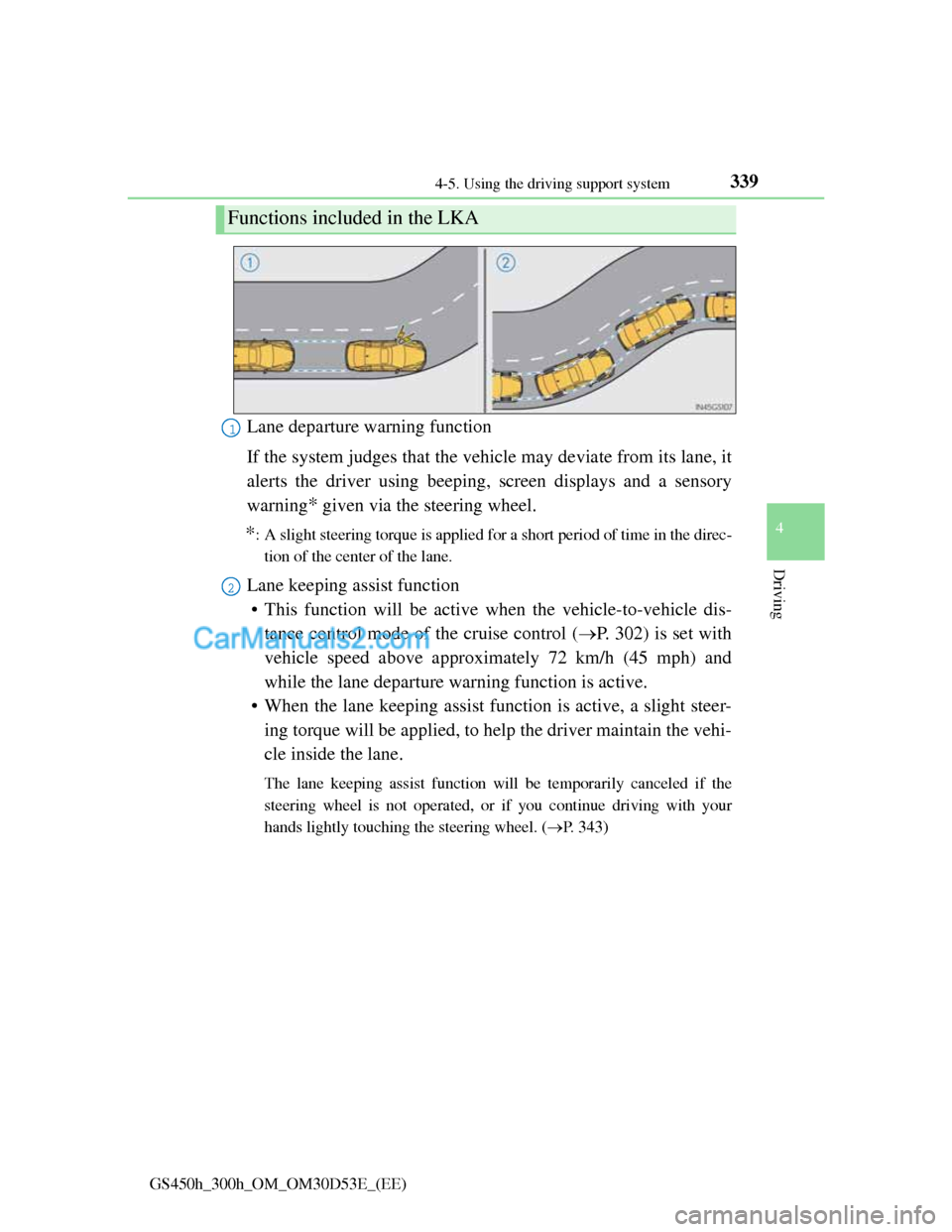
Lane departure warning function
If the system judges that the vehicle may deviate from its lane, it
alerts the driver using beeping, screen displays and a sensory
warning
* given via the steering wheel.
*: A slight steering torque is applied for a short period of time in the direc-
tion of the center of the lane.
Lane keeping assist function
• This function will be active when the vehicle-to-vehicle dis-
tance control mode of the cruise control (P. 302) is set with
vehicle speed above approximately 72 km/h (45 mph) and
while the lane departure warning function is active.
• When the lane keeping assist function is active, a slight steer-
ing torque will be applied, to help the driver maintain the vehi-
cle inside the lane.
The lane keeping assist function will be temporarily canceled if the
steering wheel is not operated, or if you continue driving with your
hands lightly touching the steering wheel. (P. 343)
Functions included in the LKA
1
2
Page 353 of 1014
3424-5. Using the driving support system
GS450h_300h_OM_OM30D53E_(EE)
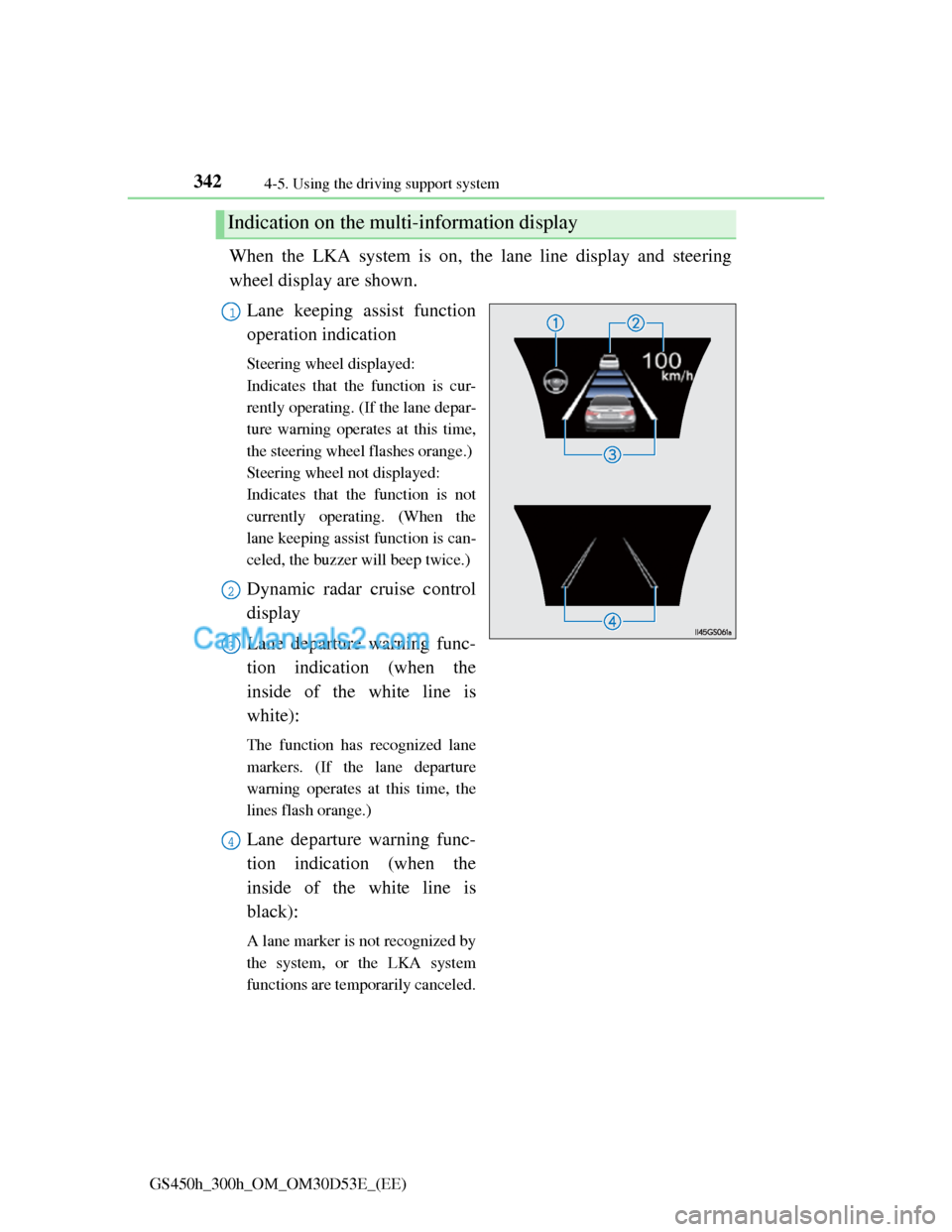
When the LKA system is on, the lane line display and steering
wheel display are shown.
Lane keeping assist function
operation indication
Steering wheel displayed:
Indicates that the function is cur-
rently operating. (If the lane depar-
ture warning operates at this time,
the steering wheel flashes orange.)
Steering wheel not displayed:
Indicates that the function is not
currently operating. (When the
lane keeping assist function is can-
celed, the buzzer will beep twice.)
Dynamic radar cruise control
display
Lane departure warning func-
tion indication (when the
inside of the white line is
white):
The function has recognized lane
markers. (If the lane departure
warning operates at this time, the
lines flash orange.)
Lane departure warning func-
tion indication (when the
inside of the white line is
black):
A lane marker is not recognized by
the system, or the LKA system
functions are temporarily canceled.
Indication on the multi-information display
1
2
3
4
Page 354 of 1014
3434-5. Using the driving support system
4
Driving
GS450h_300h_OM_OM30D53E_(EE)
Temporary cancelation of the LKA system functions
If any of the following occurs, the LKA system functions will be temporarily
canceled. The functions will resume after the necessary operating conditions
have returned.
The steering wheel is turned as far as necessary to cause the vehicle to
change lanes.
When the system detects no-handed driving. (The lane keeping assist func-
tion will be temporarily canceled, but the lane departure warning function
will continue.)
The turn signal lever is operated.
The vehicle speed deviates from the operating range of the LKA system
functions. (The buzzer will beep twice when the lane keeping assist func-
tion is being canceled.)
When the lane lines cannot be recognized while driving. (The buzzer will
beep twice when the lane keeping assist function is being canceled.)
The wiper switch is set on high speed mode or is set on AUTO mode with
wipers operating at high speed. (The lane keeping assist function will be
temporarily canceled, but the lane departure warning function will con-
tinue.)
If the vehicle crosses a line for approximately half a minute or more. (The
lane keeping assist function will be temporarily canceled, but the lane
departure warning function will continue.)
When the lane departure warning function is activated.
The lane departure warning function will not operate again for a several
seconds after it has been activated, even if the vehicle leaves the lane again.
The lane departure warning
It may be difficult to feel the sensory warning depending on the road condi-
tions.
No-handed driving warning
If the steering wheel is not operated for approximately 15 seconds on a
straight road or approximately 5 seconds on a curve, the buzzer will beep
twice, indicators on the multi-information display will flash, and the lane
keeping assist function will be temporarily canceled. If you drive the vehicle
with your hands lightly touching the steering wheel, this may also be
detected as no-handed driving.
Page 356 of 1014
345
4 4-5. Using the driving support system
Driving
GS450h_300h_OM_OM30D53E_(EE)
When driving on roads that are branching or merging
When driving on a road surface that is wet due to rain, previous rainfall,
standing water, etc.
When the vehicle experiences strong up-and-down motion such as when
driving on an extremely rough road or on a seam in the pavement
When headlight brightness at nighttime is reduced due to dirt on the lenses,
or when the headlights are misaligned
When driving with a strong crosswind
When driving on winding roads or roads that are uneven
When driving on rough or unpaved roads
When changing the tires
Depending on the tires used, sufficient performance may not be maintain-
able.
Warning messages for LKA
Warning messages are used to indicate a system malfunction or to inform the
driver of the need for caution while driving. (P. 842, 854)
CAUTION
Before using the LKA system
Do not rely solely on the LKA system. The LKA system does not drive the
vehicle automatically, nor does it reduce the amount of care you need to
take. As such, the driver must always assume full responsibility for under-
standing his/her surroundings, for operating the steering wheel to correct
the driving line, and for driving safely.
Inappropriate or negligent driving could lead to an accident.
To avoid operating the LKA by mistake
Switch the LKA off using the “LKA” switch when not in use.
Page 375 of 1014
3644-5. Using the driving support system
GS450h_300h_OM_OM30D53E_(EE)
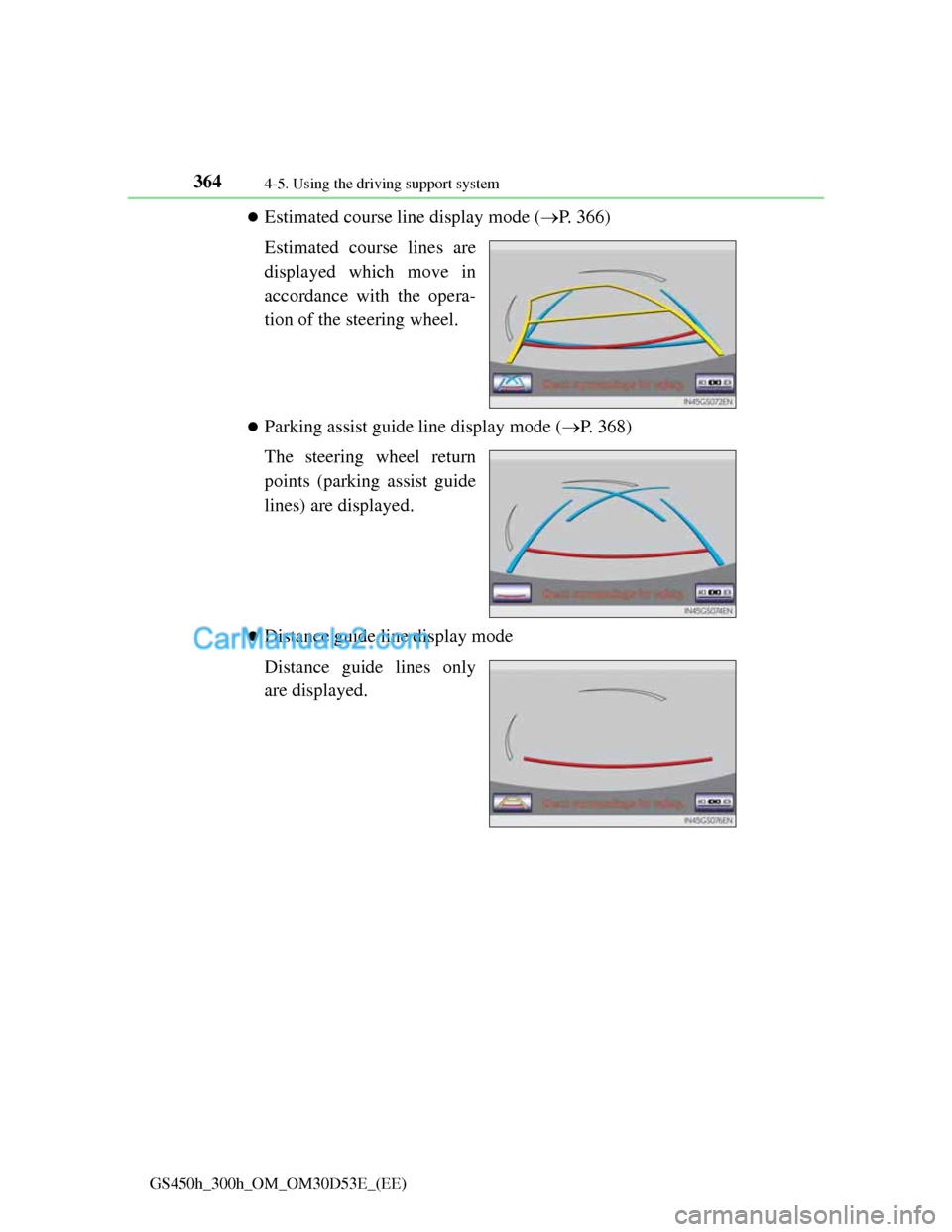
Estimated course line display mode (P. 366)
Estimated course lines are
displayed which move in
accordance with the opera-
tion of the steering wheel.
Parking assist guide line display mode (P. 368)
The steering wheel return
points (parking assist guide
lines) are displayed.
Distance guide line display mode
Distance guide lines only
are displayed.
Page 376 of 1014
3654-5. Using the driving support system
4
Driving
GS450h_300h_OM_OM30D53E_(EE)
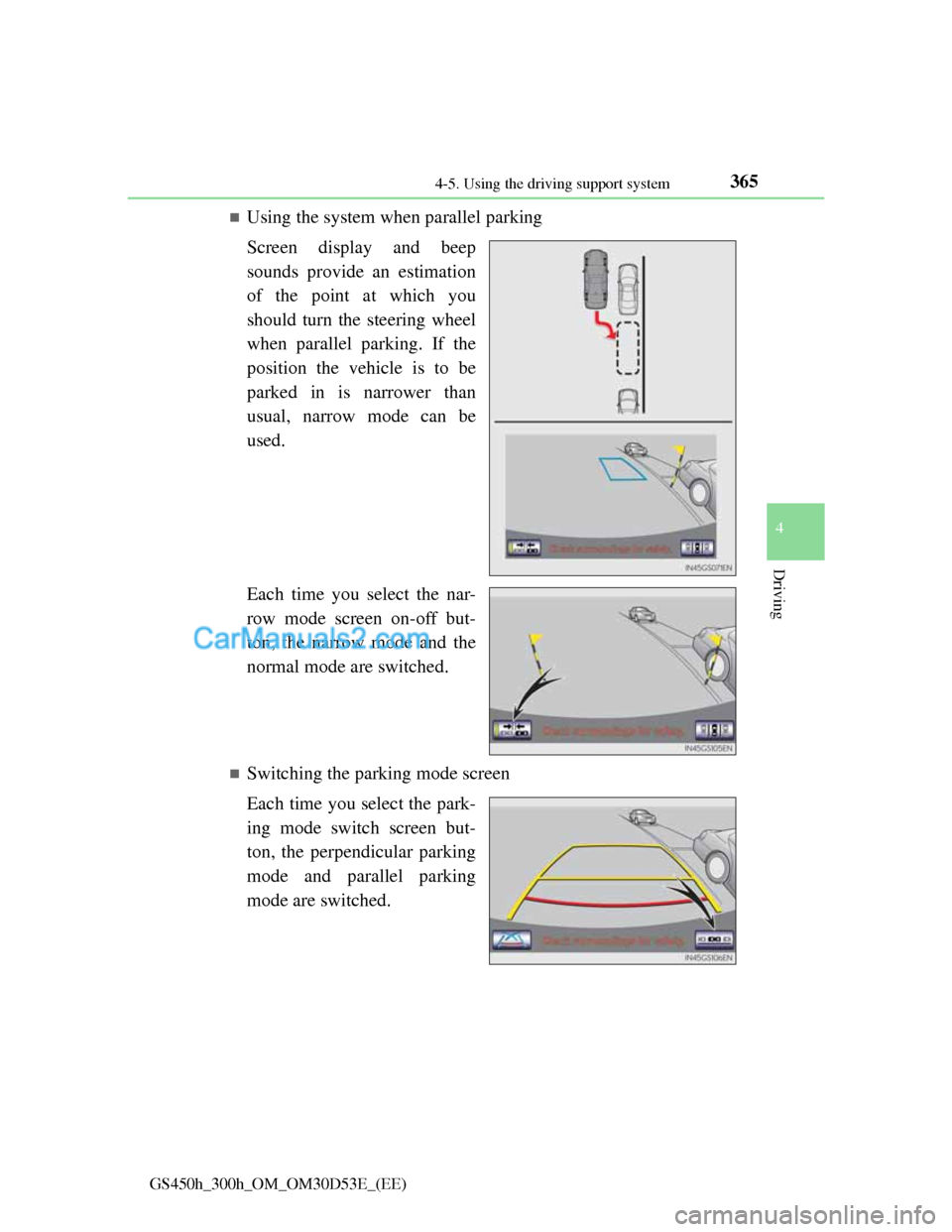
Using the system when parallel parking
Screen display and beep
sounds provide an estimation
of the point at which you
should turn the steering wheel
when parallel parking. If the
position the vehicle is to be
parked in is narrower than
usual, narrow mode can be
used.
Each time you select the nar-
row mode screen on-off but-
ton, the narrow mode and the
normal mode are switched.
Switching the parking mode screen
Each time you select the park-
ing mode switch screen but-
ton, the perpendicular parking
mode and parallel parking
mode are switched.
Page 377 of 1014
3664-5. Using the driving support system
GS450h_300h_OM_OM30D53E_(EE)
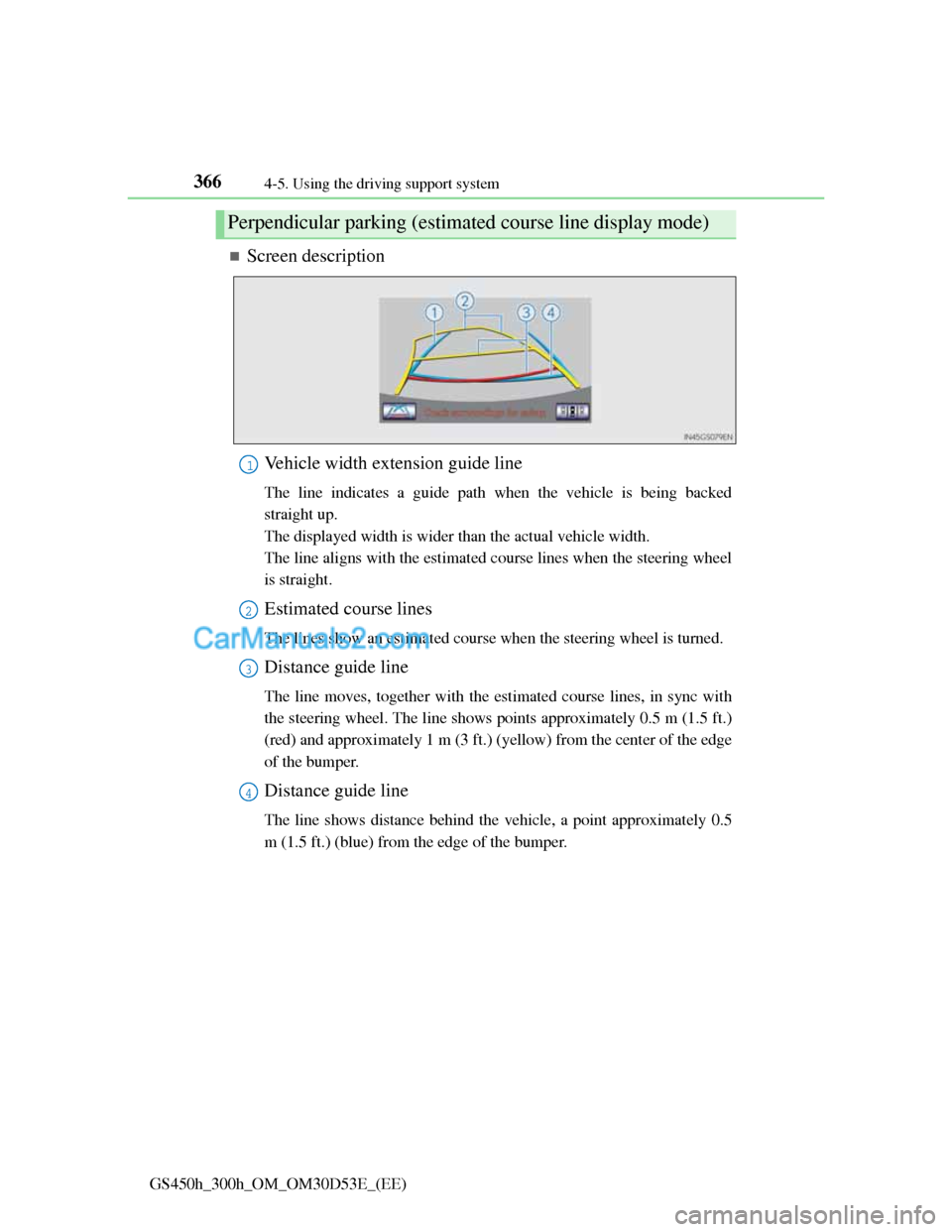
Screen description
Vehicle width extension guide line
The line indicates a guide path when the vehicle is being backed
straight up.
The displayed width is wider than the actual vehicle width.
The line aligns with the estimated course lines when the steering wheel
is straight.
Estimated course lines
The lines show an estimated course when the steering wheel is turned.
Distance guide line
The line moves, together with the estimated course lines, in sync with
the steering wheel. The line shows points approximately 0.5 m (1.5 ft.)
(red) and approximately 1 m (3 ft.) (yellow) from the center of the edge
of the bumper.
Distance guide line
The line shows distance behind the vehicle, a point approximately 0.5
m (1.5 ft.) (blue) from the edge of the bumper.
Perpendicular parking (estimated course line display mode)
1
2
3
4
Page 378 of 1014
3674-5. Using the driving support system
4
Driving
GS450h_300h_OM_OM30D53E_(EE)
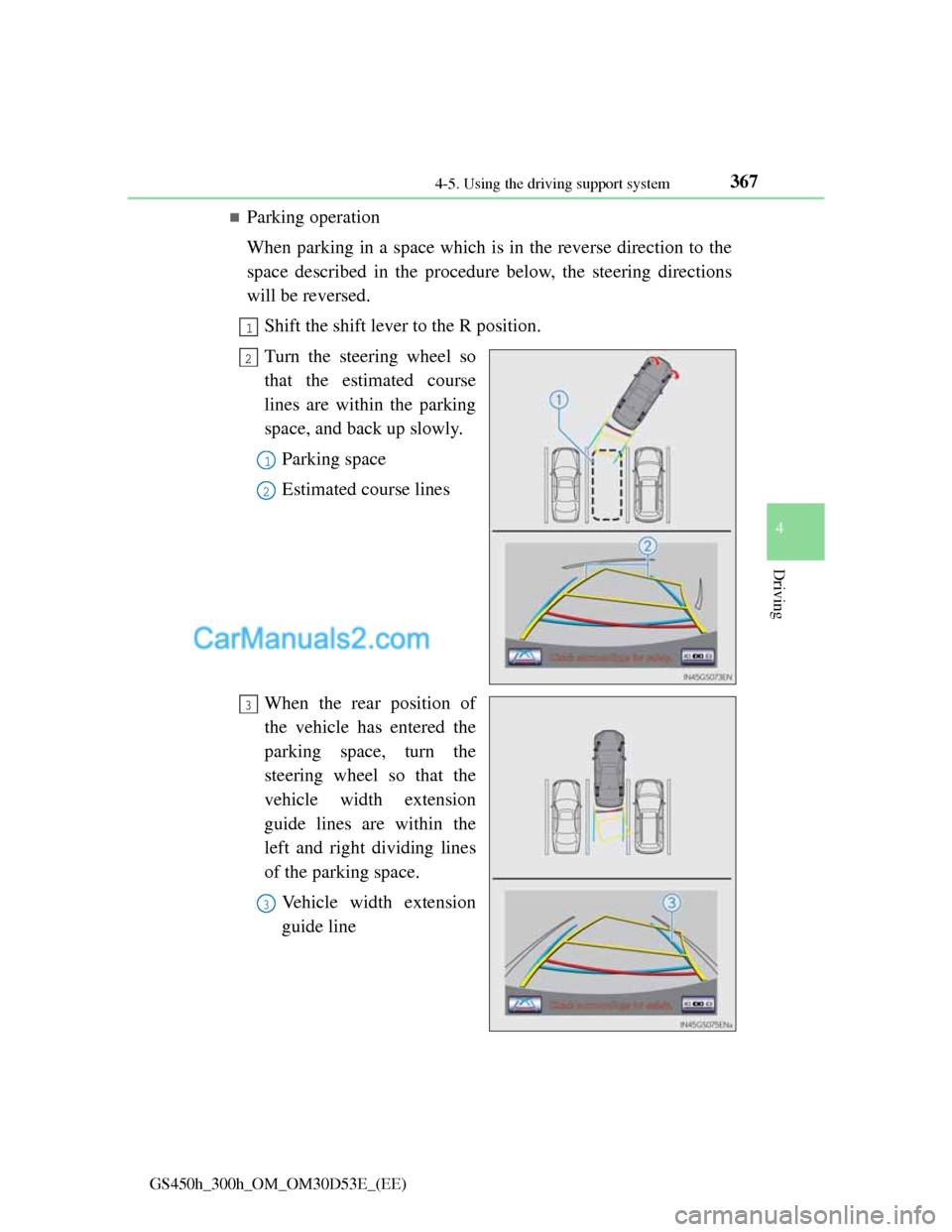
Parking operation
When parking in a space which is in the reverse direction to the
space described in the procedure below, the steering directions
will be reversed.
Shift the shift lever to the R position.
Turn the steering wheel so
that the estimated course
lines are within the parking
space, and back up slowly.
Parking space
Estimated course lines
When the rear position of
the vehicle has entered the
parking space, turn the
steering wheel so that the
vehicle width extension
guide lines are within the
left and right dividing lines
of the parking space.
Vehicle width extension
guide line
1
2
1
2
3
3
Page 379 of 1014
3684-5. Using the driving support system
GS450h_300h_OM_OM30D53E_(EE)
Once the vehicle width extension guide lines and the parking
space lines are parallel, straighten the steering wheel and back
up slowly until the vehicle has completely entered the parking
space.
Stop the vehicle in an appropriate place, and finish parking.
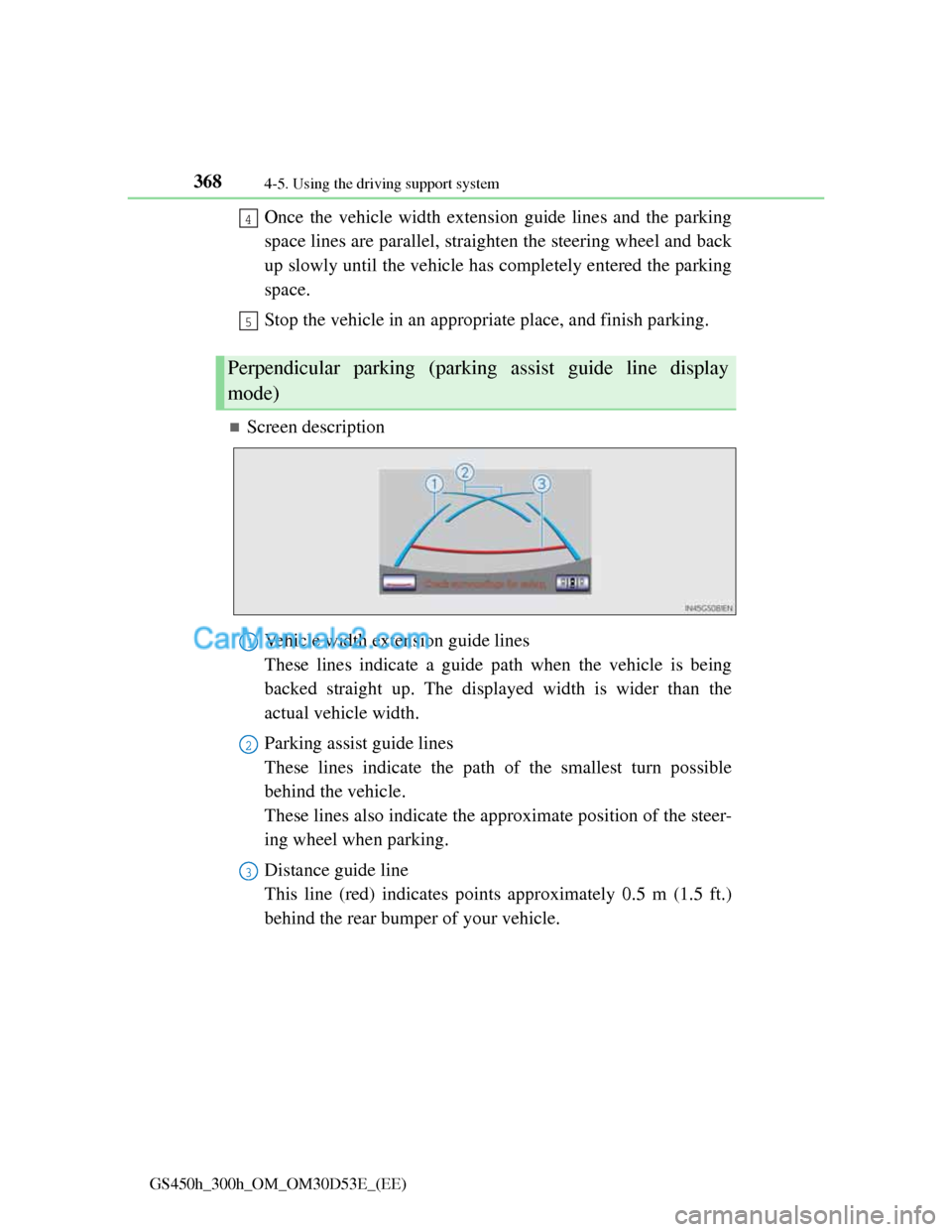
Screen description
Vehicle width extension guide lines
These lines indicate a guide path when the vehicle is being
backed straight up. The displayed width is wider than the
actual vehicle width.
Parking assist guide lines
These lines indicate the path of the smallest turn possible
behind the vehicle.
These lines also indicate the approximate position of the steer-
ing wheel when parking.
Distance guide line
This line (red) indicates points approximately 0.5 m (1.5 ft.)
behind the rear bumper of your vehicle.
Perpendicular parking (parking assist guide line display
mode)
4
5
1
2
3