ECO mode Lexus GS300h 2013 Workshop Manual
[x] Cancel search | Manufacturer: LEXUS, Model Year: 2013, Model line: GS300h, Model: Lexus GS300h 2013Pages: 1014
Page 609 of 1014
5895-3. Using the audio system
5
Interior features
GS450h_300h_OM_OM30D53E_(EE)
MP3 and WMA playback
• When a device containing MP3 or WMA files is connected, all files in
the USB memory device are checked. Once the file check is finished, the
first MP3 or WMA file is played. To make the file check finish more
quickly, we recommend that you do not include any files other than MP3
or WMA files or create any unnecessary folders.
• When the USB device is connected and the audio source is changed to
USB memory mode, the USB device will start playing the first file in the
first folder. If the same device is removed and reinserted (and the con-
tents have not been changed), the USB device will resume play from the
same point in which it was last used.
Extensions
If the file extensions .mp3 and .wma are used for files other than MP3 and
WMA files, they will be skipped (not played).
Playback
• To play MP3 files with steady sound quality, we recommend a fixed bit
rate of at least 128 kbps and a sampling frequency of 44.1 kHz.
• There is a wide variety of freeware and other encoding software for MP3
and WMA files on the market, and depending on the status of the encod-
ing and the file format, poor sound quality or noise at the start of play-
back may result. In some cases, playback may not be possible at all.
• Microsoft, Windows, and Windows Media are registered trademarks of
Microsoft Corporation in the U.S.A. and other countries.
Page 619 of 1014
599
5 5-3. Using the audio system
Interior features
GS450h_300h_OM_OM30D53E_(EE)
iPod cover art
Depending on the iPod and the songs in the iPod, iPod cover art may be dis-
played. This function can be changed to “On” or “Off”. (P. 593)
It may take time to display iPod cover art, and the iPod may not be operated
while the cover art display is in process.
Only iPod cover art that is saved in JPEG format can be displayed.
iPod functions
When the iPod connected to the system includes iPod video, the system can
only output the sound by selecting “Video” on the “iPod” screen.
Depending on the iPod, the video sound may not be able to be heard.
When an iPod is connected and the audio source is changed to iPod mode,
the iPod will resume play from the same point in which it was last used.
Depending on the iPod that is connected to the system, certain functions
may not be available. If a function is unavailable due to a malfunction (as
opposed to a system specification), disconnecting the device and reconnect-
ing it once again may resolve the problem.
When using an iPod
You maybe unable to use the instrument panel power outlet if the iPod is con-
nected to the USB port at the same time.
Battery charge
When an iPod is connected using a genuine iPod cable, the iPod starts
charging its battery.
Error messages for iPod
“iPod error”:
This indicates a problem in the iPod or its connection.
“No music files found.”:
This indicates that there is no music data in the iPod.
“Please check the iPod firmware version.”:
This indicates that the software version is not compatible. Perform the iPod
firmware updates and try again.
“iPod authorization failed.”:
This indicates that it failed to authorize the iPod. Please check your iPod.
Page 640 of 1014
6175-4. Using the hands-free phone system(for cellular phone)
5
Interior features
GS450h_300h_OM_OM30D53E_(EE)
Compatible models
This system supports the following service.
Bluetooth® Specification Ver. 1.1 or higher (Recommended: Ver. 2.1+EDR
or higher)
Profiles
• HFP (Hands Free Profile) Ver. 1.0 or higher (Recommended: Ver. 1.5 or
higher)
• OPP (Object Push Profile) Ver. 1.1 or higher
• PBAP (Phone Book Access Profile) Ver. 1.0 or higher
• MAP (Message Access Profile) Ver. 1.0 or higher
• DUN (Dial-Up Networking Profile) Ver.1.1 or higher
*
*
: This profile is necessary when using connected services. For details,
refer to the “Navigation System Owner’s Manual”
If your cellular phone does not support HFP, you cannot enter the Bluetooth
®
phone, and take OPP, PBAP, MAP or DUN service individually.
If the connected Bluetooth
® phone version is older than recommended or
incompatible, this function may not be used.
Page 652 of 1014
6295-4. Using the hands-free phone system(for cellular phone)
5
Interior features
GS450h_300h_OM_OM30D53E_(EE)
Reconnecting to the Bluetooth® phone
If the system cannot connect due to poor signal strength with the power
switch in ACCESSORY or ON mode, the system will automatically attempt
to reconnect.
If the phone is turned off, the system will not attempt to reconnect. In this
case, it must be connected manually, or the phone must be re-selected or re-
entered.
Connecting the phone while Bluetooth® audio is playing
Bluetooth® audio will stop temporarily.
It may take time to connect.
Connecting the phone while another Bluetooth® device is connected
When another Bluetooth
® device is currently connected, a confirmation mes-
sage will be displayed. To disconnect the Bluetooth® device, select “Yes”.
Connecting the phone while 5 Bluetooth® devices have already been regis-
tered
When 5 Bluetooth
® devices have already been registered, a registered device
needs to be deleted. Select “Yes” to delete one or more.
Select the device to be deleted, then select “Remove”, and “Yes”.
If the Bluetooth® phone has a Bluetooth® audio function
When the Bluetooth
® phone to be registered has a Bluetooth® audio function,
this audio function will be registered automatically at the same time and con-
firmation message may be displayed. If this screen is displayed, select “Yes”
to connect the audio function or select “No” to cancel the connection.
Page 732 of 1014
7085-7. Other interior features
GS450h_300h_OM_OM30D53E_(EE)
The seat heaters/seat ventilators can be used when
The power switch is in ON mode.
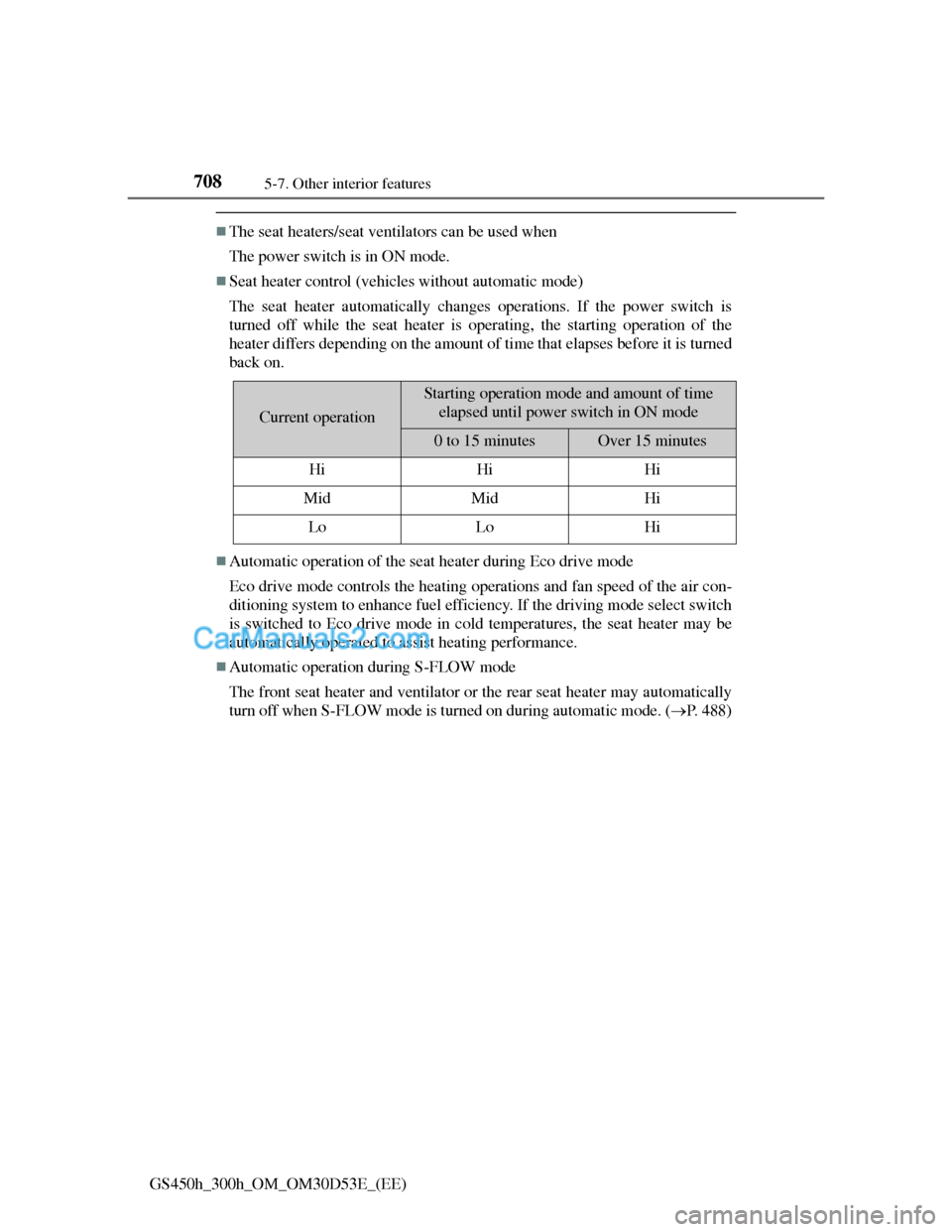
Seat heater control (vehicles without automatic mode)
The seat heater automatically changes operations. If the power switch is
turned off while the seat heater is operating, the starting operation of the
heater differs depending on the amount of time that elapses before it is turned
back on.
Automatic operation of the seat heater during Eco drive mode
Eco drive mode controls the heating operations and fan speed of the air con-
ditioning system to enhance fuel efficiency. If the driving mode select switch
is switched to Eco drive mode in cold temperatures, the seat heater may be
automatically operated to assist heating performance.
Automatic operation during S-FLOW mode
The front seat heater and ventilator or the rear seat heater may automatically
turn off when S-FLOW mode is turned on during automatic mode. (P. 488)
Current operation
Starting operation mode and amount of time
elapsed until power switch in ON mode
0 to 15 minutesOver 15 minutes
HiHiHi
MidMidHi
LoLoHi
Page 745 of 1014
7216-1. Maintenance and care
6
Maintenance and care
GS450h_300h_OM_OM30D53E_(EE)
Notes for a smart entry & start system
If the door handle becomes wet while the electronic key is within the effec-
tive range, the door may lock and unlock repeatedly. In that case, follow the
following correction procedures to wash the vehicle:
Place the key in a position 2 m (6 ft.) or more separate from the vehicle
while the vehicle is being washed. (Take care to ensure that the key is not
stolen.)
Set the electronic key to battery-saving mode to disable the smart entry &
start system. (P. 1 4 9 )
Aluminum wheels
Remove any dirt immediately by using a neutral detergent. Do not use hard
brushes or abrasive cleaners. Do not use strong or harsh chemical cleaners.
Use the same mild detergent and wax as used on the paint.
Do not use detergent on the wheels when they are hot, for example after
driving for long distance in the hot weather.
Wash detergent from the wheels immediately after use.
Bumpers
Do not scrub with abrasive cleaners.
Front side windows water-repellent coating
The following precautions can extend the effectiveness of the water-repel-
lent coating.
• Remove any dirt, etc. from the front side windows regularly.
• Do not allow dirt and dust to accumulate on the windows for a long
period.
Clean the windows with a soft, damp cloth as soon as possible.
• Do not use wax or glass cleaners that contain abrasives when cleaning
the windows.
• Do not use any metallic objects to remove condensation build up.
When the water-repellent performance has become insufficient, the coating
can be repaired. Contact any authorized Lexus dealer or repairer, or another
duly qualified and equipped professional.
Outside rear view mirror rain-clearing coating (if equipped)
Observe the following precautions in order to retain the rain-clearing proper-
ties of the mirrors:
Clean the mirrors using a car shampoo or glass cleaner that does not contain
silicone or an abrasive compound, and rinse thoroughly with water.
Allow the mirrors to be exposed to direct sunlight for 1 to 2 days.
Page 746 of 1014
7226-1. Maintenance and care
GS450h_300h_OM_OM30D53E_(EE)
CAUTION
When washing the vehicle
Do not apply water to the inside of the engine compartment. Doing so may
cause the electrical components etc. to catch fire.
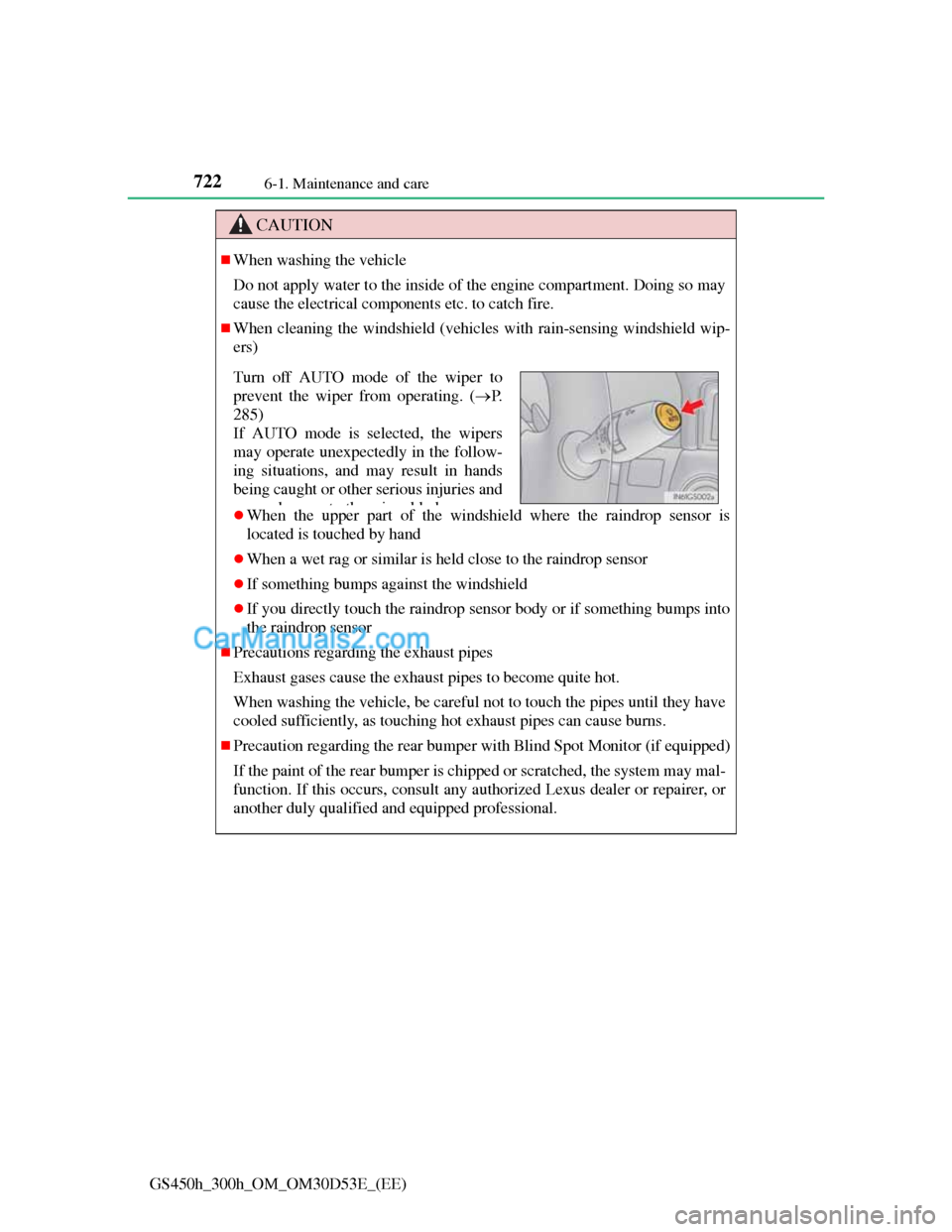
When cleaning the windshield (vehicles with rain-sensing windshield wip-
ers)
When the upper part of the windshield where the raindrop sensor is
located is touched by hand
When a wet rag or similar is held close to the raindrop sensor
If something bumps against the windshield
If you directly touch the raindrop sensor body or if something bumps into
the raindrop sensor
Precautions regarding the exhaust pipes
Exhaust gases cause the exhaust pipes to become quite hot.
When washing the vehicle, be careful not to touch the pipes until they have
cooled sufficiently, as touching hot exhaust pipes can cause burns.
Precaution regarding the rear bumper with Blind Spot Monitor (if equipped)
If the paint of the rear bumper is chipped or scratched, the system may mal-
function. If this occurs, consult any authorized Lexus dealer or repairer, or
another duly qualified and equipped professional.
Turn off AUTO mode of the wiper to
prevent the wiper from operating. (P.
285)
If AUTO mode is selected, the wipers
may operate unexpectedly in the follow-
ing situations, and may result in hands
being caught or other serious injuries and
dtthibld
Page 747 of 1014
7236-1. Maintenance and care
6
Maintenance and care
GS450h_300h_OM_OM30D53E_(EE)
NOTICE
To prevent paint deterioration and corrosion on the body and components
(aluminum wheels etc.)
Wash the vehicle immediately in the following cases:
• After driving near the sea coast
• After driving on salted roads
• If coal tar or tree sap is present on the paint surface
• If dead insects, insect droppings or bird droppings are present on the
paint surface
• After driving in an area contaminated with soot, oily smoke, mine dust,
iron powder or chemical substances
• If the vehicle becomes heavily soiled with dust or mud
• If liquids such as benzene and gasoline are spilled on the paint surface
If the paint is chipped or scratched, have it repaired immediately.
To prevent the wheels from corroding, remove any dirt and store in a
place with low humidity when storing the wheels.
Cleaning the exterior lights
Wash carefully. Do not use organic substances or scrub with a hard brush.
This may damage the surfaces of the lights.
Do not apply wax to the surfaces of the lights.
Wax may cause damage to the lenses.
When using an automatic car wash (vehicles with rain-sensing windshield
wipers)
Turn off AUTO mode of the wiper to prevent the wiper from operating.
(P. 285)
If AUTO mode is selected, the wipers may operate and the wiper blades
may be damaged.
Page 775 of 1014
751 6-3. Do-it-yourself maintenance
6
Maintenance and care
GS450h_300h_OM_OM30D53E_(EE)
Before recharging
When recharging, the 12-volt battery produces hydrogen gas which is flam-
mable and explosive. Therefore, observe the following precautions before
recharging:
If recharging with the 12-volt battery installed on the vehicle, be sure to dis-
connect the ground cable.
Make sure the power switch on the charger is off when connecting and dis-
connecting the charger cables to the 12-volt battery.
After recharging/reconnecting the 12-volt battery
The hybrid system may not start. Follow the procedure below to initialize
the system.
Shift the shift lever to P.
Open and close any of the doors.
Restart the hybrid system.
Unlocking the doors using the smart entry & start system may not be possi-
ble immediately after reconnecting the 12-volt battery. If this happens, use
the wireless remote control or the mechanical key to lock/unlock the doors.
Start the hybrid system with the power switch in ACCESSORY mode. The
hybrid system may not start with the power switch turned off. However, the
hybrid system will operate normally from the second attempt.
The power switch mode is recorded by the vehicle. If the 12-volt battery is
reconnected, the vehicle will return the power switch mode to the status it
was in before the 12-volt battery was disconnected. Make sure to turn off
the power switch before disconnect the 12-volt battery. Take extra care
when connecting the 12-volt battery if the power switch mode prior to dis-
charge is unknown.
If the system will not start even after multiple attempts at all methods above,
contact any authorized Lexus dealer or repairer, or another duly qualified and
equipped professional.
1
2
3
Page 785 of 1014
761 6-3. Do-it-yourself maintenance
6
Maintenance and care
GS450h_300h_OM_OM30D53E_(EE)
The initialization operation (vehicles with the tire pressure warning system)
Make sure to carry out initialization after adjusting the tire inflation pres-
sure.
Also, make sure the tires are cold before carrying out initialization or tire
inflation pressure adjustment.
If you have accidentally turned the power switch off during initialization, it
is not necessary to press the reset switch again as initialization will restart
automatically when the power switch has been turned to ON mode for the
next time.
If you accidentally press the reset switch when initialization is not neces-
sary, adjust the tire inflation pressure to the specified level when the tires
are cold, and conduct initialization again.
Warning performance of the tire pressure warning system (if equipped)
The warning of the tire pressure warning system will change in accordance
with the conditions under which it was initialized. For this reason, the system
may give a warning even if the tire pressure does not reach a low enough
level, or if the pressure is higher than the pressure that was adjusted to when
the system was initialized.
When initialization of the tire pressure warning system has failed (vehicles
with the tire pressure warning system)
Initialization can be completed in a few minutes. However, in the following
cases, the settings have not been recorded and the system will not operate
properly. If repeated attempts to record tire inflation pressure settings are
unsuccessful, have the vehicle inspected by any authorized Lexus dealer or
repairer, or another duly qualified and equipped professional.
When operating the tire pressure warning reset switch, the tire pressure
warning light does not blink 3 times.
After carrying out the initialization procedure, the tire pressure warning
light blinks for 1 minute then stays on after driving for 20 minutes.
Registering ID codes (vehicles with the tire pressure warning system)
The ID codes of the tire pressure warning valve and transmitters for two sets
of wheels can be registered.
It is not necessary to register the ID codes when replacing normal tires with
snow tires, if the ID codes for the wheels of both normal tires and snow tires
are registered beforehand.
For information about changing ID codes, ask any authorized Lexus dealer or
repairer, or another duly qualified and equipped professional.