trunk Lexus GS300h 2013 Manual PDF
[x] Cancel search | Manufacturer: LEXUS, Model Year: 2013, Model line: GS300h, Model: Lexus GS300h 2013Pages: 1014
Page 340 of 1014
3294-5. Using the driving support system
4
Driving
GS450h_300h_OM_OM30D53E_(EE)
Dynamic radar cruise control with full-speed range can be set when
The shift lever is in D or range 4 or higher of S has been selected.
Range 4 or higher of D has been selected by using the paddle shift.
Vehicle speed is above approximately 50 km/h (30 mph).
Accelerating after setting the vehicle speed
The vehicle can accelerate normally. After acceleration, the set speed
resumes. However, during vehicle-to-vehicle distance control mode, the
vehicle speed may decrease below the set speed in order to maintain the dis-
tance to the vehicle ahead.
Automatic cancelation of vehicle-to-vehicle distance control
Vehicle-to-vehicle distance control driving is automatically canceled in the
following situations:
Actual vehicle speed falls below approximately 40 km/h (25 mph) when
there are no vehicle ahead.
The preceding vehicle leaves the lane when your vehicle is following at a
speed below 40 km/h (25 mph).
VSC is activated.
TRC is activated for a period of time.
When the VSC or TRC system is turned off by pressing the VSC OFF
switch.
The sensor cannot operate correctly because it is covered in some way.
The windshield wipers are operating at high speed (when the wiper switch
is set to AUTO mode or the high speed wiper operation).
When snow mode is set.
The parking brake is operated.
The vehicle is stopped by system control on a steep incline.
Pre-crash brake assist is activated.
The following are detected when the vehicle has been stopped by system
control:
• The driver is not wearing a seat belt.
• The driver’s door is opened.
• The trunk or hood is opened.
• The vehicle has been stopped for about 3 minutes.
If vehicle-to-vehicle distance control driving is automatically canceled for
any other reason, there may be a malfunction in the system. Contact any
Page 347 of 1014
3364-5. Using the driving support system
GS450h_300h_OM_OM30D53E_(EE)
CAUTION
When the radar sensor may not be correctly detecting the vehicle ahead
Apply the brakes as necessary when any of the following types of vehicles
are in front of you.
As the sensor may not be able to correctly detect these types of vehicles, the
approach warning (P. 308) will not be activated, and a fatal or serious
accident may result.
Vehicles that cut in suddenly
Vehicles traveling at low speeds
Vehicles that are not moving
Vehicles with small rear ends (trailers with no load on board etc.)
Motorcycles traveling in the same lane
Conditions under which the vehicle-to-vehicle distance control may not
function correctly
Apply the brakes as necessary in the following conditions as the radar sen-
sor may not be able to correctly detect vehicles ahead, and a fatal or serious
accident may result:
When water or snow thrown up by the surrounding vehicles hinders the
functioning of the radar sensor
When your vehicle is pointing upwards (caused by a heavy load in the
trunk etc.)
When the road curves or when the lanes are narrow
When steering wheel operation or your position in the lane is unstable
When the vehicle ahead of you decelerates suddenly
Page 387 of 1014
3764-5. Using the driving support system
GS450h_300h_OM_OM30D53E_(EE)
Leaving the vehicle stopped, turn the steering wheel all the
way to the left.
Be sure to turn the steering wheel only when the vehicle is stopped.
When the screen changes, keep the steering wheel in its cur-
rent position and back up.
When backing up, be careful not to hit any obstacles with the right front
corner of your vehicle. Back the vehicle up slowly.
When the vehicle is parallel with the road or the shoulder,
straighten the steering wheel.
Check your surroundings visually and with the mirrors, then
back up using the distance guide lines as a reference, and stop.
When the vehicle is approximately in the desired parking location, the
parallel parking assist is complete.
Parallel parking assist mode information
• There is a possibility that parallel parking guidance may not
be given when backing up at a very slow speed.
• If the trunk is opened during parallel parking guidance, the
parallel parking assist will be interrupted and canceled. Stop
the vehicle, shift the shift lever out of the R position, and
restart the operation from the step
.
Canceling parallel parking assist
Select .
Vehicles with Lexus parking assist-sensor
If Lexus parking assist-sensor detects an object while you
attempt to park in a parking space on the left, the black and
yellow vertical pole could be obscured by Lexus parking
assist-sensor display. In this event, turn Lexus parking assist-
sensor switch off (P. 349), and operate the vehicle while
checking the safety of the surrounding area direct visually and
with mirror. After the operation, turn the switch on.
8
9
10
1
Page 398 of 1014
3874-5. Using the driving support system
4
Driving
GS450h_300h_OM_OM30D53E_(EE)
Guide lines are not dis-
playedThe trunk lid is open.
Close the trunk lid.
If this does not resolve
the symptom, have the
vehicle inspected by
any authorized Lexus
dealer or repairer, or
another duly qualified
and equipped profes-
sional.
“System is initializ-
ing.” is displayed
• The 12-volt battery
has been reinstalled.
• The steering wheel
has been moved
while the 12-volt bat-
tery was being rein-
stalled.
• 12-volt battery power
is low.
• The steering sensor
has been reinstalled.
• There is a malfunc-
tion in the signals
being output by the
steering sensor.
Stop the vehicle, and
turn the steering wheel
as far as it will go to
the left and right.
If this does not resolve
the symptom, have the
vehicle inspected by
any authorized Lexus
dealer or repairer, or
another duly qualified
and equipped profes-
sional.
• On the system initial-
ization screen, select
the “?” button to dis-
play the operating
procedure.
SymptomLikely causeSolution
Page 399 of 1014
3884-5. Using the driving support system
GS450h_300h_OM_OM30D53E_(EE)
CAUTION
When using the Lexus parking assist monitor system
The Lexus parking assist monitor is a supplemental device intended to
assist the driver when backing up. When backing up, be sure to check visu-
ally behind and all around the vehicle before proceeding.
Observe the following precautions to avoid an accident that could result in
death or serious injuries.
Never depend on the Lexus parking assist monitor entirely when backing
up. The image and the position of the guide lines displayed on the screen
may differ from the actual state.
Use caution, just as you would when backing up any vehicle.
Be sure to back up slowly, depressing the brake pedal to control vehicle
speed.
If you seem likely to hit nearby vehicles, obstacles, people or mount the
shoulder, depress the brake pedal to stop the vehicle, then disable the
assist system by select on the screen to cancel the system.
The instructions given are only guidelines.
When and how much to turn the steering wheel will vary according to
traffic conditions, road surface conditions, vehicle condition, etc. when
parking. It is necessary to be fully aware of this before using the parking
assist system.
When parking, be sure to check that the parking space will accommodate
your vehicle before maneuvering into it.
Do not use the Lexus parking assist monitor in the following cases:
• On icy or slick road surfaces, or in snow
• When using tire chains or emergency tires
• When the trunk lid is not closed completely
• On roads that are not flat or straight, such as curves or slopes.
Page 458 of 1014
441
5Interior features
GS450h_300h_OM_OM30D53E_(EE)5-4. Using the hands-free phone
system (for cellular phone)
Hands-free system
(for cellular phone) ......... 611
Using a Bluetooth
®
phone............................... 625
Setting the hands-free system
(for cellular phone) ......... 645
Setting the Bluetooth
®...... 671
5-5. Using the interior lights
Interior lights list ............... 684
• Interior light .................. 685
• Personal lights............... 685
5-6. Using the storage features
List of storage features ...... 687
• Glove box ..................... 689
• Console box .................. 690
• Cup holders ................... 691
• Auxiliary boxes............. 693
Trunk features ................... 6945-7. Other interior features
Sun visors and
vanity mirrors ................. 697
Clock................................. 698
Ashtrays ............................ 699
Power outlets .................... 700
Heated steering wheel....... 702
Seat heaters/
seat ventilators ................ 704
Armrest ..............................711
Rear sunshade/
rear door sunshades ........ 712
Coat hooks ........................ 715
Assist grips ....................... 716
Utility hook ....................... 717
Page 713 of 1014
6895-6. Using the storage featurers
5
Interior features
GS450h_300h_OM_OM30D53E_(EE)
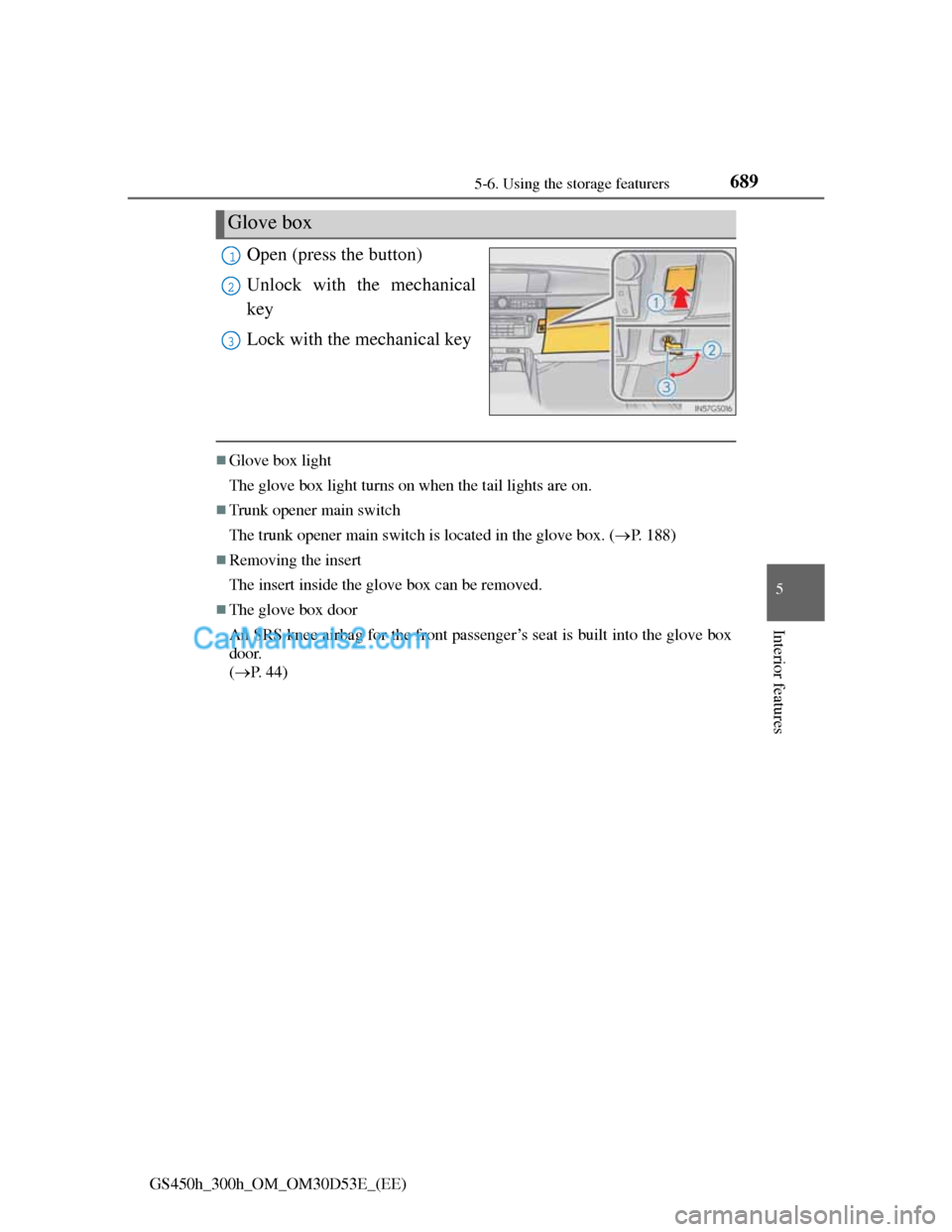
Open (press the button)
Unlock with the mechanical
key
Lock with the mechanical key
Glove box light
The glove box light turns on when the tail lights are on.
Trunk opener main switch
The trunk opener main switch is located in the glove box. (P. 188)
Removing the insert
The insert inside the glove box can be removed.
The glove box door
An SRS knee airbag for the front passenger’s seat is built into the glove box
door.
(P. 44)
Glove box
1
2
3
Page 718 of 1014
6945-6. Using the storage featurers
GS450h_300h_OM_OM30D53E_(EE)
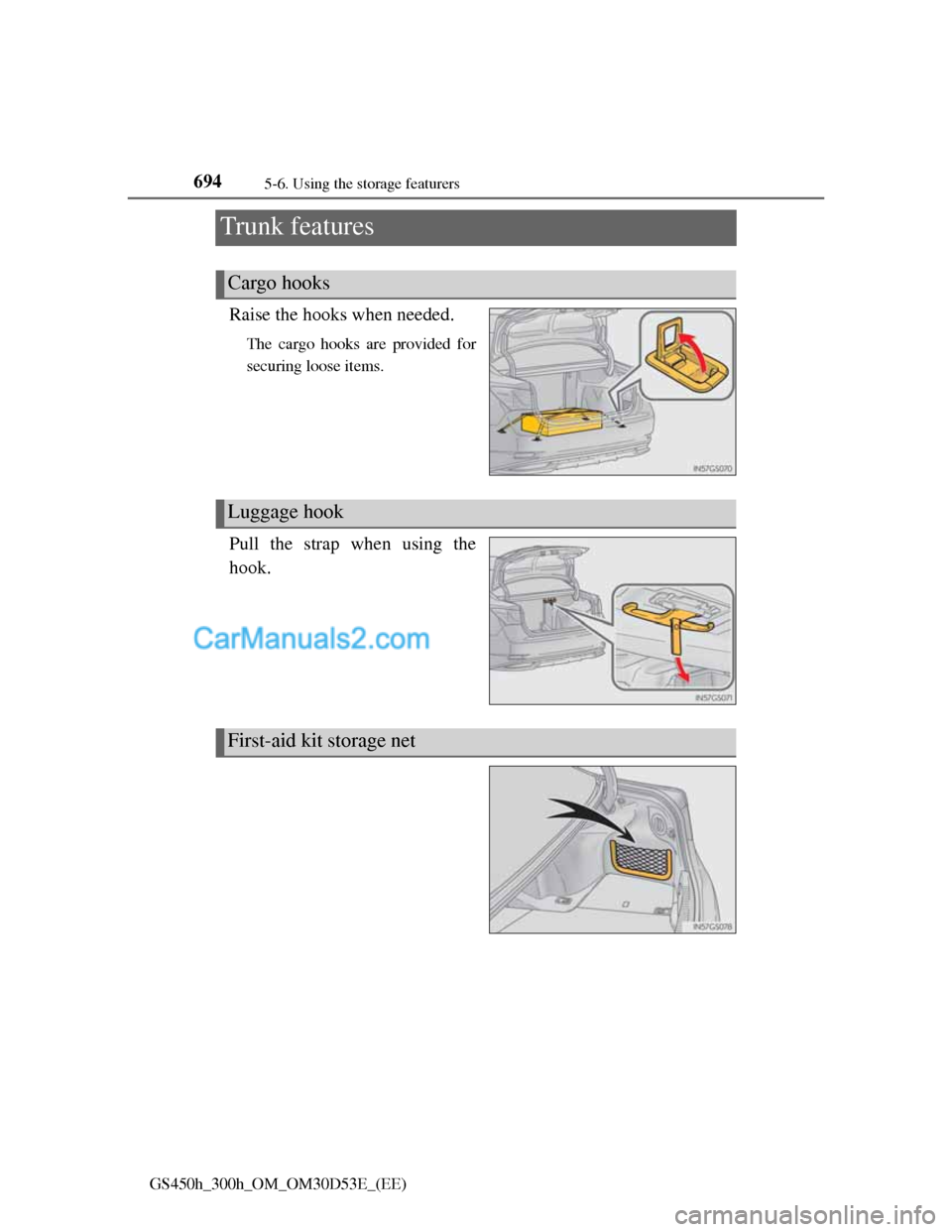
Trunk features
Raise the hooks when needed.
The cargo hooks are provided for
securing loose items.
Pull the strap when using the
hook.
Cargo hooks
Luggage hook
First-aid kit storage net
Page 749 of 1014
7256-1. Maintenance and care
6
Maintenance and care
GS450h_300h_OM_OM30D53E_(EE)
Caring for leather areas
Lexus recommends cleaning the interior of the vehicle at least twice a year to
maintain the quality of the vehicle’s interior.
Shampooing the carpets
There are several commercial foaming-type cleaners available. Use a sponge
or brush to apply the foam. Rub in overlapping circles. Do not use water.
Wipe dirty surfaces and let them dry. Excellent results are obtained by keep-
ing the carpet as dry as possible.
Seat belts
Clean with mild soap and lukewarm water using a cloth or sponge. Also
check the belts periodically for excessive wear, fraying or cuts.
When cleaning the carpeted portions of the glove box, console box, etc.
If a strong adhesive tape is used, there is a possibility that the surface of the
carpet could be damaged.
CAUTION
Water in the vehicle
Do not splash or spill liquid in the vehicle, such as on the floor, in the
hybrid battery (traction battery) air vents, and in the trunk.
Doing so may cause the hybrid battery, electrical components, etc. to mal-
function or catch fire.
Do not get any of the SRS components or wiring in the vehicle interior
wet.
(P. 46)
An electrical malfunction may cause the airbags to deploy or not function
properly, resulting in death or serious injury.
Cleaning the interior (especially instrument panel)
Do not use polish wax or polish cleaner. The instrument panel may reflect
off the windshield, obstructing the driver’s view and leading to an accident,
resulting in death or serious injury.
Page 809 of 1014
785 6-3. Do-it-yourself maintenance
6
Maintenance and care
GS450h_300h_OM_OM30D53E_(EE)
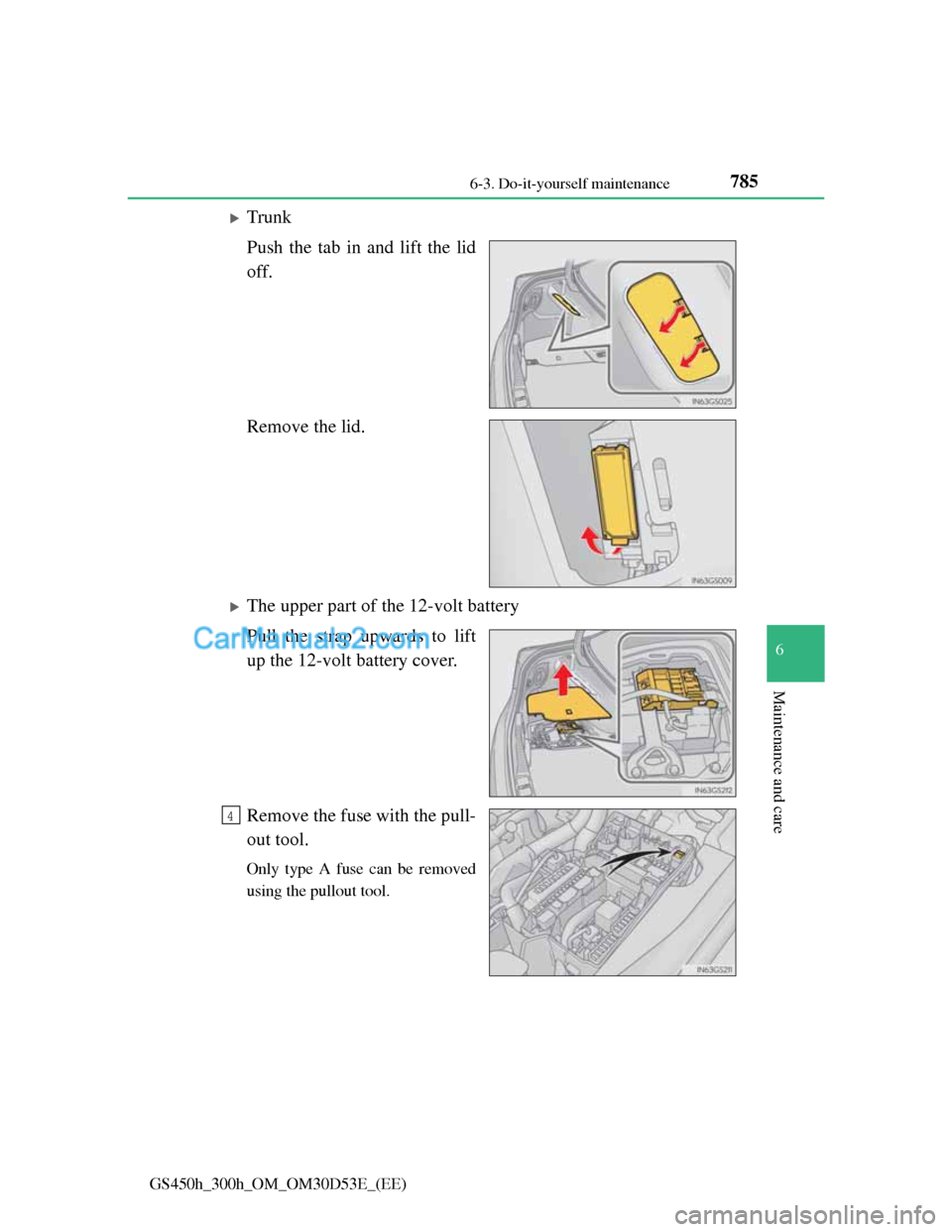
Trunk
Push the tab in and lift the lid
off.
Remove the lid.
The upper part of the 12-volt battery
Pull the strap upwards to lift
up the 12-volt battery cover.
Remove the fuse with the pull-
out tool.
Only type A fuse can be removed
using the pullout tool.
4