door lock Lexus GS300h 2015 User Guide
[x] Cancel search | Manufacturer: LEXUS, Model Year: 2015, Model line: GS300h, Model: Lexus GS300h 2015Pages: 620
Page 92 of 620
921-3. Theft deterrent system
GS450h_300h_OM_OM30F00E_(EE)
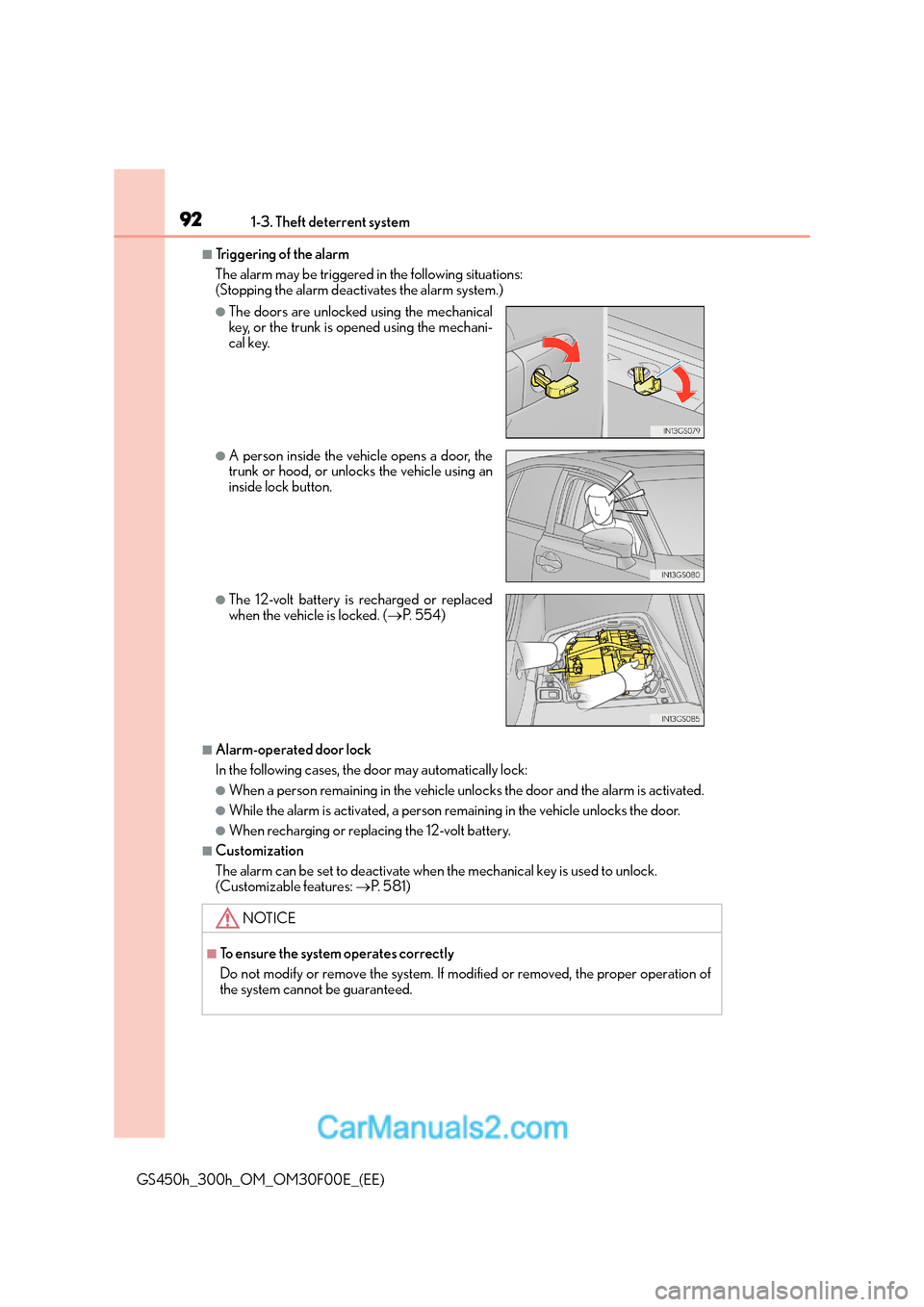
■Triggering of the alarm
The alarm may be triggered in the following situations:
(Stopping the alarm deactivates the alarm system.)
■Alarm-operated door lock
In the following cases, the door may automatically lock:
●When a person remaining in the vehicle unlocks the door and the alarm is activated.
●While the alarm is activated, a person remaining in the vehicle unlocks the door.
●When recharging or replacing the 12-volt battery.
■Customization
The alarm can be set to deactivate when the mechanical key is used to unlock.
(Customizable features: →P. 5 8 1 )
●The doors are unlocked using the mechanical
key, or the trunk is opened using the mechani-
cal key.
●A person inside the vehicle opens a door, the
trunk or hood, or unlocks the vehicle using an
inside lock button.
●The 12-volt battery is recharged or replaced
when the vehicle is locked. ( →P. 5 5 4 )
NOTICE
■To ensure the system operates correctly
Do not modify or remove the system. If modified or removed, the proper operation of
the system cannot be guaranteed.
Page 94 of 620
941-3. Theft deterrent system
GS450h_300h_OM_OM30F00E_(EE)
■Canceling and automatic re-enabling of the intrusion sensor and tilt sensor
●The alarm will still be set even when the intr usion sensor and tilt sensor are canceled.
●After the intrusion sensor and tilt sensor are canceled, pressing the power switch or
unlocking the doors using the entry functi on, wireless remote control or mechanical
key will re-enable the intrusion sensor and tilt sensor.
●The intrusion sensor and tilt sensor will au tomatically be re-enabled when the alarm
system is deactivated.
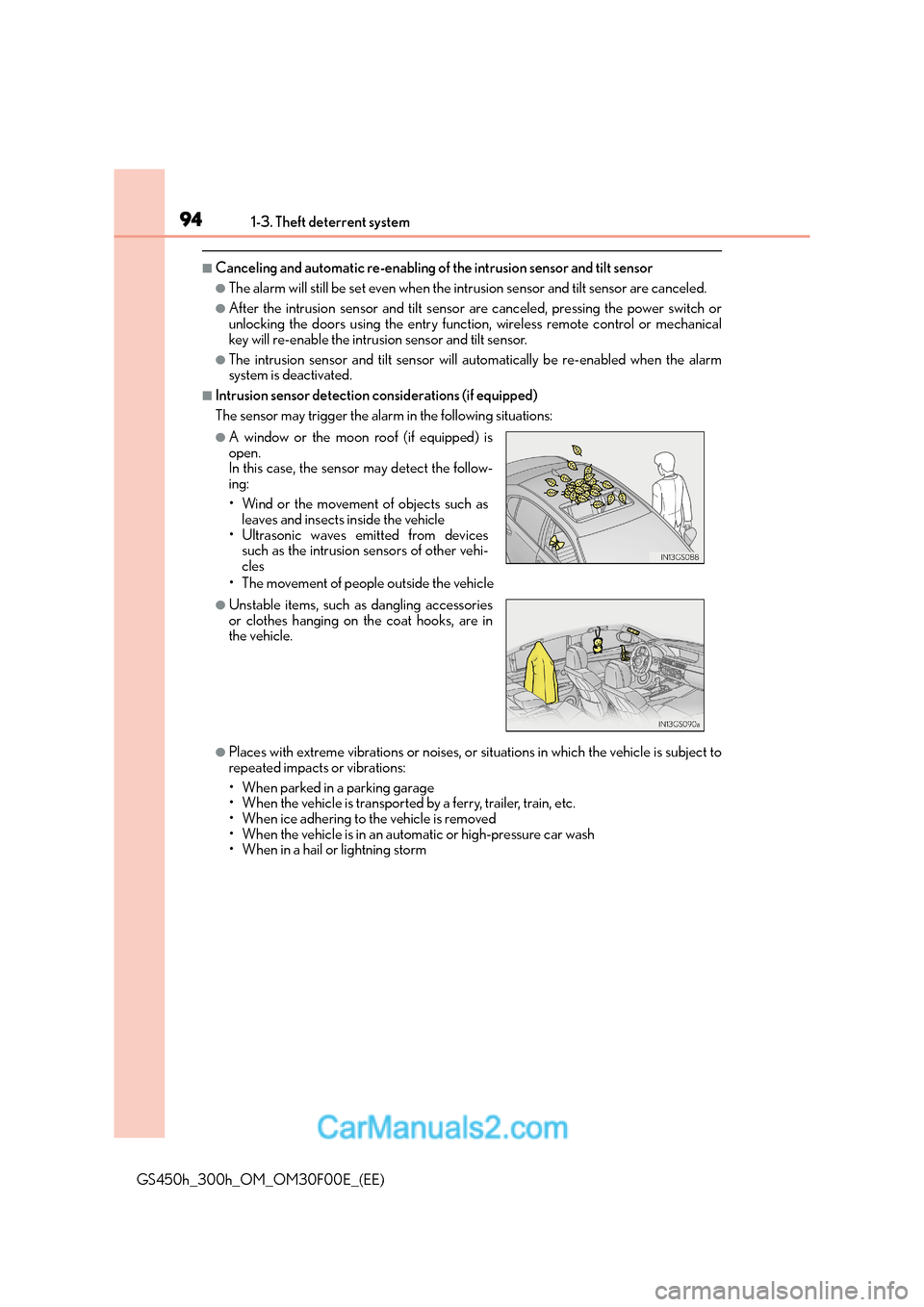
■Intrusion sensor detection considerations (if equipped)
The sensor may trigger the alarm in the following situations:
• The movement of people outside the vehicle
●Places with extreme vibrations or noises, or situations in which the vehicle is subject to
repeated impacts or vibrations:
• When parked in a parking garage
• When the vehicle is transported by a ferry, trailer, train, etc.
• When ice adhering to the vehicle is removed
• When the vehicle is in an automatic or high-pressure car wash
• When in a hail or lightning storm
●A window or the moon roof (if equipped) is
open.
In this case, the sensor may detect the follow-
ing:
• Wind or the movement of objects such asleaves and insects inside the vehicle
• Ultrasonic waves emitted from devices such as the intrusion sensors of other vehi-
cles
●Unstable items, such as dangling accessories
or clothes hanging on the coat hooks, are in
the vehicle.
Page 133 of 620
133
3
Operation of
each component
GS450h_300h_OM_OM30F00E_(EE)
3-1. Key information
Keys .................................................. 134
3-2. Opening, closing and locking the doors and trunk
Doors ............................................... 139
Trunk ..................................................146
Smart entry & start system...... 153
3-3. Adjusting the seats Front seats....................................... 175
Driving position memory ..........178
Head restraints ............................ 183
3-4. Adjusting the steering wheel and mirrors
Steering wheel ............................. 186
Inside rear view mirror.............. 188
Outside rear view mirrors ....... 190
3-5. Opening, closing the windows and moon roof
Power windows ............................ 193
Moon roof ...................................... 196
Page 134 of 620
1343-1. Key information
GS450h_300h_OM_OM30F00E_(EE)
Keys
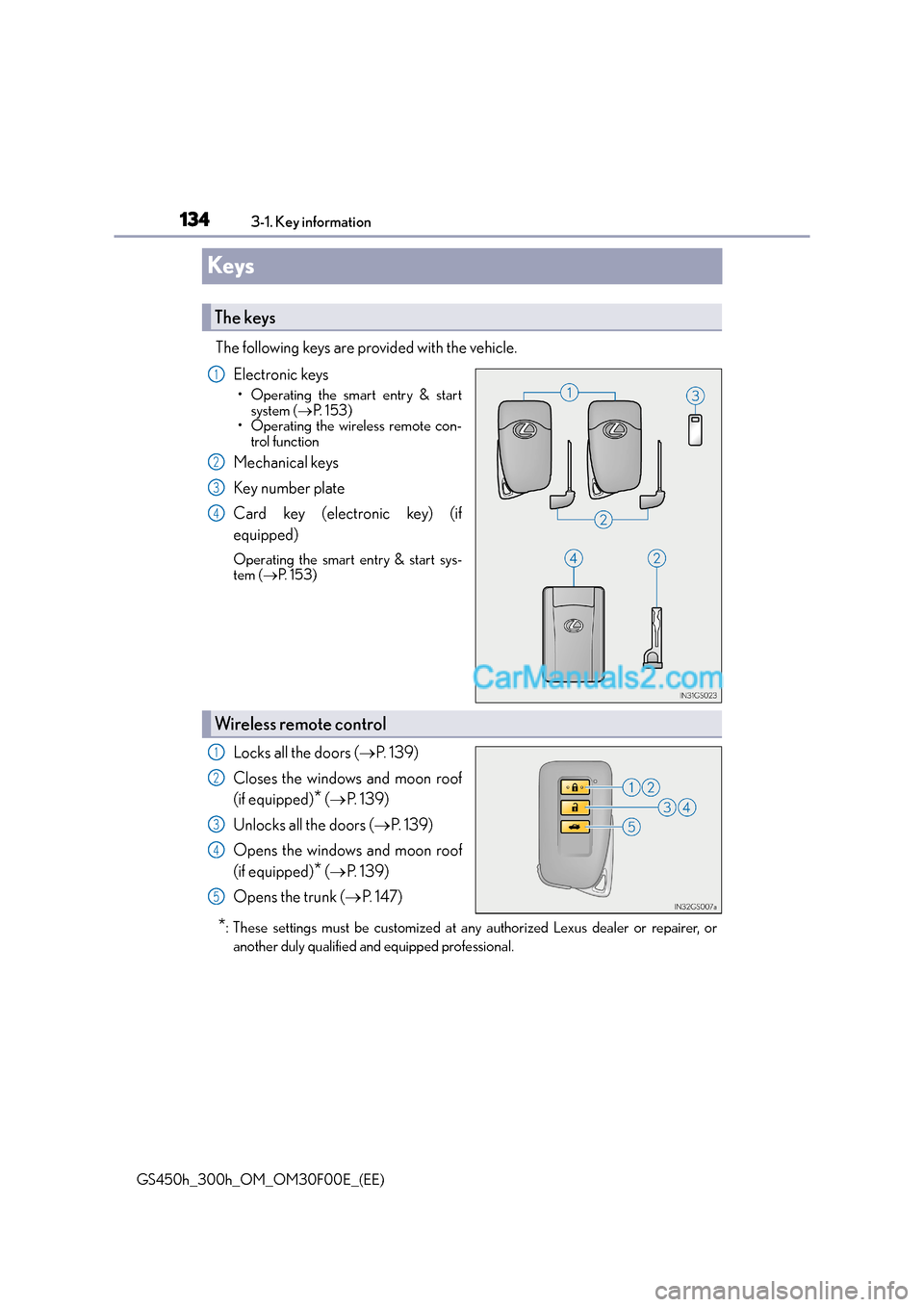
The following keys are provided with the vehicle. Electronic keys
• Operating the smart entry & startsystem ( →P. 1 5 3 )
• Operating the wireless remote con- trol function
Mechanical keys
Key number plate
Card key (electronic key) (if
equipped)
Operating the smart entry & start sys-
tem ( →P. 1 5 3 )
Locks all the doors ( →P. 1 3 9 )
Closes the windows and moon roof
(if equipped)
* ( → P. 1 3 9 )
Unlocks all the doors ( →P. 1 3 9 )
Opens the windows and moon roof
(if equipped)
* ( → P. 1 3 9 )
Opens the trunk ( →P. 1 4 7 )
*: These settings must be customized at any authorized Lexus dealer or repairer, or
another duly qualified and equipped professional.
The keys
1
2
3
4
Wireless remote control
1
2
3
4
5
Page 139 of 620
139
3
3-2. Opening, closing and locking the doors and trunk
Operation of each component
GS450h_300h_OM_OM30F00E_(EE)
Doors
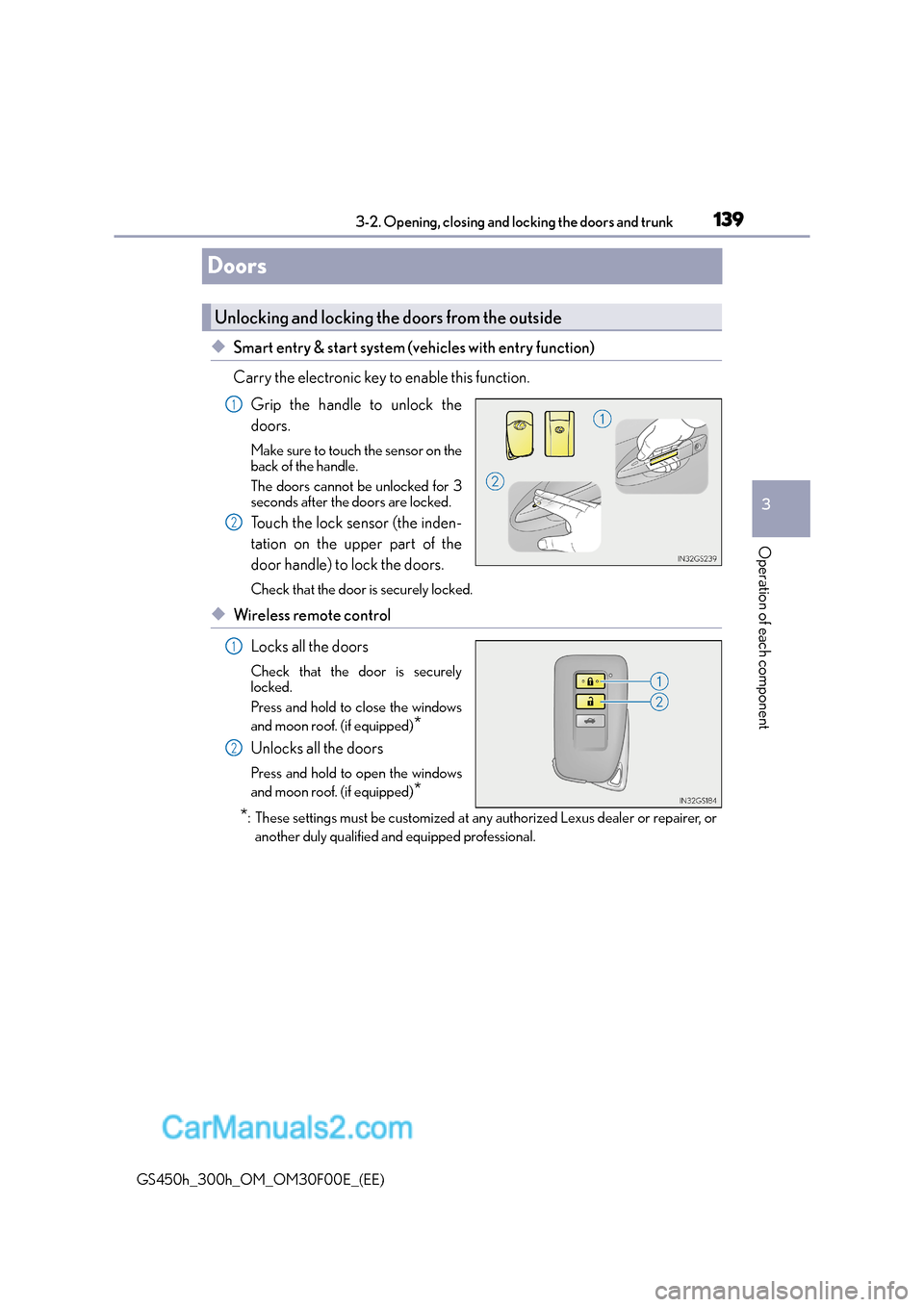
◆Smart entry & start system (vehicles with entry function)
Carry the electronic key to enable this function.
Grip the handle to unlock the
doors.
Make sure to touch the sensor on the
back of the handle.
The doors cannot be unlocked for 3
seconds after the doors are locked.
Touch the lock sensor (the inden-
tation on the upper part of the
door handle) to lock the doors.
Check that the door is securely locked.
◆Wireless remote control
Locks all the doors
Check that the door is securely
locked.
Press and hold to close the windows
and moon roof. (if equipped)
*
Unlocks all the doors
Press and hold to open the windows
and moon roof. (if equipped)
*
*
: These settings must be customized at an y authorized Lexus dealer or repairer, or
another duly qualified and equipped professional.
Unlocking and locking the doors from the outside
1
2
1
2
Page 140 of 620
1403-2. Opening, closing and locking the doors and trunk
GS450h_300h_OM_OM30F00E_(EE)
■Operation signals
The emergency flashers flash to indicate that the doors have been locked/unlocked.
(Locked: once; Unlocked: twice)
■Security feature
If a door is not opened within approximately 30 seconds after the vehicle is unlocked, the
security feature automatically locks the vehicle again.
■Welcome light illumination control
The front position, tail and license plate lights automatically turn on at night when the
doors are unlocked using the entry function or wireless remote control if the light switch
is in the “AUTO” position.
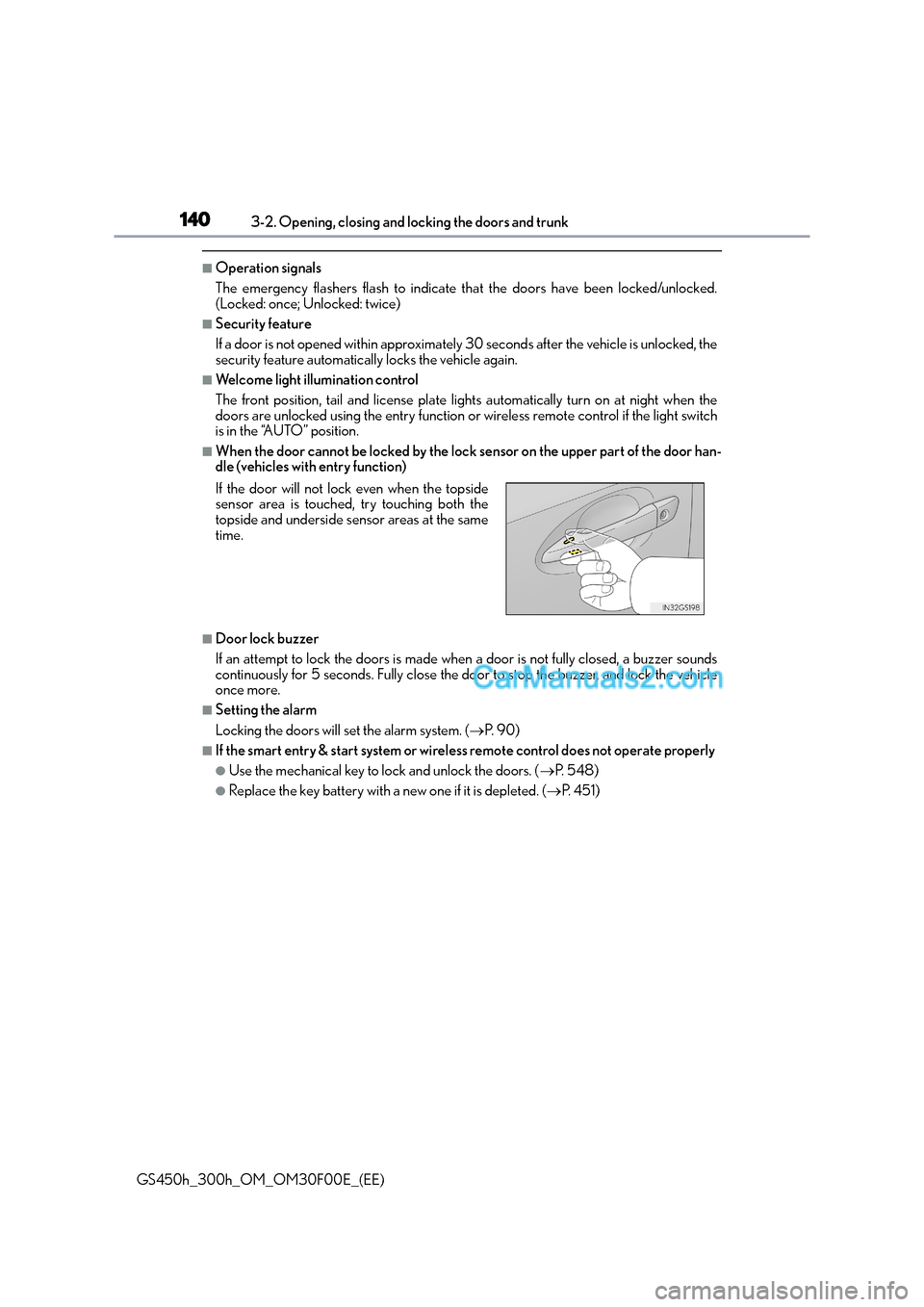
■When the door cannot be locked by the lock sensor on the upper part of the door han-
dle (vehicles with entry function)
■Door lock buzzer
If an attempt to lock the doors is made when a door is not fully closed, a buzzer sounds
continuously for 5 seconds. Fully close the door to stop the buzzer, and lock the vehicle
once more.
■Setting the alarm
Locking the doors will set the alarm system. ( →P. 9 0 )
■If the smart entry & start system or wireless remote control does not operate properly
●Use the mechanical key to lock and unlock the doors. ( →P. 5 4 8 )
●Replace the key battery with a new one if it is depleted. ( →P. 4 5 1 )
If the door will not lock even when the topside
sensor area is touched, try touching both the
topside and underside sensor areas at the same
time.
Page 141 of 620
1413-2. Opening, closing and locking the doors and trunk
3
Operation of each component
GS450h_300h_OM_OM30F00E_(EE)
WA R N I N G
Observe the following precautions.
Failing to do so may result in death or serious injury.
■When using the wireless remote control and operating the power windows or moon
roof (if equipped)
Operate the power window or moon roof after checking to make sure that there is no
possibility of any passenger having any of their body parts caught in the window or
moon roof. Also, do not allow children to operate the wireless remote control. It is pos-
sible for children and other passengers to get caught in the power window or moon
roof.
■Jam protection function
●Never try jamming any part of your body to activate the jam protection function
intentionally.
●The jam protection function may not work if something gets caught just before the
window or moon roof fully closes.
Page 142 of 620
1423-2. Opening, closing and locking the doors and trunk
GS450h_300h_OM_OM30F00E_(EE)
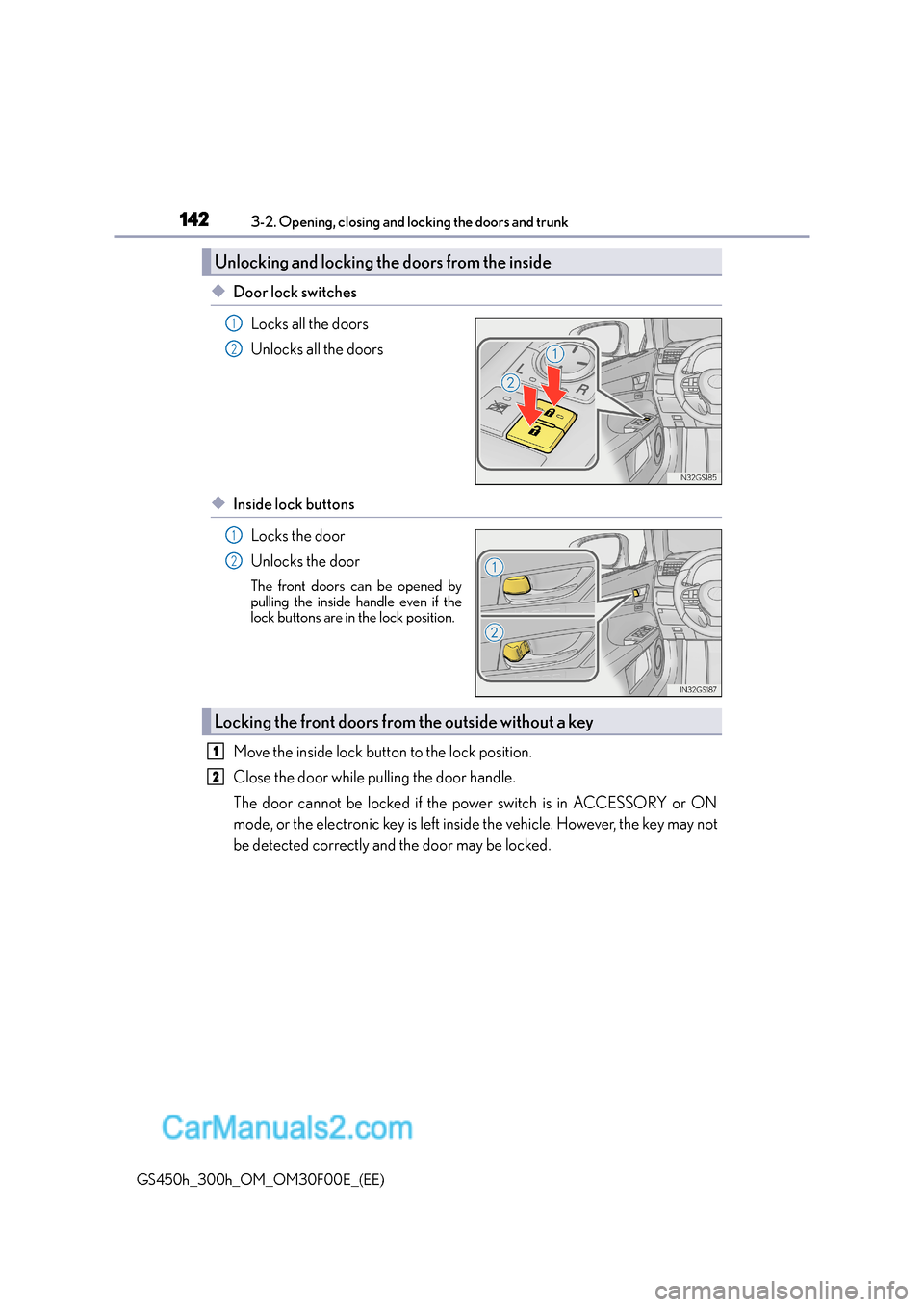
◆Door lock switchesLocks all the doors
Unlocks all the doors
◆Inside lock buttonsLocks the door
Unlocks the door
The front doors can be opened by
pulling the inside ha ndle even if the
lock buttons are in the lock position.
Move the inside lock butt on to the lock position.
Close the door while pulling the door handle.
The door cannot be locked if the power switch is in ACCESSORY or ON
mode, or the electronic key is left inside the vehicle. However, the key may not
be detected correctly and the door may be locked.
Unlocking and locking th e doors from the inside
1
2
1
2
Locking the front doors from the outside without a key
1
2
Page 143 of 620
1433-2. Opening, closing and locking the doors and trunk
3
Operation of each component
GS450h_300h_OM_OM30F00E_(EE)
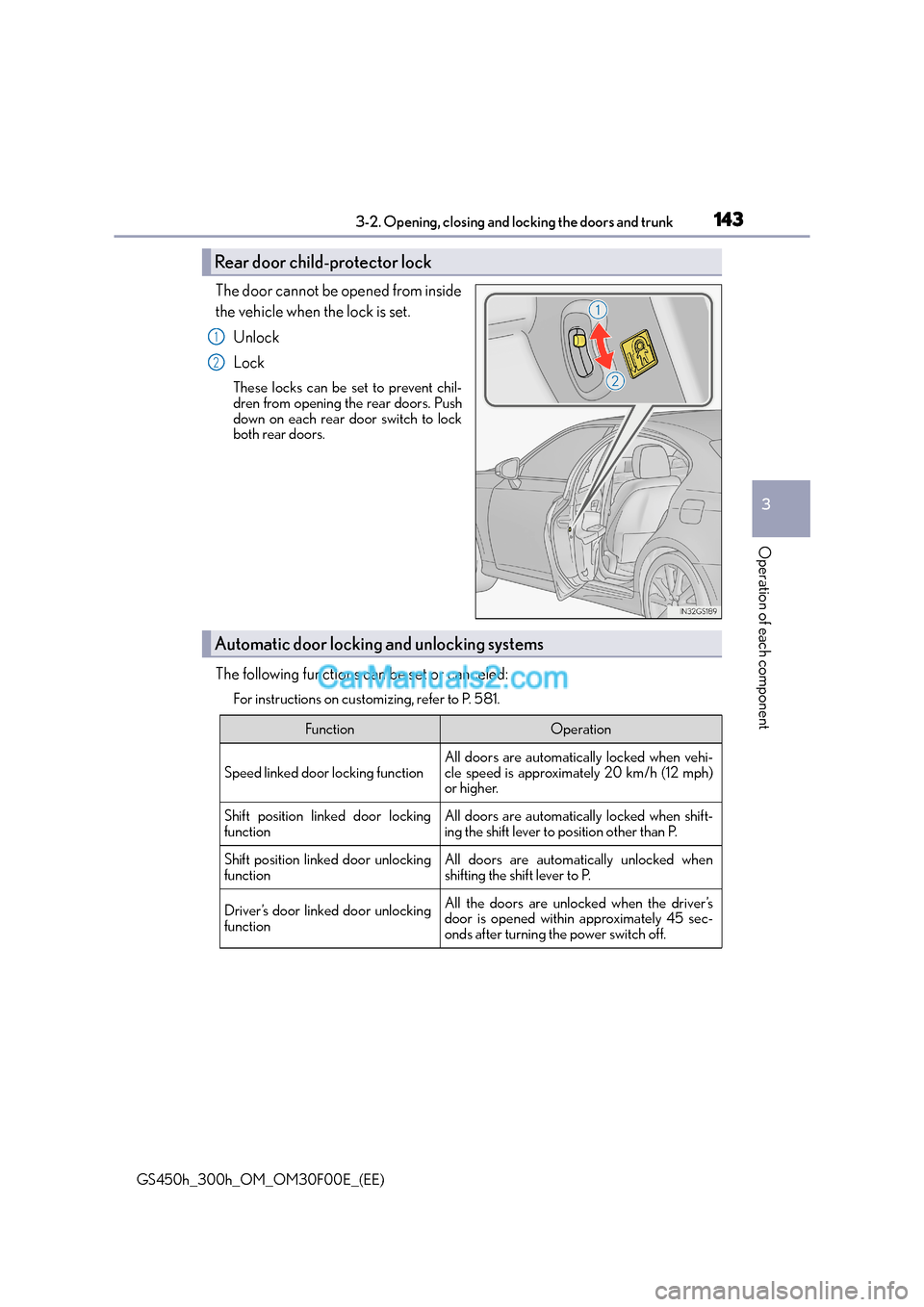
The door cannot be opened from inside
the vehicle when the lock is set.Unlock
Lock
These locks can be set to prevent chil-
dren from opening the rear doors. Push
down on each rear door switch to lock
both rear doors.
The following functions can be set or canceled:
For instructions on customizing, refer to P. 581.
Rear door child-protector lock
1
2
Automatic door locking and unlocking systems
FunctionOperation
Speed linked door locking function
All doors are automatically locked when vehi-
cle speed is approximately 20 km/h (12 mph)
or higher.
Shift position linked door locking
functionAll doors are automatically locked when shift-
ing the shift lever to position other than P.
Shift position linked door unlocking
functionAll doors are automatically unlocked when
shifting the shift lever to P.
Driver’s door linked door unlocking
functionAll the doors are unlocked when the driver’s
door is opened within approximately 45 sec-
onds after turning the power switch off.
Page 144 of 620
1443-2. Opening, closing and locking the doors and trunk
GS450h_300h_OM_OM30F00E_(EE)
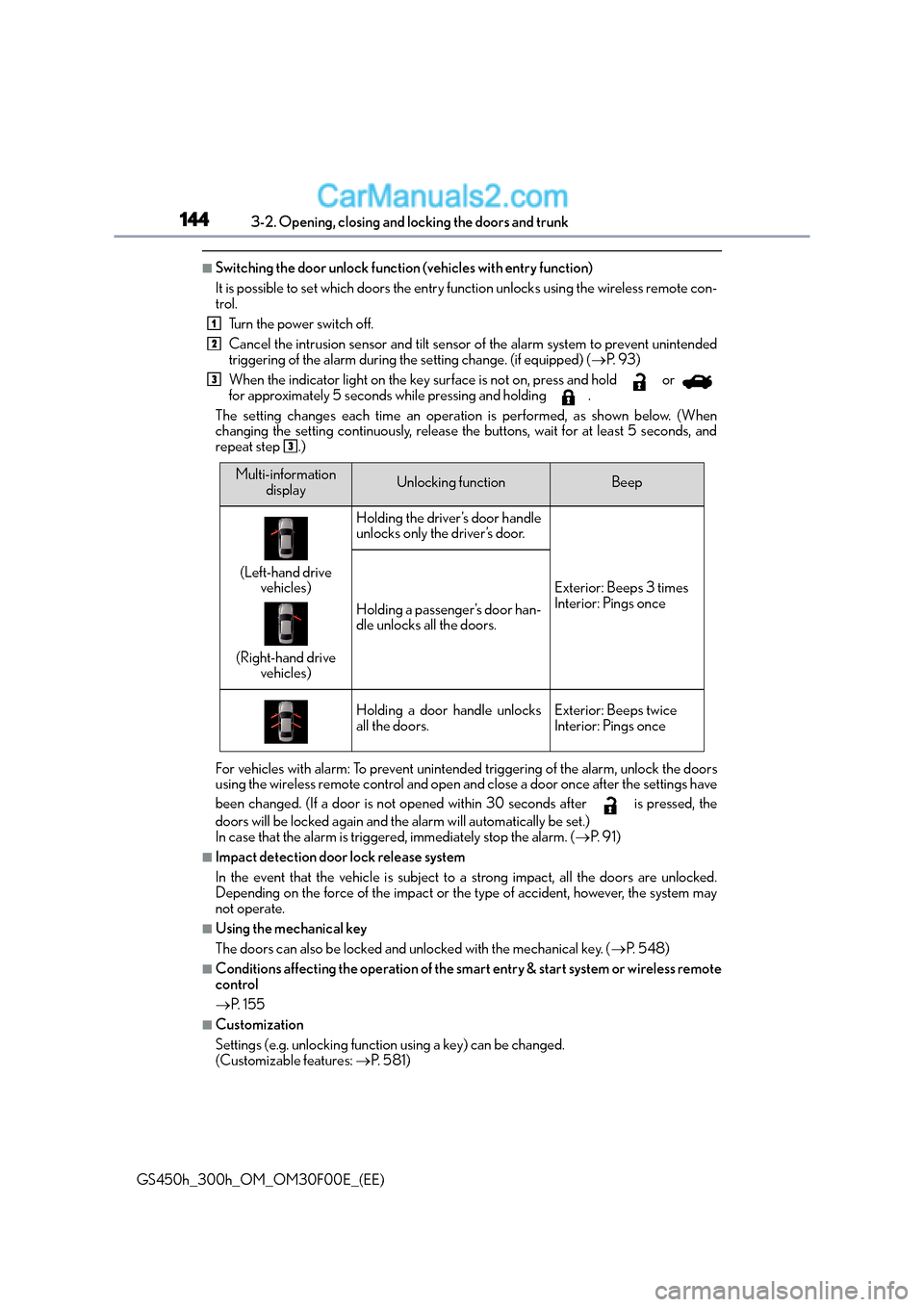
■Switching the door unlock function (vehicles with entry function)
It is possible to set which doors the entry function unlocks using the wireless remote con-
trol. Turn the power switch off.
Cancel the intrusion sensor and tilt sensor of the alarm system to prevent unintended
triggering of the alarm during the setting change. (if equipped) ( →P. 9 3 )
When the indicator light on the key surface is not on, press and hold or
for approximately 5 seconds while pressing and holding .
The setting changes each time an operation is performed, as shown below. (When
changing the setting continuously, release the buttons, wait for at least 5 seconds, and
repeat step .)
For vehicles with alarm: To prevent unintended triggering of the alarm, unlock the doors
using the wireless remote control and open an d close a door once after the settings have
been changed. (If a door is not opened within 30 seconds after is pressed, the
doors will be locked again and the alarm will automatically be set.)
In case that the alarm is triggered, immediately stop the alarm. ( →P. 9 1 )
■Impact detection door lock release system
In the event that the vehicle is subject to a strong impact, all the doors are unlocked.
Depending on the force of the impact or the type of accident, however, the system may
not operate.
■Using the mechanical key
The doors can also be locked and unlocked with the mechanical key. ( →P. 5 4 8 )
■Conditions affecting the operation of the smart entry & start system or wireless remote
control
→P. 1 5 5
■Customization
Settings (e.g. unlocking function using a key) can be changed.
(Customizable features: →P. 5 8 1 )
1
2
3
3
Multi-information
displayUnlocking functionBeep
(Left-hand drive vehicles)
(Right-hand drive vehicles)
Holding the driver’s door handle
unlocks only the driver’s door.
Exterior: Beeps 3 times
Interior: Pings once
Holding a passenger’s door han-
dle unlocks all the doors.
Holding a door handle unlocks
all the doors.Exterior: Beeps twice
Interior: Pings once