instrument panel Lexus GS300h 2015 User Guide
[x] Cancel search | Manufacturer: LEXUS, Model Year: 2015, Model line: GS300h, Model: Lexus GS300h 2015Pages: 620
Page 105 of 620
1052. Instrument cluster
2
Instrument cluster
GS450h_300h_OM_OM30F00E_(EE)
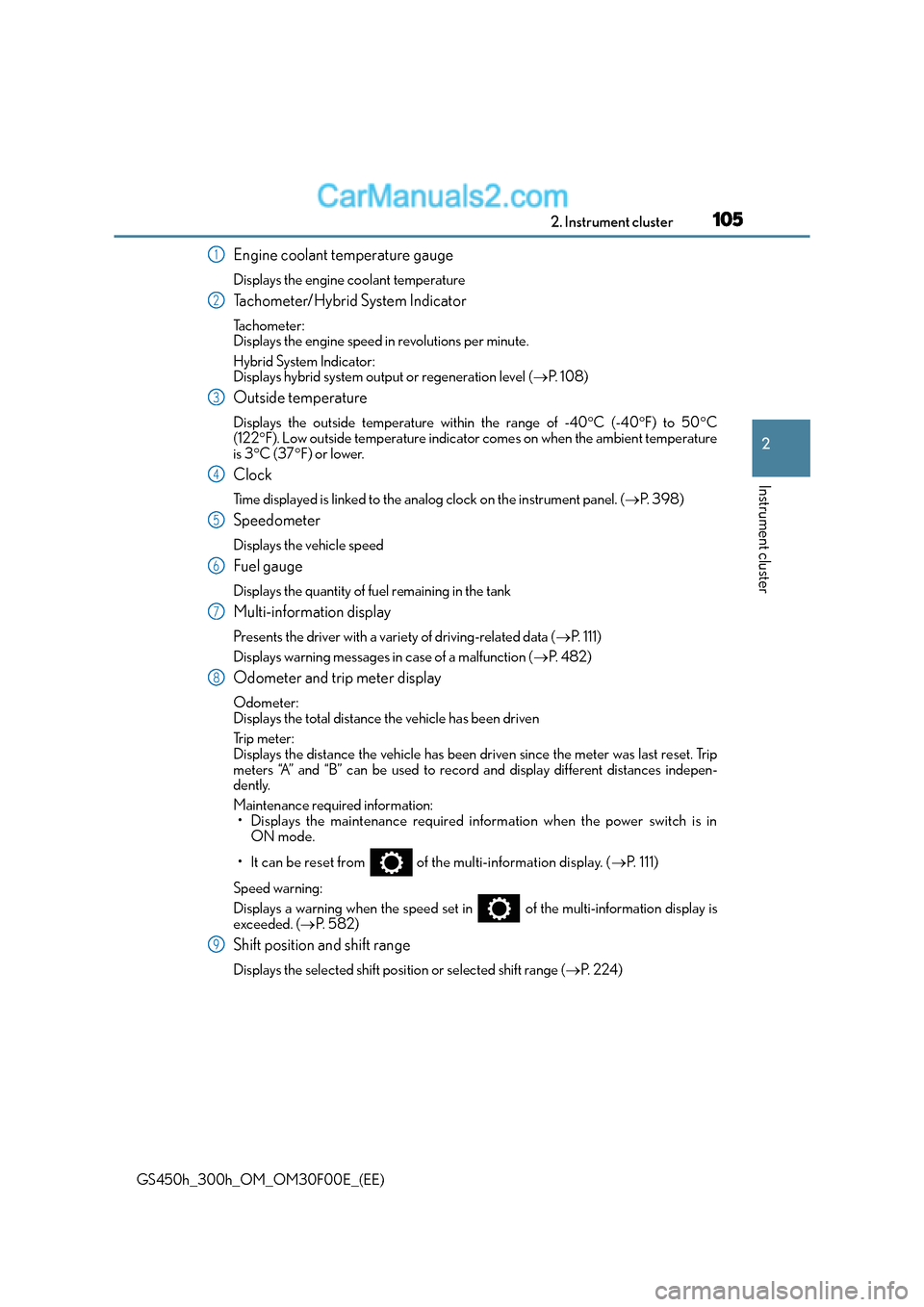
Engine coolant temperature gauge
Displays the engine coolant temperature
Tachometer/Hybrid System Indicator
Tachometer:
Displays the engine speed in revolutions per minute.
Hybrid System Indicator:
Displays hybrid system output or regeneration level (→P. 1 0 8 )
Outside temperature
Displays the outside temperature within the range of -40 °C (-40 °F) to 50 °C
(122 °F). Low outside temperature indicator comes on when the ambient temperature
is 3 °C (37 °F) or lower.
Clock
Time displayed is linked to the analog clock on the instrument panel. (→P. 3 9 8 )
Speedometer
Displays the vehicle speed
Fuel gauge
Displays the quantity of fuel remaining in the tank
Multi-information display
Presents the driver with a variety of driving-related data ( →P. 111)
Displays warning messages in case of a malfunction ( →P. 4 8 2 )
Odometer and trip meter display
Odometer:
Displays the total distance the vehicle has been driven
Tr i p m e t e r :
Displays the distance the vehicle has been driven since the meter was last reset. Trip
meters “A” and “B” can be used to record and display different distances indepen-
dently.
Maintenance required information:
• Displays the maintenance required information when the power switch is in ON mode.
• It can be reset from of the multi-information display. ( →P. 111)
Speed warning:
Displays a warning when the speed set in of the multi-information display is
exceeded. ( →P. 5 8 2 )
Shift position and shift range
Displays the selected shift posi tion or selected shift range (→P. 2 2 4 )
1
2
3
4
5
6
7
8
9
Page 107 of 620
1072. Instrument cluster
2
Instrument cluster
GS450h_300h_OM_OM30F00E_(EE)
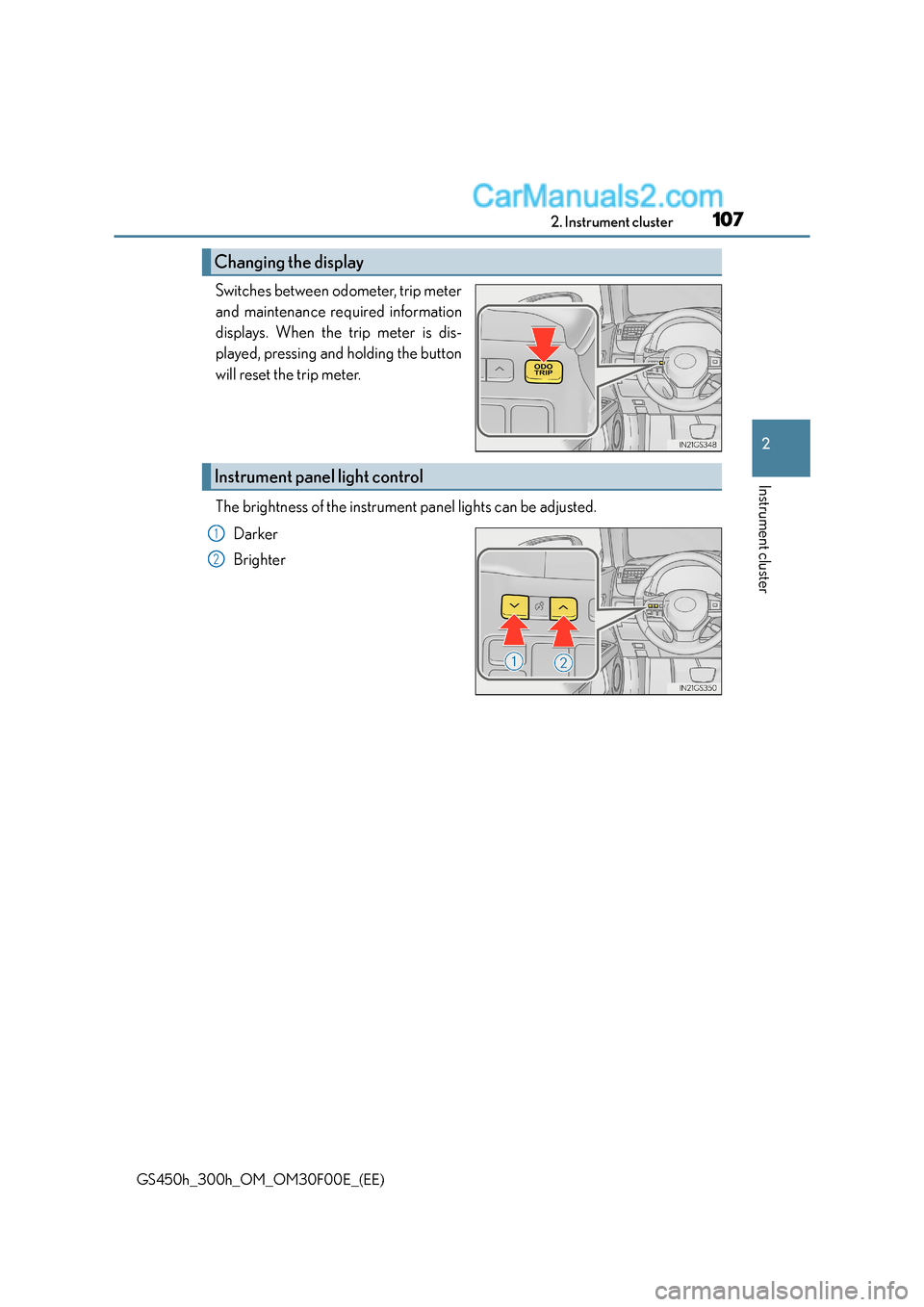
Switches between odometer, trip meter
and maintenance required information
displays. When the trip meter is dis-
played, pressing and holding the button
will reset the trip meter.
The brightness of the instrument panel lights can be adjusted.Darker
Brighter
Changing the display
Instrument panel light control
1
2
Page 108 of 620
1082. Instrument cluster
GS450h_300h_OM_OM30F00E_(EE)
■The meters and display illuminate when
The power switch is in ON mode.
■Instrument panel brightness adjustment
The instrument panel brightness levels when the tail lights are on and off can be adjusted
individually. However, when the surroundings ar e bright (daytime, etc.), turning on the tail
lights will not change the in strument panel brightness.
■Limitation of brightness adjustment
The brightness of the instrument panel lights is automatically adjusted based on the light
sensor detecting how bright the surroundings are. However, if the instrument panel
brightness has been manually set to either the brightest or darkest setting, the automatic
adjustment will not be performed.
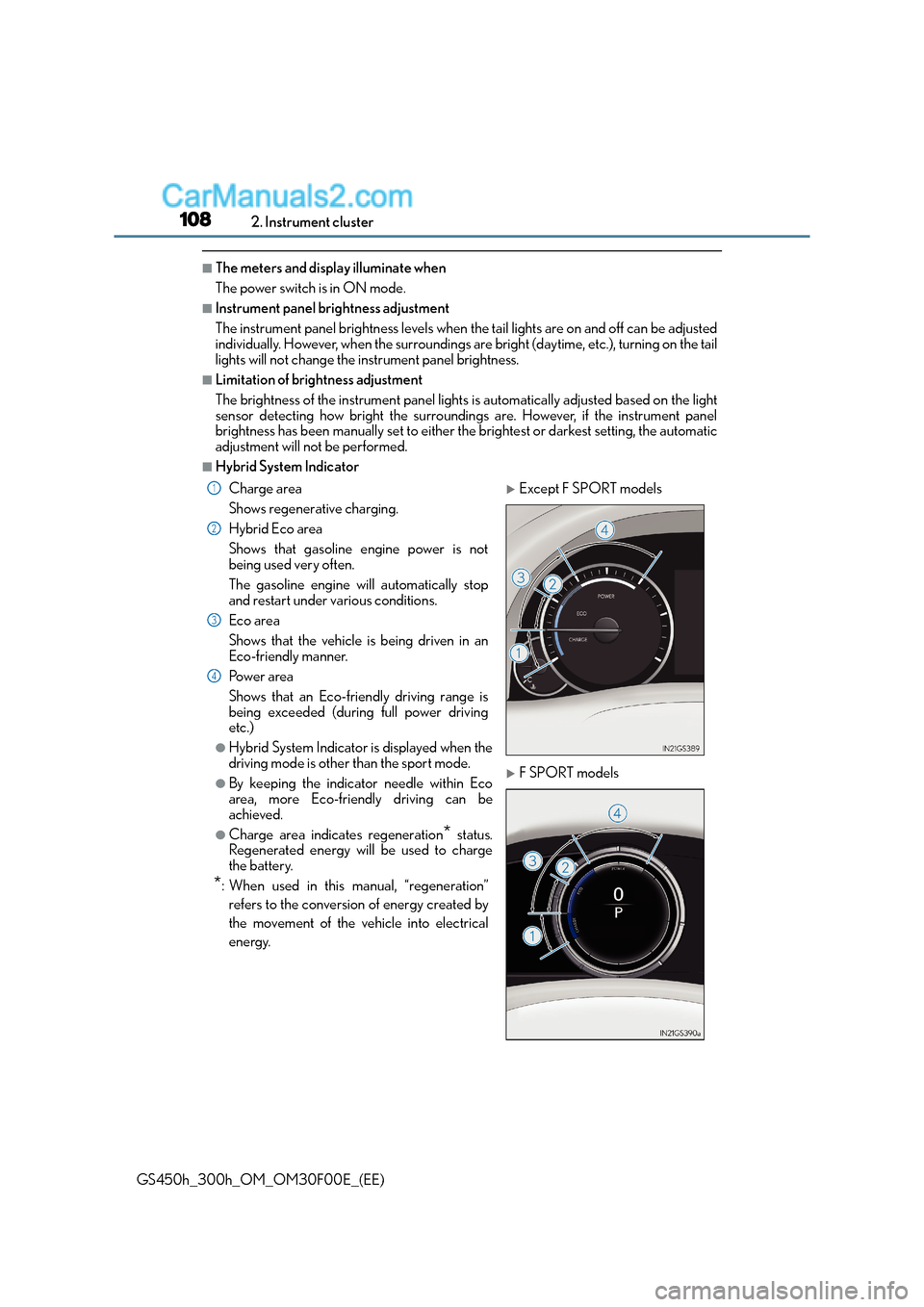
■Hybrid System Indicator
Charge area
Shows regenerative charging.
Hybrid Eco area
Shows that gasoline engine power is not
being used very often.
The gasoline engine will automatically stop
and restart under various conditions.
Eco area
Shows that the vehicle is being driven in an
Eco-friendly manner.
Po w e r a re a
Shows that an Eco-friendly driving range is
being exceeded (during full power driving
etc.)
●Hybrid System Indicator is displayed when the
driving mode is other than the sport mode.
●By keeping the indicator needle within Eco
area, more Eco-friendly driving can be
achieved.
●Charge area indicates regeneration* status.
Regenerated energy will be used to charge
the battery.
*: When used in this manual, “regeneration”
refers to the conversion of energy created by
the movement of the vehicle into electrical
energy.
XExcept F SPORT models
XF SPORT models
1
2
3
4
Page 116 of 620
1162. Instrument cluster
GS450h_300h_OM_OM30F00E_(EE)
■●
Language
Select to change the language on the display.
●Units
Select to change the unit of measure.
●EV indicator
Select to activate/deactivate the EV indicator.
● switch
Displays a procedure to register a desired screen to .
You can register 1 screen as a shortcut, which can be displayed by pressing .
●Drive information 1 /2 /3
Select to select up to 2 items that will be displayed on a Drive information screen,
up to 3 Drive information screens can be set.
●Po p - u p d i s p l a y
Select to set the following pop-up displa ys, which may appear in some situations,
on/off. • Route guidance of the navigation system-linked display (if equipped)
• Incoming call display of the hands-free phone system
• Instrument panel brightness adjustment display
●Accent color (except F SPORT models)
Select to change the accent colors on the screen, such as the cursor color.
●Needle (F SPORT models)
Select to change the needle color for the tachometer.
●Rev indicator (F SPORT models)
Select to set the rev indicator on/off.
When set to on, proceed to set the engine speed at which the rev indicator will be
displayed.
Selectable engine speed range:
2000 r/min. to 6000 r/min.
●Rev peak (F SPORT models)
Select to set the rev peak on/off.
●Tachometer
Select to set the tachometer or Hybrid System Indicator to always be displayed or
be changed to automatically according to the driving mode.
●Default settings
Registered or changed meter settings will be deleted or returned to their default
setting.
Page 156 of 620
1563-2. Opening, closing and locking the doors and trunk
GS450h_300h_OM_OM30F00E_(EE)
■Note for the entry function (if equipped)
●Even when the electronic key is within the effective range (detection areas), the system
may not operate properly in the following cases:
• The electronic key is too close to the window or outside door handle, near theground, or in a high place when the doors are locked or unlocked.
• The electronic key is near the ground or in a high place, or too close to the rear
bumper center when the trunk is opened.
• The electronic key is on the instrument pa nel, rear package tray or floor, or in the
door pockets or glove box when the hybrid system is started or power switch modes
are changed.
●Do not leave the electronic key on top of th e instrument panel or near the door pockets
when exiting the vehicle. Depending on the radio wave reception conditions, it may be
detected by the antenna outside the cabin and the door will become lockable from the
outside, possibly trapping the electronic key inside the vehicle.
●As long as the electronic key is within the effective range, the doors may be locked or
unlocked by anyone. However, only the doors detecting the electronic key can be used
to unlock the vehicle.
●The doors may unlock or lock if a large amou nt of water splashes on the door handle,
such as in the rain or in a car wash when the electronic key is within the effective range.
(The doors will automatically be locked af ter approximately 30 seconds if the doors
are not opened and closed.)
●If the wireless remote control is used to lock the doors when the electronic key is near
the vehicle, there is a possibility that the d oor may not be unlocked by the entry func-
tion. (Use the wireless remote control to unlock the doors.)
●Touching the door lock sensor while wearing gloves may delay or prevent lock opera-
tion.
●If the door handle becomes wet while the electronic key is within the effective range,
the door may lock and unlock repeatedly. In that case, follow the following correction
procedures to wash the vehicle:
• Place the electronic key in a location 2 m (6 ft.) or more away from the vehicle. (Take care to ensure that the key is not stolen.)
• Set the electronic key to battery-saving mode to disable the smart entry & start sys- tem. ( →P. 1 5 5 )
●If the electronic key is inside the vehicle and a door handle becomes wet during a car
wash, a message may be shown on the multi-information display and a buzzer will
sound outside the vehicle. To turn off the alarm, lock all the doors.
●The lock sensor may not work properly if it comes into contact with ice, snow, mud, etc.
Clean the lock sensor and attempt to operate it again, or use the lock sensor on the
lower part of the door handle.
●A sudden approach to the effective range or door handle may prevent the doors from
being unlocked. In this case, return the door handle to the original position and check
that the doors unlock before pulling the door handle again.
●Gripping the door handle when wearing a glove may not unlock the door.
●If there is another electronic key in the de tection area, it may take slightly longer to
unlock the doors after the door handle is gripped.
●Fingernails may scrape against the door duri ng operation of the door handle. Be care-
ful not to injure fingernails or damage the surface of the door.
Page 157 of 620
1573-2. Opening, closing and locking the doors and trunk
3
Operation of each component
GS450h_300h_OM_OM30F00E_(EE)
■Note for the push-start function
●Even when the electronic key is within the effective range (detection areas), the system
may not operate properly when the electronic key is on the instrument panel, rear
package tray or floor, or in the door pockets or glove box when the hybrid system is
started or power switch modes are changed.
●Even if the electronic key is not inside the vehicle, it may be possible to start the hybrid
system if the electronic key is near the window.
■When the vehicle is not driven for extended periods
●Vehicles with entry function: To prevent theft of the vehicle, do not leave the electronic
key within 2 m (6 ft.) of the vehicle.
●The smart entry & start system can be deactivated in advance. ( →P. 5 8 1 )
■To operate the system properly
●Make sure to carry the electronic key when operating the system. Do not get the elec-
tronic key too close to the vehicle when operating the system from the outside of the
vehicle.
Depending on the position and holding condition of the electronic key, the key may not
be detected correctly and the system may not operate properly. (The alarm may go off
accidentally, or the door lock prev ention function may not operate.)
●Do not leave the electronic key inside the trunk.
The key confinement prevention function may not operate, depending on the location
of the key (close to a spare tire [if equipped], the inside edge of the trunk), conditions
(inside a metal bag, close to metallic object s) and the radio waves in the surrounding
area. ( →P. 1 4 8 )
■If the smart entry & start system does not operate properly
●Locking and unlocking the doors and opening the trunk: Use the mechanical key.
(→ P. 5 4 8 )
●Starting the hybrid system: →P. 5 4 9
■Customization
Settings (e. g. smart entry & start system) can be changed.
(Customizable features: →P. 5 8 1 )
■If the smart entry & start system has been deactivated in a customized setting
●Locking and unlocking the doors and opening the trunk:
Use the wireless remote control or mechanical key. ( →P. 139, 147, 548)
●Starting the hybrid system and changing power switch modes: →P. 5 4 9
●Stopping the hybrid system: →P. 2 1 8
Page 177 of 620
1773-3. Adjusting the seats
3
Operation of each component
GS450h_300h_OM_OM30F00E_(EE)
WA R N I N G
■Operating the front passenger’s seat from the driver’s seat (if equipped)
Do not operate the front passenger’s seat when a passenger is seated in it. In addition,
do not let anyone sit down in the front passenger’s seat while the seat is being operated.
The front passenger may catch their legs between the instrument panel and seat,
resulting in injury.
■When adjusting the seat positions or the ottoman (if equipped)
Make sure to leave enough space around the feet so they do not get stuck.
■When using the ottoman (if equipped)
●Do not operate the ottoman when the vehicle is moving.
Failure to do so may cause death or serious injury in the event of sudden braking or a
collision.
●Do not sit on the ottoman of the passenger seat.
Doing so may cause seat belts to be worn improperly, which may lead to serious
injury or death in the event of sudden braking or a collision.
●Do not step on the ottoman.
Doing so could damage the ottoman, or could cause you to seriously injure yourself
by falling over.
●Stow the ottoman when you get in or out of the vehicle or when the ottoman is not in
use to avoid stumbling over it.
●Do not allow anyone to put their hands or feet under the passenger seat when stow-
ing the ottoman.
NOTICE
■Operating the front passenger’s seat from the driver’s seat (if equipped)
Before operating the front passenger’s seat, make sure that there is no luggage or any
other objects on the seat or in the f ootwell that could prevent its operation.
Such items may result in excess force being applied, causing damage to the seat and/or
the luggage.
■To prevent an ottoman malfunction (if equipped)
●Do not place any objects in the front passe nger footwell that could prevent the oper-
ation of the ottoman.
●Do not place heavy luggage on the ottoman.
●Do not place anything under the ottoman when in use.
There is a possibility that something may get caught and cause damages when stow-
ing the ottoman.
Page 180 of 620
1803-3. Adjusting the seats
GS450h_300h_OM_OM30F00E_(EE)
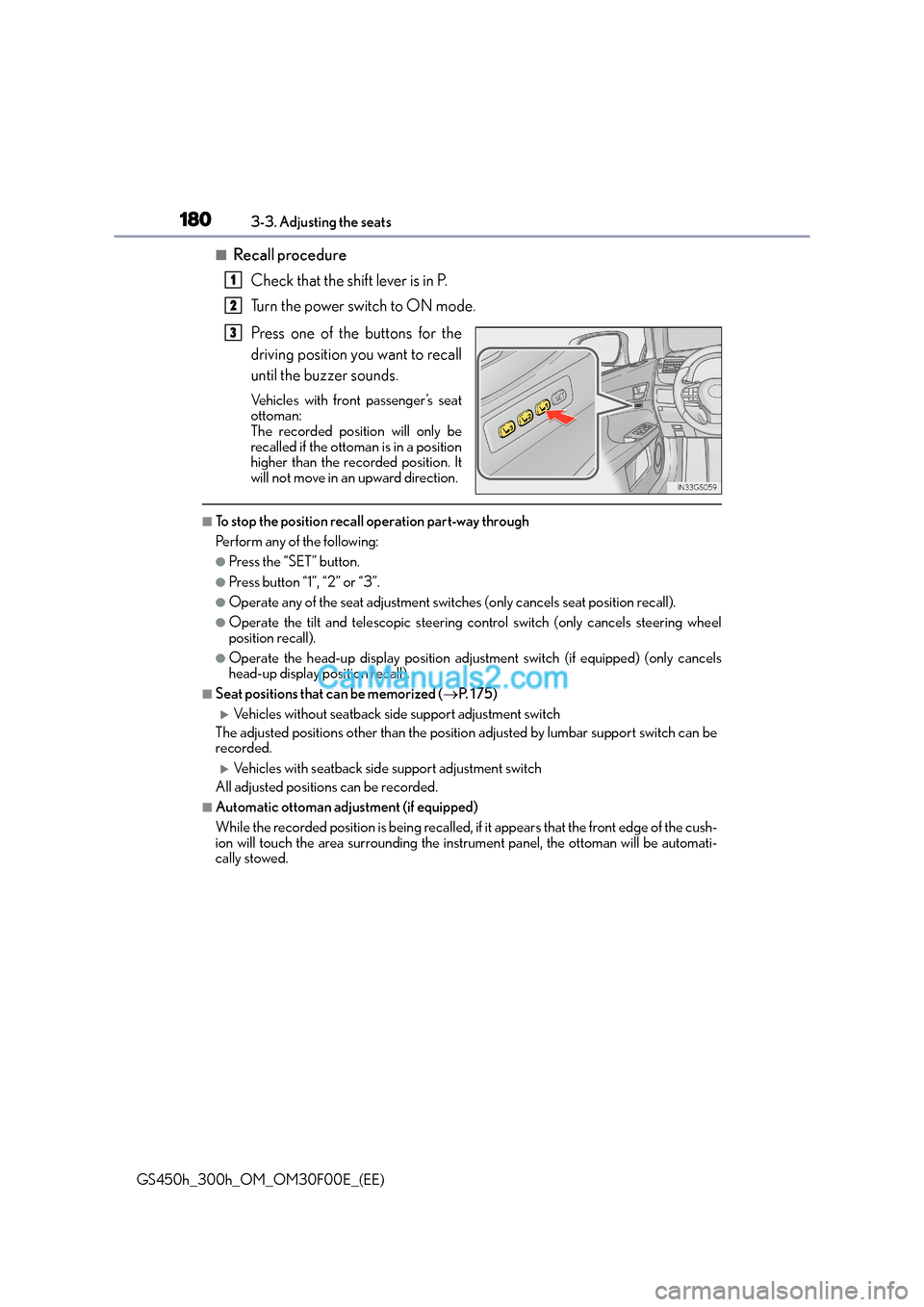
■Recall procedureCheck that the shift lever is in P.
Turn the power switch to ON mode.
Press one of the buttons for the
driving position you want to recall
until the buzzer sounds.
Vehicles with front passenger’s seat
ottoman:
The recorded position will only be
recalled if the ottoman is in a position
higher than the recorded position. It
will not move in an upward direction.
■To stop the position recall operation part-way through
Perform any of the following:
●Press the “SET” button.
●Press button “1”, “2” or “3”.
●Operate any of the seat adjustment switches (only cancels seat position recall).
●Operate the tilt and telescopic steering control switch (only cancels steering wheel
position recall).
●Operate the head-up display position adjustment switch (if equipped) (only cancels
head-up display position recall).
■Seat positions that can be memorized ( →P. 1 7 5 )
XVehicles without seatback side support adjustment switch
The adjusted positions other than the position adjusted by lumbar support switch can be
recorded.
XVehicles with seatback side support adjustment switch
All adjusted positions can be recorded.
■Automatic ottoman adjustment (if equipped)
While the recorded position is being recalled, if it appears that the front edge of the cush-
ion will touch the area surrounding the instrument panel, the ottoman will be automati-
cally stowed.
1
2
3
Page 205 of 620
2054-1. Before driving
4
Driving
GS450h_300h_OM_OM30F00E_(EE)
WA R N I N G
Observe the following precautions.
Failure to do so may result in death or serious injury.
■When the vehicle is stopped
●Do not depress the accelerator pedal unnecessarily.
If the shift lever is any position other than P or N, the vehicle may accelerate suddenly
and unexpectedly, causing an accident.
●In order to prevent accidents due to the vehicle rolling away, always keep depressing
the brake pedal while stopped with the “R EADY” indicator is illuminated, and apply
the parking brake as necessary.
●If the vehicle is stopped on an incline, in order to prevent accidents caused by the
vehicle rolling forward or backward, always depress the brake pedal and securely
apply the parking brake as needed.
●Avoid revving or racing the engine.
Running the engine at high speed while the vehicle is stopped may cause the exhaust
system to overheat, which could result in a fire if combustible material is nearby.
■When the vehicle is parked
●Do not leave glasses, cigarette lighters, spra y cans, or soft drink cans in the vehicle
when it is in the sun.
Doing so may result in the following:
• Gas may leak from a cigarette lighter or spray can, and may lead to a fire.
• The temperature inside the vehicle may cause the plastic lenses and plastic mate-
rial of glasses to deform or crack.
• Soft drink cans may fracture, causing the contents to spray over the interior of the vehicle, and may also cause a short circuit in the vehicle’s electrical components.
●Do not leave cigarette lighters in the vehicle. If a cigarette lighter is in a place such as
the glove box or on the floor, it may be lit accidentally when luggage is loaded or the
seat is adjusted, causing a fire.
●Do not attach adhesive discs to the windshield or windows. Do not place containers
such as air fresheners on the instrument panel or dashboard. Adhesive discs or con-
tainers may act as lenses, causing a fire in the vehicle.
●Do not leave a door or window open if the curved glass is coated with a metallized
film such as a silver-colored one. Reflected sunlight may cause the glass to act as a
lens, causing a fire.
●Always apply the parking brake, shift the shift lever to P, stop the hybrid system and
lock the vehicle.
Do not leave the vehicle unattended while the “READY” indicator is illuminated.
●Do not touch the exhaust pipes while the “READY” indicator is illuminated or imme-
diately after turning the hybrid system off.
Doing so may cause burns.
Page 208 of 620
2084-1. Before driving
GS450h_300h_OM_OM30F00E_(EE)
Cargo and luggage
Take notice of the following information about storage precautions, cargo
capacity and load:
WA R N I N G
■Things that must not be carried in the trunk
The following things may cause a fire if loaded in the trunk:
●Receptacles containing gasoline
●Aerosol cans
■Storage precautions
Observe the following precautions.
Failure to do so may prevent the pedals from being depressed properly, may block the
driver’s vision, or may result in items hitt ing the driver or passengers, possibly causing
an accident.
●Stow cargo and luggage in the trunk whenever possible.
●Do not place cargo or luggage in or on the following locations.
• At the feet of the driver
• On the front passenger or rear seats (when stacking items)
• On the package tray
• On the instrument panel
• On the dashboard
• In front of the Remote Touch screen
●Secure all items in the occupant compartment.
■Load and distribution
●Do not overload your vehicle.
●Do not apply loads unevenly.
Improper loading may cause deterioration of steering or braking control which may
cause death or serious injury.