ECO mode Lexus GS300h 2015 Owner's Guide
[x] Cancel search | Manufacturer: LEXUS, Model Year: 2015, Model line: GS300h, Model: Lexus GS300h 2015Pages: 620
Page 225 of 620
2254-2. Driving procedures
4
Driving
GS450h_300h_OM_OM30F00E_(EE)
■Sport mode/Eco drive mode
→P. 3 3 0
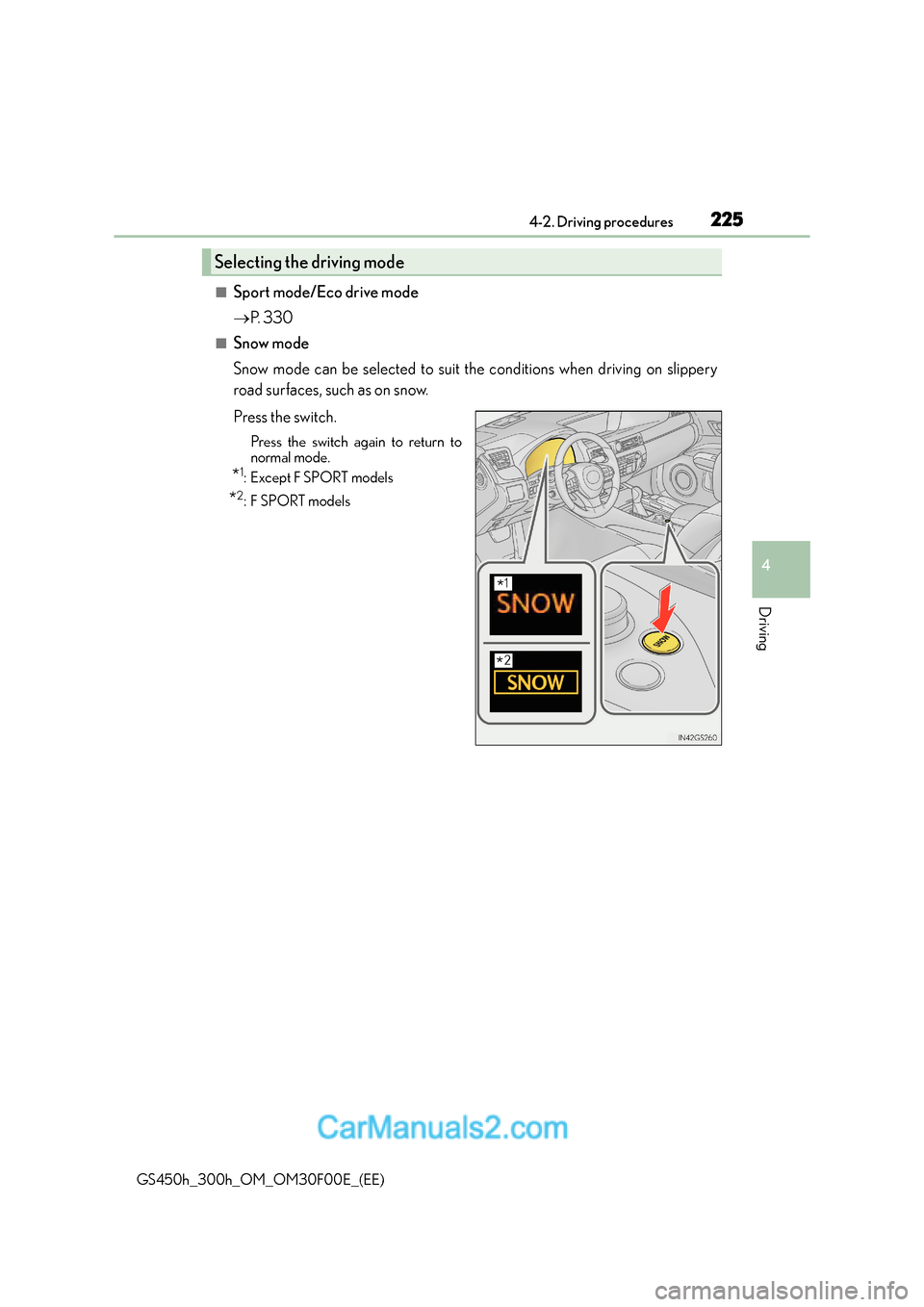
■Snow mode
Snow mode can be selected to suit the conditions when driving on slippery
road surfaces, such as on snow.
Press the switch.
Press the switch again to return to
normal mode.
*1:Except F SPORT models
*2:F SPORT models
Selecting the driving mode
*1
*2
Page 232 of 620
2324-2. Driving procedures
GS450h_300h_OM_OM30F00E_(EE)
■Parking brake operation
●When the power switch is not in ON mode, the parking brake cannot be released using
the parking brake switch.
●When the power switch is not in ON mode, automatic mode (automatic brake setting
and releasing) is not available.
●If the parking brake is operated repeatedly over a short period of time, the system may
restrict operation to prevent overheating. If this happens, refrain from operating the
parking brake. Normal operation will return after about 1 minute.
●Vehicles with towing package: In situations such as when parking while towing a trailer,
the maximum amount of braking force can be used by pressing the parking brake
switch with the parking brake already set.
●Vehicles without towing package: In situations such as when parking on a steep slope*,
the maximum amount of braking force can be used by pressing the parking brake
switch with the parking brake already set.
*: Use wheel chocks when parking on a steep slope.
■Parking brake operation sound
When the parking brake operates, a motor sound (whirring sound) may be heard. This
does not indicate a malfunction.
■Parking brake indicator light
●Depending on the power switch mode, the parking brake indicator light will come on
and stay on as described below:
ON mode: Comes on until the parking brake is released.
Not in ON mode: Stays on for approximately 15 seconds.
●When the power switch is turned off with the parking brake set, the parking brake indi-
cator light will stay on for about 15 seco nds. This does not indicate a malfunction.
■When there is a malfunction in the system
Warning lights and/or warning message will turn on or flash. (→P. 4 7 8 , 4 8 2 )
Depending on the condition, the park ing brake indicator light may flash.
■Parking brake engaged warning buzzer
→P. 4 8 8
■Usage in winter time
→P. 3 5 4
Page 254 of 620
2544-3. Operating the lights and wipers
GS450h_300h_OM_OM30F00E_(EE)
■The windshield wiper and washer can be operated when
The power switch is in ON mode.
■Dripping prevention wiper sweep
After washing and wiping operation several times, the wipers operate one more time
after a short delay to prevent dripping.
However, the last sweep will not happen while the vehicle is moving.
■Effects of vehicle speed on wiper operation
●Intermittent windshield wipers interval changes when the vehicle is stopped.
●With low speed operation selected, wiper operation will be switched from low speed to
intermittent operation only when the vehicle is stationary.
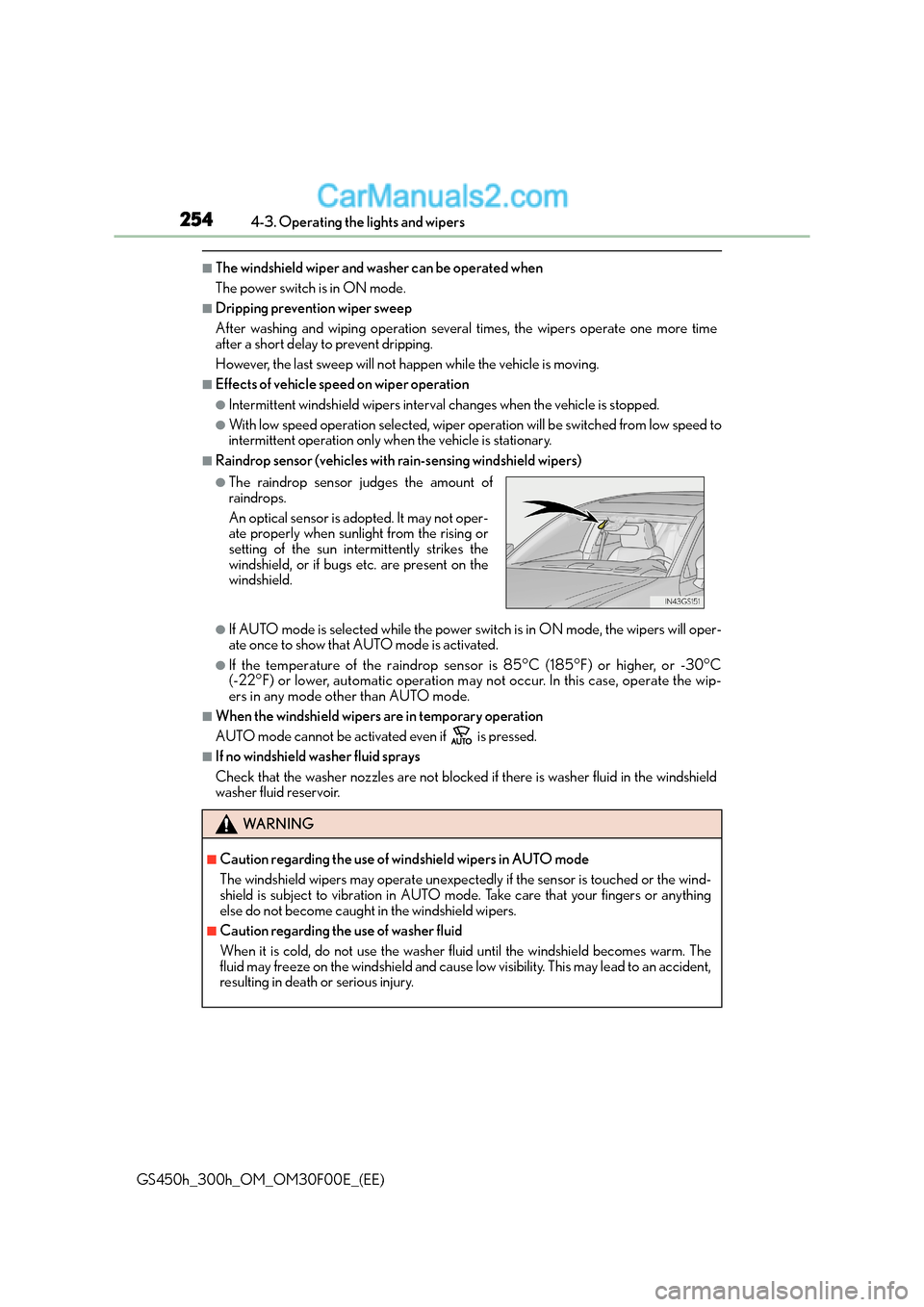
■Raindrop sensor (vehicles with rain-sensing windshield wipers)
●If AUTO mode is selected while the power sw itch is in ON mode, the wipers will oper-
ate once to show that AUTO mode is activated.
●If the temperature of the raindrop sensor is 85°C (185°F) or higher, or -30°C
(-22°F) or lower, automatic operation may not occur. In this case, operate the wip-
ers in any mode other than AUTO mode.
■When the windshield wipers are in temporary operation
AUTO mode cannot be activated even if is pressed.
■If no windshield washer fluid sprays
Check that the washer nozzles are not blocked if there is washer fluid in the windshield
washer fluid reservoir.
●The raindrop sensor judges the amount of
raindrops.
An optical sensor is adopted. It may not oper-
ate properly when sunlight from the rising or
setting of the sun intermittently strikes the
windshield, or if bugs etc. are present on the
windshield.
WA R N I N G
■Caution regarding the use of windshield wipers in AUTO mode
The windshield wipers may operate unexpectedly if the sensor is touched or the wind-
shield is subject to vibration in AUTO mode. Take care that your fingers or anything
else do not become caught in the windshield wipers.
■Caution regarding the use of washer fluid
When it is cold, do not use the washer fl uid until the windshield becomes warm. The
fluid may freeze on the windshield and cause low visibility. This may lead to an accident,
resulting in death or serious injury.
Page 302 of 620
3024-5. Using the driving support systems
GS450h_300h_OM_OM30F00E_(EE)
■When driving vehicle in country with different speed unit
Since RSA recognizes signs based on the set unit of the meter, it is necessary to change
the set unit of the meter. Adjust the set unit of the meter to the speed unit of signs in the
current location. (→P. 585)
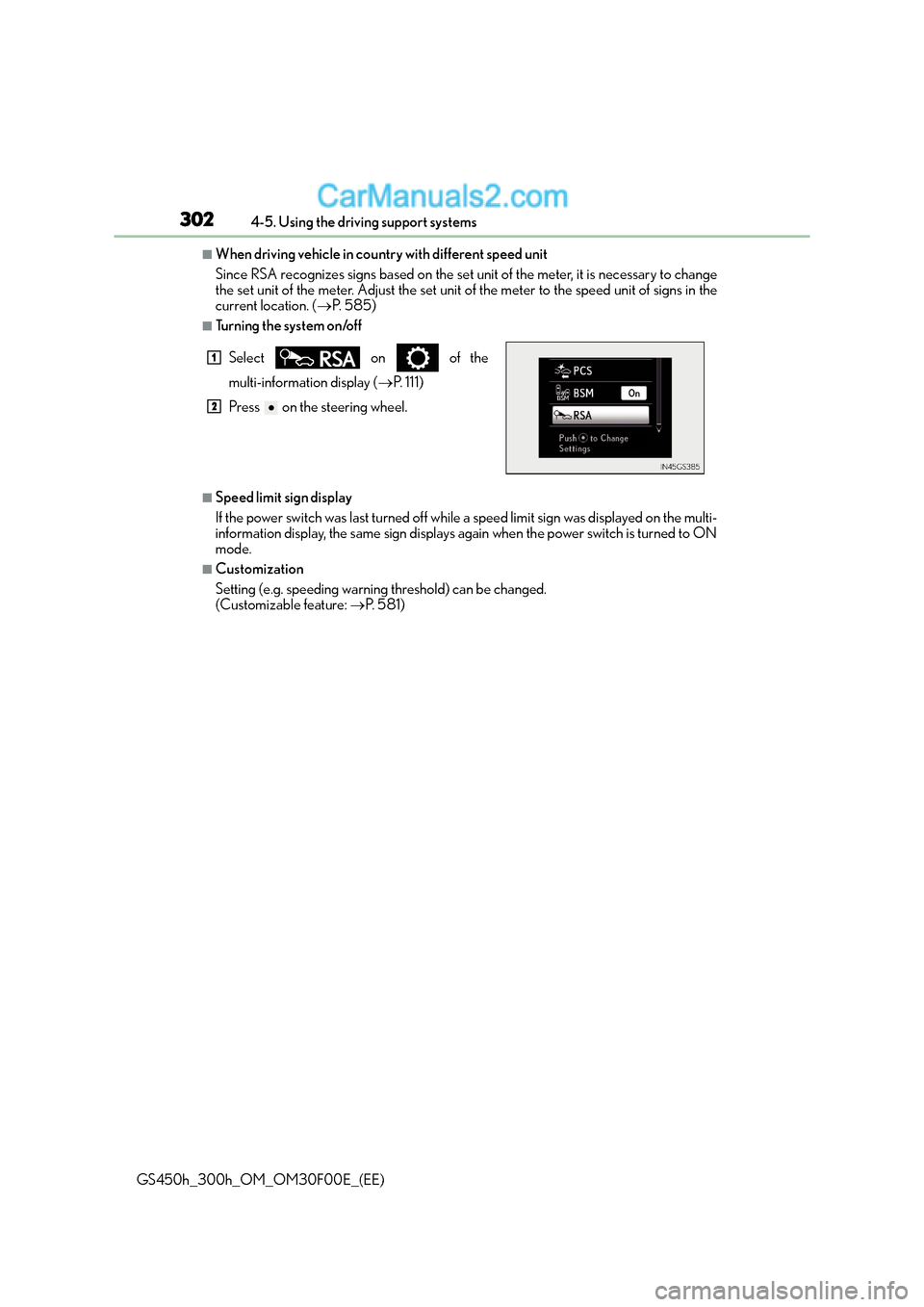
■Turning the system on/off
■Speed limit sign display
If the power switch was last turned off while a speed limit sign was displayed on the multi-
information display, the same sign displays again when the power switch is turned to ON
mode.
■Customization
Setting (e.g. speeding warning threshold) can be changed.
(Customizable feature: →P. 5 8 1 )
Select on of the
multi-information display (
→P. 111)
Press on the steering wheel.
1
2
Page 307 of 620
3074-5. Using the driving support systems
4
Driving
GS450h_300h_OM_OM30F00E_(EE)
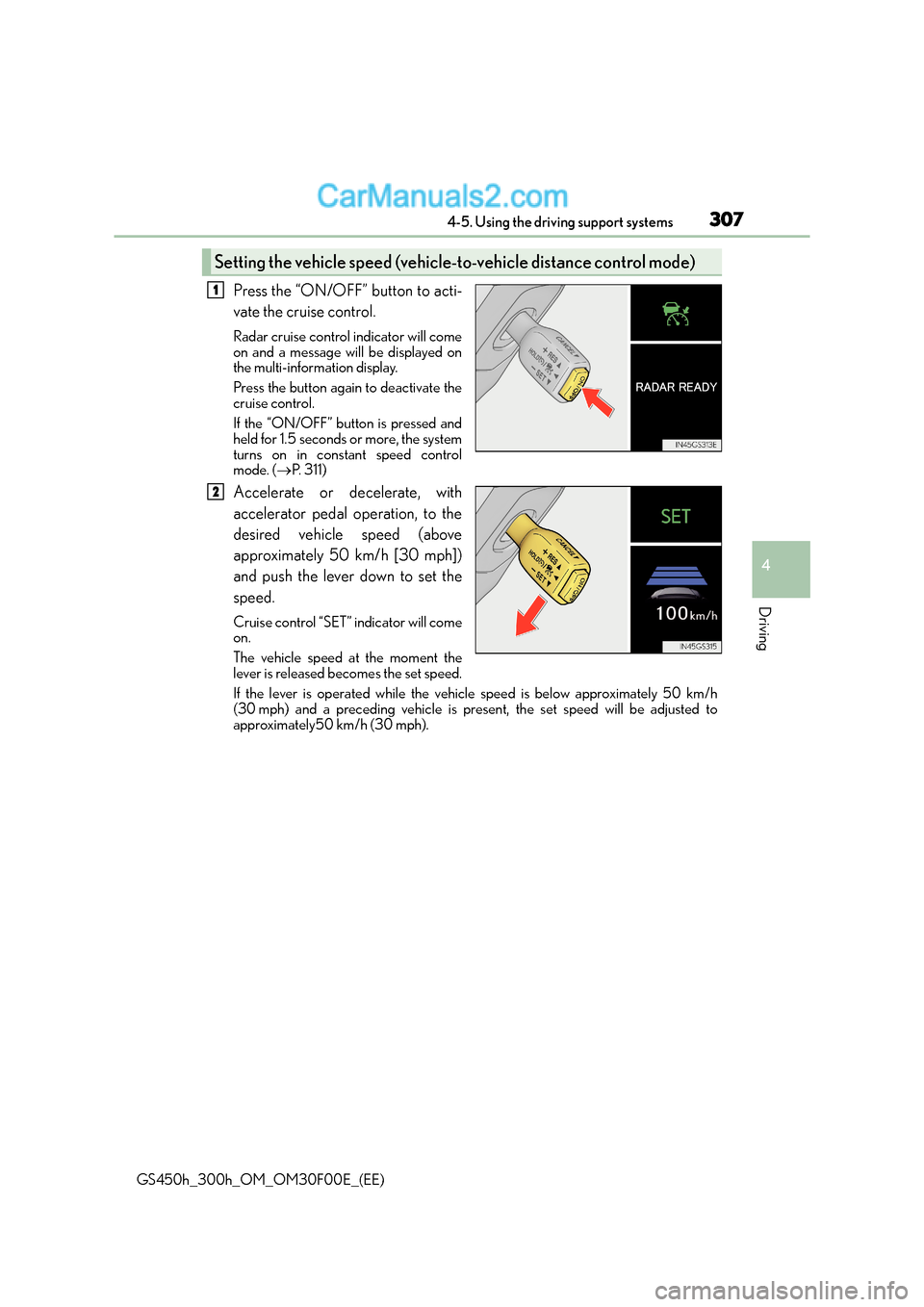
Press the “ON/OFF” button to acti-
vate the cruise control.
Radar cruise control indicator will come
on and a message will be displayed on
the multi-information display.
Press the button again to deactivate the
cruise control.
If the “ON/OFF” button is pressed and
held for 1.5 seconds or more, the system
turns on in constant speed control
mode. (→P. 311)
Accelerate or decelerate, with
accelerator pedal operation, to the
desired vehicle speed (above
approximately 50 km/h [30 mph])
and push the lever down to set the
speed.
Cruise control “SET” indicator will come
on.
The vehicle speed at the moment the
lever is released becomes the set speed.
If the lever is operated while the vehi cle speed is below approximately 50 km/h
(30 mph) and a preceding vehicle is pres ent, the set speed will be adjusted to
approximately50 km/h (30 mph).
Setting the vehicle speed (vehicle-t o-vehicle distance control mode)
1
2
Page 311 of 620
3114-5. Using the driving support systems
4
Driving
GS450h_300h_OM_OM30F00E_(EE)
When constant speed control mode is selected, your vehicle will maintain a set
speed without controlling the vehicle-to-vehicle distance. Select this mode only
when vehicle-to-vehicle distance control mode does not function correctly due
to a dirty radar sensor, etc.
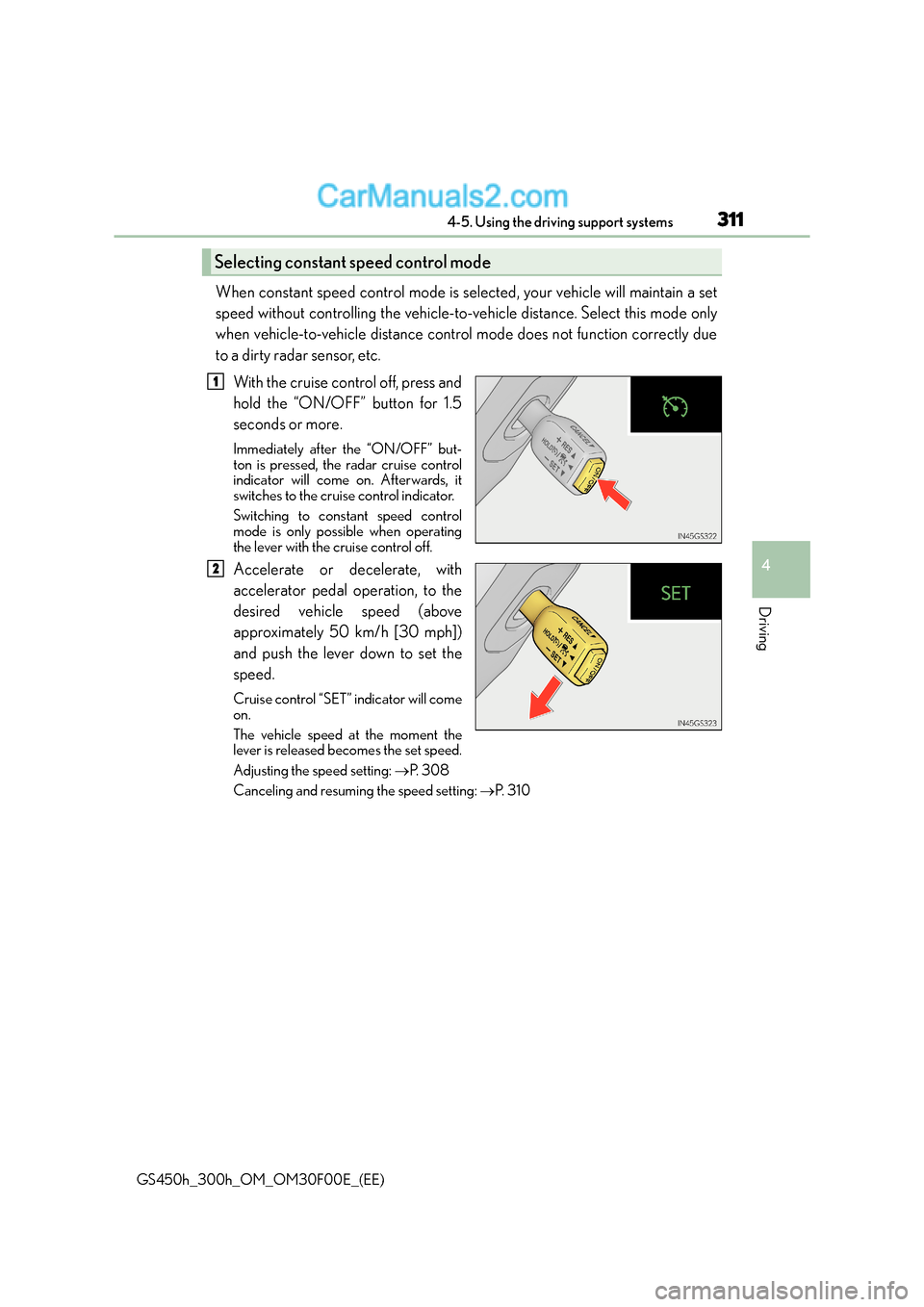
With the cruise control off, press and
hold the “ON/OFF” button for 1.5
seconds or more.
Immediately after the “ON/OFF” but-
ton is pressed, the radar cruise control
indicator will come on. Afterwards, it
switches to the cruise control indicator.
Switching to constant speed control
mode is only possible when operating
the lever with the cruise control off.
Accelerate or decelerate, with
accelerator pedal operation, to the
desired vehicle speed (above
approximately 50 km/h [30 mph])
and push the lever down to set the
speed.
Cruise control “SET” indicator will come
on.
The vehicle speed at the moment the
lever is released becomes the set speed.
Adjusting the speed setting: →P. 3 0 8
Canceling and resuming the speed setting: →P. 3 1 0
Selecting constant speed control mode
1
2
Page 319 of 620
3194-5. Using the driving support systems
4
Driving
GS450h_300h_OM_OM30F00E_(EE)
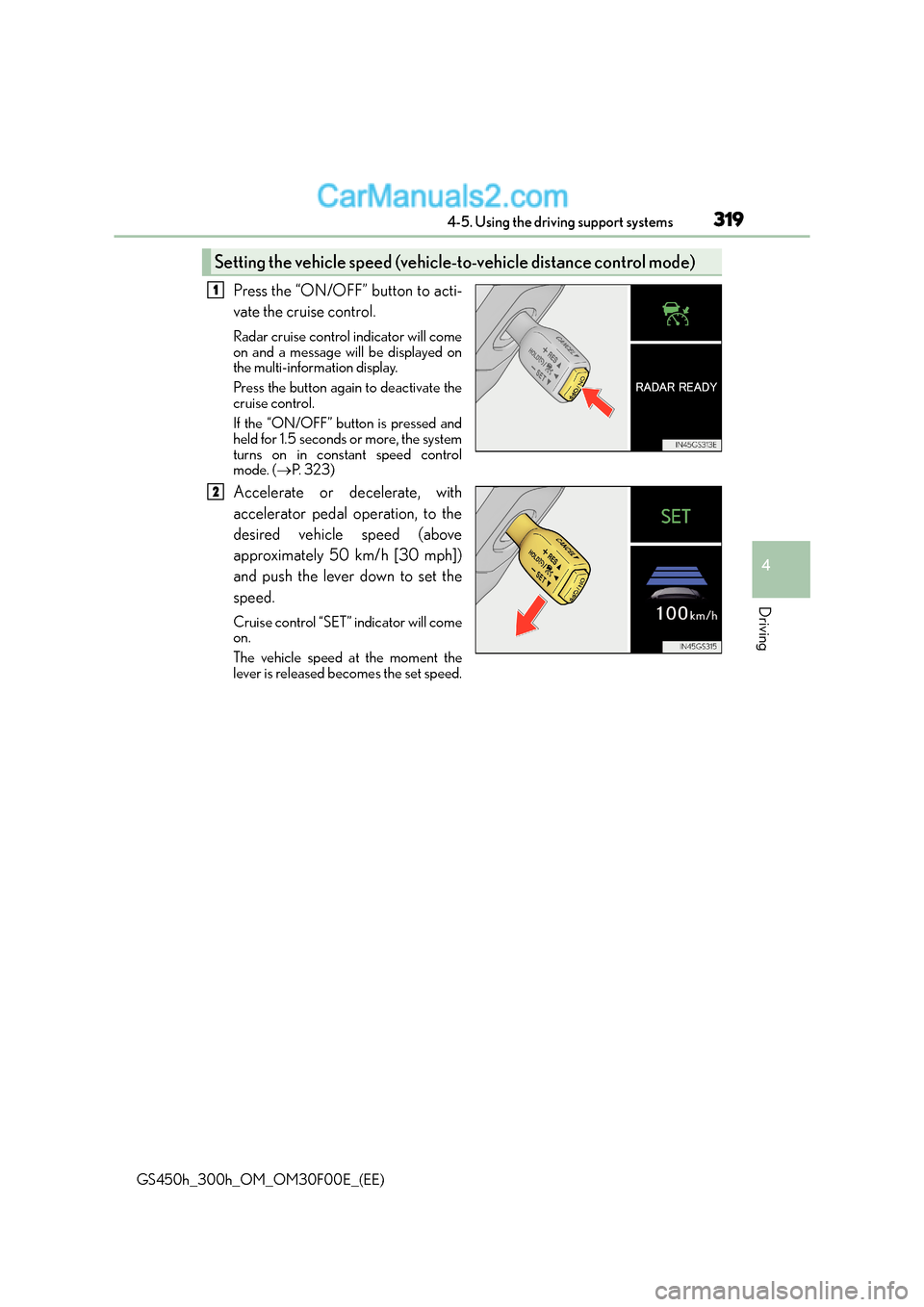
Press the “ON/OFF” button to acti-
vate the cruise control.
Radar cruise control indicator will come
on and a message will be displayed on
the multi-information display.
Press the button again to deactivate the
cruise control.
If the “ON/OFF” button is pressed and
held for 1.5 seconds or more, the system
turns on in constant speed control
mode. (→P. 323)
Accelerate or decelerate, with
accelerator pedal operation, to the
desired vehicle speed (above
approximately 50 km/h [30 mph])
and push the lever down to set the
speed.
Cruise control “SET” indicator will come
on.
The vehicle speed at the moment the
lever is released becomes the set speed.
Setting the vehicle speed (vehicle-t o-vehicle distance control mode)
1
2
Page 323 of 620
3234-5. Using the driving support systems
4
Driving
GS450h_300h_OM_OM30F00E_(EE)
When constant speed control mode is selected, your vehicle will maintain a set
speed without controlling the vehicle-to-vehicle distance. Select this mode only
when vehicle-to-vehicle distance control mode does not function correctly due
to a dirty radar sensor, etc.
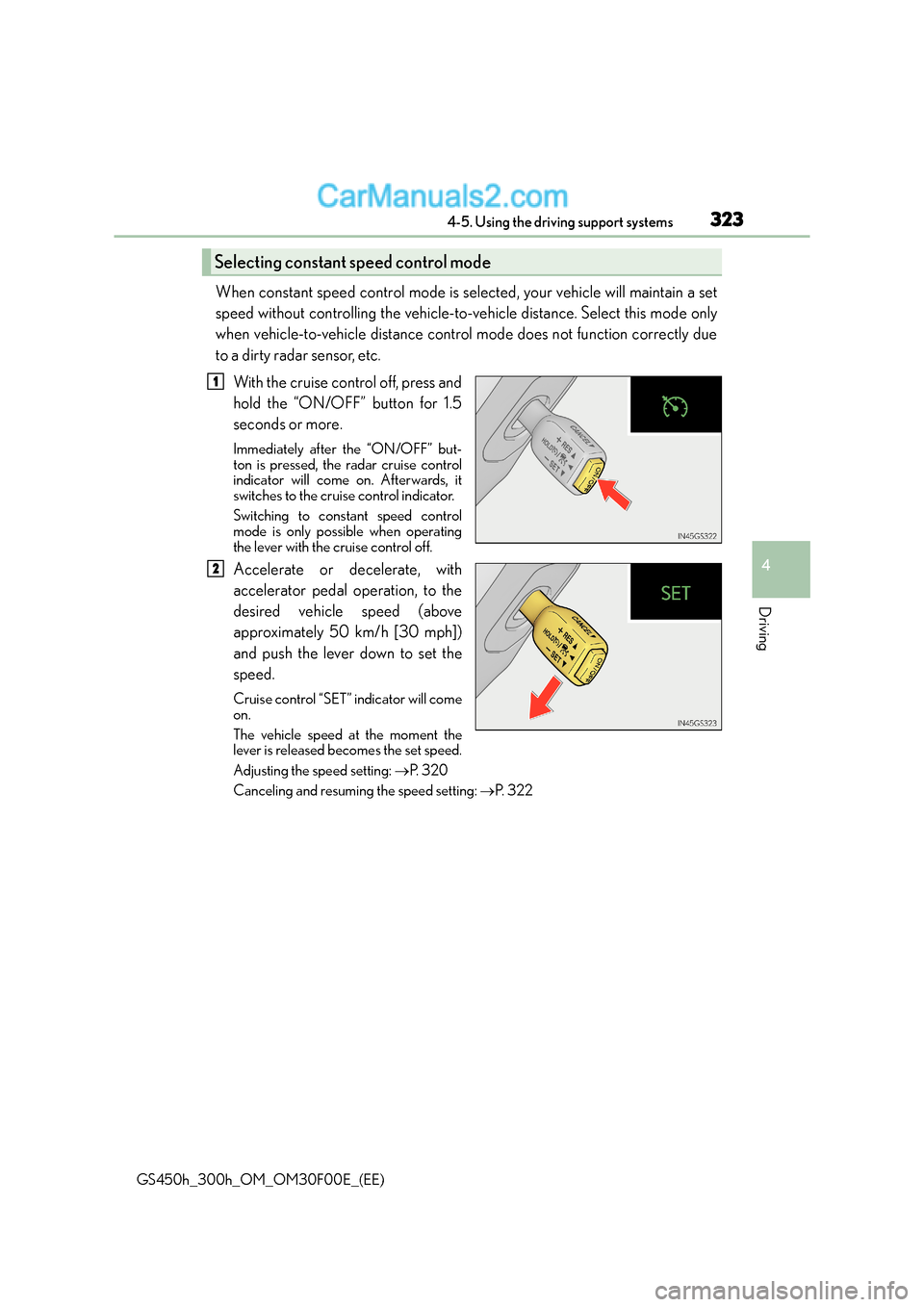
With the cruise control off, press and
hold the “ON/OFF” button for 1.5
seconds or more.
Immediately after the “ON/OFF” but-
ton is pressed, the radar cruise control
indicator will come on. Afterwards, it
switches to the cruise control indicator.
Switching to constant speed control
mode is only possible when operating
the lever with the cruise control off.
Accelerate or decelerate, with
accelerator pedal operation, to the
desired vehicle speed (above
approximately 50 km/h [30 mph])
and push the lever down to set the
speed.
Cruise control “SET” indicator will come
on.
The vehicle speed at the moment the
lever is released becomes the set speed.
Adjusting the speed setting: →P. 3 2 0
Canceling and resuming the speed setting: →P. 3 2 2
Selecting constant speed control mode
1
2
Page 330 of 620
3304-5. Using the driving support systems
GS450h_300h_OM_OM30F00E_(EE)
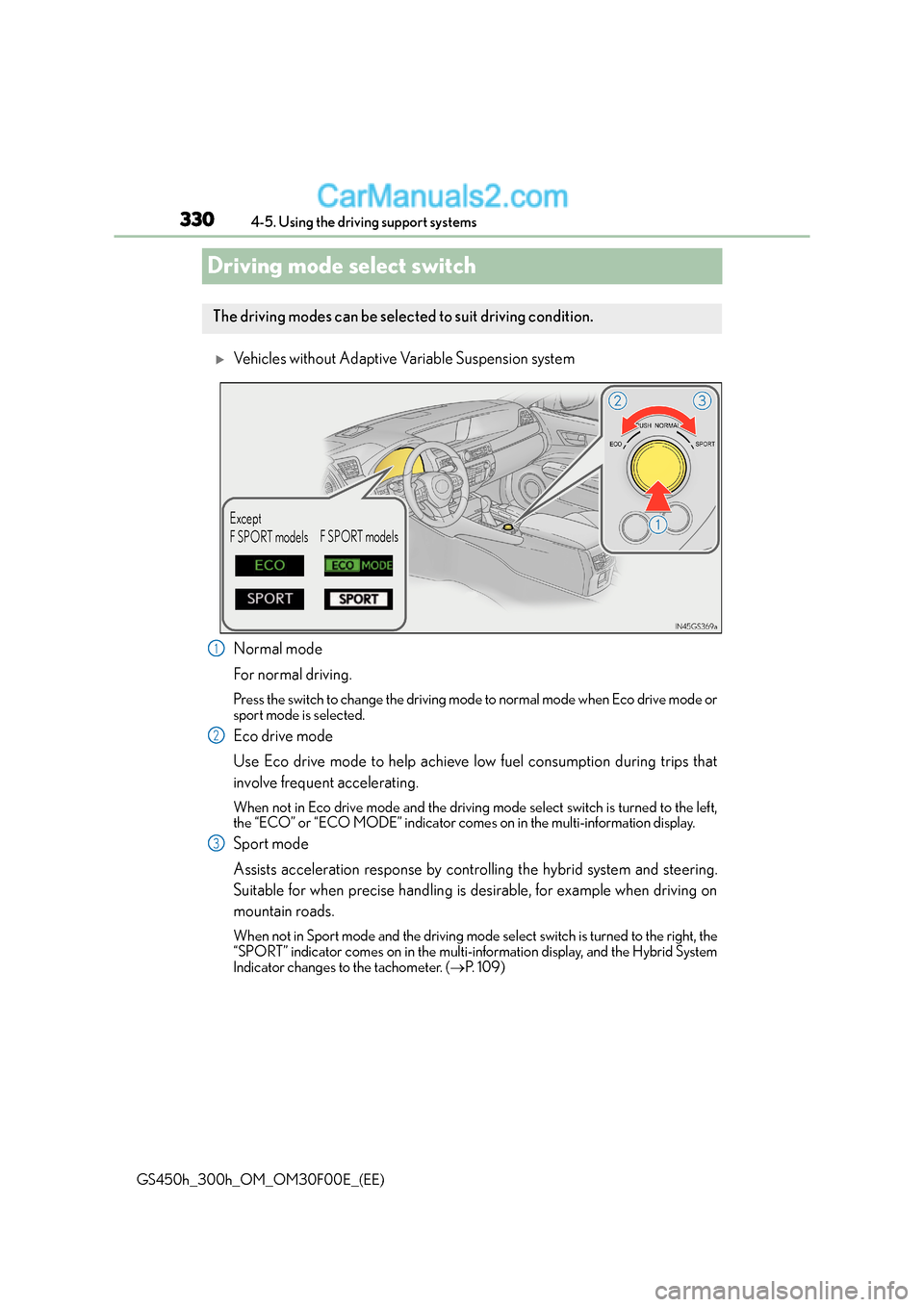
Driving mode select switch
XVehicles without Adaptive Variable Suspension system
Normal mode
For normal driving.
Press the switch to change the driving mode to normal mode when Eco drive mode or
sport mode is selected.
Eco drive mode
Use Eco drive mode to help achieve low fuel consumption during trips that
involve frequent accelerating.
When not in Eco drive mode and the driving mo de select switch is turned to the left,
the “ECO” or “ECO MODE” indicator come s on in the multi-information display.
Sport mode
Assists acceleration response by controlling the hybrid system and steering.
Suitable for when precise handling is desirable, for example when driving on
mountain roads.
When not in Sport mode and the driving mode select switch is turned to the right, the
“SPORT” indicator comes on in the multi-information display, and the Hybrid System
Indicator changes to the tachometer. ( →P. 1 0 9 )
The driving modes can be select ed to suit driving condition.
Except
F SPORT modelsF SPORT models
1
2
3
Page 331 of 620
3314-5. Using the driving support systems
4
Driving
GS450h_300h_OM_OM30F00E_(EE)
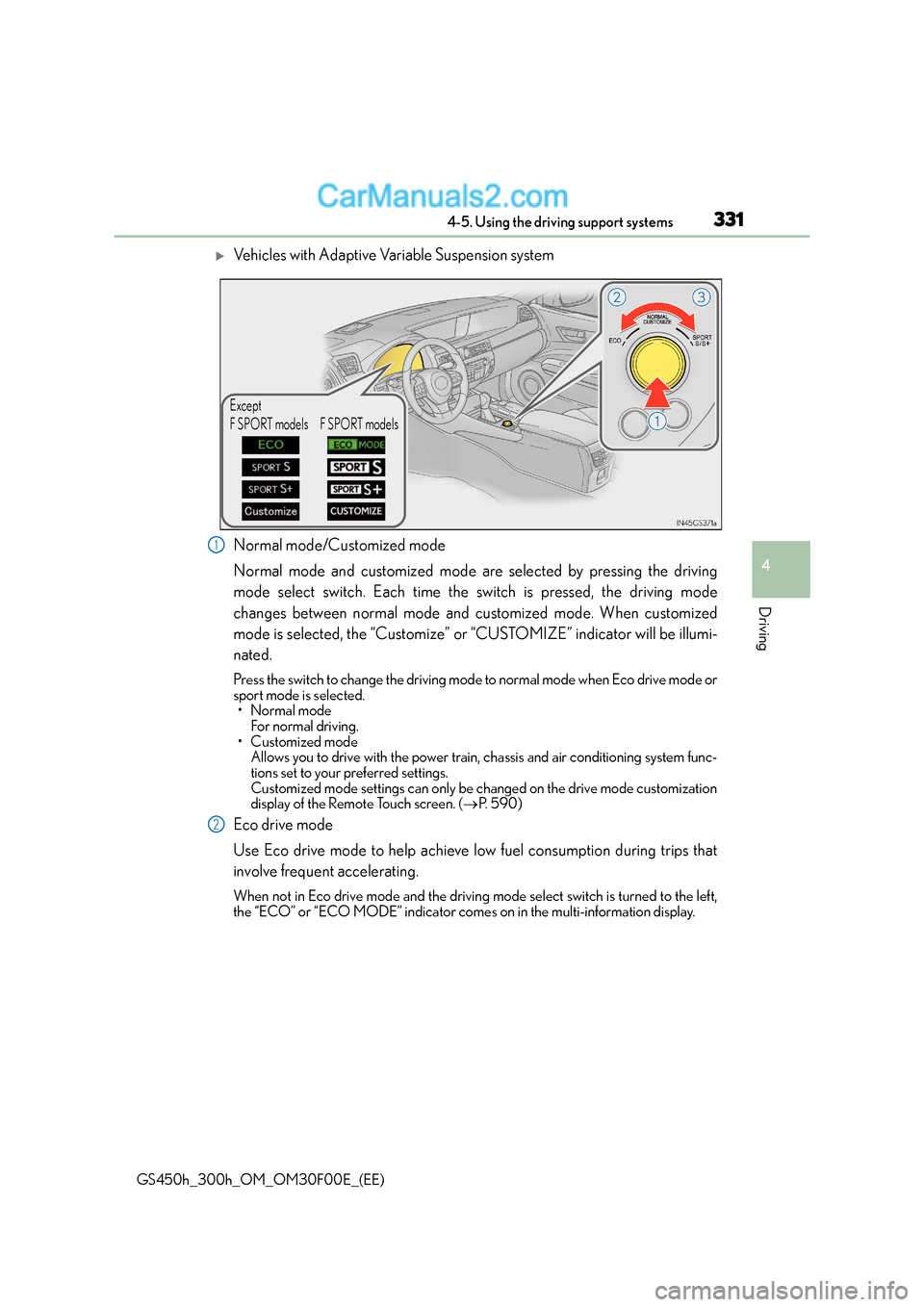
XVehicles with Adaptive Variable Suspension system
Normal mode/Customized mode
Normal mode and customized mode are selected by pressing the driving
mode select switch. Each time the switch is pressed, the driving mode
changes between normal mode and customized mode. When customized
mode is selected, the “Customize” or “CUSTOMIZE” indicator will be illumi-
nated.
Press the switch to change the driving mode to normal mode when Eco drive mode or
sport mode is selected.•Normal mode
For normal driving.
• Customized mode Allows you to drive with the power train, chassis and air conditioning system func-
tions set to your preferred settings.
Customized mode settings can only be ch anged on the drive mode customization
display of the Remote Touch screen. ( →P. 5 9 0 )
Eco drive mode
Use Eco drive mode to help achieve low fuel consumption during trips that
involve frequent accelerating.
When not in Eco drive mode and the driving mo de select switch is turned to the left,
the “ECO” or “ECO MODE” indicator come s on in the multi-information display.
Except
F SPORT models F SPORT models
1
2