Heat Lexus GS300h 2015 Owner's Guide
[x] Cancel search | Manufacturer: LEXUS, Model Year: 2015, Model line: GS300h, Model: Lexus GS300h 2015Pages: 620
Page 379 of 620
3795-2. Using the air conditioning system and defogger
5
Interior features
GS450h_300h_OM_OM30F00E_(EE)
■Changing the air outlets
Press .
The air outlets change as follows each time is pressed.
: Air flows to the upper body.
: Air flows to the upper body and feet.
: Air flows to the feet.
Press .
The air conditioning system will operate, an d air outlets and fan speed will be adjusted
automatically.
“AUTO” will be displayed on the control panel.
Adjust the temperature setting.
When the rear seat heaters are set to “AUTO” mode, the system is operated automat-
ically according to the set temperature, outside temperature, etc.
To stop the operation, press the “OFF” button.
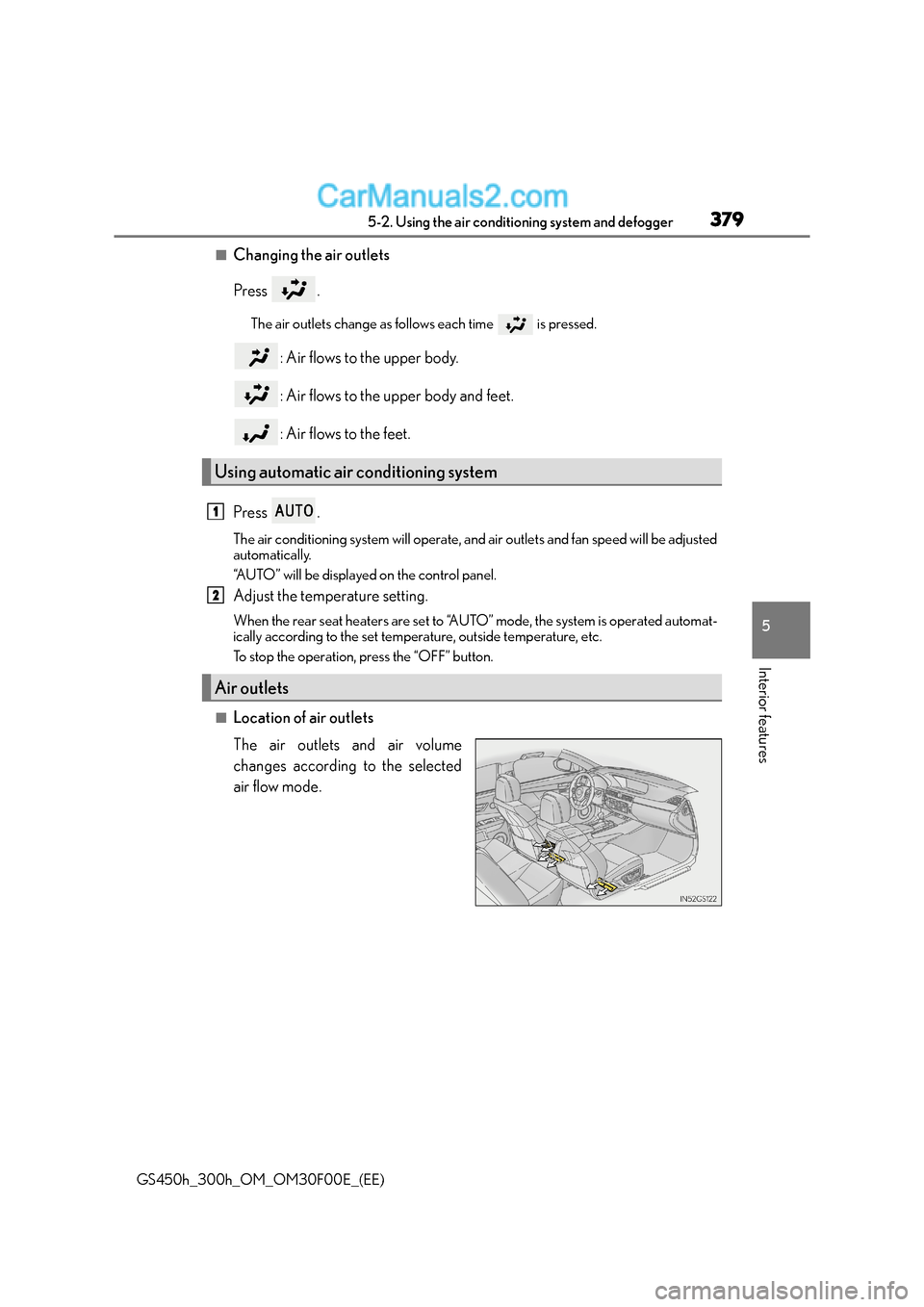
■Location of air outlets
The air outlets and air volume
changes according to the selected
air flow mode.
Using automatic air conditioning system
Air outlets
1
2
Page 381 of 620
381
5
5-2. Using the air conditioning system and defogger
Interior features
GS450h_300h_OM_OM30F00E_(EE)
Heated steering wheel∗/seat heaters∗/seat ventilators∗
∗: If equipped
Heated steering wheel and seat heaters heat the side grips of the steering
wheel and seats, respectively. Seat ventilators maintain good airflow by blow-
ing air from the seats.
WA R N I N G
●Care should be taken to prevent injury if
anyone in the following categories comes in
contact with the steering wheel and seats when the heater is on:
• Babies, small children, the elderly, the sick and the physically challenged
• Persons with sensitive skin
• Persons who are fatigued
• Persons who have taken alcohol or drugs that induce sleep (sleeping drugs, cold
remedies, etc.)
●Observe the following precautions to prevent minor burns or overheating:
• Do not cover the seat with a blanket or cushion when using the seat heater.
• Do not use seat heater more than necessary.
NOTICE
●To prevent damage to the seat heaters/seat ventilators, do not put heavy objects that
have an uneven surface on the seat and do not stick sharp objects (needles, nails, etc.)
into the seat.
●To prevent 12-volt battery discharge, do not use the functions when the hybrid system
is off.
Page 382 of 620
3825-2. Using the air conditioning system and defogger
GS450h_300h_OM_OM30F00E_(EE)
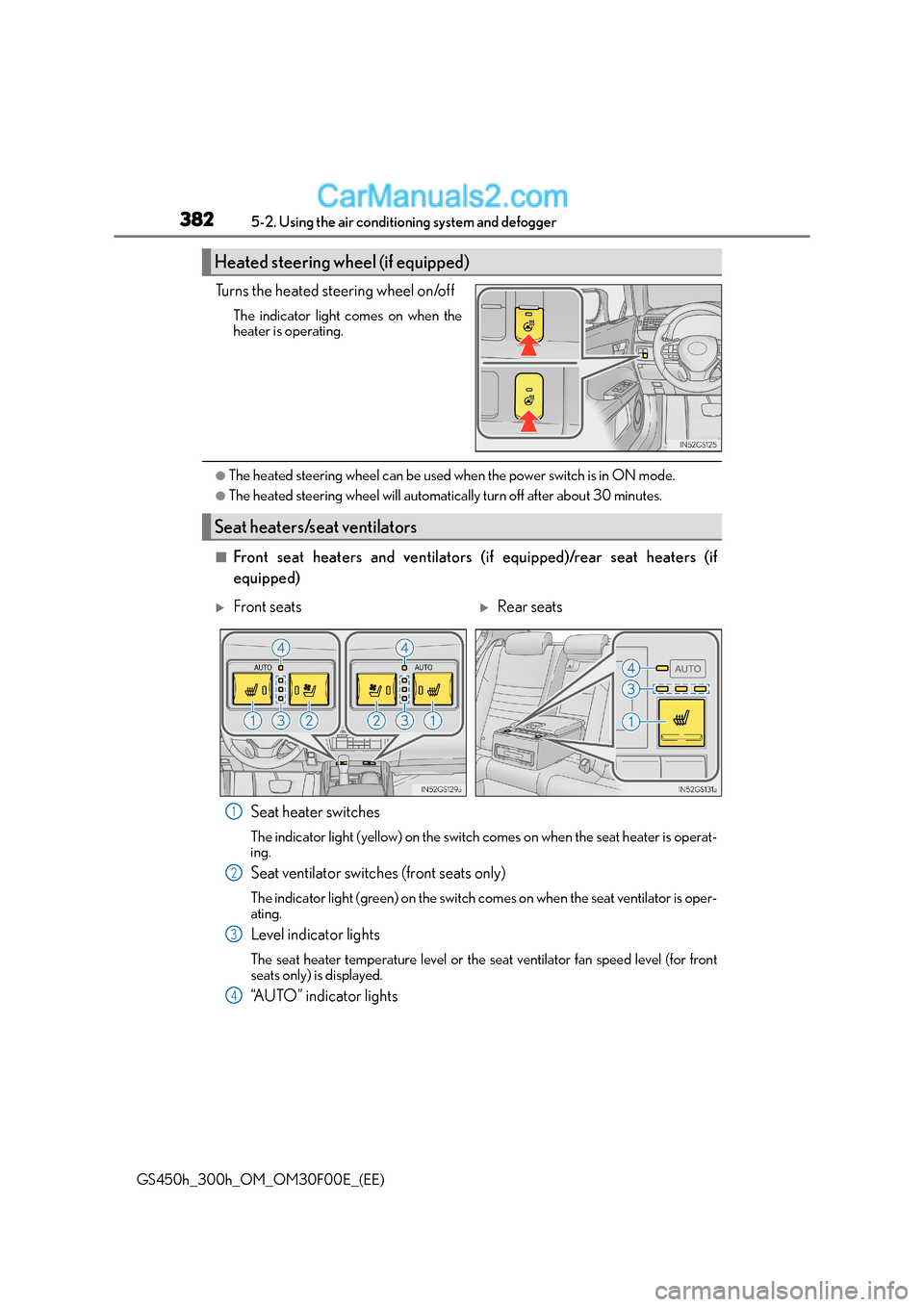
Turns the heated steering wheel on/off
The indicator light comes on when the
heater is operating.
●The heated steering wheel can be used when the power switch is in ON mode.
●The heated steering wheel will automatically turn off after about 30 minutes.
■Front seat heaters and ventilators (i f equipped)/rear seat heaters (if
equipped)
Seat heater switches
The indicator light (yellow) on the switch comes on when the seat heater is operat-
ing.
Seat ventilator switches (front seats only)
The indicator light (green) on the switch comes on when the seat ventilator is oper-
ating.
Level indicator lights
The seat heater temperature level or the seat ventilator fan speed level (for front
seats only) is displayed.
“AUTO” indicator lights
Heated steering wheel (if equipped)
Seat heaters/seat ventilators
XFront seatsXRear seats
1
2
3
4
Page 383 of 620
3835-2. Using the air conditioning system and defogger
5
Interior features
GS450h_300h_OM_OM30F00E_(EE)
●Modes and indicators
The mode can be changed by pressing the switch.
*: When automatic mode is selected, the level automatically changes depending on the
air conditioning settings.
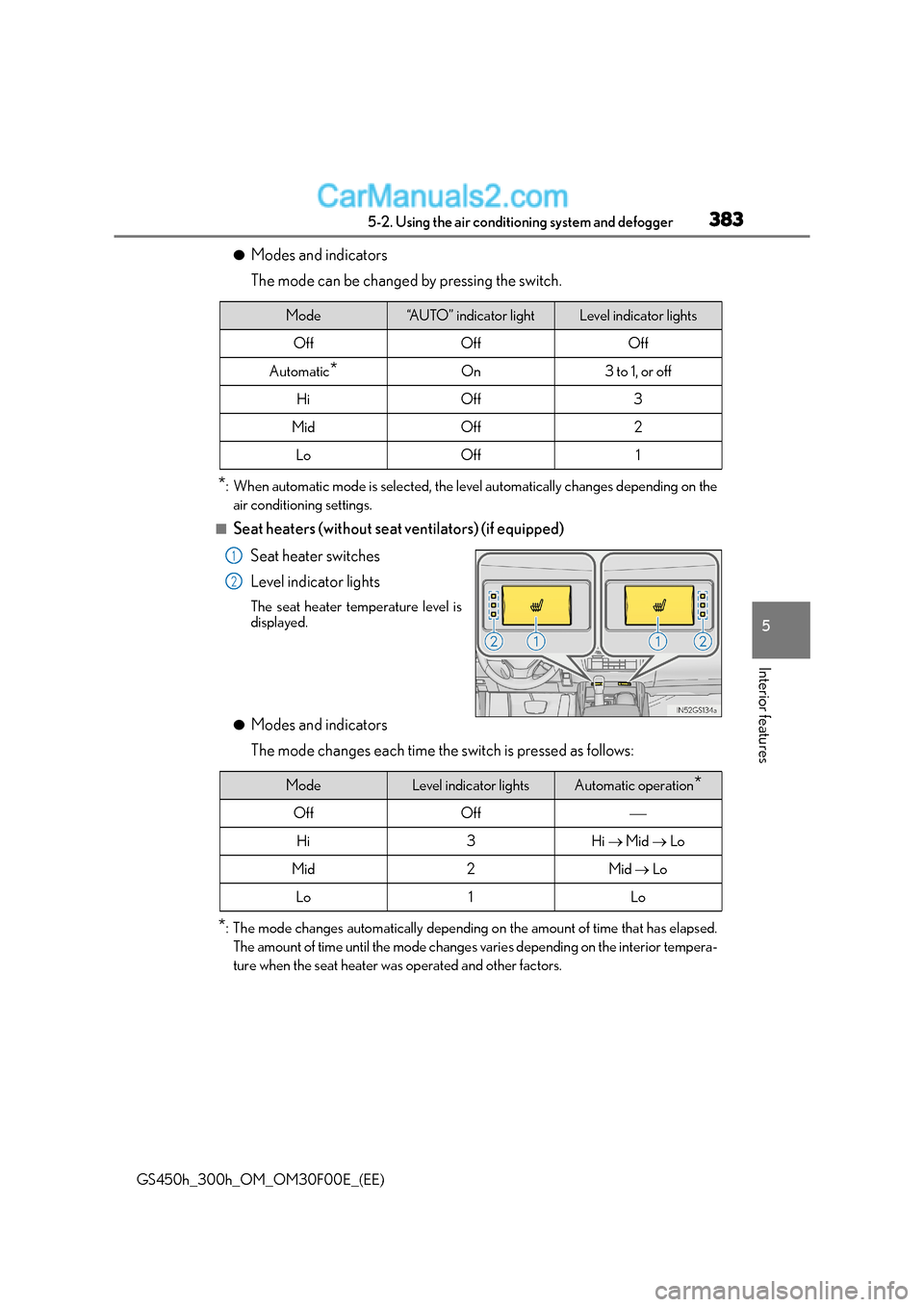
■Seat heaters (without seat ventilators) (if equipped)
Seat heater switches
Level indicator lights
The seat heater temperature level is
displayed.
●Modes and indicators
The mode changes each time the switch is pressed as follows:
*: The mode changes automatically depending on the amount of time that has elapsed. The amount of time until the mode changes varies depending on the interior tempera-
ture when the seat heater was operated and other factors.
Mode“AUTO” indicator lightLevel indicator lights
OffOffOff
Automatic*On3 to 1, or off
HiOff3
MidOff2
LoOff1
1
2
ModeLevel indicator lightsAutomatic operation*
OffOff
Hi3Hi → Mid → Lo
Mid2Mid → Lo
Lo1Lo
Page 384 of 620
3845-2. Using the air conditioning system and defogger
GS450h_300h_OM_OM30F00E_(EE)
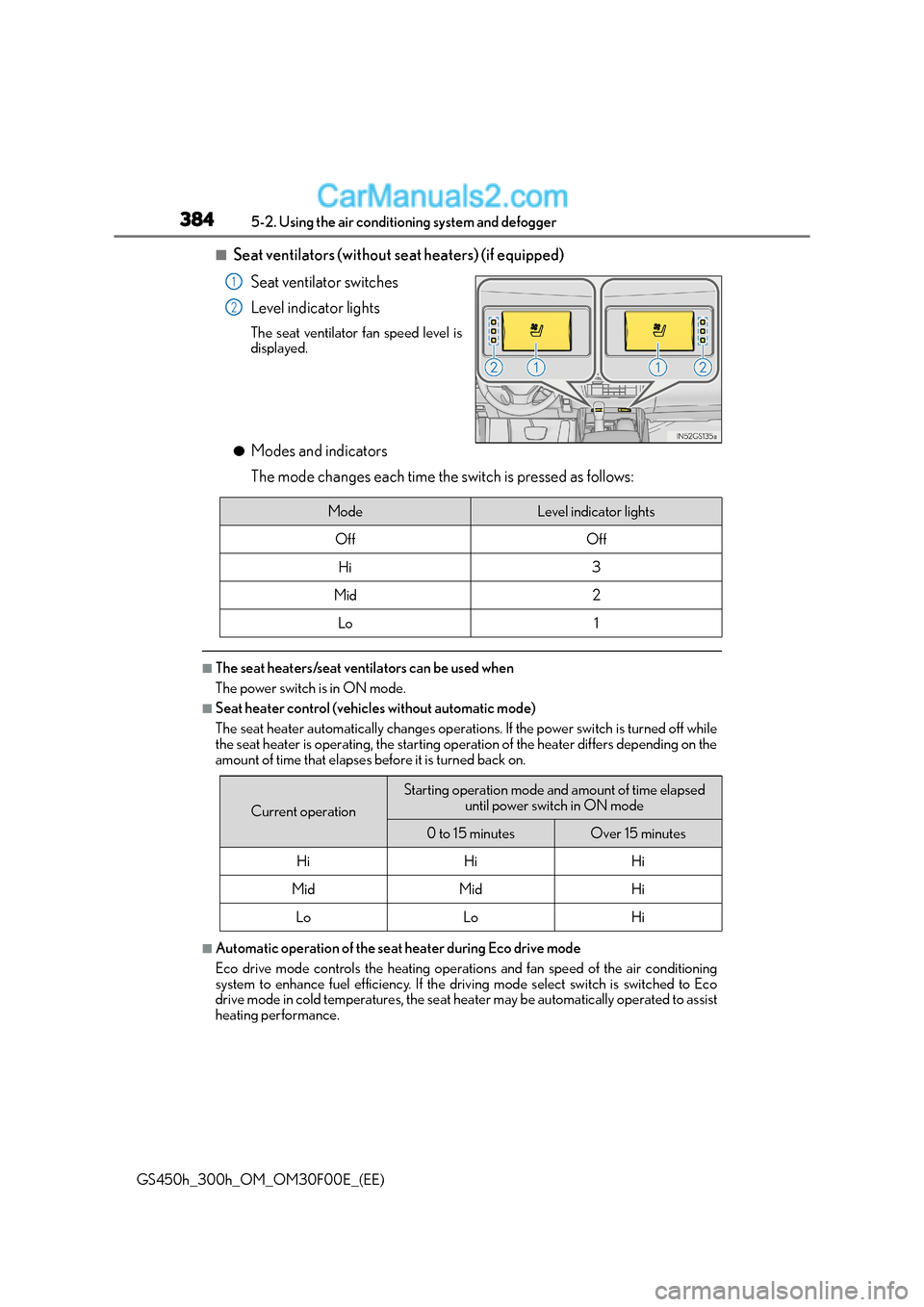
■Seat ventilators (without seat heaters) (if equipped)
Seat ventilator switches
Level indicator lights
The seat ventilator fan speed level is
displayed.
●Modes and indicators
The mode changes each time the switch is pressed as follows:
■The seat heaters/seat ventilators can be used when
The power switch is in ON mode.
■Seat heater control (vehicles without automatic mode)
The seat heater automatically changes operations. If the power switch is turned off while
the seat heater is operating, the starting operation of the heater differs depending on the
amount of time that elapses before it is turned back on.
■Automatic operation of the seat heater during Eco drive mode
Eco drive mode controls the heating operations and fan speed of the air conditioning
system to enhance fuel efficiency. If the driv ing mode select switch is switched to Eco
drive mode in cold temperatures, the seat heater may be automatically operated to assist
heating performance.
1
2
ModeLevel indicator lights
OffOff
Hi3
Mid2
Lo1
Current operation
Starting operation mode and amount of time elapsed
until power switch in ON mode
0 to 15 minutesOver 15 minutes
HiHiHi
MidMidHi
LoLoHi
Page 385 of 620
3855-2. Using the air conditioning system and defogger
5
Interior features
GS450h_300h_OM_OM30F00E_(EE)
■Automatic operation during S-FLOW mode
The front seat heater and ventilator or the rear seat heater may automatically turn off
when S-FLOW mode is turned on during automatic mode. (→P. 3 6 7 )
■Button lock function (vehicles with rear control panel)
To prevent inadvertent operation, some buttons on the rear armrest can be locked.
(→ P. 3 8 0 )
■When the switch is disabled (v ehicles with rear control panel)
When the rear control panel switch cannot be operated even though the button lock
function is released, check whether the switch is disabled due to selecting on
Remote Touch screen. ( →P. 3 7 3 )
■Rear control panel illumination off function (vehicles with rear control panel)
Control panel illumination on the re ar armrest can be turned off. (→P. 3 8 0 )
■Customization
The automatic operation of the front seat heaters (without seat ventilators) and the auto-
matic mode settings for the front seat heaters and ventilators or the rear seat heaters can
be changed. (Customizable features: →P. 5 9 2 )
Page 389 of 620
389
5
5-4. Using the storage features
Interior features
GS450h_300h_OM_OM30F00E_(EE)
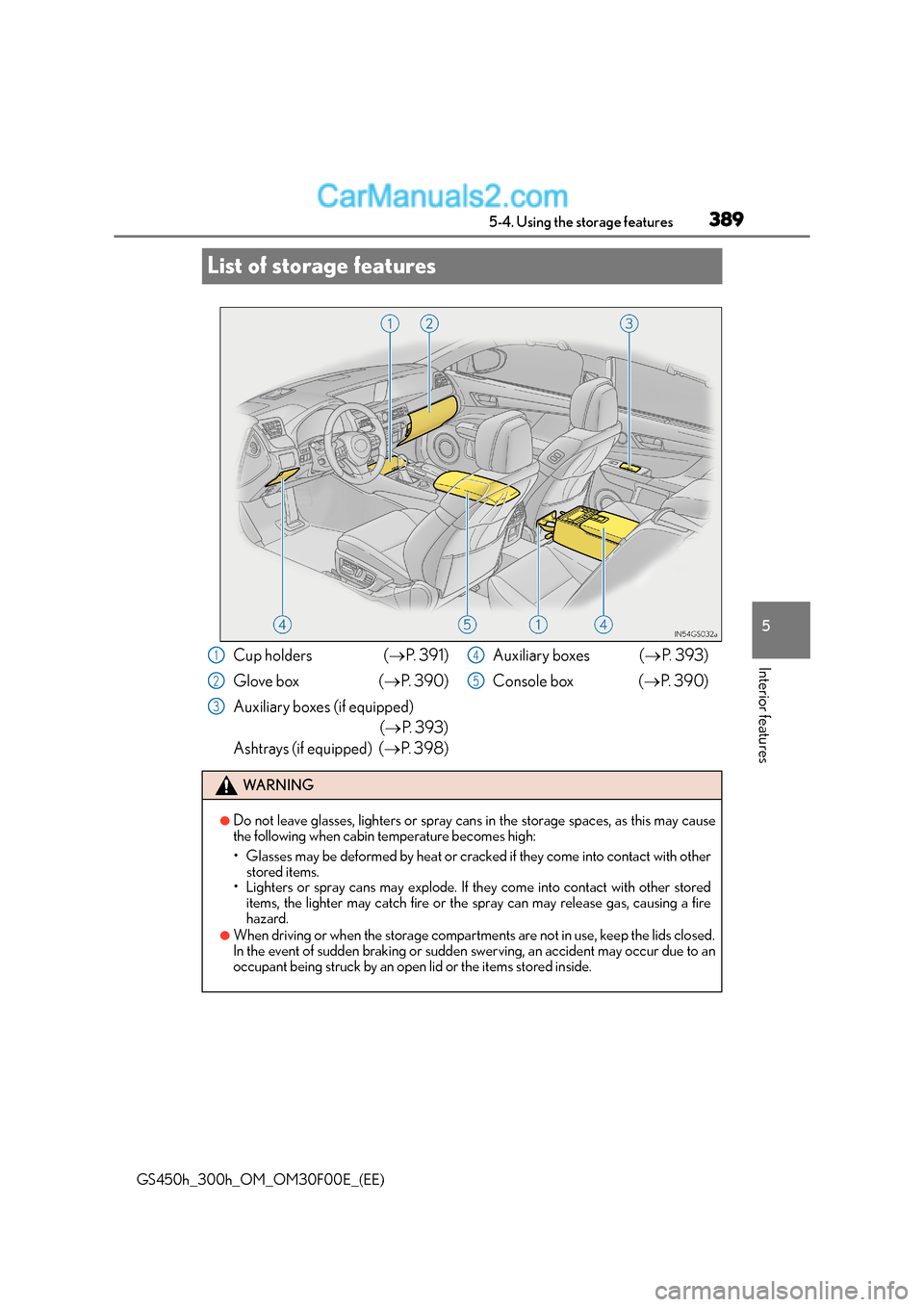
List of storage features
Cup holders (
→P. 3 9 1 )
Glove box ( →P. 3 9 0 )
Auxiliary boxes (if equipped) (→ P. 393)
Ashtrays (if equipped) ( →P. 3 9 8 ) Auxiliary boxes (
→P. 393)
Console box ( →P. 3 9 0 )
WA R N I N G
●Do not leave glasses, lighters or spray cans in the storage spaces, as this may cause
the following when cabin temperature becomes high:
• Glasses may be deformed by heat or cracked if they come into contact with other
stored items.
• Lighters or spray cans may explode. If th ey come into contact with other stored
items, the lighter may catch fire or the spray can may release gas, causing a fire
hazard.
●When driving or when the storage compartments are not in use, keep the lids closed.
In the event of sudden braking or sudden swerving, an accident may occur due to an
occupant being struck by an open lid or the items stored inside.
1
2
3
4
5
Page 412 of 620
4126-1. Maintenance and care
GS450h_300h_OM_OM30F00E_(EE)
NOTICE
■Cleaning detergents
●Do not use the following types of detergent, as they may discolor the vehicle interior
or cause streaks or damage to painted surfaces:
• Non-seat portions: Organic substances such as benzene or gasoline, alkaline oracidic solutions, dye, and bleach
• Seats: Alkaline or acidic solutions, such as thinner, benzene, and alcohol
●Do not use polish wax or polish cleaner. The instrument panel’s or other interior part’s
painted surface may be damaged.
■Preventing damage to leather surfaces
Observe the following precautions to avoid damage to and deterioration of leather
surfaces:
●Remove any dust or dirt from leather surfaces immediately.
●Do not expose the vehicle to direct sunlight for extended periods of time. Park the
vehicle in the shade, especially during summer.
●Do not place items made of vinyl, plastic, or containing wax on the upholstery, as they
may stick to the leather surface if the vehicle interior heats up significantly.
■Water on the floor
Do not wash the vehicle floor with water.
Vehicle systems such as the audio system may be damaged if water comes into contact
with electrical components such as the audio system above or under the floor of the
vehicle. Water may also cause the body to rust.
■When cleaning the inside of the windshield (vehicles with Lexus Safety System+)
Do not allow glass cleaner to contact the lens. Also, do not touch the lens. ( →P. 2 6 2 )
■Cleaning the inside of the rear window
●Do not use glass cleaner to clean the rear window, as this may cause damage to the
rear window defogger heater wires or antenna. Use a cloth dampened with luke-
warm water to gently wipe the window clean. Wipe the window in strokes running
parallel to the heater wires or antenna.
●Be careful not to scratch or damage the heater wires or antenna.
Page 445 of 620
445
6
6-3. Do-it-yourself maintenance
Maintenance and care
GS450h_300h_OM_OM30F00E_(EE)
Tire inflation pressure
■Effects of incorrect tire inflation pressure
Driving with incorrect tire inflation pressure may result in the following:
●Reduced fuel economy
●Reduced driving comfort and poor handling
●Reduced tire life due to wear
●Reduced safety
●Damage to the drive train
If a tire needs frequent inflating, have it checked by any authorized Lexus dealer or
repairer, or another duly qualified and equipped professional.
■Instructions for checking tire inflation pressure
When checking tire inflation pressure, observe the following:
●Check only when the tires are cold.
If your vehicle has been parked for at least 3 hours or has not been driven for more than
1.5 km or 1 mile, you will get an accurate cold tire inflation pressure reading.
●Always use a tire pressure gauge.
It is difficult to judge if a tire is prop erly inflated based only on its appearance.
●It is normal for the tire inflation pressure to be higher after driving as heat is generated
in the tire. Do not reduce tire inflation pressure after driving.
●Passengers and luggage weight should be pl aced so that the vehicle is balanced.
Make sure to maintain proper tire inflation pressure. Tire inflation pressure
should be checked at least once per month. However, Lexus recommends
that tire inflation pressure be checked once every two weeks. ( →P. 5 7 5 )
WA R N I N G
■Proper inflation is critical to save tire performance
Keep your tires properly inflated.
If the tires are not properly inflated, the following conditions may occur which could
lead to an accident resulting in death or serious injury:
●Excessive wear
●Uneven wear
●Poor handling
●Possibility of blowouts resulting from overheated tires
●Air leaking from between tire and wheel
●Wheel deformation and/or tire damage
●Greater possibility of tire damage while driving (due to road hazards, expansion
joints, sharp edges in the road, etc.)
Page 466 of 620
4666-3. Do-it-yourself maintenance
GS450h_300h_OM_OM30F00E_(EE)
WA R N I N G
■Replacing light bulbs
●Turn off the lights. Do not attempt to replace the bulb immediately after turning off the
lights.
The bulbs become very hot and may cause burns.
●Do not touch the glass portion of the light bu lb with bare hands. When it is unavoid-
able to hold the glass portion, use and hold with a clean dry cloth to avoid getting
moisture and oils on the bulb.
Also, if the bulb is scratched or dropped, it may blow out or crack.
●Fully install light bulbs and any parts used to secure them. Failure to do so may result
in heat damage, fire, or water entering th e headlight unit. This may damage the head-
lights or cause condensation to build up on the lens.
■To prevent damage or fire
●Make sure bulbs are fully seated and locked.
●Check the wattage of the bulb before installing to prevent heat damage.
NOTICE
■When replacing the outer foot lights
If the front window is stopping you from conducting the replace operation properly,
open the window on the side you are workin g on to allow you enough space to work.
Continuing the operation without giving yourself enough space to work could lead you
to scratch the vehicle.