warning Lexus GS300h 2015 Owner's Guide
[x] Cancel search | Manufacturer: LEXUS, Model Year: 2015, Model line: GS300h, Model: Lexus GS300h 2015Pages: 620
Page 232 of 620
2324-2. Driving procedures
GS450h_300h_OM_OM30F00E_(EE)
■Parking brake operation
●When the power switch is not in ON mode, the parking brake cannot be released using
the parking brake switch.
●When the power switch is not in ON mode, automatic mode (automatic brake setting
and releasing) is not available.
●If the parking brake is operated repeatedly over a short period of time, the system may
restrict operation to prevent overheating. If this happens, refrain from operating the
parking brake. Normal operation will return after about 1 minute.
●Vehicles with towing package: In situations such as when parking while towing a trailer,
the maximum amount of braking force can be used by pressing the parking brake
switch with the parking brake already set.
●Vehicles without towing package: In situations such as when parking on a steep slope*,
the maximum amount of braking force can be used by pressing the parking brake
switch with the parking brake already set.
*: Use wheel chocks when parking on a steep slope.
■Parking brake operation sound
When the parking brake operates, a motor sound (whirring sound) may be heard. This
does not indicate a malfunction.
■Parking brake indicator light
●Depending on the power switch mode, the parking brake indicator light will come on
and stay on as described below:
ON mode: Comes on until the parking brake is released.
Not in ON mode: Stays on for approximately 15 seconds.
●When the power switch is turned off with the parking brake set, the parking brake indi-
cator light will stay on for about 15 seco nds. This does not indicate a malfunction.
■When there is a malfunction in the system
Warning lights and/or warning message will turn on or flash. (→P. 4 7 8 , 4 8 2 )
Depending on the condition, the park ing brake indicator light may flash.
■Parking brake engaged warning buzzer
→P. 4 8 8
■Usage in winter time
→P. 3 5 4
Page 233 of 620
2334-2. Driving procedures
4
Driving
GS450h_300h_OM_OM30F00E_(EE)
NOTICE
■When parking the vehicle
Before you leave the vehicle, set the parking brake, shift the shift lever to P and make
sure that the vehicle does not move.
■When the system malfunctions
Stop the vehicle in a safe place and check the warning messages.
■When the parking brake cannot be released due to a malfunction
Use the parking brake release tool to manually release the parking brake. (→P. 5 4 6 )
Driving the vehicle with the parking brake set will lead to brake components overheat-
ing, which may affect braking performance and increase brake wear.
Page 234 of 620
2344-2. Driving procedures
GS450h_300h_OM_OM30F00E_(EE)
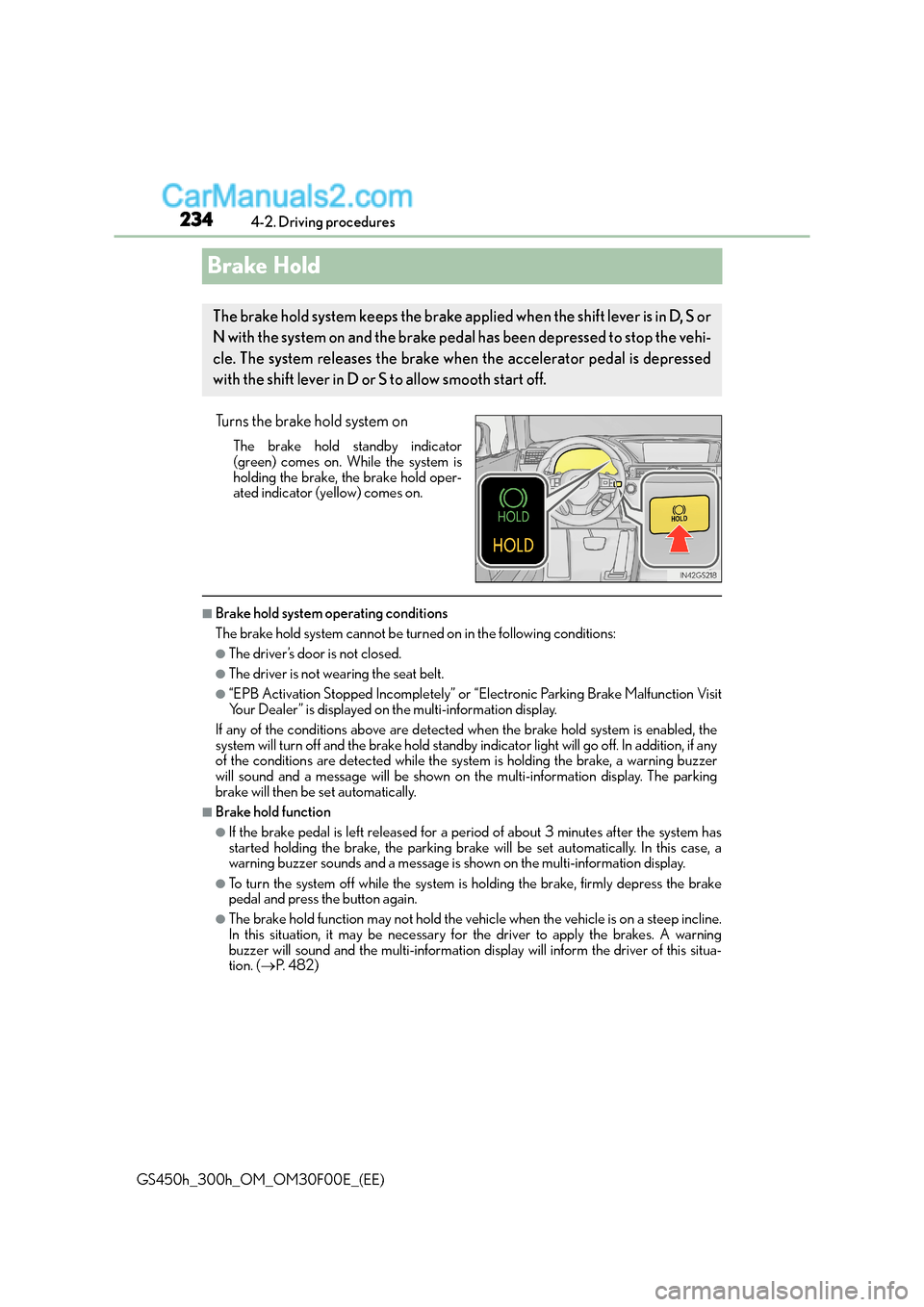
Brake Hold
Turns the brake hold system on
The brake hold standby indicator
(green) comes on. While the system is
holding the brake, the brake hold oper-
ated indicator (yellow) comes on.
■Brake hold system operating conditions
The brake hold system cannot be turn ed on in the following conditions:
●The driver’s door is not closed.
●The driver is not wearing the seat belt.
●“EPB Activation Stopped Incompletely” or “Electronic Parking Brake Malfunction Visit
Your Dealer” is displayed on the multi-information display.
If any of the conditions above are detected when the brake hold system is enabled, the
system will turn off and the brake hold standby indicator light will go off. In addition, if any
of the conditions are detected while the sy stem is holding the brake, a warning buzzer
will sound and a message will be shown on th e multi-information display. The parking
brake will then be set automatically.
■Brake hold function
●If the brake pedal is left released for a period of about 3 minutes after the system has
started holding the brake, th e parking brake will be set automatically. In this case, a
warning buzzer sounds and a message is shown on the multi-information display.
●To turn the system off while the system is holding the brake, firmly depress the brake
pedal and press the button again.
●The brake hold function may not hold the vehicle when the vehicle is on a steep incline.
In this situation, it may be necessary for the driver to apply the brakes. A warning
buzzer will sound and the multi-information di splay will inform the driver of this situa-
tion. ( →P. 4 8 2 )
The brake hold system keeps the brake applied when the shift lever is in D, S or
N with the system on and the brake peda l has been depressed to stop the vehi-
cle. The system releases the brake wh en the accelerator pedal is depressed
with the shift lever in D or S to allow smooth start off.
Page 235 of 620
2354-2. Driving procedures
4
Driving
GS450h_300h_OM_OM30F00E_(EE)
■When the parking brake is set automatically while the system is holding the brakes
The parking brake will not be released automatically. Perform one of the following proce-
dures to release the parking brake and confirm that the parking brake indicator light
turns off. ( →P. 2 3 1 )
●With the brake pedal depressed, operate the parking brake switch.
●Fasten your seat belt, check that the shift leve r is in either D or R and slowly depress the
accelerator pedal.
■Warning message and buzzers
Warning messages and buzzers are used to in dicate a system malfunction or to inform
the driver of the need for caution. ( →P. 4 8 2 )
WA R N I N G
■When the vehicle is on a steep incline
When using the brake hold system on a steep incline exercise caution. The brake hold
function may not hold the vehicle in such a situation.
■When stopped on a slippery road
The system cannot stop the vehicle when the gripping ability of the tires has been
exceeded. Do not use the system when stopped on a slippery road.
NOTICE
■When parking the vehicle
The brake hold system is not designed for use when parking the vehicle for a long
period of time. Turning the power switch o ff while the system is holding the brake may
release the brake, which would cause the vehicle to move. When operating the power
switch, depress the brake pedal, set the parking brake and shift the shift lever to P.
Page 244 of 620
2444-3. Operating the lights and wipers
GS450h_300h_OM_OM30F00E_(EE)
●In the situations shown below, the system may not be able to accurately detect sur-
rounding brightness levels. This may cause the low beams to remain on or the high
beams to cause problems for pedestrians, vehicles ahead or other parties. In these
cases, manually switch between the high and low beams.
• In bad weather (rain, snow, fog, sandstorms etc.)
• The windshield is obscured by fog, mist, ice, dirt etc.
• The windshield is cracked or damaged.
• The camera sensor is deformed or dirty.
• The camera sensor temperature is extremely high.
• Surrounding brightness levels are equal to those of headlights, tail lights or fog lights.
• Vehicles ahead have headlights that are either switched off, dirty, are changing color, or have are not aimed properly.
• The vehicle is hit by water, snow, dust, etc. from a preceding vehicle.
• When driving through an area of intermittently changing brightness and darkness.
• When frequently and repeatedly driving ascending/descending roads, or roads with rough, bumpy or uneven surfaces (such as stone-paved roads, gravel tracks etc.).
• When frequently and repeatedly taking curves or driving on a winding road.
• There is a highly reflective object ahead of the vehicle, such as a sign or a mirror.
• The back of a vehicle ahead is highly reflective, such as a container on a truck.
• The vehicle’s headlights are damaged or dirty.
• The vehicle is listing or tilting, due to a flat tire, a trailer being towed etc.
• The high beam and low beam are repeatedly being switched between in an abnor- mal manner.
• The driver believes that the high beam may be causing problems or distress to other
drivers or pedestrians nearby.
■Warning message
Warning messages are used to indicate a system malfunction or to inform the driver
of the need for caution. ( →P. 4 8 2 )
■Customization
Some functions can be customized. ( →P. 5 8 1 )
Page 248 of 620
2484-3. Operating the lights and wipers
GS450h_300h_OM_OM30F00E_(EE)
●In the situations shown below, the system may not be able to accurately detect sur-
rounding brightness levels. This may cause the low beams to remain on or the high
beams to cause problems for pedestrians, vehicles ahead or other parties. In these
cases, manually switch between the high and low beams.
• In bad weather (rain, snow, fog, sandstorms etc.)
• The windshield is obscured by fog, mist, ice, dirt etc.
• The windshield is cracked or damaged.
• The inside rear view mirror or camera sensor is deformed or dirty.
• The camera sensor temperature is extremely high.
• Surrounding brightness levels are equal to those of headlights, tail lights or fog lights.
• Vehicles ahead have headlights that are either switched off, dirty, are changing color, or have are not aimed properly.
• When driving through an area of intermittently changing brightness and darkness.
• When frequently and repeatedly driving ascending/descending roads, or roads with rough, bumpy or uneven surfaces (such as stone-paved roads, gravel tracks etc.).
• When frequently and repeatedly taking curves or driving on a winding road.
• There is a highly reflective object ahead of the vehicle, such as a sign or a mirror.
• The back of a vehicle ahead is highly reflective, such as a container on a truck.
• The vehicle’s headlights are damaged or dirty.
• The vehicle is listing or tilting, due to a flat tire, a trailer being towed etc.
• The high beam and low beam are repeatedly being switched between in an abnor-
mal manner.
• The driver believes that the high beam may be causing problems or distress to other drivers or pedestrians nearby.
• When going through the Straits of Dover.
■Warning message
Warning messages are used to indicate a system malfunction or to inform the driver of
the need for caution. ( →P. 4 8 2 )
Page 269 of 620
269
4
4-5. Using the driving support systems
Driving
GS450h_300h_OM_OM30F00E_(EE)
PCS (Pre-Crash Safety system)∗
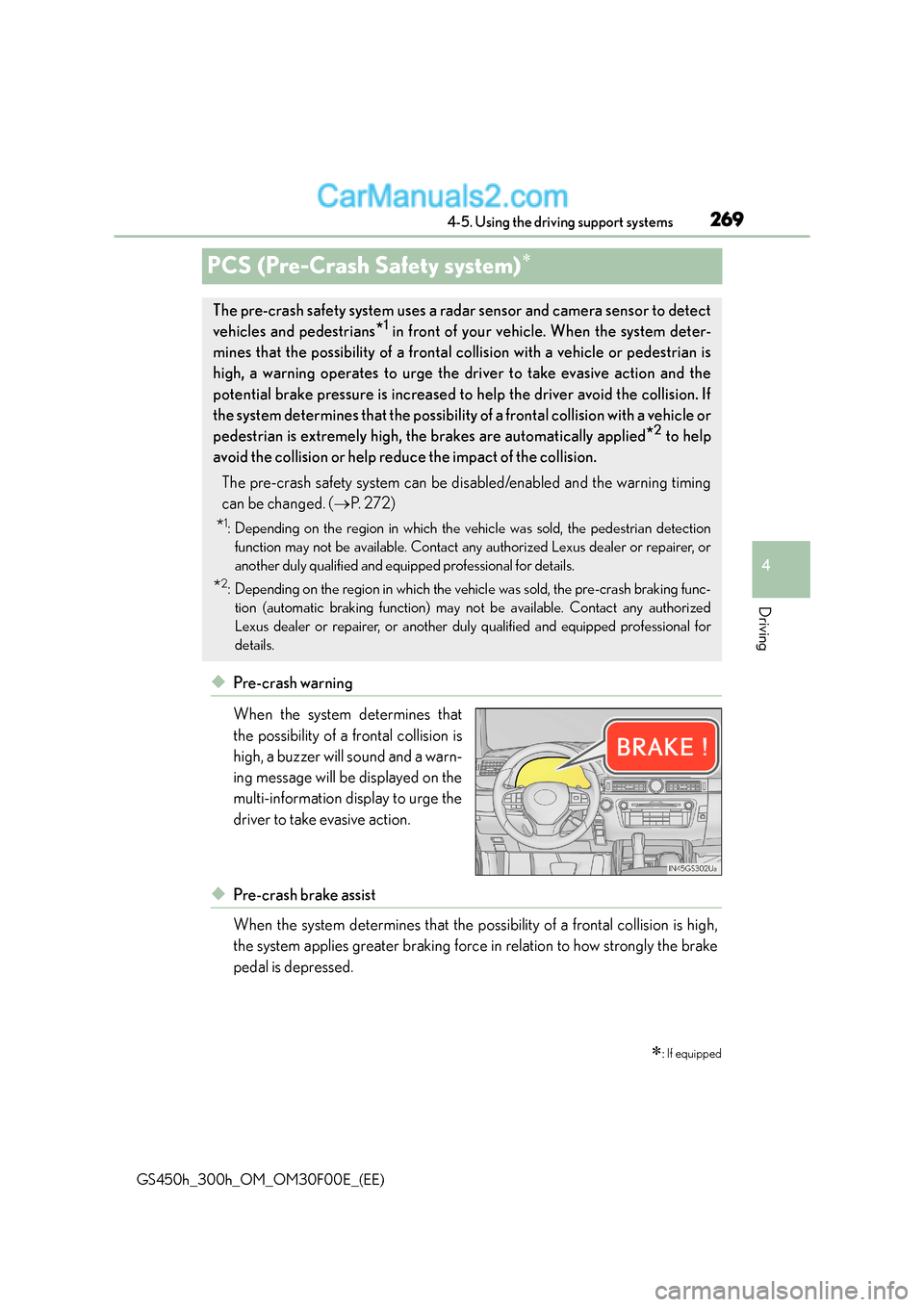
◆Pre-crash warning
When the system determines that
the possibility of a frontal collision is
high, a buzzer will sound and a warn-
ing message will be displayed on the
multi-information display to urge the
driver to take evasive action.
◆Pre-crash brake assist
When the system determines that the possibility of a frontal collision is high,
the system applies greater braking force in relation to how strongly the brake
pedal is depressed.
∗: If equipped
The pre-crash safety system uses a radar sensor and camera sensor to detect
vehicles and pedestrians
*1 in front of your vehicle. When the system deter-
mines that the possibility of a frontal collision with a vehicle or pedestrian is
high, a warning operates to urge the dr iver to take evasive action and the
potential brake pressure is increased to help the driver avoid the collision. If
the system determines that the possibility of a frontal collision with a vehicle or
pedestrian is extremely high, the brakes are automatically applied
*2 to help
avoid the collision or help reduce the impact of the collision.
The pre-crash safety system can be disabled/enabled and the warning timing
can be changed. ( →P. 2 7 2 )
*1: Depending on the region in which the vehicle was sold, the pedestrian detection
function may not be available. Contact any authorized Lexus dealer or repairer, or
another duly qualified and equipped professional for details.
*2: Depending on the region in which the vehicle was sold, the pre-crash braking func-tion (automatic braking function) may not be available. Contact any authorized
Lexus dealer or repairer, or another duly qualified and equipped professional for
details.
Page 272 of 620
2724-5. Using the driving support systems
GS450h_300h_OM_OM30F00E_(EE)
■Enabling/disabling the pre-crash safety system
The pre-crash safety system can be enabled/disabled on ( →P. 111) of
the multi-information display.
The system is automatically enabled each time the power switch is turned to ON
mode.
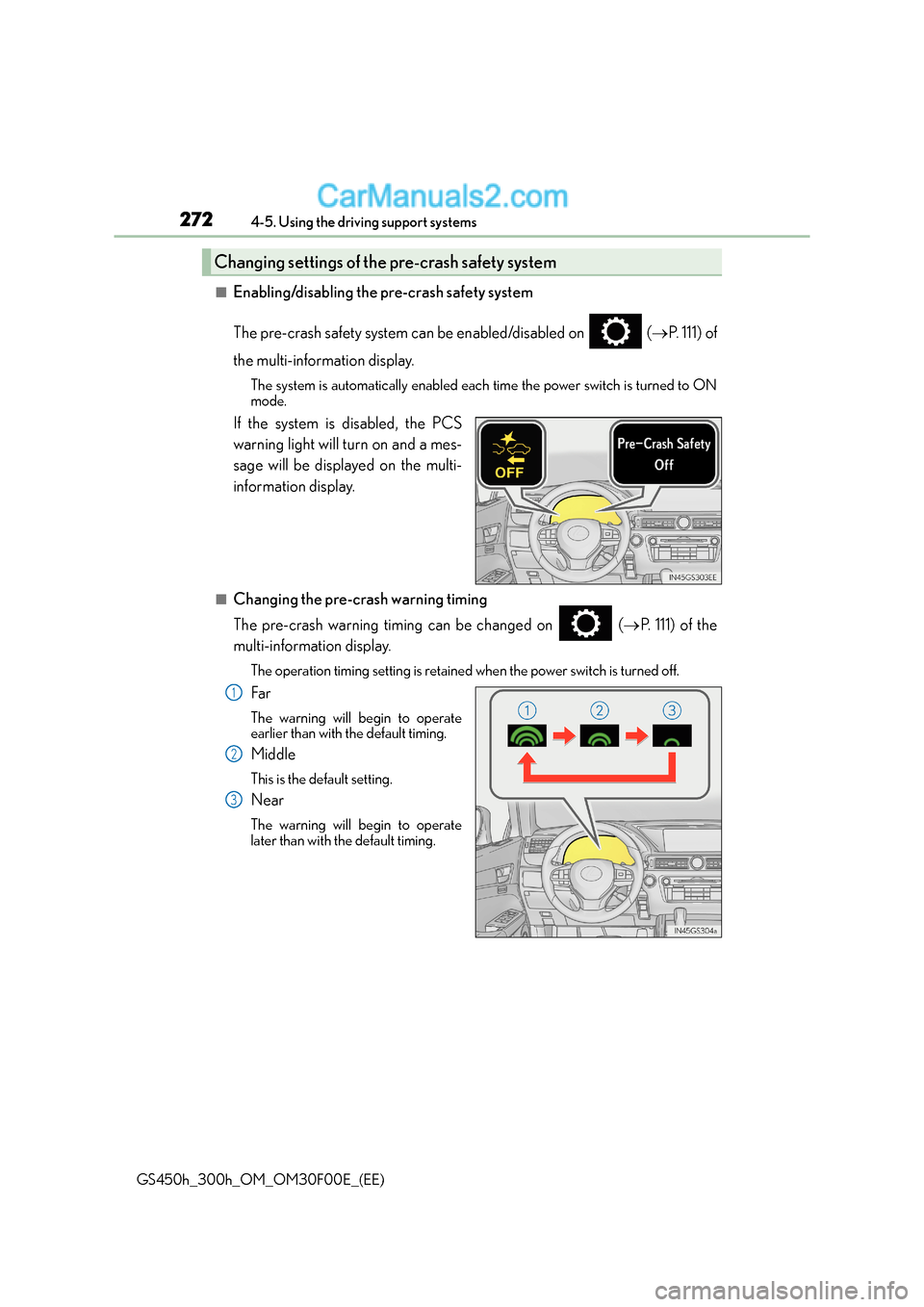
If the system is disabled, the PCS
warning light will turn on and a mes-
sage will be displayed on the multi-
information display.
■Changing the pre-crash warning timing
The pre-crash warning timing can be changed on ( →P. 111) of the
multi-information display.
The operation timing setting is retained when the power switch is turned off.
Fa r
The warning will begin to operate
earlier than with the default timing.
Middle
This is the default setting.
Near
The warning will begin to operate
later than with the default timing.
Changing settings of the pre-crash safety system
1
2
3
Page 273 of 620
2734-5. Using the driving support systems
4
Driving
GS450h_300h_OM_OM30F00E_(EE)
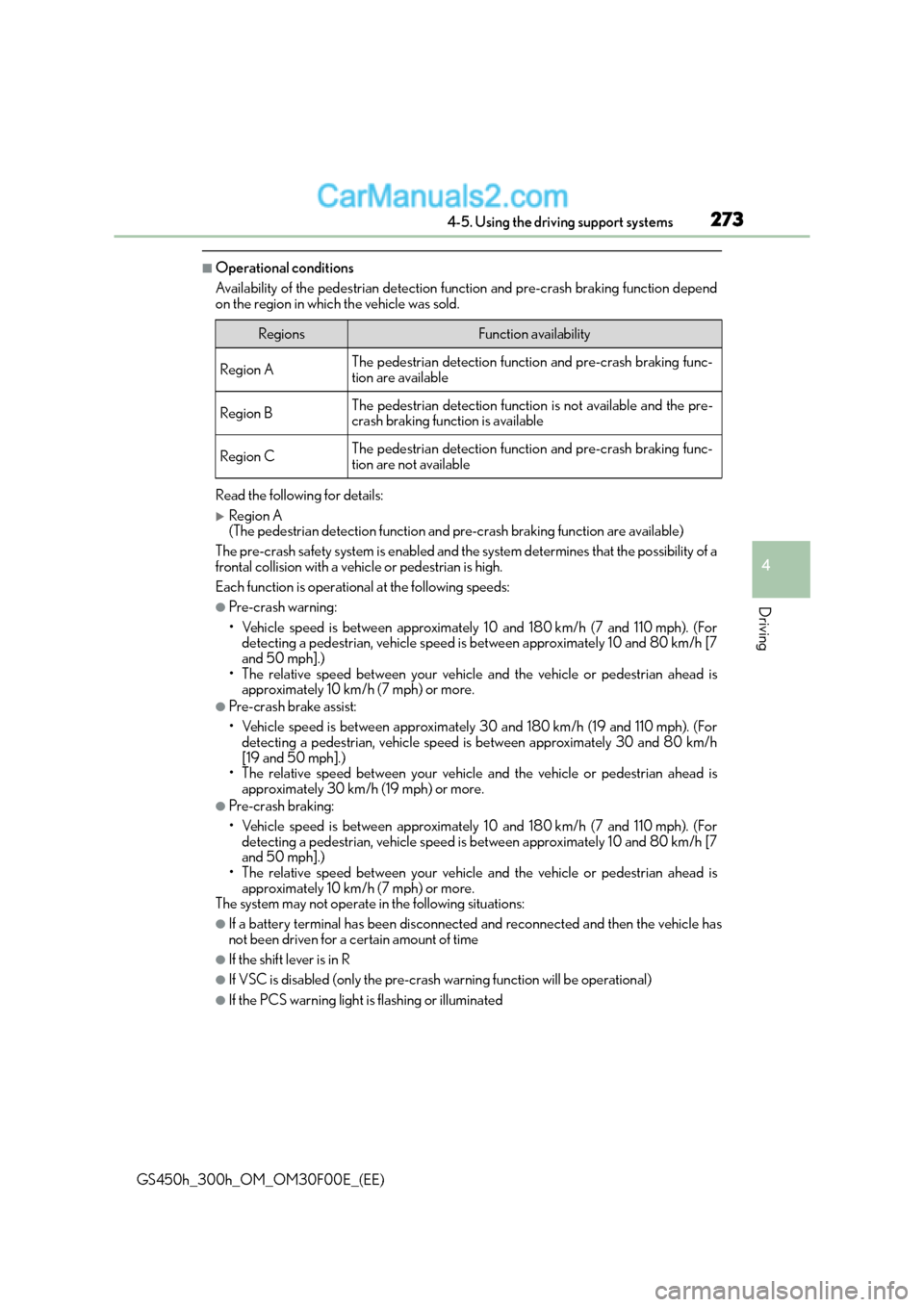
■Operational conditions
Availability of the pedestrian detection function and pre-crash braking function depend
on the region in which the vehicle was sold.
Read the following for details:
XRegion A
(The pedestrian detection function and pre-crash braking function are available)
The pre-crash safety system is enabled and th e system determines that the possibility of a
frontal collision with a vehicle or pedestrian is high.
Each function is operational at the following speeds:
●Pre-crash warning:
• Vehicle speed is between approximately 10 and 180 km/h (7 and 110 mph). (For detecting a pedestrian, vehicle speed is between approximately 10 and 80 km/h [7
and 50 mph].)
• The relative speed between your vehicle and the vehicle or pedestrian ahead is approximately 10 km/h (7 mph) or more.
●Pre-crash brake assist:
• Vehicle speed is between approximately 30 and 180 km/h (19 and 110 mph). (Fordetecting a pedestrian, vehicle speed is between approximately 30 and 80 km/h
[19 and 50 mph].)
• The relative speed between your vehicle and the vehicle or pedestrian ahead is approximately 30 km/h (19 mph) or more.
●Pre-crash braking:
• Vehicle speed is between approximately 10 and 180 km/h (7 and 110 mph). (For
detecting a pedestrian, vehicle speed is between approximately 10 and 80 km/h [7
and 50 mph].)
• The relative speed between your vehicle and the vehicle or pedestrian ahead is
approximately 10 km/h (7 mph) or more.
The system may not operate in the following situations:
●If a battery terminal has been disconnected and reconnected and then the vehicle has
not been driven for a certain amount of time
●If the shift lever is in R
●If VSC is disabled (only the pre-crash warning function will be operational)
●If the PCS warning light is flashing or illuminated
RegionsFunction availability
Region AThe pedestrian detection function and pre-crash braking func-
tion are available
Region BThe pedestrian detection function is not available and the pre-
crash braking function is available
Region CThe pedestrian detection function and pre-crash braking func-
tion are not available
Page 274 of 620
2744-5. Using the driving support systems
GS450h_300h_OM_OM30F00E_(EE)
XRegion B
(The pedestrian detection function is not available and the pre-crash braking function
is available)
The pre-crash safety system is enabled and th e system determines that the possibility of a
frontal collision with a vehicle is high.
Each function is operational at the following speeds:
●Pre-crash warning:
• Vehicle speed is between approximately 15 and 180 km/h (10 and 110 mph).
• The relative speed between your vehicle and the vehicle ahead is approximately
10 km/h (7 mph) or more.
●Pre-crash brake assist:
• Vehicle speed is between approximately 30 and 180 km/h (19 and 110 mph).
• The relative speed between your vehicle and the vehicle ahead is approximately30 km/h (19 mph) or more.
●Pre-crash braking:
• Vehicle speed is between approximately 15 and 180 km/h (10 and 110 mph).
• The relative speed between your vehicle and the vehicle ahead is approximately10 km/h (7 mph) or more.
The system may not operate in the following situations:
●If a battery terminal has been disconnected and reconnected and then the vehicle has
not been driven for a certain amount of time
●If the shift lever is in R
●If VSC is disabled (only the pre-crash warning function will be operational)
●If the PCS warning light is flashing or illuminated
XRegion C
(The pedestrian detection function and pre-crash braking function are not available)
The pre-crash safety system is enabled and th e system determines that the possibility of a
frontal collision with a vehicle is high.
Each function is operational at the following speeds:
●Pre-crash warning:
• Vehicle speed is between approximately 15 and 180 km/h (10 and 110 mph).
• The relative speed between your vehicle and the vehicle ahead is approximately 10 km/h (7 mph) or more.
●Pre-crash brake assist:
• Vehicle speed is between approximately 30 and 180 km/h (19 and 110 mph).
• The relative speed between your vehicle and the vehicle ahead is approximately30 km/h (19 mph) or more.
The system may not operate in the following situations:
●If a battery terminal has been disconnected and reconnected and then the vehicle has
not been driven for a certain amount of time
●If the shift lever is in R
●If VSC is disabled (only the pre-crash warning function will be operational)
●If the PCS warning light is flashing or illuminated