ad blue Lexus GS300h 2016 Navigation manual
[x] Cancel search | Manufacturer: LEXUS, Model Year: 2016, Model line: GS300h, Model: Lexus GS300h 2016Pages: 383, PDF Size: 46.51 MB
Page 266 of 383

266
1. LEXUS PARKING ASSIST MONITOR
GS_Navi+MM_OM30F13E_(EE)
15.09.01 14:54
XTurn the steering wheel right
Black and yellow vertical pole
Blue outline
WA R N I N G
●Be sure to check that there are no obsta-
cles inside the blue outline.
If there are any obstacles inside the blue
outline, do not use the parallel parking
assist.
●When positioning the blue outline over
the parking space, be sure to position it
so that the extended blue line may not
cross the tyre of the vehicle parked in
front of the empty space.
●If the extended line of the blue outline is
crossing the parked vehicle, your vehicle
may be too close. Check that there is a
gap of approximately 1 m (3 ft.) between
your vehicle and the parked vehicle.
XExtended line overlapping wheel
Page 267 of 383

267
1. LEXUS PARKING ASSIST MONITOR
PERIPHERAL MONITORING SYSTEM
GS_Navi+MM_OM30F13E_(EE)
15.09.01 14:54
6
6Keep the steering wheel in its current
position and backing up.
zThe parallel parking assist will be cancelled
if the steering wheel is moved while back-
ing up. Shift the shift lever out of the “R”
position, and restart from the procedure “1”.
7A curved blue line will appear on the
screen. Keep the steering wheel in its
current position and back up slowly.
Stop when the curved blue line meets
the corner of the desired parking space.
X Curved blue line
WA R N I N G
●When backing up, be careful not to hit
any obstacles with your vehicle. Back the
vehicle up slowly.
Page 268 of 383
268
1. LEXUS PARKING ASSIST MONITOR
GS_Navi+MM_OM30F13E_(EE)
15.09.01 14:54
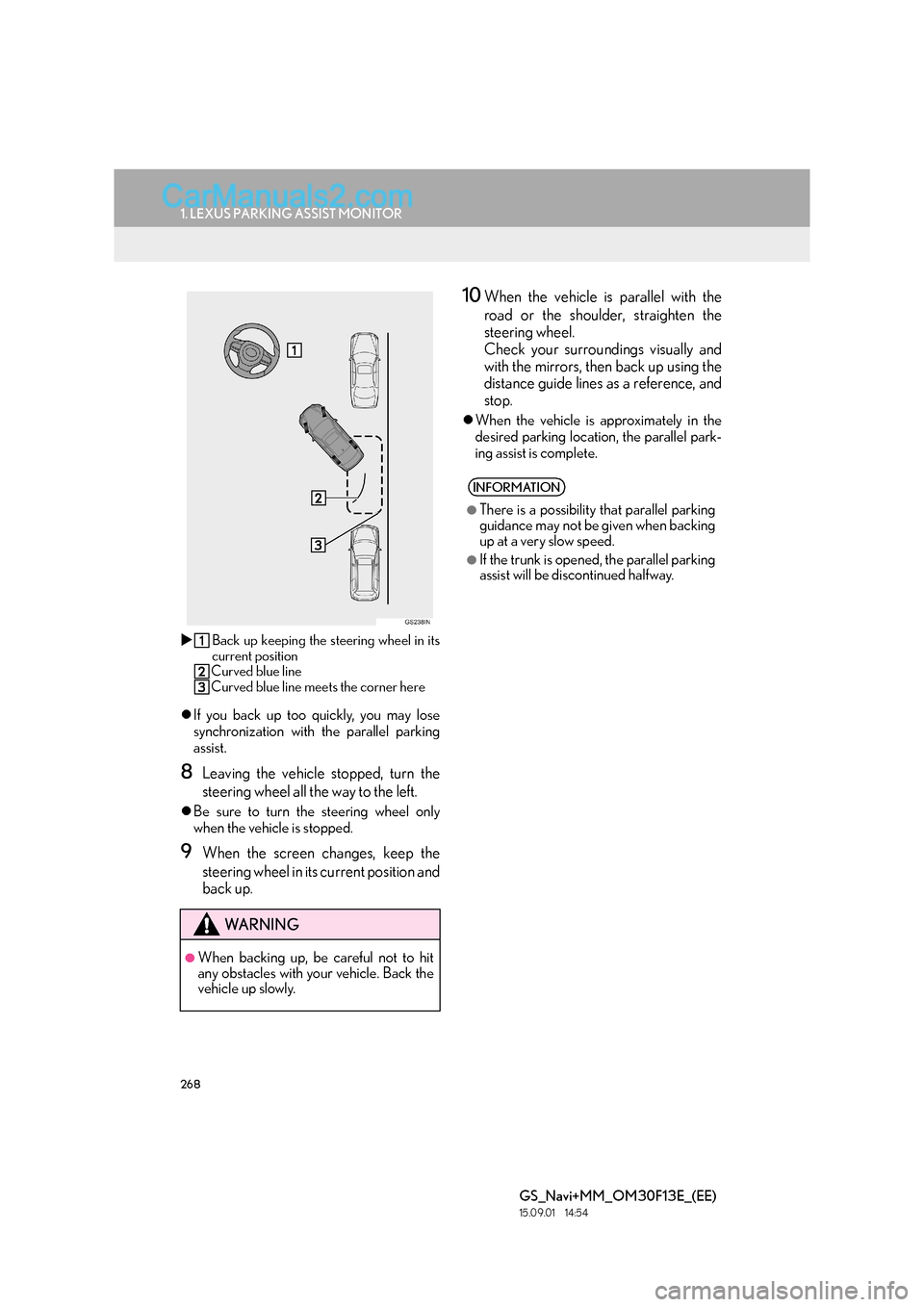
XBack up keeping the steering wheel in its
current position
Curved blue line
Curved blue line meets the corner here
z If you back up too quickly, you may lose
synchronization with the parallel parking
assist.
8Leaving the vehicle stopped, turn the
steering wheel all the way to the left.
zBe sure to turn the steering wheel only
when the vehicle is stopped.
9When the screen changes, keep the
steering wheel in its current position and
back up.
10When the vehicle is parallel with the
road or the shoulder, straighten the
steering wheel.
Check your surroundings visually and
with the mirrors, then back up using the
distance guide lines as a reference, and
stop.
zWhen the vehicle is approximately in the
desired parking location, the parallel park-
ing assist is complete.
WA R N I N G
●When backing up, be careful not to hit
any obstacles with your vehicle. Back the
vehicle up slowly.
INFORMATION
●
There is a possibility that parallel parking
guidance may not be given when backing
up at a very slow speed.
●If the trunk is opened, the parallel parking
assist will be discontinued halfway.
Page 293 of 383

7
293
GS_Navi+MM_OM30F13E_(EE)
15.09.01 14:53
1
2
3
4
5 6
7
8 9
1. QUICK REFERENCE ............................ 294
2. SOME BASICS ......................................... 295
REGISTERING/CONNECTING A Bluetooth® PHONE .......................................... 296
USING THE TELEPHONE SWITCH/MICROPHONE ............................ 297
SPEECH COMMAND SYSTEM .................. 298
ABOUT THE CONTACTS IN THE CONTACT LIST.................................................. 299
WHEN SELLING OR DISPOSING OF THE VEHICLE ...................................................... 299
3. CALLING ON THE Bluetooth®
PHONE ....................................................300
BY FAVOURITES LIST ......................................... 301
BY CALL HISTORY ............................................... 301
BY CONTACTS LIST .......................................... 302
BY DIAL PAD .......................................................... 304
BY OFF HOOK SWITCH ................................. 305
SOS............................................................................... 305
4. RECEIVING ON THE Bluetooth®
PHONE .................................................... 307
INCOMING CALLS............................................. 307
5. TALKING ON THE Bluetooth®
PHONE ....................................................308
INCOMING CALL WAITING......................... 310
6. Bluetooth® PHONE MESSAGE
FUNCTION .............................................. 311
RECEIVING A MESSAGE ................................. 312
CHECKING MESSAGES ................................... 313
REPLYING TO A MESSAGE
(QUICK REPLY) .................................................. 314
CALLING THE MESSAGE SENDER ........... 315
1. TELEPHONE SETTINGS ....................... 316
“Sounds” SCREEN ................................................... 317
“Notifications” SCREEN ........................................ 318
“Contact/Call history” SCREEN ....................... 319
“Messaging settings” SCREEN.......................... 327
“Lexus Euro assistance 24 settings” SCREEN ................................................................. 328
1. TROUBLESHOOTING .........................330
1
TELEPHONE OPERATION
(HANDS-FREE SYSTEM FOR
CELLULAR PHONES)
2SETUP
3WHAT TO DO IF...
TELEPHONE
For vehicles sold outside Europe, some of the functions cannot be operated while driving.
Page 294 of 383

294
GS_Navi+MM_OM30F13E_(EE)
15.09.01 14:54
1. TELEPHONE OPERATION (HANDS-FREE SYSTEM FOR CELLULAR PHONES)
1. QUICK REFERENCE
The telephone top screen can be reached by the following methods:
XUsing the steering wheel switches
Press the switch on the steering wheel.
XFrom the “Menu” screen
Press the “MENU” button on the Remote Touch, then select “Telephone”.
FunctionPage
Telephone operation
Registering/connecting Bluetooth® device45
Calling on the Bluetooth® phone300
Receiving on the Bluetooth® phone307
Talking on the Bluetooth® phone308
Message functionUsing the Bluetooth® phone message function311
Setting up a telephoneTelephone settings316
Bluetooth® settings51
Page 295 of 383

295
1. TELEPHONE OPERATION (HANDS-FREE SYSTEM FOR CELLULAR PHONES)
GS_Navi+MM_OM30F13E_(EE)
15.09.01 14:54
TELEPHONE
7
2. SOME BASICS
The hands-free system enables calls to
be made and received without having to
take your hands off the steering wheel.
This system supports Bluetooth
®.
Bluetooth® is a wireless data system
that enables cellular phones to be used
without being connected by a cable or
placed in a cradle.
The operating procedure of the tele-
phone is explained here.
WA R N I N G
●Use a cellular phone or connect the
Bluetooth® phone only when safe and
legal to do so.
●Your audio unit is fitted with Bluetooth®
antennas. People with implantable car-
diac pacemakers, cardiac resynchroniza-
tion therapy-pacemakers or implantable
cardioverter defibrillators should main-
tain a reasonable distance between
themselves and the Bluetooth
® antennas.
The radio waves may affect the operation
of such devices.
●Before using Bluetooth® devices, users
of any electrical medical device other
than implantable cardiac pacemakers,
cardiac resynchronization therapy-pace-
makers or implantable cardioverter
defibrillators should consult the manufac-
turer of the device for information about
its operation under the influence of radio
waves. Radio waves could have unex-
pected effects on the operation of such
medical devices.
Page 296 of 383

296
1. TELEPHONE OPERATION (HANDS-FREE SYSTEM FOR CELLULAR PHONES)
GS_Navi+MM_OM30F13E_(EE)
15.09.01 14:54
NOTICE
●Do not leave your cellular phone in the
vehicle. The temperature inside may rise
to a level that could damage the tele-
phone.
INFORMATION
●
If your cellular phone does not support
Bluetooth®, this system cannot function.
●In the following conditions, the system
may not function:
• The cellular phone is turned off.
• The current position is outside the com- munication area.
• The cellular phone is not connected.
• The cellular phone has a low battery.
●When using Bluetooth® audio and
hands-free system at the same time, the
following problems may occur:
•The Bluetooth
® connection may be cut.
• Noise may be heard on the Bluetooth
®
audio playback.
REGISTERING/
CONNECTING A Bluetooth®
PHONE
To use the hands-free system for cellular
phones, it is necessary to register a cel-
lular phone with the system. ( →P.45)
Bluetooth® PHONE
CONDITION DISPLAY
The condition of the Bluetooth
® phone
appears on the upper right side of the
screen. ( →P.16)
Page 300 of 383

300
1. TELEPHONE OPERATION (HANDS-FREE SYSTEM FOR CELLULAR PHONES)
GS_Navi+MM_OM30F13E_(EE)
15.09.01 14:54
3. CALLING ON THE Bluetooth® PHONE
1Press the “MENU” button on the
Remote Touch.
2Select “Telephone” .
3Select the desired tab to call from.
zThe telephone top screen can be displayed
by pressing the switch on the steering
wheel.After a Bluetooth® phone has been reg-
istered, a call can be made using the
hands-free system. There are several
methods by which a call can be made, as
described below.
How to make a call listPage
By favourites list301
By call history301
By contacts list302
By dial pad304
By e-mail/SMS/MMS315
By POI call*98
SOS305
By off hook switch305
By speech command system244
By quick dial*367
*: With 12.3-inch display
Page 303 of 383

303
1. TELEPHONE OPERATION (HANDS-FREE SYSTEM FOR CELLULAR PHONES)
TELEPHONE
GS_Navi+MM_OM30F13E_(EE)
15.09.01 14:54
7
■FOR PBAP COMPATIBLE
Bluetooth
® PHONES
X When “Automatic transfer” is set to on
(→ P.319)
zContacts are transferred automatically.
X When “Automatic transfer” is set to off
(→ P.319)
1Select the desired item.
2Check that a confirmation screen is dis-
played when the operation is complete.
■FOR PBAP INCOMPATIBLE BUT
OPP COMPATIBLE Bluetooth
®
PHONES
1Select the desired item.
WHEN THE CONTACT IS
EMPTY
No.Function
Select to always transfer all the con-
tacts from a connected cellular
phone automatically.
Select to transfer all the contacts
from a connected cellular phone
only once.
Select to cancel transferring.
No.Function
Select to transfer the contacts from
the connected cellular phone.
Select to add a new contact manual-
ly.
Select to cancel transferring.
Page 304 of 383

304
1. TELEPHONE OPERATION (HANDS-FREE SYSTEM FOR CELLULAR PHONES)
GS_Navi+MM_OM30F13E_(EE)
15.09.01 14:54
XWhen “Transfer” is selected
2Follow the steps in “ XWhen the contact
is not registered” from “STEP 2”.
( → P.322)
X When “Add” is selected
2Follow the steps in “REGISTERING A
NEW CONTACT TO THE CON-
TACTS LIST” from “STEP 2”.
(→ P.324)
1Display the telephone top screen.
(→ P.300)
2Select the “Dial Pad” tab and enter the
telephone number.
“SOS” : → P.305
3Select or press the switch on
the steering wheel.
4Check that the “Call” screen is dis-
played.INFORMATION
●
Manual transfer operation cannot be per-
formed while driving.
●If your cellular phone is neither PBAP nor
OPP compatible, the contacts cannot be
transferred.
●Depending on the type of Bluetooth®
phone:
• It may be necessary to perform addi- tional steps on the telephone when
transferring contact data.
• The registered image in the contact list may not transfer depending on the type
of Bluetooth
® phone connected.
BY DIAL PAD
INFORMATION
●
Depending on the type of Bluetooth®
phone being connected, it may be neces-
sary to perform additional steps on the
telephone.