navigation system Lexus GS300h 2016 User Guide
[x] Cancel search | Manufacturer: LEXUS, Model Year: 2016, Model line: GS300h, Model: Lexus GS300h 2016Pages: 620
Page 124 of 620

1242. Instrument cluster
GS450h_300h_OM_OM30F00E_(EE)
Display of the following screens can be switched on or off.
●Audio display
●Route guidance display (vehicles with navigation system)
■Changing the settingsContinue holding the “DISP” but-
ton until the screen changes, and
repeat the process until the set-
ting you want to change is dis-
played.
Customization can be performed
when the head-up display is on and
the vehicle is traveling at less than
8 km/h (5 mph).
Press the “DISP” button to switch between on and off.
On and off will be switched between each time the button is pressed.
If the button is left alone without being op erated for a short time, setting will be fin-
ished automatically.
■Head-up display
●The head-up display may seem dark and hard to see when viewed through sunglasses,
especially polarized sunglasses.
Adjust the brightness of the head-up display or remove your sunglasses.
●When the head-up display is turned off, it will remain off even if the power switch is
turned to ON mode after the power switch has been turned off.
●The startup image will be displayed on the head-up display after the power switch has
been turned to ON mode while the head-up display switch is set to on.
■When the 12-volt battery is disconnected
The customize settings of the head-up display will be reset.
■Head-up display automatic position adjustment
If the display position is recorded into me mory, the head-up display will be automatically
adjusted to the desired position. ( →P. 1 7 8 )
Display customization
1
2
Page 301 of 620
3014-5. Using the driving support systems
4
Driving
GS450h_300h_OM_OM30F00E_(EE)
In the following situations, the RSA system alerts the driver using a warning dis-
play.
●When the vehicle speed exceeds the speed warning threshold applied to the
speed limit of the sign displayed on the multi-information display, the sign
color becomes inverted.
●If it is detected that your vehicle is overtaking when a no overtaking sign is dis-
played on the multi-information display, the sign flashes.
●When the RSA system recognizes a no-entry sign and detects that the vehicle
has entered a no-entry area based on the map information of the navigation
system, the no-entry sign flashes.
■Automatic turn-off of RSA sign display
One or more signs automatically turn off in the following situations.
●A new sign is not recognized for a certain distance.
●The road changes due to a left or right turn, etc.
■Conditions in which the function may not operate or detect correctly
In the following situations, RSA does not op erate normally and may not recognize signs,
display the incorrect sign, etc. However, this does not indicate a malfunction.
●The camera sensor is misaligned due to a st rong impact being applied to the sensor,
etc.
●Dirt, snow, stickers, etc., are on the windshield near the camera sensor.
●In inclement weather such as heavy rain, fog, snow or sand storms
●Light from an oncoming vehicle, the sun, etc., enters the camera sensor.
●The sign is dirty, faded, tilted or bent, and if an electronic sign, the contrast is poor.
●All or part of the sign is hidden by the leaves of a tree, a pole, etc.
●The sign is only visible to the camera sensor for a short amount of time.
●The driving scene (turning, lane change, etc.) is judged incorrectly.
●Even if it is a sign not appropriate for the currently traveled lane, such a sign exists
directly after a freeway branches, or in an adjacent lane just before merging.
●Stickers are attached to the rear of the preceding vehicle.
●A sign resembling a system compatible sign is recognized.
●The vehicle is driven in a country with a different direction of traffic.
●Side road speed signs may be detected and displayed (if positioned in sight of the cam-
era sensor) while the vehicle is traveling on the main road.
●Roundabout exit road speed signs may be detected and displayed (if positioned in sight
of the camera sensor) while traveling on a roundabout.
Warning display
Page 360 of 620
3605-1. Remote Touch screen
GS450h_300h_OM_OM30F00E_(EE)
Remote Touch/12.3-inch display∗ ∗
: If equipped
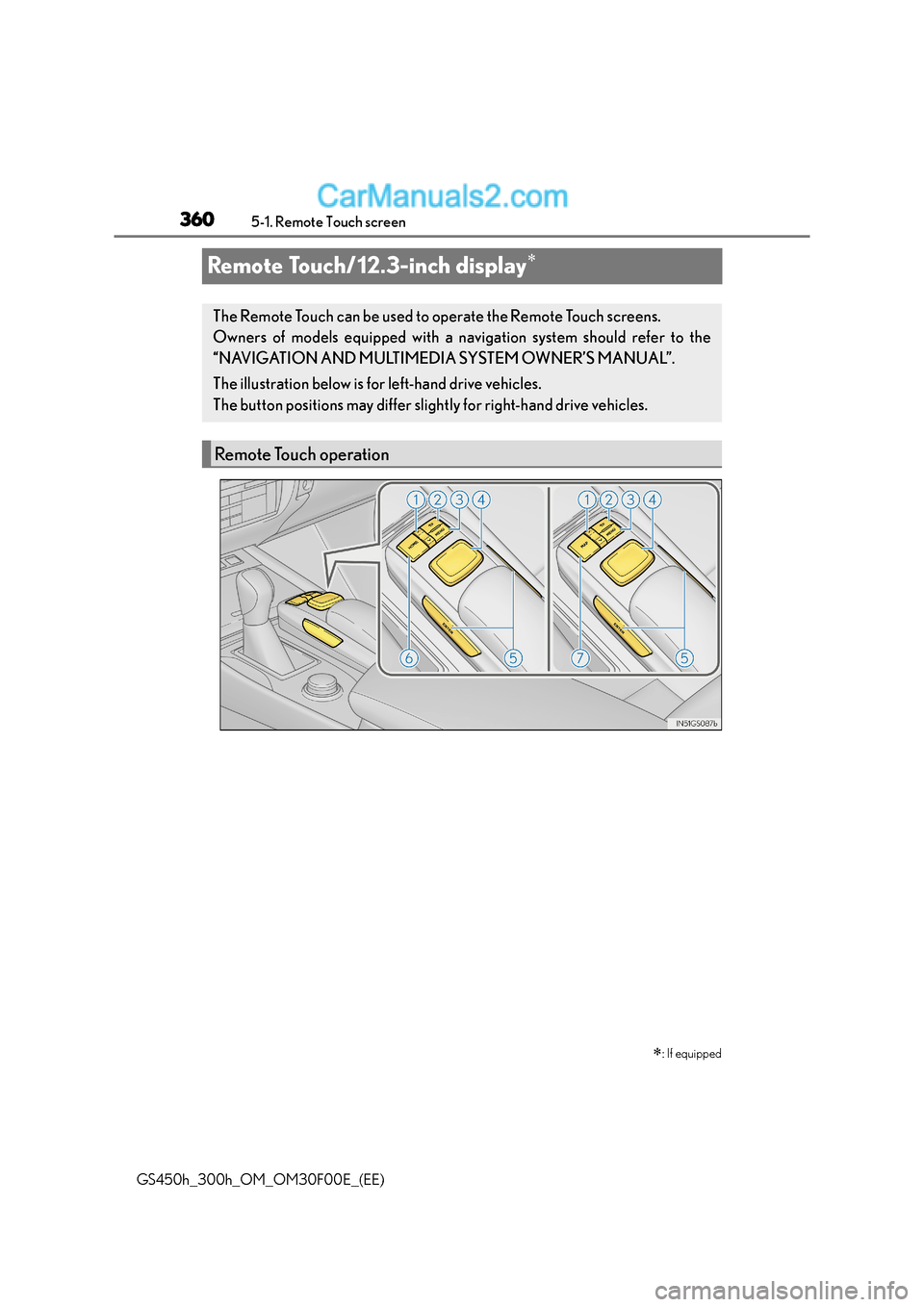
The Remote Touch can be used to operate the Remote Touch screens.
Owners of models equipped with a navi gation system should refer to the
“NAVIGATION AND MULTIMEDIA SYSTEM OWNER’S MANUAL”.
The illustration below is for left-hand drive vehicles.
The button positions may differ slight ly for right-hand drive vehicles.
Remote Touch operation
Page 363 of 620
3635-1. Remote Touch screen
5
Interior features
GS450h_300h_OM_OM30F00E_(EE)
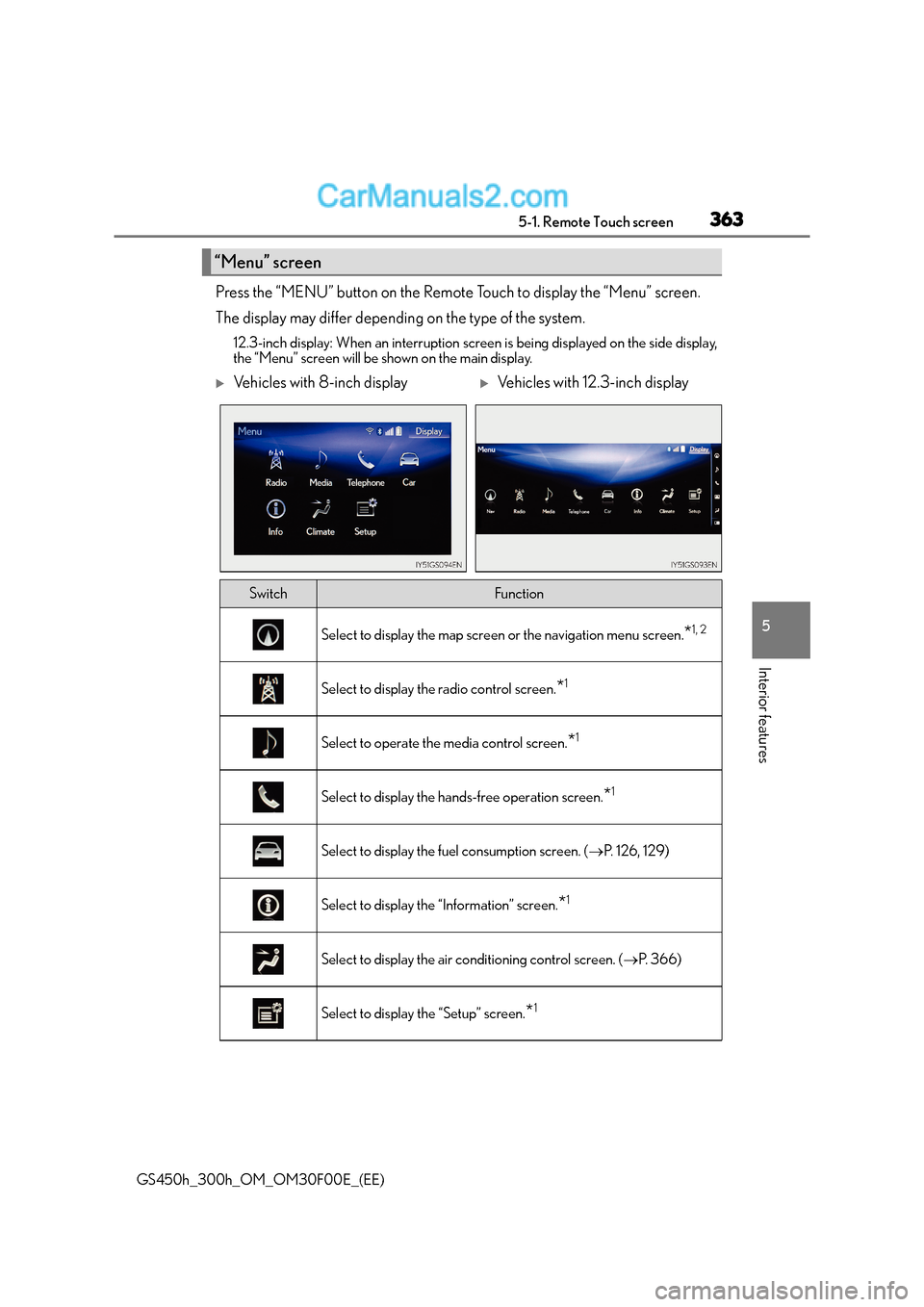
Press the “MENU” button on the Remote Touch to display the “Menu” screen.
The display may differ depending on the type of the system.
12.3-inch display: When an interruption screen is being displayed on the side display,
the “Menu” screen will be shown on the main display.
“Menu” screen
XVehicles with 8-inch displayXVehicles with 12.3-inch display
SwitchFunction
Select to display the map screen or the navigation menu screen.*1, 2
Select to display the radio control screen.*1
Select to operate the media control screen.*1
Select to display the hands-free operation screen.*1
Select to display the fuel consumption screen. (→P. 126, 129)
Select to display the “Information” screen.*1
Select to display the air conditioning control screen. ( →P. 3 6 6 )
Select to display the “Setup” screen.*1
Page 364 of 620

3645-1. Remote Touch screen
GS450h_300h_OM_OM30F00E_(EE)
*1: Refer to the “NAVIGATION AND MULTIMEDIA SYSTEM OWNER’S MANUAL”.
*2: If equipped
■Full screen display
The following functions can be displayed full screen:
*: Refer to the “NAVIGATION AND MULTIMEDIA SYSTEM OWNER’S MAN-UAL”.
■Split-screen display
Different information can be displayed on the left and right of the screen. For
example, air conditioning system screen can be displayed and operated while
the fuel consumption information screen is being displayed. The large screen
on the left of the display is called the main display, and the small screen to the
right is called the side display.
“Display”Select to adjust the contrast and brightness of the screens, turn the
screen off, etc.*1
12.3-inch display operation
SwitchFunction
●Initial screen*
●“Menu” screen ( →P. 363)
●Map screen*
●Audio screen*
●Energy monitor/fuel consumption
screen ( →P. 1 2 6 )
●Air conditioning control screen
(→ P. 366)
Page 365 of 620
3655-1. Remote Touch screen
5
Interior features
GS450h_300h_OM_OM30F00E_(EE)
For details of the functions and operation of the main display, refer to the respec-
tive section.
■Display the side display
XBasic screens
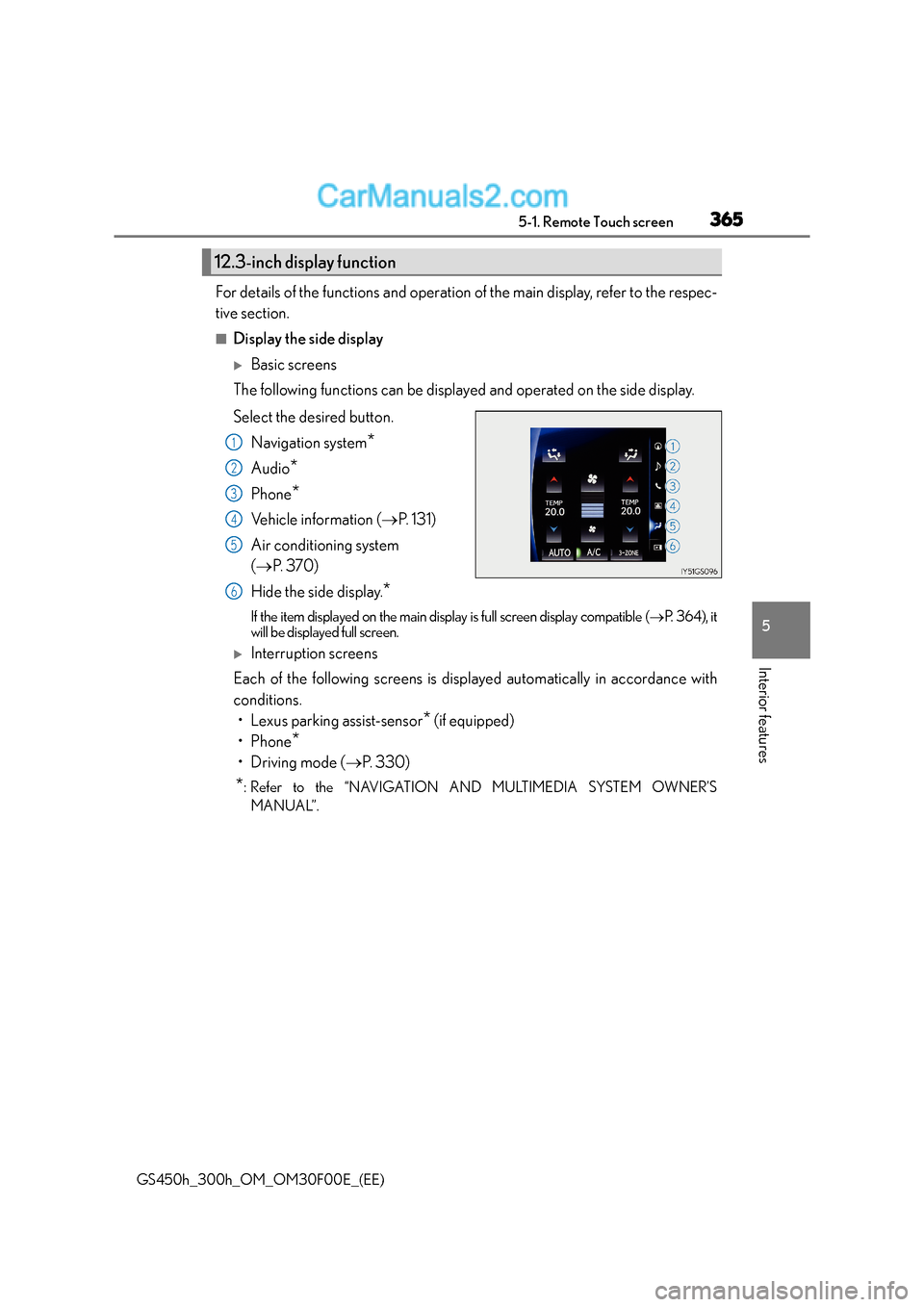
The following functions can be displayed and operated on the side display.
Select the desired button.
Navigation system
*
Audio*
Phone*
Vehicle information ( →P. 131)
Air conditioning system
( → P. 3 7 0 )
Hide the side display.
*
If the item displayed on the main display is full screen display compatible ( →P. 3 6 4 ) , i t
will be displayed full screen.
XInterruption screens
Each of the following screens is disp layed automatically in accordance with
conditions. • Lexus parking assist-sensor
* (if equipped)
•Phone
*
•Driving mode ( →P. 3 3 0 )
*: Refer to the “NAVIGATION AND MULTIMEDIA SYSTEM OWNER’S
MANUAL”.
12.3-inch display function
1
2
3
4
5
6
Page 398 of 620
3985-5. Using the other interior features
GS450h_300h_OM_OM30F00E_(EE)
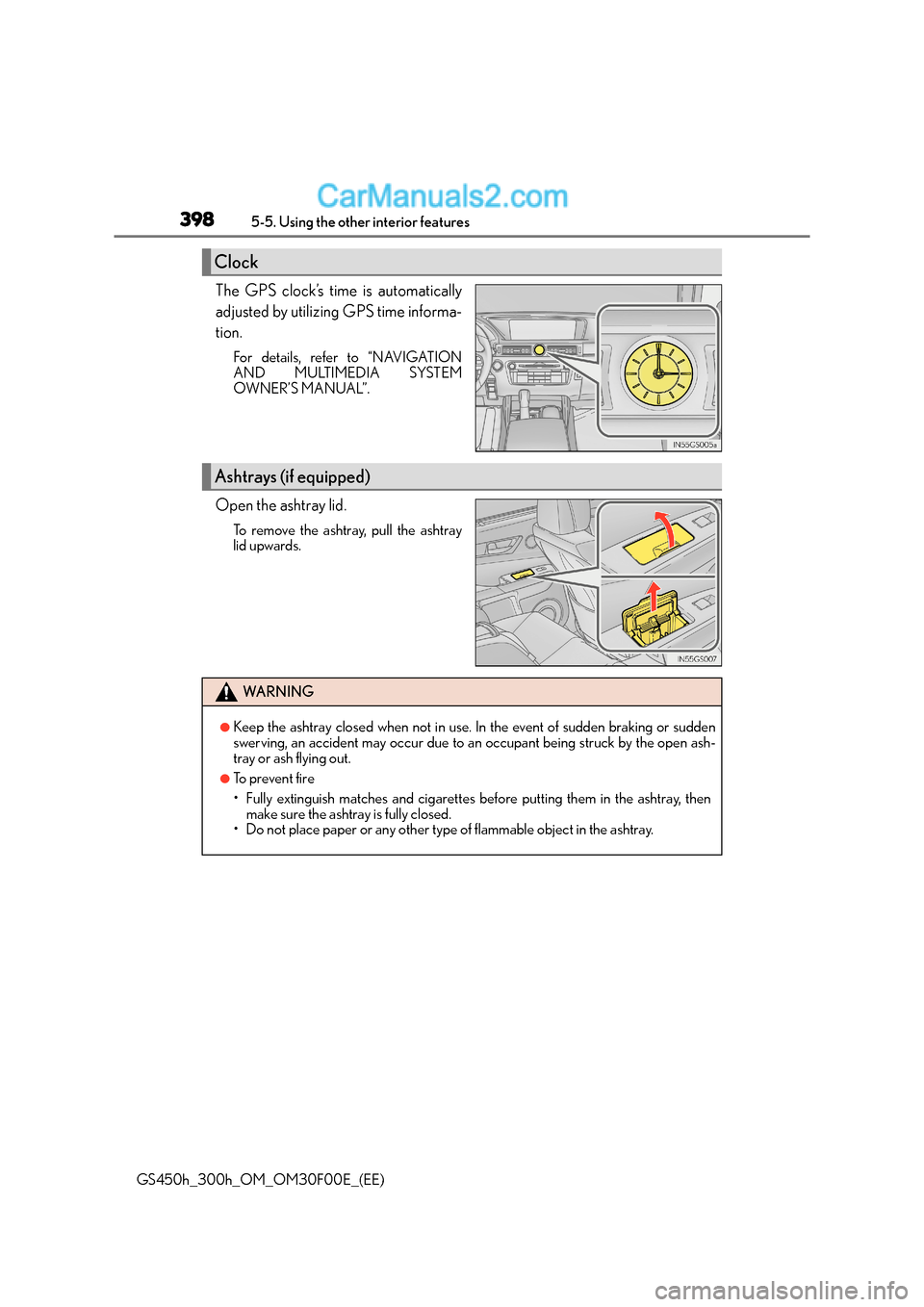
The GPS clock’s time is automatically
adjusted by utilizing GPS time informa-
tion.
For details, refer to “NAVIGATION
AND MULTIMEDIA SYSTEM
OWNER’S MANUAL”.
Open the ashtray lid.
To remove the ashtray, pull the ashtray
lid upwards.
Clock
Ashtrays (if equipped)
WA R N I N G
●Keep the ashtray closed when not in use. In the event of sudden braking or sudden
swerving, an accident may occur due to an occupant being struck by the open ash-
tray or ash flying out.
●To prevent fire
• Fully extinguish matches and cigarettes before putting them in the ashtray, thenmake sure the ashtray is fully closed.
• Do not place paper or any other type of flammable object in the ashtray.
Page 526 of 620
5267-2. Steps to take in an emergency
GS450h_300h_OM_OM30F00E_(EE)
WA R N I N G
■When using the compact spare tire
●Remember that the compact spare tire provided is specifically designed for use with
your vehicle. Do not use your compact spare tire on another vehicle.
●Do not use more than one compact spare tire simultaneously.
●Replace the compact spare tire with a standard tire as soon as possible.
●Avoid sudden acceleration, abrupt steeri ng, sudden braking and shifting operations
that cause sudden engine braking.
■When the compact spare tire is attached
The vehicle speed may not be correctly detected, and the following systems may not
operate correctly:
■Speed limit when using the compact spare tire
Do not drive at speeds in excess of 80 km/h (50 mph) when a compact spare tire is
installed on the vehicle.
The compact spare tire is not designed for driving at high speeds. Failure to observe
this precaution may lead to an accid ent causing death or serious injury.
■After using the tools and jack
Before driving, make sure all the tools and jack are securely in place in their storage
location to reduce the possibility of personal injury during a collision or sudden brak-
ing.
• ABS & Brake assist
•VSC
•TRC
• Cruise control (if equipped)
• Dynamic radar cruise control (if equipped)
• Dynamic radar cruise control with full-
speed range (if equipped)
• (Pre-Crash Safety system) (if equipped)
•EPS
•AFS (if equipped)
• LDH (if equipped)
• DRS (if equipped)
• Adaptive Variable Suspension system (if equipped) • LDA (Lane Departure Alert with
steering control) (if equipped)
• LKA (Lane-Keeping Assist) (if equipped)
• Tire pressure warning system (if equipped)
•VDIM
• VGRS (if equipped)
• Lexus parking assist monitor (if equipped)
• Lexus parking assist-sensor (if equipped)
• Navigation system (if equipped)
Page 590 of 620
5908-2. Customization
GS450h_300h_OM_OM30F00E_(EE)
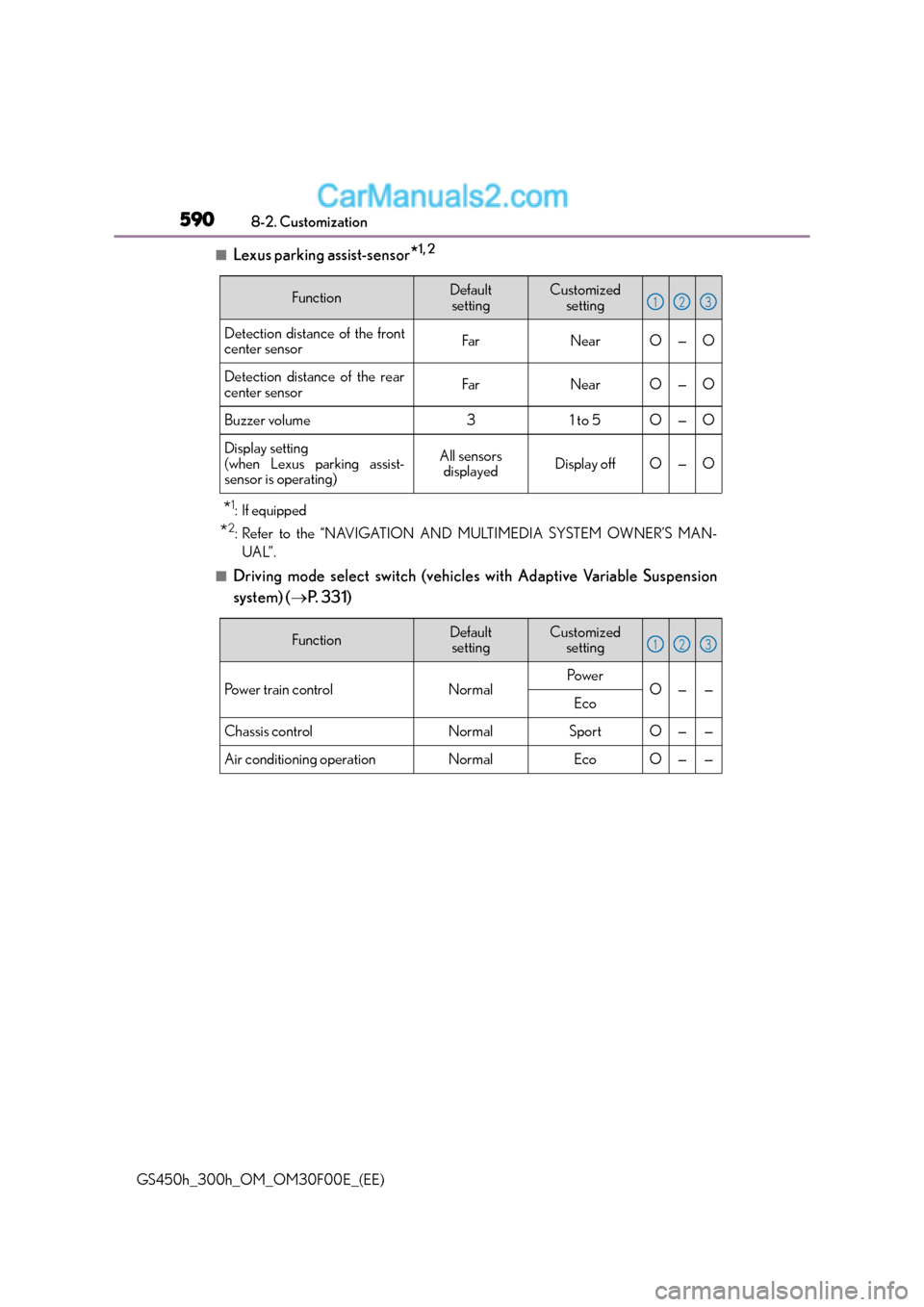
■Lexus parking assist-sensor*1, 2
*1:If equipped
*2: Refer to the “NAVIGATION AND MULTIMEDIA SYSTEM OWNER’S MAN- UAL”.
■Driving mode select switch (vehicles with Adaptive Variable Suspension
system) ( →P. 3 3 1 )
FunctionDefault
settingCustomized setting
Detection distance of the front
center sensorFarNearO—O
Detection distance of the rear
center sensorFarNearO—O
Buzzer volume31 to 5O—O
Display setting
(when Lexus parking assist-
sensor is operating)All sensors displayedDisplay offO—O
123
FunctionDefaultsettingCustomized setting
Po w e r t r a i n c o n t r o lNormalPo w e rO——Eco
Chassis controlNormalSportO——
Air conditioning operationNormalEcoO——
123
Page 597 of 620
597
Index
GS450h_300h_OM_OM30F00E_(EE)
What to do if... (Troubleshooting)................................598
Alphabetical index................................. 602
For information regarding the equipment listed below, refer to the
“NAVIGATION AND MULTIMEDIA SYSTEM OWNER’S MAN-
UAL”
• Audio system
•Navigation system
• Lexus parking assist-sensor
• Lexus parking assist monitor