start Lexus GS300h 2016 User Guide
[x] Cancel search | Manufacturer: LEXUS, Model Year: 2016, Model line: GS300h, Model: Lexus GS300h 2016Pages: 620
Page 81 of 620
811-2. Hybrid system
1
GS450h_300h_OM_OM30F00E_(EE)
For safety and security
■If a warning light comes on, a warning message is displayed, or the 12-volt battery is dis-
connected
The hybrid system may not start. In this case, try to start the system again. If the “READY”
indicator does not come on, contact any authorized Lexus dealer or repairer, or another
duly qualified and equipped professional.
■Running out of fuel
When the vehicle has run out of fuel and the hybrid system cannot be started, refuel the
vehicle with at least enough gasoline to make the low fuel level warning light (→P. 4 7 8 )
go off. If there is only a small amount of fu el, the hybrid system may not be able to start.
(The standard amount of fuel is about 9.9 L [2.6 gal., 2.2 Imp.gal.], when the vehicle is on
a level surface. This value may vary when the vehicle is on a slope. Add extra fuel when
the vehicle is inclined.)
■Electromagnetic waves
●High voltage parts and cables on hybrid vehicles incorporate electromagnetic shield-
ing, and therefore emit approximately the same amount of electromagnetic waves as
conventional gasoline powered vehicles or home electronic appliances.
●Your vehicle may cause sound interference in some third party-produced radio parts.
■Hybrid battery (traction battery)
The hybrid battery (traction battery) has a lim ited service life. The lifespan of the hybrid
battery (traction battery) can change in accordance with driving style and driving condi-
tions.
■Declaration of conformity
This model conforms to hydrogen emissions according to regulation ECE100 (Battery
electric vehicle safety).
WA R N I N G
■High voltage precautions
This vehicle has high voltage DC and AC systems as well as a 12-volt system. DC and
AC high voltage is very dangerous and can cause severe burns and electric shock that
may result in death or serious injury.
●Never touch, disassemble, remove or replace the high voltage parts, cables or their
connectors.
●The hybrid system will become hot after starting as the system uses high voltage. Be
careful of both the high voltage and the high temperature, and always obey the warn-
ing labels attached to the vehicle.
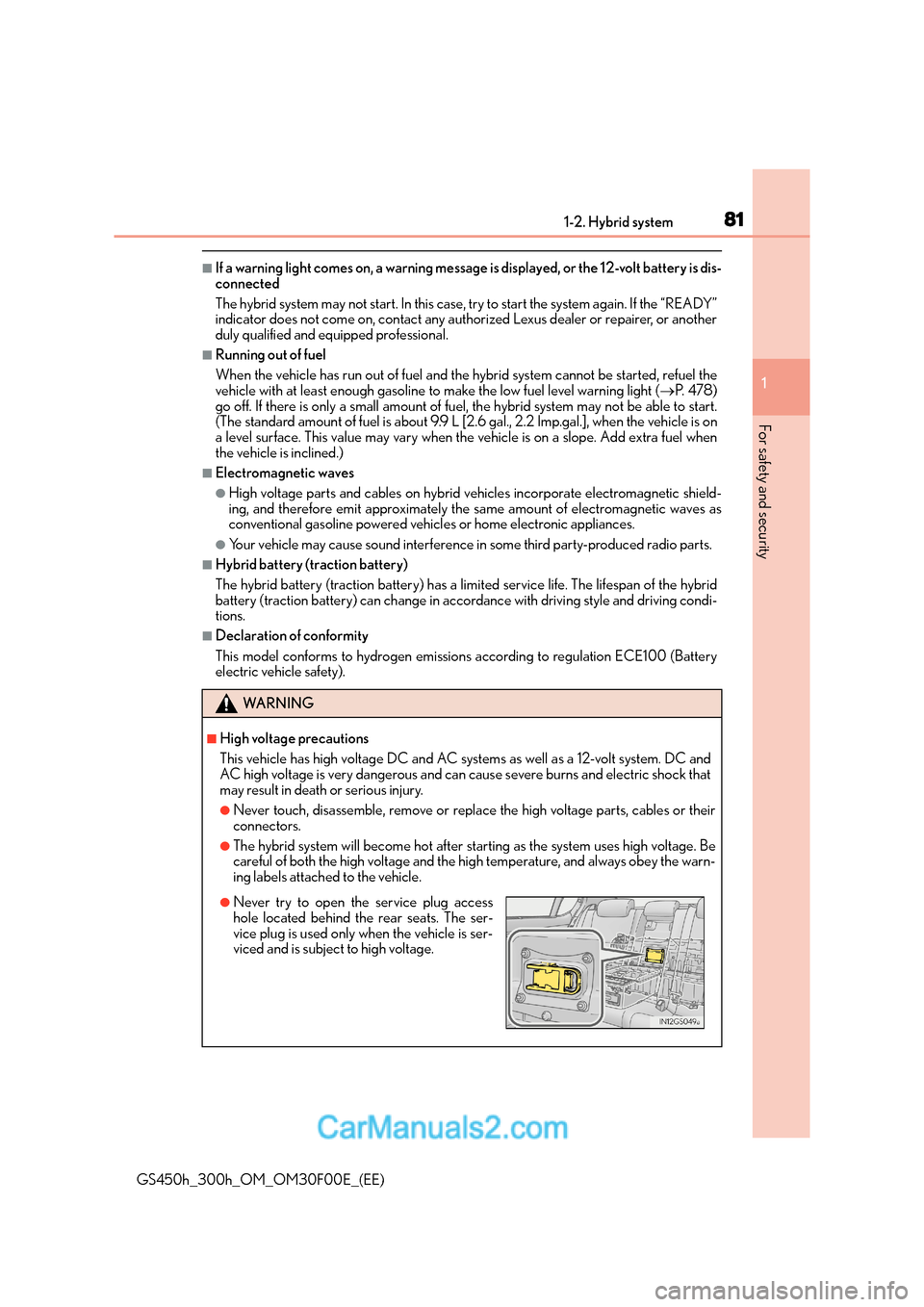
●Never try to open the service plug access
hole located behind the rear seats. The ser-
vice plug is used only when the vehicle is ser-
viced and is subject to high voltage.
Page 84 of 620
841-3. Theft deterrent system
GS450h_300h_OM_OM30F00E_(EE)
Immobilizer system
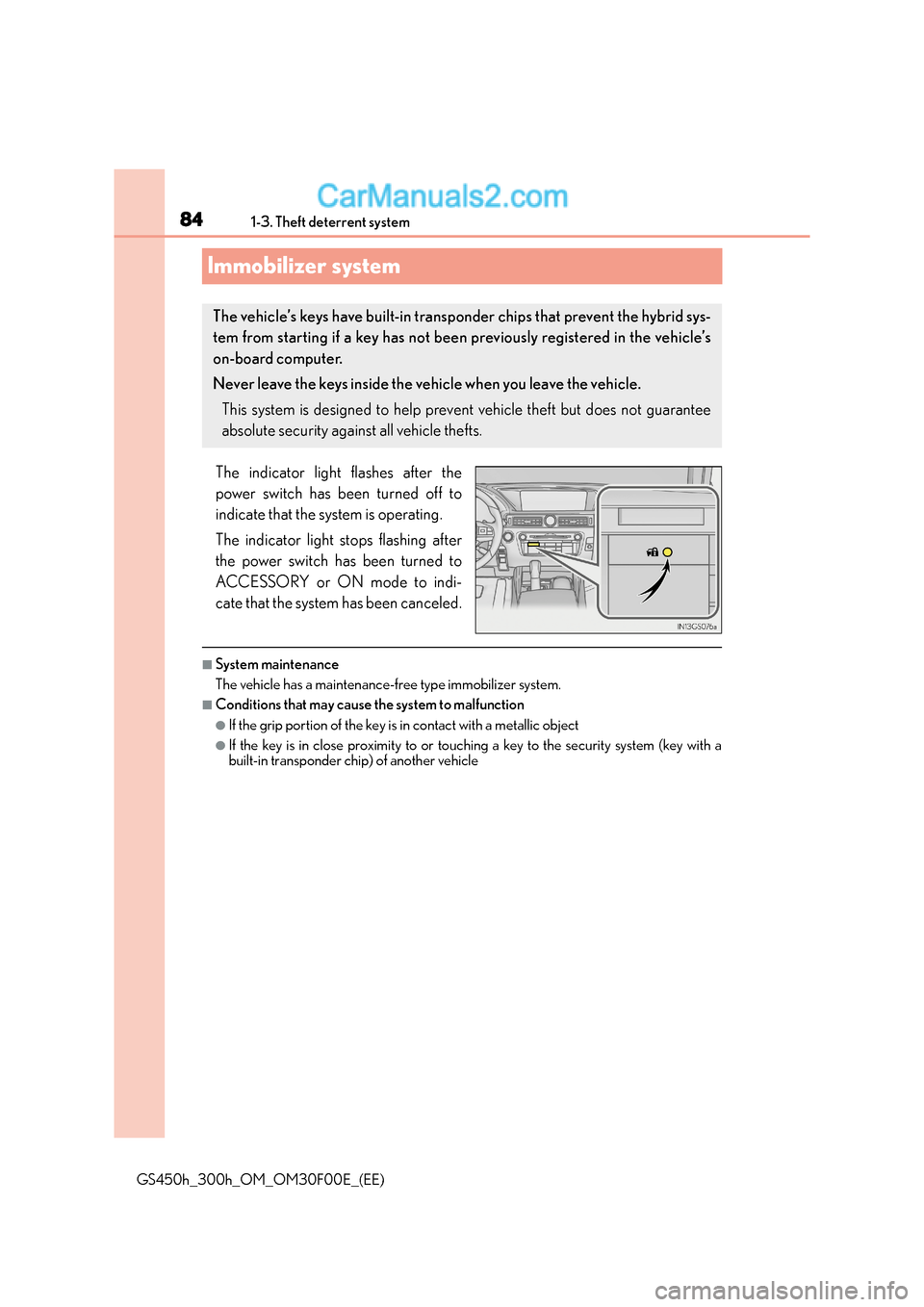
The indicator light flashes after the
power switch has been turned off to
indicate that the system is operating.
The indicator light stops flashing after
the power switch has been turned to
ACCESSORY or ON mode to indi-
cate that the system has been canceled.
■System maintenance
The vehicle has a maintenance-free type immobilizer system.
■Conditions that may cause the system to malfunction
●If the grip portion of the key is in contact with a metallic object
●If the key is in close proximity to or touching a key to the security system (key with a
built-in transponder chip) of another vehicle
The vehicle’s keys have built-in transp onder chips that prevent the hybrid sys-
tem from starting if a key has not been previously registered in the vehicle’s
on-board computer.
Never leave the keys inside the vehicle when you leave the vehicle.
This system is designed to help prev ent vehicle theft but does not guarantee
absolute security against all vehicle thefts.
Page 91 of 620
911-3. Theft deterrent system
1
GS450h_300h_OM_OM30F00E_(EE)
For safety and security
Do one of the following to deactivate or stop the alarm:
●Unlock the doors or open the trunk using the entry function or wireless
remote control.
●Turn the power switch to ACCESSORY or ON mode, or start the hybrid sys-
tem. (The alarm will be deactivated or stopped after a few seconds.)
■System maintenance
The vehicle has a maintenance-free type alarm system.
■Items to check before locking the vehicle
To prevent unexpected triggering of the alarm and vehicle theft, make sure of the follow-
ing:
●Nobody is in the vehicle.
●The windows and moon roof (if equipped) are closed before the alarm is set.
●No valuables or other personal items are left in the vehicle.
Deactivating or st opping the alarm
Page 103 of 620
1032. Instrument cluster
2
Instrument cluster
GS450h_300h_OM_OM30F00E_(EE)
*1: Refer to “NAVIGATION AND MULTIMEDIA SYSTEM OWNER’S MANUAL”
*2: These lights turn on when the power switch is turned to ON mode to indicate that asystem check is being performed. They will turn off after the “READY” indicator turns
on. There may be a malfunction in a system if a light does not come on, or turn off.
Have the vehicle inspected by any authorized Lexus dealer or repairer, or another
duly qualified and equipped professional.
*3: These lights turn on when the power switch is turned to ON mode to indicate that a system check is being performed. They will turn off after the hybrid system is on, or
after a few seconds. There may be a malfunction in a system if the lights do not come
on, or turn off. Have the vehicle inspected by any authorized Lexus dealer or repairer,
or another duly qualified and equipped professional.
*4: This light illuminates on the Center panel.
*5: The light flashes to indicate that the system is operating.
*6: When the outside temperature is approximately 3 °C (37 °F) or lower, the indicator
will flash for approximately 10 seconds, then stay on.
*7: The light turns on when the system is turned off.
*8: In order to confirm operation, the BSM outside rear view mirror indicators illuminate in the following situations:
• When the power switch is in ON mode, the BSM function is enabled on of the multi-information display.
• When the BSM function is enabled on of the multi-information display, the power switch is turned to ON mode.
If the system is functioning correctly, the BSM outside rear view mirror indicators will
turn off after a few seconds.
If the BSM outside rear view mirror indicators do not illuminate or do not turn off,
there may be a malfunction with the system.
If this occurs, have the vehicle inspected by any authorized Lexus dealer or repairer,
or another duly qualified and equipped professional.
*9: This light illuminates on the outside rear view mirrors.
WA R N I N G
■If a safety system warning light does not come on
Should a safety system light such as the ABS and SRS warning light not come on when
you start the hybrid system, this could mean that these systems are not available to help
protect you in an accident, which could result in death or serious injury. Have the vehi-
cle inspected by any authorized Lexus dealer or repairer, or another duly qualified and
equipped professional immediately if this occurs.
Page 108 of 620
1082. Instrument cluster
GS450h_300h_OM_OM30F00E_(EE)
■The meters and display illuminate when
The power switch is in ON mode.
■Instrument panel brightness adjustment
The instrument panel brightness levels when the tail lights are on and off can be adjusted
individually. However, when the surroundings ar e bright (daytime, etc.), turning on the tail
lights will not change the in strument panel brightness.
■Limitation of brightness adjustment
The brightness of the instrument panel lights is automatically adjusted based on the light
sensor detecting how bright the surroundings are. However, if the instrument panel
brightness has been manually set to either the brightest or darkest setting, the automatic
adjustment will not be performed.
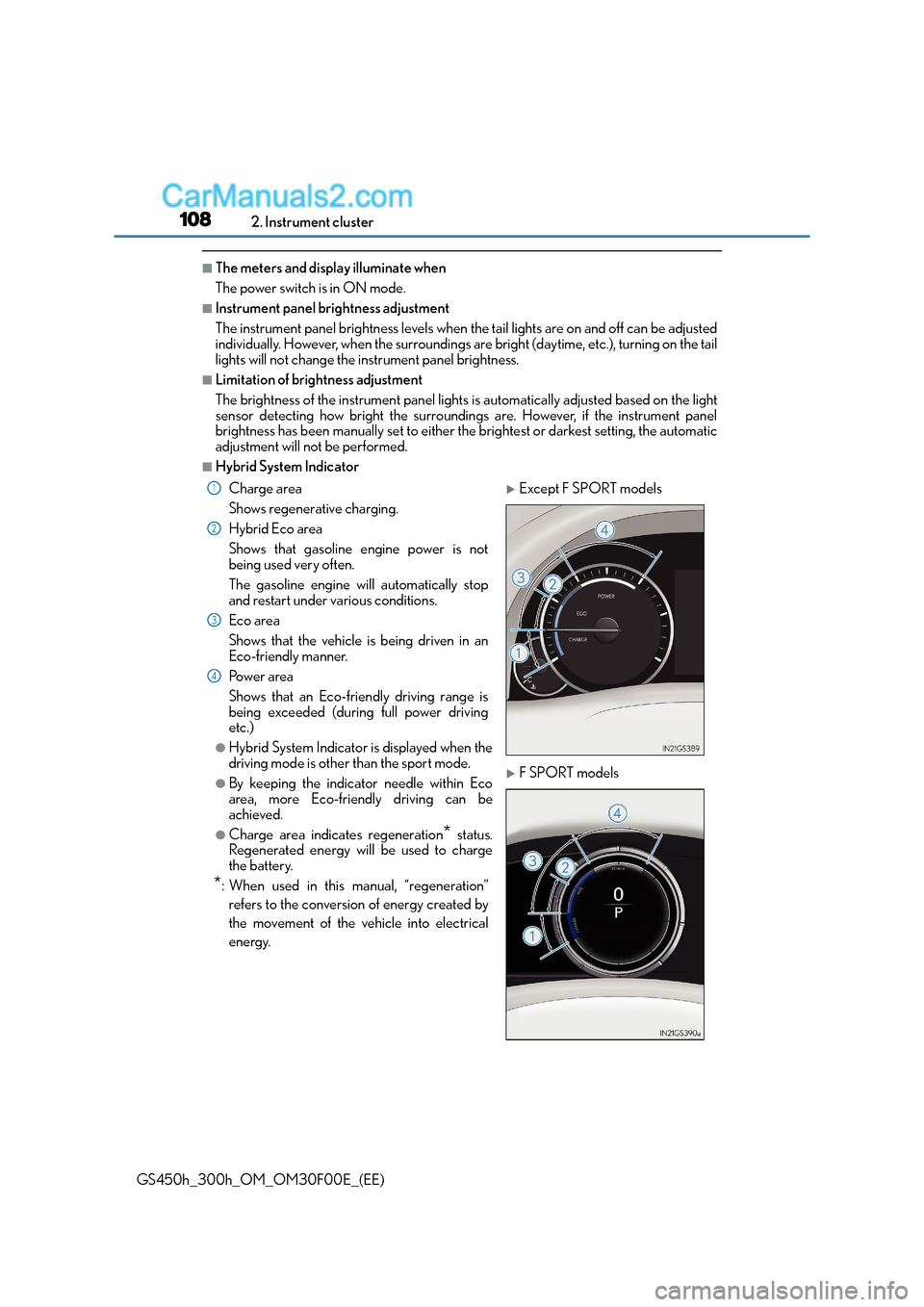
■Hybrid System Indicator
Charge area
Shows regenerative charging.
Hybrid Eco area
Shows that gasoline engine power is not
being used very often.
The gasoline engine will automatically stop
and restart under various conditions.
Eco area
Shows that the vehicle is being driven in an
Eco-friendly manner.
Po w e r a re a
Shows that an Eco-friendly driving range is
being exceeded (during full power driving
etc.)
●Hybrid System Indicator is displayed when the
driving mode is other than the sport mode.
●By keeping the indicator needle within Eco
area, more Eco-friendly driving can be
achieved.
●Charge area indicates regeneration* status.
Regenerated energy will be used to charge
the battery.
*: When used in this manual, “regeneration”
refers to the conversion of energy created by
the movement of the vehicle into electrical
energy.
XExcept F SPORT models
XF SPORT models
1
2
3
4
Page 113 of 620
1132. Instrument cluster
2
Instrument cluster
GS450h_300h_OM_OM30F00E_(EE)
Items displayed can be switched by pressing or of the meter control
switches to select and pressing or .
■Current fuel consumption*1
Displays the current rate of fuel consumption
■Average fuel economy (after reset*2/after start/after refuel)*1
Displays the average fuel consumption since the function was reset, the hybrid
system was started, and the vehicle was refueled, respectively
Use the displayed average fuel consumption as a reference.
■Average speed (after reset*2/a f t e r s t a r t )*1
Displays the average vehicle speed since the function was reset and the
hybrid system was started, respectively
■Elapsed time (after reset*2/a f t e r s t a r t )*1
Displays the elapsed time since the function was reset and the hybrid system
was started, respectively
■Distance (range/after start)*1
Displays the estimated maximum distance that can be driven with the quantity
of fuel remaining and the distance driven after the hybrid system was started
respectively.
• This distance is computed based on your average fuel consumption. As a result,the actual distance that can be driven may differ from that displayed.
• When only a small amount of fuel is added to the tank, the display may not be
updated.
When refueling, turn the power switch off. If the vehicle is refueled without turning
the power switch off, the display may not be updated.
Drive information
Page 123 of 620
1232. Instrument cluster
2
Instrument cluster
GS450h_300h_OM_OM30F00E_(EE)
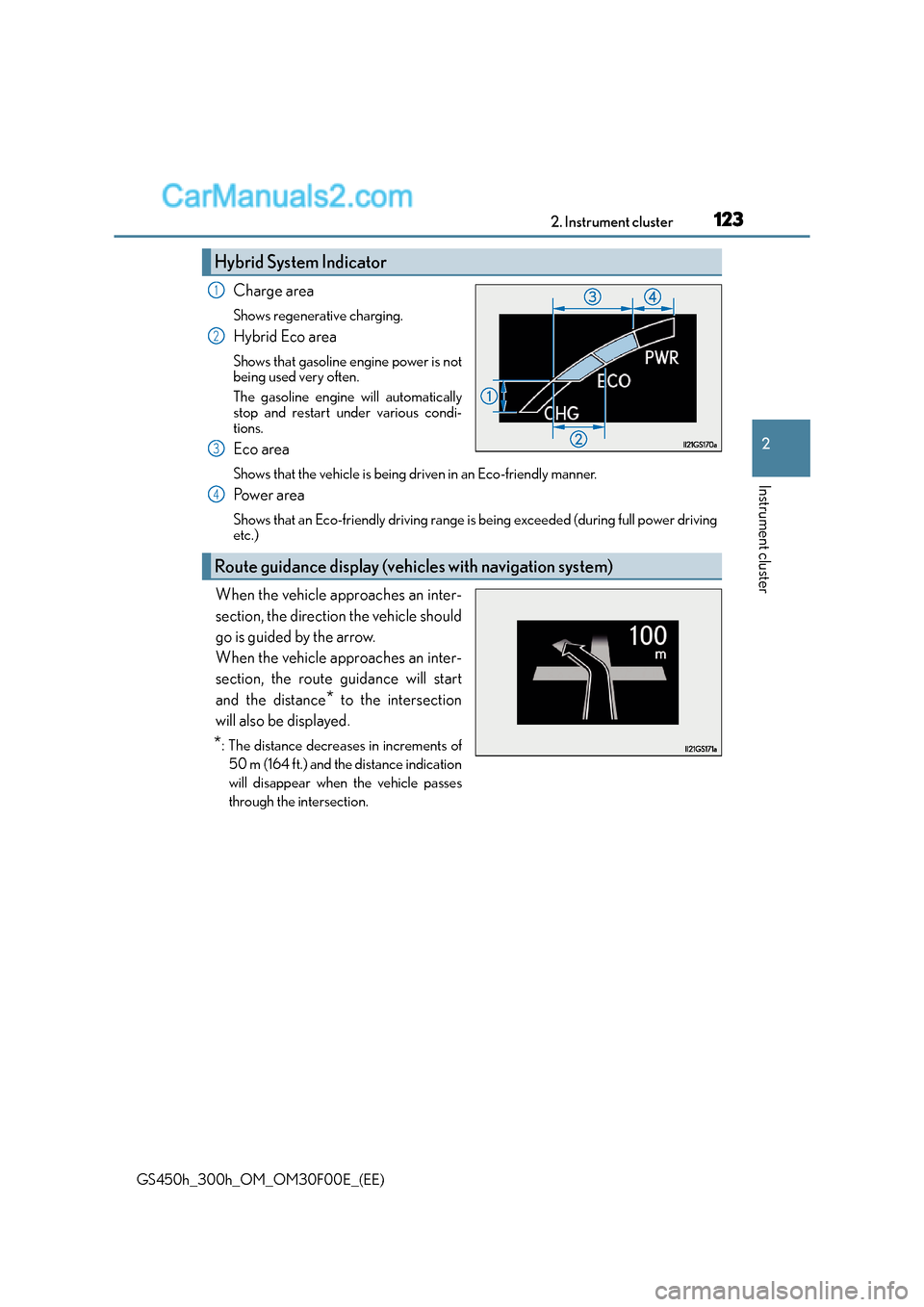
Charge area
Shows regenerative charging.
Hybrid Eco area
Shows that gasoline engine power is not
being used very often.
The gasoline engine will automatically
stop and restart under various condi-
tions.
Eco area
Shows that the vehicle is being driven in an Eco-friendly manner.
Po w e r a re a
Shows that an Eco-friendly driving range is being exceeded (during full power driving
etc.)
When the vehicle approaches an inter-
section, the direction the vehicle should
go is guided by the arrow.
When the vehicle approaches an inter-
section, the route guidance will start
and the distance
* to the intersection
will also be displayed.
*: The distance decrea ses in increments of
50 m (164 ft.) and the distance indication
will disappear when the vehicle passes
through the intersection.
Hybrid System Indicator
1
2
3
Route guidance display (vehicles with navigation system)
4
Page 124 of 620

1242. Instrument cluster
GS450h_300h_OM_OM30F00E_(EE)
Display of the following screens can be switched on or off.
●Audio display
●Route guidance display (vehicles with navigation system)
■Changing the settingsContinue holding the “DISP” but-
ton until the screen changes, and
repeat the process until the set-
ting you want to change is dis-
played.
Customization can be performed
when the head-up display is on and
the vehicle is traveling at less than
8 km/h (5 mph).
Press the “DISP” button to switch between on and off.
On and off will be switched between each time the button is pressed.
If the button is left alone without being op erated for a short time, setting will be fin-
ished automatically.
■Head-up display
●The head-up display may seem dark and hard to see when viewed through sunglasses,
especially polarized sunglasses.
Adjust the brightness of the head-up display or remove your sunglasses.
●When the head-up display is turned off, it will remain off even if the power switch is
turned to ON mode after the power switch has been turned off.
●The startup image will be displayed on the head-up display after the power switch has
been turned to ON mode while the head-up display switch is set to on.
■When the 12-volt battery is disconnected
The customize settings of the head-up display will be reset.
■Head-up display automatic position adjustment
If the display position is recorded into me mory, the head-up display will be automatically
adjusted to the desired position. ( →P. 1 7 8 )
Display customization
1
2
Page 129 of 620
1292. Instrument cluster
2
Instrument cluster
GS450h_300h_OM_OM30F00E_(EE)
Press the “MENU” button on the Remote Touch, then select on the “Menu”
screen.
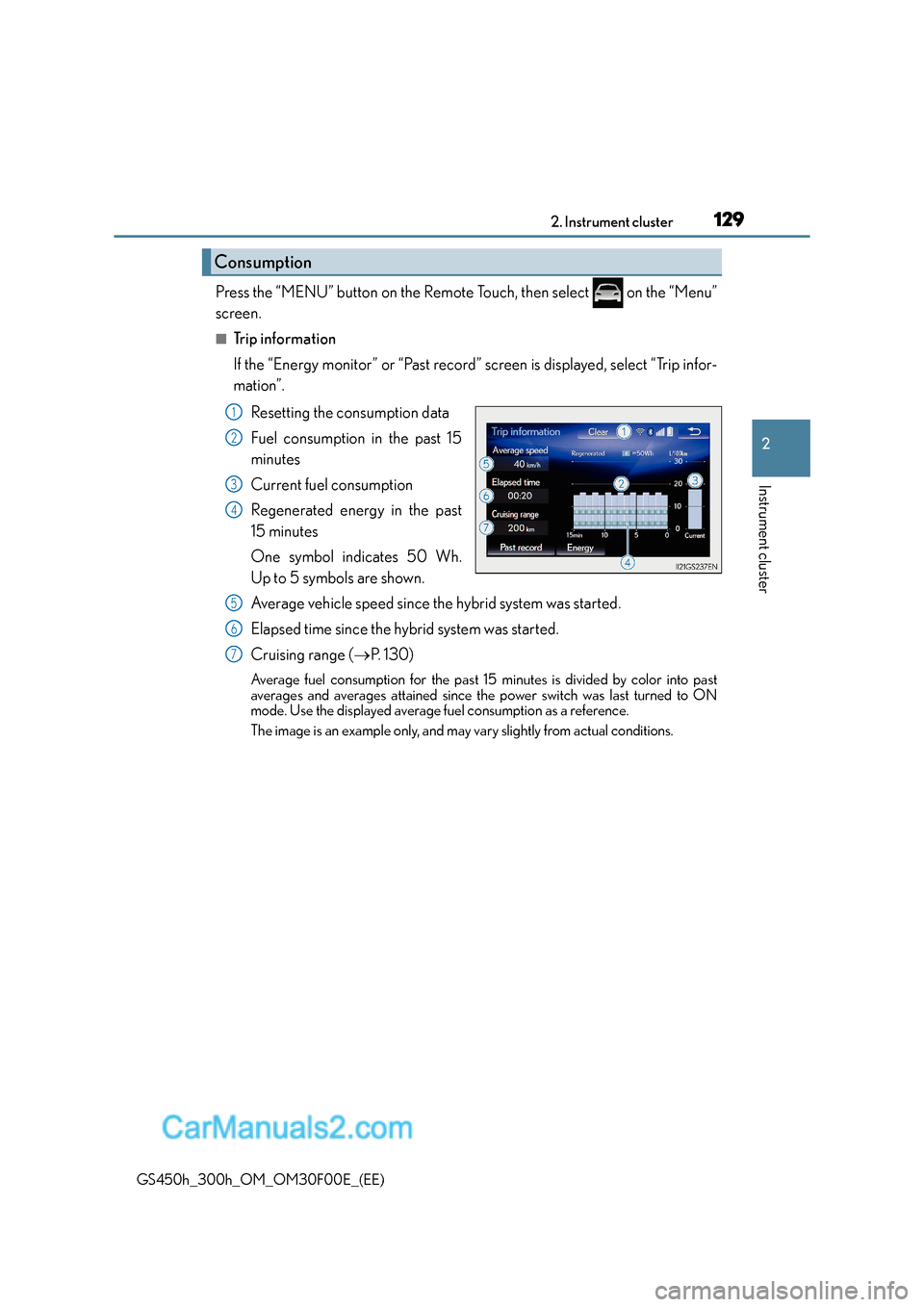
■Trip information
If the “Energy monitor” or “Past record” screen is displayed, select “Trip infor-
mation”.Resetting the consumption data
Fuel consumption in the past 15
minutes
Current fuel consumption
Regenerated energy in the past
15 minutes
One symbol indicates 50 Wh.
Up to 5 symbols are shown.
Average vehicle speed since the hybrid system was started.
Elapsed time since the hybrid system was started.
Cruising range ( →P. 1 3 0 )
Average fuel consumption for the past 15 minutes is divided by color into past
averages and averages attained since the power switch was last turned to ON
mode. Use the displayed average fuel consumption as a reference.
The image is an example only, and may vary slightly from actual conditions.
Consumption
1
2
3
4
5
6
7
Page 131 of 620
1312. Instrument cluster
2
Instrument cluster
GS450h_300h_OM_OM30F00E_(EE)
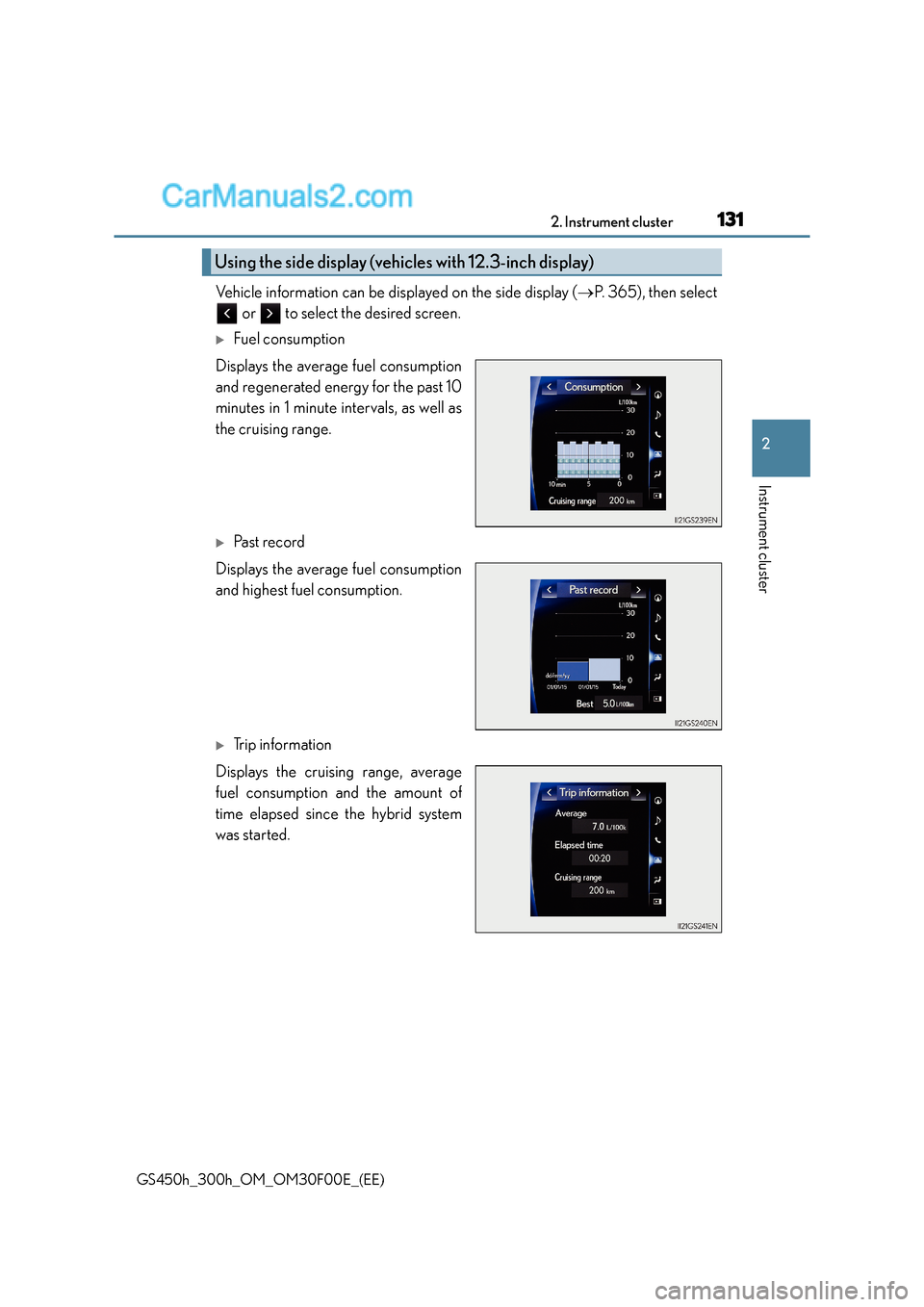
Vehicle information can be displayed on the side display (→P. 3 6 5 ) , t h e n s e l e c t
or to select the desired screen.
XFuel consumption
Displays the average fuel consumption
and regenerated energy for the past 10
minutes in 1 minute intervals, as well as
the cruising range.
XPa s t re c o rd
Displays the average fuel consumption
and highest fuel consumption.
XTrip information
Displays the cruising range, average
fuel consumption and the amount of
time elapsed since the hybrid system
was started.
Using the side display (vehic les with 12.3-inch display)