stop start Lexus GS300h 2016 Owner's Guide
[x] Cancel search | Manufacturer: LEXUS, Model Year: 2016, Model line: GS300h, Model: Lexus GS300h 2016Pages: 620
Page 201 of 620
2014-1. Before driving
4
Driving
GS450h_300h_OM_OM30F00E_(EE)
■When starting off on a uphill
The hill-start assist control is available. (→P. 3 4 5 )
■For fuel-efficient driving
Keep in mind that hybrid vehicles are similar to conventional vehicles, and it is necessary
to refrain from activities such as sudden acceleration, etc. Refer to “Hybrid vehicle driv-
ing tips”. ( →P. 3 5 1 )
■Driving in the rain
●Drive carefully when it is raining, becaus e visibility will be reduced, the windows may
become fogged-up, and the road will be slippery.
●Drive carefully when it starts to rain, beca use the road surface will be especially slip-
pery.
●Refrain from high speeds when driving on an expressway in the rain, because there may
be a layer of water between the tires and the road surface, preventing the steering and
brakes from operating properly.
■Restraining hybrid system output (Brake Override System)
●When the accelerator and brake pedals are depressed at the same time, the hybrid sys-
tem output may be restrained.
●A warning message is displayed on the mult i-information display while the system is
operating. ( →P. 5 0 3 )
■Restraining sudden start (Drive-Start Control)
●When the following unusual operation is performed, the hybrid system output may be
restrained.
• When the shift lever is shifted from R to D, D to R, N to R, P to D, or P to R (D
includes S) with the accelerator pedal depressed, a warning message appears on
the multi-information display. ( →P. 4 8 9 )
• When the accelerator pedal is depressed too much while the vehicle is in reverse.
●While Drive-Start Control is being activated, your vehicle may have trouble escaping
from the mud or fresh snow. In such case, deactivate TRC ( →P. 346) to cancel Drive-
Start Control so that the vehicle may become able to escape from the mud or fresh
snow.
■Breaking in your new Lexus
To extend the life of the vehicle, observing the following precautions is recommended:
●For the first 300 km (186 miles):
Avoid sudden stops.
●For the first 800 km (500 miles):
Do not tow a trailer.
●For the first 1000 km (621 miles):
• Do not drive at extremely high speeds.
• Avoid sudden acceleration.
• Do not drive continuously in low gears.
• Do not drive at a constant speed for extended periods.
Page 203 of 620
2034-1. Before driving
4
Driving
GS450h_300h_OM_OM30F00E_(EE)
WA R N I N G
Observe the following precautions.
Failure to do so may result in death or serious injury.
■When starting the vehicle
Always keep your foot on the brake pedal while stopped with the “READY” indicator is
illuminated. This prevents the vehicle from creeping.
■When driving the vehicle
●Do not drive if you are unfamiliar with the location of the brake and accelerator ped-
als to avoid depressing the wrong pedal.
• Accidentally depressing the accelerator pedal instead of the brake pedal will result in sudden acceleration that may lead to an accident.
• When backing up, you may twist your body around, leading to a difficulty in oper-
ating the pedals. Make sure to operate the pedals properly.
• Make sure to keep a correct driving posture even when moving the vehicle only slightly. This allows you to depress the brake and accelerator pedals properly.
• Depress the brake pedal using your right foot. Depressing the brake pedal using
your left foot may delay response in an emergency, resulting in an accident.
●The driver should pay extra attention to pedestrians when the vehicle is powered only
by the electric motor (traction motor). As there is no engine noise, the pedestrians
may misjudge the vehicle’s movement.
●Do not drive the vehicle over or stop the vehicle near flammable materials.
The exhaust system and exhaust gases can be extremely hot. These hot parts may
cause a fire if there is any flammable material nearby.
●During normal driving, do not turn off the hybrid system. Turning the hybrid system off
while driving will not cause loss of steering or braking control, however, power assist
to the steering will be lost. This will make it more difficult to steer smoothly, so you
should pull over and stop the vehicle as soon as it is safe to do so.
In the event of an emergency, such as if it becomes impossible to stop the vehicle in
the normal way: →P. 4 6 9
●Use engine braking (downshift) to maintain a safe speed when driving down a steep
hill.
Using the brakes continuously may cause the brakes to overheat and lose effective-
ness. ( →P. 2 2 4 )
●Do not adjust the positions of the steering wheel, the seat, or the inside or outside rear
view mirrors while driving.
Doing so may result in a loss of vehicle control.
●Always check that all passengers’ arms, heads or other parts of their body are not
outside the vehicle.
Page 214 of 620
2144-1. Before driving
GS450h_300h_OM_OM30F00E_(EE)
Your vehicle will handle differently when towing a trailer. In order to avoid acci-
dent, death or serious injury, keep the following in mind when towing:
■Checking connections between trailer and lights
Stop the vehicle and check the operation of the connection between the
trailer and lights after driving for a brief period as well as before starting off.
■Practicing driving with a coupled trailer
●Get the feel for turning, stopping and reversing with the trailer coupled by
practicing in an area with no or light traffic.
●When reversing with a coupled trailer, hold the section of the steering
wheel nearest to you and rotate clockwise to turn the trailer left or counter-
clockwise to turn it right. Always rotate a little at a time to prevent steering
error. Have someone guide you when reversing to lessen the risk of an
accident.
■Increasing vehicle-to-vehicle distance
At a speed of 10 km/h (6 mph), the distance to the vehicle running ahead of
you should be equivalent to or greater than the combined length of your vehi-
cle and trailer. Avoid sudden braking th at may cause skidding. Otherwise, the
vehicle may spin out of control. This is especially true when driving on wet or
slippery road surfaces.
■Sudden acceleration/steering input/cornering
Executing sharp turns when towing may result in the trailer colliding with your
vehicle. Decelerate well in advance when approaching turns and take them
slowly and carefully to avoid sudden braking.
■Important points regarding turning
The wheels of the trailer will travel closer to the inside of the curve than the
wheels of the vehicle. To make allowance for this, take the turns wider than you
would normally do.
■Important points regarding stability
Vehicle movement resulting from uneven road surfaces and strong cross-
winds will affect handling. The vehicle may also be rocked by passing buses or
large trucks. Frequently check behind when moving alongside such vehicles.
As soon as such vehicle movement occurs, immediately start to decelerate
smoothly by slowly applying the brakes. Always steer the vehicle straight
ahead while braking.
Guidance
Page 219 of 620
2194-2. Driving procedures
4
Driving
GS450h_300h_OM_OM30F00E_(EE)
If the hybrid system is stopped with the shift lever in a position other than P, the
power switch will not be turned off but instead be turned to ACCESSORY
mode. Perform the following procedure to turn the switch off:Check that the parking brake is set.
Shift the shift lever to P.
Check that “Turn Off Vehicle” is displayed on the multi-information display
and then press the power switch once.
Check that “Turn Off Vehicle” on the multi-information display is off.
■Auto power off function
If the vehicle is left in ACCESSORY mode for more than 20 minutes or ON mode (the
hybrid system is not operating) for more than an hour with the shift lever in P, the power
switch will automatically turn off. However, this function cannot entirely prevent 12-volt
battery discharge. Do not leave the vehicle with the power switch in ACCESSORY or
ON mode for long periods of time when the hybrid system is not operating.
■Sounds and vibrations specific to a hybrid vehicle
→P. 7 7
■Electronic key battery depletion
→P. 1 3 6
■When the ambient temperature is low, su ch as during winter driving conditions
When starting the hybrid system, the flashing time of the “READY” indicator may be
long. Leave the vehicle as it is until the “REA DY” indicator is steady on, as steady means
the vehicle is able to move.
■Conditions affecting operation
→ P. 1 5 5
■Notes for the push-start function
→P. 1 5 7
■If the hybrid system does not start
●The immobilizer system may not have been deactivated. ( →P. 8 4 )
Contact any authorized Lexus dealer or repairer, or another duly qualified and
equipped professional.
●Check that the shift lever is securely set in P. The hybrid system may not start if the shift
lever is displaced out of P. “Shift to P position to Start” will be displayed on the multi-
information display.
■Steering lock
After turning the power switch off and opening and closing the doors, the steering wheel
will be locked due to the steering lock func tion. Operating the power switch again auto-
matically cancels the steering lock.
When stopping the hybrid system with the shift lever in a position other
than P
1
2
3
4
Page 221 of 620
2214-2. Driving procedures
4
Driving
GS450h_300h_OM_OM30F00E_(EE)
WA R N I N G
■When starting the hybrid system
Always start the hybrid system while sitting in the driver’s seat. Do not depress the
accelerator pedal while starting the hybrid system under any circumstances.
Doing so may cause an accident resulting in death or serious injury.
■Caution while driving
If hybrid system failure occurs while the vehicle is moving, do not lock or open the
doors until the vehicle reaches a safe and complete stop. Activation of the steering lock
in this circumstance may lead to an accident, resulting in death or serious injury.
■Stopping the hybrid system in an emergency
If you want to stop the hybrid system in an emergency while driving the vehicle, press
and hold the power switch for more than 2 se conds, or press it briefly 3 times or more
in succession. ( →P. 4 6 9 )
However, do not touch the power switch while driving except in an emergency. Turning
the hybrid system off while driving will not cause loss of steering or braking control,
however, power assist to the steering will be lost. This will make it more difficult to steer
smoothly, so you should pull over and stop the vehicle as soon as it is safe to do so.
NOTICE
■To prevent 12-volt battery discharge
●Do not leave the power switch in ACCESSORY or ON mode for long periods of
time without the hybrid system on.
●If “POWER ON” is displayed on the multi-in formation display, the power switch is not
off. Exit the vehicle after turning the power switch off.
●Do not stop the hybrid system when the shift lever is in a position other than P. If the
hybrid system is stopped in another shift lever position, the power switch will not be
turned off but instead be turned to ACCESSORY mode. If the vehicle is left in
ACCESSORY mode, 12-volt battery discharge may occur.
■When starting the hybrid system
If the hybrid system becomes difficult to start, have your vehicle checked by any autho-
rized Lexus dealer or repairer, or anothe r duly qualified and equipped professional
immediately.
■Symptoms indicating a malfunction with the power switch
If the power switch seems to be operating somewhat differently than usual, such as the
switch sticking slightly, there may be a malfunction. Contact any authorized Lexus
dealer or repairer, or another duly qualif ied and equipped professional immediately.
Page 224 of 620
2244-2. Driving procedures
GS450h_300h_OM_OM30F00E_(EE)
Hybrid transmission
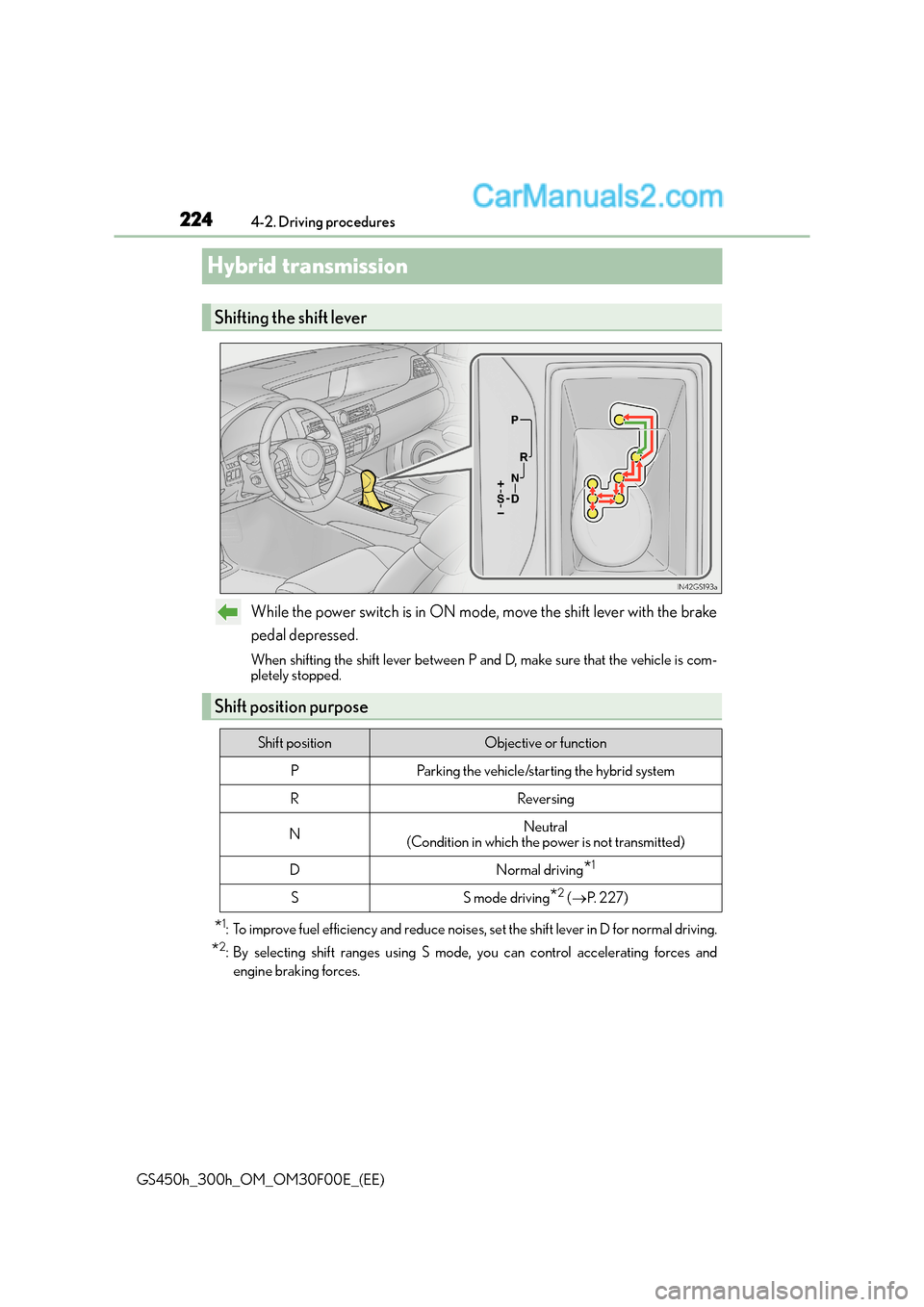
While the power switch is in ON mode, move the shift lever with the brake
pedal depressed.
When shifting the shift lever between P and D, make sure that the vehicle is com-
pletely stopped.
*1: To improve fuel efficiency and reduce noises , set the shift lever in D for normal driving.
*2: By selecting shift ranges using S mode, you can control accelerating forces and
engine braking forces.
Shifting the shift lever
Shift position purpose
Shift positionObjective or function
PParking the vehicle/starting the hybrid system
RReversing
NNeutral
(Condition in which the power is not transmitted)
DNormal driving*1
SS mode driving*2 ( → P. 2 2 7 )
Page 228 of 620
2284-2. Driving procedures
GS450h_300h_OM_OM30F00E_(EE)
■Automatic deactivation of shift range selection in the D position
Shift range selection in the D position will be deactivated in the following situations:
●When the vehicle comes to a stop
●If the accelerator pedal is depressed for more than a certain period of time
●When the shift lever is shifted to other than D
■Downshifting restrictions warning buzzer
To help ensure safety and driving performance, downshifting operation may sometimes
be restricted. In some circumstances, downsh ifting may not be possible even when the
shift lever or paddle shift switch is operated. (A buzzer will sound twice.)
■Snow mode automatic deactivation
Snow mode is automatically deactivated if the power switch is turned off after driving in
snow mode.
■When driving with cruise control, dynamic radar cruise control or dynamic radar
cruise control with full-speed range activated
Even when performing the following actions with the intent of enabling engine braking,
engine braking will not activate because cruise control, dynamic radar cruise control or
dynamic radar cruise control with full-speed range will not be canceled.
●GS450h: While driving in the D position or S mode, downshifting to 7, 6, 5 or 4.
( → P. 303, 315, 327)
●GS300h: While driving in the D position, downshifting to 5 or 4. ( →P. 303, 315, 327)
●When switching the driving mode to sport mode while driving in D position. ( →P. 330)
■Restraining sudden start (Drive-Start Control)
●When the following unusual operation is performed, the engine output may be
restrained.
• When the shift lever is shifted from R to D, D to R, N to R, P to D, or P to R (D
includes S) with the accelerator pedal depressed, a warning message appears on
the multi-information display. ( →P. 4 8 2 )
• When the accelerator pedal is depressed too much while the vehicle is in reverse.
■If the shift lever cannot be shifted from P
→ P. 5 4 5
WA R N I N G
■When driving on slippery road surfaces
Be careful of downshifting and sudden acceler ation, as this could result in the vehicle
skidding to the side or spinning.
Page 234 of 620
2344-2. Driving procedures
GS450h_300h_OM_OM30F00E_(EE)
Brake Hold
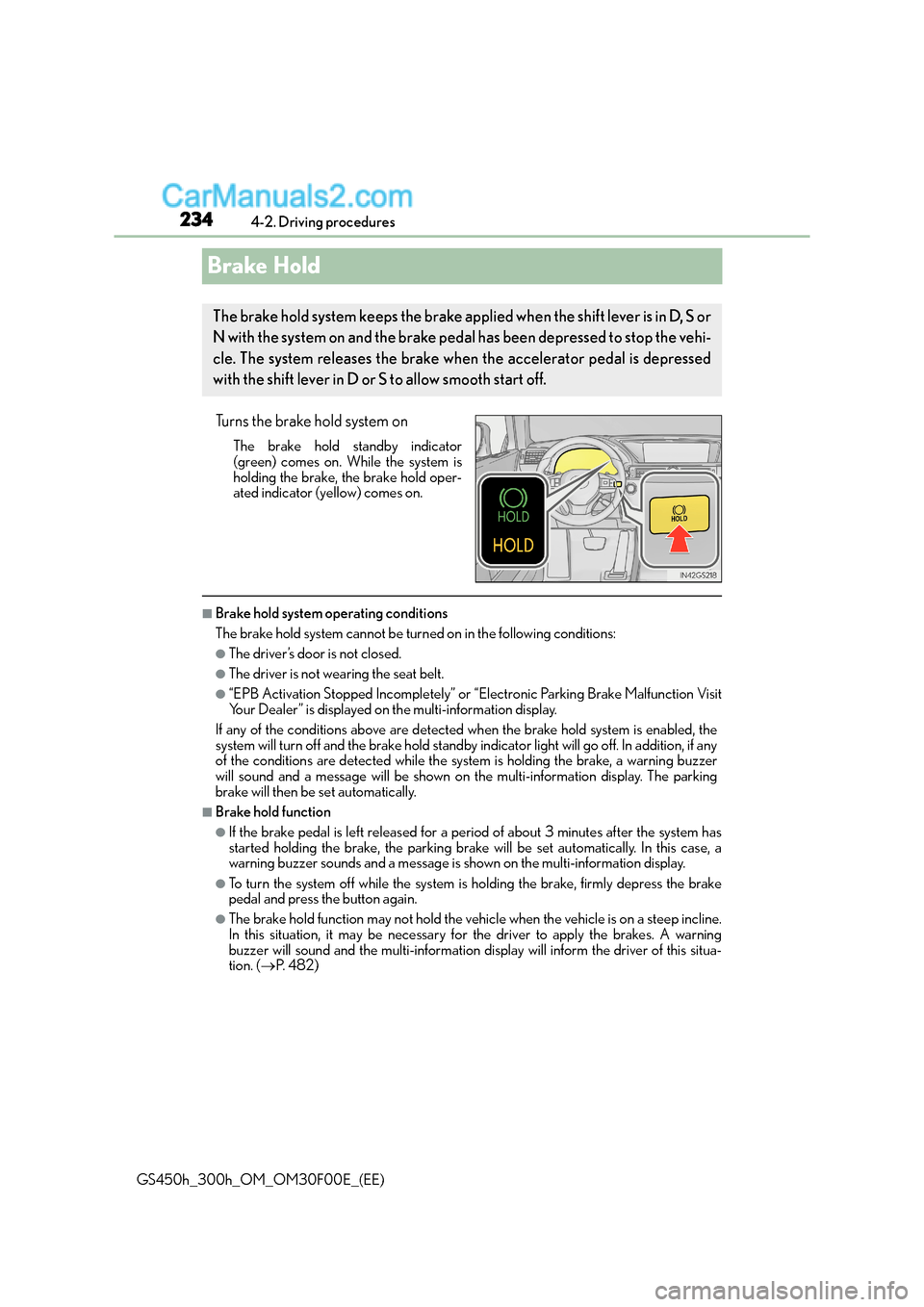
Turns the brake hold system on
The brake hold standby indicator
(green) comes on. While the system is
holding the brake, the brake hold oper-
ated indicator (yellow) comes on.
■Brake hold system operating conditions
The brake hold system cannot be turn ed on in the following conditions:
●The driver’s door is not closed.
●The driver is not wearing the seat belt.
●“EPB Activation Stopped Incompletely” or “Electronic Parking Brake Malfunction Visit
Your Dealer” is displayed on the multi-information display.
If any of the conditions above are detected when the brake hold system is enabled, the
system will turn off and the brake hold standby indicator light will go off. In addition, if any
of the conditions are detected while the sy stem is holding the brake, a warning buzzer
will sound and a message will be shown on th e multi-information display. The parking
brake will then be set automatically.
■Brake hold function
●If the brake pedal is left released for a period of about 3 minutes after the system has
started holding the brake, th e parking brake will be set automatically. In this case, a
warning buzzer sounds and a message is shown on the multi-information display.
●To turn the system off while the system is holding the brake, firmly depress the brake
pedal and press the button again.
●The brake hold function may not hold the vehicle when the vehicle is on a steep incline.
In this situation, it may be necessary for the driver to apply the brakes. A warning
buzzer will sound and the multi-information di splay will inform the driver of this situa-
tion. ( →P. 4 8 2 )
The brake hold system keeps the brake applied when the shift lever is in D, S or
N with the system on and the brake peda l has been depressed to stop the vehi-
cle. The system releases the brake wh en the accelerator pedal is depressed
with the shift lever in D or S to allow smooth start off.
Page 309 of 620
3094-5. Using the driving support systems
4
Driving
GS450h_300h_OM_OM30F00E_(EE)
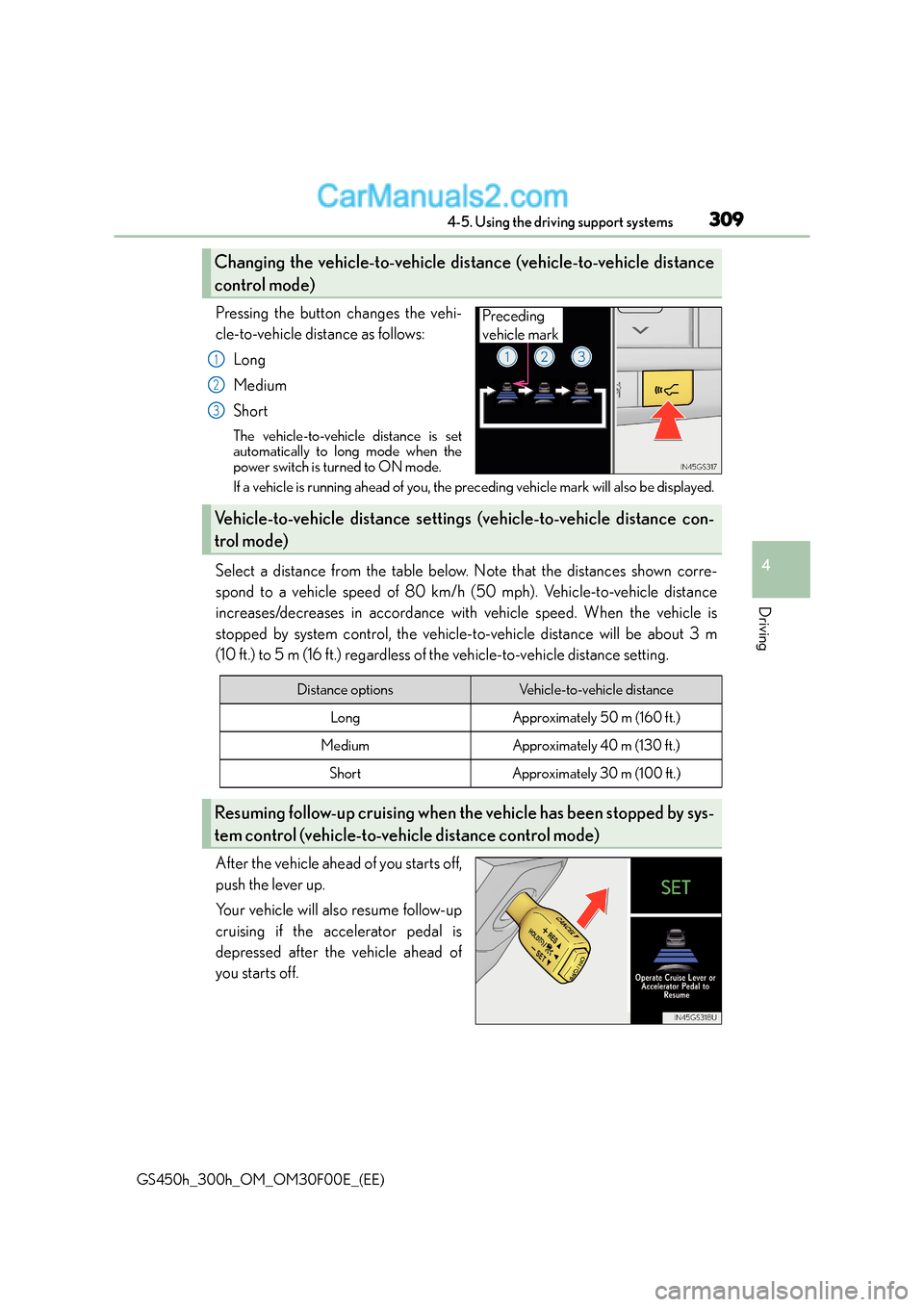
Pressing the button changes the vehi-
cle-to-vehicle distance as follows:Long
Medium
Short
The vehicle-to-vehicle distance is set
automatically to long mode when the
power switch is turned to ON mode.
If a vehicle is running ahead of you, the pr eceding vehicle mark will also be displayed.
Select a distance from the table below. Note that the distances shown corre-
spond to a vehicle speed of 80 km/h (50 mph). Vehicle-to-vehicle distance
increases/decreases in accordance with vehicle speed. When the vehicle is
stopped by system control, the vehicle-to-vehicle distance will be about 3 m
(10 ft.) to 5 m (16 ft.) regardless of the vehicle-to-vehicle distance setting.
After the vehicle ahead of you starts off,
push the lever up.
Your vehicle will also resume follow-up
cruising if the accelerator pedal is
depressed after the vehicle ahead of
you starts off.
Changing the vehicle-to-vehicle distance (vehicle-to-vehicle distance
control mode)
Preceding
vehicle mark
1
2
3
Vehicle-to-vehicle distance setting s (vehicle-to-vehicle distance con-
trol mode)
Distance optionsVehicle-to-vehicle distance
LongApproximately 50 m (160 ft.)
MediumApproximately 40 m (130 f t.)
ShortApproximately 30 m (100 ft.)
Resuming follow-up cruising when th e vehicle has been stopped by sys-
tem control (vehicle-to-vehicle distance control mode)
Page 344 of 620
3444-5. Using the driving support systems
GS450h_300h_OM_OM30F00E_(EE)
Driving assist systems
◆ECB (Electronically Controlled Brake System)
The electronically controlled system generates braking force corresponding
to the brake operation
◆ABS (Anti-lock Brake System)
Helps to prevent wheel lock when the brakes are applied suddenly, or if the
brakes are applied while driving on a slippery road surface
◆Brake assist
Generates an increased level of braking force after the brake pedal is
depressed when the system detects a panic stop situation
◆VSC (Vehicle Stability Control)
Helps the driver to control skidding when swerving suddenly or turning on
slippery road surfaces
◆TRC (Traction Control)
Helps to maintain drive power and pr event the drive wheels from spinning
when starting the vehicle or accelerating on slippery roads
◆VGRS (Variable Gear Ratio Steering) (if equipped)
Adjusts the front wheel turning angle in accordance with the vehicle speed
and steering wheel movement
To help enhance driving safety and performance, the following systems oper-
ate automatically in response to various driving situations. Be aware, however,
that these systems are supplementary and should not be relied upon too
heavily when operating the vehicle.