display Lexus GS300h 2017 Owners Manual
[x] Cancel search | Manufacturer: LEXUS, Model Year: 2017, Model line: GS300h, Model: Lexus GS300h 2017Pages: 600, PDF Size: 58.17 MB
Page 345 of 600
345
5-1. Remote Touch screen
5
Interior features
GS450h_300h_OM_OM30F92E_(EE) For details of the functions and operation of the main display, refer to the respec-
tive section.
■Display the side display
Basic screens
The following functions can be displayed and operated on the side display.
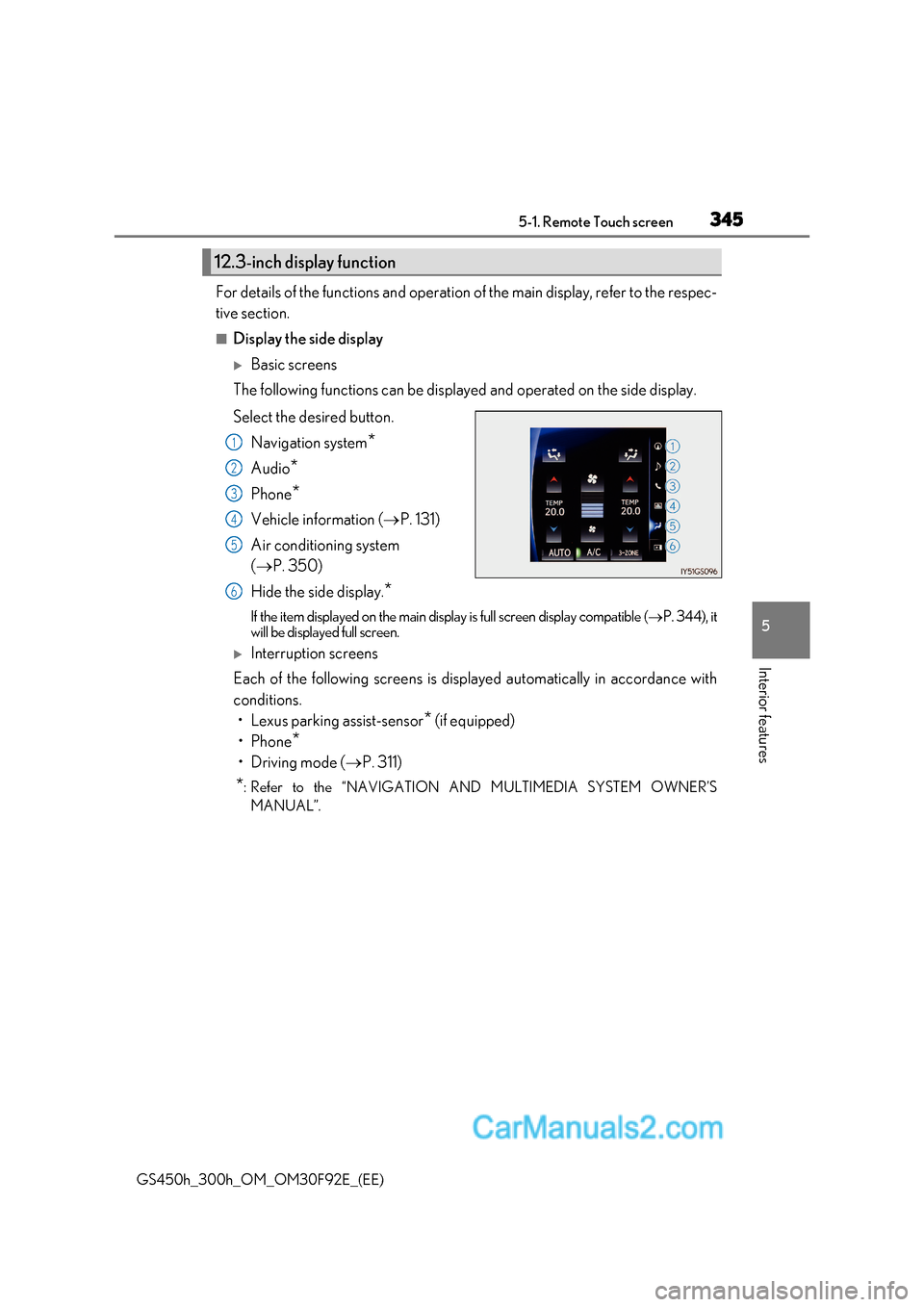
Select the desired button.
Navigation system *
Audio *
Phone *
Vehicle information ( P. 131)
Air conditioning system ( P. 350)
Hide the side display. *
If the item displayed on the main display is full screen display compatible ( P. 344), it
will be displayed full screen.
Interruption screens
Each of the following screens is displayed automatically in accordance with
conditions.
Page 346 of 600
3465-2. Using the air conditioning system and defogger
GS450h_300h_OM_OM30F92E_(EE)
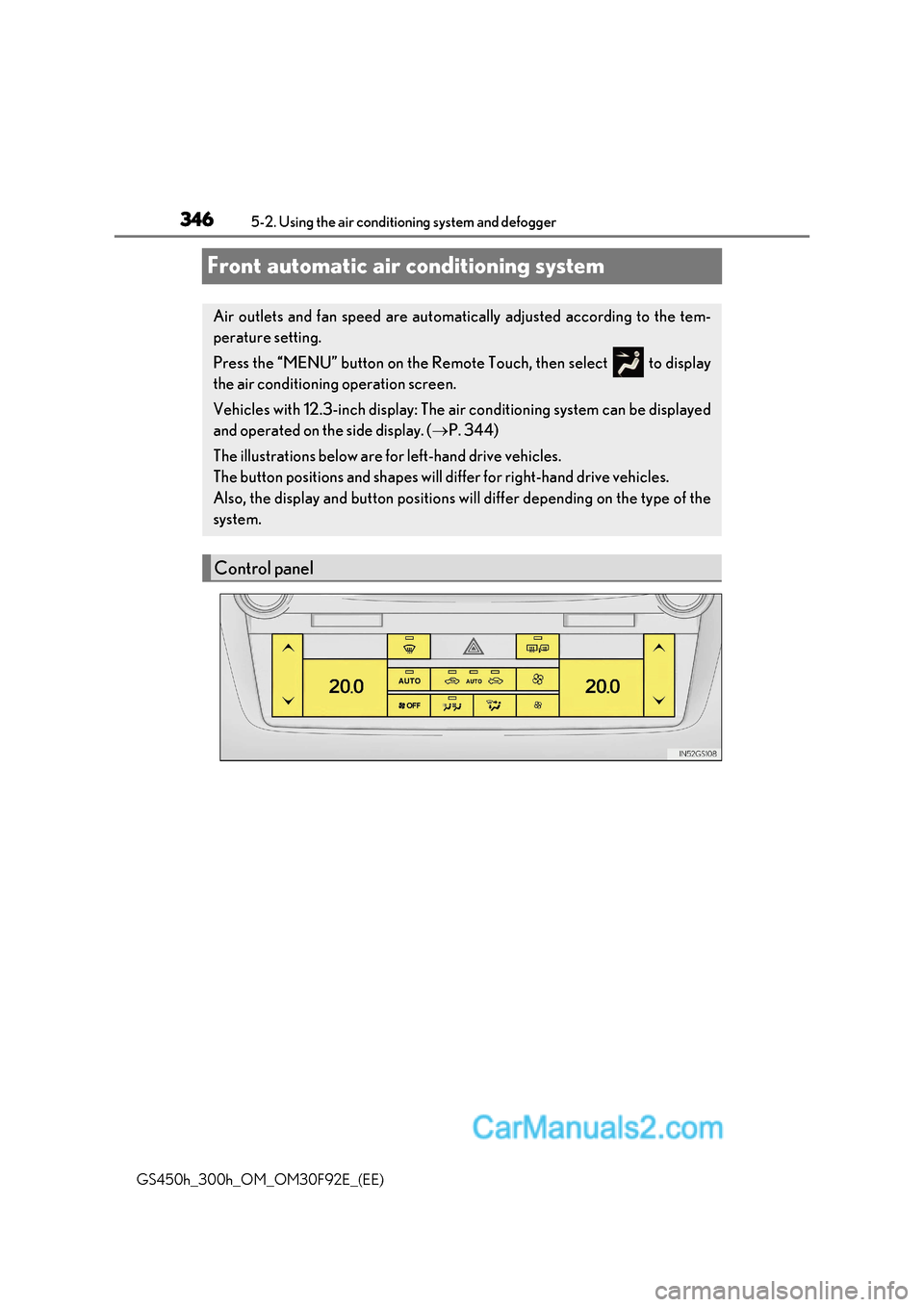
Front automatic air conditioning system
Air outlets and fan speed are automatically adjusted according to the tem-
perature setting.
Press the “MENU” button on the Remote Touch, then select to display
the air conditioning operation screen.
Vehicles with 12.3-inch display: The air conditioning system can be displayed
and operated on the side display. ( P. 344)
The illustrations below are for left-hand drive vehicles.
The button positions and shapes will di ffer for right-hand drive vehicles.
Also, the display and button positions will differ depending on the type of the
system.
Control panel
Page 348 of 600
3485-2. Using the air conditio ning system and defogger
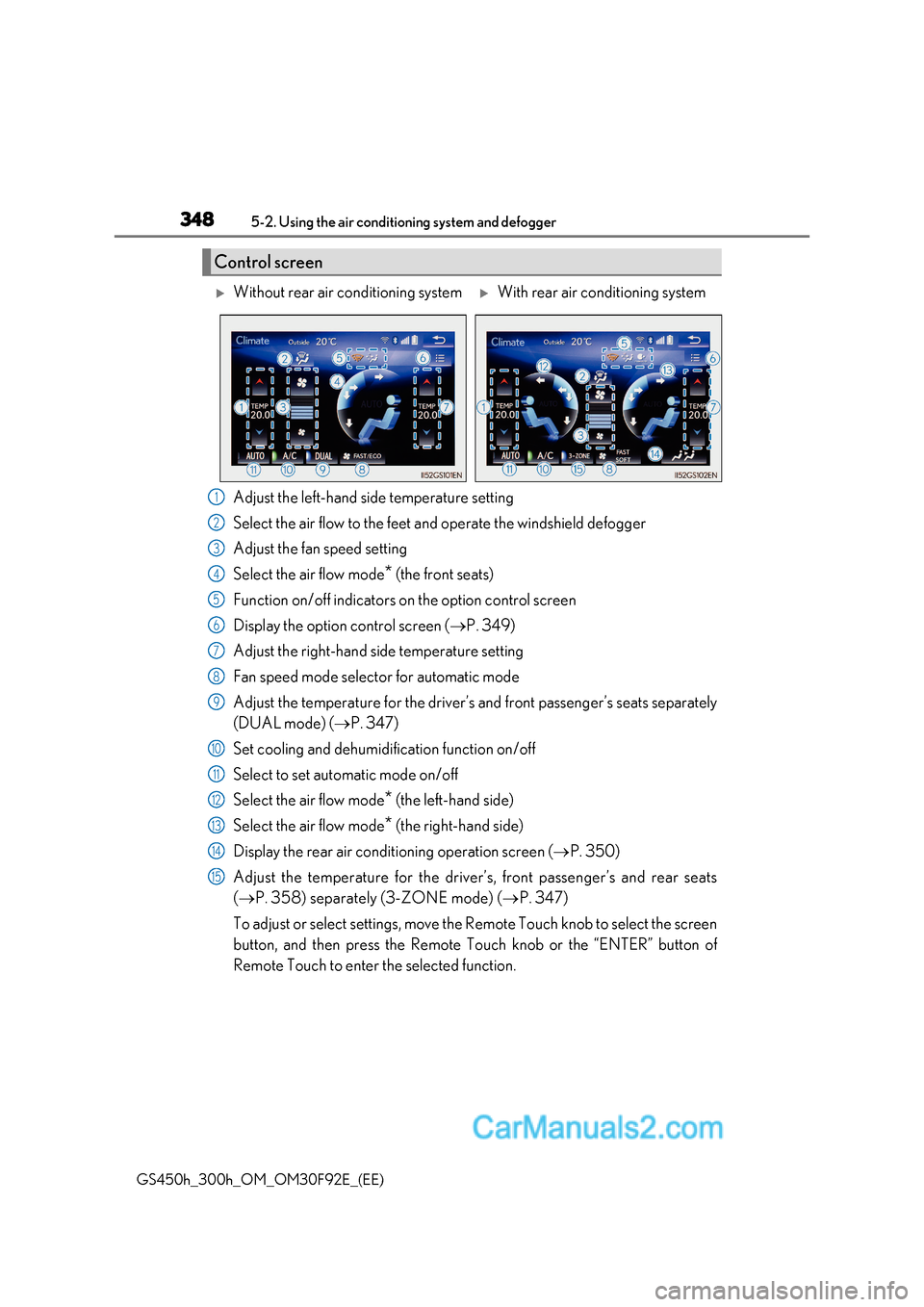
GS450h_300h_OM_OM30F92E_(EE)Adjust the left-hand side temperature setting
Select the air flow to the feet and operate the windshield defogger
Adjust the fan speed setting
Select the air flow mode
* (the front seats)
Function on/off indicators on the option control screen
Display the option control screen ( P. 349)
Adjust the right-hand side temperature setting
Fan speed mode selector for automatic mode
Adjust the temperature for the driver’s and front passenger’s seats separately
(DUAL mode) ( P. 347)
Set cooling and dehumidification function on/off
Select to set automatic mode on/off
Select the air flow mode *
(the left-hand side)
Select the air flow mode * (the right-hand side)
Display the rear air conditioning operation screen ( P. 350)
Adjust the temperature for the driver’s, front passenger’s and rear seats ( P. 358) separately (3-ZONE mode) ( P. 347)
To adjust or select settings, move the Remote Touch knob to select the screen
button, and then press the Remote Touch knob or the “ENTER” button of
Remote Touch to enter the selected function.
Control screen
Without rear air conditioning systemWith rear air conditioning system
1
2
3
4
5
6
7
8
9
10
11
12
13
14
15
Page 349 of 600
349
5-2. Using the air conditioning system and defogger
5
Interior features
GS450h_300h_OM_OM30F92E_(EE) *
: Air flows to the upper body
Air flows to the upper body and feet
Air flows to the feet
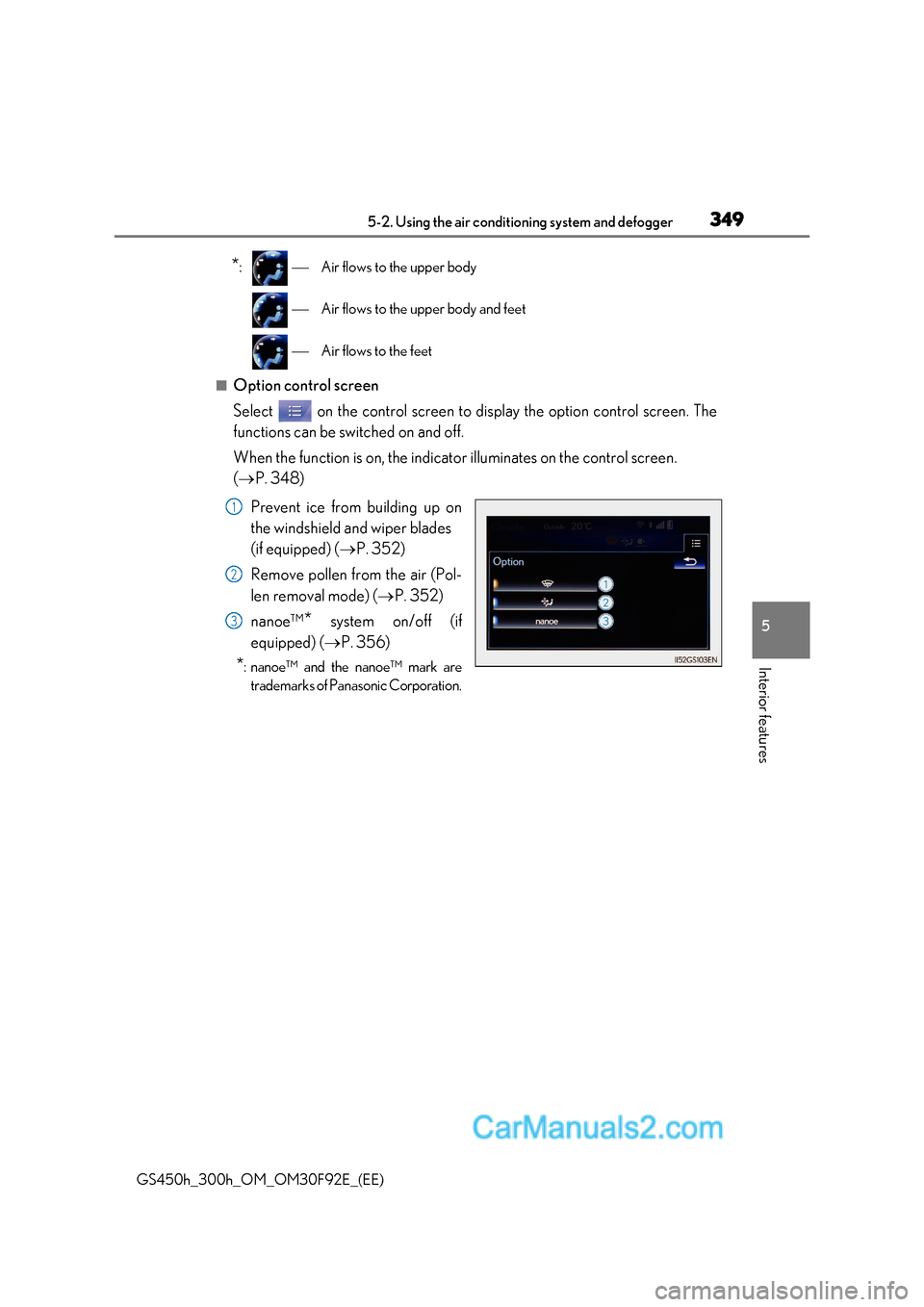
■Option control screen
Select on the control screen to display the option control screen. The
functions can be switched on and off.
When the function is on, the indicator illuminates on the control screen. ( P. 348)
Prevent ice from building up on
the windshield and wiper blades
(if equipped) ( P. 352)
Remove pollen from the air (Pol-
len removal mode) ( P. 352)
nanoe™ *
system on/off (if
equipped) ( P. 356)
* : nanoe™ and the nanoe™ mark are
trademarks of Panasonic Corporation.
1
2
3
Page 350 of 600
3505-2. Using the air conditio ning system and defogger
GS450h_300h_OM_OM30F92E_(EE)
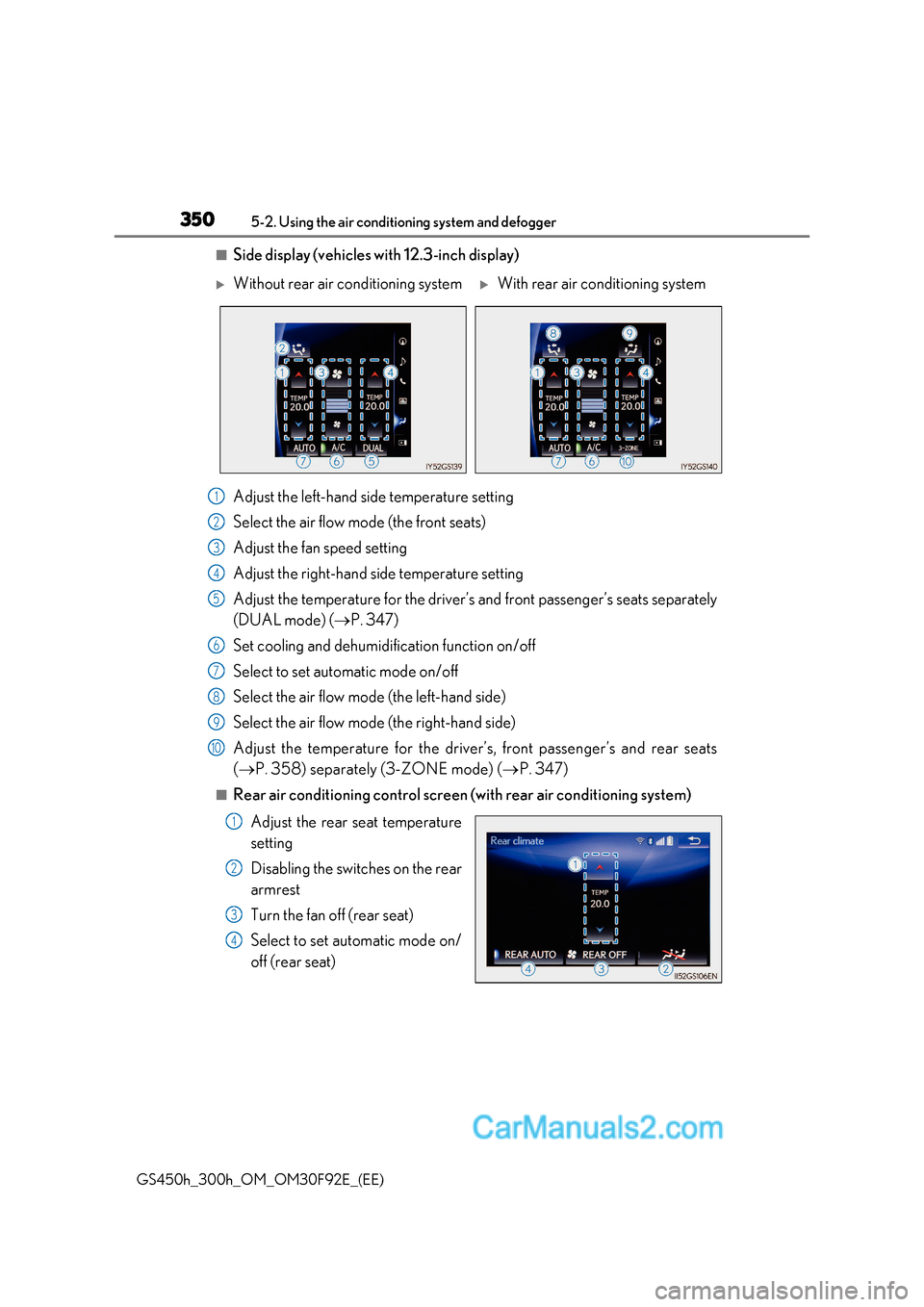
■Side display (vehicles with 12.3-inch display)
Adjust the left-hand side temperature setting
Select the air flow mode (the front seats)
Adjust the fan speed setting
Adjust the right-hand side temperature setting
Adjust the temperature for the driver’s and front passenger’s seats separately
(DUAL mode) (P. 347)
Set cooling and dehumidification function on/off
Select to set automatic mode on/off
Select the air flow mode (the left-hand side)
Select the air flow mode (the right-hand side)
Adjust the temperature for the driver’s, front passenger’s and rear seats ( P. 358) separately (3-ZONE mode) ( P. 347)
■Rear air conditioning control screen (with rear air conditioning system)
Adjust the rear seat temperature
setting
Disabling the switches on the rear
armrest
Turn the fan off (rear seat)
Select to set automatic mode on/
off (rear seat)
Without rear air conditioning systemWith rear air conditioning system
1
2
3
4
5
6
7
8
9
10
1
2
3
4
Page 353 of 600
353
5-2. Using the air conditioning system and defogger
5
Interior features
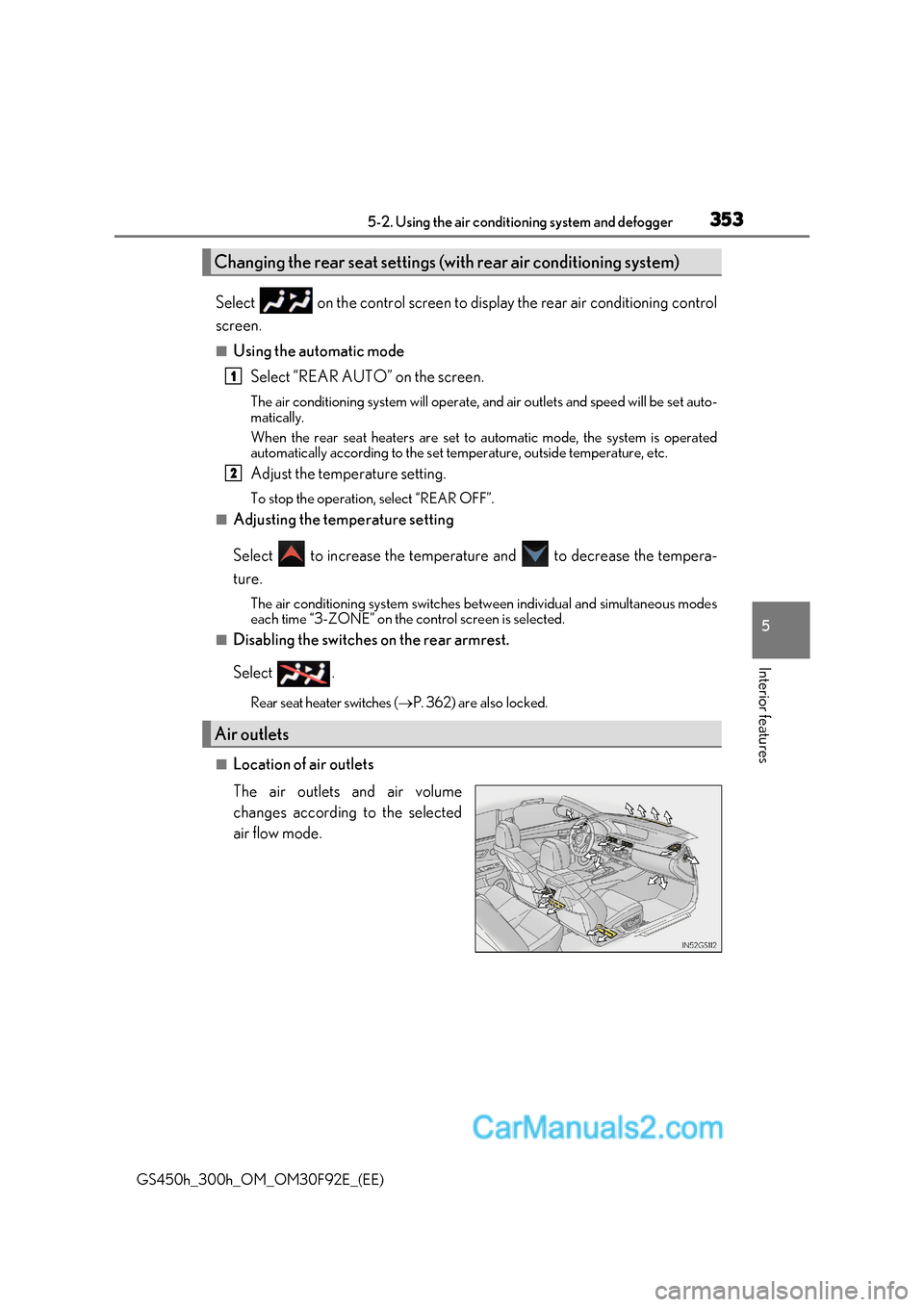
GS450h_300h_OM_OM30F92E_(EE) Select on the control screen to display the rear air conditioning control
screen.
■Using the automatic mode
Select “REAR AUTO” on the screen.
The air conditioning system will operate, and air outlets and speed will be set auto-
matically.
When the rear seat heaters are set to automatic mode, the system is operated
automatically according to the set temperature, outside temperature, etc.
Adjust the temperature setting.
To stop the operation, select “REAR OFF”.
■Adjusting the temperature setting
Select to increase the temperature and to decrease the tempera-
ture.The air conditioning system switches between individual and simultaneous modes
each time “3-ZONE” on the control screen is selected.
■Disabling the switches on the rear armrest.
Select .
Rear seat heater switches ( P. 362) are also locked.
■Location of air outlets
The air outlets and air volume
changes according to the selected
air flow mode.
Changing the rear seat settings (w ith rear air conditioning system)
Air outlets
1
2
Page 355 of 600
355
5-2. Using the air conditioning system and defogger
5
Interior features
GS450h_300h_OM_OM30F92E_(EE)
■Outside/recirculated air mode
●When driving on dusty roads su ch as tunnels or in heavy traffic, set the outside/recircu-
lated air mode button to the recirculated air mode. This is effective in preventing out-
side air from entering the vehicle interior. During cooling operation, setting the
recirculated air mode will also cool the vehicle interior effectively.
●Outside/recirculated air mode may automatically switch depending on the tempera-
ture setting or the inside temperature.
■Automatic mode for air intake control
In automatic mode, the system detects exhaust gas and other pollutants and automati-
cally switches between outside air and recirculated air modes.
When the dehumidification function is off, and the fan is operating, turning automatic
mode on will activate the dehumidification function.
■Operation of the air conditioning system in Eco drive mode
In the Eco drive mode, the air conditioning system is controlled as follows to prioritize
fuel efficiency:
●Engine speed and compressor operation controlled to restrict heating/cooling capac- ity
●Fan speed restricted when automatic mode is selected
To improve air conditioning performanc e, perform the following operations:
●Adjust the fan speed
●Turn off Eco drive mode (P. 311)
■When the S-FLOW mode operates
If air flows to the driver’s seat only, the temperature setting for the front passenger’s seat
is not displayed.
■When the outside temperature is low
The dehumidification function may not operate even when “A/C” on the option control
screen is selected.
■Ventilation and air conditioning odors
●To let fresh air in, set the air conditioning system to the outside air mode.
●During use, various odors from inside and outside the vehicle may enter into and accu-
mulate in the air conditioning system. This may then cause odor to be emitted from the
vents.
●To reduce potential odors from occurring:
Page 359 of 600
359
5-2. Using the air conditioning system and defogger
5
Interior features
GS450h_300h_OM_OM30F92E_(EE)
■Changing the air outlets
Press .
The air outlets change as follo ws each time is pressed.
: Air flows to the upper body.
: Air flows to the upper body and feet.
: Air flows to the feet.
Press .
The air conditioning system will operate, and air outlets and fan speed will be adjusted
automatically.
“AUTO” will be displaye d on the control panel.
Adjust the temperature setting.
When the rear seat heaters are set to “AUTO” mode, the system is operated automat-
ically according to the set temperature, outside temperature, etc.
To stop the operation, press the “OFF” button.
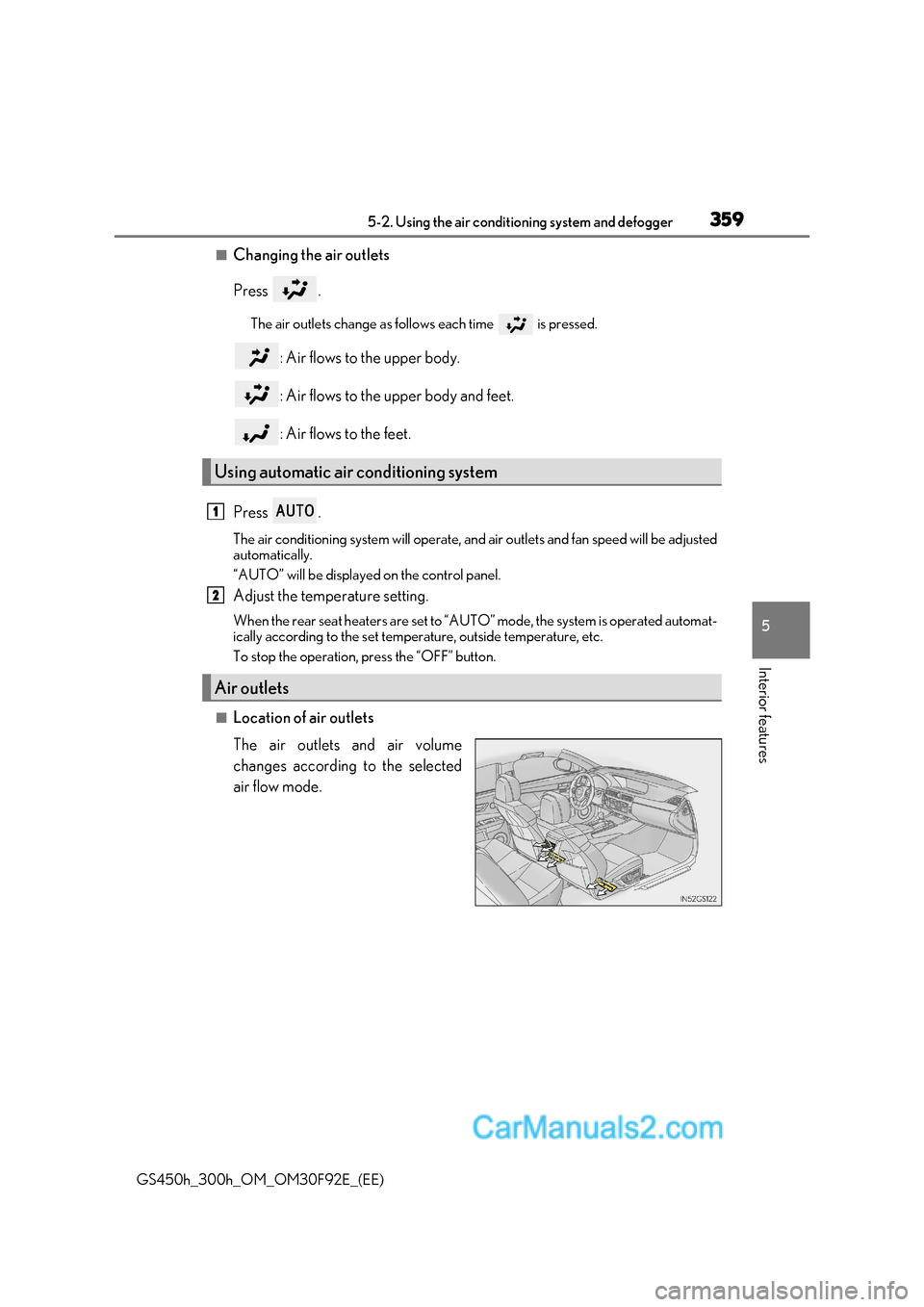
■Location of air outlets
The air outlets and air volume
changes according to the selected
air flow mode.
Using automatic air conditioning system
Air outlets
1
2
Page 360 of 600
3605-2. Using the air conditio ning system and defogger
GS450h_300h_OM_OM30F92E_(EE)
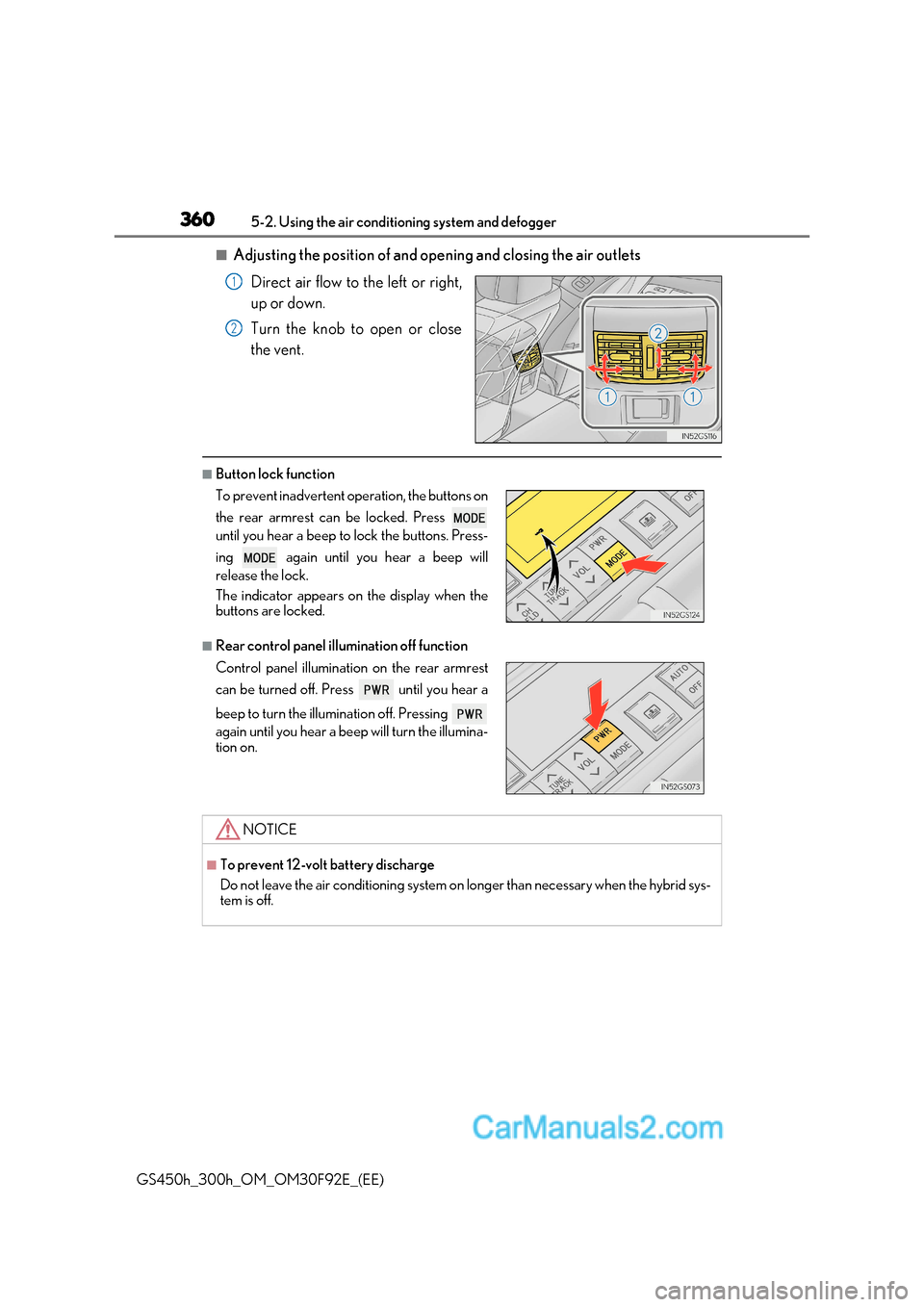
■Adjusting the position of and opening and closing the air outlets
Direct air flow to the left or right,
up or down.
Turn the knob to open or close
the vent.
■Button lock function
■Rear control panel illumination off function
1
2
To prevent inadvertent operation, the buttons on
the rear armrest can be locked. Press
until you hear a beep to lock the buttons. Press-
ing again until you hear a beep will
release the lock.
The indicator appears on the display when the
buttons are locked.
Control panel illumination on the rear armrest
can be turned off. Press until you hear a
beep to turn the illumination off. Pressing
again until you hear a beep will turn the illumina-
tion on.
NOTICE
■To prevent 12-volt battery discharge
Do not leave the air conditioning system on longer than necessary when the hybrid sys-
tem is off.
Page 362 of 600
3625-2. Using the air conditio ning system and defogger
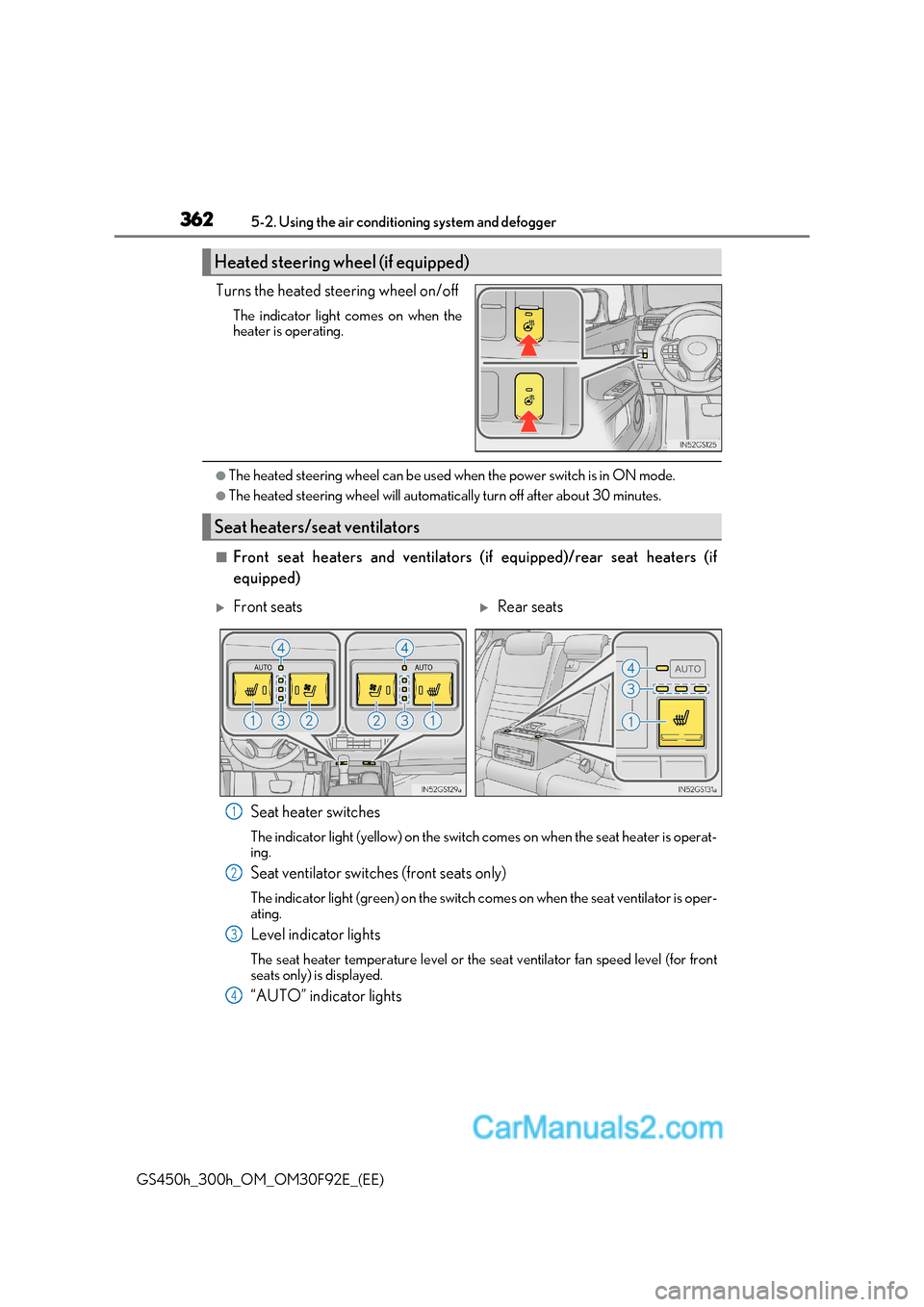
GS450h_300h_OM_OM30F92E_(EE)Turns the heated steering wheel on/off
The indicator light comes on when the
heater is operating.
●The heated steering wheel can be used when the power switch is in ON mode.
●The heated steering wheel will automatically turn off after about 30 minutes.
■Front seat heaters and ventilators (if equipped)/rear seat heaters (if equipped)
Seat heater switches
The indicator light (yellow) on the switch comes on when the seat heater is operat- ing.
Seat ventilator switches (front seats only)
The indicator light (green) on the switch co mes on when the seat ventilator is oper-
ating.
Level indicator lights
The seat heater temperature level or the seat ventilator fan speed level (for front
seats only) is displayed.
“AUTO” indicator lights
Heated steering wheel (if equipped)
Seat heaters/seat ventilators
Front seatsRear seats
1
2
3
4