instrument panel Lexus GS300h 2017 User Guide
[x] Cancel search | Manufacturer: LEXUS, Model Year: 2017, Model line: GS300h, Model: Lexus GS300h 2017Pages: 600, PDF Size: 58.17 MB
Page 107 of 600
107
2. Instrument cluster
2
Instrument cluster
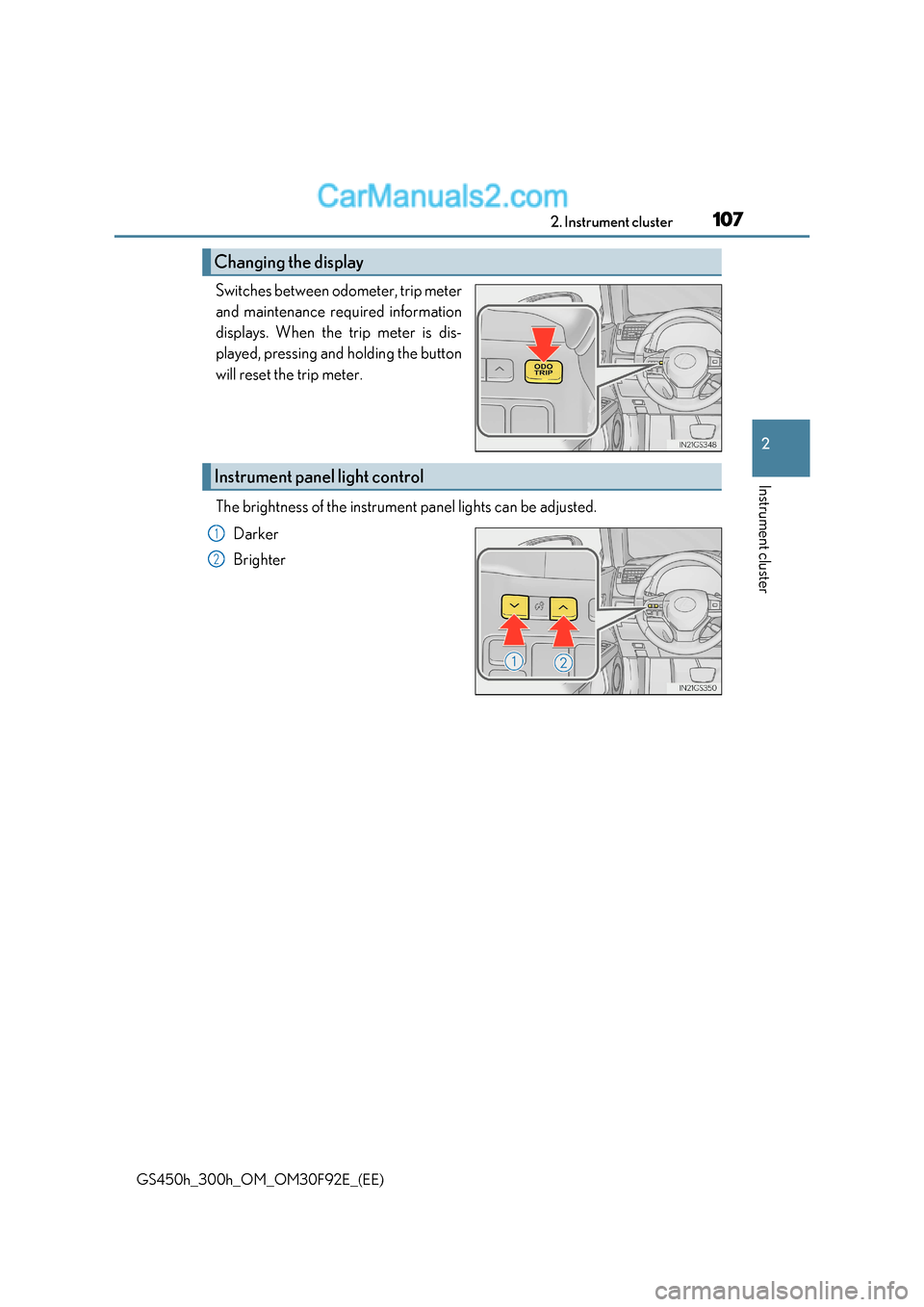
GS450h_300h_OM_OM30F92E_(EE) Switches between odometer, trip meter
and maintenance required information
displays. When the trip meter is dis-
played, pressing and holding the button
will reset the trip meter.
The brightness of the instrument panel lights can be adjusted.
Darker
Brighter
Changing the display
Instrument panel light control
1
2
Page 108 of 600
1082. Instrument cluster
GS450h_300h_OM_OM30F92E_(EE)
■The meters and display illuminate when
The power switch is in ON mode.
■Instrument panel brightness adjustment
The instrument panel brightness levels when th e tail lights are on and off can be adjusted
individually. However, when the surroundings ar e bright (daytime, etc.), turning on the tail
lights will not change the in strument panel brightness.
■Limitation of brightness adjustment
The brightness of the instrument panel lights is automatically adjusted based on the light
sensor detecting how bright the surroundings are. However, if the instrument panel
brightness has been manually set to either the brightest or darkest setting, the automatic
adjustment will not be performed.
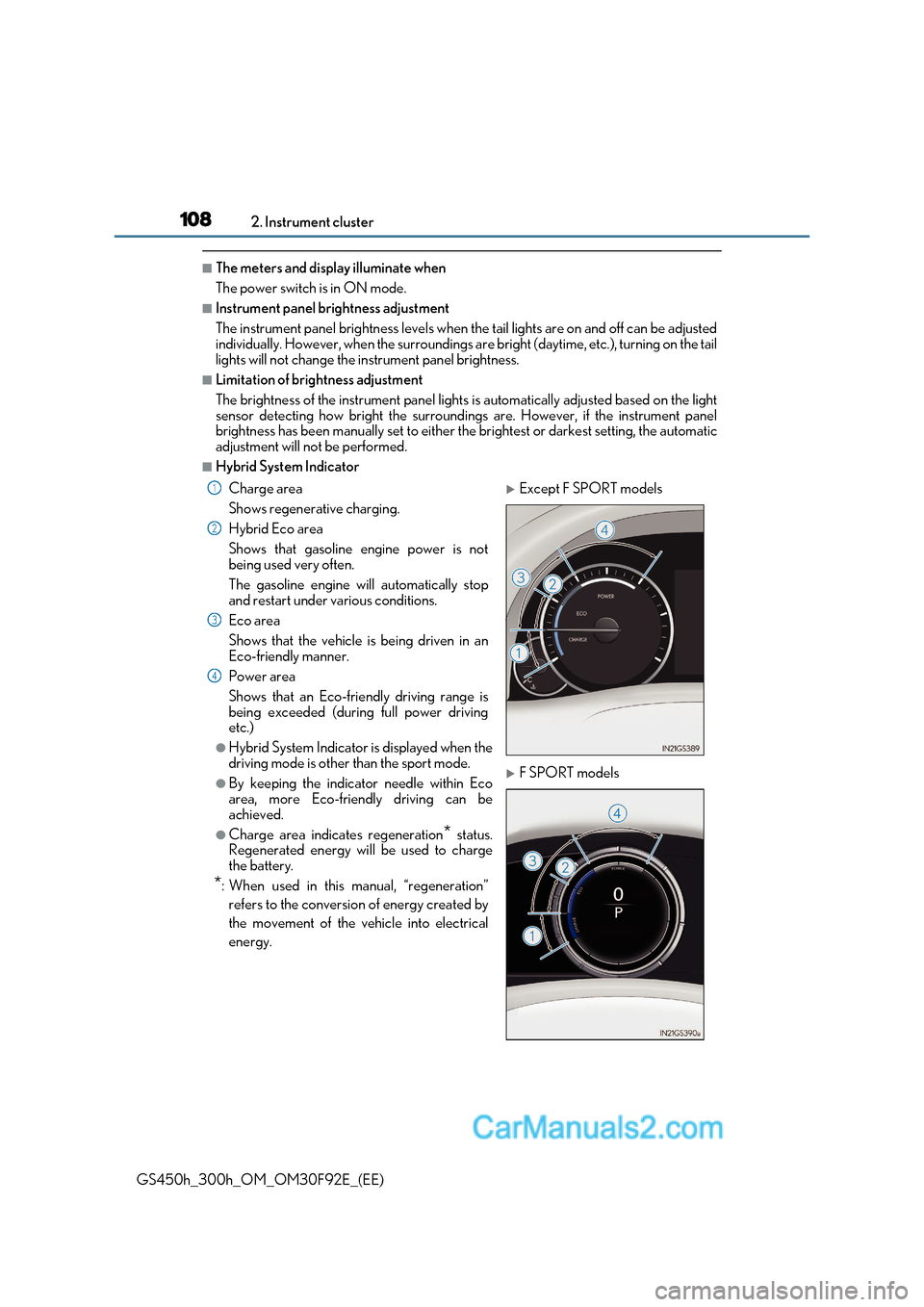
■Hybrid System Indicator
Charge area
Shows regenerative charging.
Hybrid Eco area
Shows that gasoline engine power is not
being used very often.
The gasoline engine will automatically stop
and restart under various conditions.
Eco area
Shows that the vehicle is being driven in an
Eco-friendly manner.
Power area
Shows that an Eco-friendly driving range is
being exceeded (during full power driving
etc.)
●Hybrid System Indicator is displayed when the
driving mode is other than the sport mode.
●By keeping the indicator needle within Eco
area, more Eco-friendly driving can be
achieved.
●Charge area indicates regeneration * status.
Regenerated energy will be used to charge
the battery.
* : When used in this manual, “regeneration”
refers to the conversion of energy created by
the movement of the vehicle into electrical
energy.
Except F SPORT models
F SPORT models
1
2
3
4
Page 157 of 600
157
3-2. Opening, closing and locking the doors and trunk
3
Operation of each component
GS450h_300h_OM_OM30F92E_(EE)
■Note for the push-start function
●Even when the electronic key is within the effective range (detection areas), the system
may not operate properly when the electronic key is on the instrument panel, rear
package tray or floor, or in the door pock ets or glove box when the hybrid system is
started or power switch modes are changed.
●Even if the electronic key is not inside the ve hicle, it may be possible to start the hybrid
system if the electronic key is near the window.
■When the vehicle is not driven for extended periods
●Vehicles with entry function: To prevent theft of the vehicle, do not leave the electronic
key within 2 m (6 ft.) of the vehicle.
●The smart entry & start system can be deactivated in advance. ( P. 561)
■To operate the system properly
●Make sure to carry the electronic key when operating the system. Do not get the elec-
tronic key too close to the vehicle when operating the system from the outside of the
vehicle.
Depending on the position and holding condit ion of the electronic key, the key may not
be detected correctly and the system may not operate properly. (The alarm may go off
accidentally, or the door lock prev ention function may not operate.)
●Do not leave the electronic key inside the trunk.
The key confinement prevention function may not operate, depending on the location
of the key (close to a spare tire [if equipped], the inside edge of the trunk), conditions
(inside a metal bag, close to metallic obje cts) and the radio waves in the surrounding
area. ( P. 148)
■If the smart entry & start system does not operate properly
●Locking and unlocking the doors and opening the trunk: Use the mechanical key. ( P. 527)
●Starting the hybrid system: P. 528
■Customization
Settings (e. g. smart entry & start system) can be changed.
(Customizable features: P. 561)
■If the smart entry & start system has be en deactivated in a customized setting
●Locking and unlocking the doors and opening the trunk:
Use the wireless remote control or mechanical key. ( P. 139, 147, 527)
●Starting the hybrid system and changing power switch modes: P. 528
●Stopping the hybrid system: P. 218
Page 177 of 600
177
3-3. Adjusting the seats
3
Operation of each component
GS450h_300h_OM_OM30F92E_(EE)
WARNING
■Operating the front passenger’s seat from the driver’s seat (if equipped)
Do not operate the front passenger’s seat when a passenger is seated in it. In addition,
do not let anyone sit down in the front passeng er’s seat while the seat is being operated.
The front passenger may catch their legs between the instrument panel and seat,
resulting in injury.
■When adjusting the seat positions or the ottoman (if equipped)
Make sure to leave enough space around the feet so they do not get stuck.
■When using the ottoman (if equipped)
●Do not operate the ottoman when the vehicle is moving.
Failure to do so may cause death or serious injury in the event of sudden braking or a
collision.
●Do not sit on the ottoman of the passenger seat.
Doing so may cause seat belts to be worn improperly, which may lead to serious
injury or death in the event of sudden braking or a collision.
●Do not step on the ottoman.
Doing so could damage the ottoman, or co uld cause you to seriously injure yourself
by falling over.
●Stow the ottoman when you get in or out of the vehicle or when the ottoman is not in
use to avoid stumbling over it.
●Do not allow anyone to put their hands or feet under the passenger seat when stow-
ing the ottoman.
NOTICE
■Operating the front passenger’s seat from the driver’s seat (if equipped)
Before operating the front passenger’s seat, make sure that there is no luggage or any
other objects on the seat or in the f ootwell that could prevent its operation.
Such items may result in excess force being applied, causing damage to the seat and/or
the luggage.
■To prevent an ottoman malfunction (if equipped)
●Do not place any objects in the front passenger footwell that could prevent the oper-
ation of the ottoman.
●Do not place heavy luggage on the ottoman.
●Do not place anything under the ottoman when in use.
There is a possibility that something may get caught and cause damages when stow-
ing the ottoman.
Page 180 of 600
1803-3. Adjusting the seats
GS450h_300h_OM_OM30F92E_(EE)
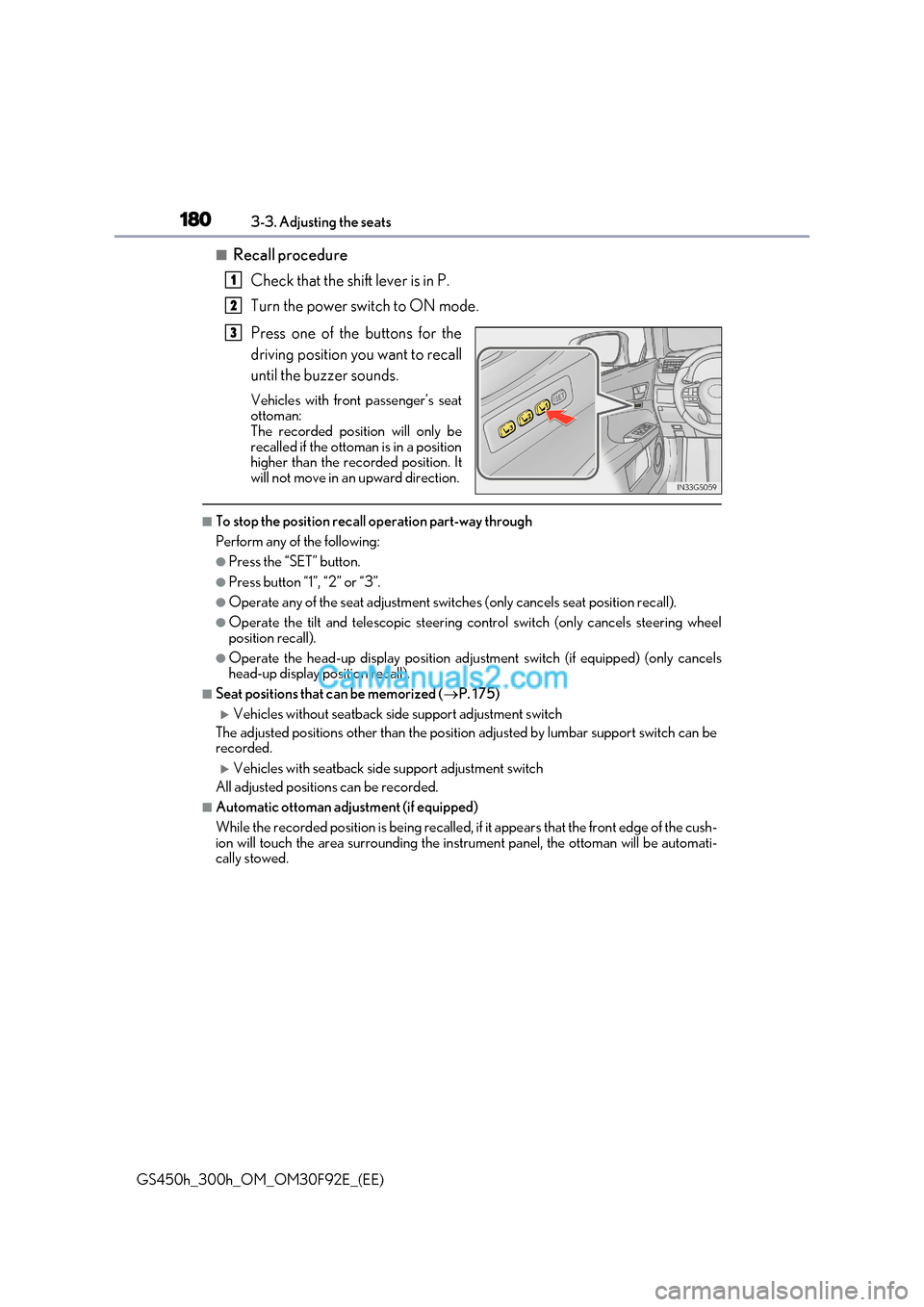
■Recall procedure
Check that the shift lever is in P.
Turn the power switch to ON mode.
Press one of the buttons for the
driving position you want to recall
until the buzzer sounds.
Vehicles with front passenger’s seat
ottoman:
The recorded position will only be
recalled if the ottoman is in a position
higher than the recorded position. It
will not move in an upward direction.
■To stop the position recall operation part-way through
Perform any of the following:
●Press the “SET” button.
●Press button “1”, “2” or “3”.
●Operate any of the seat adjustment switches (only cancels seat position recall).
●Operate the tilt and telescopic steering control switch (only cancels steering wheel
position recall).
●Operate the head-up display position adju stment switch (if equipped) (only cancels
head-up display position recall).
■Seat positions that can be memorized ( P. 175)
Vehicles without seatback side support adjustment switch
The adjusted positions other than the position adjusted by lumbar support switch can be
recorded.
Vehicles with seatback side support adjustment switch
All adjusted positions can be recorded.
■Automatic ottoman adjustment (if equipped)
While the recorded position is being recalled, if it appears that the front edge of the cush-
ion will touch the area surrounding the instrument panel, the ottoman will be automati-
cally stowed.
1
2
3
Page 237 of 600
237
4
4-3. Operating the lights and wipers
Driving
GS450h_300h_OM_OM30F92E_(EE)
Headlight switch
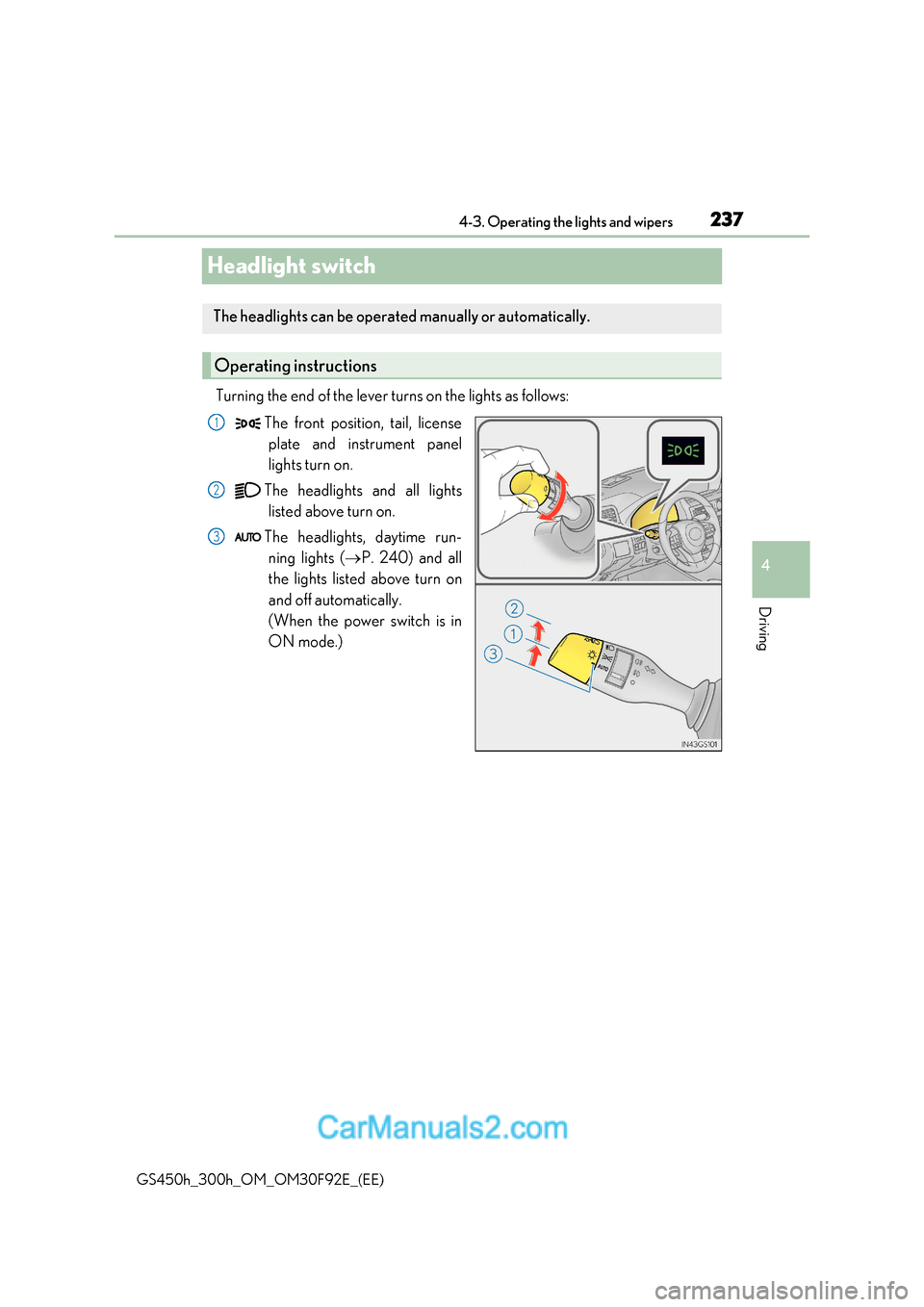
Turning the end of the lever turns on the lights as follows:The front position, tail, licenseplate and instrument panel
lights turn on.
The headlights and all lights listed above turn on.
The headlights, daytime run- ning lights ( P. 240) and all
the lights listed above turn on
and off automatically.
(When the power switch is in
ON mode.)
The headlights can be operated manually or automatically.
Operating instructions
1
2
3
Page 357 of 600
357
5-2. Using the air conditioning system and defogger
5
Interior features
GS450h_300h_OM_OM30F92E_(EE)
WARNING
■To prevent the windshield from fogging up
●Do not use during cool air operation in extremely humid weather. The d iffer-
ence between the temperature of the outside air and that of the windshield can cause
the outer surface of the windshield to fog up, blocking your vision.
■To prevent burns
●Do not touch the rear view mirror surfaces when the outside rear view mirror defog-
gers are on.
●Vehicles with windshield wiper de-icer: Do not touch the glass at lower part of the
windshield or to the side of the front pilla rs when the windshield wiper de-icer is on.
■nanoe generator (if equipped)
Do not disassemble or repair the generator because it contains high voltage parts.
Contact any authorized Lexus retailer or Lexus authorized repairer, or any reliable
repairer if the generator needs repair.
NOTICE
■To prevent 12-volt battery discharge
Do not leave the air conditioning system on longer than necessary when the hybrid sys-
tem is off.
■To prevent damage to the nanoe (if equipped)
Do not insert anything into the driver’s side vent, attach a nything to it, or use sprays
around the driver’s side vent. These things may cause the generator not to work prop-
erly.
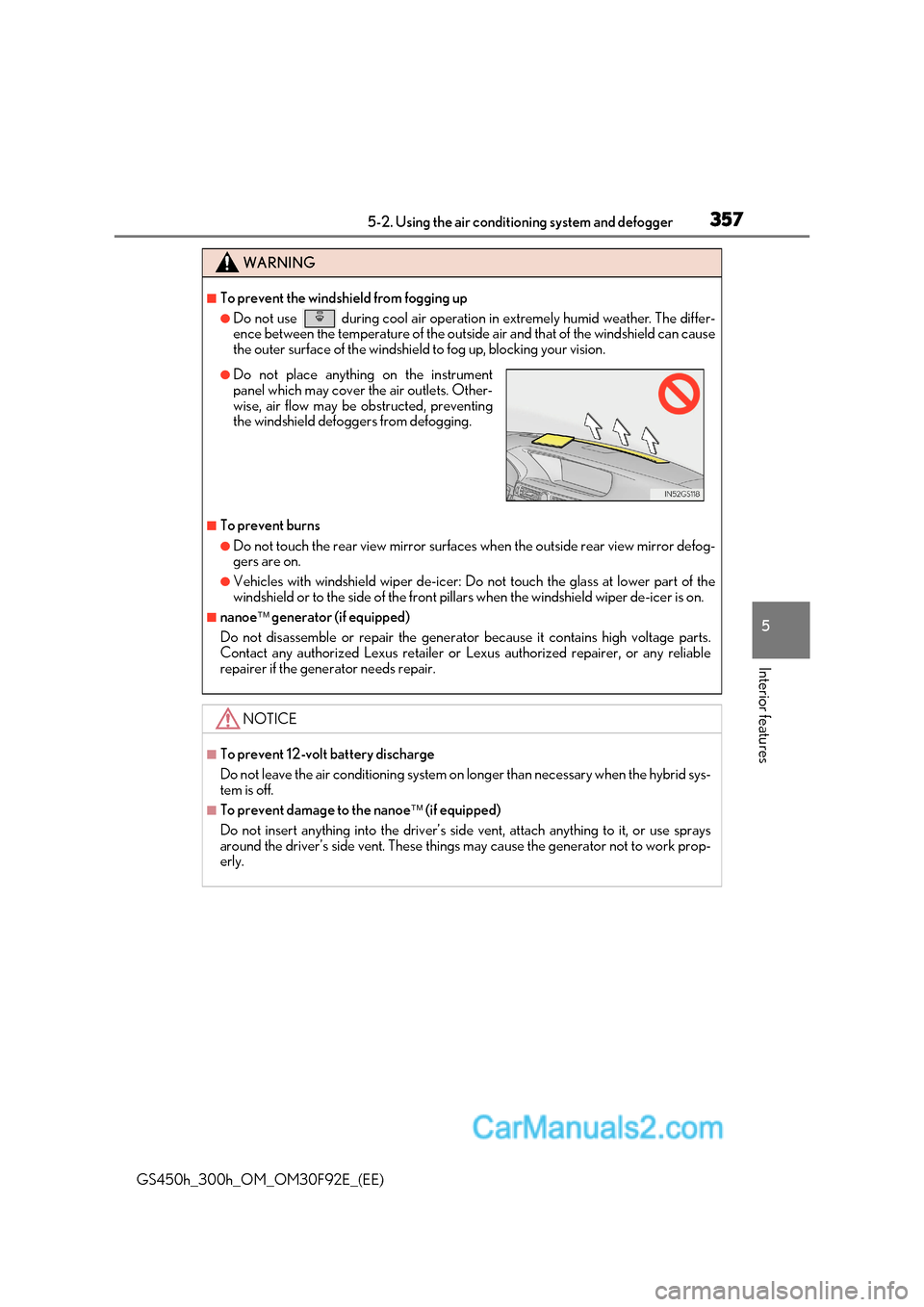
●Do not place anything on the instrument
panel which may cover the air outlets. Other-
wise, air flow may be obstructed, preventing
the windshield defoggers from defogging.
Page 366 of 600
3665-3. Using the interior lights
GS450h_300h_OM_OM30F92E_(EE)
Interior lights list
When the instrument panel light control swit ch is turned to minimum and the tail lights
are on, the inside door handle lights, th e ornament lights and the footwell lights will
turn off. ( P. 107)
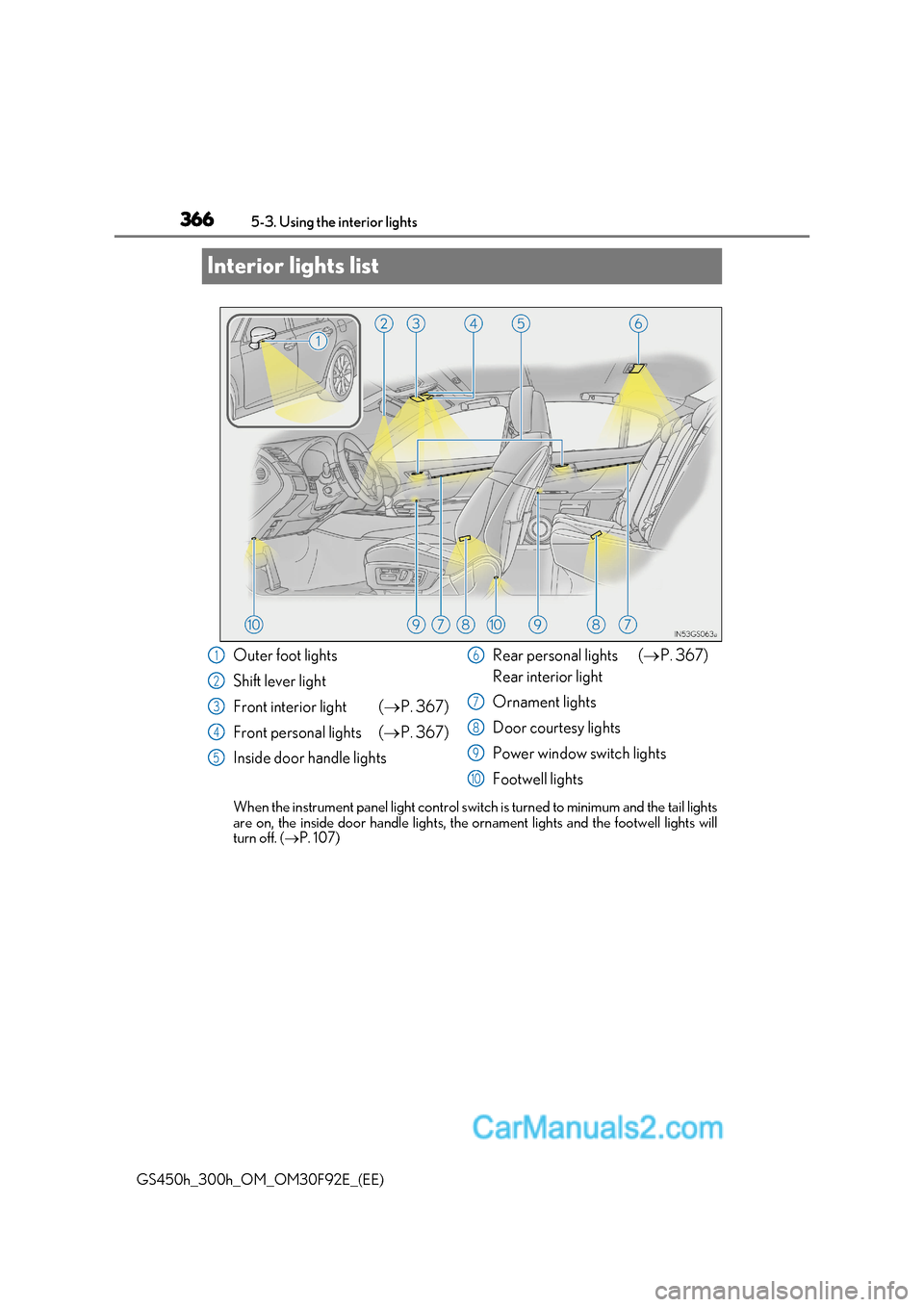
Outer foot lights
Shift lever light
Front interior light ( P. 367)
Front personal lights ( P. 367)
Inside door handle lights Rear personal lights (
P. 367)
Rear interior light
Ornament lights
Door courtesy lights
Power window switch lights
Footwell lights1
2
3
4
5
6
7
8
9
10
Page 395 of 600
395
6-1. Maintenance and care
6
Maintenance and care
GS450h_300h_OM_OM30F92E_(EE)
■Caring for leather areas
Lexus recommends cleaning the interior of the vehicle at least twice a year to maintain
the quality of the vehicle’s interior.
■Shampooing the carpets
There are several commercial foaming-type cleaners available. Use a sponge or brush to
apply the foam. Rub in overlapping circles. Do not use water. Wipe dirty surfaces and let
them dry. Excellent results are obtained by keeping the carpet as dry as possible.
■Seat belts
Clean with mild soap and lukewarm water using a cloth or sponge. Also check the belts
periodically for excessive wear, fraying or cuts.
■When cleaning the carpeted portions of the glove box, console box, etc.
If a strong adhesive tape is used, there is a possibility that the surface of the carpet could
be damaged.
WARNING
■Water in the vehicle
●Do not splash or spill liquid in the vehicle, such as on the floor, in the hybrid battery
(traction battery) air vents, and in the trunk.
Doing so may cause the hybrid battery, electrical components, etc. to malfunction or
catch fire.
●Do not get any of the SRS components or wiring in the vehicle interior wet. ( P. 44)
An electrical malfunction may cause the airbags to deploy or not function properly,
resulting in death or serious injury.
■Cleaning the interior (especially instrument panel)
Do not use polish wax or polish cleaner. The instrument panel may reflect off the wind-
shield, obstructing the driver’s view and leading to an accident, resulting in death or
serious injury.
Page 438 of 600
4386-3. Do-it-yourself maintenance
GS450h_300h_OM_OM30F92E_(EE)
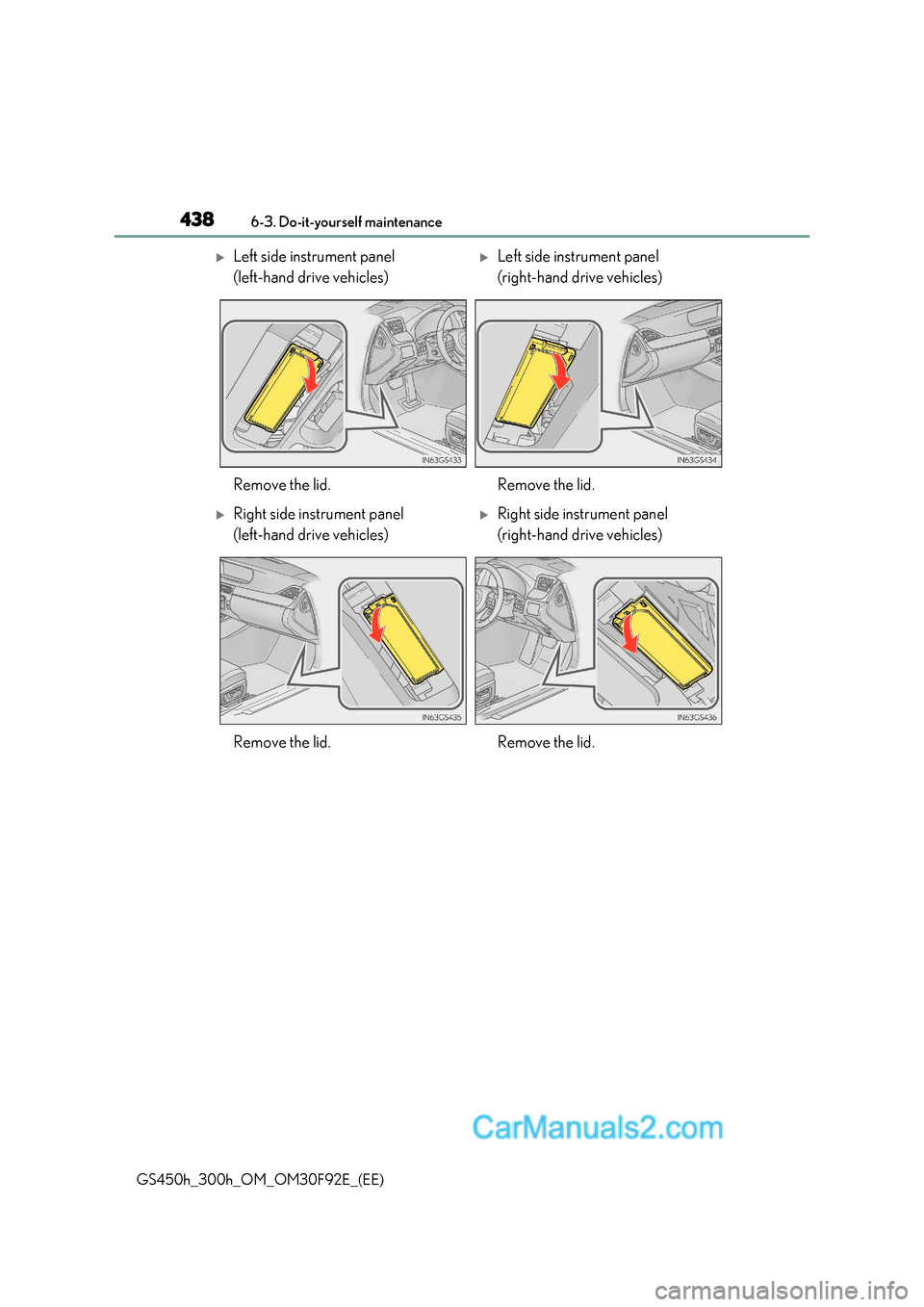
Left side instrument panel
(left-hand drive vehicles)Left side instrument panel
(right-hand drive vehicles)
Remove the lid. Remove the lid.
Right side instrument panel
(left-hand drive vehicles)Right side instrument panel
(right-hand drive vehicles)
Remove the lid. Remove the lid.