trailer Lexus GS300h 2017 User Guide
[x] Cancel search | Manufacturer: LEXUS, Model Year: 2017, Model line: GS300h, Model: Lexus GS300h 2017Pages: 600, PDF Size: 58.17 MB
Page 233 of 600

233
4-2. Driving procedures
4
Driving
GS450h_300h_OM_OM30F92E_(EE)
■Parking brake operation
●When the power switch is not in ON mode, the parking brake cannot be released using
the parking brake switch.
●When the power switch is not in ON mode, automatic mode (automatic brake setting
and releasing) is not available.
●If the parking brake is operated repeatedly over a short period of time, the system may
restrict operation to prevent overheating. If this happens, refrain from operating the
parking brake. Normal operation wi ll return after about 1 minute.
●Vehicles with towing package: In situations such as when parking while towing a trailer,
the maximum amount of braking force can be used by pressing the parking brake
switch with the parking brake already set.
●Vehicles without towing package: In situations such as when parking on a steep slope *,
the maximum amount of braking force can be used by pressing the parking brake
switch with the parking brake already set.
* : Use wheel chocks when parking on a steep slope.
■Parking brake operation sound
When the parking brake operates, a motor sound (whirring sound) may be heard. This
does not indicate a malfunction.
■Parking brake indicator light
●Depending on the power switch mode, the parking brake indicator light will come on
and stay on as described below:
ON mode: Comes on until the parking brake is released.
Not in ON mode: Stays on for approximately 15 seconds.
●When the power switch is turned off with th e parking brake set, the parking brake indi-
cator light will stay on for about 15 seco nds. This does not indicate a malfunction.
■When there is a malfunction in the system
Warning lights and/or warning message will turn on or flash. ( P. 462, 466)
Depending on the condition, the park ing brake indicator light may flash.
■Parking the vehicle P. 200
■Parking brake engaged warning buzzer P. 472
■Usage in winter time P. 334
Page 285 of 600
285
4-5. Using the driving support systems
4
Driving
GS450h_300h_OM_OM30F92E_(EE)
WARNING
■Before using LKA system
Do not rely solely upon the LKA system. Th e LKA system does not automatically drive
the vehicle or reduce the amount of attention that must be paid to the area in front of
the vehicle. The driver must always assume full responsibility for driving safely by pay-
ing careful attention to the surrounding conditions and operating the steering wheel to
correct the path of the vehicle. Also, the driver must take adequate breaks when
fatigued, such as from driving for a long period of time.
Failure to perform appropriate driving operat ions and pay careful attention may lead to
an accident, resulting in death or serious injury.
■To avoid operating LKA system by mistake
When not using the LKA system, use the LKA switch to turn the system off.
■Situations unsuitable for LKA system
Do not use the LKA system in the following situations.
The system may not operate properly and le ad to an accident, resulting in death or
serious injury.
●A spare tire, tire chains, etc. are equipped.
●When the tires have been excessively worn, or when the tire inflation pressure is low.
●Tires which differ by structure, manufacturer, brand or tread pattern are used.
●Objects or patterns that could be mistaken for white (yellow) lines are present on the
side of the road (guardrails, cu rbs, reflective poles, etc.).
●Vehicle is driven on a snow-covered road.
●White (yellow) lines are difficult to see due to rain, snow, fog, dust, etc.
●Asphalt repair marks, white (yellow) line ma rks, etc. are present due to road repair.
●Vehicle is driven in a temporary lane or restricted lane due to construction work.
●Vehicle is driven on a road surface which is slippery due to rainy weather, fallen snow,
freezing, etc.
●Vehicle is driven in traffic lanes other than on highways and freeways.
●Vehicle is driven in a construction zone.
●Vehicle is towing a trailer or another vehicle. (vehicles with towing package)
■Preventing LKA system malfunctions and operations performed by mistake
●Do not modify the headlights or place stickers, etc. on the surface of the lights.
●Do not modify the suspension etc. If the suspension etc. needs to be replaced, con-
tact any authorized Lexus retailer or Le xus authorized repairer, or any reliable
repairer.
●Do not install or place anything on the hood or grille. Also, do not install a grille guard
(bull bars, kangaroo bar, etc.).
●If your windshield needs repairs, contac t any authorized Lexus retailer or Lexus
authorized repairer, or any reliable repairer.
Page 298 of 600
2984-5. Using the driving support systems
GS450h_300h_OM_OM30F92E_(EE)
WARNING
■Situations unsuitable for dynamic radar cruise control with full-speed range
Do not use dynamic radar cruise control with full-speed range in any of the following
situations.
Doing so may result in inappropriate speed control and could cause an accident result-
ing in death or serious injury.
●Roads where there are pedestrians, cyclists, etc.
●In heavy traffic
●On roads with sharp bends
●On winding roads
●On slippery roads, such as those covered with rain, ice or snow
●On steep downhills, or where there are sudden changes between sharp up and down
gradients
Vehicle speed may exceed the set sp eed when driving down a steep hill.
●At entrances to freeways and highways
●When weather conditions are bad enough that they may prevent the se nsors from
detecting correctly (fog, snow, sandstorm, heavy rain, etc.)
●When there is rain, snow, etc. on the fron t surface of the radar sensor or camera sen-
sor
●In traffic conditions that require frequent repeated acceleration and deceleration
●When your vehicle is towing a trailer (vehicles with towing package) or during emer-
gency towing
●When an approach warning buzzer is heard often
Page 306 of 600
3064-5. Using the driving support systems
GS450h_300h_OM_OM30F92E_(EE)
■Automatic cancelation of constant speed control mode
Constant speed control mode is automatica lly canceled in the following situations:
●Actual vehicle speed is more than approximately 16 km/h (10 mph) below the set vehi-
cle speed.
●Actual vehicle speed falls below approximately 40 km/h (25 mph).
●VSC is activated.
●TRC is activated for a period of time.
●When the VSC or TRC system is turned off by pressing the VSC OFF switch.
●Pre-crash braking is activated.
If constant speed control mode is automatically canceled for any other reason, there may
be a malfunction in the system. Contact an y authorized Lexus retailer or Lexus autho-
rized repairer, or any reliable repairer.
■Warning messages and buzzers for dynamic radar cruise control with full-speed range
Warning messages and buzzers are used to indicate a system malfunction or to inform
the driver of the need for caution while driv ing. If a warning message is shown on the
multi-information display, read the message and follow the instructions. ( P. 466)
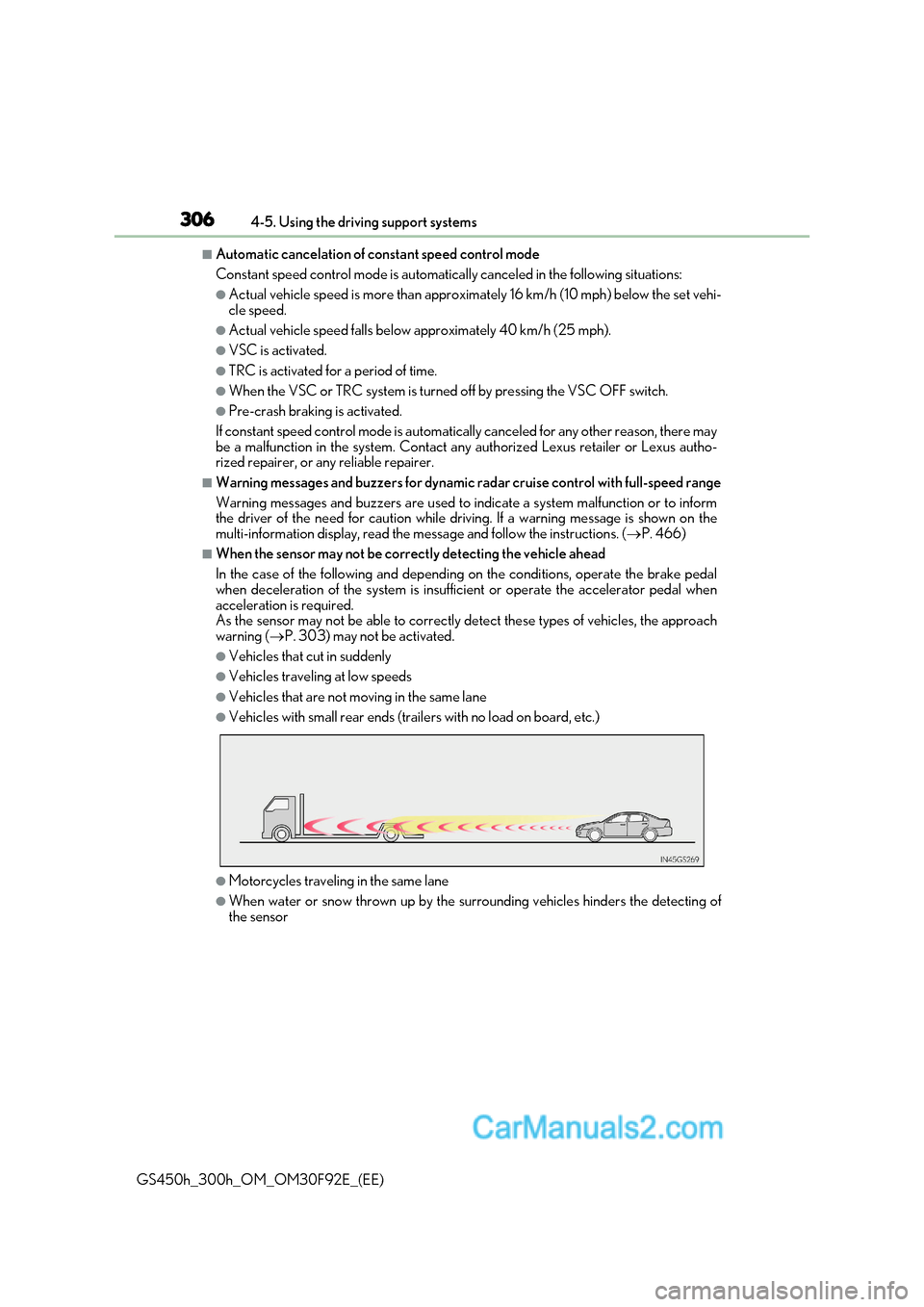
■When the sensor may not be correctly detecting the vehicle ahead
In the case of the following and depending on the conditions, operate the brake pedal
when deceleration of the system is insufficient or operate the accelerator pedal when
acceleration is required.
As the sensor may not be able to correctly detect these types of vehicles, the approach
warning ( P. 303) may not be activated.
●Vehicles that cut in suddenly
●Vehicles traveling at low speeds
●Vehicles that are not moving in the same lane
●Vehicles with small rear ends (trailers with no load on board, etc.)
●Motorcycles travelin g in the same lane
●When water or snow thrown up by the surrounding vehicles hinders the detecting of
the sensor
Page 310 of 600
3104-5. Using the driving support systems
GS450h_300h_OM_OM30F92E_(EE)
■Automatic cruise control cancelation
Cruise control will stop maintaining the vehicl e speed in any of the following situations.
●Actual vehicle speed falls more than approximately 16 km/h (10 mph) below the preset
vehicle speed.
At this time, the memorized set speed is not retained.
●Actual vehicle speed is below approximately 40 km/h (25 mph).
●VSC is activated.
●TRC is activated for a period of time.
●When the VSC or TRC system is turned off by pressing the VSC OFF switch.
■If the warning message for the cruise control is shown on the multi-information display
Press the “ON/OFF” button once to deactivate the system, and then press the button
again to reactivate the system.
If the cruise control speed cannot be set or if the cruise control cancels immediately after
being activated, there may be a malfunction in the cruise control system. Have the vehi-
cle inspected by any authorized Lexus retaile r or Lexus authorized repairer, or any reli-
able repairer.
WARNING
■To avoid operating the cruise control by mistake
Switch the cruise control off using the “ON/OFF” button when not in use.
■Situations unsuitable for cruise control
Do not use cruise control in any of the following situations.
Doing so may result in loss of control and could cause an accident resulting in death or
serious injury.
●In heavy traffic
●On roads with sharp bends
●On winding roads
●On slippery roads, such as those covered with rain, ice or snow
●On steep hills
Vehicle speed may exceed the set sp eed when driving down a steep hill.
●When your vehicle is towing a trailer or during emergency towing
Page 323 of 600
323
4-5. Using the driving support systems
4
Driving
GS450h_300h_OM_OM30F92E_(EE)
■Conditions under which the Rear Crossing Traffic Alert function will not detect a vehi-
cle
The Rear Crossing Traffic Alert function is not designed to detec t the following types of
vehicles and/or objects.
●Small motorcycles, bicycles, pedestrians etc. *
●Vehicles approaching from directly behind
●Guardrails, walls, signs, parked vehicles and similar stationary objects*
●Vehicles moving away from your vehicle
●Vehicles approaching from the parking spaces next to your vehicle *
●Vehicles backing up in the parking space next to your vehicle*
* : Depending on conditions, detection of a vehicle and/or object may occur.
■Conditions under which the Rear Crossing Traffic Alert function may not function cor-
rectly
The Rear Crossing Traffic Alert function may not detect vehicles correctly in the follow-
ing conditions:
●During bad weather such as heavy rain, fog, snow etc.
●When ice or mud etc. is attached to the rear bumper
●When multiple vehicles approach continuously
●Shallow angle parking
●When a vehicle is approaching at high speed
●When parking on a steep incline, such as hills, a dip in the road etc.
●Directly after the BSM function is turned on
●When your vehicle is towing a trailer (vehicles with towing package)
●When items such as a bicycle carrier ar e installed on the rear of the vehicle
●Directly after the hybrid system is started with the BSM function is turned on
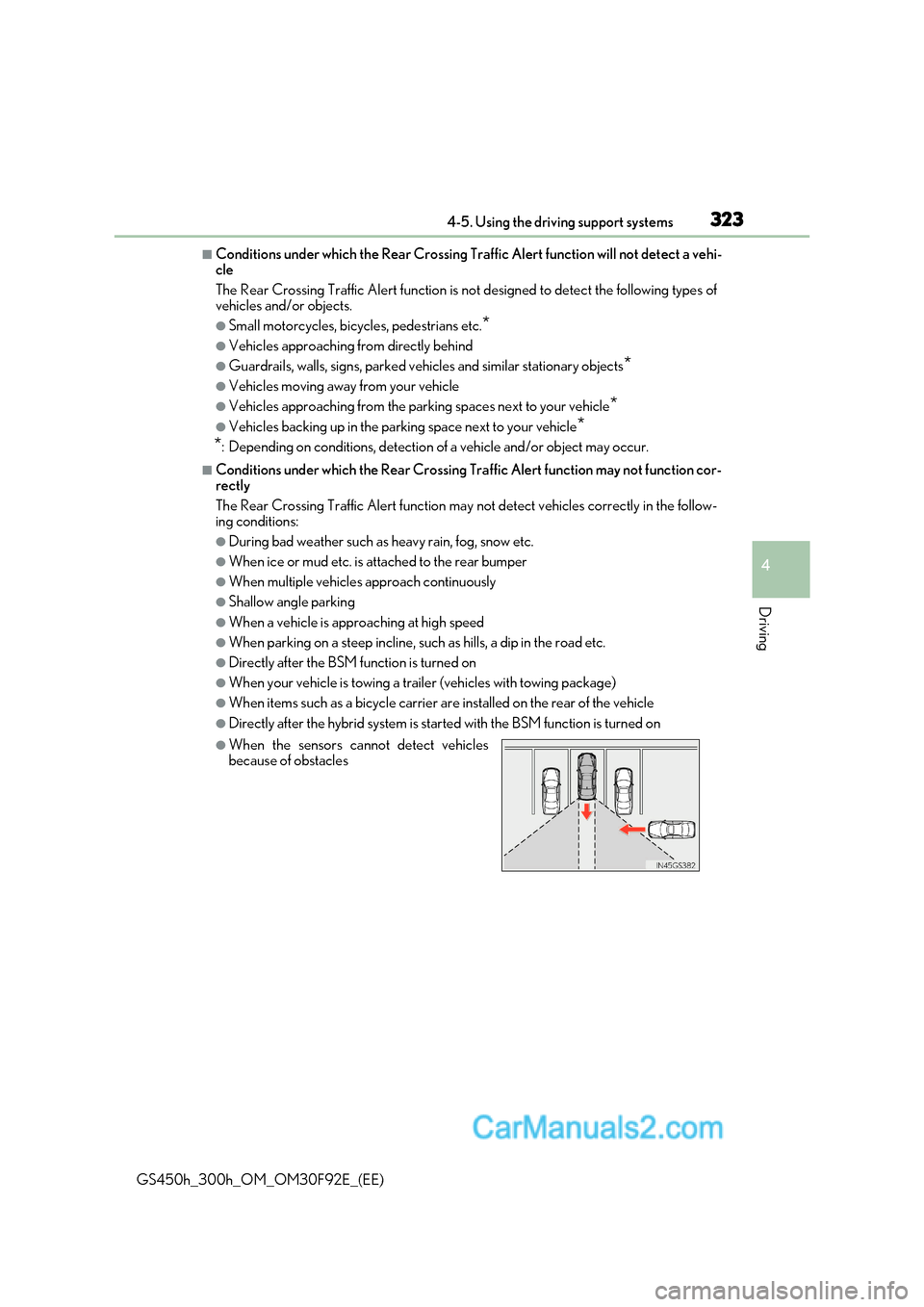
●When the sensors cannot detect vehicles
because of obstacles
Page 557 of 600
557
8
8-1. Specifications
Vehicle specifications
GS450h_300h_OM_OM30F92E_(EE)
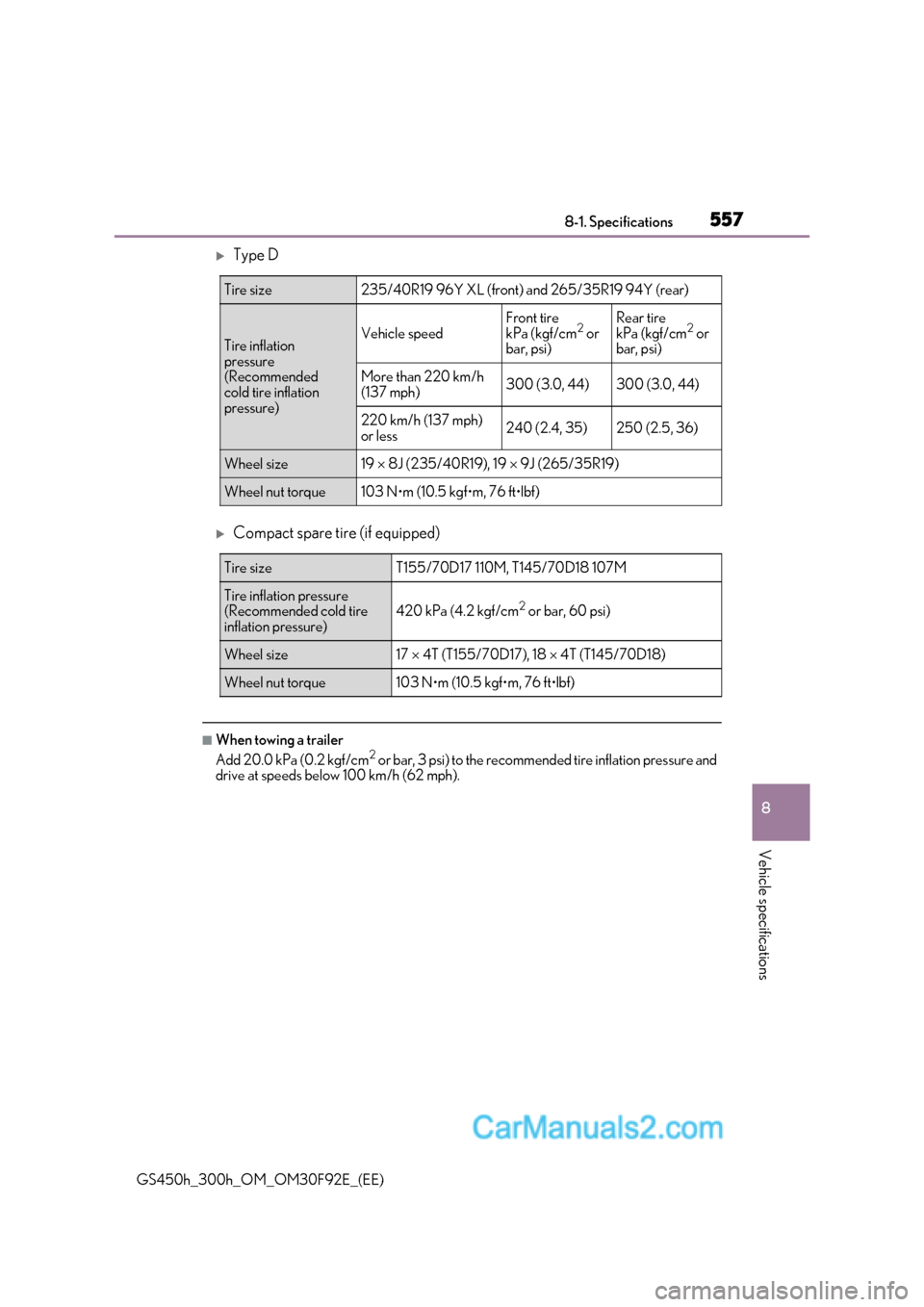
Type D
Compact spare tire (if equipped)
■When towing a trailer
Add 20.0 kPa (0.2 kgf/cm2
or bar, 3 psi) to the recommend ed tire inflation pressure and
drive at speeds below 100 km/h (62 mph).
Tire size235/40R19 96Y XL (front) and 265/35R19 94Y (rear)
Tire inflation
pressure
(Recommended
cold tire inflation
pressure)Vehicle speed
Front tire
kPa (kgf/cm 2
or
bar, psi)Rear tire
kPa (kgf/cm 2
or
bar, psi)
More than 220 km/h
(137 mph)300 (3.0, 44)300 (3.0, 44)
220 km/h (137 mph)
or less240 (2.4, 35)250 (2.5, 36)
Wheel size19 8J (235/40R19), 19 9J (265/35R19)
Wheel nut torque103 N
Page 597 of 600
597
Alphabetical index
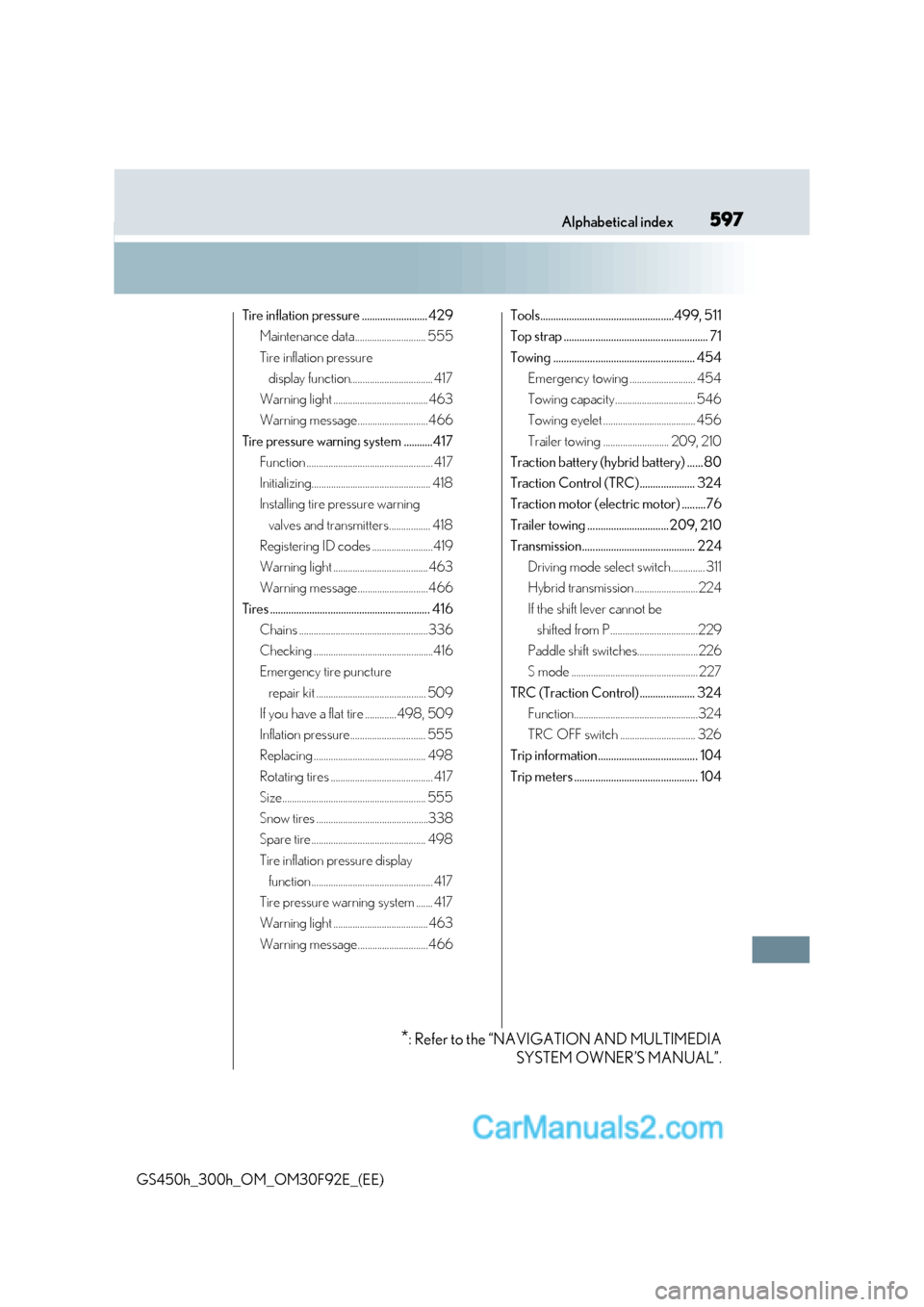
GS450h_300h_OM_OM30F92E_(EE) Tire inflation pressure ......................... 429
Maintenance data............................. 555
Tire inflation pressure display function.................................. 417
Warning light ....................................... 463
Warning message.............................466
Tire pressure warning system ...........417 Function .................................................... 417
Initializing................................................. 418
Installing tire pressure warning
valves and transmitters................. 418
Registering ID codes .........................419
Warning light ....................................... 463
Warning message.............................466
Tires ............................................................. 416 Chains .....................................................336
Checking .................................................416
Emergency tire puncture
repair kit ............................................. 509
If you have a flat tire .............498, 509
Inflation pressure............................... 555
Replacing .............................................. 498
Rotating tires .......................................... 417
Size........................................................... 555
Snow tires ..............................................338
Spare tire ............................................... 498
Tire inflation pressure display function .................................................. 417
Tire pressure warning system ....... 417
Warning light ....................................... 463
Warning message.............................466 Tools...................................................499, 511
Top strap ....................................................... 71
Towing ...................................................... 454
Emergency towing ........................... 454
Towing capacity................................. 546
Towing eyelet ...................................... 456
Trailer towing ........................... 209, 210
Traction battery (hybrid battery) ...... 80
Traction Control (TRC) ..................... 324
Traction motor (electric motor) .........76
Trailer towing ............................... 209, 210
Transmission........................................... 224
Driving mode select switch.............. 311
Hybrid transmission .......................... 224
If the shift lever cannot be shifted from P....................................229
Paddle shift switches.........................226
S mode .................................................... 227
TRC (Traction Control) ..................... 324 Function...................................................324
TRC OFF switch ............................... 326
Trip information...................................... 104
Trip meters ............................................... 104
* : Refer to the “NAVIGATION AND MULTIMEDIA
SYSTEM OWNER’S MANUAL”.