window Lexus GS300h 2017 User Guide
[x] Cancel search | Manufacturer: LEXUS, Model Year: 2017, Model line: GS300h, Model: Lexus GS300h 2017Pages: 600, PDF Size: 58.17 MB
Page 90 of 600
901-3. Theft deterrent system
GS450h_300h_OM_OM30F92E_(EE)
Double locking system
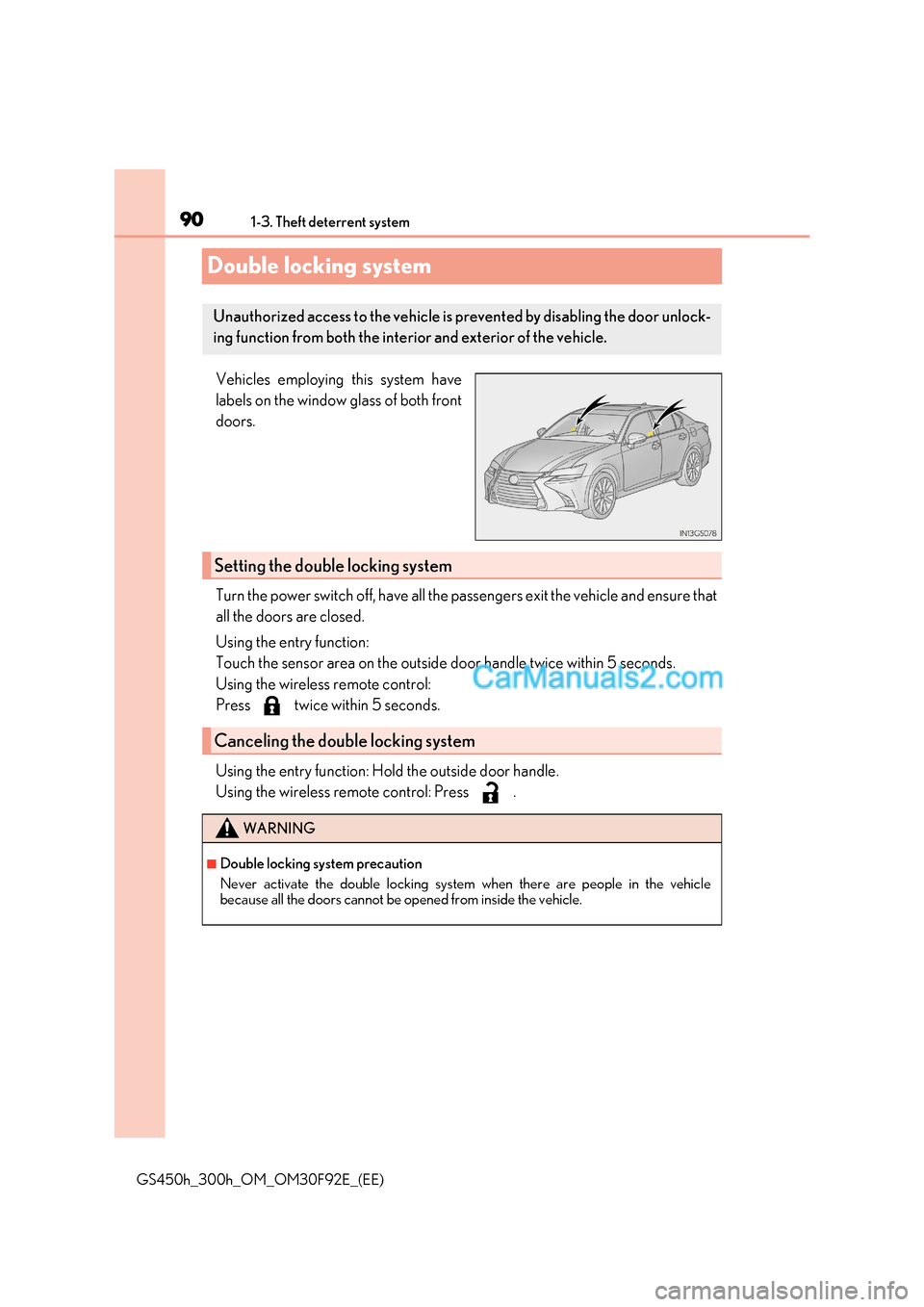
Vehicles employing this system have
labels on the window glass of both front doors.
Turn the power switch off, have all the passengers exit the vehicle and ensure that
all the doors are closed.
Using the entry function:
Touch the sensor area on the outside door handle twice within 5 seconds.
Using the wireless remote control:
Press twice within 5 seconds.
Using the entry function: Hold the outside door handle.
Using the wireless remote control: Press .
Unauthorized access to the vehicle is pr evented by disabling the door unlock-
ing function from both the interior and exterior of the vehicle.
Setting the double locking system
Canceling the double locking system
WARNING
■Double locking system precaution
Never activate the double locking system when there are people in the vehicle
because all the doors cannot be opened from inside the vehicle.
Page 92 of 600

921-3. Theft deterrent system
GS450h_300h_OM_OM30F92E_(EE) Do one of the following to deactivate or stop the alarm: ●
Unlock the doors or open the trunk using the entry function or wireless
remote control.
● Turn the power switch to ACCESSORY or ON mode, or start the hybrid sys-
tem. (The alarm will be deactivated or stopped after a few seconds.)
■System maintenance
The vehicle has a maintenance-free type alarm system.
■Items to check before locking the vehicle
To prevent unexpected triggering of the alarm and vehicle theft, make sure of the follow- ing:
●Nobody is in the vehicle.
●The windows and moon roof (if equipped) are closed before the alarm is set.
●No valuables or other personal items are left in the vehicle.
Deactivating or stopping the alarm
Page 133 of 600
133
3
Operation of
each component
GS450h_300h_OM_OM30F92E_(EE) 3-1. Key information
Keys .................................................. 134
3-2. Opening, closing and locking the doors and trunk
Doors ............................................... 139
Trunk .................................................146
Smart entry & start system ...... 153
3-3. Adjusting the seats Front seats.......................................175
Driving position memory ......... 178
Head restraints ............................ 183
3-4. Adjusting the steering wheel and mirrors
Steering wheel ............................. 186
Inside rear view mirror ............. 188
Outside rear view mirrors....... 190
3-5. Opening, closing the windows and moon roof
Power windows ........................... 193
Moon roof ...................................... 196
Page 139 of 600
139
3
3-2. Opening, closing and locking the doors and trunk
Operation of each component
GS450h_300h_OM_OM30F92E_(EE)
Doors
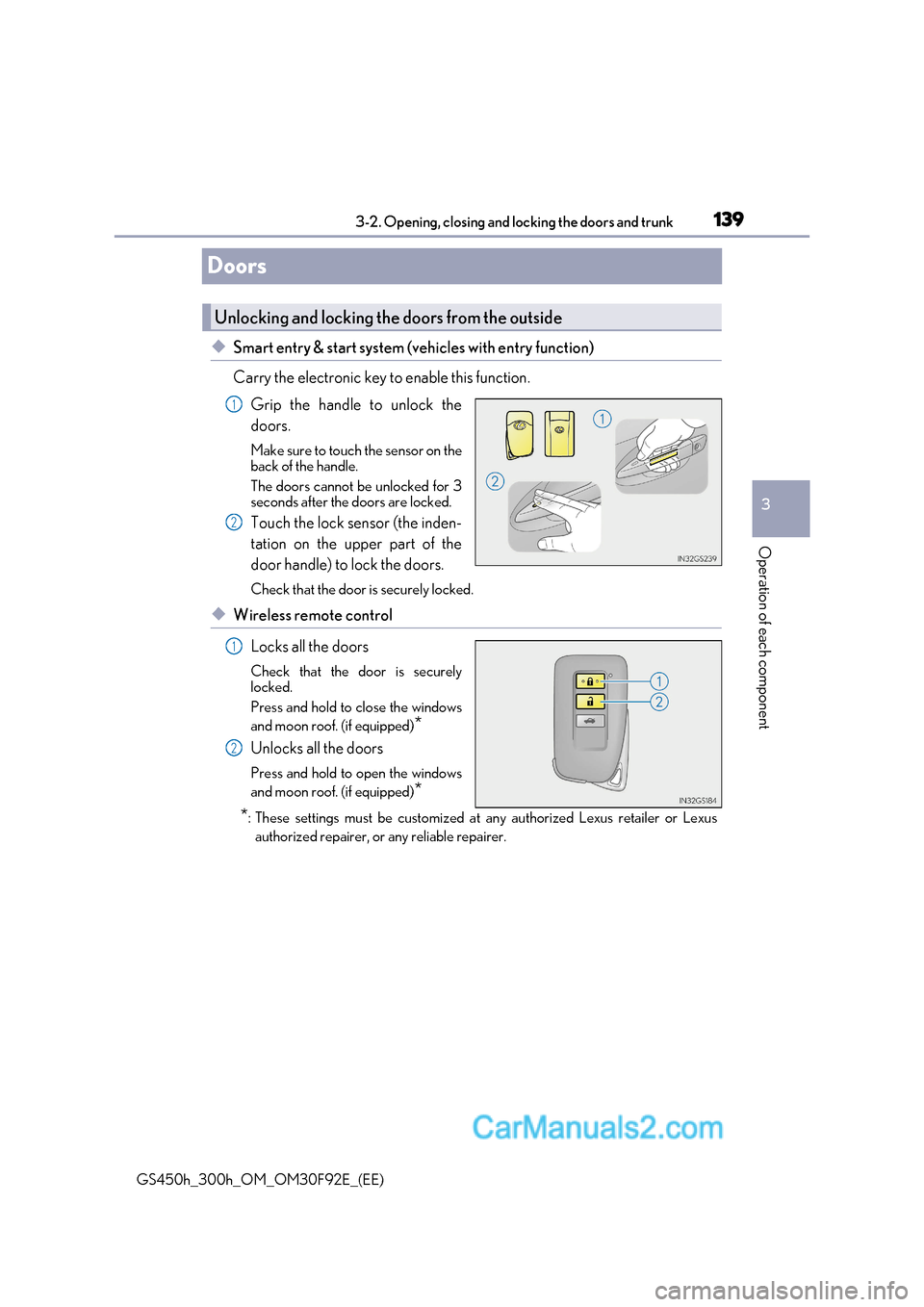
◆Smart entry & start system (vehicles with entry function)
Carry the electronic key to enable this function.Grip the handle to unlock the doors.
Make sure to touch the sensor on the
back of the handle.
The doors cannot be unlocked for 3
seconds after the doors are locked.
Touch the lock sensor (the inden-
tation on the upper part of the
door handle) to lock the doors.
Check that the door is securely locked.
◆Wireless remote control
Locks all the doors
Check that the door is securely
locked.
Press and hold to close the windows
and moon roof. (if equipped) *
Unlocks all the doors
Press and hold to open the windows
and moon roof. (if equipped) *
* : These settings must be customized at any authorized Lexus retailer or Lexus
authorized repairer, or any reliable repairer.
Unlocking and locking the doors from the outside
1
2
1
2
Page 141 of 600
141
3-2. Opening, closing and locking the doors and trunk
3
Operation of each component
GS450h_300h_OM_OM30F92E_(EE)
WARNING
Observe the following precautions.
Failing to do so may result in death or serious injury.
■When using the wireless remote control and operating the power windows or moon
roof (if equipped)
Operate the power window or moon roof afte r checking to make sure that there is no
possibility of any passenger having any of their body parts caught in the window or
moon roof. Also, do not allow children to oper ate the wireless remote control. It is pos-
sible for children and other passengers to get caught in the power window or moon roof.
■Jam protection function
●Never try jamming any part of your body to activate the jam protection function
intentionally.
●The jam protection function may not work if something gets caught just before the
window or moon roof fully closes.
Page 157 of 600
157
3-2. Opening, closing and locking the doors and trunk
3
Operation of each component
GS450h_300h_OM_OM30F92E_(EE)
■Note for the push-start function
●Even when the electronic key is within the effective range (detection areas), the system
may not operate properly when the electronic key is on the instrument panel, rear
package tray or floor, or in the door pock ets or glove box when the hybrid system is
started or power switch modes are changed.
●Even if the electronic key is not inside the ve hicle, it may be possible to start the hybrid
system if the electronic key is near the window.
■When the vehicle is not driven for extended periods
●Vehicles with entry function: To prevent theft of the vehicle, do not leave the electronic
key within 2 m (6 ft.) of the vehicle.
●The smart entry & start system can be deactivated in advance. ( P. 561)
■To operate the system properly
●Make sure to carry the electronic key when operating the system. Do not get the elec-
tronic key too close to the vehicle when operating the system from the outside of the
vehicle.
Depending on the position and holding condit ion of the electronic key, the key may not
be detected correctly and the system may not operate properly. (The alarm may go off
accidentally, or the door lock prev ention function may not operate.)
●Do not leave the electronic key inside the trunk.
The key confinement prevention function may not operate, depending on the location
of the key (close to a spare tire [if equipped], the inside edge of the trunk), conditions
(inside a metal bag, close to metallic obje cts) and the radio waves in the surrounding
area. ( P. 148)
■If the smart entry & start system does not operate properly
●Locking and unlocking the doors and opening the trunk: Use the mechanical key. ( P. 527)
●Starting the hybrid system: P. 528
■Customization
Settings (e. g. smart entry & start system) can be changed.
(Customizable features: P. 561)
■If the smart entry & start system has be en deactivated in a customized setting
●Locking and unlocking the doors and opening the trunk:
Use the wireless remote control or mechanical key. ( P. 139, 147, 527)
●Starting the hybrid system and changing power switch modes: P. 528
●Stopping the hybrid system: P. 218
Page 192 of 600
1923-4. Adjusting the steering wheel and mirrors
GS450h_300h_OM_OM30F92E_(EE)
■Mirror angle can be adjusted when
The power switch is in ACCESSORY or ON mode.
■When the mirrors are fogged up
The outside rear view mirrors can be clea red using the mirror defoggers. Turn on the
rear window defogger to turn on the outside rear view mirror defoggers. ( P. 352)
■Automatic adjustment of the mirror angle
A desired mirror face angle can be entered to memory and recalled automatically by the
driving position memory. ( P. 178)
■Auto anti-glare function
When the anti-glare inside rear view mirror is set to automatic mode, the outside rear
view mirrors will activate in conjunction with the anti-glare inside rear view mirror to
reduce reflected light. ( P. 188)
■Using automatic mode in cold weather
When automatic mode is used in cold weather, the door mirror could freeze up and
automatic stowing and return may not be possible. In this event, remove any ice and snow
from the door mirror, then either operate the mirror using manual mode or move the mir- ror by hand.
WARNING
■Important points while driving
Observe the following precautions while driving.
Failure to do so may result in loss of control of the vehicle and cause an accident, result-
ing in death or serious injury.
●Do not adjust the mirrors while driving.
●Do not drive with the mirrors folded.
●Both the driver and passenger side mirrors must be extended and properly adjusted
before driving.
■When a mirror is moving
To avoid personal injury and mirror malfunction, be careful not to get your hand caught
by the moving mirror.
■When the mirror defoggers are operating
Do not touch the rear view mirror surfaces, as they can become very hot and burn you.
Page 193 of 600
193
3
3-5. Opening, closing the windows and moon roof
Operation of each component
GS450h_300h_OM_OM30F92E_(EE)
Power windows
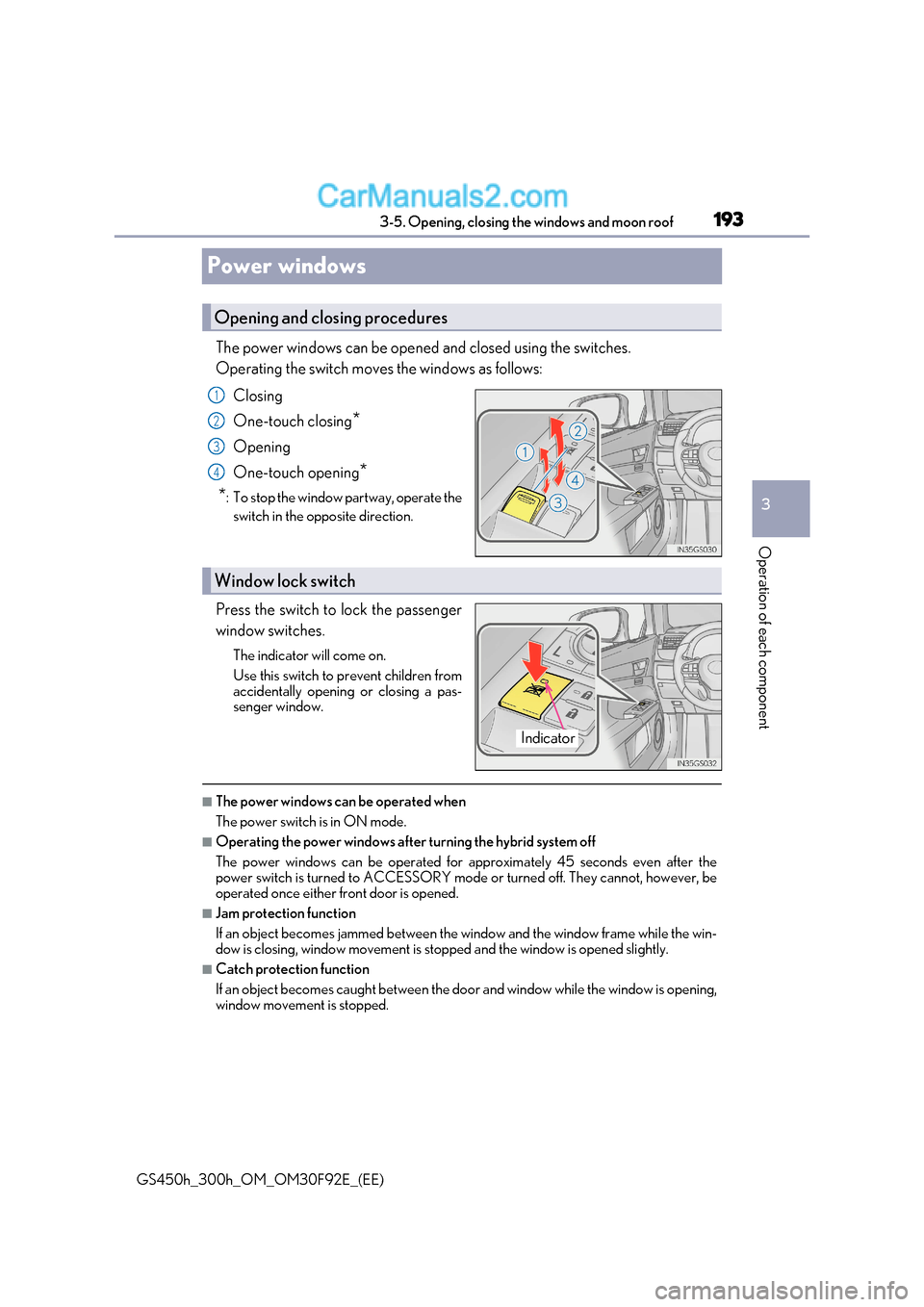
The power windows can be opened and closed using the switches.
Operating the switch moves the windows as follows:Closing
One-touch closing *
Opening
One-touch opening *
* : To stop the window partway, operate the
switch in the opposite direction.
Press the switch to lock the passenger
window switches. The indicator will come on.
Use this switch to prevent children from
accidentally opening or closing a pas-
senger window.
■The power windows can be operated when
The power switch is in ON mode.
■Operating the power windows after turning the hybrid system off
The power windows can be operated for approximately 45 seconds even after the
power switch is turned to ACCESSORY mode or turned off. They c annot, however, be
operated once either front door is opened.
■Jam protection function
If an object becomes jammed between the window and the window frame while the win-
dow is closing, window movement is stop ped and the window is opened slightly.
■Catch protection function
If an object becomes caught between the door and window while th e window is opening,
window movement is stopped.
Opening and closing procedures
1
2
3
4
Window lock switch
Indicator
Page 194 of 600
1943-5. Opening, closing the windows and moon roof
GS450h_300h_OM_OM30F92E_(EE)
■When the window cannot be opened or closed
When the jam protection function or catch protection function operates unusually and
the door window cannot be opened or closed , perform the following operations with the
power window switch of that door.
●Stop the vehicle. With the power switch in ON mode, within 4 seco nds of the jam pro-
tection function or catch protection function activating, continuously operate the
power window switch in the one-touch clos ing direction or one-touch opening direc-
tion so that the door window can be opened and closed.
●If the door window cannot be opened and closed even when performing the above
operations, perform the following procedure for function initialization.
Turn the power switch to ON mode.
Pull and hold the power window switch in the one-touch closing direction and com-
pletely close the door window.
Release the power window switch for a mo ment, resume pulling the switch in the
one-touch closing direction, and hold it there for approximately 6 seconds or more.
Press and hold the power window switch in the one-touch opening direc tion. After
the door window is completely opened, cont inue holding the switch for an additional
1 second or more.
Release the power window switch for a moment, resume pushing the switch in the
one-touch opening direction, and hold it there for approximately 4 seconds or
more.
Pull and hold the power window switch in the one-touch closing direction again.
After the door window is completely closed, continue holding the switch for a fur-
ther 1 second or more.
If you release the switch while the window is moving, start again from the beginning.
If the window reverses and cannot be fully closed or opened, have the vehicle inspected
by any authorized Lexus retailer or Lexus auth orized repairer, or any reliable repairer.
■Door lock linked window operation
●The power windows can be opened and closed using the mechanical key. * ( P. 527)
●The power windows can be opened and closed using the wireless remote control. *
( P. 139)
* : These settings must be customized at an y authorized Lexus retailer or Lexus autho-
rized repairer, or any reliable repairer.
■When the 12-volt battery is disconnected
The window lock switch is disabled. If ne cessary, press the window lock switch after
reconnecting the 12-volt battery.
■Power windows open warning buzzer
The buzzer sounds and a message is shown on the multi-information display in the instru-
ment cluster when the power switch is turned off and the driver’s door is opened with the
power windows open.
■Customization
Settings (e.g. linked door lock operation) can be changed.
(Customizable features: P. 561)
1
2
3
4
5
6
Page 195 of 600
195
3-5. Opening, closing the windows and moon roof
3
Operation of each component
GS450h_300h_OM_OM30F92E_(EE)
WARNING
Observe the following precautions.
Failure to do so may result in death or serious injury.
■Closing the windows
●The driver is responsible for all the power window operations, including the operation
for the passengers. In order to prevent acci dental operation, especially by a child, do
not let a child operate the power windows. It is possible for children and other passen-
gers to have body parts caught in the power window. Also, when riding with a child, it
is recommended to use the window lock switch. ( P. 193)
●Check to make sure that all passengers do not have any part of their body in a posi-
tion where it could be caught wh en a window is being operated.
●When using the wireless remote control or mechanical key and operating the power
windows, operate the power window after checking to make sure that there is no pos-
sibility of any passenger having any of thei r body parts caught in the window. Also do
not let a child operate window by the wireless remote control or mechanical key. It is
possible for children and other passengers to get caught in the power window.
●When exiting the vehicle, turn the power switch off, carry the key and exit the vehicle
along with the child. There may be accidental operation, due to mischief, etc., that
may possibly lead to an accident.
■Jam protection function
●Never use any part of your body to intent ionally activate the jam protection function.
●The jam protection function may not work if something gets jammed just before the
window is fully closed. Be careful not to ge t any part of your body jammed in the win-
dow.
■Catch protection function
●Never use any part of your body or clothing to intentionally activate the catch protec-
tion function.
●The catch protection function may not work if something gets caught just before the
window is fully opened. Be careful not to get any part of your body or clothing caught
in the window.