lock LEXUS GS300H 2019 Owners Manual
[x] Cancel search | Manufacturer: LEXUS, Model Year: 2019, Model line: GS300H, Model: LEXUS GS300H 2019Pages: 600, PDF Size: 55.99 MB
Page 528 of 600
5287-2. Steps to take in an emergency
GS450h_300h_OM_OM30F92E_(EE)
Ensure that the shift lever is in P and depress the brake pedal.
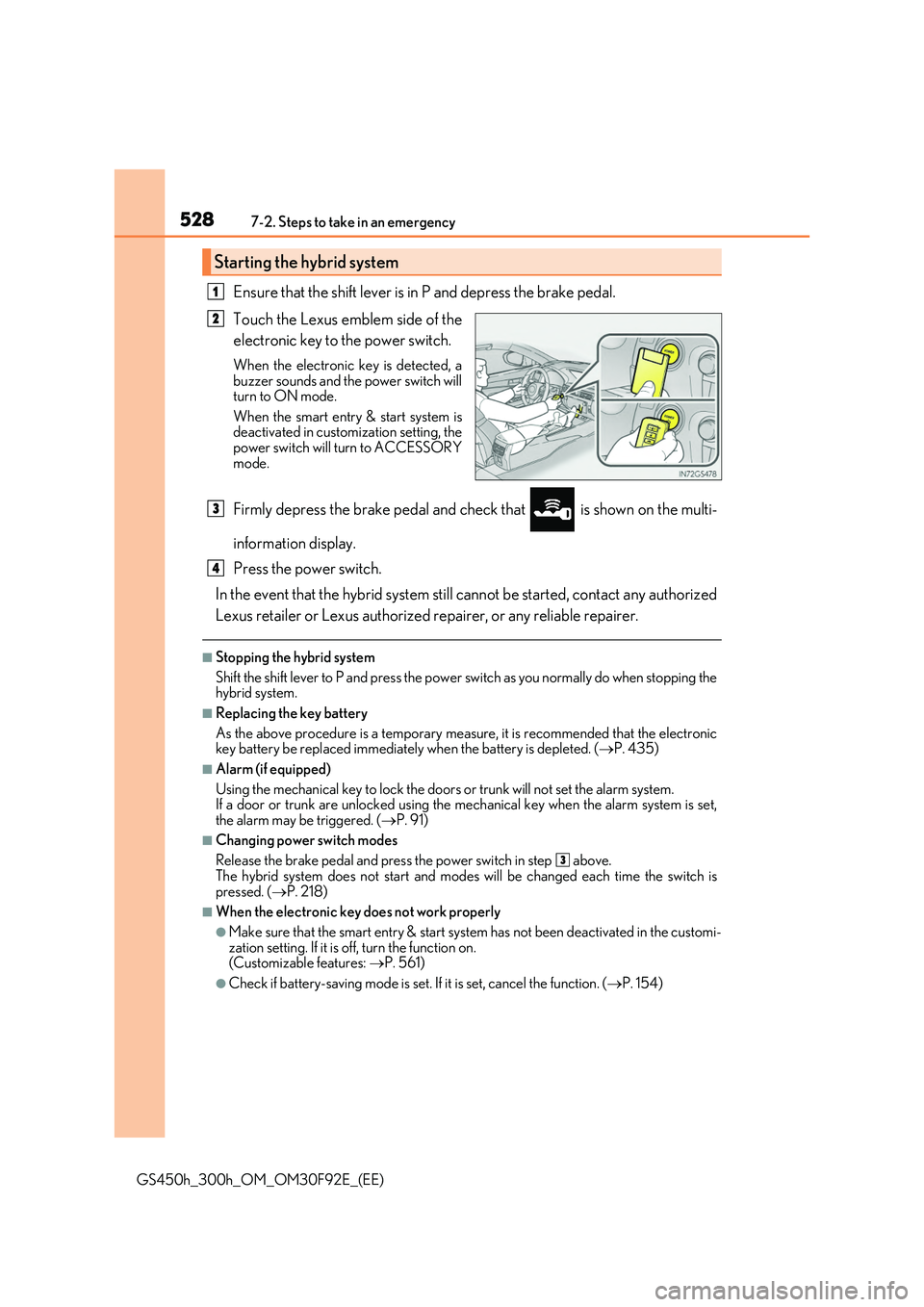
Touch the Lexus emblem side of the
electronic key to the power switch.
When the electronic key is detected, a buzzer sounds and the power switch willturn to ON mode.
When the smart entry & start system is deactivated in customization setting, thepower switch will turn to ACCESSORY
mode.
Firmly depress the brake pedal and ch eck that is shown on the multi-
information display.
Press the power switch.
In the event that the hybrid system still cannot be started, contact any authorized
Lexus retailer or Lexus authorized repairer, or any reliable repairer.
■Stopping the hybrid system
Shift the shift lever to P and press the power switch as you normally do when stopping the hybrid system.
■Replacing the key battery
As the above procedure is a temporary measure, it is recommended that the electronic key battery be replaced immediately when the battery is depleted. ( P. 435)
■Alarm (if equipped)
Using the mechanical key to lock the doors or trunk will not set the alarm system. If a door or trunk are unlocked using the me chanical key when the alarm system is set,
the alarm may be triggered. ( P. 91)
■Changing power switch modes
Release the brake pedal and press the power switch in step above.
The hybrid system does not start and modes will be changed each time the switch is pressed. ( P. 218)
■When the electronic key does not work properly
●Make sure that the smart entry & start system has not been deactivated in the customi- zation setting. If it is off, turn the function on. (Customizable features: P. 561)
●Check if battery-saving mode is set. If it is set, cancel the function. (P. 154)
Starting the hybrid system
1
2
3
4
3
Page 530 of 600

5307-2. Steps to take in an emergency
GS450h_300h_OM_OM30F92E_(EE)
If the 12-volt battery is discharged
If you have a set of jumper (or booster) cables and a second vehicle with a 12-volt
battery, you can jump start your vehicle by following the steps below.
Confirm that the electronic key is
being carried.
When connecting the jumper (or
booster) cables, depending on the situa- tion, the alarm may activate and doorslocked. ( P. 93)
Open the hood (P. 401), remove
the engine compartment covers
( P. 405) and open the fuse box
cover.
Remove all of the clips.
Push the tabs on either side to
detach the lock and lift the lid off
while pulling the lock plate.
Open the exclusive jump starting
terminal cover.
The following procedures may be used to start the hybrid system if the 12-volt
battery is discharged.
You can also call any authorized Lexus retailer or Lexus authorized repairer,
or any reliable repairer.
1
2
1
2
3
Page 533 of 600
5337-2. Steps to take in an emergency
7
When trouble arises
GS450h_300h_OM_OM30F92E_(EE)
■Starting the hybrid system when the 12-volt battery is discharged
The hybrid system cannot be started by push-starting.
■To prevent 12-volt battery discharge
●Turn off the headlights and the audio system while the hybrid system is off.
●Turn off any unnecessary electrical componen ts when the vehicle is running at a low speed for an extended period, such as in heavy traffic.
■Charging the 12-volt battery
The electricity stored in the 12-volt battery will discharge gradually even when the vehicle is not in use, due to natural discharge and the draining effects of certain electrical appli-ances. If the vehicle is left for a long time, the 12-volt battery may discharge, and the
hybrid system may be unable to start. (The 12-volt battery recharges automatically while the hybrid system is operating.)
■When recharging or replacing the 12-volt battery
●In some cases, it may not be possible to unlock the doors using the smart entry & startsystem when the 12-volt battery is discharged. Use the wireless remote control or themechanical key to lock or unlock the doors.
●The hybrid system may not start on the first attempt after the 12-volt battery hasrecharged but will start normally after the second attempt. This is not a malfunction.
●The power switch mode is memorized by the vehicle. When the 12-volt battery is
reconnected, the system will return to the mode it was in before the 12-volt battery was discharged. Before disconnecting the 12-v olt battery, turn the power switch off. If you are unsure what mode the power switch was in before the 12-volt battery dis-
charged, be especially careful when reconnecting the 12-volt battery.
WARNING
■Avoiding 12-volt battery fires or explosions
Observe the following precautions to prevent accidentally igniting the flammable gas that may be emitted from the 12-volt battery:
●Make sure each jumper cable is connected to the correct terminal and that it is notunintentionally in contact with any other than the intended terminal.
●Do not allow the other end of the jumper cable connected to the “+” terminal to come
into contact with any other parts or metal surfaces in the area, such as brackets or unpainted metal.
●Do not allow the + and - clamps of the jumper cables to come into contact with each
other.
●Do not smoke, use matches, cigarette lighters or allow open flame near the 12-volt battery.
Page 548 of 600
5488-1. Specifications
GS450h_300h_OM_OM30F92E_(EE)
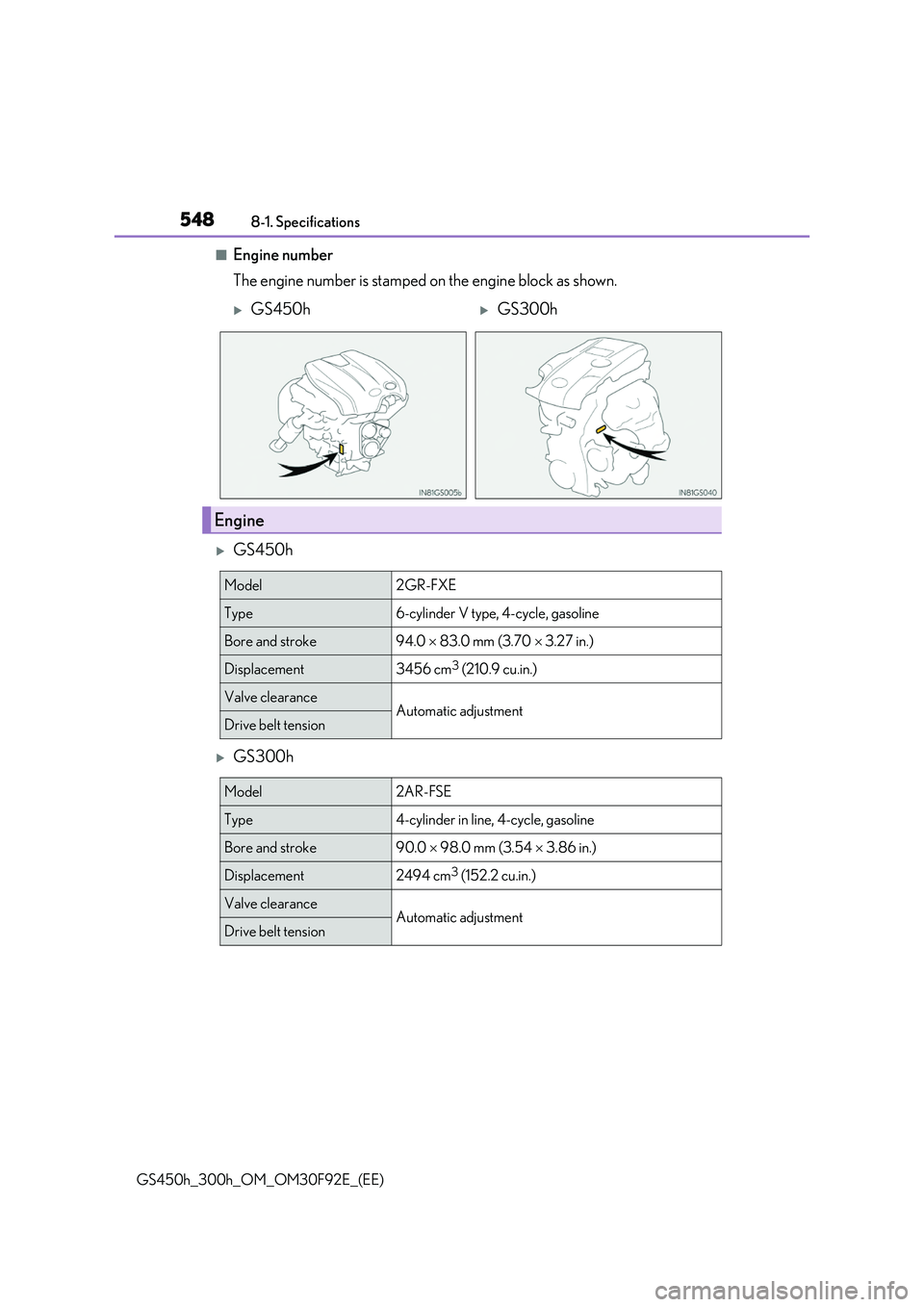
■Engine number
The engine number is stamped on the engine block as shown.
GS450h
GS300h
GS450hGS300h
Engine
Model2GR-FXE
Type6-cylinder V type, 4-cycle, gasoline
Bore and stroke94.0 83.0 mm (3.70 3.27 in.)
Displacement3456 cm3 (210.9 cu.in.)
Valve clearanceAutomatic adjustmentDrive belt tension
Model2AR-FSE
Type4-cylinder in line, 4-cycle, gasoline
Bore and stroke90.0 98.0 mm (3.54 3.86 in.)
Displacement2494 cm3 (152.2 cu.in.)
Valve clearanceAutomatic adjustmentDrive belt tension
Page 563 of 600
563
8
8-2. Customization
Vehicle specifications
GS450h_300h_OM_OM30F92E_(EE)
*1: The default setting varies according to countries.
*2: Some status screens cannot be registered (indicated on the multi-information display)
*3: 2 of the following items: current fuel cons umption, average fuel economy (after reset),
average fuel economy (after refuel), average fuel economy (after start), average vehi-
cle speed (after reset), average vehicle speed (after start), distance (driving range),
distance (after start), elapsed time (after reset), elapsed time (after start), blank
*4:Except F SPORT models
*5:F SPORT models
Drive information screen dis- played on the third screen of (Drive information 3)
Average fuel economy
(after refuel)*3—O—
Elapsed time (after start)
Pop-up displayOnOff—O—
Accent color*4Color 1Color 2OO—
Changeover to tachometerwhen sport mode is selected Auto
Hybrid system indicator (always)—O—Tachometer
(always)
Clock 24-hour display 12-hour display—O—
Needle*5Blue Red —O—White
Rev indicator*54000 r/min
2000 to 6000 r/min —O—
Off
Rev peak*5OnOff—O—
FunctionDefault settingCustomized setting123
Page 566 of 600
5668-2. Customization
GS450h_300h_OM_OM30F92E_(EE)
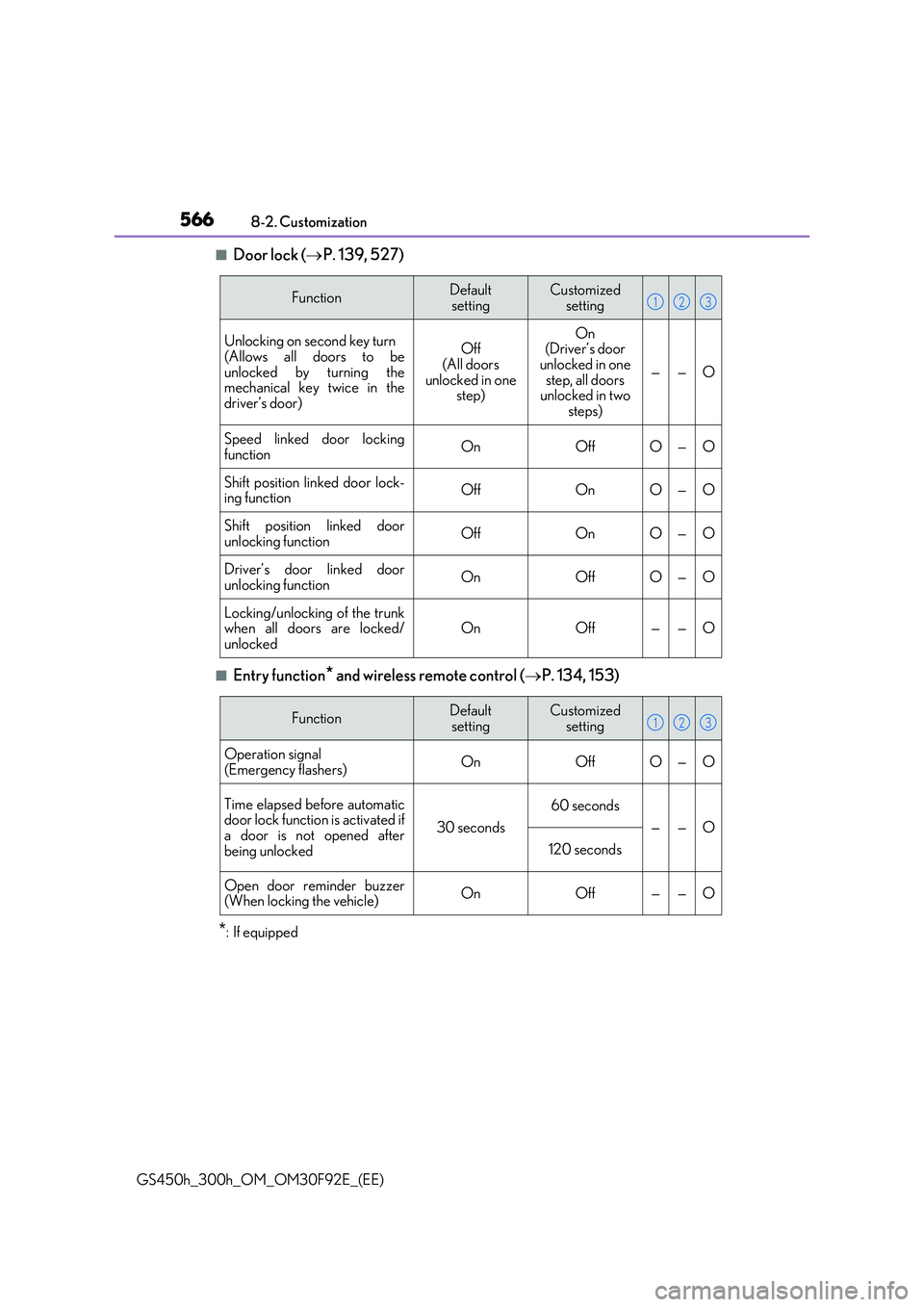
■Door lock ( P. 139, 527)
■Entry function* and wireless remote control (P. 134, 153)
*: If equipped
FunctionDefault
setting
Customized
setting
Unlocking on second key turn
(Allows all doors to be unlocked by turning themechanical key twice in the
driver’s door)
Off (All doors
unlocked in one step)
On(Driver’s door unlocked in one
step, all doors unlocked in two steps)
——O
Speed linked door locking
functionOnOffO—O
Shift position linked door lock- ing functionOffOnO—O
Shift position linked doorunlocking functionOffOnO—O
Driver’s door linked door
unlocking functionOnOffO—O
Locking/unlocking of the trunk when all doors are locked/unlockedOnOff——O
123
FunctionDefaultsettingCustomized setting
Operation signal
(Emergency flashers)OnOffO—O
Time elapsed before automatic door lock function is activated ifa door is not opened after
being unlocked
30 seconds
60 seconds
——O
120 seconds
Open door reminder buzzer (When locking the vehicle)OnOff——O
123
Page 567 of 600
567
8
8-2. Customization
Vehicle specifications
GS450h_300h_OM_OM30F92E_(EE)
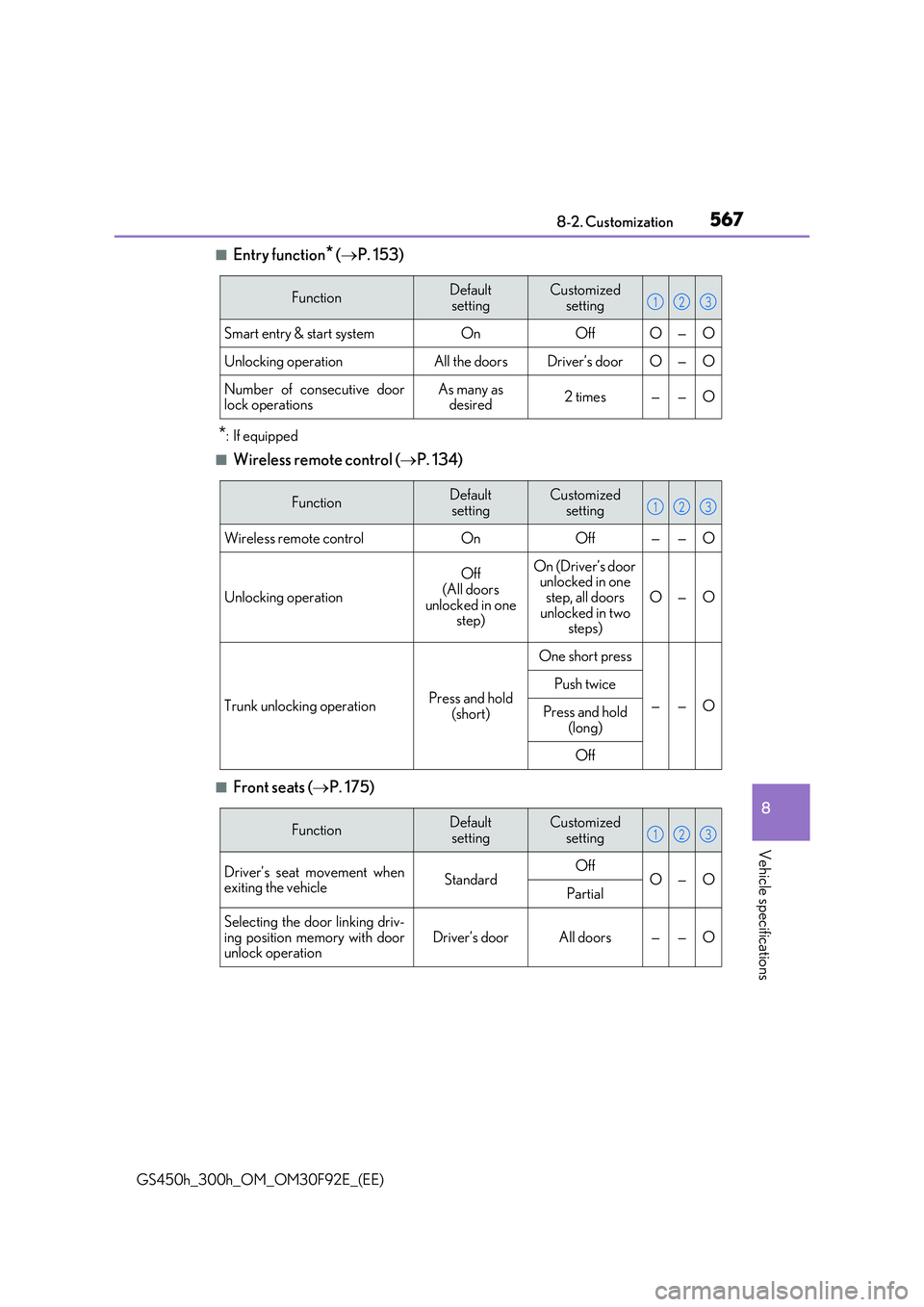
■Entry function* ( P. 153)
*: If equipped
■Wireless remote control (P. 134)
■Front seats (P. 175)
FunctionDefault
setting
Customized
setting
Smart entry & start systemOnOffO—O
Unlocking operationAll the doorsDriver’s doorO—O
Number of consecutive door lock operationsAs many as desired2 times——O
123
FunctionDefault
setting
Customized
setting
Wireless remote controlOnOff——O
Unlocking operation
Off
(All doors unlocked in one step)
On (Driver’s door unlocked in one step, all doors
unlocked in two steps)
O—O
Trunk unlocking operationPress and hold
(short)
One short press
——O
Push twice
Press and hold
(long)
Off
123
FunctionDefault settingCustomized setting
Driver’s seat movement whenexiting the vehicleStandardOffO—OPartial
Selecting the door linking driv-
ing position memory with door unlock operationDriver’s doorAll doors——O
123
Page 568 of 600
5688-2. Customization
GS450h_300h_OM_OM30F92E_(EE)
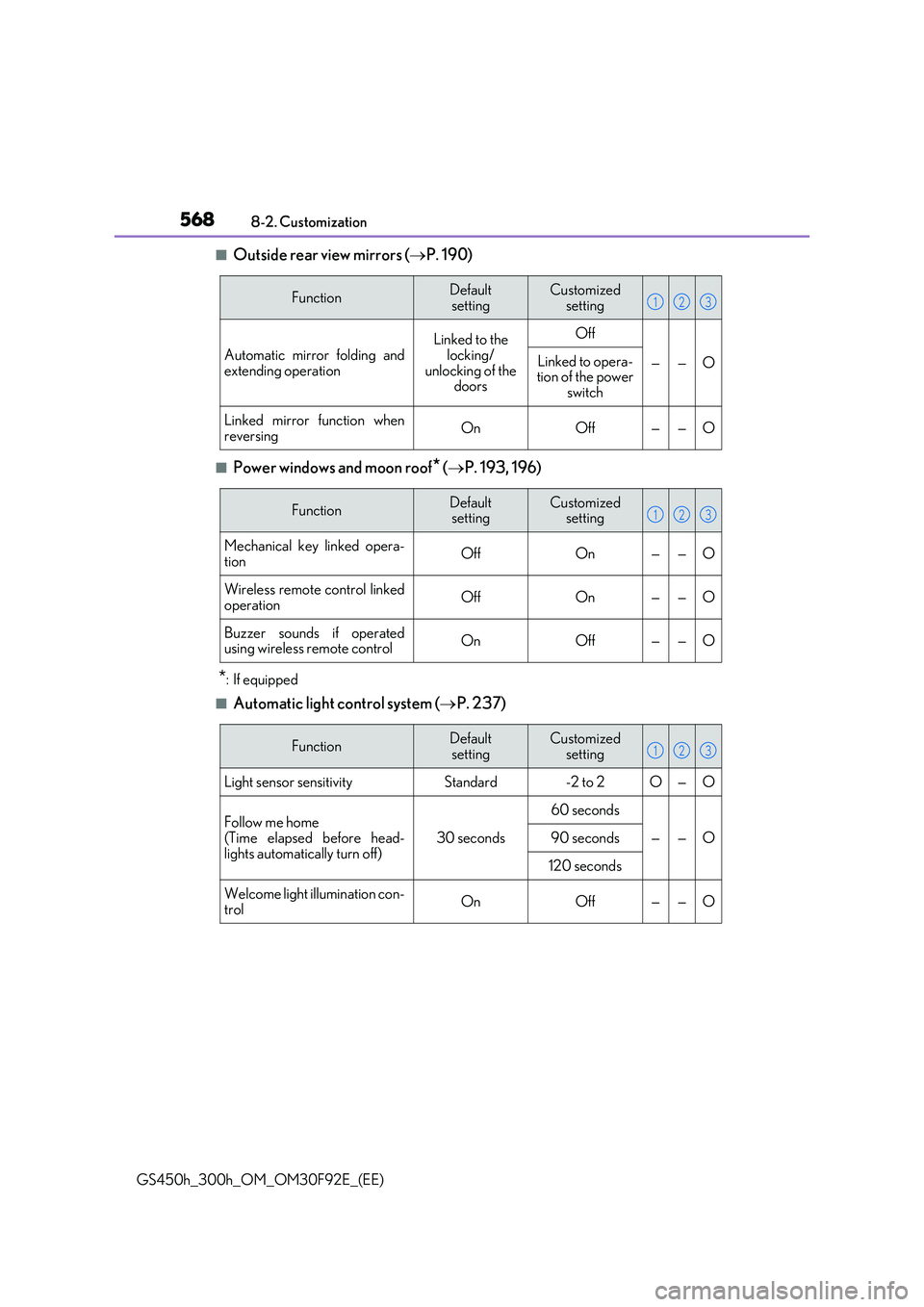
■Outside rear view mirrors ( P. 190)
■Power windows and moon roof* (P. 193, 196)
*: If equipped
■Automatic light control system (P. 237)
FunctionDefault
setting
Customized
setting
Automatic mirror folding and
extending operation
Linked to the locking/
unlocking of the doors
Off
——OLinked to opera-tion of the power switch
Linked mirror function when
reversingOnOff——O
123
FunctionDefault settingCustomized setting
Mechanical key linked opera-
tionOffOn——O
Wireless remote control linked operationOffOn——O
Buzzer sounds if operatedusing wireless remote controlOnOff——O
123
FunctionDefaultsettingCustomized setting
Light sensor sensitivityStandard-2 to 2O—O
Follow me home (Time elapsed before head-
lights automatically turn off)
30 seconds
60 seconds
——O90 seconds
120 seconds
Welcome light illumination con-
trolOnOff——O
123
Page 573 of 600
573
8
8-2. Customization
Vehicle specifications
GS450h_300h_OM_OM30F92E_(EE)
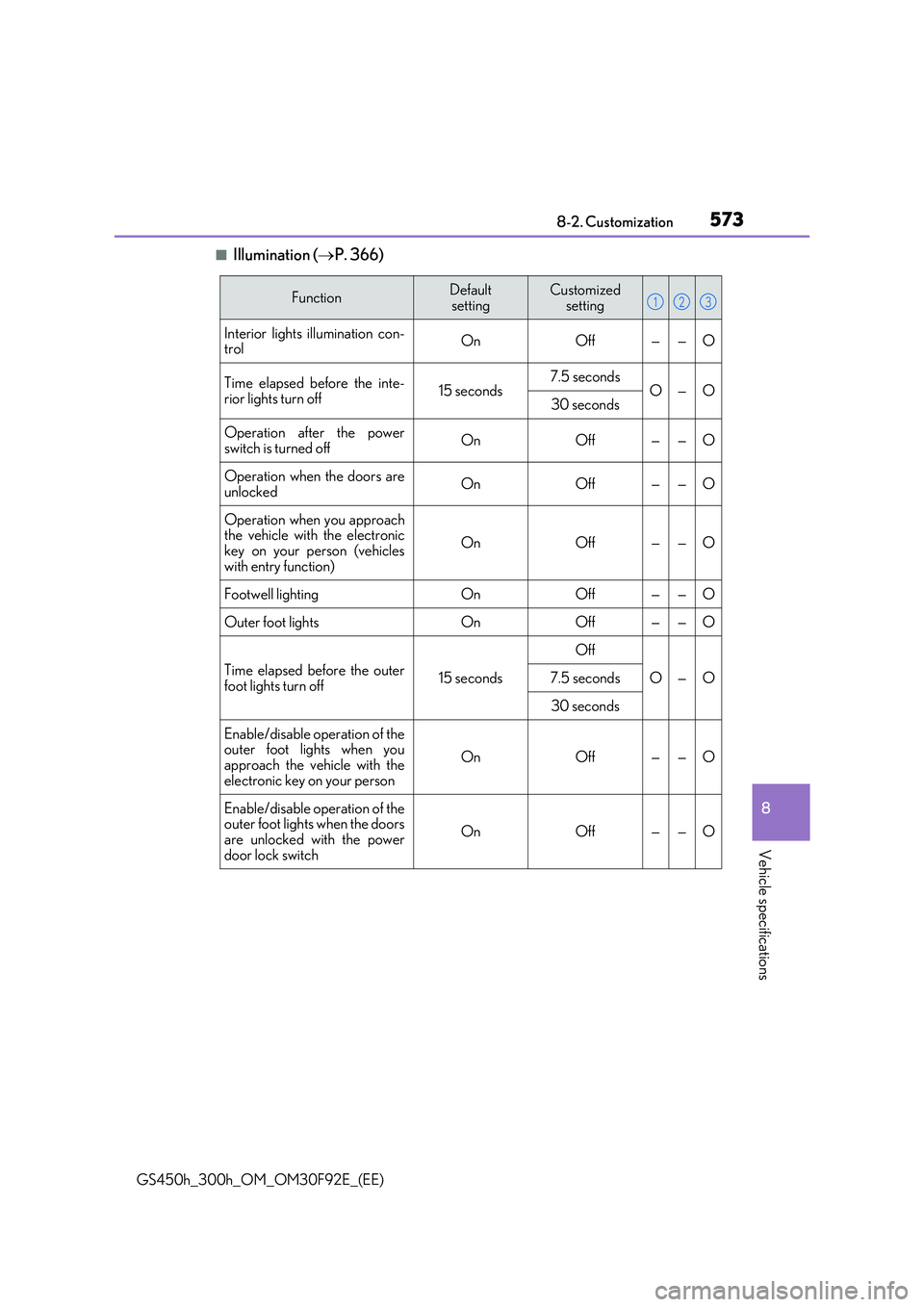
■Illumination ( P. 366)
FunctionDefault
setting
Customized
setting
Interior lights illumination con- trolOnOff——O
Time elapsed before the inte-
rior lights turn off15 seconds7.5 secondsO—O30 seconds
Operation after the power switch is turned offOnOff——O
Operation when the doors are
unlockedOnOff——O
Operation when you approach the vehicle with the electronickey on your person (vehicles
with entry function)
OnOff——O
Footwell lightingOnOff——O
Outer foot lightsOnOff——O
Time elapsed before the outer
foot lights turn off15 seconds
Off
O—O7.5 seconds
30 seconds
Enable/disable operation of the outer foot lights when you
approach the vehicle with the electronic key on your person
OnOff——O
Enable/disable operation of theouter foot lights when the doors
are unlocked with the power door lock switch
OnOff——O
123
Page 574 of 600
5748-2. Customization
GS450h_300h_OM_OM30F92E_(EE)
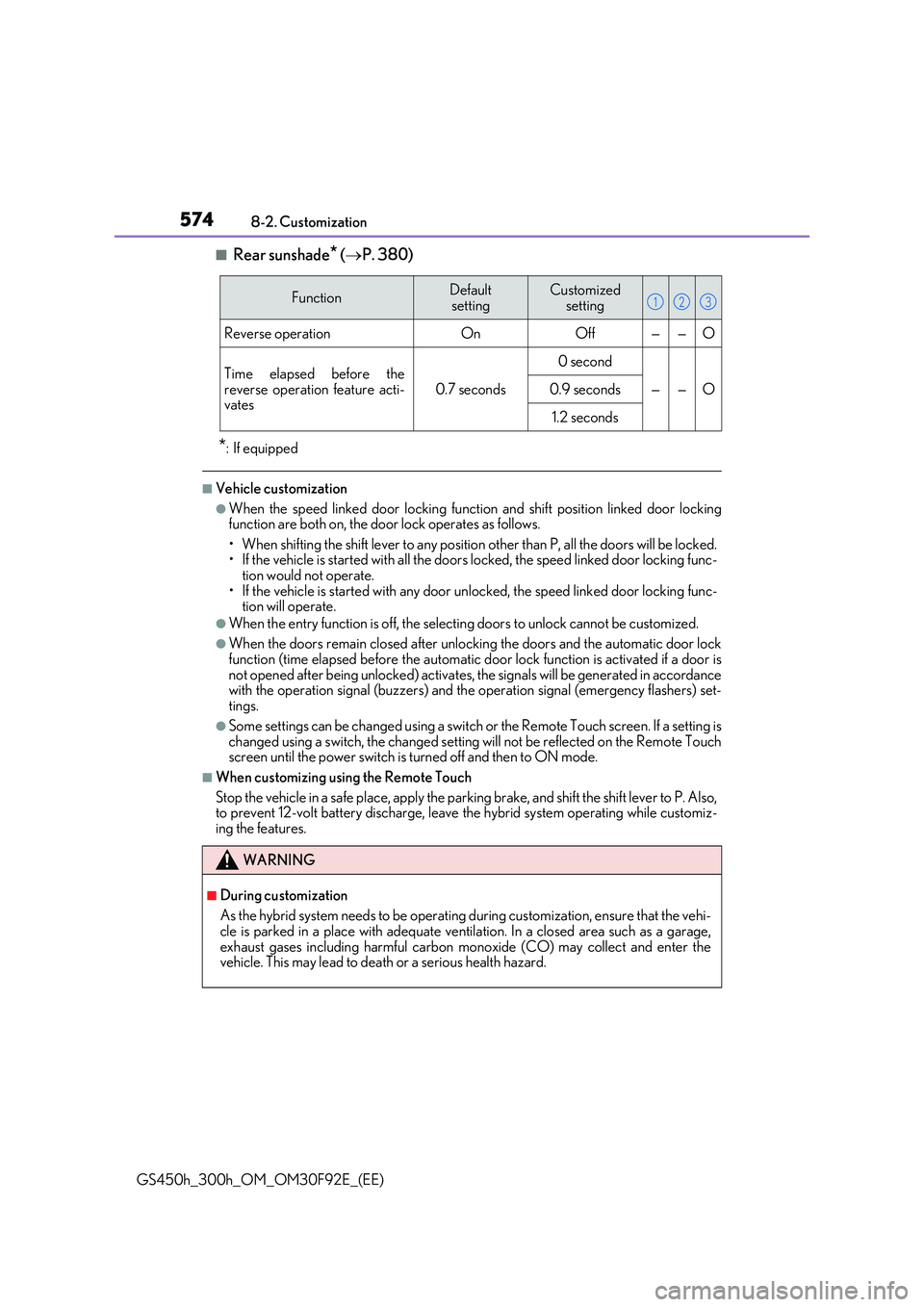
■Rear sunshade* ( P. 380)
*: If equipped
■Vehicle customization
●When the speed linked door locking function and shift position linked door locking function are both on, the door lock operates as follows.
• When shifting the shift lever to any position other than P, all the doors will be locked. • If the vehicle is started with all the door s locked, the speed linked door locking func- tion would not operate.
• If the vehicle is started with any door un locked, the speed linked door locking func- tion will operate.
●When the entry function is off, the select ing doors to unlock cannot be customized.
●When the doors remain closed after unlocking the doors and the automatic door lock function (time elapsed before the automatic door lock function is activated if a door is
not opened after being unlocked) activates, the signals will be generated in accordance with the operation signal (buzzers) and the operation signal (emergency flashers) set-tings.
●Some settings can be changed using a switch or the Remote Touch screen. If a setting ischanged using a switch, the changed setting will not be reflected on the Remote Touchscreen until the power switch is turned off and then to ON mode.
■When customizing using the Remote Touch
Stop the vehicle in a safe place, apply the parking brake, and shift the shift lever to P. Also, to prevent 12-volt battery discharge, leave the hybrid system operating while customiz-
ing the features.
FunctionDefault
setting
Customized
setting
Reverse operationOnOff——O
Time elapsed before the
reverse operation feature acti- vates0.7 seconds
0 second
——O0.9 seconds
1.2 seconds
WARNING
■During customization
As the hybrid system needs to be operating during customization, ensure that the vehi- cle is parked in a place with adequate ventilation. In a closed area such as a garage,
exhaust gases including harmful carbon monoxide (CO) may collect and enter the vehicle. This may lead to death or a serious health hazard.
123