child lock LEXUS GS300H 2019 User Guide
[x] Cancel search | Manufacturer: LEXUS, Model Year: 2019, Model line: GS300H, Model: LEXUS GS300H 2019Pages: 600, PDF Size: 55.99 MB
Page 71 of 600
711-1. For safe use
1
For safety and security
GS450h_300h_OM_OM30F92E_(EE)
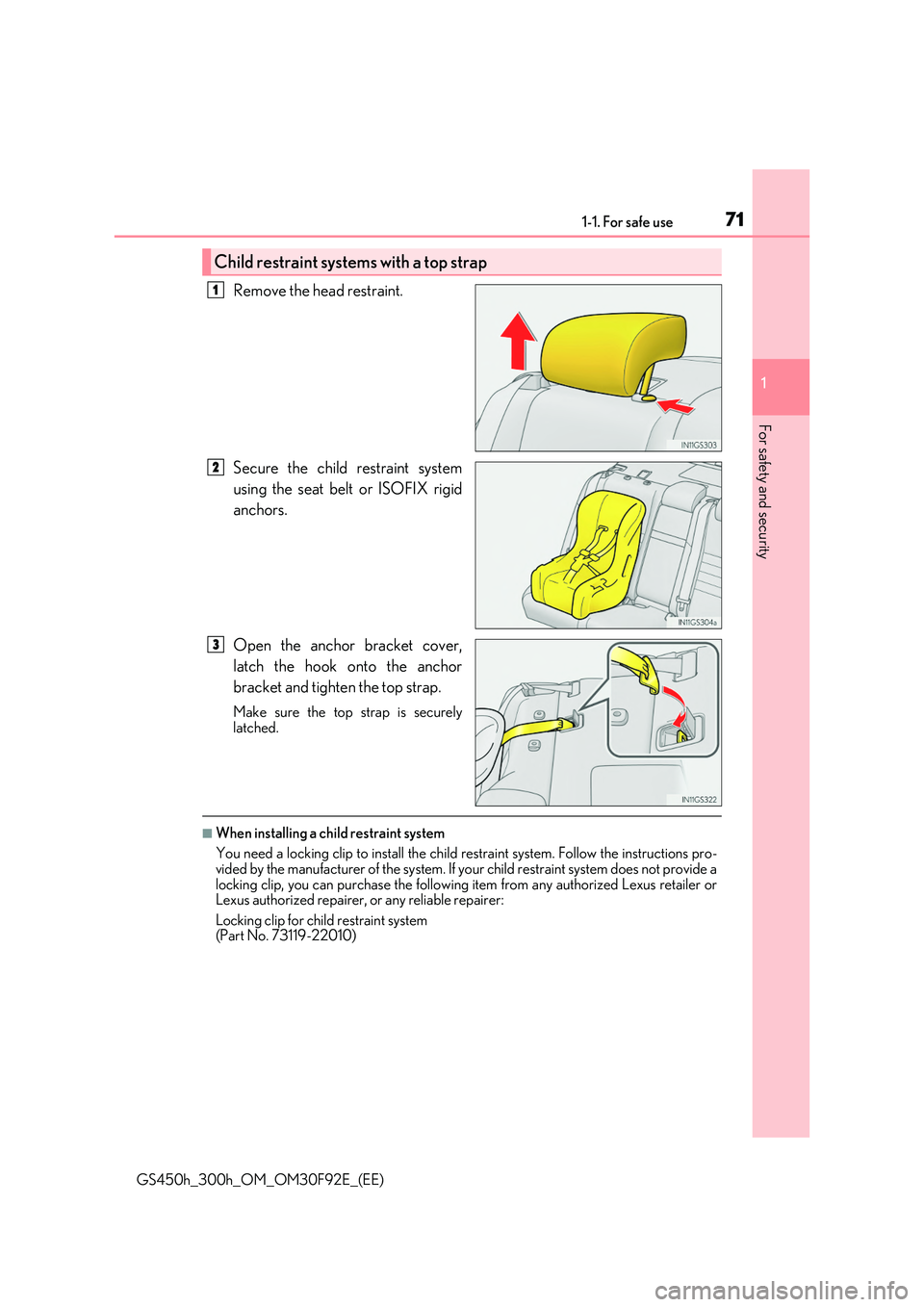
Remove the head restraint.
Secure the child restraint system
using the seat belt or ISOFIX rigid
anchors.
Open the anchor bracket cover,
latch the hook onto the anchor
bracket and tighten the top strap.
Make sure the top strap is securely latched.
■When installing a child restraint system
You need a locking clip to install the child restraint system. Follow the instructions pro-
vided by the manufacturer of the system. If your child restraint system does not provide a locking clip, you can purchase the following item from any authorized Lexus retailer or Lexus authorized repairer, or any reliable repairer:
Locking clip for child restraint system (Part No. 73119-22010)
Child restraint systems with a top strap
1
2
3
Page 74 of 600
741-1. For safe use
GS450h_300h_OM_OM30F92E_(EE)
WARNING
■When installing a child restraint system
●If child restraint system regulations exist in the country where you reside, please con- tact any authorized Lexus retailer or Le xus authorized repairer, or any reliable
repairer for the child rest raint system installation.
●When a junior seat is installed, always ensure that the shoulder belt is positioned across the center of the child’s shoulder. The belt should be kept away from the child’s
neck, but not so that it could fall off the ch ild’s shoulder. Failing to do so may result in death or serious injury in the event of su dden braking, sudden swerving or an acci- dent.
●Ensure that the belt and plate are securely locked and the seat belt is not twisted.
●Shake the child restraint system left and right, and forward and backward to ensure that it has been securely installed.
●After securing a child restraint system, never adjust the seat.
●Follow all installation instructions provided by the child restraint system manufacturer.
■To correctly attach a child restraint system to the anchors
When using the lower anchors, be sure that there are no foreign objects around the anchors and that the seat belt is not caught behind the child restraint system. Make sure the child restraint system is se curely attached, or it may cause death or serious injury to
the child or other passengers in the event of sudden braking, sudden swerving or an accident.
Page 141 of 600
1413-2. Opening, closing and locking the doors and trunk
3
Operation of each component
GS450h_300h_OM_OM30F92E_(EE)
WARNING
Observe the following precautions. Failing to do so may result in death or serious injury.
■When using the wireless remote control and operating the power windows or moon
roof (if equipped)
Operate the power window or moon roof afte r checking to make sure that there is no possibility of any passenger having any of their body parts caught in the window or
moon roof. Also, do not allow children to oper ate the wireless remote control. It is pos- sible for children and other passengers to get caught in the power window or moonroof.
■Jam protection function
●Never try jamming any part of your body to activate the jam protection functionintentionally.
●The jam protection function may not work if something gets caught just before thewindow or moon roof fully closes.
Page 143 of 600
1433-2. Opening, closing and locking the doors and trunk
3
Operation of each component
GS450h_300h_OM_OM30F92E_(EE)
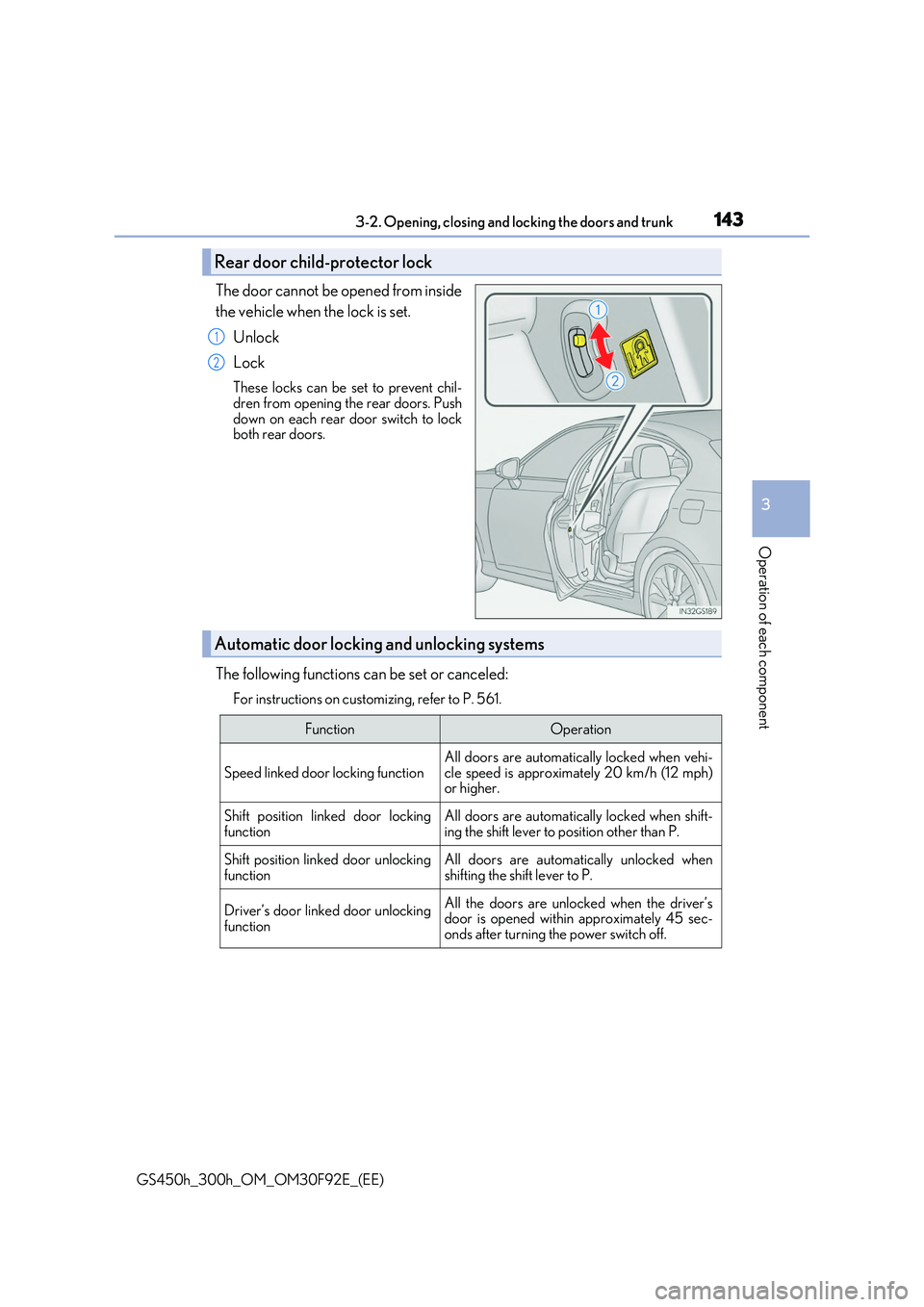
The door cannot be opened from inside
the vehicle when the lock is set.
Unlock
Lock
These locks can be set to prevent chil-
dren from opening the rear doors. Push down on each rear door switch to lockboth rear doors.
The following functions can be set or canceled:
For instructions on customizing, refer to P. 561.
Rear door child-protector lock
1
2
Automatic door locking and unlocking systems
FunctionOperation
Speed linked door locking function
All doors are automatically locked when vehi-
cle speed is approximately 20 km/h (12 mph) or higher.
Shift position linked door lockingfunctionAll doors are automatically locked when shift-ing the shift lever to position other than P.
Shift position linked door unlocking
function
All doors are automatically unlocked when
shifting the shift lever to P.
Driver’s door linked door unlocking
function
All the doors are unlocked when the driver’s door is opened within approximately 45 sec-onds after turning the power switch off.
Page 145 of 600
1453-2. Opening, closing and locking the doors and trunk
3
Operation of each component
GS450h_300h_OM_OM30F92E_(EE)
■Impact detection door lock release system
In the event that the vehicle is subject to a strong impact, all the doors are unlocked. Depending on the force of the impact or the type of accident, however, the system may
not operate.
■Using the mechanical key
The doors can also be locked and unlocked with the mechanical key. ( P. 527)
■Conditions affecting the operation of the smart entry & start system or wireless remote control
P. 155
■Customization
Settings (e.g. unlocking function using a key) can be changed. (Customizable features: P. 561)
WARNING
■To prevent an accident
Observe the following precautions while driving the vehicle. Failure to do so may result in a door openin g and an occupant throwing out of the vehi- cle, resulting in death or serious injury.
●Ensure that all doors are properly closed.
●Do not pull the inside handle of the doors while driving. Be especially careful for the front doors, as the doors may be opened even if the
inside lock buttons are in locked position.
●Set the rear door child-protector locks when children are seated in the rear seats.
Page 149 of 600
1493-2. Opening, closing and locking the doors and trunk
3
Operation of each component
GS450h_300h_OM_OM30F92E_(EE)
■Jam protection function (vehicles with power trunk lid)
While the trunk lid is closing automatically, the trunk lid will stop closing and open if something gets caught.
■If the smart entry & start system or wireless remote control does not operate properly
●Use the mechanical key to open the trunk. ( P. 527)
●Replace the key battery with a new one if it is depleted. (P. 435)
■When leaving a key to the vehicle with a parking attendant
P. 136
■Customization
The trunk unlocking operation can be changed. (Customizable features: P. 566)
WARNING
Observe the following precautions. Failure to do so may result in death or serious injury.
■Before driving
●Make sure that the trunk lid is fully closed. If the trunk lid is not fully closed, it may open unexpectedly while driv ing and hit near-by objects or luggage in the trunk may
be thrown out, causing an accident.
●Do not allow children to play in the trunk. If a child is accidentally locked in the trunk, they could suffer from heat exhaustion,
suffocation or other injuries.
●Do not allow a child to open or close the trunk lid. Doing so may cause the trunk lid to open unexpectedly, or cause the child’s hands,
head, or neck to be caught by the closing trunk lid.
■Important points while driving
Never let anyone sit in the trunk. In the event of sudden braking or a collision, they are
susceptible to death or serious injury.
Page 193 of 600
193
3
3-5. Opening, closing the windows and moon roof
Operation of each component
GS450h_300h_OM_OM30F92E_(EE)
Power windows
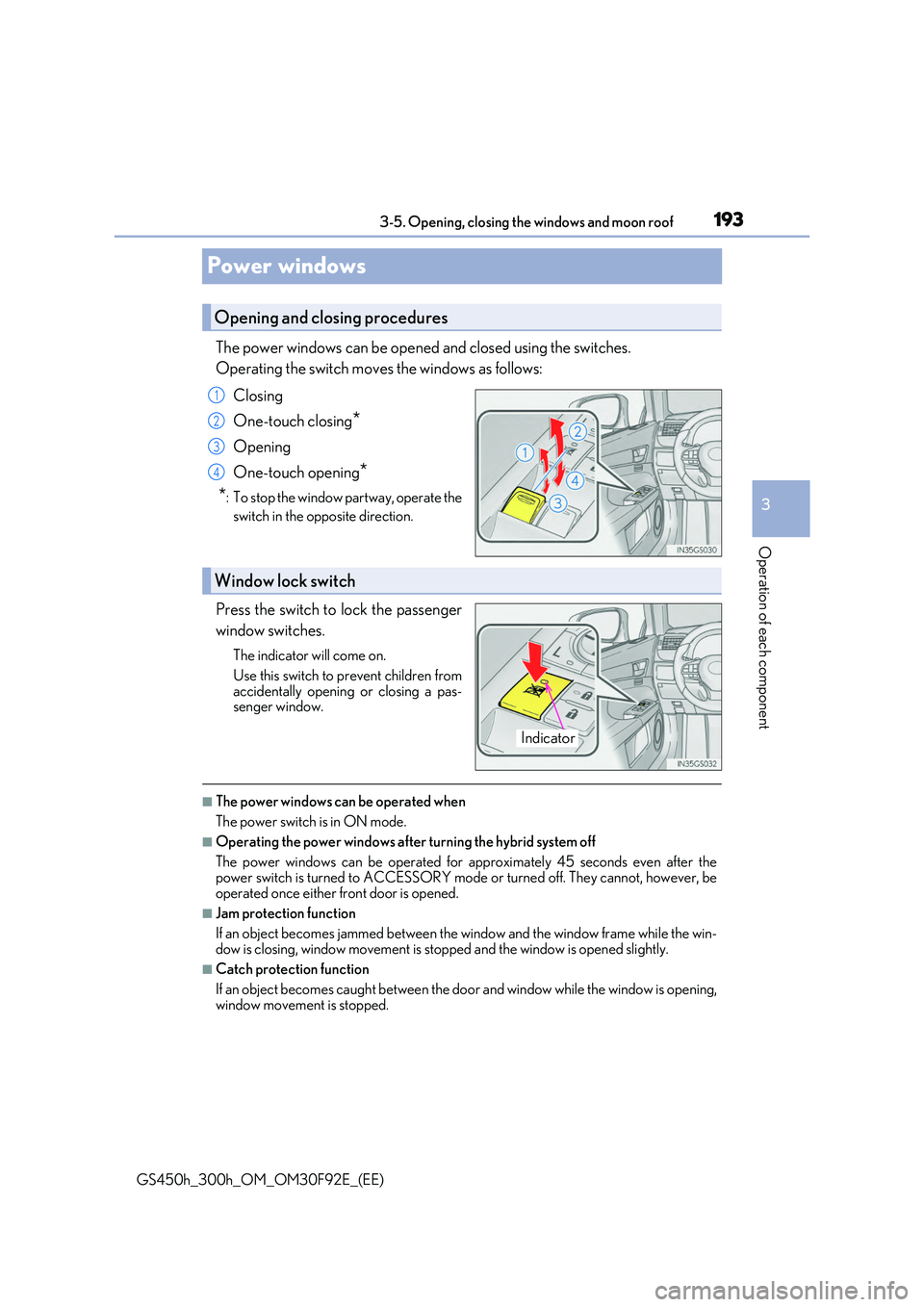
The power windows can be opened and closed using the switches.
Operating the switch moves the windows as follows:
Closing
One-touch closing*
Opening
One-touch opening*
*: To stop the window partway, operate the
switch in the opposite direction.
Press the switch to lock the passenger
window switches.
The indicator will come on.
Use this switch to prevent children from
accidentally opening or closing a pas- senger window.
■The power windows can be operated when
The power switch is in ON mode.
■Operating the power windows after turning the hybrid system off
The power windows can be operated for approximately 45 seconds even after the power switch is turned to ACCESSORY mode or turned off. They cannot, however, be
operated once either front door is opened.
■Jam protection function
If an object becomes jammed between the window and the window frame while the win-
dow is closing, window movement is stop ped and the window is opened slightly.
■Catch protection function
If an object becomes caught between the door and window while the window is opening,
window movement is stopped.
Opening and closing procedures
1
2
3
4
Window lock switch
Indicator
Page 195 of 600
1953-5. Opening, closing the windows and moon roof
3
Operation of each component
GS450h_300h_OM_OM30F92E_(EE)
WARNING
Observe the following precautions. Failure to do so may result in death or serious injury.
■Closing the windows
●The driver is responsible for all the power window operations, including the operation for the passengers. In order to prevent acci dental operation, especially by a child, do not let a child operate the power windows. It is possible for children and other passen-
gers to have body parts caught in the power window. Also, when riding with a child, it is recommended to use the window lock switch. ( P. 193)
●Check to make sure that all passengers do not have any part of their body in a posi-
tion where it could be caught wh en a window is being operated.
●When using the wireless remote control or mechanical key and operating the power windows, operate the power window after checking to make sure that there is no pos-
sibility of any passenger having any of thei r body parts caught in the window. Also do not let a child operate window by the wireless remote control or mechanical key. It ispossible for children and other passengers to get caught in the power window.
●When exiting the vehicle, turn the power switch off, carry the key and exit the vehiclealong with the child. There may be accidental operation, due to mischief, etc., thatmay possibly lead to an accident.
■Jam protection function
●Never use any part of your body to intent ionally activate the jam protection function.
●The jam protection function may not work if something gets jammed just before the
window is fully closed. Be careful not to ge t any part of your body jammed in the win- dow.
■Catch protection function
●Never use any part of your body or clothing to intentionally activate the catch protec-tion function.
●The catch protection function may not work if something gets caught just before the
window is fully opened. Be careful not to get any part of your body or clothing caught in the window.
Page 198 of 600
1983-5. Opening, closing the windows and moon roof
GS450h_300h_OM_OM30F92E_(EE)
■Moon roof open warning buzzer
The buzzer sounds and a message is shown on the multi-information display in the instru- ment cluster when the power switch is turned off and the driver’s door is opened with the
moon roof open.
■Customization
Settings (e.g. linked door lock operation) can be changed.
(Customizable features: P. 561)
WARNING
Observe the following precautions. Failure to do so may cause death or serious injury.
■Opening the moon roof
●Do not allow any passengers to put their hands or heads outside the vehicle while it ismoving.
●Do not sit on top of the moon roof.
■Closing the moon roof
●The driver is responsible for moon roof opening and closing operations. In order to prevent accidental operation, espe cially by a child, do not let a child oper-
ate the moon roof. It is possible for childre n and other passengers to have body parts caught in the moon roof.
●Check to make sure that all passengers do not have any part of their body in a posi-
tion where it could be caught when the moon roof is being operated.
●When using the wireless remote control or mechanical key and operating the moon roof, operate the moon roof after checking to make sure that there is no possibility of
any passenger having any of their body parts caught in the moon roof. Also, do not let a child operate moon roof by the wireless remo te control or mechanical key. It is pos- sible for children and other passengers to get caught in the moon roof.
●When exiting the vehicle, turn the power switch off, carry the key and exit the vehiclealong with the child. There may be accidental operation, due to mischief, etc., thatmay possibly lead to an accident.
■Jam protection function
●Never use any part of your body to intent ionally activate the jam protection function.
●The jam protection function may not work if something gets caught just before the
moon roof fully closes.
Page 413 of 600
413 6-3. Do-it-yourself maintenance
6
Maintenance and care
GS450h_300h_OM_OM30F92E_(EE)
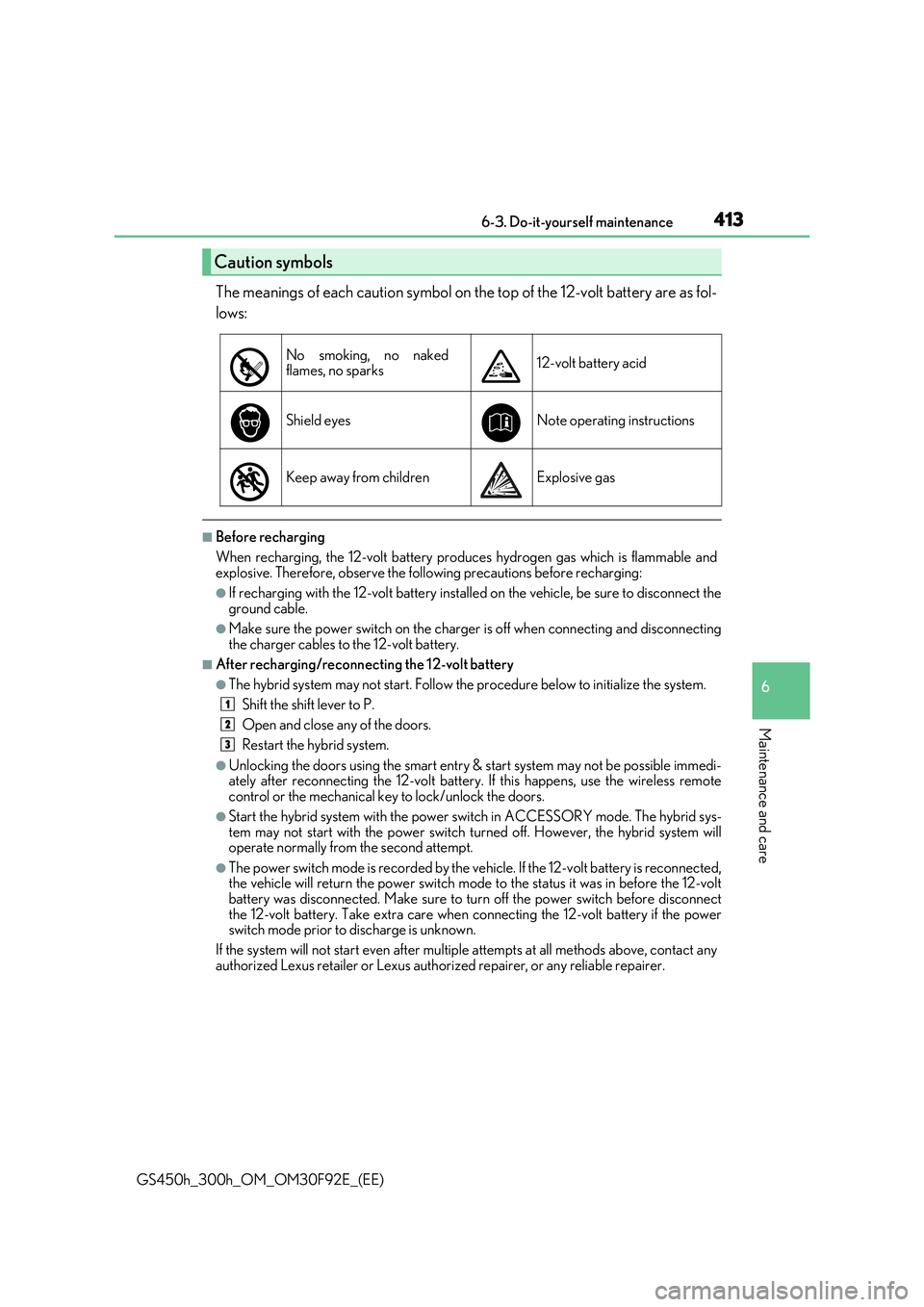
The meanings of each caution symbol on the top of the 12-volt battery are as fol-
lows:
■Before recharging
When recharging, the 12-volt battery produces hydrogen gas which is flammable and explosive. Therefore, observe the following precautions before recharging:
●If recharging with the 12-volt battery installed on the vehicle, be sure to disconnect the
ground cable.
●Make sure the power switch on the charger is off when connecting and disconnecting
the charger cables to the 12-volt battery.
■After recharging/reconnecting the 12-volt battery
●The hybrid system may not start. Follow the procedure below to initialize the system.
Shift the shift lever to P.
Open and close any of the doors.
Restart the hybrid system.
●Unlocking the doors using the smart entry & start system may not be possible immedi- ately after reconnecting the 12-volt battery. If this happens, use the wireless remotecontrol or the mechanical key to lock/unlock the doors.
●Start the hybrid system with the power switch in ACCESSORY mode. The hybrid sys-tem may not start with the power switch turned off. However, the hybrid system willoperate normally from the second attempt.
●The power switch mode is recorded by the vehicle. If the 12-volt battery is reconnected,the vehicle will return the power switch mode to the status it was in before the 12-volt battery was disconnected. Make sure to tu rn off the power switch before disconnect
the 12-volt battery. Take extra care when connecting the 12-volt battery if the power switch mode prior to discharge is unknown.
If the system will not start even after multiple attempts at all methods above, contact any
authorized Lexus retailer or Lexus author ized repairer, or any reliable repairer.
Caution symbols
No smoking, no naked flames, no sparks12-volt battery acid
Shield eyesNote operating instructions
Keep away from childrenExplosive gas
1
2
3