fog light LEXUS GS300H 2019 User Guide
[x] Cancel search | Manufacturer: LEXUS, Model Year: 2019, Model line: GS300H, Model: LEXUS GS300H 2019Pages: 600, PDF Size: 55.99 MB
Page 248 of 600
2484-3. Operating the lights and wipers
GS450h_300h_OM_OM30F92E_(EE)
■High beam automatic turning on or off conditions
●When all of the following conditions are fulfilled, the high beam will be automatically turned on (after approximately 1 second):
• Vehicle speed is above approximately 40 km/h (25 mph).
• The area ahead of the vehicle is dark. • There are no vehicles ahead with headlights or tail lights turned on.• There are few streetlights on the road ahead.
●If any of the following conditions are fulfille d, the high beam will be automatically turned off:
• Vehicle speed drops below appr oximately 30 km/h (19 mph). • The area ahead of the vehicle is not dark.• Vehicles ahead have headlights or tail lights turned on.
• There are many streetlights on the road ahead.
■Camera sensor detection information
●The high beam may not be automatically turned off in the following situations:
• When oncoming vehicles suddenly appear from a curve • When the vehicle is cut in front of by another vehicle• When vehicles ahead are hidden from sight due to repeated curves, road dividers or
roadside trees • When vehicles ahead appear from the faraway lane on wide road• When vehicles ahead have no lights
●The high beam may be turned off if a vehicles ahead that is using fog lights without usingthe headlights is detected.
●House lights, street lights, traffic signals, and illuminated billboards or signs may cause the high beam to switch to the low beams, or the low beams to remain on.
●The following factors may affect the amount of time taken to turn the high beam on or
off:
• The brightness of headlights, fog light s, and tail lights of vehicles ahead • The movement and direction of vehicles ahead
• When vehicle ahead only has operational lights on one side • When vehicle ahead is a two-wheeled vehicle• The condition of the road (gradient, curve, condition of the road surface etc.)
• The number of passengers and amount of luggage
●The high beam may be turned on or off when the driver does not expect it.
●Bicycles or similar objects may not be detected.
Page 249 of 600
2494-3. Operating the lights and wipers
4
Driving
GS450h_300h_OM_OM30F92E_(EE)
●In the situations shown below, the system may not be able to accurately detect sur- rounding brightness levels. This may cause the low beams to remain on or the highbeams to cause problems for pedestrians, vehicles ahead or other parties. In these
cases, manually switch between the high and low beams.
• In bad weather (rain, snow, fog, sandstorms etc.) • The windshield is obscured by fog, mist, ice, dirt etc.
• The windshield is cracked or damaged. • The inside rear view mirror or ca mera sensor is deformed or dirty. • The camera sensor temperature is extremely high.
• Surrounding brightness levels are equal to th ose of headlights, tail lights or fog lights. • Vehicles ahead have headlights that are either switched off, dirty, are changing color,or are not aimed properly.
• When driving through an area of interm ittently changing brightness and darkness. • When frequently and repeatedly driving ascending/descending roads, or roads withrough, bumpy or uneven surfaces (such as stone-paved roads, gravel tracks etc.).
• When frequently and repeatedly taking curves or driving on a winding road. • There is a highly reflective object ahead of the vehicle, such as a sign or a mirror.• The back of a vehicle ahead is highly reflective, such as a container on a truck.
• The vehicle’s headlights are damaged or dirty. • The vehicle is listing or tilting, due to a flat tire, a trailer being towed etc.• The high beam and low beam are repeated ly being switched between in an abnor-
mal manner. • The driver believes that the high beam may be causing problems or distress to otherdrivers or pedestrians nearby.
• When going through the Straits of Dover.
■Warning message
Warning messages are used to indicate a syst em malfunction or to inform the driver of
the need for caution. ( P. 466)
Page 250 of 600
2504-3. Operating the lights and wipers
GS450h_300h_OM_OM30F92E_(EE)
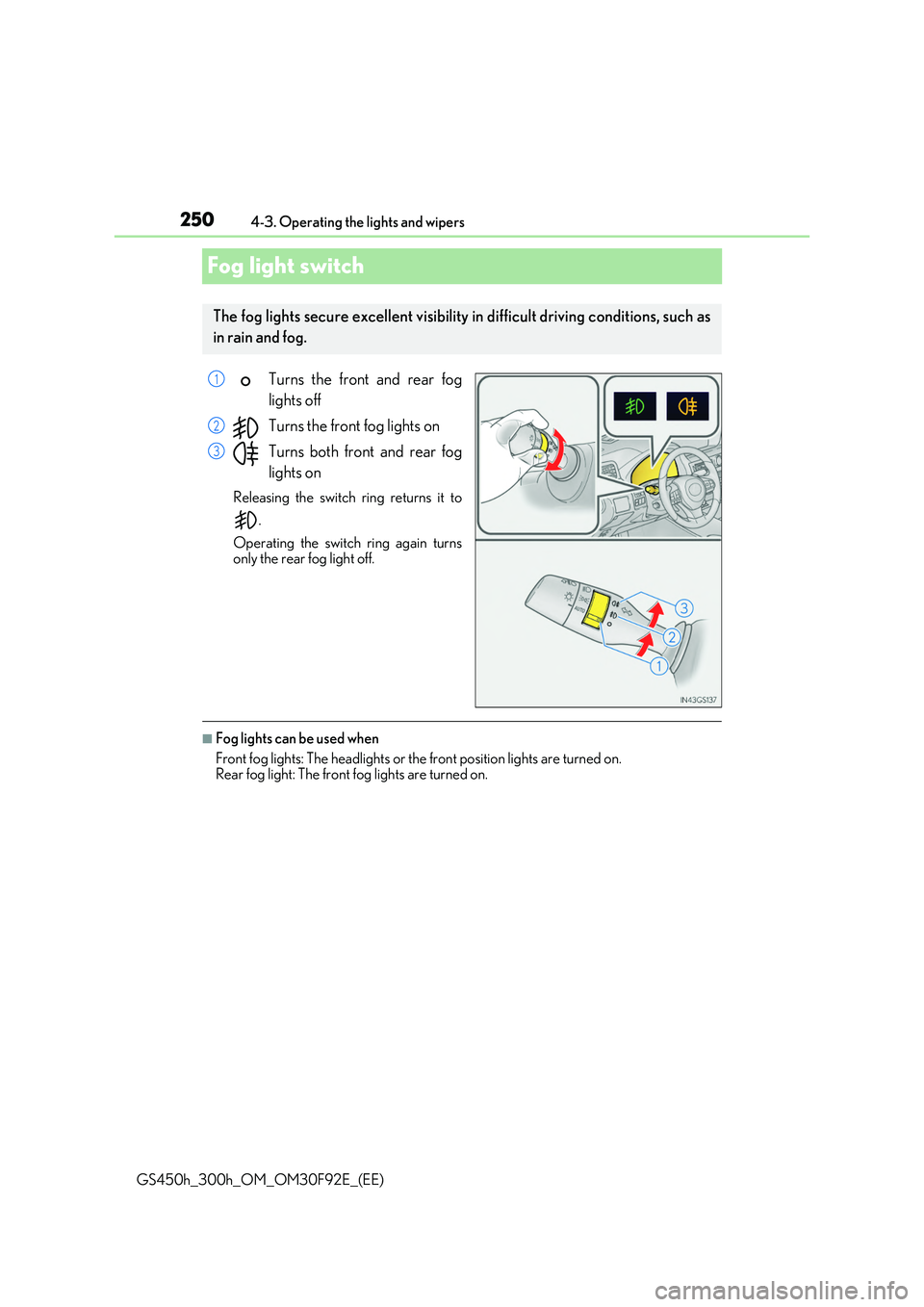
Fog light switch
Turns the front and rear fog
lights off
Turns the front fog lights on
Turns both front and rear fog
lights on
Releasing the switch ring returns it to
.
Operating the switch ring again turns
only the rear fog light off.
■Fog lights can be used when
Front fog lights: The headlights or the front position lights are turned on. Rear fog light: The front fog lights are turned on.
The fog lights secure excellent visibility in difficult driving conditions, such as
in rain and fog.
1
2
3
Page 265 of 600
2654-5. Using the driving support systems
4
Driving
GS450h_300h_OM_OM30F92E_(EE)
WARNING
■To avoid malfunction of the camera sensor
Observe the following precautions.
Otherwise, the camera sensor may not oper ate properly, possibly leading to an acci-
dent resulting in death or serious injury.
●Keep the windshield clean at all times.
• If the windshield is dirty or covered with an oily film, water droplets, snow, etc.,
clear the windshield. • If a glass coating agent is applied to the windshield, it will still be necessary to use the windshield wipers to remove water droplets, etc. from the area of the wind-
shield in front of the camera sensor. • If the inner side of the windshield where th e camera sensor is installed is dirty, con- tact any authorized Lexus retailer or Le xus authorized repairer, or any reliable
repairer.
●If the part of the windshield in front of the camera sensor is fogged up or covered with condensation or ice, use the windshield defogger to remove the fog, condensation orice. ( P. 352)
●If water droplets cannot be properly removed from the area of the windshield in front of the camera sensor by the windshield wipers, replace the wiper insert or wiperblade.
If the wiper inserts or wiper blades need to be replaced, contact any authorized Lexus retailer or Lexus authorized repairer, or any reliable repairer.
●Do not attach window tinting to the windshield.
●Replace the windshield if it is damaged or cracked. If the windshield needs to be replaced, contact any authorized Lexus retailer or Lexusauthorized repairer, or any reliable repairer.
●Do not get the camera sensor wet.
●Do not allow bright lights to shine into the camera sensor.
●Do not dirty or damage the camera sensor.
When cleaning the inside of the windshield, do not allow glass cleaner to contact the lens. Also, do not touch the lens. If the lens is dirty or damaged, contact any authorized Lexus retailer or Lexus autho-
rized repairer, or any reliable repairer.
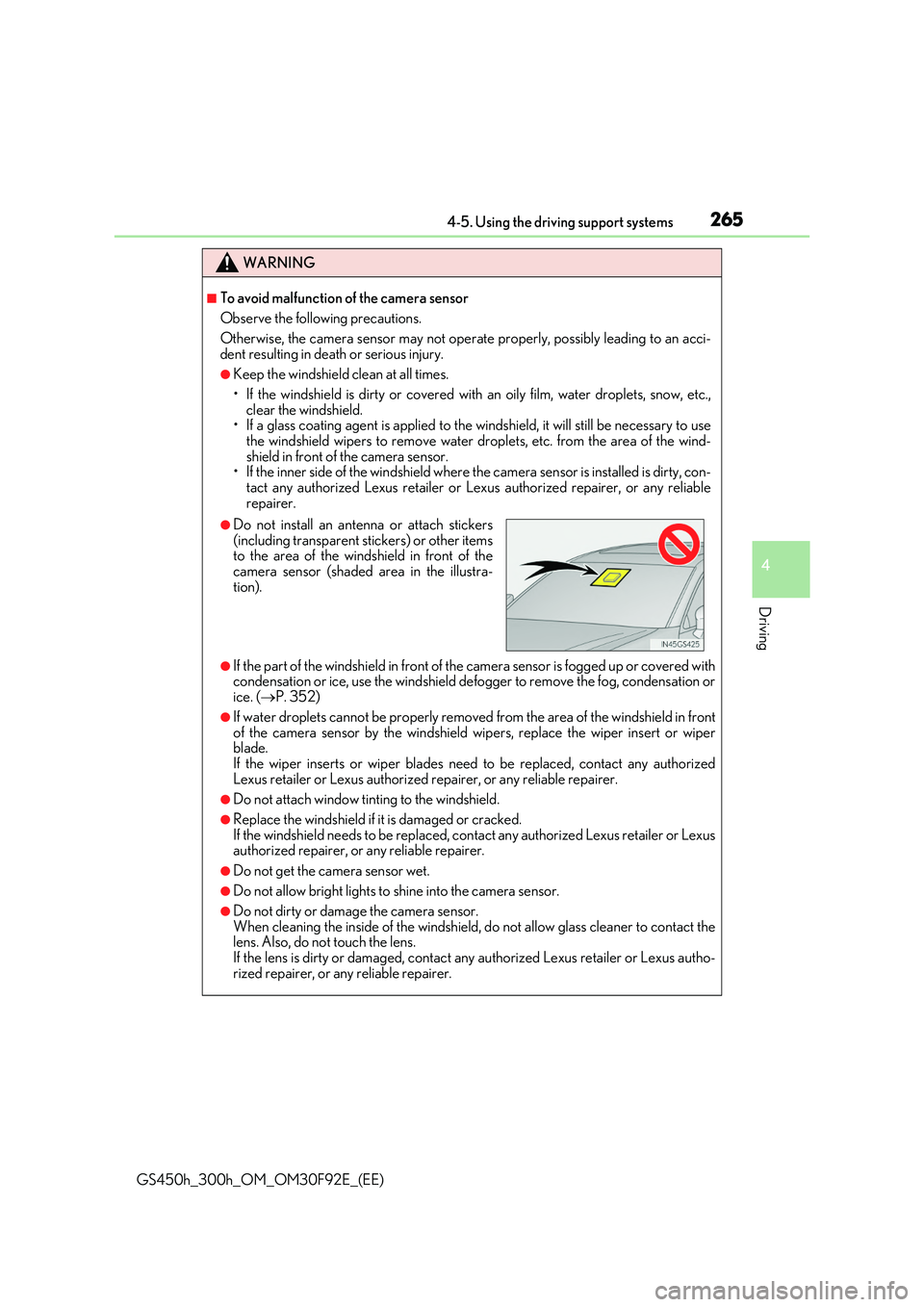
●Do not install an antenna or attach stickers
(including transparent stickers) or other items to the area of the windshield in front of thecamera sensor (shaded area in the illustra-
tion).
Page 279 of 600
2794-5. Using the driving support systems
4
Driving
GS450h_300h_OM_OM30F92E_(EE)
■Situations in which the system may not operate properly
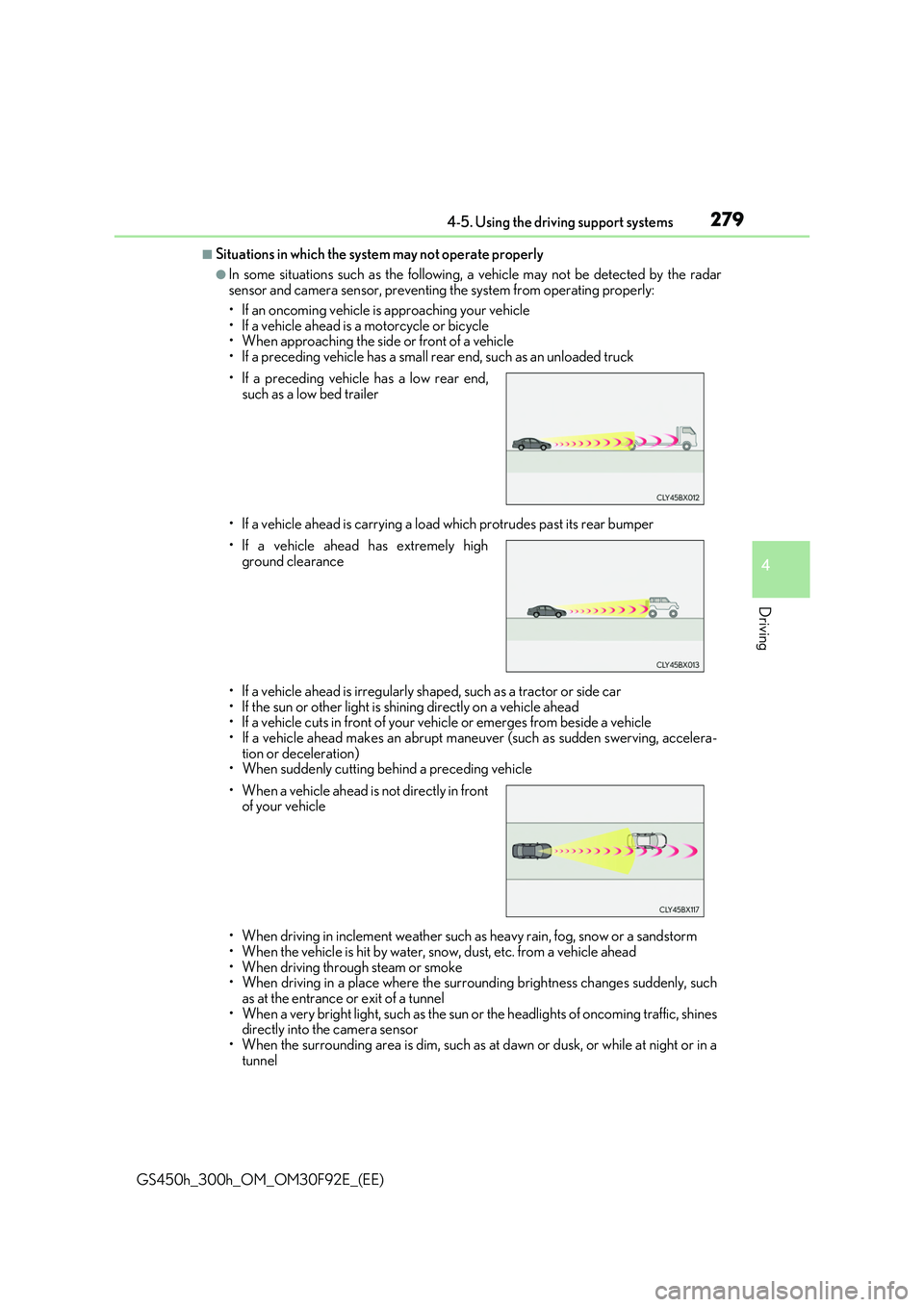
●In some situations such as the following, a vehicle may not be detected by the radar sensor and camera sensor, preventing the system from operating properly:
• If an oncoming vehicle is approaching your vehicle • If a vehicle ahead is a motorcycle or bicycle• When approaching the side or front of a vehicle
• If a preceding vehicle has a small rear end, such as an unloaded truck
• If a vehicle ahead is carrying a load which protrudes past its rear bumper
• If a vehicle ahead is irregularly sh aped, such as a tractor or side car
• If the sun or other light is shin ing directly on a vehicle ahead • If a vehicle cuts in front of your vehicle or emerges from beside a vehicle• If a vehicle ahead makes an abrupt mane uver (such as sudden swerving, accelera-
tion or deceleration) • When suddenly cutting behind a preceding vehicle
• When driving in inclement we ather such as heavy rain, fog, snow or a sandstorm • When the vehicle is hit by water, snow, dust, etc. from a vehicle ahead
• When driving through steam or smoke • When driving in a place where the surro unding brightness changes suddenly, such as at the entrance or exit of a tunnel
• When a very bright light, such as the sun or the headlights of oncoming traffic, shines directly into the camera sensor• When the surrounding area is dim, such as at dawn or dusk, or while at night or in a
tunnel
• If a preceding vehicle has a low rear end,
such as a low bed trailer
• If a vehicle ahead has extremely high
ground clearance
• When a vehicle ahead is not directly in front of your vehicle
Page 281 of 600
2814-5. Using the driving support systems
4
Driving
GS450h_300h_OM_OM30F92E_(EE)
*4: Depending on the region in which the vehicle was sold, the pedestrian detection
function may not be available.
■If the PCS warning light flashes and a warnin g message is displayed on the multi-infor- mation display
The pre-crash safety system may be temporar ily unavailable or there may be a malfunc-
tion in the system.
●In the following situations, the warning light will turn off, the message will disappear and the system will become operational when normal operating conditions return:
• When the radar sensor or camera sensor or the area around either sensor is hot, such as in the sun• When the radar sensor or camera sensor or the area around either sensor is cold,
such as in an extremely cold environment • When the radar sensor or front grille emblem is dirty or covered with snow, etc.• When the part of the windshield in front of the camera sensor is fogged up or cov-
ered with condensation or ice (Defogging the windshield: P. 352) • If the camera sensor is obstructed, such as when the hood is open or a sticker isattached to the windshield near the camera sensor
●If the PCS warning light continues to flash or the warning message does not disappear,the system may be malfunctioning. Have the vehicle inspected by any authorized Lexus
retailer or Lexus authorized repairer, or any reliable repairer immediately.
■If VSC is disabled
●If VSC is disabled (P. 327), the pre-crash brake assist and pre-crash braking func-
tions are also disabled.
●The PCS warning light will turn on and “VSC Turned Off Pre-Crash Brake System Unavailable” will be displayed on the multi-information display.
Page 285 of 600
2854-5. Using the driving support systems
4
Driving
GS450h_300h_OM_OM30F92E_(EE)
WARNING
■Before using LKA system
Do not rely solely upon the LKA system. Th e LKA system does not automatically drive the vehicle or reduce the amount of attention that must be paid to the area in front of
the vehicle. The driver must always assume full responsibility for driving safely by pay- ing careful attention to the surrounding conditions and operating the steering wheel tocorrect the path of the vehicle. Also, the driver must take adequate breaks when
fatigued, such as from driving for a long period of time. Failure to perform appropriate driving operat ions and pay careful attention may lead to an accident, resulting in death or serious injury.
■To avoid operating LKA system by mistake
When not using the LKA system, use the LKA switch to turn the system off.
■Situations unsuitable for LKA system
Do not use the LKA system in the following situations. The system may not operate properly and le ad to an accident, resulting in death or serious injury.
●A spare tire, tire chains, etc. are equipped.
●When the tires have been excessively worn, or when the tire inflation pressure is low.
●Tires which differ by structure, manufacturer, brand or tread pattern are used.
●Objects or patterns that could be mistaken for white (yellow) lines are present on the side of the road (guardrails, cu rbs, reflective poles, etc.).
●Vehicle is driven on a snow-covered road.
●White (yellow) lines are difficult to see due to rain, snow, fog, dust, etc.
●Asphalt repair marks, white (yellow) line marks, etc. are present due to road repair.
●Vehicle is driven in a temporary lane or restricted lane due to construction work.
●Vehicle is driven on a road surface which is slippery due to rainy weather, fallen snow, freezing, etc.
●Vehicle is driven in traffic lanes other than on highways and freeways.
●Vehicle is driven in a construction zone.
●Vehicle is towing a trailer or another vehicle. (vehicles with towing package)
■Preventing LKA system malfunctions and operations performed by mistake
●Do not modify the headlights or place stickers, etc. on the surface of the lights.
●Do not modify the suspension etc. If the suspension etc. needs to be replaced, con- tact any authorized Lexus retailer or Le xus authorized repairer, or any reliable
repairer.
●Do not install or place anything on the hood or grille. Also, do not install a grille guard (bull bars, kangaroo bar, etc.).
●If your windshield needs repairs, contac t any authorized Lexus retailer or Lexus authorized repairer, or any reliable repairer.
Page 294 of 600
2944-5. Using the driving support systems
GS450h_300h_OM_OM30F92E_(EE)
*1: If the turn signal indicator is not operated when changing lanes, the mark does not dis-
play.
*2:On some models
In the following situations, the RSA system alerts the driver using a warning dis-
play.
●When the vehicle speed exceeds the speed warning threshold applied to the
speed limit of the sign displayed on the multi-information display, the sign
color becomes inverted.
●If it is detected that your vehicle is overtaking when a no overtaking sign is dis-
played on the multi-information display, the sign flashes.
●On some models: When the RSA system recognizes a no-entry sign and
detects that the vehicle has entered a no-entry area based on the map infor-
mation of the navigation system, the no-entry sign flashes.
Depending on the situation, traffic environment (traffic direction, speed, unit)
may be detected incorrectly and a warning display may not operate properly.
■Automatic turn-off of RSA sign display
One or more signs automatically turn off in the following situations.
●A new sign is not recognized for a certain distance.
●The road changes due to a left or right turn, etc.
■Conditions in which the function may not operate or detect correctly
In the following situations, RSA does not op erate normally and may not recognize signs,
display the incorrect sign, etc. However, this does not indicate a malfunction.
●The camera sensor is misaligned due to a strong impact being applied to the sensor, etc.
●Dirt, snow, stickers, etc. are on the windshield near the camera sensor.
●In inclement weather such as heavy rain, fog, snow or sand storms
●Light from an oncoming vehicle, the sun, etc. enters the camera sensor.
●The sign is dirty, faded, tilted or bent, and if an electronic sign, the contrast is poor.
●All or part of the sign is hidden by the leaves of a tree, a pole, etc.
●The sign is only visible to the camera sensor for a short amount of time.
●The driving scene (turning, lane change, etc.) is judged incorrectly.
●Even if it is a sign not appropriate for the currently traveled lane, such a sign exists
directly after a freeway branches, or in an adjacent lane just before merging.
●Stickers are attached to the rear of the preceding vehicle.
●A sign resembling a system comp atible sign is recognized.
●The vehicle is driven in a country with a different direction of traffic.
Warning display
Page 339 of 600
339
5Interior features
GS450h_300h_OM_OM30F92E_(EE)
5-1. Remote Touch screen
Remote Touch/12.3-inch
display ......................................... 340
5-2. Using the air conditioning
system and defogger
Front automatic
air conditioning system ......... 346
Rear air conditioning
system ......................................... 358
Heated steering wheel/
seat heaters/
seat ventilators .......................... 361
5-3. Using the interior lights
Interior lights list..........................366
• Interior lights .......................... 367
• Personal lights ....................... 367
5-4. Using the storage features
List of storage features ............ 369
• Glove box ............................... 370
• Console box .......................... 370
• Cup holders .............................371
• Auxiliary boxes ..................... 373
Trunk features ............................. 374
5-5. Using the other interior
features
Other interior features ............ 377
• Sun visors ................................ 377
• Vanity mirrors .........................377
• Clock ........................................ 378
• Ashtrays................................... 378
• Power outlets......................... 379
• Armrest................................... 380
• Rear sunshade/
rear door sunshades.......... 380
• Coat hooks .............................382
• Assist grips .............................383
ERA-GLONASS ......................384
Page 354 of 600
3545-2. Using the air conditioning system and defogger
GS450h_300h_OM_OM30F92E_(EE)
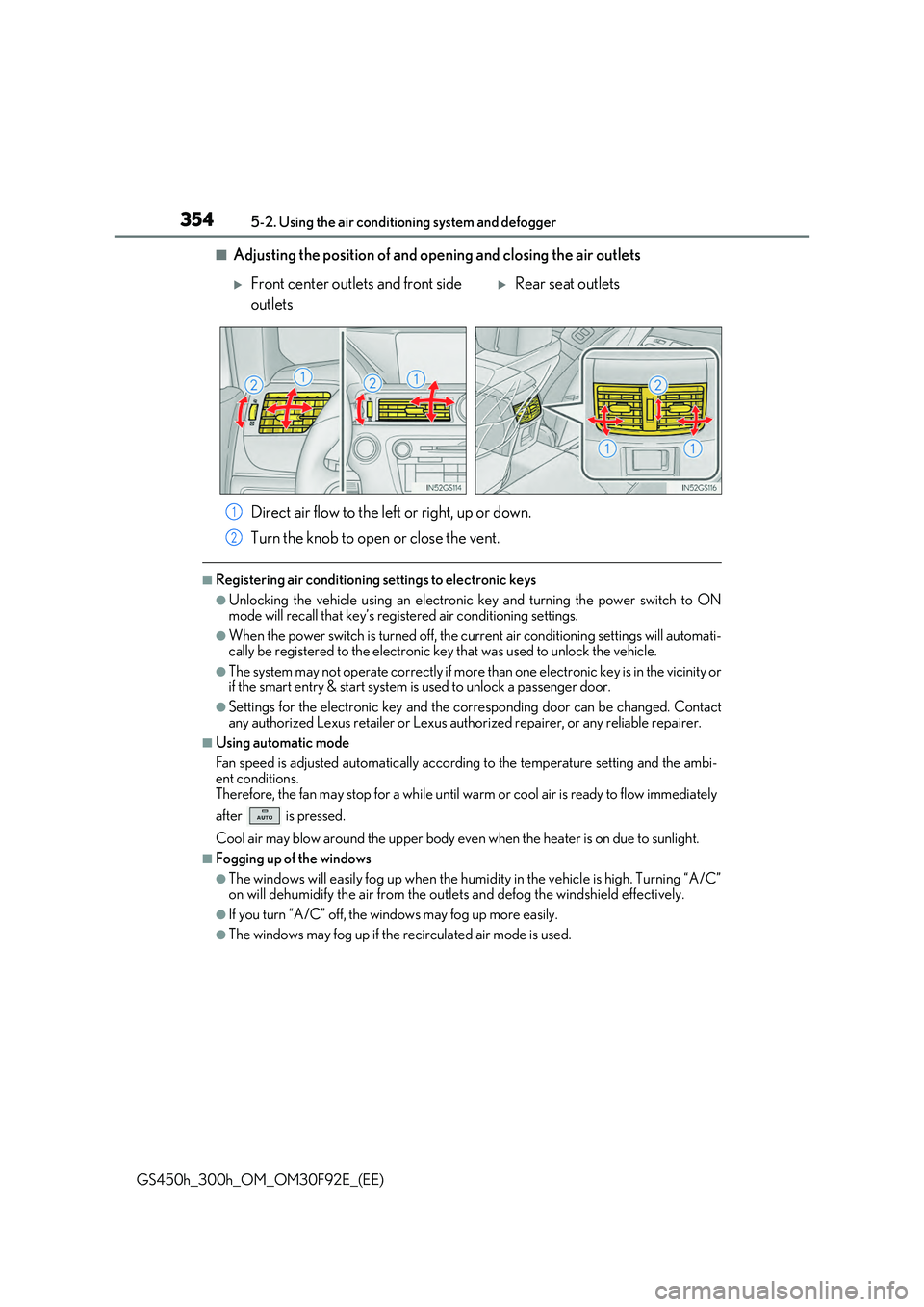
■Adjusting the position of and opening and closing the air outlets
Direct air flow to the left or right, up or down.
Turn the knob to open or close the vent.
■Registering air conditioning settings to electronic keys
●Unlocking the vehicle using an electronic key and turning the power switch to ON
mode will recall that key’s registered air conditioning settings.
●When the power switch is turned off, the cu rrent air conditioning settings will automati- cally be registered to the electronic key that was used to unlock the vehicle.
●The system may not operate correctly if more than one electronic key is in the vicinity orif the smart entry & start system is used to unlock a passenger door.
●Settings for the electronic key and the corresponding door can be changed. Contact
any authorized Lexus retailer or Lexus author ized repairer, or any reliable repairer.
■Using automatic mode
Fan speed is adjusted automatically according to the temperature setting and the ambi-
ent conditions. Therefore, the fan may stop for a while until wa rm or cool air is ready to flow immediately
after is pressed.
Cool air may blow around the upper body even when the heater is on due to sunlight.
■Fogging up of the windows
●The windows will easily fog up when the humidity in the vehicle is high. Turning “A/C” on will dehumidify the air from the outlets and defog the windshield effectively.
●If you turn “A/C” off, the windows may fog up more easily.
●The windows may fog up if the recirculated air mode is used.
Front center outlets and front side
outlets
Rear seat outlets
1
2