front light LEXUS GS300H 2019 User Guide
[x] Cancel search | Manufacturer: LEXUS, Model Year: 2019, Model line: GS300H, Model: LEXUS GS300H 2019Pages: 600, PDF Size: 55.99 MB
Page 55 of 600

551-1. For safe use
1
For safety and security
GS450h_300h_OM_OM30F92E_(EE)
Insert the mechanical key into the cylin-
der and rotate to the “OFF” position.
The “OFF” indicator light turns on (only
when the power switch is in ON mode).
■“PASSENGER AIR BAG” indicator information
If any of the following problems occur, it is possible that there is a malfunction in the sys- tem. Have the vehicle inspected by any au thorized Lexus retailer or Lexus authorized repairer, or any reliable repairer.
●Neither “ON” nor “OFF” comes on.
●The indicator light does not change when the airbag manual on-off switch is switchedto “ON” or “OFF”.
Deactivating the front seat passenge r airbag, front passenger knee air-
bag and front passenger side airbag
WARNING
■When installing a child restraint system
For safety reasons, always install a child rest raint system in a rear seat. In the event that
the rear seat cannot be used, the front seat can be used as long as the airbag manual on-off system is set to off.If the airbag manual on-off system is left on, the strong impact of the airbag deployment
(inflation) may cause serious injury or even death.
■When a child restraint system is not installed on the front passenger seat
Ensure that the airbag manual on-off system is set to on.
If it is left off, the airbag may not deploy in the event of an accident, which may result in serious injury or even death.
Page 101 of 600
1012. Instrument cluster
2
Instrument cluster
GS450h_300h_OM_OM30F92E_(EE)
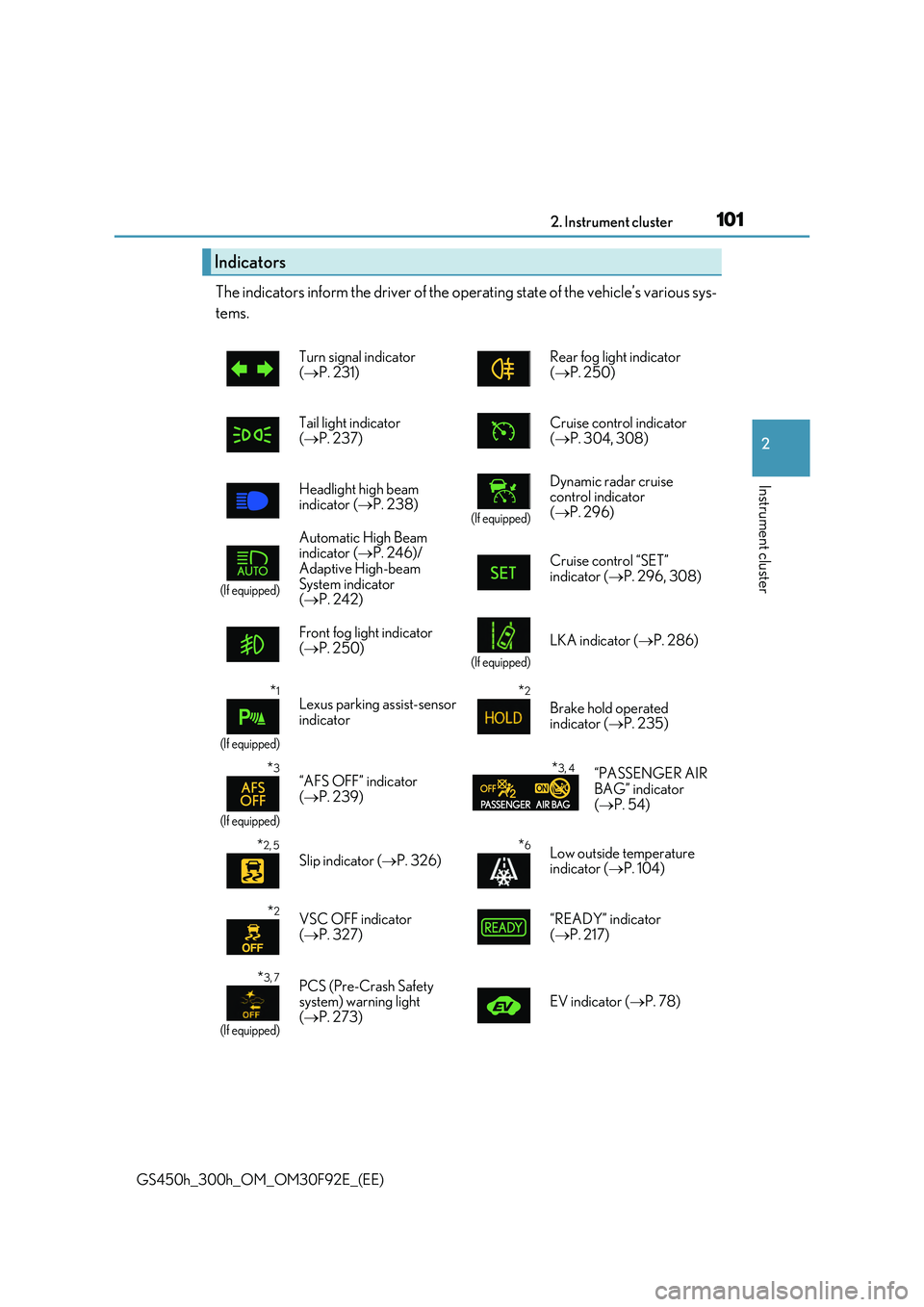
The indicators inform the driver of the operating state of the vehicle’s various sys-
tems.
Indicators
Turn signal indicator ( P. 231) Rear fog light indicator ( P. 250)
Tail light indicator
( P. 237)
Cruise control indicator
( P. 304, 308)
Headlight high beam indicator ( P. 238)(If equipped)
Dynamic radar cruise control indicator
( P. 296)
(If equipped)
Automatic High Beam indicator ( P. 246)/
Adaptive High-beam System indicator ( P. 242)
Cruise control “SET” indicator ( P. 296, 308)
Front fog light indicator ( P. 250)(If equipped)
LKA indicator (P. 286)
*1
(If equipped)
Lexus parking assist-sensor indicator
*2
Brake hold operated indicator ( P. 235)
*3
(If equipped)
“AFS OFF” indicator ( P. 239)
*3, 4“PASSENGER AIR BAG” indicator
( P. 54)
*2, 5
Slip indicator (P. 326)*6Low outside temperature indicator ( P. 104)
*2VSC OFF indicator ( P. 327)“READY” indicator ( P. 217)
*3, 7
(If equipped)
PCS (Pre-Crash Safety system) warning light ( P. 273) EV indicator (P. 78)
Page 115 of 600
1152. Instrument cluster
2
Instrument cluster
GS450h_300h_OM_OM30F92E_(EE)
■Display off
A blank screen is displayed
*1: Displayed when the item is set in “Drive Info 1”, “Drive Info 2” or “Drive Info 3”.
( P. 562)
*2: The function can be reset by pressing the of the meter control switches for longer
than 1 second when the item to reset is displayed.
If there is more than one item that can be reset, the item selection screen will appear.
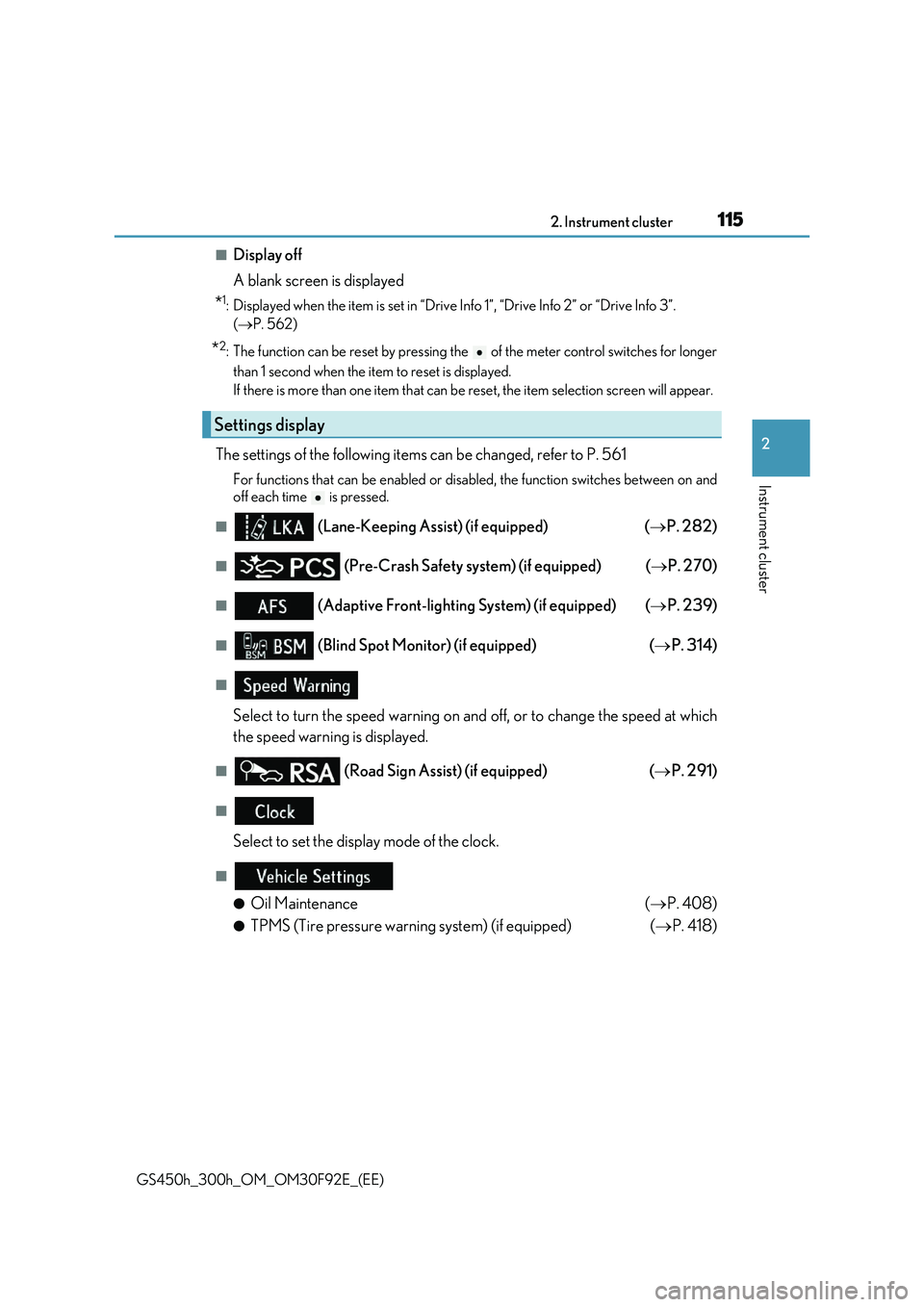
The settings of the following items can be changed, refer to P. 561
For functions that can be enabled or disabled, the function switches between on and
off each time is pressed.
■ (Lane-Keeping Assist) (if equipped) ( P. 282)
■ (Pre-Crash Safety system) (if equipped) (P. 270)
■ (Adaptive Front-lighting System) (if equipped) (P. 239)
■ (Blind Spot Monitor) (if equipped) (P. 314)
■
Select to turn the speed warning on and off, or to change the speed at which
the speed warning is displayed.
■ (Road Sign Assi st) (if equipped) (P. 291)
■
Select to set the display mode of the clock.
■
●Oil Maintenance ( P. 408)
●TPMS (Tire pressure warning system) (if equipped) (P. 418)
Settings display
Page 140 of 600
1403-2. Opening, closing and locking the doors and trunk
GS450h_300h_OM_OM30F92E_(EE)
■Operation signals
The emergency flashers flash to indicate that the doors have been locked/unlocked. (Locked: once; Unlocked: twice)
■Security feature
If a door is not opened within approximately 30 seconds after the vehicle is unlocked, the security feature automatically locks the vehicle again.
■Welcome light illumination control
The front position, tail and license plate lights automatically turn on at night when the doors are unlocked using the entry function or wireless remote control if the light switch is in the “AUTO” position.
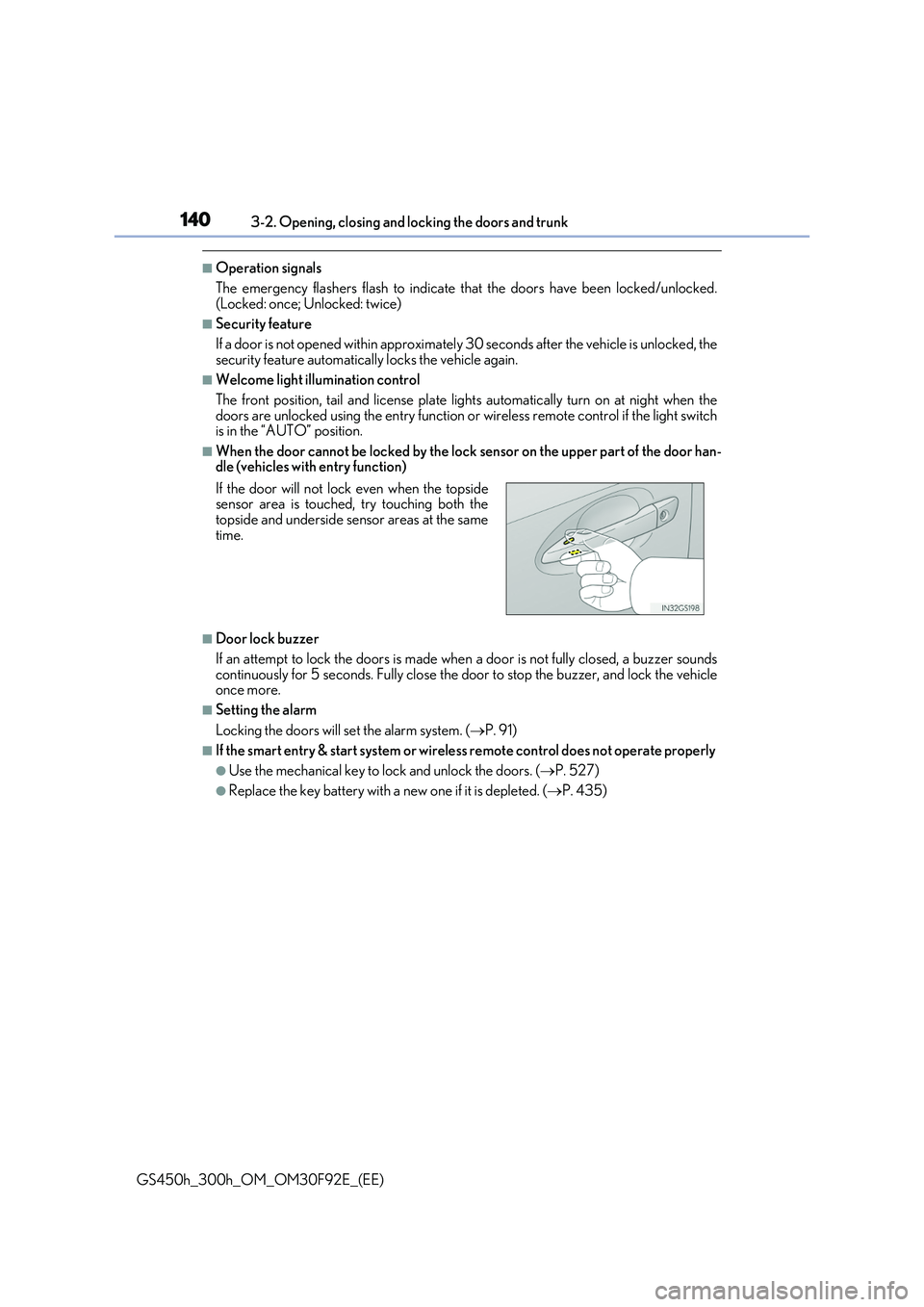
■When the door cannot be locked by the lock sensor on the upper part of the door han-dle (vehicles with entry function)
■Door lock buzzer
If an attempt to lock the doors is made when a door is not fully closed, a buzzer sounds
continuously for 5 seconds. Fully close the door to stop the buzzer, and lock the vehicle once more.
■Setting the alarm
Locking the doors will set the alarm system. ( P. 91)
■If the smart entry & start system or wireless remote control does not operate properly
●Use the mechanical key to lock and unlock the doors. (P. 527)
●Replace the key battery with a new one if it is depleted. (P. 435)
If the door will not lock even when the topside sensor area is touched, try touching both thetopside and underside sensor areas at the same
time.
Page 181 of 600
1813-3. Adjusting the seats
3
Operation of each component
GS450h_300h_OM_OM30F92E_(EE)
■Operating the driving position memory after turning the power switch off
Driver’s seat: Recorded seat positions can be activated up to 180 seconds after the driver’s door is
opened and another 60 seconds after it is closed again.
Front passenger’s seat: Recorded seat positions can be activated up to 180 seconds after the front passenger’s
door is opened.
■In order to correctly use the driving position memory function
If a seat position is already in the furthest possible position and the seat is operated in the
same direction, the recorded position may be slightly different when it is recalled.
Each electronic key (including a card key) can be registered to recall your pre-
ferred driving position.
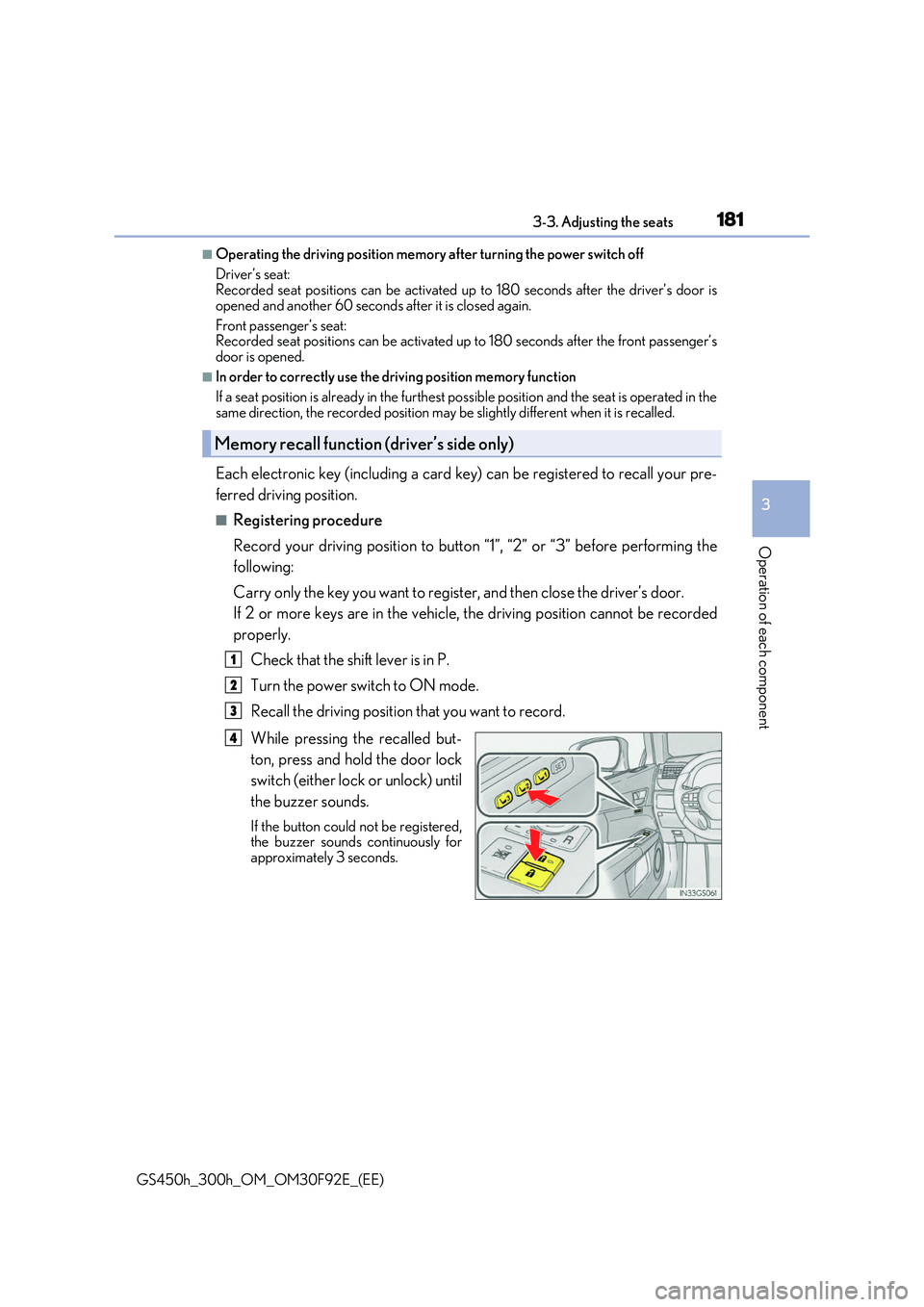
■Registering procedure
Record your driving position to button “1”, “2” or “3” before performing the
following:
Carry only the key you want to register, and then close the driver’s door.
If 2 or more keys are in the vehicle, the driving position cannot be recorded
properly.
Check that the shift lever is in P.
Turn the power switch to ON mode.
Recall the driving position that you want to record.
While pressing the recalled but-
ton, press and hold the door lock
switch (either lock or unlock) until
the buzzer sounds.
If the button could not be registered, the buzzer sounds continuously forapproximately 3 seconds.
Memory recall function (driver’s side only)
1
2
3
4
Page 193 of 600
193
3
3-5. Opening, closing the windows and moon roof
Operation of each component
GS450h_300h_OM_OM30F92E_(EE)
Power windows
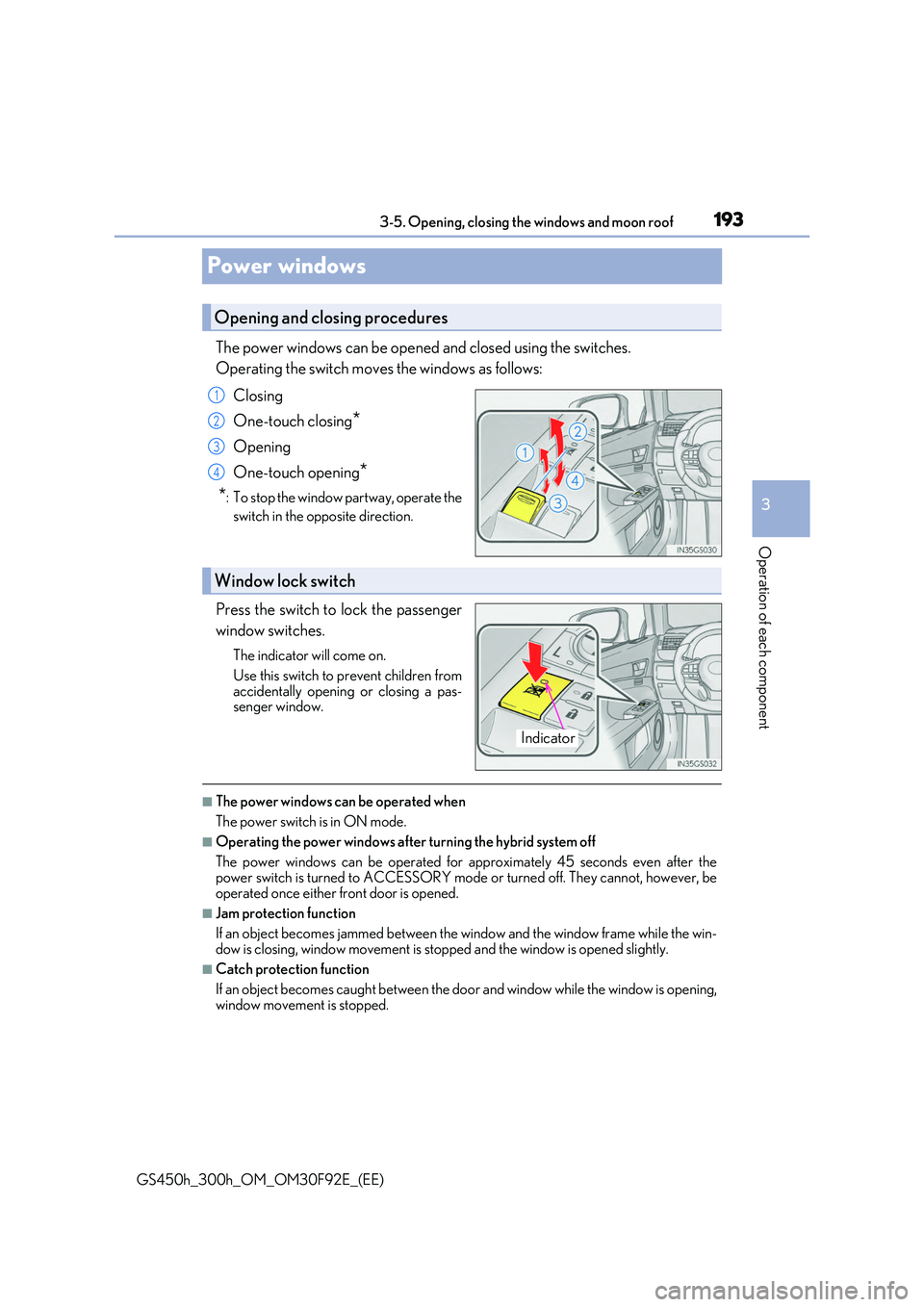
The power windows can be opened and closed using the switches.
Operating the switch moves the windows as follows:
Closing
One-touch closing*
Opening
One-touch opening*
*: To stop the window partway, operate the
switch in the opposite direction.
Press the switch to lock the passenger
window switches.
The indicator will come on.
Use this switch to prevent children from
accidentally opening or closing a pas- senger window.
■The power windows can be operated when
The power switch is in ON mode.
■Operating the power windows after turning the hybrid system off
The power windows can be operated for approximately 45 seconds even after the power switch is turned to ACCESSORY mode or turned off. They cannot, however, be
operated once either front door is opened.
■Jam protection function
If an object becomes jammed between the window and the window frame while the win-
dow is closing, window movement is stop ped and the window is opened slightly.
■Catch protection function
If an object becomes caught between the door and window while the window is opening,
window movement is stopped.
Opening and closing procedures
1
2
3
4
Window lock switch
Indicator
Page 196 of 600
1963-5. Opening, closing the windows and moon roof
GS450h_300h_OM_OM30F92E_(EE)
Moon roof
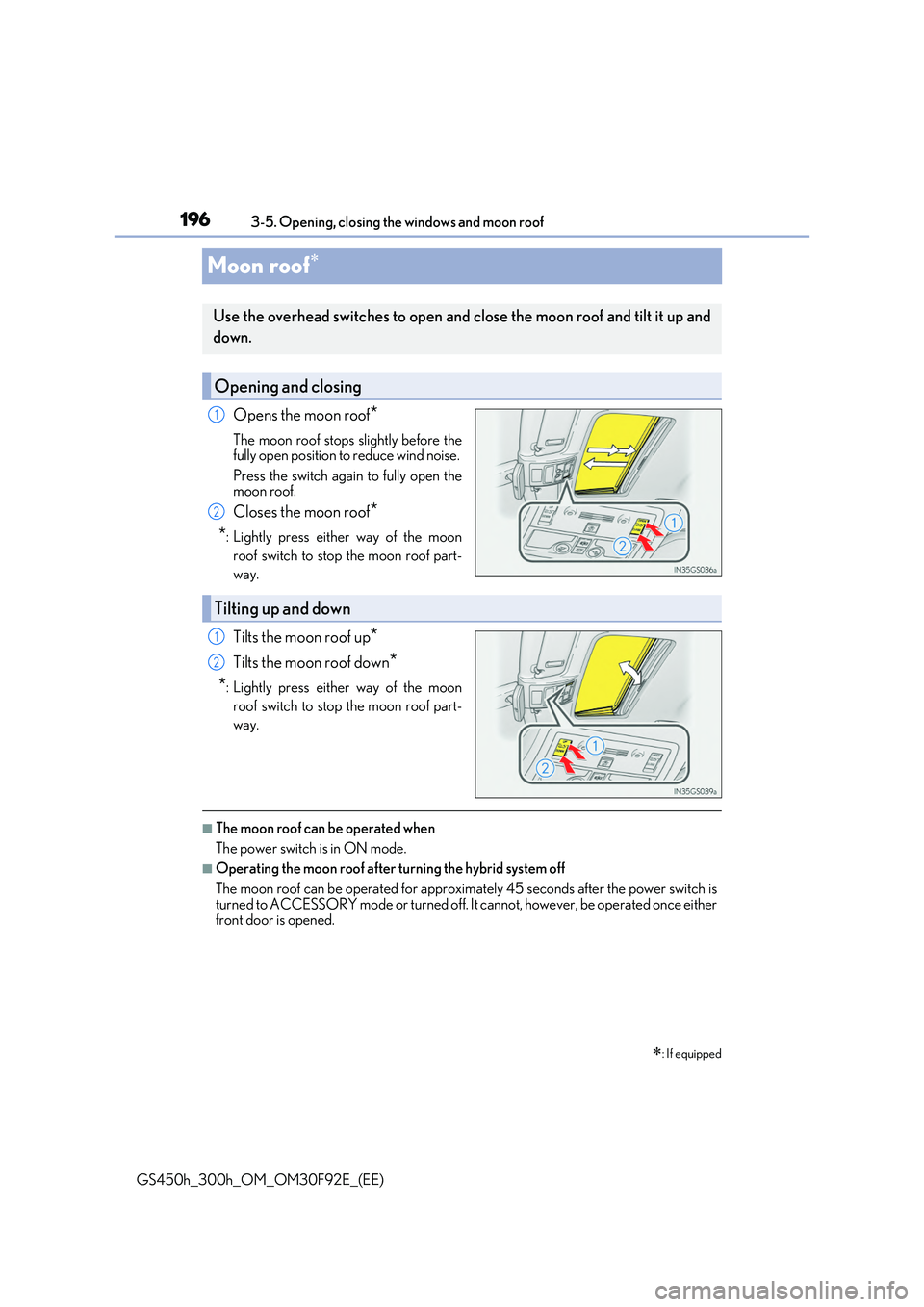
Opens the moon roof*
The moon roof stops slightly before the fully open position to reduce wind noise.
Press the switch again to fully open the moon roof.
Closes the moon roof*
*: Lightly press either way of the moon
roof switch to stop the moon roof part-
way.
Tilts the moon roof up*
Tilts the moon roof down*
*: Lightly press either way of the moon
roof switch to stop the moon roof part-
way.
■The moon roof can be operated when
The power switch is in ON mode.
■Operating the moon roof after turning the hybrid system off
The moon roof can be operated for approximately 45 seconds after the power switch is turned to ACCESSORY mode or turned off. It cannot, however, be operated once either
front door is opened.
: If equipped
Use the overhead switches to open and close the moon roof and tilt it up and
down.
Opening and closing
1
2
Tilting up and down
1
2
Page 204 of 600
2044-1. Before driving
GS450h_300h_OM_OM30F92E_(EE)
WARNING
Observe the following precautions. Failure to do so may result in death or serious injury.
■When driving on slippery road surfaces
●Sudden braking, acceleration and steering may cause tire slippage and reduce your ability to control the vehicle.
●Sudden acceleration, engine braking due to shifting, or changes in engine speed
could cause the vehicle to skid, resulting in an accident.
●After driving through a puddle, lightly depress the brake pedal to make sure that the brakes are functioning properly. Wet brake pads may prevent the brakes from func-
tioning properly. If the brakes on only one side are wet and not functioning properly, steering control may be affected.
■When shifting the shift lever
●Do not let the vehicle roll backward while the shift lever is in a driving position, or rollforward while the shift lever is in R.Doing so may result in an accident or damage to the vehicle.
●Do not shift the shift lever to P while the vehicle is moving. Doing so can damage the transmission and may result in a loss of vehicle control.
●Do not shift the shift lever to R while the vehicle is moving forward.
Doing so can damage the transmission and may result in a loss of vehicle control.
●Do not shift the shift lever to a driving position while the vehicle is moving backward. Doing so can damage the transmission and may result in a loss of vehicle control.
●Shifting the shift lever to N while the vehicle is moving will disengage the hybrid sys- tem. Engine braking is not available with the hybrid system disengaged.
●Be careful not to shift the shift lever with the accelerator pedal depressed. Shifting the
shift lever to any position other than P or N may lead to unexpected rapid accelera- tion of the vehicle that may cause an accident and result in death or serious injury.
■If you hear a squealing or scraping noise (brake pad wear indicators)
Have the brake pads checked and replaced by any authorized Lexus retailer or Lexus authorized repairer, or any reliable repairer as soon as possible. Rotor damage may result if the pads are not replaced when needed.
Front and rear* brakes: Moderate levels of brake pad and disc wear allow enhanced braking power. As a result, the discs may wear more quickly than conventional brakediscs. Therefore, when replacing the brake pads, Lexus recommends that you also
have the thickness of the discs measured. It is dangerous to drive the vehicle when th e wear limits of the brake pads and/or those of the brake discs are exceeded.
*: Except for Reunion, Canary Islands, Russi a, Ukraine, Israel, Turkey, Kazakhstan,
Georgia
Page 231 of 600
231
4
4-2. Driving procedures
Driving
GS450h_300h_OM_OM30F92E_(EE)
Turn signal lever
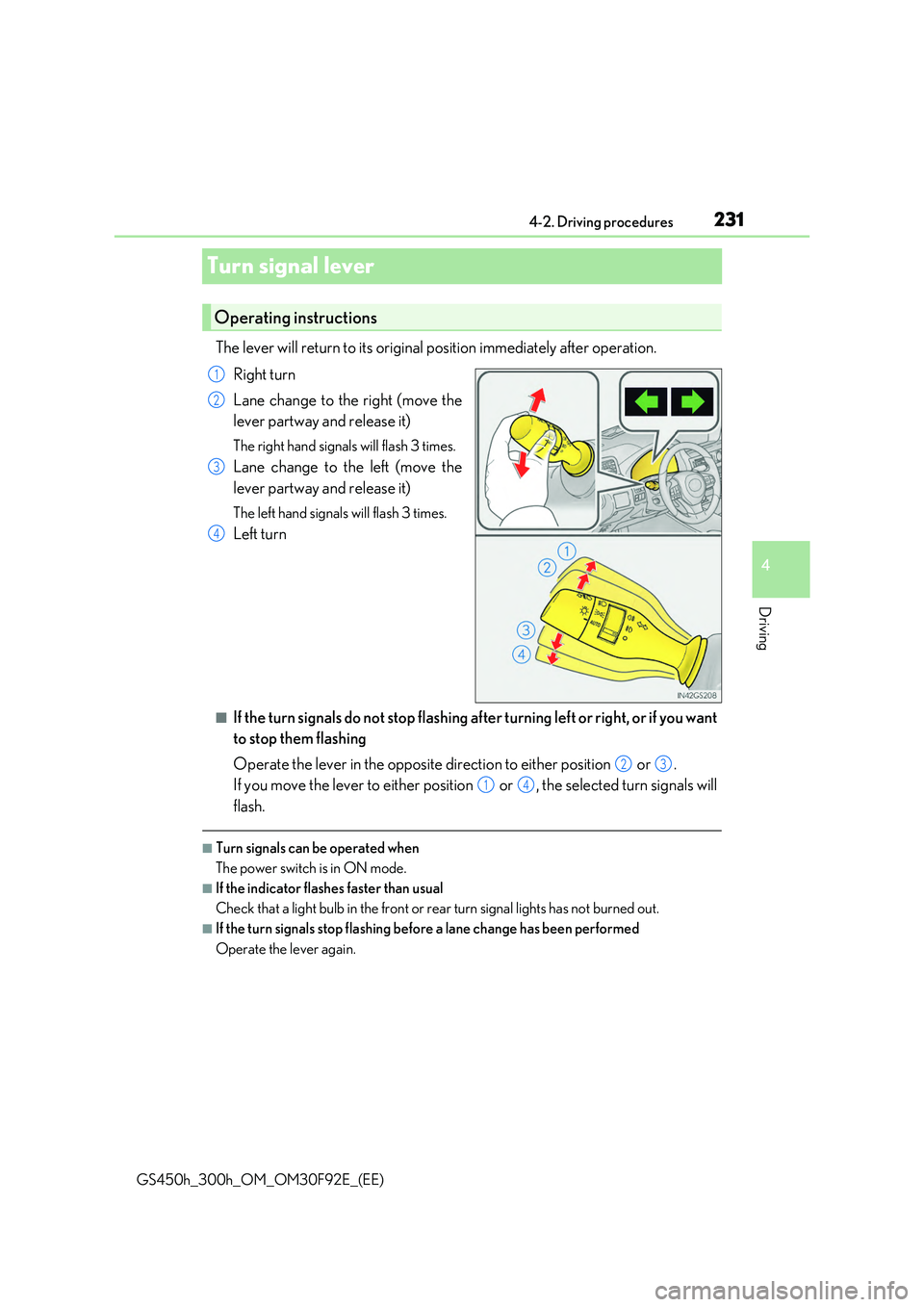
The lever will return to its original position immediately after operation.
Right turn
Lane change to the right (move the
lever partway and release it)
The right hand signals will flash 3 times.
Lane change to the left (move the
lever partway and release it)
The left hand signals will flash 3 times.
Left turn
■If the turn signals do not stop flashing af ter turning left or right, or if you want
to stop them flashing
Operate the lever in the opposite direction to either position or .
If you move the lever to either position or , the selected turn signals will
flash.
■Turn signals can be operated when
The power switch is in ON mode.
■If the indicator flashes faster than usual
Check that a light bulb in the front or rear turn signal lights has not burned out.
■If the turn signals stop flashing before a lane change has been performed
Operate the lever again.
Operating instructions
1
2
3
4
23
14
Page 237 of 600
237
4
4-3. Operating the lights and wipers
Driving
GS450h_300h_OM_OM30F92E_(EE)
Headlight switch
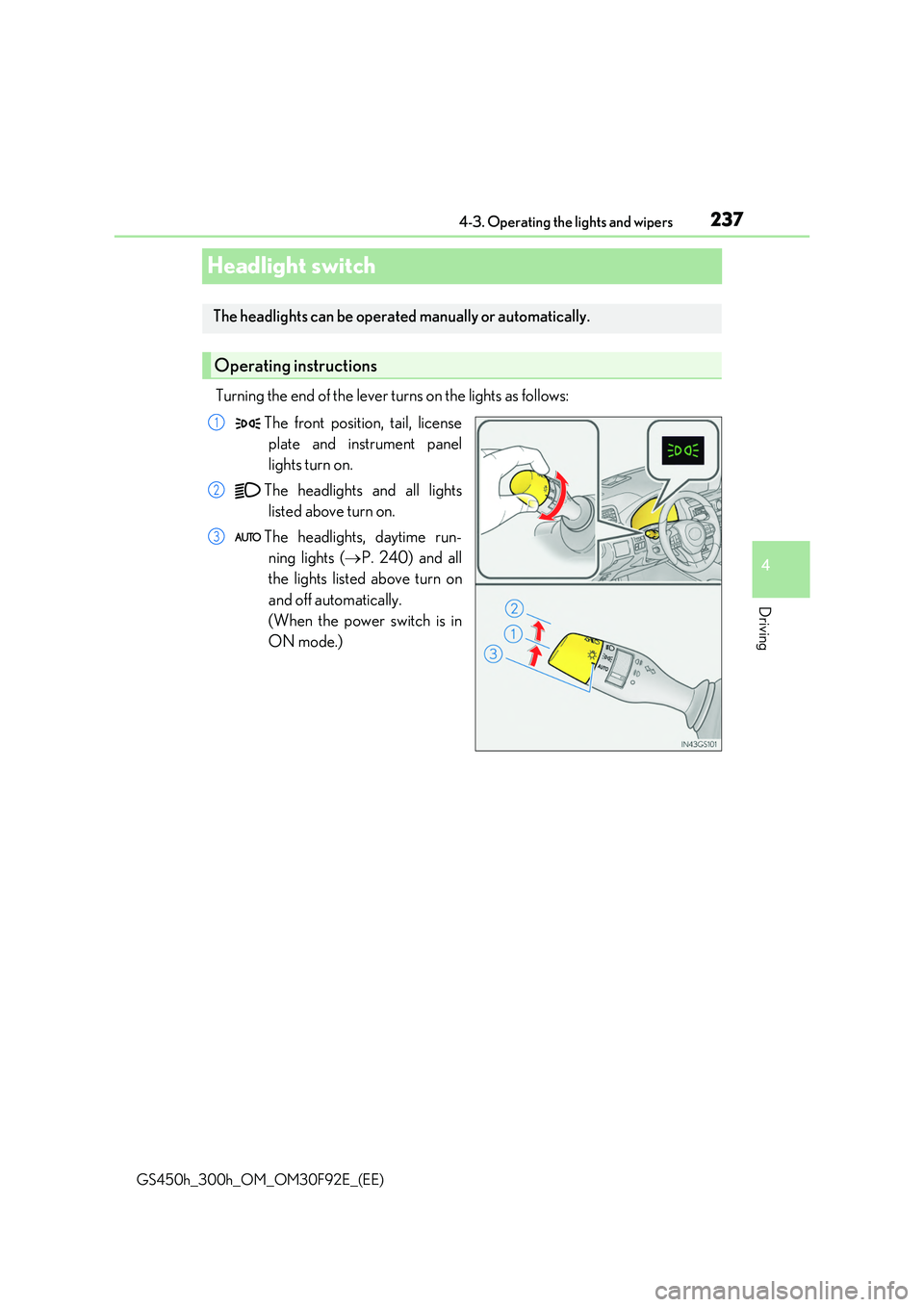
Turning the end of the lever turns on the lights as follows:
The front position, tail, license
plate and instrument panel
lights turn on.
The headlights and all lights
listed above turn on.
The headlights, daytime run-
ning lights ( P. 240) and all
the lights listed above turn on
and off automatically.
(When the power switch is in
ON mode.)
The headlights can be operated manually or automatically.
Operating instructions
1
2
3