key battery LEXUS GS300H 2019 User Guide
[x] Cancel search | Manufacturer: LEXUS, Model Year: 2019, Model line: GS300H, Model: LEXUS GS300H 2019Pages: 600, PDF Size: 55.99 MB
Page 194 of 600
1943-5. Opening, closing the windows and moon roof
GS450h_300h_OM_OM30F92E_(EE)
■When the window cannot be opened or closed
When the jam protection function or catch protection function operates unusually and the door window cannot be opened or closed , perform the following operations with the
power window switch of that door.
●Stop the vehicle. With the power switch in ON mode, within 4 seconds of the jam pro- tection function or catch protection function activating, continuously operate the
power window switch in the one-touch clos ing direction or one-touch opening direc- tion so that the door window can be opened and closed.
●If the door window cannot be opened and closed even when performing the above
operations, perform the following pr ocedure for function initialization.
Turn the power switch to ON mode.
Pull and hold the power window switch in the one-touch closing direction and com-
pletely close the door window.
Release the power window switch for a mo ment, resume pulling the switch in the one-touch closing direction, and hold it there for approximately 6 seconds or more.
Press and hold the power window switch in the one-touch opening direction. After the door window is completely opened, cont inue holding the switch for an additional 1 second or more.
Release the power window switch for a moment, resume pushing the switch in the one-touch opening direction, and hold it there for approximately 4 seconds or more.
Pull and hold the power window switch in the one-touch closing direction again. After the door window is completely closed, continue holding the switch for a fur-ther 1 second or more.
If you release the switch while the window is moving, start again from the beginning. If the window reverses and cannot be fully closed or opened, have the vehicle inspected
by any authorized Lexus retailer or Lexus auth orized repairer, or any reliable repairer.
■Door lock linked window operation
●The power windows can be opened and closed using the mechanical key.* (P. 527)
●The power windows can be opened and closed using the wireless remote control.*(P. 139)
*: These settings must be customized at any authorized Lexus retailer or Lexus autho-
rized repairer, or any reliable repairer.
■When the 12-volt battery is disconnected
The window lock switch is disabled. If ne cessary, press the window lock switch after reconnecting the 12-volt battery.
■Power windows open warning buzzer
The buzzer sounds and a message is shown on the multi-information display in the instru- ment cluster when the power switch is turned off and the driver’s door is opened with thepower windows open.
■Customization
Settings (e.g. linked door lock operation) can be changed. (Customizable features: P. 561)
1
2
3
4
5
6
Page 219 of 600
2194-2. Driving procedures
4
Driving
GS450h_300h_OM_OM30F92E_(EE)
If the hybrid system is stopped with the shift lever in a position other than P, the
power switch will not be turned off but instead be turned to ACCESSORY
mode. Perform the following procedure to turn the switch off:
Check that the parking brake is set.
Shift the shift lever to P.
Check that “Turn Off Vehicle” is displayed on the multi-information display
and then press the power switch once.
Check that “Turn Off Vehicle” on the multi-information display is off.
■Auto power off function
If the vehicle is left in ACCESSORY mode for more than 20 minutes or ON mode (the
hybrid system is not operating) for more than an hour with the shift lever in P, the power switch will automatically turn off. However, this function cannot entirely prevent 12-voltbattery discharge. Do not leave the vehicle with the power switch in ACCESSORY or
ON mode for long periods of time when the hybrid system is not operating.
■Sounds and vibrations specific to a hybrid vehicle
P. 79
■Electronic key battery depletion
P. 136
■When the ambient temperature is low, such as during winter driving conditions
When starting the hybrid system, the flashing time of the “READY” indicator may be long. Leave the vehicle as it is until the “REA DY” indicator is steady on, as steady means the vehicle is able to move.
■Conditions affecting operation
P. 155
■Notes for the push-start function
P. 157
■If the hybrid system does not start
●The immobilizer system may not have been deactivated. (P. 85)
Contact any authorized Lexus retailer or Le xus authorized repairer, or any reliable repairer.
●Check that the shift lever is securely set in P. The hybrid system may not start if the shift
lever is displaced out of P. “Shift to P posi tion to Start” will be displayed on the multi- information display.
■Steering lock
After turning the power switch off and opening and closing the doors, the steering wheel will be locked due to the steering lock func tion. Operating the power switch again auto- matically cancels the steering lock.
When stopping the hybrid system with the shift lever in a position other
than P
1
2
3
4
Page 220 of 600
2204-2. Driving procedures
GS450h_300h_OM_OM30F92E_(EE)
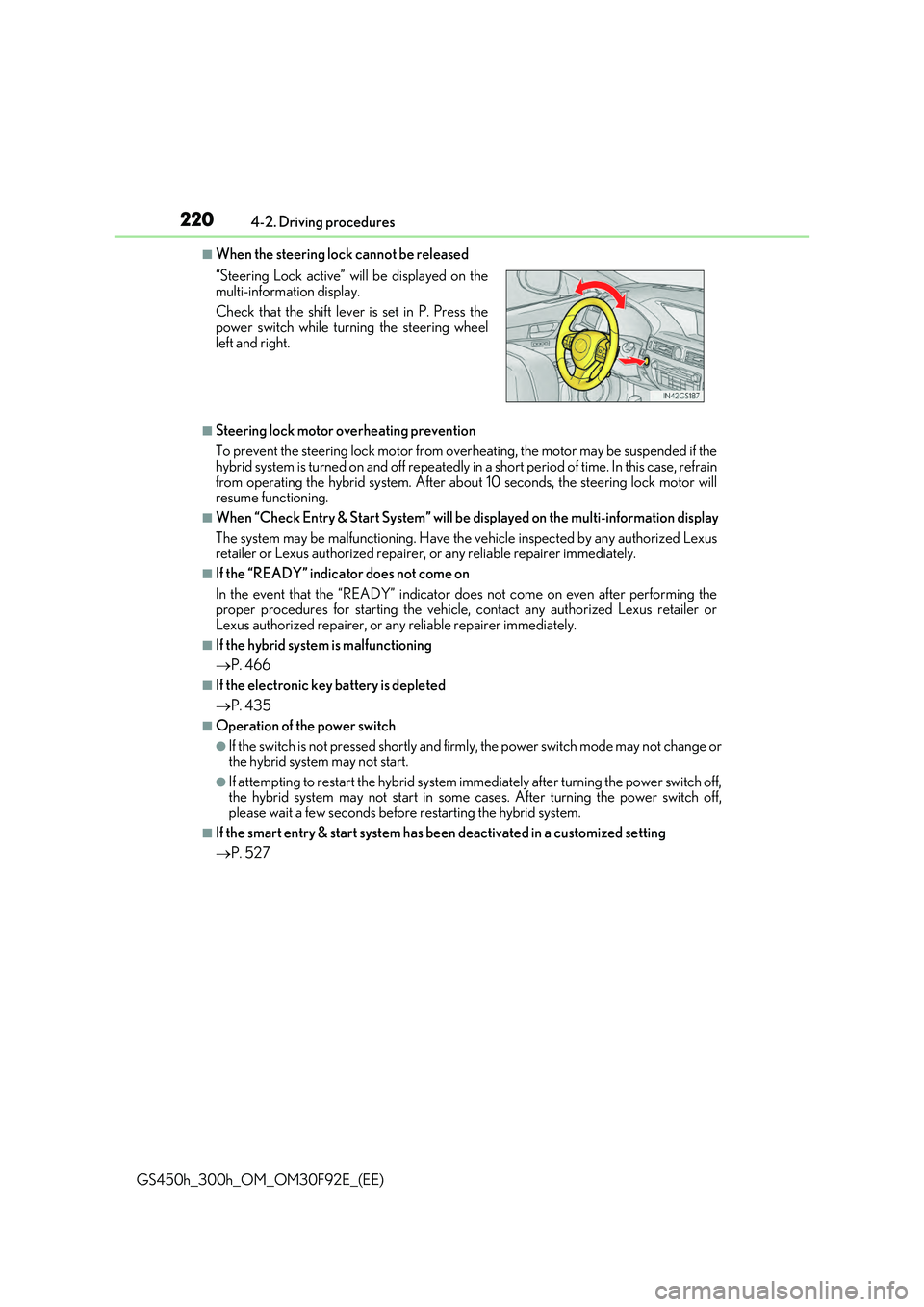
■When the steering lock cannot be released
■Steering lock motor overheating prevention
To prevent the steering lock motor from overheating, the motor may be suspended if the hybrid system is turned on and off repeatedly in a short period of time. In this case, refrain
from operating the hybrid system. After abou t 10 seconds, the steering lock motor will resume functioning.
■When “Check Entry & Start System” will be displayed on the multi-information display
The system may be malfunctioning. Have the vehicle inspected by any authorized Lexus retailer or Lexus authorized repairer, or any reliable repairer immediately.
■If the “READY” indicator does not come on
In the event that the “READY” indicator does not come on even after performing the proper procedures for starting the vehicle, contact any authorized Lexus retailer orLexus authorized repairer, or any reliable repairer immediately.
■If the hybrid system is malfunctioning
P. 466
■If the electronic key battery is depleted
P. 435
■Operation of the power switch
●If the switch is not pressed shortly and firmly, the power switch mode may not change or
the hybrid system may not start.
●If attempting to restart the hybrid system immediately after turning the power switch off, the hybrid system may not start in some cases. After turning the power switch off,
please wait a few seconds before restarting the hybrid system.
■If the smart entry & start system has been deactivated in a customized setting
P. 527
“Steering Lock active” will be displayed on the
multi-information display.
Check that the shift lever is set in P. Press the power switch while turning the steering wheel
left and right.
Page 368 of 600
3685-3. Using the interior lights
GS450h_300h_OM_OM30F92E_(EE)
●Illuminated entry system: The lights automatically turn on/off according to power switch mode, the presence of the electronic key, whether the doors are locked/unlocked, andwhether the doors are opened/closed.
●If the interior lights remain on when the powe r switch is turned off, the lights will go off automatically after 20 minutes.
●Setting (e.g. the time elapsed before lights turn off) can be changed.
(Customizable features: P. 561)
NOTICE
To prevent 12-volt battery discharge, do not leave the lights on longer than necessary when the hybrid system is off.
Page 389 of 600
389
6Maintenance and care
GS450h_300h_OM_OM30F92E_(EE)
6-1. Maintenance and care
Cleaning and protecting
the vehicle exterior ................390
Cleaning and protecting
the vehicle interior.................. 394
6-2. Maintenance
Maintenance
requirements ............................ 397
6-3. Do-it-yourself maintenance
Do-it-yourself service
precautions................................ 399
Hood ................................................ 401
Positioning a floor jack ............ 402
Engine compartment ...............403
12-volt battery ...............................412
Tires ...................................................416
Tire inflation pressure .............. 429
Wheels ............................................ 431
Air conditioning filter ............... 433
Electronic key battery.............. 435
Checking and replacing
fuses.............................................. 437
Light bulbs..................................... 442
Page 391 of 600
3916-1. Maintenance and care
6
Maintenance and care
GS450h_300h_OM_OM30F92E_(EE)
■High-pressure car washes
●Do not allow the nozzles of the car wash to come within close proximity of the windows.
●Before using the car wash, check that the fuel filler door on your vehicle is closed prop-
erly.
■Notes for a smart entry & start system (vehicles with entry function)
If the door handle becomes wet while the electronic key is within the effective range, the
door may lock and unlock repeatedly. In that case, follow the following correction proce- dures to wash the vehicle:
●Place the key in a position 2 m (6 ft.) or more separate from the vehicle while the vehi-
cle is being washed. (Take care to ensure that the key is not stolen.)
●Set the electronic key to battery-saving mode to disable the smart entry & start system. ( P. 155)
■Aluminum wheels
●Remove any dirt immediately by using a neutral detergent. Do not use hard brushes or abrasive cleaners. Do not use strong or harsh chemical cleaners.
Use the same mild detergent and wax as used on the paint.
●Do not use detergent on the wheels when they are hot, for example after driving for long distance in the hot weather.
●Wash detergent from the wheels immediately after use.
■Brake caliper coating (vehicles with orange brake calipers for F SPORT models)
●When using detergent, use neutral detergent.
Do not use hard brushes or abrasive clea ners, as they will damage the coating.
●Do not use detergent on the brake calipers when they are hot.
●Wash detergent off immediately after use.
■Bumpers
Do not scrub with abrasive cleaners.
■Front side windows water-repellent coating
●The following precautions can extend the effectiveness of the water-repellent coating.
• Remove any dirt, etc. from the front side windows regularly.
• Do not allow dirt and dust to accumulate on the windows for a long period. Clean the windows with a soft, damp cloth as soon as possible.• Do not use wax or glass cleaners that co ntain abrasives when cleaning the windows.
• Do not use any metallic objects to remove condensation build up.
●When the water-repellent performance has become insufficient, the coating can be
repaired. Contact any authorized Lexus reta iler or Lexus authorized repairer, or any reliable repairer.
Page 413 of 600
413 6-3. Do-it-yourself maintenance
6
Maintenance and care
GS450h_300h_OM_OM30F92E_(EE)
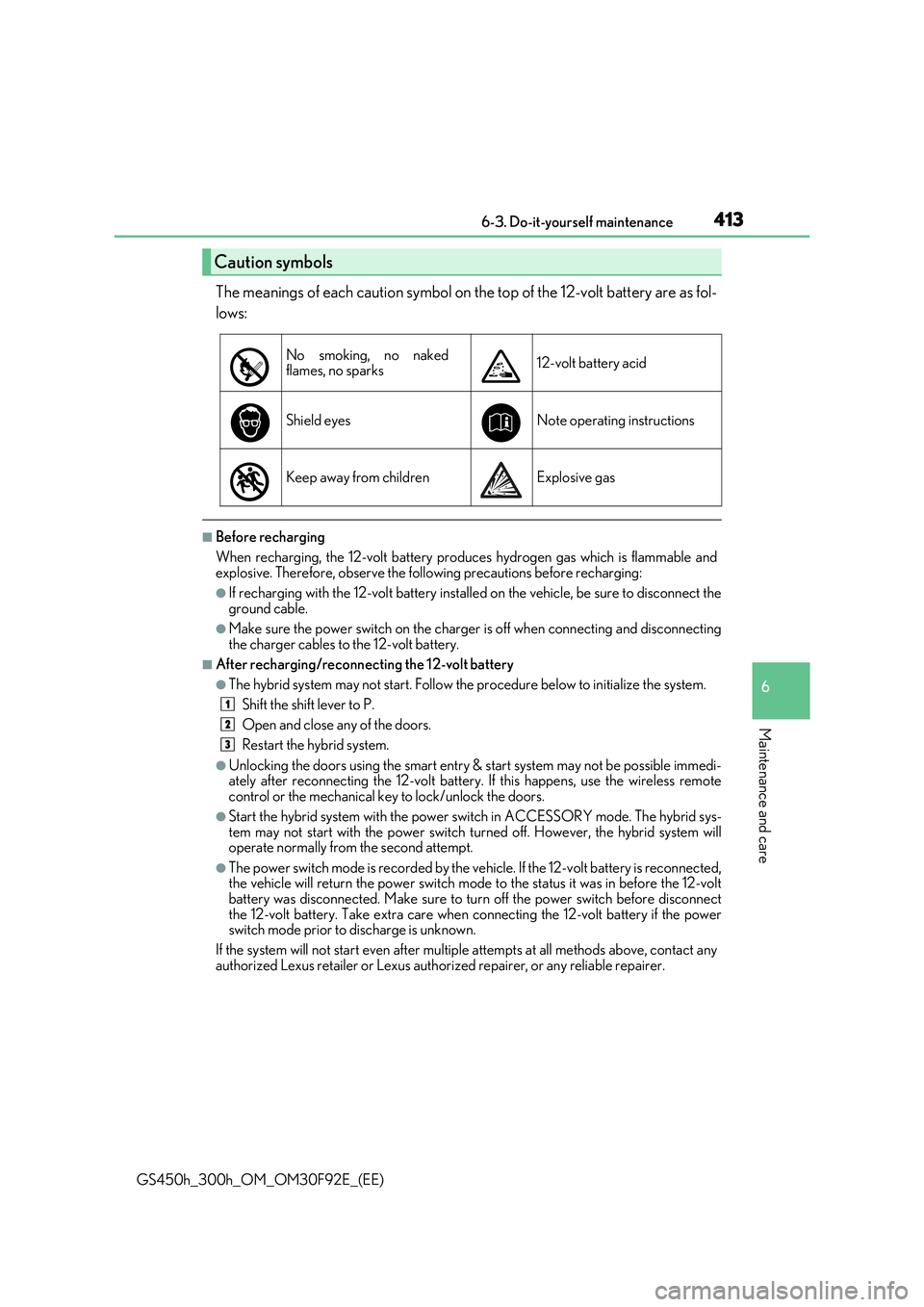
The meanings of each caution symbol on the top of the 12-volt battery are as fol-
lows:
■Before recharging
When recharging, the 12-volt battery produces hydrogen gas which is flammable and explosive. Therefore, observe the following precautions before recharging:
●If recharging with the 12-volt battery installed on the vehicle, be sure to disconnect the
ground cable.
●Make sure the power switch on the charger is off when connecting and disconnecting
the charger cables to the 12-volt battery.
■After recharging/reconnecting the 12-volt battery
●The hybrid system may not start. Follow the procedure below to initialize the system.
Shift the shift lever to P.
Open and close any of the doors.
Restart the hybrid system.
●Unlocking the doors using the smart entry & start system may not be possible immedi- ately after reconnecting the 12-volt battery. If this happens, use the wireless remotecontrol or the mechanical key to lock/unlock the doors.
●Start the hybrid system with the power switch in ACCESSORY mode. The hybrid sys-tem may not start with the power switch turned off. However, the hybrid system willoperate normally from the second attempt.
●The power switch mode is recorded by the vehicle. If the 12-volt battery is reconnected,the vehicle will return the power switch mode to the status it was in before the 12-volt battery was disconnected. Make sure to tu rn off the power switch before disconnect
the 12-volt battery. Take extra care when connecting the 12-volt battery if the power switch mode prior to discharge is unknown.
If the system will not start even after multiple attempts at all methods above, contact any
authorized Lexus retailer or Lexus author ized repairer, or any reliable repairer.
Caution symbols
No smoking, no naked flames, no sparks12-volt battery acid
Shield eyesNote operating instructions
Keep away from childrenExplosive gas
1
2
3
Page 435 of 600
435
6
6-3. Do-it-yourself maintenance
Maintenance and care
GS450h_300h_OM_OM30F92E_(EE)
Electronic key battery
●Flathead screwdriver
●Small flathead screwdriver
●Lithium battery CR2032
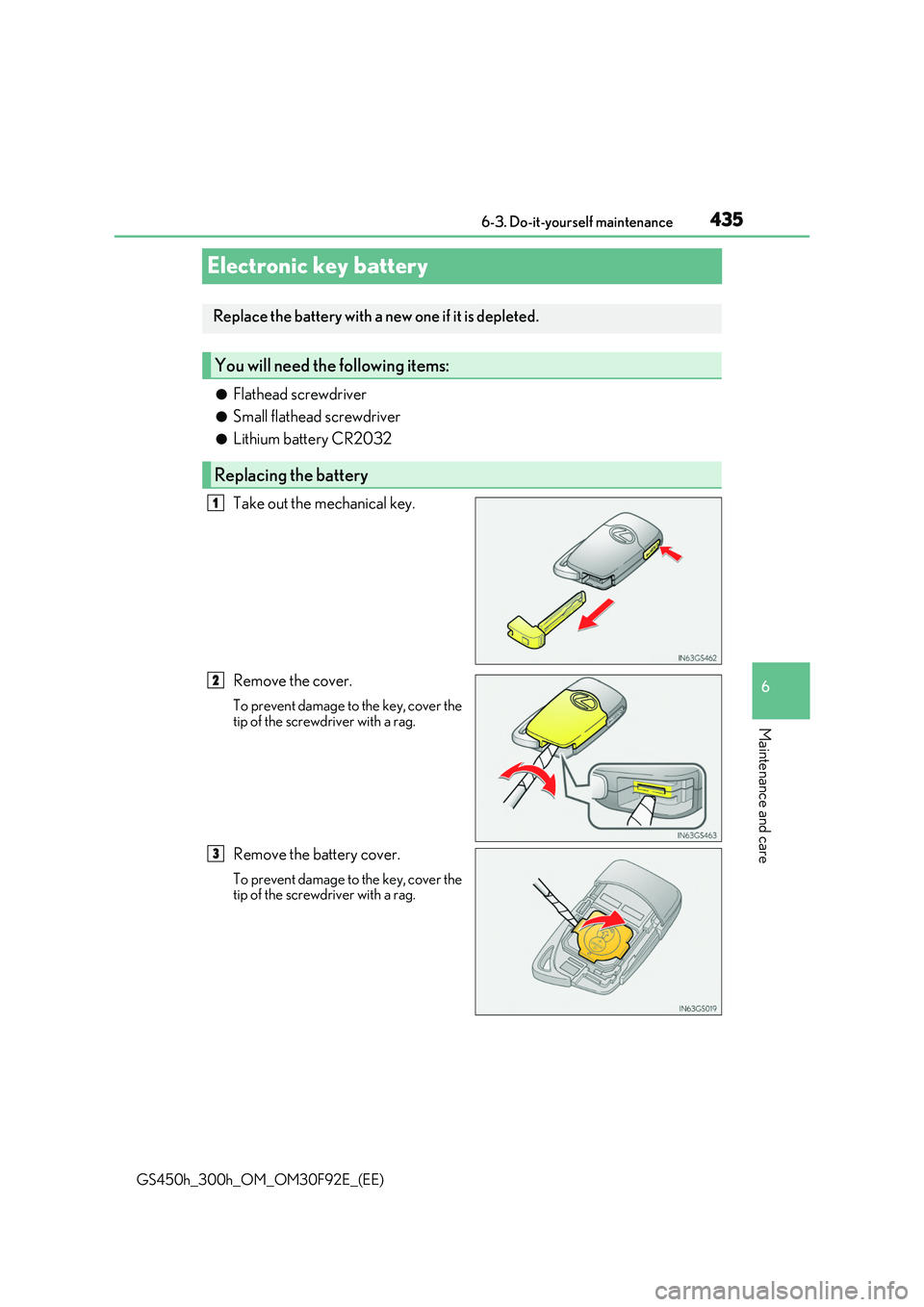
Take out the mechanical key.
Remove the cover.
To prevent damage to the key, cover the tip of the screwdriver with a rag.
Remove the battery cover.
To prevent damage to the key, cover thetip of the screwdriver with a rag.
Replace the battery with a new one if it is depleted.
You will need th e following items:
Replacing the battery
1
2
3
Page 436 of 600
4366-3. Do-it-yourself maintenance
GS450h_300h_OM_OM30F92E_(EE)
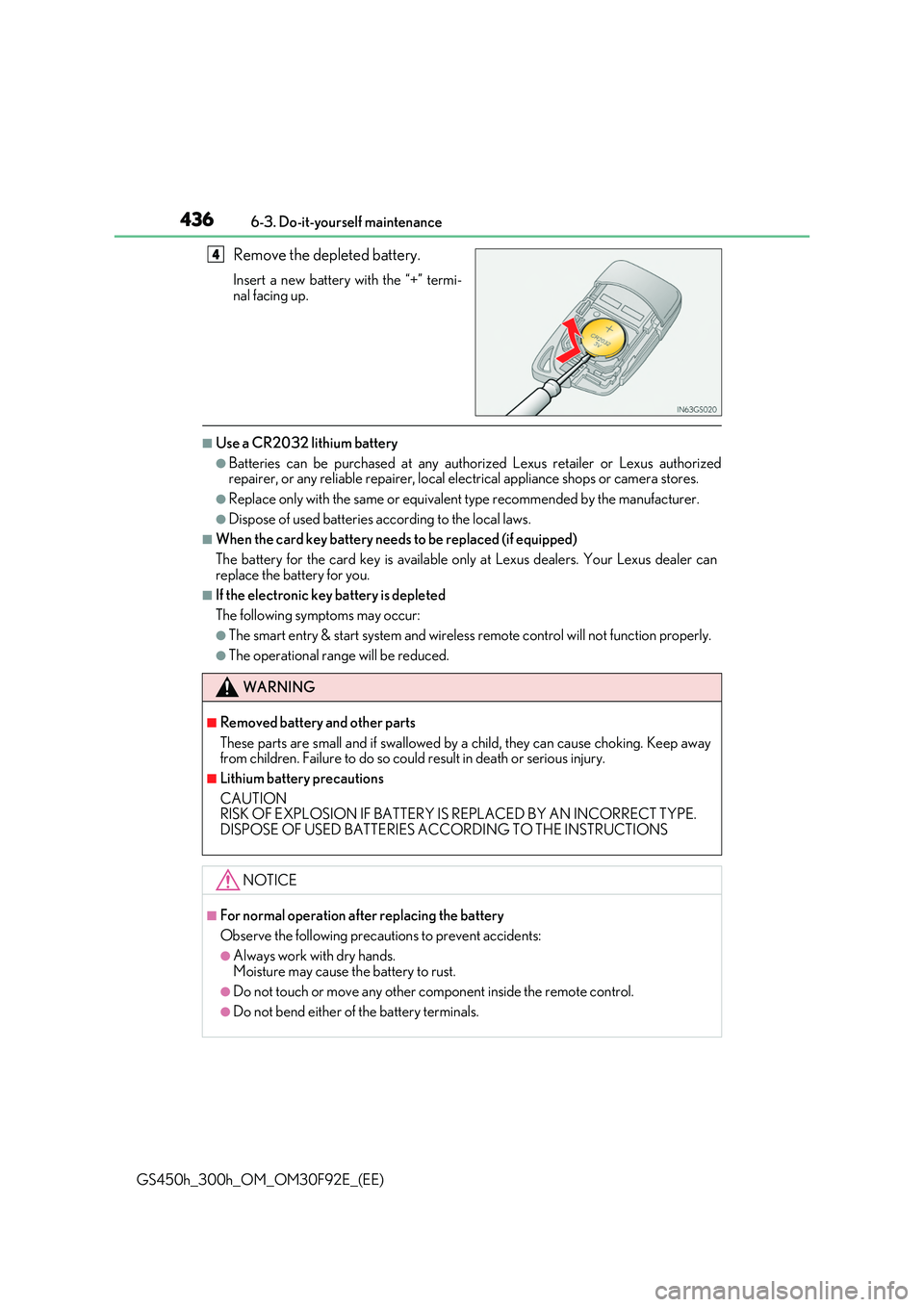
Remove the depleted battery.
Insert a new battery with the “+” termi-
nal facing up.
■Use a CR2032 lithium battery
●Batteries can be purchased at any authorized Lexus retailer or Lexus authorized repairer, or any reliable repairer, local el ectrical appliance shops or camera stores.
●Replace only with the same or equivalent type recommended by the manufacturer.
●Dispose of used batteries according to the local laws.
■When the card key battery needs to be replaced (if equipped)
The battery for the card key is available only at Lexus dealers. Your Lexus dealer can replace the battery for you.
■If the electronic key battery is depleted
The following symptoms may occur:
●The smart entry & start system and wireless remote control will not function properly.
●The operational range will be reduced.
4
WARNING
■Removed battery and other parts
These parts are small and if swallowed by a child, they can cause choking. Keep away from children. Failure to do so could result in death or serious injury.
■Lithium battery precautions
CAUTION RISK OF EXPLOSION IF BATTERY IS REPLACED BY AN INCORRECT TYPE. DISPOSE OF USED BATTERIES ACCORDING TO THE INSTRUCTIONS
NOTICE
■For normal operation after replacing the battery
Observe the following precautions to prevent accidents:
●Always work with dry hands. Moisture may cause the battery to rust.
●Do not touch or move any other component inside the remote control.
●Do not bend either of the battery terminals.
Page 451 of 600
451
7When trouble arises
GS450h_300h_OM_OM30F92E_(EE)
7-1. Essential information
Emergency flashers ..................452
If your vehicle has to be
stopped in an
emergency.................................453
7-2. Steps to take in an
emergency
If your vehicle needs
to be towed................................ 454
If you think something
is wrong....................................... 459
If a warning light turns on
or a warning buzzer
sounds..........................................460
If a warning message
is displayed ................................ 466
If you have a flat tire
(vehicles with spare tire) ......498
If you have a flat tire
(vehicles without spare
tire)................................................509
If the hybrid system
will not start................................ 523
If the parking brake
cannot be released................. 525
If the electronic key does
not operate properly ............. 527
If the 12-volt battery is
discharged .................................530
If your vehicle overheats .........535
If the vehicle becomes
stuck ............................................. 542