roof LEXUS GS300H 2019 User Guide
[x] Cancel search | Manufacturer: LEXUS, Model Year: 2019, Model line: GS300H, Model: LEXUS GS300H 2019Pages: 600, PDF Size: 55.99 MB
Page 65 of 600
651-1. For safe use
1
For safety and security
GS450h_300h_OM_OM30F92E_(EE)
WARNING
■Child restraint precautions
●For effective protection in automobile accidents and sudden stops, a child must be properly restrained, using a seat belt or child restraint system depending on the age
and size of the child. Holding a child in your arms is not a substitute for a child restraint system. In an accident, the child can be crushed against the windshield, or betweenyou and the vehicle’s interior.
●Lexus strongly urges the use of a proper child restraint system that conforms to thesize of the child, installed on the rear seat. According to accident statistics, the child is safer when properly restrained in the rear seat than in the front seat.
●Never use a rear-facing child restraint syst em on the front passenger seat when the airbag manual on-off switch is on. ( P. 54) In the event of an accident, the force of the rapid inflation of the front passenger air-
bag can cause death or serious injury to the child.
●A forward-facing child restraint system ma y be installed on the front passenger seat only when it is unavoidable. A child restra int system that requires a top strap should
not be used in the front passenger seat sinc e there is no top strap anchor for the front passenger seat. Adjust the seatback as up right as possible and always move the seat as far back as possible because the front passenger airbag could inflate with consid-
erable speed and force. Otherwise, the ch ild may be killed or seriously injured.
●Do not allow the child to lean his/her head or any part of his/her body against the door or the area of the seat, front and rear pillars or roof side rails from which the SRS
side airbags or SRS curtain shield airbags depl oy even if the child is seated in the child restraint system. It is dangerous if the SR S side airbags and curtain shield airbags inflate, and the impact could cause death or serious injury to the child.
●Make sure you have complied with all instal lation instructions provided by the child restraint manufacturer and that the system is properly secured. If it is not securedproperly, it may cause death or serious inju ry to the child in the event of a sudden
stop, sudden swerve or accident.
■When children are in the vehicle
Do not allow children to play with the seat belt. If the seat belt becomes twisted around
a child’s neck, it may lead to choking or othe r serious injuries that could result in death. If this occurs and the buckle cannot be unfa stened, scissors should be used to cut the belt.
■When the child restraint system is not in use
●Keep the child restraint system properly secure d on the seat even if it is not in use. Do not store the child restraint system un secured in the passenger compartment.
●If it is necessary to detach the child restraint system, remove it from the vehicle or store it securely in the trunk. If a head restraint was removed when installing a child restraint system, always install the head restraint before driving. This will prevent it
from injuring passengers in the event of a sudden stop, sudden swerve or accident.
Page 92 of 600
921-3. Theft deterrent system
GS450h_300h_OM_OM30F92E_(EE)
Do one of the following to deactivate or stop the alarm:
●Unlock the doors or open the trunk using the entry function or wireless
remote control.
●Turn the power switch to ACCESSORY or ON mode, or start the hybrid sys-
tem. (The alarm will be deactivated or stopped after a few seconds.)
■System maintenance
The vehicle has a maintenance-free type alarm system.
■Items to check before locking the vehicle
To prevent unexpected triggering of the alarm and vehicle theft, make sure of the follow-
ing:
●Nobody is in the vehicle.
●The windows and moon roof (if equipped) are closed before the alarm is set.
●No valuables or other personal items are left in the vehicle.
Deactivating or st opping the alarm
Page 95 of 600
951-3. Theft deterrent system
1
GS450h_300h_OM_OM30F92E_(EE)
For safety and security
■Canceling and automatic re-enabling of the intrusion sensor and tilt sensor
●The alarm will still be set even when the intrusion sensor and tilt sensor are canceled.
●After the intrusion sensor and tilt sensor are canceled, pressing the power switch or unlocking the doors using the entry function, wireless remote control or mechanical
key will re-enable the intrusio n sensor and tilt sensor.
●The intrusion sensor and tilt sensor will automatically be re-enabled when the alarm system is deactivated.
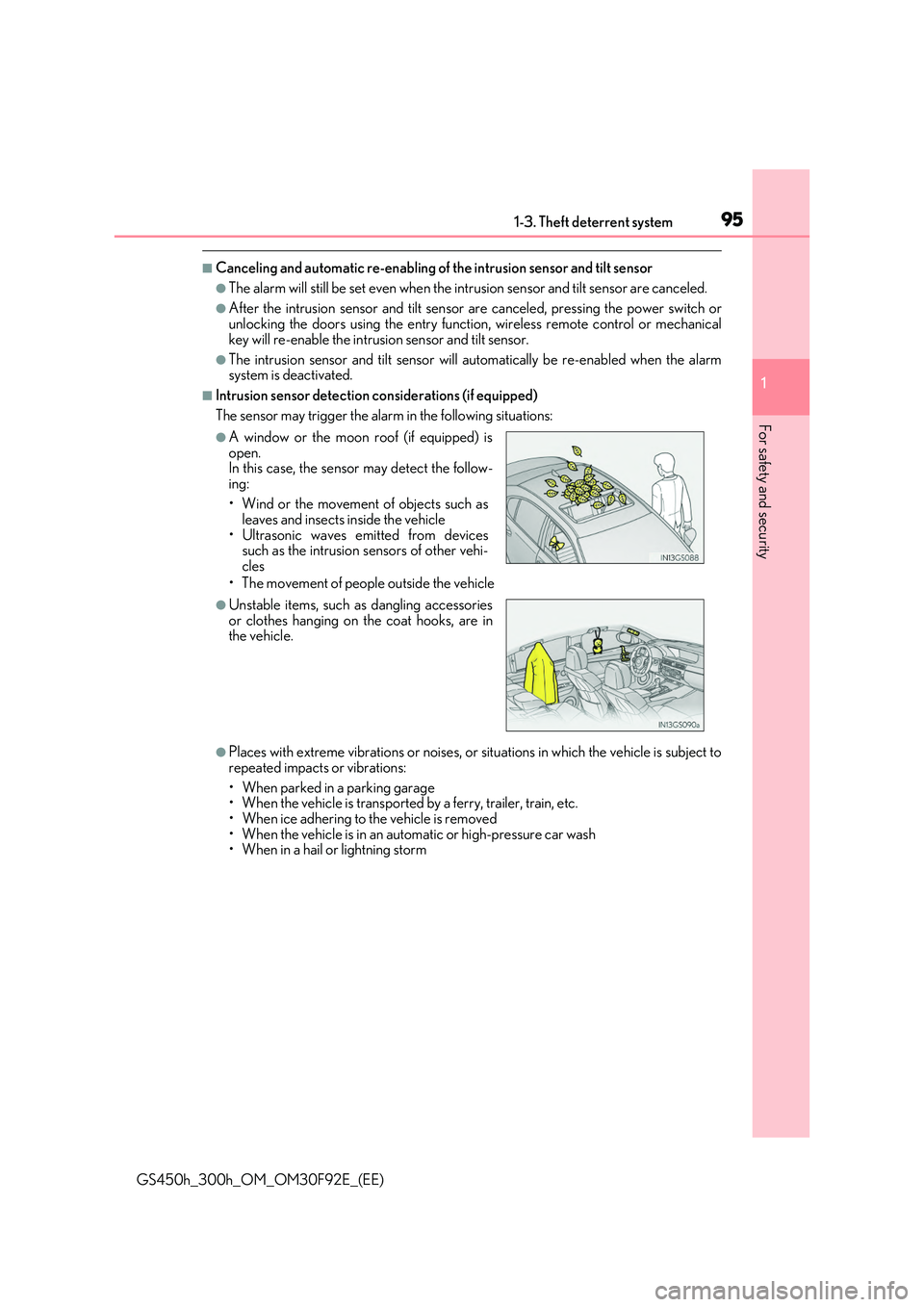
■Intrusion sensor detection considerations (if equipped)
The sensor may trigger the alarm in the following situations:
• The movement of people outside the vehicle
●Places with extreme vibrations or noises, or situations in which the vehicle is subject to
repeated impacts or vibrations:
• When parked in a parking garage • When the vehicle is transported by a ferry, trailer, train, etc.
• When ice adhering to the vehicle is removed • When the vehicle is in an automatic or high-pressure car wash• When in a hail or lightning storm
●A window or the moon roof (if equipped) isopen. In this case, the sensor may detect the follow-
ing:
• Wind or the movement of objects such as leaves and insects inside the vehicle
• Ultrasonic waves emitted from devices such as the intrusion sensors of other vehi-cles
●Unstable items, such as dangling accessoriesor clothes hanging on the coat hooks, are inthe vehicle.
Page 133 of 600
133
3
Operation of
each component
GS450h_300h_OM_OM30F92E_(EE)
3-1. Key information
Keys .................................................. 134
3-2. Opening, closing and locking
the doors and trunk
Doors ............................................... 139
Trunk .................................................146
Smart entry & start system ...... 153
3-3. Adjusting the seats
Front seats.......................................175
Driving position memory ......... 178
Head restraints ............................ 183
3-4. Adjusting the steering
wheel and mirrors
Steering wheel ............................. 186
Inside rear view mirror ............. 188
Outside rear view mirrors....... 190
3-5. Opening, closing the
windows and moon roof
Power windows ........................... 193
Moon roof ...................................... 196
Page 134 of 600
1343-1. Key information
GS450h_300h_OM_OM30F92E_(EE)
Keys
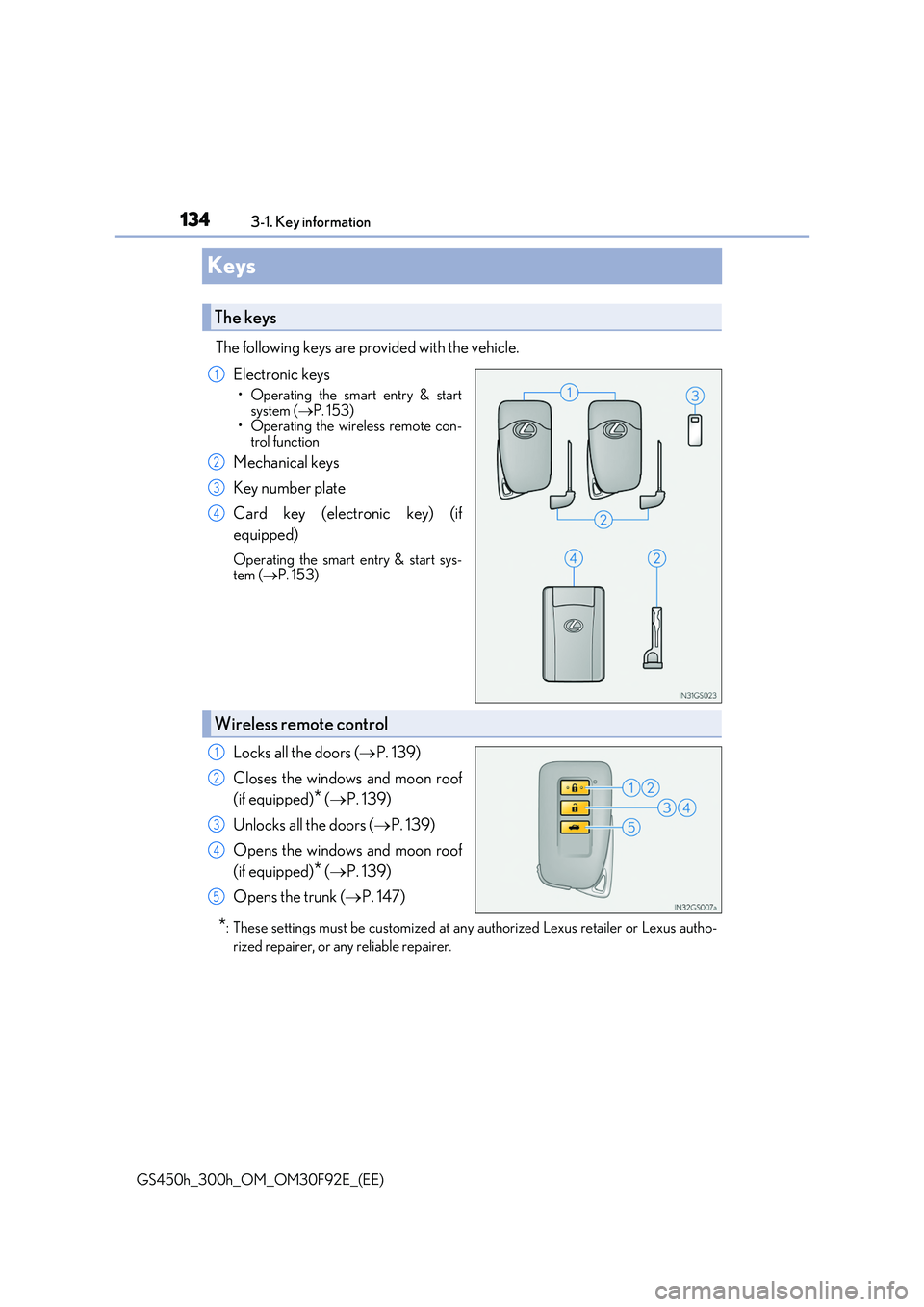
The following keys are provided with the vehicle.
Electronic keys
• Operating the smart entry & start
system ( P. 153) • Operating the wireless remote con-trol function
Mechanical keys
Key number plate
Card key (electronic key) (if
equipped)
Operating the smart entry & start sys- tem ( P. 153)
Locks all the doors (P. 139)
Closes the windows and moon roof
(if equipped)* ( P. 139)
Unlocks all the doors ( P. 139)
Opens the windows and moon roof
(if equipped)* ( P. 139)
Opens the trunk ( P. 147)
*: These settings must be customized at any authorized Lexus retailer or Lexus autho-
rized repairer, or any reliable repairer.
The keys
1
2
3
4
Wireless remote control
1
2
3
4
5
Page 135 of 600
1353-1. Key information
3
Operation of each component
GS450h_300h_OM_OM30F92E_(EE)
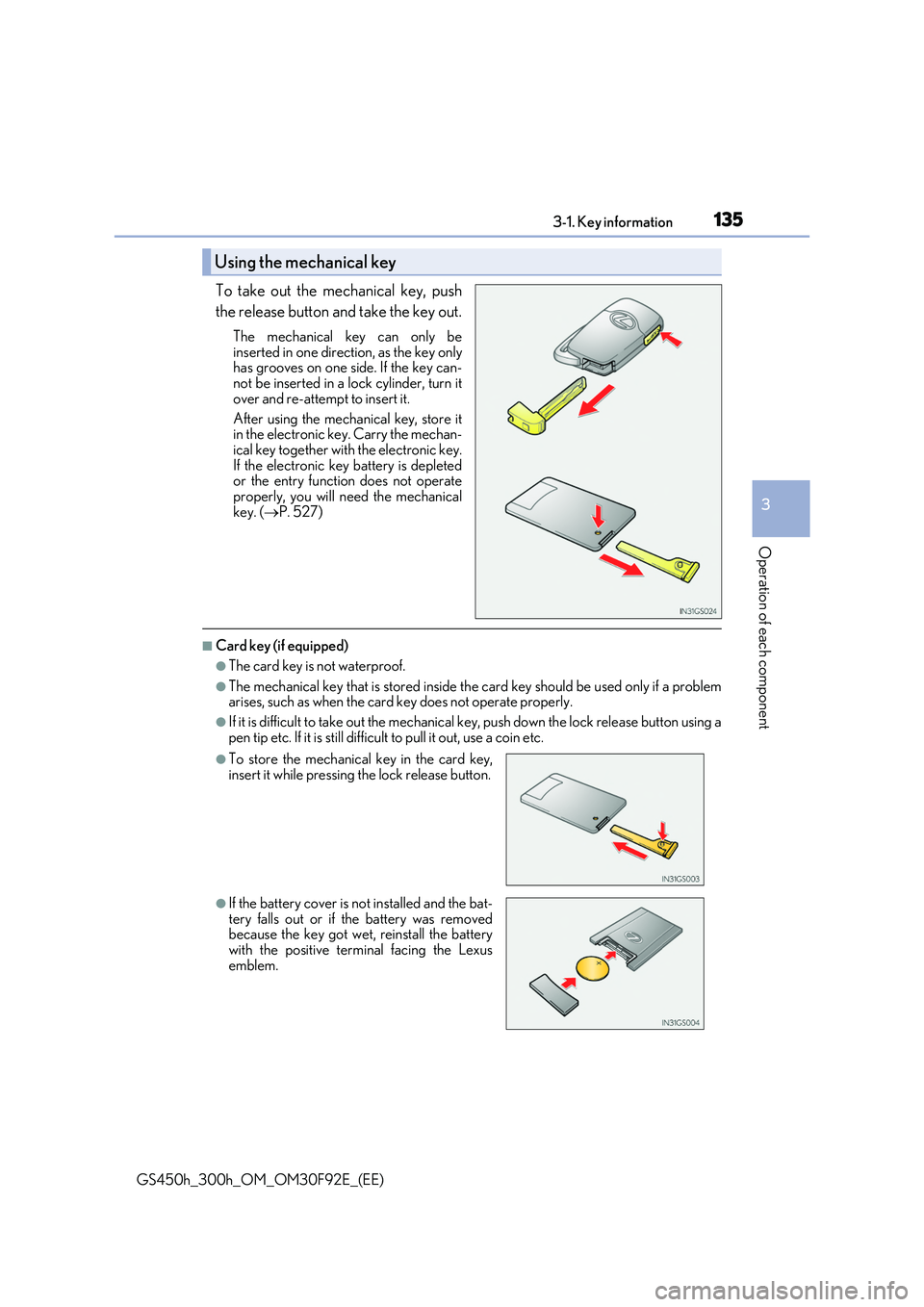
To take out the mechanical key, push
the release button and take the key out.
The mechanical key can only be
inserted in one direction, as the key only has grooves on one si de. If the key can- not be inserted in a lock cylinder, turn it
over and re-attempt to insert it.
After using the mechanical key, store it in the electronic key. Carry the mechan-
ical key together with the electronic key. If the electronic key battery is depletedor the entry function does not operate
properly, you will need the mechanical key. ( P. 527)
■Card key (if equipped)
●The card key is not waterproof.
●The mechanical key that is stored inside the card key should be used only if a problem arises, such as when the card key does not operate properly.
●If it is difficult to take out the mechanical key, push down the lock release button using a
pen tip etc. If it is still difficu lt to pull it out, use a coin etc.
Using the mechanical key
●To store the mechanical key in the card key,
insert it while pressing the lock release button.
●If the battery cover is not installed and the bat-
tery falls out or if the battery was removed because the key got wet, reinstall the batterywith the positive terminal facing the Lexus
emblem.
Page 139 of 600
139
3
3-2. Opening, closing and locking the doors and trunk
Operation of each component
GS450h_300h_OM_OM30F92E_(EE)
Doors
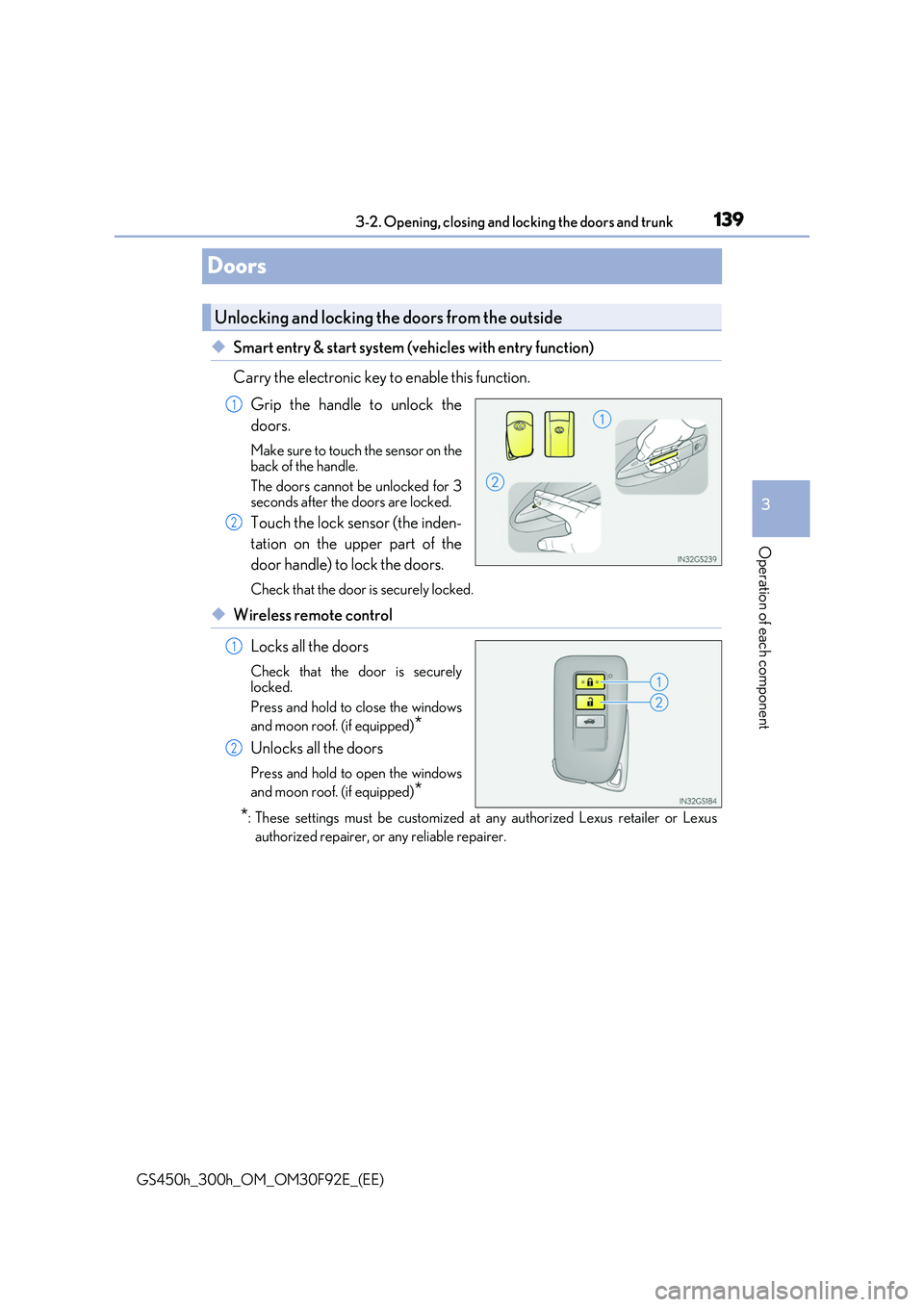
◆Smart entry & start system (vehicles with entry function)
Carry the electronic key to enable this function.
Grip the handle to unlock the
doors.
Make sure to touch the sensor on the back of the handle.
The doors cannot be unlocked for 3 seconds after the doors are locked.
Touch the lock sensor (the inden-
tation on the upper part of the
door handle) to lock the doors.
Check that the door is securely locked.
◆Wireless remote control
Locks all the doors
Check that the door is securely locked.
Press and hold to close the windows
and moon roof. (if equipped)*
Unlocks all the doors
Press and hold to open the windows
and moon roof. (if equipped)*
*: These settings must be customized at any authorized Lexus retailer or Lexus
authorized repairer, or any reliable repairer.
Unlocking and locking the doors from the outside
1
2
1
2
Page 141 of 600
1413-2. Opening, closing and locking the doors and trunk
3
Operation of each component
GS450h_300h_OM_OM30F92E_(EE)
WARNING
Observe the following precautions. Failing to do so may result in death or serious injury.
■When using the wireless remote control and operating the power windows or moon
roof (if equipped)
Operate the power window or moon roof afte r checking to make sure that there is no possibility of any passenger having any of their body parts caught in the window or
moon roof. Also, do not allow children to oper ate the wireless remote control. It is pos- sible for children and other passengers to get caught in the power window or moonroof.
■Jam protection function
●Never try jamming any part of your body to activate the jam protection functionintentionally.
●The jam protection function may not work if something gets caught just before thewindow or moon roof fully closes.
Page 193 of 600
193
3
3-5. Opening, closing the windows and moon roof
Operation of each component
GS450h_300h_OM_OM30F92E_(EE)
Power windows
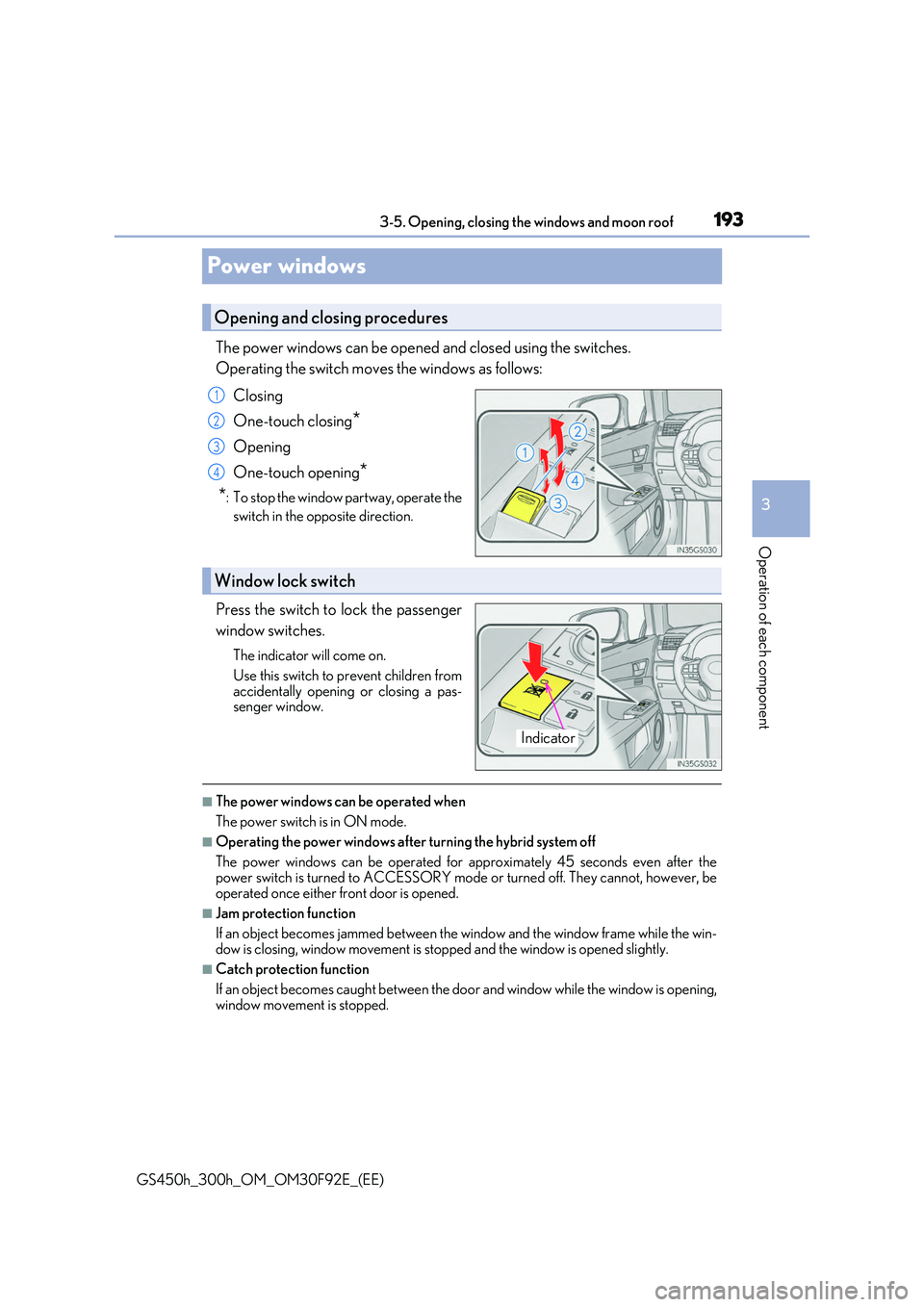
The power windows can be opened and closed using the switches.
Operating the switch moves the windows as follows:
Closing
One-touch closing*
Opening
One-touch opening*
*: To stop the window partway, operate the
switch in the opposite direction.
Press the switch to lock the passenger
window switches.
The indicator will come on.
Use this switch to prevent children from
accidentally opening or closing a pas- senger window.
■The power windows can be operated when
The power switch is in ON mode.
■Operating the power windows after turning the hybrid system off
The power windows can be operated for approximately 45 seconds even after the power switch is turned to ACCESSORY mode or turned off. They cannot, however, be
operated once either front door is opened.
■Jam protection function
If an object becomes jammed between the window and the window frame while the win-
dow is closing, window movement is stop ped and the window is opened slightly.
■Catch protection function
If an object becomes caught between the door and window while the window is opening,
window movement is stopped.
Opening and closing procedures
1
2
3
4
Window lock switch
Indicator
Page 194 of 600
1943-5. Opening, closing the windows and moon roof
GS450h_300h_OM_OM30F92E_(EE)
■When the window cannot be opened or closed
When the jam protection function or catch protection function operates unusually and the door window cannot be opened or closed , perform the following operations with the
power window switch of that door.
●Stop the vehicle. With the power switch in ON mode, within 4 seconds of the jam pro- tection function or catch protection function activating, continuously operate the
power window switch in the one-touch clos ing direction or one-touch opening direc- tion so that the door window can be opened and closed.
●If the door window cannot be opened and closed even when performing the above
operations, perform the following pr ocedure for function initialization.
Turn the power switch to ON mode.
Pull and hold the power window switch in the one-touch closing direction and com-
pletely close the door window.
Release the power window switch for a mo ment, resume pulling the switch in the one-touch closing direction, and hold it there for approximately 6 seconds or more.
Press and hold the power window switch in the one-touch opening direction. After the door window is completely opened, cont inue holding the switch for an additional 1 second or more.
Release the power window switch for a moment, resume pushing the switch in the one-touch opening direction, and hold it there for approximately 4 seconds or more.
Pull and hold the power window switch in the one-touch closing direction again. After the door window is completely closed, continue holding the switch for a fur-ther 1 second or more.
If you release the switch while the window is moving, start again from the beginning. If the window reverses and cannot be fully closed or opened, have the vehicle inspected
by any authorized Lexus retailer or Lexus auth orized repairer, or any reliable repairer.
■Door lock linked window operation
●The power windows can be opened and closed using the mechanical key.* (P. 527)
●The power windows can be opened and closed using the wireless remote control.*(P. 139)
*: These settings must be customized at any authorized Lexus retailer or Lexus autho-
rized repairer, or any reliable repairer.
■When the 12-volt battery is disconnected
The window lock switch is disabled. If ne cessary, press the window lock switch after reconnecting the 12-volt battery.
■Power windows open warning buzzer
The buzzer sounds and a message is shown on the multi-information display in the instru- ment cluster when the power switch is turned off and the driver’s door is opened with thepower windows open.
■Customization
Settings (e.g. linked door lock operation) can be changed. (Customizable features: P. 561)
1
2
3
4
5
6