trailer LEXUS GS300H 2019 User Guide
[x] Cancel search | Manufacturer: LEXUS, Model Year: 2019, Model line: GS300H, Model: LEXUS GS300H 2019Pages: 600, PDF Size: 55.99 MB
Page 215 of 600
2154-1. Before driving
4
Driving
GS450h_300h_OM_OM30F92E_(EE)
■Passing other vehicles
Consider the total combined length of your vehicle and trailer and ensure that
the vehicle-to-vehicle distance is sufficient before executing lane changes.
■Transmission information
To maintain engine braking efficiency, when using engine braking, when driv-
ing on a long steep downgrade, do not use the transmission in D. (P. 227)
■If the engine overheats
Towing a loaded trailer up a long, steep incline in temperatures exceeding
30 C (85F) may result in the engine overheating. If the engine coolant tem-
perature gauge indicates that the engine is overheating, turn the air condition-
ing off immediately, leave the road and stop the vehicle in a safe place.
( P. 535)
■When parking the vehicle
Always place wheel chocks under the wheels of both the vehicle and trailer.
Firmly set the parking brake and shift the shift lever to P.
WARNING
Follow all the instructions described in this se ction. Failure to do so could cause an acci- dent resulting in death or serious injury.
■Trailer towing precautions
When towing, make sure that none of the weight limits are exceeded. ( P. 211)
■To avoid accident or injury
●Do not tow a trailer when the compact spare tire is installed on your vehicle.
●Do not tow a trailer when the tire installed is repaired with the emergency tire punc- ture repair kit.
●Do not use cruise control (if equipped) or dynamic radar cruise control with full-
speed range (if equipped) when trailer towing.
■Vehicle speed in towing
Observe the legal maximum speeds for trailer towing.
■Before descending hills or long declines
Reduce speed and downshift. However, never downshift suddenly while descending steep or long downhill grades.
■Operation of the brake pedal
Do not hold the brake pedal depressed often or for long periods of time.
Doing so may result in the brake ov erheating or reduce braking effects.
Page 233 of 600
2334-2. Driving procedures
4
Driving
GS450h_300h_OM_OM30F92E_(EE)
■Parking brake operation
●When the power switch is not in ON mode, the parking brake cannot be released using the parking brake switch.
●When the power switch is not in ON mode, automatic mode (automatic brake setting
and releasing) is not available.
●If the parking brake is operated repeatedly over a short period of time, the system may restrict operation to prevent overheating. If this happens, refrain from operating the
parking brake. Normal operation wi ll return after about 1 minute.
●Vehicles with towing package: In situations such as when parking while towing a trailer, the maximum amount of braking force can be used by pressing the parking brake
switch with the parking brake already set.
●Vehicles without towing package: In situations such as when parking on a steep slope*, the maximum amount of braking force can be used by pressing the parking brake
switch with the parking brake already set.
*: Use wheel chocks when parking on a steep slope.
■Parking brake operation sound
When the parking brake operates, a motor sound (whirring sound) may be heard. This
does not indicate a malfunction.
■Parking brake indicator light
●Depending on the power switch mode, the parking brake indicator light will come on
and stay on as described below:
ON mode: Comes on until the parking brake is released. Not in ON mode: Stays on for approximately 15 seconds.
●When the power switch is turned off with th e parking brake set, the parking brake indi- cator light will stay on for about 15 seco nds. This does not indicate a malfunction.
■When there is a malfunction in the system
Warning lights and/or warning message will turn on or flash. ( P. 462, 466) Depending on the condition, the park ing brake indicator light may flash.
■Parking the vehicle
P. 200
■Parking brake engaged warning buzzer
P. 472
■Usage in winter time
P. 334
Page 245 of 600
2454-3. Operating the lights and wipers
4
Driving
GS450h_300h_OM_OM30F92E_(EE)
●In the situations shown below, the system may not be able to accurately detect sur- rounding brightness levels. This may cause the low beams to remain on or the highbeams to cause problems for pedestrians, vehicles ahead or other parties. In these
cases, manually switch between the high and low beams.
• In bad weather (rain, snow, fog, sandstorms etc.) • The windshield is obscured by fog, mist, ice, dirt etc.
• The windshield is cracked or damaged. • The camera sensor is deformed or dirty.• The camera sensor temperature is extremely high.
• Surrounding brightness levels are equal to th ose of headlights, tail lights or fog lights. • Vehicles ahead have headlights that are either switched off, dirty, are changing color,or are not aimed properly.
• The vehicle is hit by water, snow, dust, etc. from a preceding vehicle. • When driving through an area of interm ittently changing brightness and darkness. • When frequently and repeatedly driving ascending/descending roads, or roads with
rough, bumpy or uneven surfaces (such as stone-paved roads, gravel tracks etc.). • When frequently and repeatedly taking curves or driving on a winding road.• There is a highly reflective object ahead of the vehicle, such as a sign or a mirror.
• The back of a vehicle ahead is highly reflective, such as a container on a truck. • The vehicle’s headlights are damaged or dirty.• The vehicle is listing or tilting, due to a flat tire, a trailer being towed etc.
• The high beam and low beam are repeated ly being switched between in an abnor- mal manner.• The driver believes that the high beam may be causing problems or distress to other
drivers or pedestrians nearby.
■Warning message
Warning messages are used to indicate a syst em malfunction or to inform the driver of
the need for caution. ( P. 466)
■Customization
Some functions can be customized. ( P. 561)
Page 249 of 600
2494-3. Operating the lights and wipers
4
Driving
GS450h_300h_OM_OM30F92E_(EE)
●In the situations shown below, the system may not be able to accurately detect sur- rounding brightness levels. This may cause the low beams to remain on or the highbeams to cause problems for pedestrians, vehicles ahead or other parties. In these
cases, manually switch between the high and low beams.
• In bad weather (rain, snow, fog, sandstorms etc.) • The windshield is obscured by fog, mist, ice, dirt etc.
• The windshield is cracked or damaged. • The inside rear view mirror or ca mera sensor is deformed or dirty. • The camera sensor temperature is extremely high.
• Surrounding brightness levels are equal to th ose of headlights, tail lights or fog lights. • Vehicles ahead have headlights that are either switched off, dirty, are changing color,or are not aimed properly.
• When driving through an area of interm ittently changing brightness and darkness. • When frequently and repeatedly driving ascending/descending roads, or roads withrough, bumpy or uneven surfaces (such as stone-paved roads, gravel tracks etc.).
• When frequently and repeatedly taking curves or driving on a winding road. • There is a highly reflective object ahead of the vehicle, such as a sign or a mirror.• The back of a vehicle ahead is highly reflective, such as a container on a truck.
• The vehicle’s headlights are damaged or dirty. • The vehicle is listing or tilting, due to a flat tire, a trailer being towed etc.• The high beam and low beam are repeated ly being switched between in an abnor-
mal manner. • The driver believes that the high beam may be causing problems or distress to otherdrivers or pedestrians nearby.
• When going through the Straits of Dover.
■Warning message
Warning messages are used to indicate a syst em malfunction or to inform the driver of
the need for caution. ( P. 466)
Page 279 of 600
2794-5. Using the driving support systems
4
Driving
GS450h_300h_OM_OM30F92E_(EE)
■Situations in which the system may not operate properly
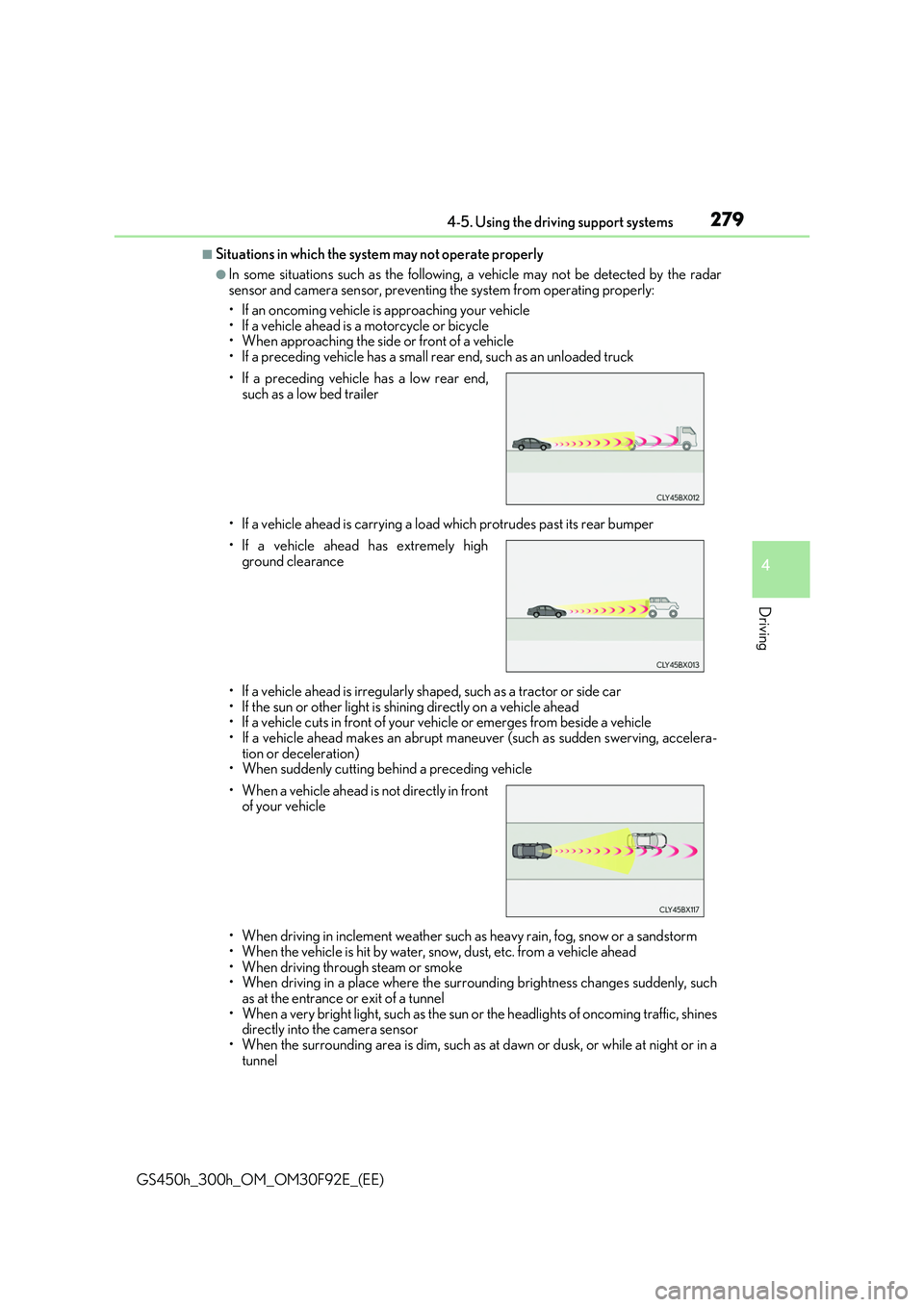
●In some situations such as the following, a vehicle may not be detected by the radar sensor and camera sensor, preventing the system from operating properly:
• If an oncoming vehicle is approaching your vehicle • If a vehicle ahead is a motorcycle or bicycle• When approaching the side or front of a vehicle
• If a preceding vehicle has a small rear end, such as an unloaded truck
• If a vehicle ahead is carrying a load which protrudes past its rear bumper
• If a vehicle ahead is irregularly sh aped, such as a tractor or side car
• If the sun or other light is shin ing directly on a vehicle ahead • If a vehicle cuts in front of your vehicle or emerges from beside a vehicle• If a vehicle ahead makes an abrupt mane uver (such as sudden swerving, accelera-
tion or deceleration) • When suddenly cutting behind a preceding vehicle
• When driving in inclement we ather such as heavy rain, fog, snow or a sandstorm • When the vehicle is hit by water, snow, dust, etc. from a vehicle ahead
• When driving through steam or smoke • When driving in a place where the surro unding brightness changes suddenly, such as at the entrance or exit of a tunnel
• When a very bright light, such as the sun or the headlights of oncoming traffic, shines directly into the camera sensor• When the surrounding area is dim, such as at dawn or dusk, or while at night or in a
tunnel
• If a preceding vehicle has a low rear end,
such as a low bed trailer
• If a vehicle ahead has extremely high
ground clearance
• When a vehicle ahead is not directly in front of your vehicle
Page 285 of 600
2854-5. Using the driving support systems
4
Driving
GS450h_300h_OM_OM30F92E_(EE)
WARNING
■Before using LKA system
Do not rely solely upon the LKA system. Th e LKA system does not automatically drive the vehicle or reduce the amount of attention that must be paid to the area in front of
the vehicle. The driver must always assume full responsibility for driving safely by pay- ing careful attention to the surrounding conditions and operating the steering wheel tocorrect the path of the vehicle. Also, the driver must take adequate breaks when
fatigued, such as from driving for a long period of time. Failure to perform appropriate driving operat ions and pay careful attention may lead to an accident, resulting in death or serious injury.
■To avoid operating LKA system by mistake
When not using the LKA system, use the LKA switch to turn the system off.
■Situations unsuitable for LKA system
Do not use the LKA system in the following situations. The system may not operate properly and le ad to an accident, resulting in death or serious injury.
●A spare tire, tire chains, etc. are equipped.
●When the tires have been excessively worn, or when the tire inflation pressure is low.
●Tires which differ by structure, manufacturer, brand or tread pattern are used.
●Objects or patterns that could be mistaken for white (yellow) lines are present on the side of the road (guardrails, cu rbs, reflective poles, etc.).
●Vehicle is driven on a snow-covered road.
●White (yellow) lines are difficult to see due to rain, snow, fog, dust, etc.
●Asphalt repair marks, white (yellow) line marks, etc. are present due to road repair.
●Vehicle is driven in a temporary lane or restricted lane due to construction work.
●Vehicle is driven on a road surface which is slippery due to rainy weather, fallen snow, freezing, etc.
●Vehicle is driven in traffic lanes other than on highways and freeways.
●Vehicle is driven in a construction zone.
●Vehicle is towing a trailer or another vehicle. (vehicles with towing package)
■Preventing LKA system malfunctions and operations performed by mistake
●Do not modify the headlights or place stickers, etc. on the surface of the lights.
●Do not modify the suspension etc. If the suspension etc. needs to be replaced, con- tact any authorized Lexus retailer or Le xus authorized repairer, or any reliable
repairer.
●Do not install or place anything on the hood or grille. Also, do not install a grille guard (bull bars, kangaroo bar, etc.).
●If your windshield needs repairs, contac t any authorized Lexus retailer or Lexus authorized repairer, or any reliable repairer.
Page 298 of 600
2984-5. Using the driving support systems
GS450h_300h_OM_OM30F92E_(EE)
WARNING
■Situations unsuitable for dynamic radar cruise control with full-speed range
Do not use dynamic radar cruise control with full-speed range in any of the following situations.
Doing so may result in inappropriate speed control and could cause an accident result- ing in death or serious injury.
●Roads where there are pedestrians, cyclists, etc.
●In heavy traffic
●On roads with sharp bends
●On winding roads
●On slippery roads, such as those covered with rain, ice or snow
●On steep downhills, or where there are sudden changes between sharp up and downgradients
Vehicle speed may exceed the set sp eed when driving down a steep hill.
●At entrances to freeways and highways
●When weather conditions are bad enough that they may prevent the sensors from
detecting correctly (fog, snow, sandstorm, heavy rain, etc.)
●When there is rain, snow, etc. on the fron t surface of the radar sensor or camera sen- sor
●In traffic conditions that require frequent repeated acceleration and deceleration
●When your vehicle is towing a trailer (vehicles with towing package) or during emer-gency towing
●When an approach warning buzzer is heard often
Page 306 of 600
3064-5. Using the driving support systems
GS450h_300h_OM_OM30F92E_(EE)
■Automatic cancelation of constant speed control mode
Constant speed control mode is automatica lly canceled in the following situations:
●Actual vehicle speed is more than approximately 16 km/h (10 mph) below the set vehi-
cle speed.
●Actual vehicle speed falls below approximately 40 km/h (25 mph).
●VSC is activated.
●TRC is activated for a period of time.
●When the VSC or TRC system is turned off by pressing the VSC OFF switch.
●Pre-crash braking is activated.
If constant speed control mode is automatically canceled for any other reason, there may be a malfunction in the system. Contact an y authorized Lexus retailer or Lexus autho- rized repairer, or any reliable repairer.
■Warning messages and buzzers for dynamic radar cruise control with full-speed range
Warning messages and buzzers are used to indicate a system malfunction or to inform the driver of the need for caution while driv ing. If a warning message is shown on the
multi-information display, read the message and follow the instructions. (P. 466)
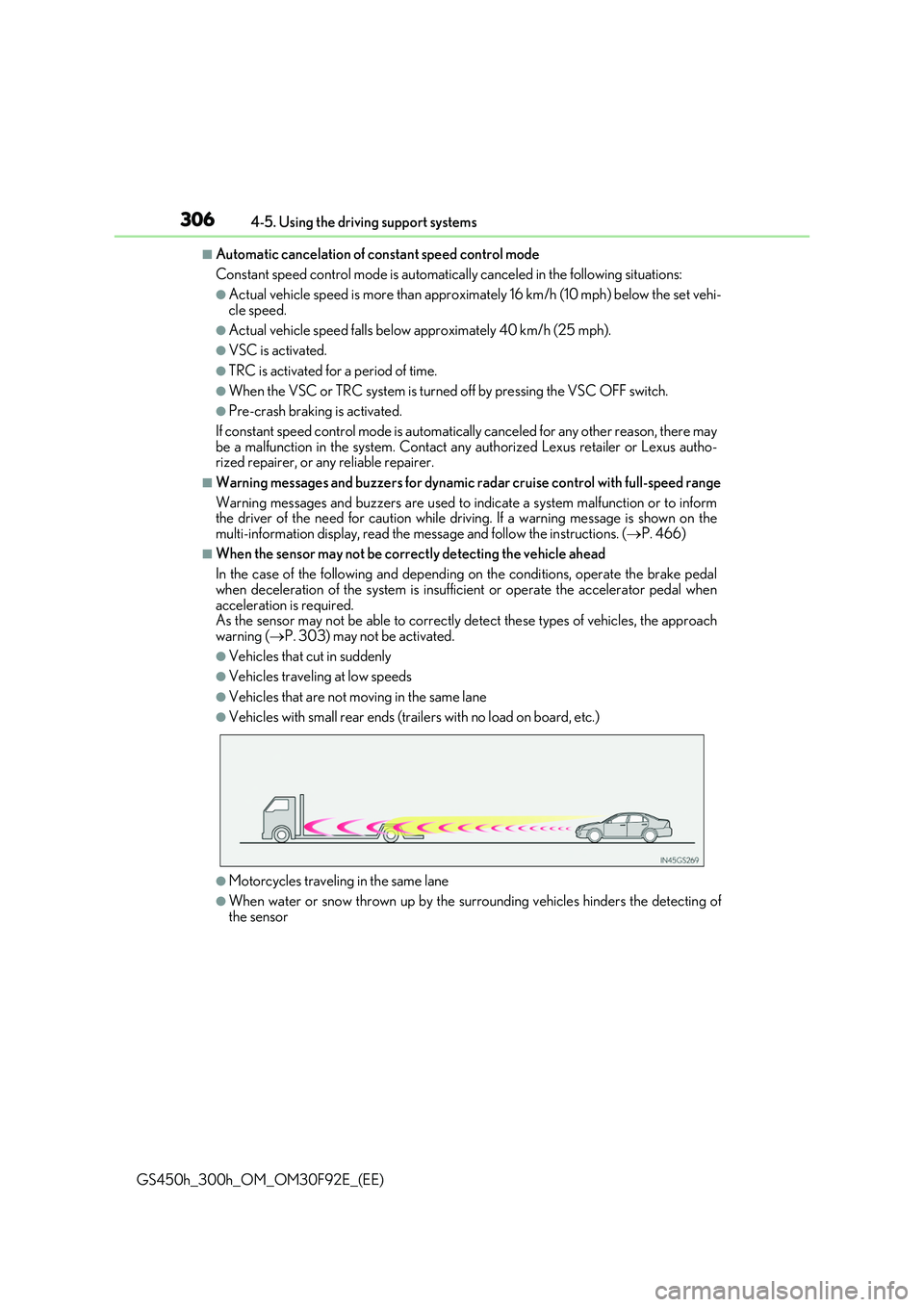
■When the sensor may not be correctly detecting the vehicle ahead
In the case of the following and depending on the conditions, operate the brake pedal
when deceleration of the system is insufficient or operate the accelerator pedal when acceleration is required.As the sensor may not be able to correctly detect these types of vehicles, the approach
warning ( P. 303) may not be activated.
●Vehicles that cut in suddenly
●Vehicles traveling at low speeds
●Vehicles that are not moving in the same lane
●Vehicles with small rear ends (trailers with no load on board, etc.)
●Motorcycles traveling in the same lane
●When water or snow thrown up by the surrounding vehicles hinders the detecting of the sensor
Page 310 of 600
3104-5. Using the driving support systems
GS450h_300h_OM_OM30F92E_(EE)
■Automatic cruise control cancelation
Cruise control will stop maintaining the vehicl e speed in any of the following situations.
●Actual vehicle speed falls more than approximately 16 km/h (10 mph) below the preset
vehicle speed. At this time, the memorized set speed is not retained.
●Actual vehicle speed is below approximately 40 km/h (25 mph).
●VSC is activated.
●TRC is activated for a period of time.
●When the VSC or TRC system is turned off by pressing the VSC OFF switch.
■If the warning message for the cruise control is shown on the multi-information display
Press the “ON/OFF” button once to deactivate the system, and then press the button again to reactivate the system.
If the cruise control speed cannot be set or if the cruise control cancels immediately after being activated, there may be a malfunction in the cruise control system. Have the vehi-cle inspected by any authorized Lexus retaile r or Lexus authorized repairer, or any reli-
able repairer.
WARNING
■To avoid operating the cruise control by mistake
Switch the cruise control off using the “ON/OFF” button when not in use.
■Situations unsuitable for cruise control
Do not use cruise control in any of the following situations. Doing so may result in loss of control and could cause an accident resulting in death orserious injury.
●In heavy traffic
●On roads with sharp bends
●On winding roads
●On slippery roads, such as those covered with rain, ice or snow
●On steep hillsVehicle speed may exceed the set sp eed when driving down a steep hill.
●When your vehicle is towing a trailer or during emergency towing
Page 323 of 600
3234-5. Using the driving support systems
4
Driving
GS450h_300h_OM_OM30F92E_(EE)
■Conditions under which the Rear Crossing Traffic Alert function will not detect a vehi- cle
The Rear Crossing Traffic Alert function is not designed to detect the following types of
vehicles and/or objects.
●Small motorcycles, bicycles, pedestrians etc.*
●Vehicles approaching from directly behind
●Guardrails, walls, signs, parked vehi cles and similar stationary objects*
●Vehicles moving away from your vehicle
●Vehicles approaching from the parking spaces next to your vehicle*
●Vehicles backing up in the parking space next to your vehicle*
*: Depending on conditions, detection of a vehicle and/or object may occur.
■Conditions under which the Rear Crossing Traffic Alert function may not function cor- rectly
The Rear Crossing Traffic Alert function may not detect vehicles correctly in the follow- ing conditions:
●During bad weather such as heavy rain, fog, snow etc.
●When ice or mud etc. is attached to the rear bumper
●When multiple vehicles approach continuously
●Shallow angle parking
●When a vehicle is approaching at high speed
●When parking on a steep incline, such as hills, a dip in the road etc.
●Directly after the BSM function is turned on
●When your vehicle is towing a trailer (vehicles with towing package)
●When items such as a bicycle carrier are installed on the rear of the vehicle
●Directly after the hybrid system is started with the BSM function is turned on
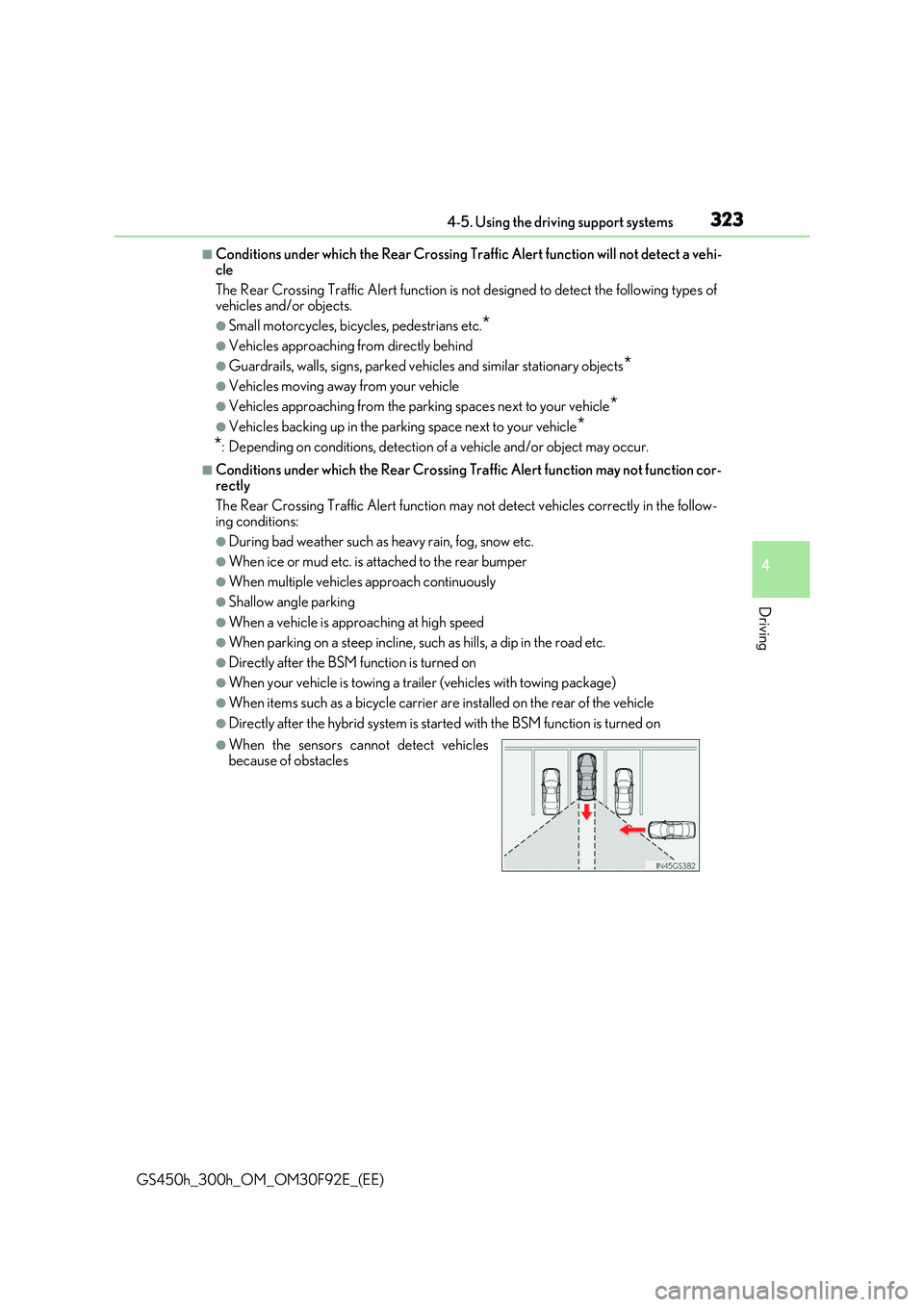
●When the sensors cannot detect vehicles
because of obstacles