wipers LEXUS GS300H 2019 User Guide
[x] Cancel search | Manufacturer: LEXUS, Model Year: 2019, Model line: GS300H, Model: LEXUS GS300H 2019Pages: 600, PDF Size: 55.99 MB
Page 244 of 600
2444-3. Operating the lights and wipers
GS450h_300h_OM_OM30F92E_(EE)
■Conditions in which the light distribution control of the headlights changes automati-
cally
●When all of the following conditions are met, the high beams will be turned on automat- ically and the system will operate:
• The vehicle speed is approximately 60 km/h (37 mph) or more.*
*: The area in the direction that the vehicl e is turning will be illuminated more brightly
than other areas while driving on a curve.
●When all of the following conditions are met, the variable high beams will turn on and the distance that the low be ams are projected will be adjusted automatically, depending
on the location of vehicles ahead:
• The vehicle speed is approximately 60 km/h (37 mph) or more. • The area ahead of the vehicle is dark.
• There are vehicles ahead with headlights or tail lights turned on.
●If any of the following conditions is met, the high beams or variable high beams will be
changed to the low beams automatically:
• The vehicle speed is below approximately 60 km/h (37 mph). • The area ahead of the vehicle is not dark.
• There are many vehicles ahead. • Vehicles ahead are moving quickly and the high beams may blind the drivers of theother vehicles.
■Camera sensor detection information
●The high beams may not be automatically changed to the variable high beams in thefollowing situations:
• When vehicles ahead suddenly appear from a curve • When the vehicle is cut in front of by another vehicle• When vehicles ahead are hidden from sight due to repeated curves, road dividers or
roadside trees • When vehicles ahead appear from the faraway lane on wide road• When vehicles ahead have no lights
●The high beams may be changed to the variable high beams if a vehicle ahead that isusing fog lights without its headlights turned on is detected.
●House lights, street lights, traffic signals, and illuminated billboards or signs may cause the high beams to change to the variable high beams, cause the high beams not tochange to the variable high beams, or change the area that is not illuminated.
●The following factors may affect the amount of time taken to turn the high beam on or off, or the speed by which the areas not illuminated change:
• The brightness of headlights, fog light s, and tail lights of vehicles ahead
• The movement and direction of vehicles ahead • When a vehicle ahead only has operational lights on one side
• When a vehicle ahead is a two-wheeled vehicle • The condition of the road (gradient, curve, condition of the road surface etc.)• The number of passengers and amount of luggage
●The light distribution control of the headlights may change unexpectedly.
●Bicycles or similar objects may not be detected.
Page 245 of 600
2454-3. Operating the lights and wipers
4
Driving
GS450h_300h_OM_OM30F92E_(EE)
●In the situations shown below, the system may not be able to accurately detect sur- rounding brightness levels. This may cause the low beams to remain on or the highbeams to cause problems for pedestrians, vehicles ahead or other parties. In these
cases, manually switch between the high and low beams.
• In bad weather (rain, snow, fog, sandstorms etc.) • The windshield is obscured by fog, mist, ice, dirt etc.
• The windshield is cracked or damaged. • The camera sensor is deformed or dirty.• The camera sensor temperature is extremely high.
• Surrounding brightness levels are equal to th ose of headlights, tail lights or fog lights. • Vehicles ahead have headlights that are either switched off, dirty, are changing color,or are not aimed properly.
• The vehicle is hit by water, snow, dust, etc. from a preceding vehicle. • When driving through an area of interm ittently changing brightness and darkness. • When frequently and repeatedly driving ascending/descending roads, or roads with
rough, bumpy or uneven surfaces (such as stone-paved roads, gravel tracks etc.). • When frequently and repeatedly taking curves or driving on a winding road.• There is a highly reflective object ahead of the vehicle, such as a sign or a mirror.
• The back of a vehicle ahead is highly reflective, such as a container on a truck. • The vehicle’s headlights are damaged or dirty.• The vehicle is listing or tilting, due to a flat tire, a trailer being towed etc.
• The high beam and low beam are repeated ly being switched between in an abnor- mal manner.• The driver believes that the high beam may be causing problems or distress to other
drivers or pedestrians nearby.
■Warning message
Warning messages are used to indicate a syst em malfunction or to inform the driver of
the need for caution. ( P. 466)
■Customization
Some functions can be customized. ( P. 561)
Page 246 of 600
2464-3. Operating the lights and wipers
GS450h_300h_OM_OM30F92E_(EE)
Automatic High Beam
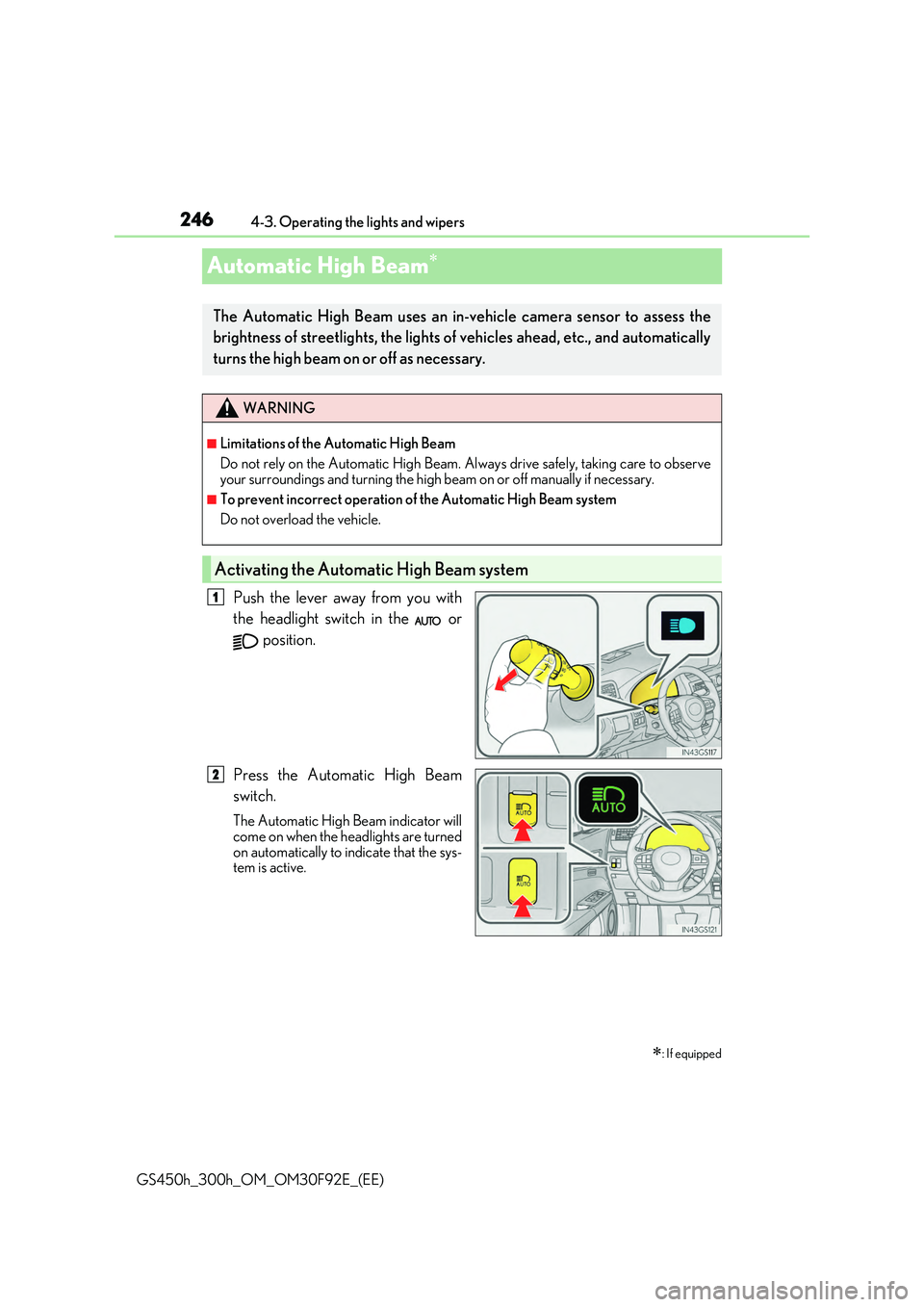
Push the lever away from you with
the headlight switch in the or
position.
Press the Automatic High Beam
switch.
The Automatic High Beam indicator will come on when the headlights are turned
on automatically to indicate that the sys- tem is active.
: If equipped
The Automatic High Beam uses an in-vehicle camera sensor to assess the
brightness of streetlights, the lights of vehicles ahead, etc., and automatically
turns the high beam on or off as necessary.
WARNING
■Limitations of the Automatic High Beam
Do not rely on the Automatic High Beam. Al ways drive safely, taking care to observe
your surroundings and turning the high beam on or off manually if necessary.
■To prevent incorrect operation of the Automatic High Beam system
Do not overload the vehicle.
Activating the Automatic High Beam system
1
2
Page 247 of 600
2474-3. Operating the lights and wipers
4
Driving
GS450h_300h_OM_OM30F92E_(EE)
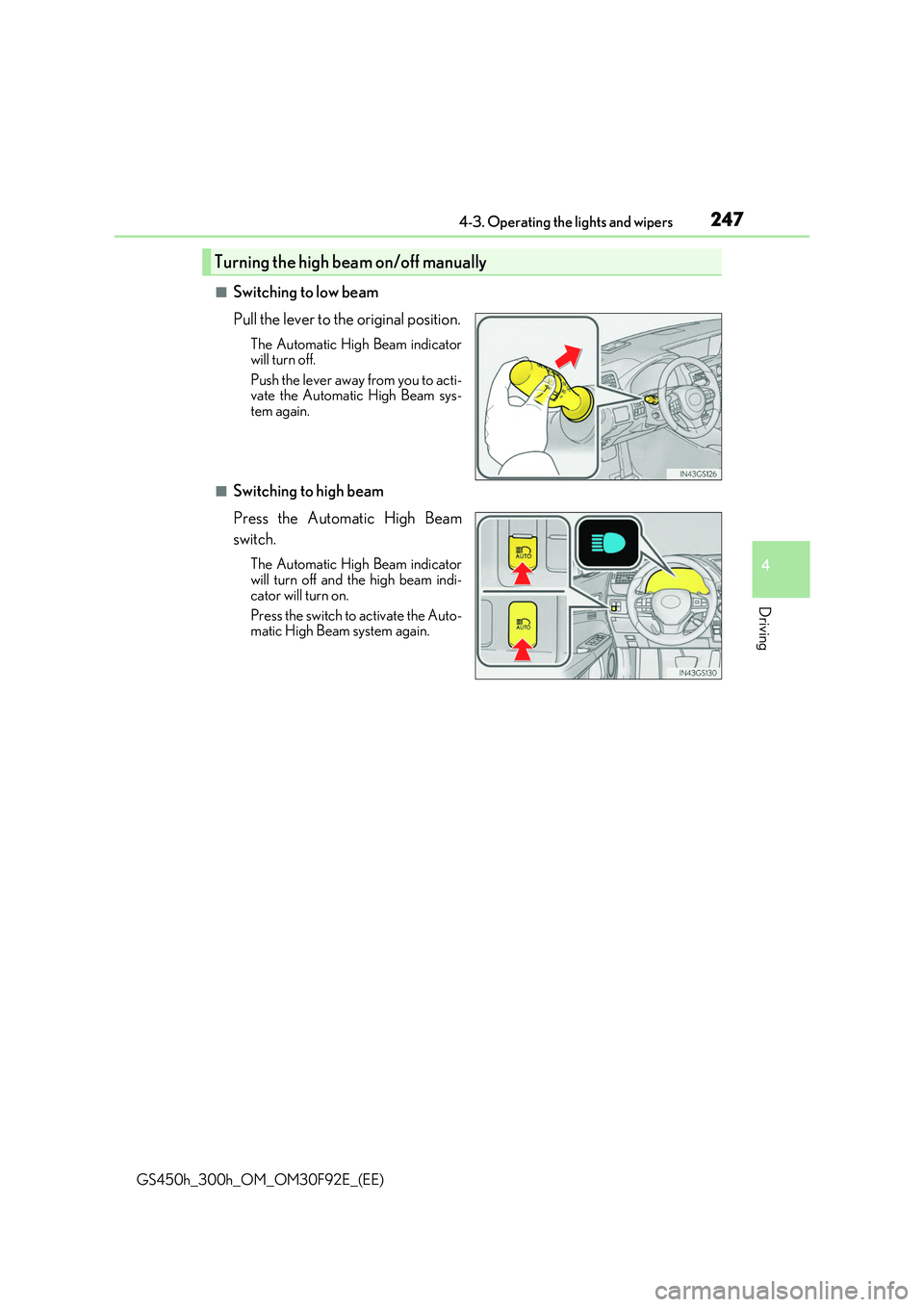
■Switching to low beam
Pull the lever to the original position.
The Automatic High Beam indicator will turn off.
Push the lever away from you to acti- vate the Automatic High Beam sys-tem again.
■Switching to high beam
Press the Automatic High Beam
switch.
The Automatic High Beam indicator will turn off and the high beam indi-
cator will turn on.
Press the switch to activate the Auto- matic High Beam system again.
Turning the high beam on/off manually
Page 248 of 600
2484-3. Operating the lights and wipers
GS450h_300h_OM_OM30F92E_(EE)
■High beam automatic turning on or off conditions
●When all of the following conditions are fulfilled, the high beam will be automatically turned on (after approximately 1 second):
• Vehicle speed is above approximately 40 km/h (25 mph).
• The area ahead of the vehicle is dark. • There are no vehicles ahead with headlights or tail lights turned on.• There are few streetlights on the road ahead.
●If any of the following conditions are fulfille d, the high beam will be automatically turned off:
• Vehicle speed drops below appr oximately 30 km/h (19 mph). • The area ahead of the vehicle is not dark.• Vehicles ahead have headlights or tail lights turned on.
• There are many streetlights on the road ahead.
■Camera sensor detection information
●The high beam may not be automatically turned off in the following situations:
• When oncoming vehicles suddenly appear from a curve • When the vehicle is cut in front of by another vehicle• When vehicles ahead are hidden from sight due to repeated curves, road dividers or
roadside trees • When vehicles ahead appear from the faraway lane on wide road• When vehicles ahead have no lights
●The high beam may be turned off if a vehicles ahead that is using fog lights without usingthe headlights is detected.
●House lights, street lights, traffic signals, and illuminated billboards or signs may cause the high beam to switch to the low beams, or the low beams to remain on.
●The following factors may affect the amount of time taken to turn the high beam on or
off:
• The brightness of headlights, fog light s, and tail lights of vehicles ahead • The movement and direction of vehicles ahead
• When vehicle ahead only has operational lights on one side • When vehicle ahead is a two-wheeled vehicle• The condition of the road (gradient, curve, condition of the road surface etc.)
• The number of passengers and amount of luggage
●The high beam may be turned on or off when the driver does not expect it.
●Bicycles or similar objects may not be detected.
Page 249 of 600
2494-3. Operating the lights and wipers
4
Driving
GS450h_300h_OM_OM30F92E_(EE)
●In the situations shown below, the system may not be able to accurately detect sur- rounding brightness levels. This may cause the low beams to remain on or the highbeams to cause problems for pedestrians, vehicles ahead or other parties. In these
cases, manually switch between the high and low beams.
• In bad weather (rain, snow, fog, sandstorms etc.) • The windshield is obscured by fog, mist, ice, dirt etc.
• The windshield is cracked or damaged. • The inside rear view mirror or ca mera sensor is deformed or dirty. • The camera sensor temperature is extremely high.
• Surrounding brightness levels are equal to th ose of headlights, tail lights or fog lights. • Vehicles ahead have headlights that are either switched off, dirty, are changing color,or are not aimed properly.
• When driving through an area of interm ittently changing brightness and darkness. • When frequently and repeatedly driving ascending/descending roads, or roads withrough, bumpy or uneven surfaces (such as stone-paved roads, gravel tracks etc.).
• When frequently and repeatedly taking curves or driving on a winding road. • There is a highly reflective object ahead of the vehicle, such as a sign or a mirror.• The back of a vehicle ahead is highly reflective, such as a container on a truck.
• The vehicle’s headlights are damaged or dirty. • The vehicle is listing or tilting, due to a flat tire, a trailer being towed etc.• The high beam and low beam are repeated ly being switched between in an abnor-
mal manner. • The driver believes that the high beam may be causing problems or distress to otherdrivers or pedestrians nearby.
• When going through the Straits of Dover.
■Warning message
Warning messages are used to indicate a syst em malfunction or to inform the driver of
the need for caution. ( P. 466)
Page 250 of 600
2504-3. Operating the lights and wipers
GS450h_300h_OM_OM30F92E_(EE)
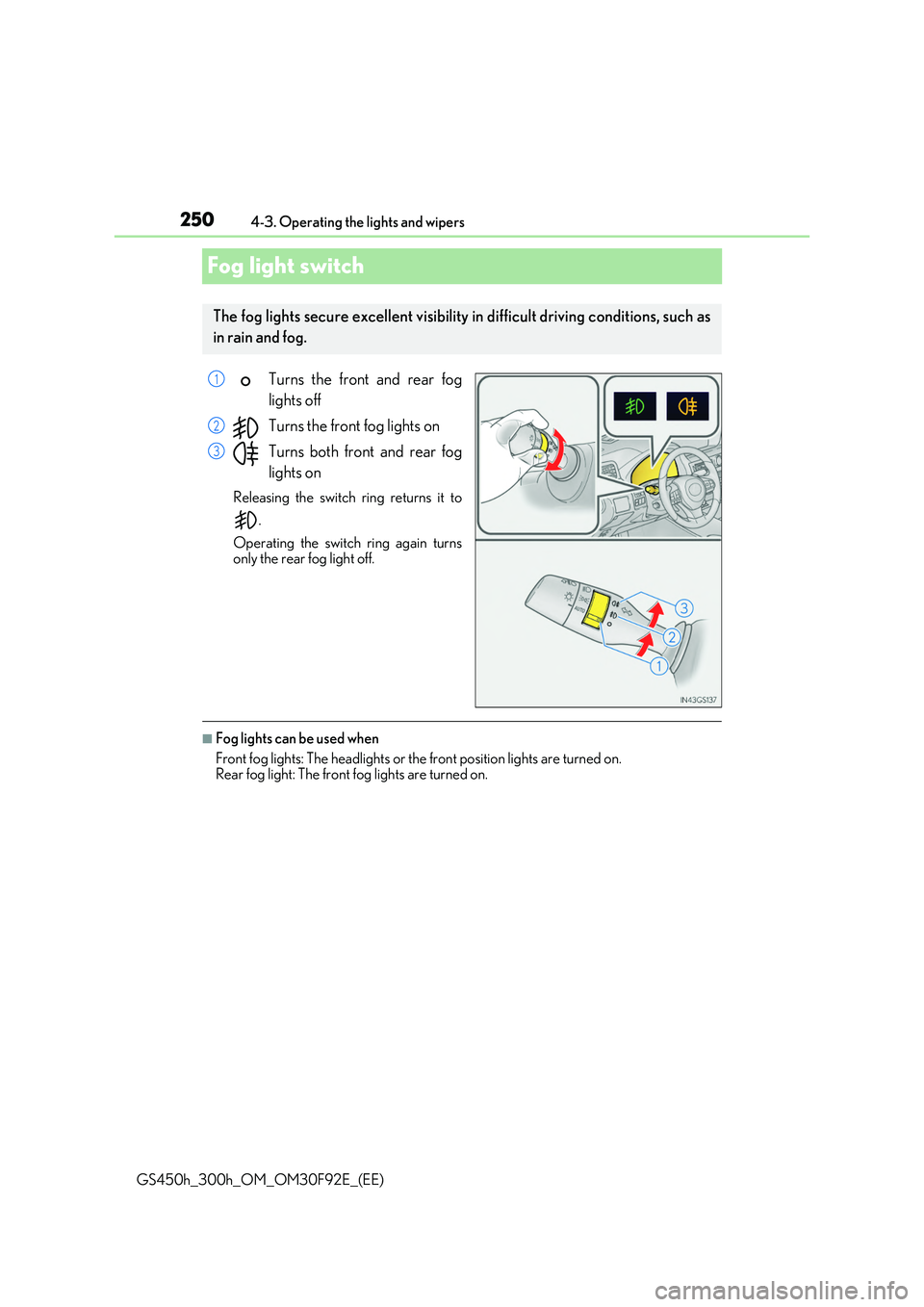
Fog light switch
Turns the front and rear fog
lights off
Turns the front fog lights on
Turns both front and rear fog
lights on
Releasing the switch ring returns it to
.
Operating the switch ring again turns
only the rear fog light off.
■Fog lights can be used when
Front fog lights: The headlights or the front position lights are turned on. Rear fog light: The front fog lights are turned on.
The fog lights secure excellent visibility in difficult driving conditions, such as
in rain and fog.
1
2
3
Page 251 of 600
251
4
4-3. Operating the lights and wipers
Driving
GS450h_300h_OM_OM30F92E_(EE)
Windshield wipers and washer
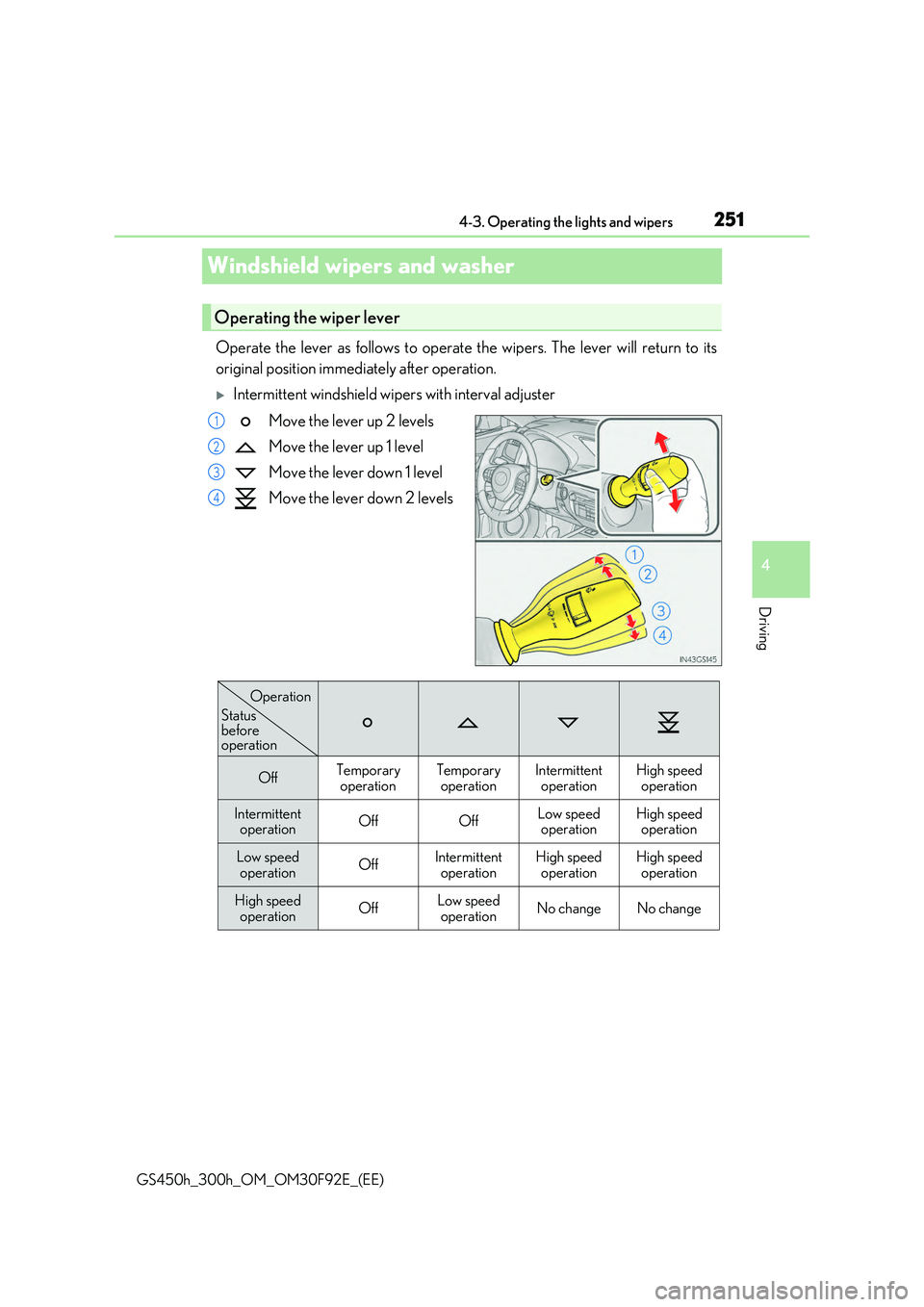
Operate the lever as follows to operate the wipers. The lever will return to its
original position immediately after operation.
Intermittent windshield wipers with interval adjuster
Move the lever up 2 levels
Move the lever up 1 level
Move the lever down 1 level
Move the lever down 2 levels
Operating the wiper lever
1
2
3
4
OffTemporary
operation
Temporary
operation
Intermittent
operation
High speed
operation
Intermittent operationOffOffLow speedoperationHigh speedoperation
Low speed operationOffIntermittentoperationHigh speedoperationHigh speedoperation
High speed
operationOffLow speed
operationNo changeNo change
Status before operation
Operation
Page 252 of 600
2524-3. Operating the lights and wipers
GS450h_300h_OM_OM30F92E_(EE)
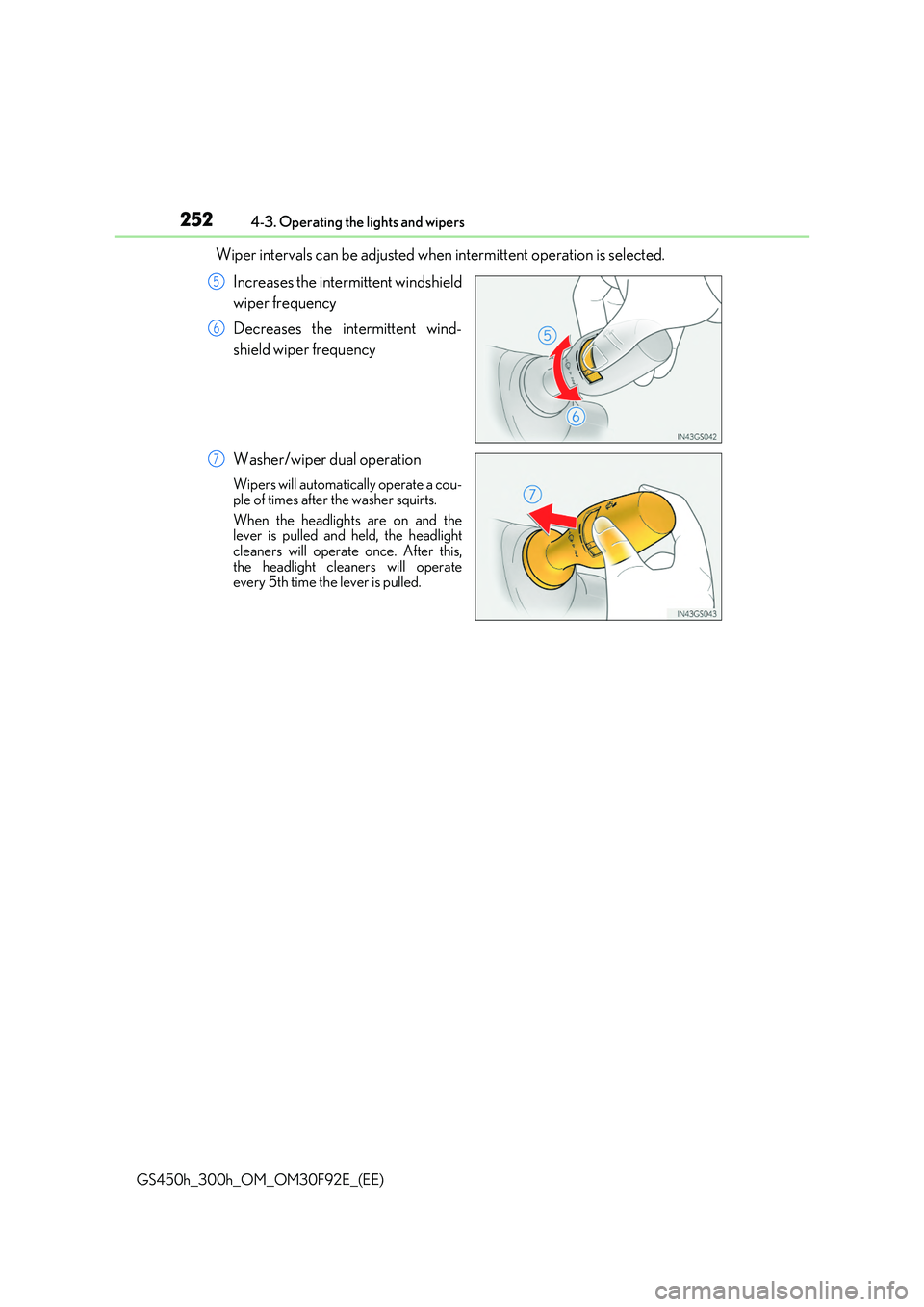
Wiper intervals can be adjusted when intermittent operation is selected.
Increases the intermittent windshield
wiper frequency
Decreases the intermittent wind-
shield wiper frequency
Washer/wiper dual operation
Wipers will automatically operate a cou- ple of times after the washer squirts.
When the headlights are on and the lever is pulled and held, the headlightcleaners will operate once. After this,
the headlight cleaners will operate every 5th time the lever is pulled.
5
6
7
Page 253 of 600
2534-3. Operating the lights and wipers
4
Driving
GS450h_300h_OM_OM30F92E_(EE)
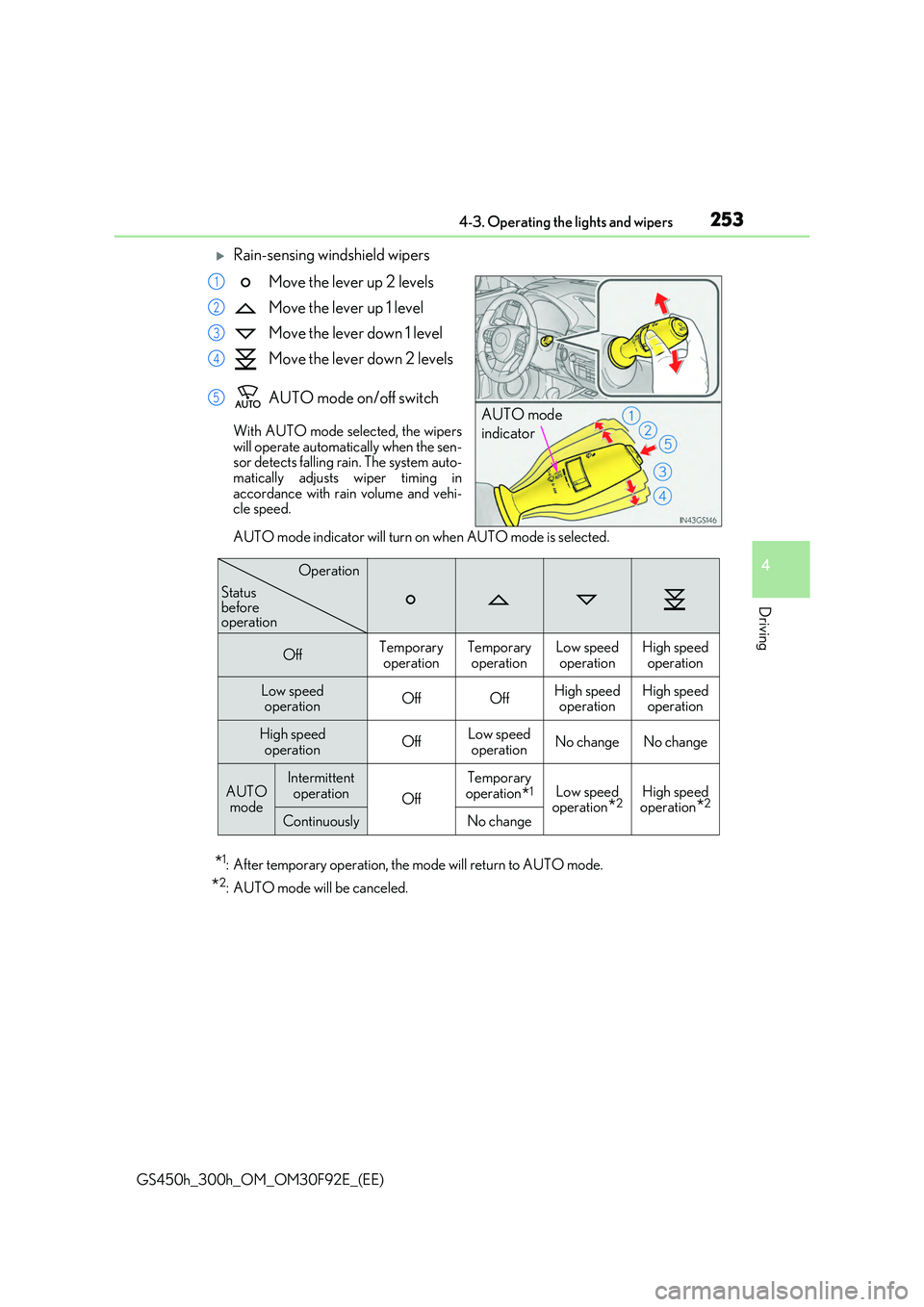
Rain-sensing windshield wipers
Move the lever up 2 levels
Move the lever up 1 level
Move the lever down 1 level
Move the lever down 2 levels
AUTO mode on/off switch
With AUTO mode selected, the wipers will operate automatically when the sen-sor detects falling rain. The system auto-
matically adjusts wiper timing in accordance with rain volume and vehi-cle speed.
AUTO mode indicator will turn on when AUTO mode is selected.
*1: After temporary operation, the mode will return to AUTO mode.
*2: AUTO mode will be canceled.
AUTO mode
indicator
1
2
3
4
5
OffTemporary operationTemporary operationLow speedoperationHigh speedoperation
Low speed operationOffOffHigh speedoperationHigh speedoperation
High speed
operationOffLow speed
operationNo changeNo change
AUTO mode
Intermittent operationOff
Temporaryoperation*1Low speedoperation*2High speedoperation*2
ContinuouslyNo change
Operation
Status beforeoperation