cruise control LEXUS GS300H 2019 Owner's Manual
[x] Cancel search | Manufacturer: LEXUS, Model Year: 2019, Model line: GS300H, Model: LEXUS GS300H 2019Pages: 600, PDF Size: 55.99 MB
Page 304 of 600
3044-5. Using the driving support systems
GS450h_300h_OM_OM30F92E_(EE)
When constant speed control mode is selected, your vehicle will maintain a set
speed without controlling the vehicle-to-vehicle distance. Select this mode only
when vehicle-to-vehicle distance control mode does not function correctly due
to a dirty radar sensor, etc.
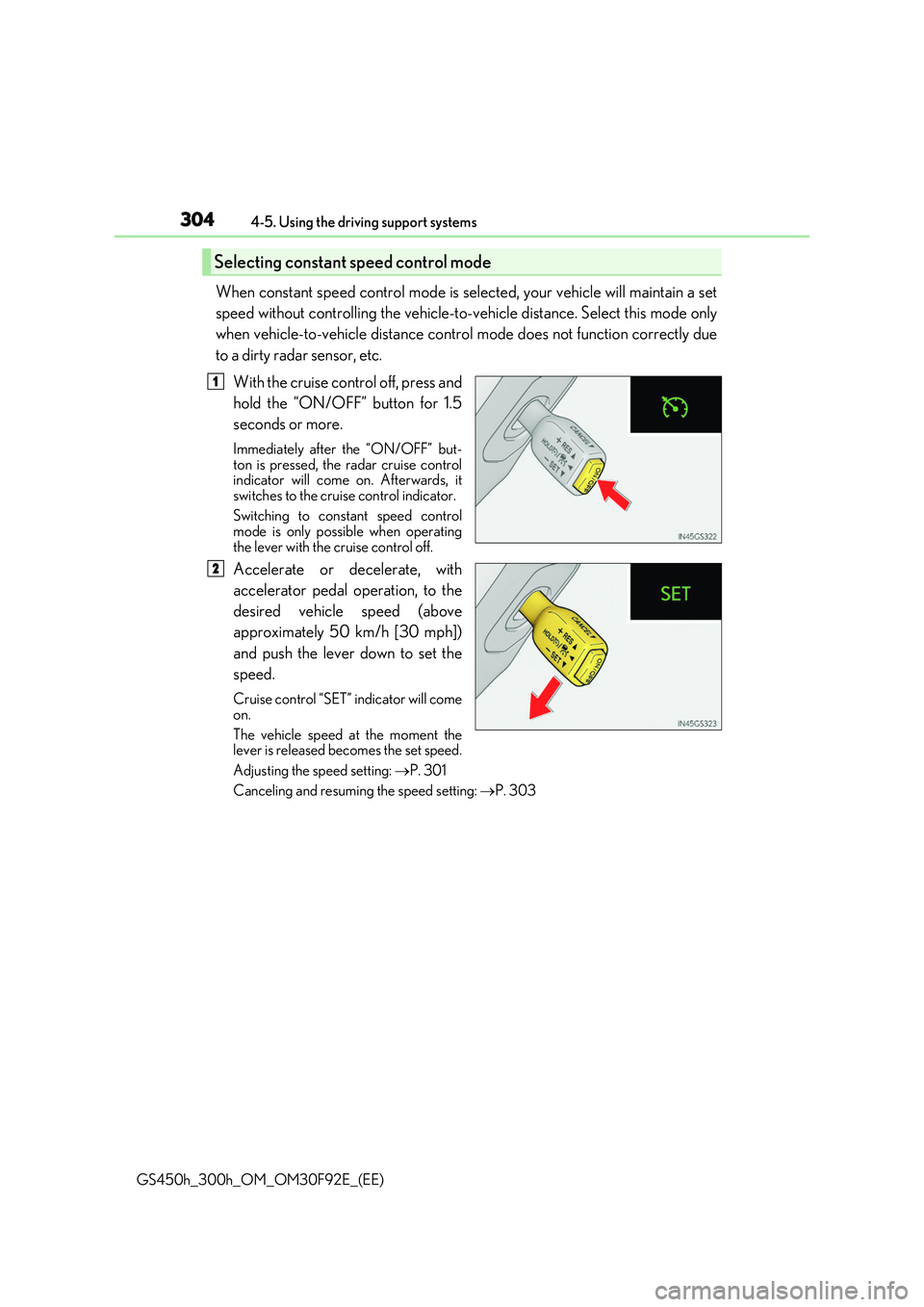
With the cruise control off, press and
hold the “ON/OFF” button for 1.5
seconds or more.
Immediately after the “ON/OFF” but- ton is pressed, the radar cruise controlindicator will come on. Afterwards, it
switches to the cruise control indicator.
Switching to constant speed control mode is only possible when operating
the lever with the cruise control off.
Accelerate or decelerate, with
accelerator pedal operation, to the
desired vehicle speed (above
approximately 50 km/h [30 mph])
and push the lever down to set the
speed.
Cruise control “SET” indicator will come
on.
The vehicle speed at the moment the lever is released becomes the set speed.
Adjusting the speed setting: P. 301
Canceling and resuming the speed setting: P. 303
Selecting constant speed control mode
1
2
Page 305 of 600
3054-5. Using the driving support systems
4
Driving
GS450h_300h_OM_OM30F92E_(EE)
■Dynamic radar cruise control with full-speed range can be set when
●The shift lever is in D or range 4 or higher of S has been selected.
●Range 4 or higher of D has been selected by using the paddle shift switch.
●Vehicle speed is above approximately 50 km/h (30 mph).
However, when a preceding vehicle is dete cted, the dynamic radar cruise control with full-speed range can be set even if the vehicle speed is at or below approximately50 km/h (30 mph).
■Accelerating after setting the vehicle speed
The vehicle can accelerate by operating the accelerator pedal. After accelerating, the set speed resumes. However, during vehicle- to-vehicle distance control mode, the vehi-
cle speed may decrease below the set speed in order to maintain the distance to the pre- ceding vehicle.
■Automatic cancelation of vehicle -to-vehicle distance control mode
Vehicle-to-vehicle distance control mode is automatically canceled in the following situ- ations.
●Actual vehicle speed falls below approximat ely 40 km/h (25 mph) when there are no
vehicles ahead.
●The preceding vehicle leaves the lane when your vehicle is following at a vehicle speed below approximately 40 km/h (25 mph). Otherwise, the sensor can not properly
detect the vehicle.
●VSC is activated.
●TRC is activated for a period of time.
●When the VSC or TRC system is turned off by pressing the VSC OFF switch.
●When snow mode is set.
●The sensor cannot detect correctly because it is covered in some way.
●Pre-crash braking is activated.
●The parking brake is operated.
●The vehicle is stopped by syst em control on a steep incline.
●The following are detected when the vehicle has been stopped by system control:
• The driver is not wearing a seat belt. • The driver’s door is opened.
• The vehicle has been stopped for about 3 minutes If vehicle-to-vehicle distance control mode is automatically canceled for any other rea-son, there may be a malfunction in the syst em. Contact any authorized Lexus retailer or
Lexus authorized repairer, or any reliable repairer.
Page 306 of 600
3064-5. Using the driving support systems
GS450h_300h_OM_OM30F92E_(EE)
■Automatic cancelation of constant speed control mode
Constant speed control mode is automatica lly canceled in the following situations:
●Actual vehicle speed is more than approximately 16 km/h (10 mph) below the set vehi-
cle speed.
●Actual vehicle speed falls below approximately 40 km/h (25 mph).
●VSC is activated.
●TRC is activated for a period of time.
●When the VSC or TRC system is turned off by pressing the VSC OFF switch.
●Pre-crash braking is activated.
If constant speed control mode is automatically canceled for any other reason, there may be a malfunction in the system. Contact an y authorized Lexus retailer or Lexus autho- rized repairer, or any reliable repairer.
■Warning messages and buzzers for dynamic radar cruise control with full-speed range
Warning messages and buzzers are used to indicate a system malfunction or to inform the driver of the need for caution while driv ing. If a warning message is shown on the
multi-information display, read the message and follow the instructions. (P. 466)
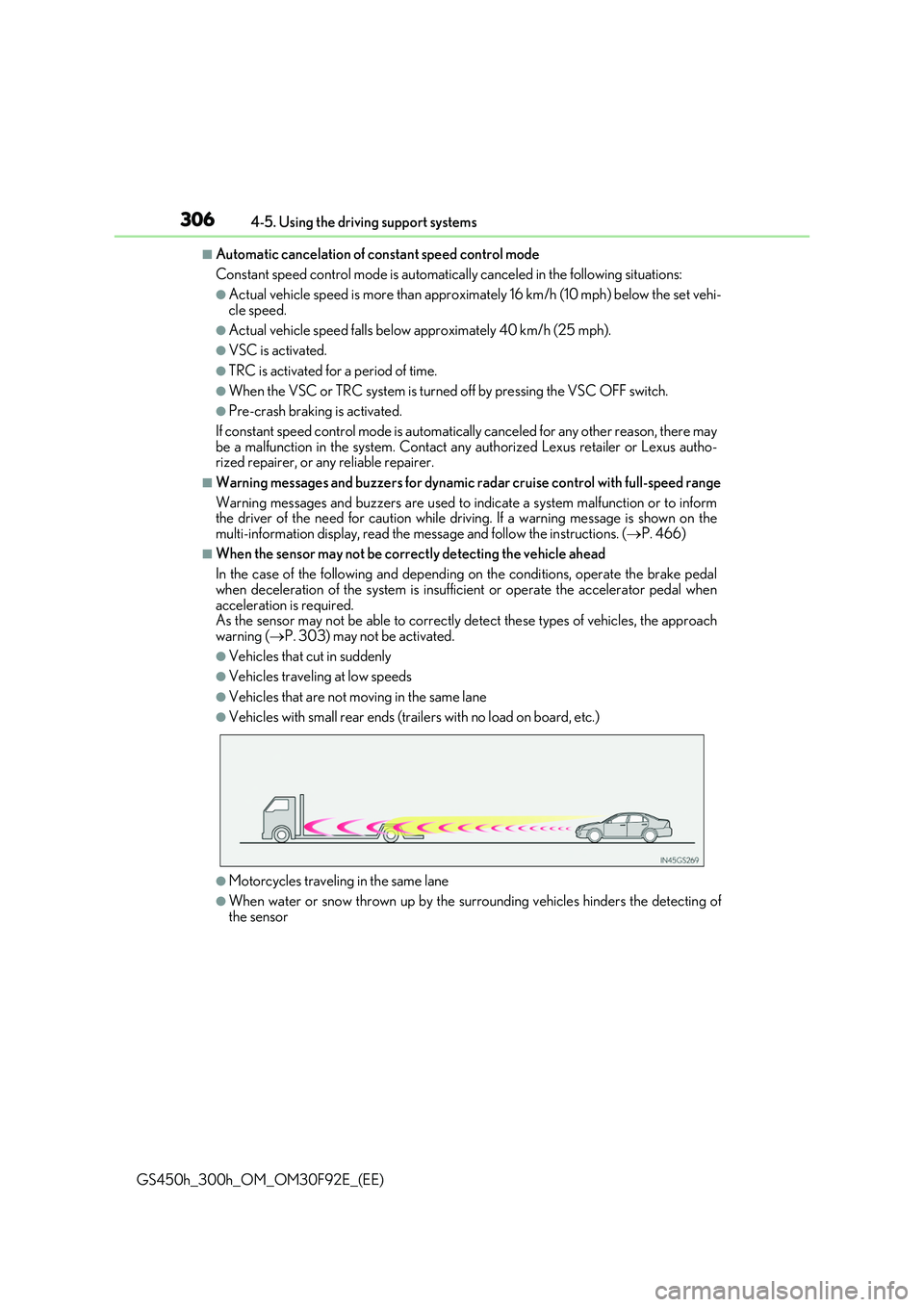
■When the sensor may not be correctly detecting the vehicle ahead
In the case of the following and depending on the conditions, operate the brake pedal
when deceleration of the system is insufficient or operate the accelerator pedal when acceleration is required.As the sensor may not be able to correctly detect these types of vehicles, the approach
warning ( P. 303) may not be activated.
●Vehicles that cut in suddenly
●Vehicles traveling at low speeds
●Vehicles that are not moving in the same lane
●Vehicles with small rear ends (trailers with no load on board, etc.)
●Motorcycles traveling in the same lane
●When water or snow thrown up by the surrounding vehicles hinders the detecting of the sensor
Page 308 of 600
3084-5. Using the driving support systems
GS450h_300h_OM_OM30F92E_(EE)
Cruise control
Use the cruise control to maintain a set speed without depressing the accelera-
tor pedal.
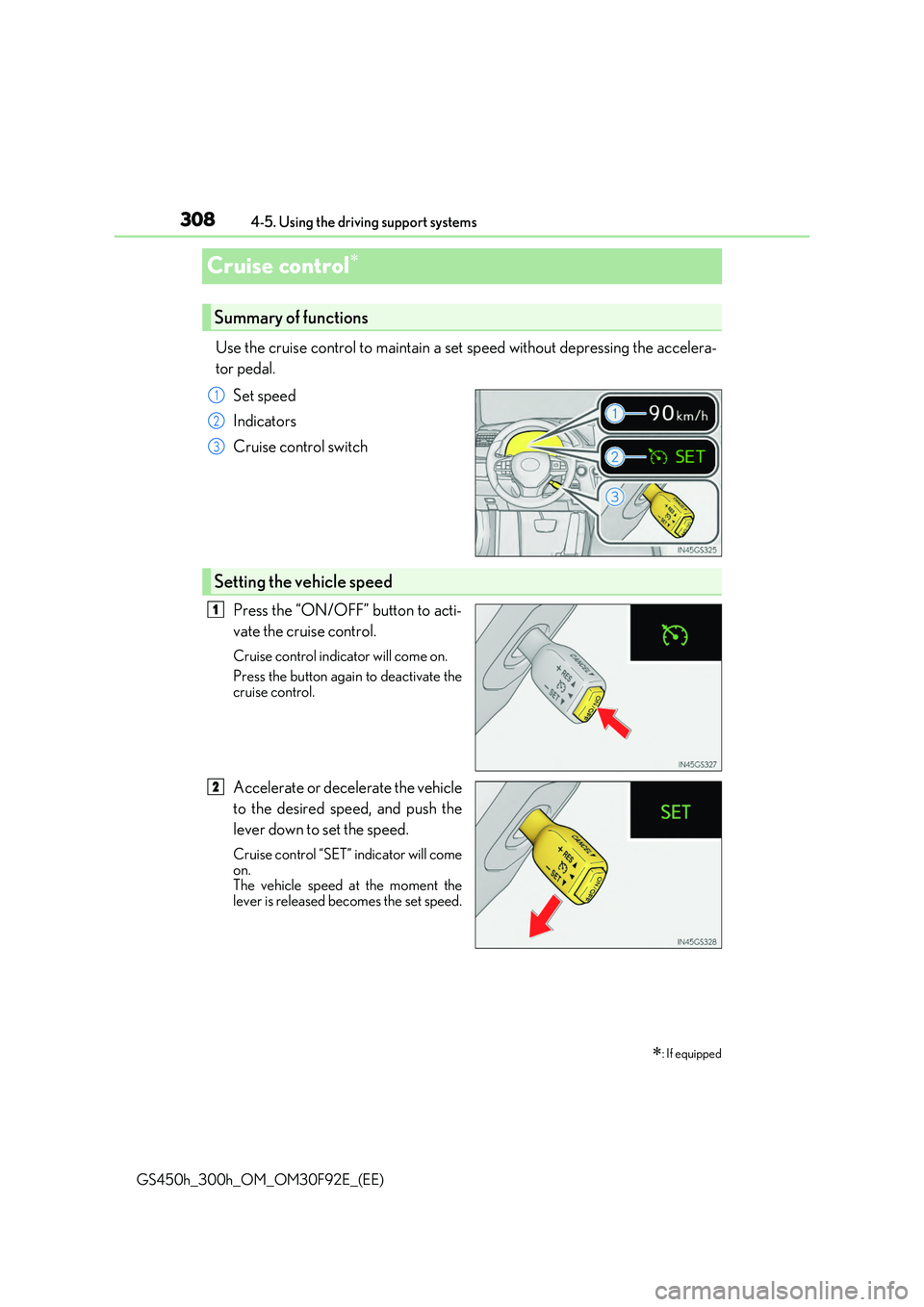
Set speed
Indicators
Cruise control switch
Press the “ON/OFF” button to acti-
vate the cruise control.
Cruise control indicator will come on.
Press the button again to deactivate the cruise control.
Accelerate or decelerate the vehicle
to the desired speed, and push the
lever down to set the speed.
Cruise control “SET” indicator will come on.The vehicle speed at the moment the
lever is released becomes the set speed.
: If equipped
Summary of functions
1
2
3
Setting the vehicle speed
1
2
Page 309 of 600
3094-5. Using the driving support systems
4
Driving
GS450h_300h_OM_OM30F92E_(EE)
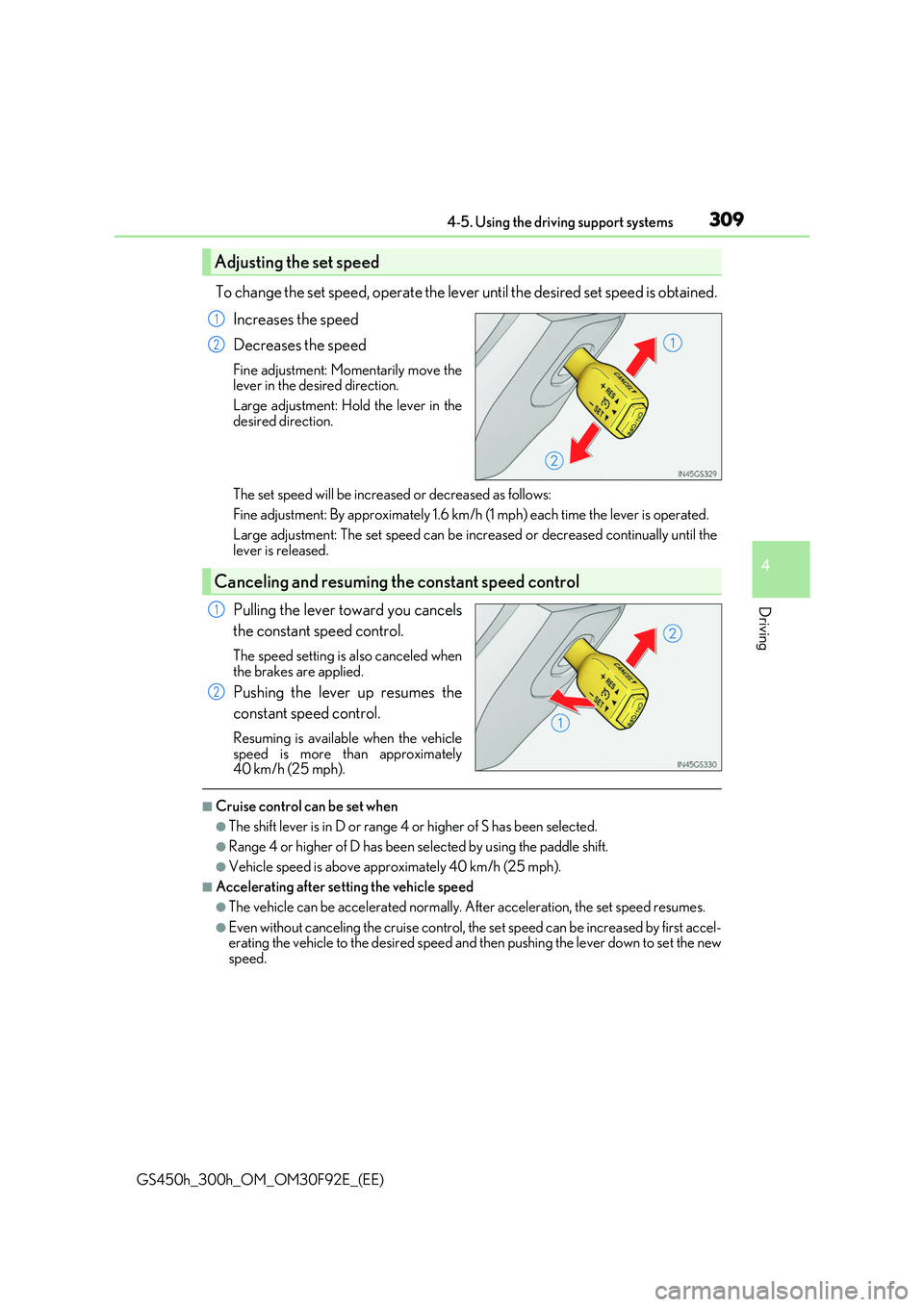
To change the set speed, operate the lever until the desired set speed is obtained.
Increases the speed
Decreases the speed
Fine adjustment: Momentarily move the lever in the desired direction.
Large adjustment: Hold the lever in the
desired direction.
The set speed will be increased or decreased as follows:
Fine adjustment: By approximately 1.6 km/h (1 mph) each time the lever is operated.
Large adjustment: The set spee d can be increased or decreased continually until the lever is released.
Pulling the lever toward you cancels
the constant speed control.
The speed setting is also canceled when the brakes are applied.
Pushing the lever up resumes the
constant speed control.
Resuming is available when the vehicle
speed is more than approximately 40 km/h (25 mph).
■Cruise control can be set when
●The shift lever is in D or range 4 or higher of S has been selected.
●Range 4 or higher of D has been selected by using the paddle shift.
●Vehicle speed is above approximately 40 km/h (25 mph).
■Accelerating after setting the vehicle speed
●The vehicle can be accelerated normally. After acceleration, the set speed resumes.
●Even without canceling the cruise control, the set speed can be increased by first accel- erating the vehicle to the desired speed and then pushing the lever down to set the newspeed.
Adjusting the set speed
1
2
Canceling and resuming the constant speed control
1
2
Page 310 of 600
3104-5. Using the driving support systems
GS450h_300h_OM_OM30F92E_(EE)
■Automatic cruise control cancelation
Cruise control will stop maintaining the vehicl e speed in any of the following situations.
●Actual vehicle speed falls more than approximately 16 km/h (10 mph) below the preset
vehicle speed. At this time, the memorized set speed is not retained.
●Actual vehicle speed is below approximately 40 km/h (25 mph).
●VSC is activated.
●TRC is activated for a period of time.
●When the VSC or TRC system is turned off by pressing the VSC OFF switch.
■If the warning message for the cruise control is shown on the multi-information display
Press the “ON/OFF” button once to deactivate the system, and then press the button again to reactivate the system.
If the cruise control speed cannot be set or if the cruise control cancels immediately after being activated, there may be a malfunction in the cruise control system. Have the vehi-cle inspected by any authorized Lexus retaile r or Lexus authorized repairer, or any reli-
able repairer.
WARNING
■To avoid operating the cruise control by mistake
Switch the cruise control off using the “ON/OFF” button when not in use.
■Situations unsuitable for cruise control
Do not use cruise control in any of the following situations. Doing so may result in loss of control and could cause an accident resulting in death orserious injury.
●In heavy traffic
●On roads with sharp bends
●On winding roads
●On slippery roads, such as those covered with rain, ice or snow
●On steep hillsVehicle speed may exceed the set sp eed when driving down a steep hill.
●When your vehicle is towing a trailer or during emergency towing
Page 476 of 600
4767-2. Steps to take in an emergency
GS450h_300h_OM_OM30F92E_(EE)
(If equipped)
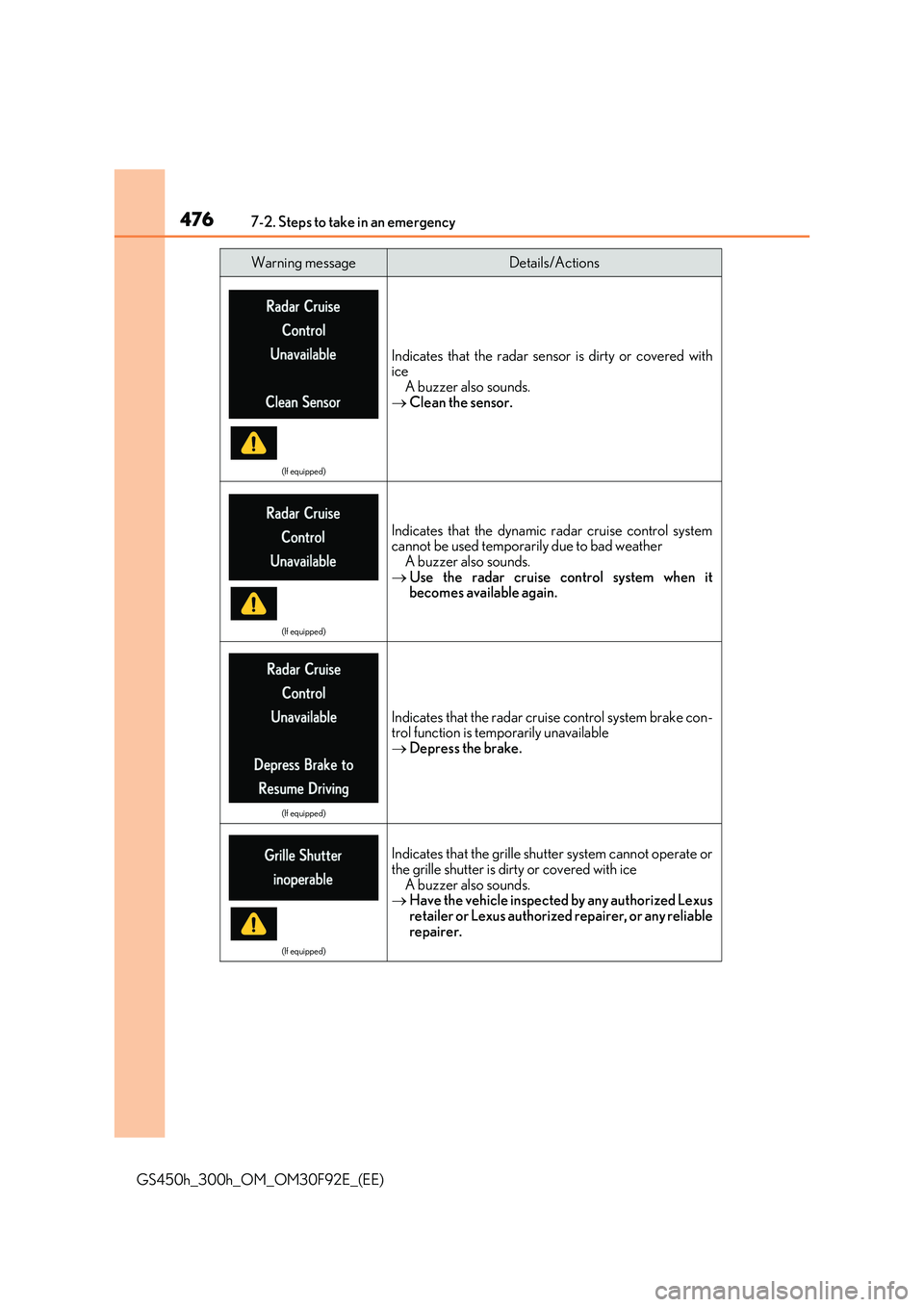
Indicates that the radar sensor is dirty or covered with iceA buzzer also sounds.
Clean the sensor.
(If equipped)
Indicates that the dynamic radar cruise control system cannot be used temporarily due to bad weatherA buzzer also sounds.
Use the radar cruise control system when it becomes available again.
(If equipped)
Indicates that the radar cruise control system brake con-trol function is temporarily unavailable Depress the brake.
(If equipped)
Indicates that the grille shutter system cannot operate or the grille shutter is dirty or covered with ice
A buzzer also sounds. Have the vehicle inspected by any authorized Lexus retailer or Lexus authorized repairer, or any reliable
repairer.
Warning messageDetails/Actions
Page 477 of 600
4777-2. Steps to take in an emergency
7
When trouble arises
GS450h_300h_OM_OM30F92E_(EE)
(Vehicles with entry function)
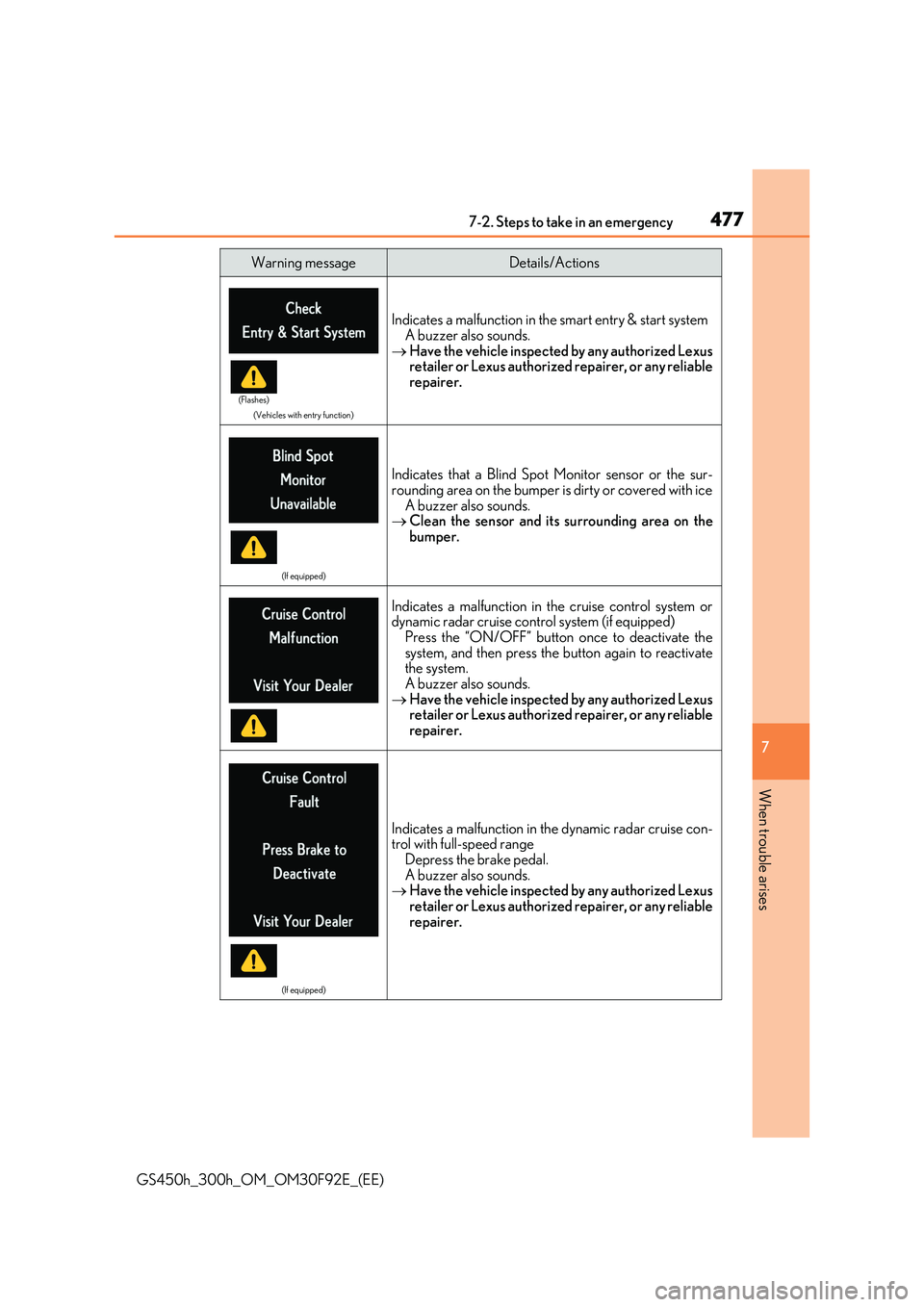
Indicates a malfunction in the smart entry & start system A buzzer also sounds.
Have the vehicle inspected by any authorized Lexus retailer or Lexus authorized repairer, or any reliablerepairer.
(If equipped)
Indicates that a Blind Spot Monitor sensor or the sur-rounding area on the bumper is dirty or covered with ice
A buzzer also sounds. Clean the sensor and its surrounding area on the bumper.
Indicates a malfunction in the cruise control system ordynamic radar cruise control system (if equipped)Press the “ON/OFF” button once to deactivate the
system, and then press the button again to reactivate the system.A buzzer also sounds.
Have the vehicle inspected by any authorized Lexus retailer or Lexus authorized repairer, or any reliable
repairer.
(If equipped)
Indicates a malfunction in th e dynamic radar cruise con- trol with full-speed range
Depress the brake pedal. A buzzer also sounds. Have the vehicle inspected by any authorized Lexus
retailer or Lexus authorized repairer, or any reliable repairer.
Warning messageDetails/Actions
(Flashes)
Page 478 of 600
4787-2. Steps to take in an emergency
GS450h_300h_OM_OM30F92E_(EE)
(If equipped)
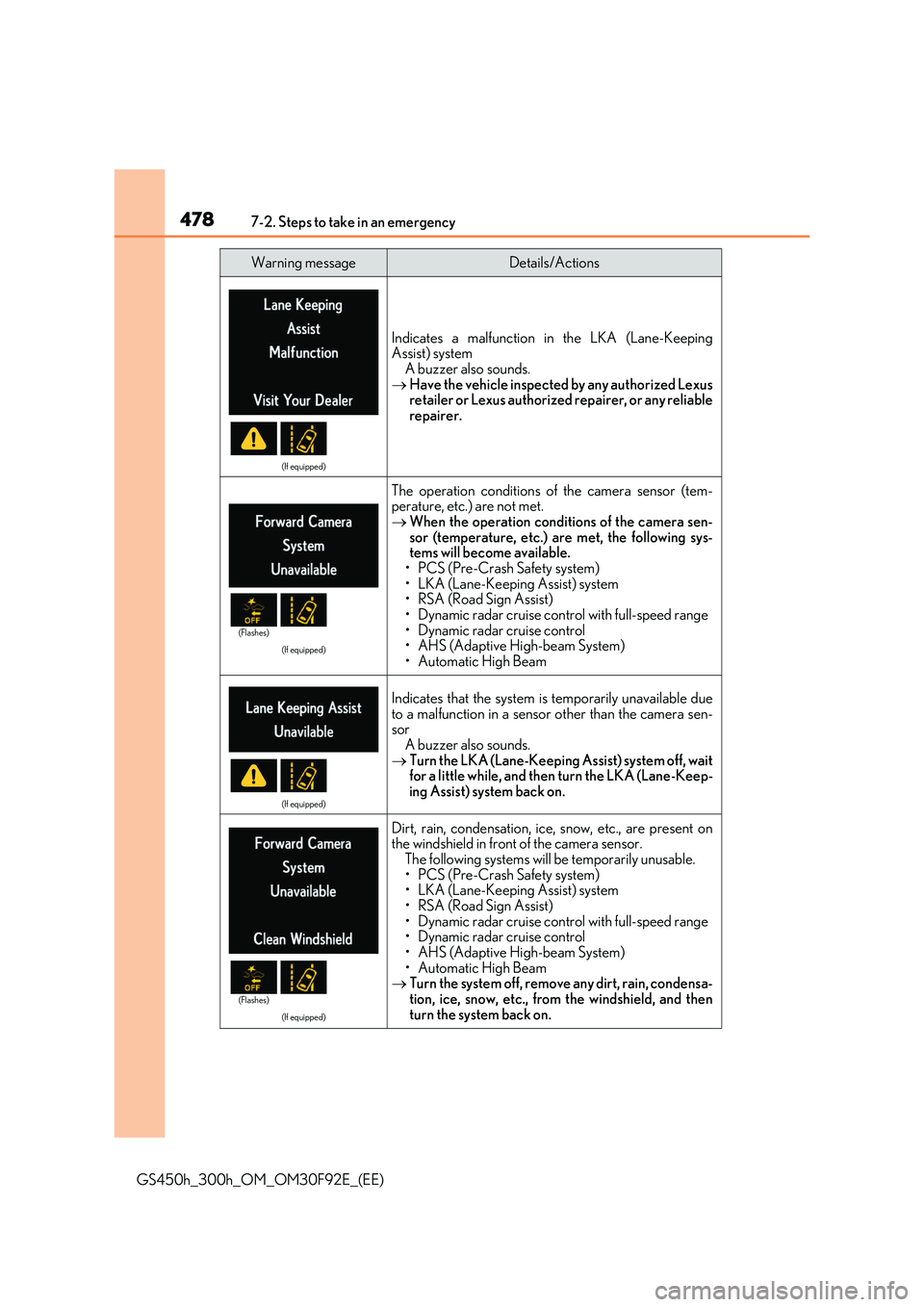
Indicates a malfunction in the LKA (Lane-Keeping Assist) system
A buzzer also sounds. Have the vehicle inspected by any authorized Lexus retailer or Lexus authorized repairer, or any reliable
repairer.
(If equipped)
The operation conditions of the camera sensor (tem- perature, etc.) are not met.
When the operation conditions of the camera sen- sor (temperature, etc.) are met, the following sys-tems will become available.
• PCS (Pre-Crash Safety system) • LKA (Lane-Keeping Assist) system• RSA (Road Sign Assist)
• Dynamic radar cruise control with full-speed range • Dynamic radar cruise control• AHS (Adaptive High-beam System)
• Automatic High Beam
(If equipped)
Indicates that the system is temporarily unavailable due
to a malfunction in a sensor other than the camera sen- sorA buzzer also sounds.
Turn the LKA (Lane-Keeping Assist) system off, wait for a little while, and then turn the LKA (Lane-Keep-ing Assist) system back on.
(If equipped)
Dirt, rain, condensation, ice, snow, etc., are present onthe windshield in front of the camera sensor.
The following systems will be temporarily unusable. • PCS (Pre-Crash Safety system)• LKA (Lane-Keeping Assist) system
• RSA (Road Sign Assist) • Dynamic radar cruise control with full-speed range• Dynamic radar cruise control
• AHS (Adaptive High-beam System) • Automatic High Beam Turn the system off, remove any dirt, rain, condensa-
tion, ice, snow, etc., from the windshield, and then turn the system back on.
Warning messageDetails/Actions
(Flashes)
(Flashes)
Page 492 of 600
4927-2. Steps to take in an emergency
GS450h_300h_OM_OM30F92E_(EE)
■Warning message in radar cruise mode (if equipped)
In the following cases, the warn ing message may not be displayed even if vehicle-to-vehi- cle distance decreases:
●When your vehicle and the vehicle ahead are traveling at the same speed or the vehicle
ahead is traveling more quickly than your vehicle
●When the vehicle ahead is traveling at a very low speed
●Immediately after cruise control speed is set
●At the instant the accelerator pedal is depressed
■Open door warning message
The open door warning message continues to display until a door or the trunk is fully
closed, even if the power switch is turned off. However, approximately 20 minutes after a door or the trunk is not fully closed, the 12-volt battery-saving function operates and thedisplay turns off even though a door or the trunk is not fully closed.
■Warning buzzer
In some cases, the buzzer may not be heard because of noisy place or an audio sound.