tow LEXUS GS300H 2019 Owner's Guide
[x] Cancel search | Manufacturer: LEXUS, Model Year: 2019, Model line: GS300H, Model: LEXUS GS300H 2019Pages: 600, PDF Size: 55.99 MB
Page 272 of 600
2724-5. Using the driving support systems
GS450h_300h_OM_OM30F92E_(EE)
WARNING
■Pre-crash braking*3
●When the pre-crash braking function is operating, a large amount of braking force will be applied.
●If the vehicle is stopped by the operation of the pre-crash braking function, the pre-crash braking function operation will be canceled after approximately 2 seconds.Depress the brake pedal as necessary.
●The pre-crash braking function may not operate if certain operations are performedby the driver. If the accelerator pedal is being depressed strongly or the steeringwheel is being turned, the system may determine that the driver is taking evasive
action and possibly prevent the pre-crash braking function from operating.
●In some situations, while the pre-crash braking function is operating, operation of thefunction may be canceled if the accelerator pedal is depressed strongly or the steer-
ing wheel is turned and the system determines that the driver is taking evasive action.
●If the brake pedal is being depressed, the system may determine that the driver is tak-ing evasive action and possibly delay the operation timing of the pre-crash braking
function.
*3: Depending on the region in which the vehicle was sold, the pre-crash braking func-
tion may not be available.
■When to disable the pre-crash safety system
In the following situations, disable the system, as it may not operate properly, possibly
leading to an accident resulting in death or serious injury:
●When the vehicle is being towed
●When your vehicle is towing another vehicle
●When transporting the vehicle via truck, boat, train or similar means of transportation
●When the vehicle is raised on a lift with the hybrid system on and the tires are allowed to rotate freely
●When inspecting the vehicle using a drum tester such as a chassis dynamometer orspeedometer tester, or when using an on vehicle wheel balancer
●When a strong impact is applied to the front bumper or front grille, due to an accident
or other reasons
●If the vehicle cannot be driven in a stable manner, such as when the vehicle has beenin an accident or is malfunctioning
●When the vehicle is driven in a sporty manner or off-road
●When the tires are not properly inflated
●When the tires are very worn
●When tires of a size other than specified are installed
●When tire chains are installed
●When a compact spare tire or an emergency tire puncture repair kit is used
●If equipment (snow plow, etc.) that may obstruct the radar sensor or camera sensor istemporarily installed to the vehicle
Page 278 of 600
2784-5. Using the driving support systems
GS450h_300h_OM_OM30F92E_(EE)
• When rapidly closing on an electric toll gate barrier, parking area barrier, or other barrier that opens and closes• When using an automatic car wash
• When the vehicle is hit by water, snow, dust, etc. from a vehicle ahead • When driving through steam or smoke
• When there are patterns or paint on the road or a wall that may be mistaken for a
vehicle or pedestrian*4
• When driving near an object that reflects radio waves, such as a large truck or guardrail
• When driving near a TV tower, broadcasting station, electric power plant, or other location where strong radio waves or electrical noise may be present
*4: Depending on the region in which the vehicle was sold, the pedestrian detection
function may not be available.
• When passing under an object (billboard, etc.) at the top of an uphill road
• When driving through or under objects that may contact the vehicle, such as thick
grass, tree branches, or a banner
Page 285 of 600
2854-5. Using the driving support systems
4
Driving
GS450h_300h_OM_OM30F92E_(EE)
WARNING
■Before using LKA system
Do not rely solely upon the LKA system. Th e LKA system does not automatically drive the vehicle or reduce the amount of attention that must be paid to the area in front of
the vehicle. The driver must always assume full responsibility for driving safely by pay- ing careful attention to the surrounding conditions and operating the steering wheel tocorrect the path of the vehicle. Also, the driver must take adequate breaks when
fatigued, such as from driving for a long period of time. Failure to perform appropriate driving operat ions and pay careful attention may lead to an accident, resulting in death or serious injury.
■To avoid operating LKA system by mistake
When not using the LKA system, use the LKA switch to turn the system off.
■Situations unsuitable for LKA system
Do not use the LKA system in the following situations. The system may not operate properly and le ad to an accident, resulting in death or serious injury.
●A spare tire, tire chains, etc. are equipped.
●When the tires have been excessively worn, or when the tire inflation pressure is low.
●Tires which differ by structure, manufacturer, brand or tread pattern are used.
●Objects or patterns that could be mistaken for white (yellow) lines are present on the side of the road (guardrails, cu rbs, reflective poles, etc.).
●Vehicle is driven on a snow-covered road.
●White (yellow) lines are difficult to see due to rain, snow, fog, dust, etc.
●Asphalt repair marks, white (yellow) line marks, etc. are present due to road repair.
●Vehicle is driven in a temporary lane or restricted lane due to construction work.
●Vehicle is driven on a road surface which is slippery due to rainy weather, fallen snow, freezing, etc.
●Vehicle is driven in traffic lanes other than on highways and freeways.
●Vehicle is driven in a construction zone.
●Vehicle is towing a trailer or another vehicle. (vehicles with towing package)
■Preventing LKA system malfunctions and operations performed by mistake
●Do not modify the headlights or place stickers, etc. on the surface of the lights.
●Do not modify the suspension etc. If the suspension etc. needs to be replaced, con- tact any authorized Lexus retailer or Le xus authorized repairer, or any reliable
repairer.
●Do not install or place anything on the hood or grille. Also, do not install a grille guard (bull bars, kangaroo bar, etc.).
●If your windshield needs repairs, contac t any authorized Lexus retailer or Lexus authorized repairer, or any reliable repairer.
Page 298 of 600
2984-5. Using the driving support systems
GS450h_300h_OM_OM30F92E_(EE)
WARNING
■Situations unsuitable for dynamic radar cruise control with full-speed range
Do not use dynamic radar cruise control with full-speed range in any of the following situations.
Doing so may result in inappropriate speed control and could cause an accident result- ing in death or serious injury.
●Roads where there are pedestrians, cyclists, etc.
●In heavy traffic
●On roads with sharp bends
●On winding roads
●On slippery roads, such as those covered with rain, ice or snow
●On steep downhills, or where there are sudden changes between sharp up and downgradients
Vehicle speed may exceed the set sp eed when driving down a steep hill.
●At entrances to freeways and highways
●When weather conditions are bad enough that they may prevent the sensors from
detecting correctly (fog, snow, sandstorm, heavy rain, etc.)
●When there is rain, snow, etc. on the fron t surface of the radar sensor or camera sen- sor
●In traffic conditions that require frequent repeated acceleration and deceleration
●When your vehicle is towing a trailer (vehicles with towing package) or during emer-gency towing
●When an approach warning buzzer is heard often
Page 303 of 600
3034-5. Using the driving support systems
4
Driving
GS450h_300h_OM_OM30F92E_(EE)
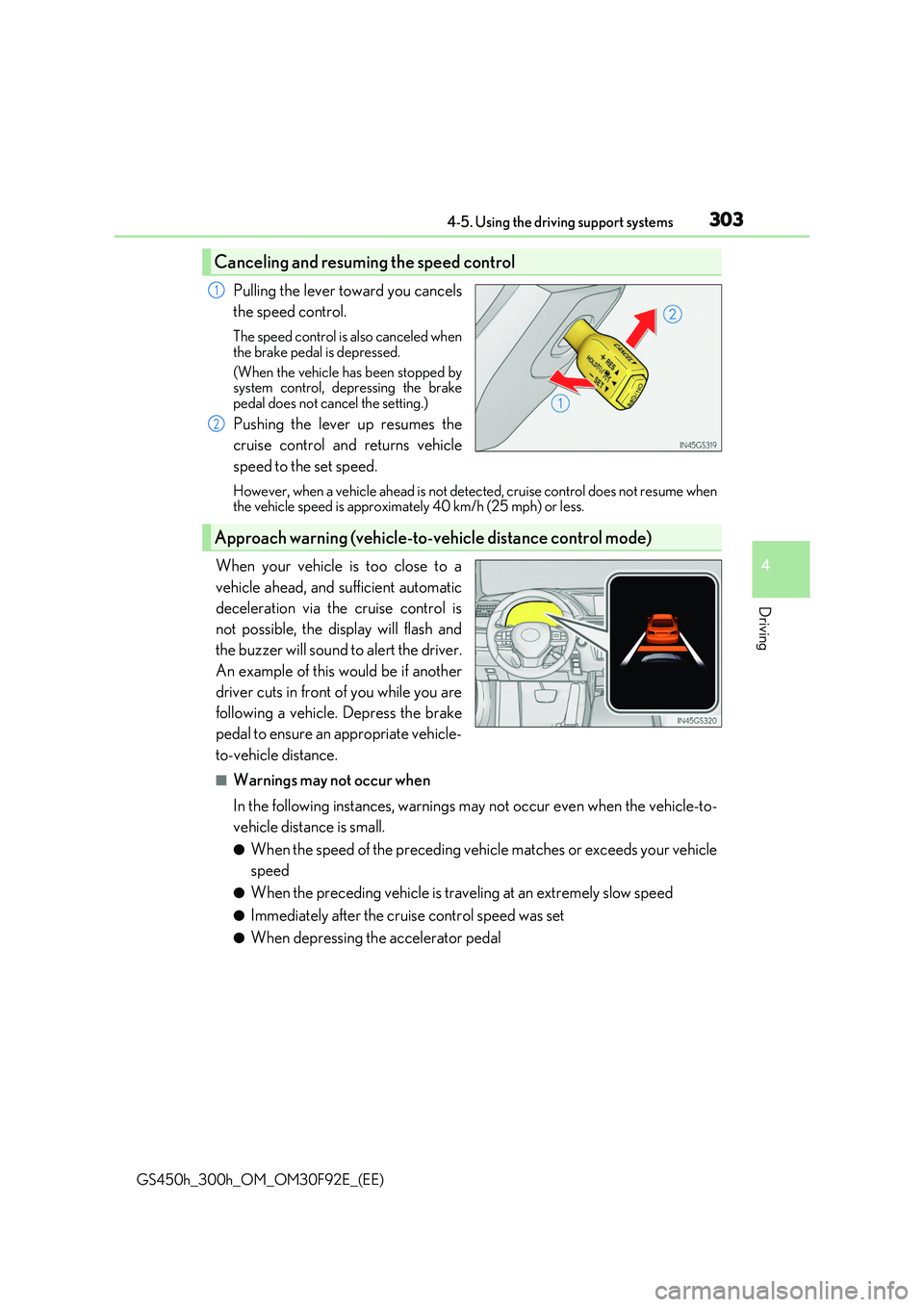
Pulling the lever toward you cancels
the speed control.
The speed control is also canceled when
the brake pedal is depressed.
(When the vehicle has been stopped by system control, depressing the brake
pedal does not cancel the setting.)
Pushing the lever up resumes the
cruise control and returns vehicle
speed to the set speed.
However, when a vehicle ahead is not detected, cruise control does not resume when the vehicle speed is approximately 40 km/h (25 mph) or less.
When your vehicle is too close to a
vehicle ahead, and sufficient automatic
deceleration via the cruise control is
not possible, the display will flash and
the buzzer will sound to alert the driver.
An example of this would be if another
driver cuts in front of you while you are
following a vehicle. Depress the brake
pedal to ensure an appropriate vehicle-
to-vehicle distance.
■Warnings may not occur when
In the following instances, warnings may not occur even when the vehicle-to-
vehicle distance is small.
●When the speed of the preceding vehicle matches or exceeds your vehicle
speed
●When the preceding vehicle is traveling at an extremely slow speed
●Immediately after the cruise control speed was set
●When depressing the accelerator pedal
Canceling and resuming the speed control
1
2
Approach warning (vehicle-to- vehicle distance control mode)
Page 309 of 600
3094-5. Using the driving support systems
4
Driving
GS450h_300h_OM_OM30F92E_(EE)
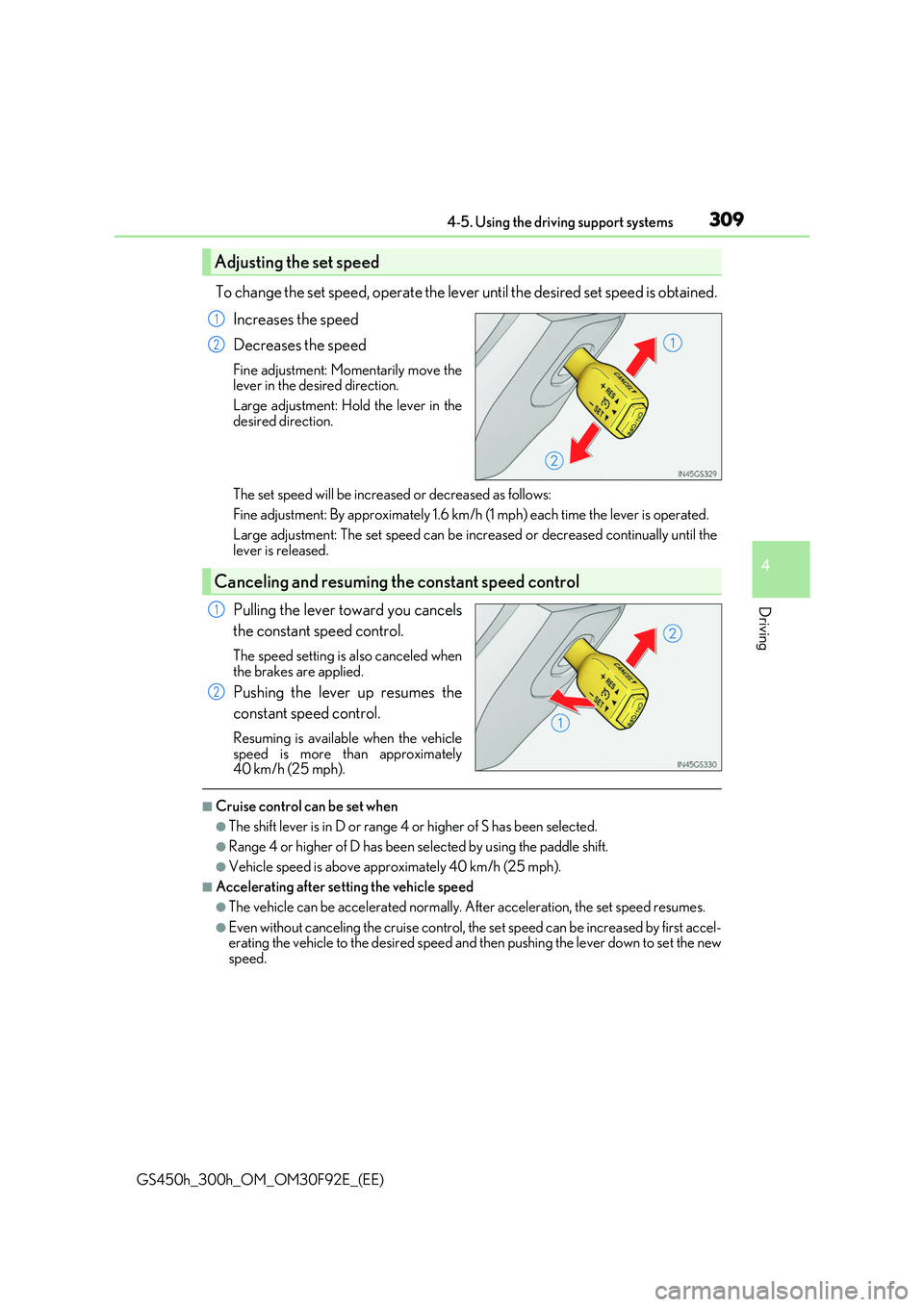
To change the set speed, operate the lever until the desired set speed is obtained.
Increases the speed
Decreases the speed
Fine adjustment: Momentarily move the lever in the desired direction.
Large adjustment: Hold the lever in the
desired direction.
The set speed will be increased or decreased as follows:
Fine adjustment: By approximately 1.6 km/h (1 mph) each time the lever is operated.
Large adjustment: The set spee d can be increased or decreased continually until the lever is released.
Pulling the lever toward you cancels
the constant speed control.
The speed setting is also canceled when the brakes are applied.
Pushing the lever up resumes the
constant speed control.
Resuming is available when the vehicle
speed is more than approximately 40 km/h (25 mph).
■Cruise control can be set when
●The shift lever is in D or range 4 or higher of S has been selected.
●Range 4 or higher of D has been selected by using the paddle shift.
●Vehicle speed is above approximately 40 km/h (25 mph).
■Accelerating after setting the vehicle speed
●The vehicle can be accelerated normally. After acceleration, the set speed resumes.
●Even without canceling the cruise control, the set speed can be increased by first accel- erating the vehicle to the desired speed and then pushing the lever down to set the newspeed.
Adjusting the set speed
1
2
Canceling and resuming the constant speed control
1
2
Page 310 of 600
3104-5. Using the driving support systems
GS450h_300h_OM_OM30F92E_(EE)
■Automatic cruise control cancelation
Cruise control will stop maintaining the vehicl e speed in any of the following situations.
●Actual vehicle speed falls more than approximately 16 km/h (10 mph) below the preset
vehicle speed. At this time, the memorized set speed is not retained.
●Actual vehicle speed is below approximately 40 km/h (25 mph).
●VSC is activated.
●TRC is activated for a period of time.
●When the VSC or TRC system is turned off by pressing the VSC OFF switch.
■If the warning message for the cruise control is shown on the multi-information display
Press the “ON/OFF” button once to deactivate the system, and then press the button again to reactivate the system.
If the cruise control speed cannot be set or if the cruise control cancels immediately after being activated, there may be a malfunction in the cruise control system. Have the vehi-cle inspected by any authorized Lexus retaile r or Lexus authorized repairer, or any reli-
able repairer.
WARNING
■To avoid operating the cruise control by mistake
Switch the cruise control off using the “ON/OFF” button when not in use.
■Situations unsuitable for cruise control
Do not use cruise control in any of the following situations. Doing so may result in loss of control and could cause an accident resulting in death orserious injury.
●In heavy traffic
●On roads with sharp bends
●On winding roads
●On slippery roads, such as those covered with rain, ice or snow
●On steep hillsVehicle speed may exceed the set sp eed when driving down a steep hill.
●When your vehicle is towing a trailer or during emergency towing
Page 314 of 600
3144-5. Using the driving support systems
GS450h_300h_OM_OM30F92E_(EE)
BSM (Blind Spot Monitor)
The Blind Spot Monitor is a system that has 2 functions;
●The Blind Spot Monitor function
Assists the driver in making the decision when changing lanes
●The Rear Crossing Traffic Alert function
Assists the driver when backing up
These functions use same sensors.
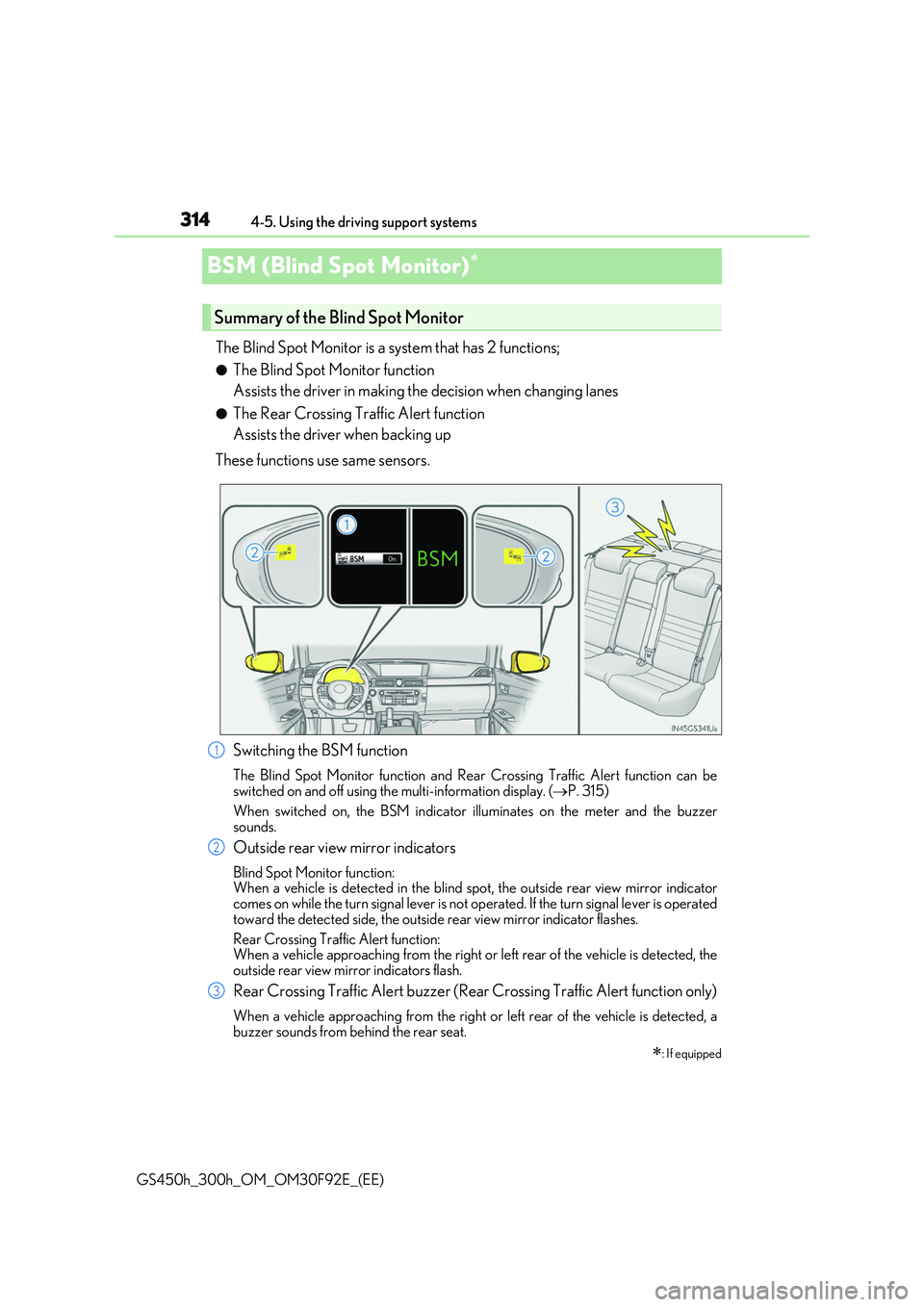
Switching the BSM function
The Blind Spot Monitor function and Rear Crossing Traffic Alert function can be switched on and off using the multi-information display. (P. 315)
When switched on, the BS M indicator illuminates on the meter and the buzzer
sounds.
Outside rear view mirror indicators
Blind Spot Monitor function: When a vehicle is detected in the blind spot, the outside rear view mirror indicator comes on while the turn signal lever is not op erated. If the turn signal lever is operated
toward the detected side, the outside rear view mirror indicator flashes.
Rear Crossing Traffic Alert function: When a vehicle approaching from the right or left rear of the vehicle is detected, the
outside rear view mirror indicators flash.
Rear Crossing Traffic Alert buzzer (Rear Crossing Traffic Alert function only)
When a vehicle approaching from the right or left rear of the vehicle is detected, a
buzzer sounds from behind the rear seat.
: If equipped
Summary of the Blind Spot Monitor
1
2
3
Page 320 of 600
3204-5. Using the driving support systems
GS450h_300h_OM_OM30F92E_(EE)
■The Blind Spot Monitor function is operational when
●The BSM function is turned on.
●Vehicle speed is greater than approximately 16 km/h (10 mph).
■The Blind Spot Monitor function will detect a vehicle when
●A vehicle in an adjacent lane overtakes your vehicle.
●Another vehicle enters the detection area when it changes lanes.
■Conditions under which the Blind Spot Monitor function will not detect a vehicle
The Blind Spot Monitor function is not designed to detect the following types of vehicles and/or objects:
●Small motorcycles, bicycles, pedestrians etc.*
●Vehicles traveling in the opposite direction
●Guardrails, walls, signs, parked vehi cles and similar stationary objects*
●Following vehicles that are in the same lane*
●Vehicles driving 2 lanes across from your vehicle*
*: Depending on conditions, detection of a vehicle and/or object may occur.
■Conditions under which the Blind Spot Monitor function may not function correctly
●The Blind Spot Monitor function may not detect vehicles correctly in the following con-
ditions:
• During bad weather such as heavy rain, fog, snow etc. • When ice or mud etc. is attached to the rear bumper
• When driving on a road surface that is wet due to rain, standing water etc. • When there is a significant difference in speed between your vehicle and the vehiclethat enters the detection area
• When a vehicle is in the detection area from a stop and remains in the detection area as your vehicle accelerates• When driving up or down consecutive steep inclines, such as hills, a dip in the road
etc. • When multiple vehicles approach with only a small gap between each vehicle• When vehicle lanes are wide, and the vehicle in the next lane is too far away from
your vehicle • When the vehicle that enters the detection area is traveling at about the same speedas your vehicle
• When there is a significant difference in height between your vehicle and the vehicle that enters the detection area• Directly after the BSM function is turned on
• When your vehicle is towing a tra iler (vehicles with towing package)
●Instances of the Blind Spot Monitor function unnecessarily detecting a vehicle and/ or object may increase under the following conditions:
• When there is only a short distance between your vehicle and a guardrail, wall etc.
• When there is only a short distance between your vehicle and a following vehicle • When vehicle lanes are narrow and a vehicle driving 2 lanes across from your vehi-cle enters the detection area
• When items such as a bicycle carrier are installed on the rear of the vehicle
Page 323 of 600
3234-5. Using the driving support systems
4
Driving
GS450h_300h_OM_OM30F92E_(EE)
■Conditions under which the Rear Crossing Traffic Alert function will not detect a vehi- cle
The Rear Crossing Traffic Alert function is not designed to detect the following types of
vehicles and/or objects.
●Small motorcycles, bicycles, pedestrians etc.*
●Vehicles approaching from directly behind
●Guardrails, walls, signs, parked vehi cles and similar stationary objects*
●Vehicles moving away from your vehicle
●Vehicles approaching from the parking spaces next to your vehicle*
●Vehicles backing up in the parking space next to your vehicle*
*: Depending on conditions, detection of a vehicle and/or object may occur.
■Conditions under which the Rear Crossing Traffic Alert function may not function cor- rectly
The Rear Crossing Traffic Alert function may not detect vehicles correctly in the follow- ing conditions:
●During bad weather such as heavy rain, fog, snow etc.
●When ice or mud etc. is attached to the rear bumper
●When multiple vehicles approach continuously
●Shallow angle parking
●When a vehicle is approaching at high speed
●When parking on a steep incline, such as hills, a dip in the road etc.
●Directly after the BSM function is turned on
●When your vehicle is towing a trailer (vehicles with towing package)
●When items such as a bicycle carrier are installed on the rear of the vehicle
●Directly after the hybrid system is started with the BSM function is turned on
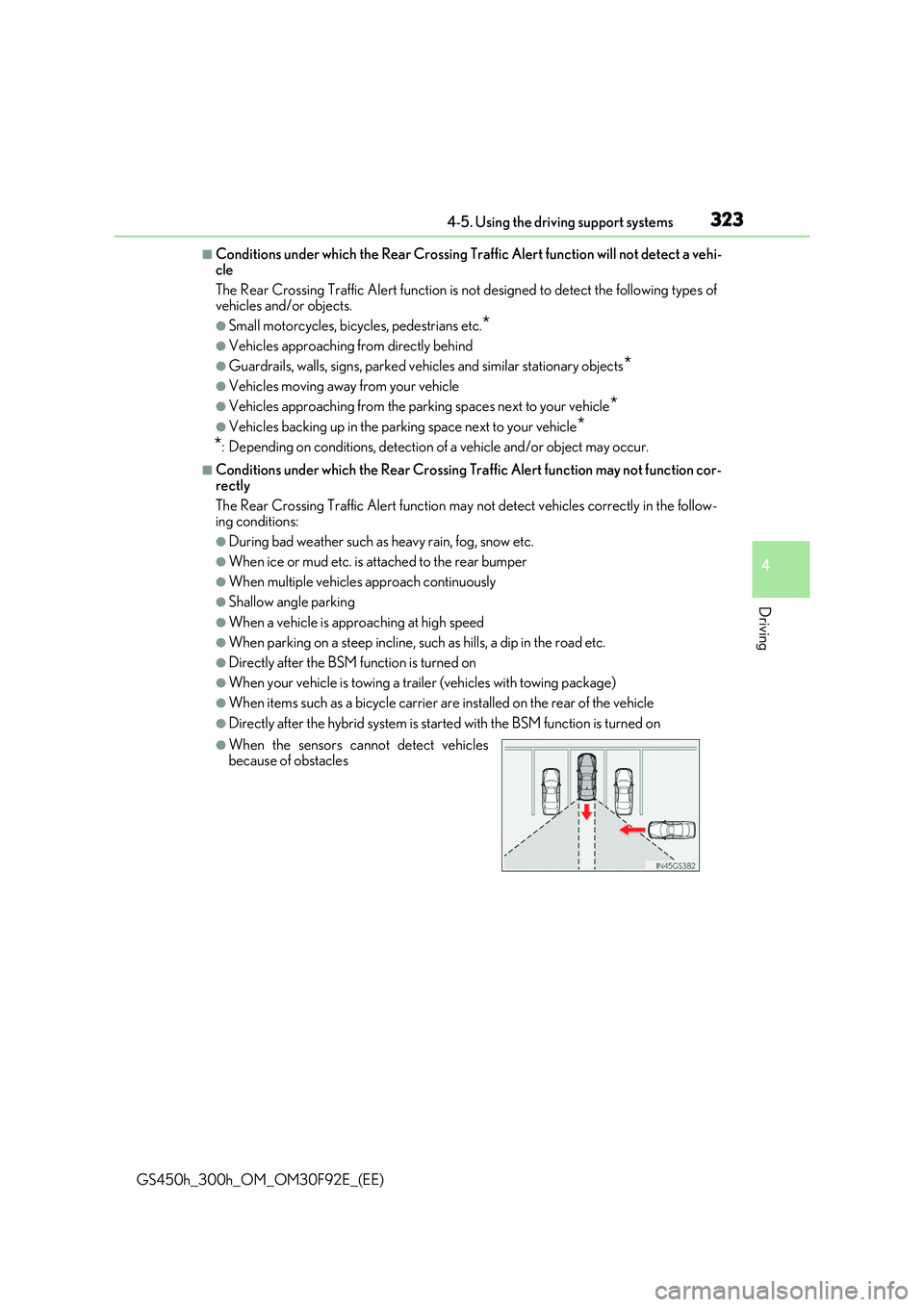
●When the sensors cannot detect vehicles
because of obstacles