Side mirror Lexus GS350 2008 User Guide
[x] Cancel search | Manufacturer: LEXUS, Model Year: 2008, Model line: GS350, Model: Lexus GS350 2008Pages: 598, PDF Size: 14.03 MB
Page 50 of 598
49
1-3. Adjustable components (seats, mirrors, steering wheel)
1
Before driving
GS_G_U
June 19, 2008 12:54 pm
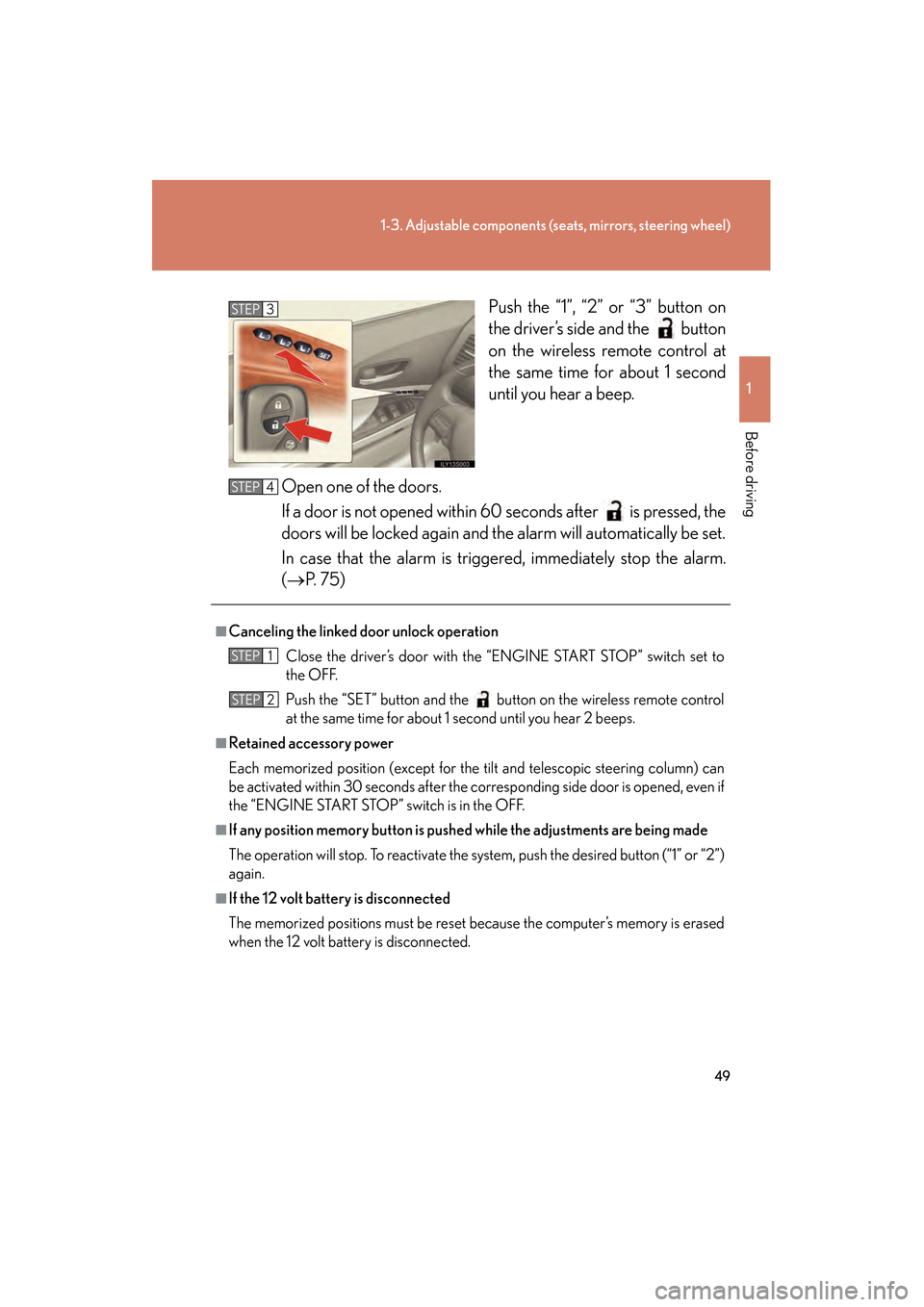
Push the “1”, “2” or “3” button on
the driver’s side and the button
on the wireless remote control at
the same time for about 1 second
until you hear a beep.
Open one of the doors.
If a door is not opened within 60 seconds after is pressed, the
doors will be locked again and the alarm will automatically be set.
In case that the alarm is triggered, immediately stop the alarm.
(→ P. 7 5 )STEP3
■Canceling the linked door unlock operation
Close the driver’s door with the “ENGINE START STOP” switch set to
the OFF.
Push the “SET” button and the button on the wireless remote control
at the same time for about 1 second until you hear 2 beeps.
■Retained accessory power
Each memorized position (except for the tilt and telescopic steering column) can
be activated within 30 seconds after the corresponding side door is opened, even if
the “ENGINE START STOP” switch is in the OFF.
■If any position memory button is push ed while the adjustments are being made
The operation will stop. To reactivate the system, push the desired button (“1” or “2”)
again.
■If the 12 volt battery is disconnected
The memorized positions must be reset because the computer’s memory is erased
when the 12 volt battery is disconnected.
STEP4
STEP1
STEP2
GS_U_G.book Page 49 Thursday, June 19, 2008 12:54 PM
Page 55 of 598
54
1-3. Adjustable components (seats, mirrors, steering wheel)
GS_G_U
June 19, 2008 12:54 pm
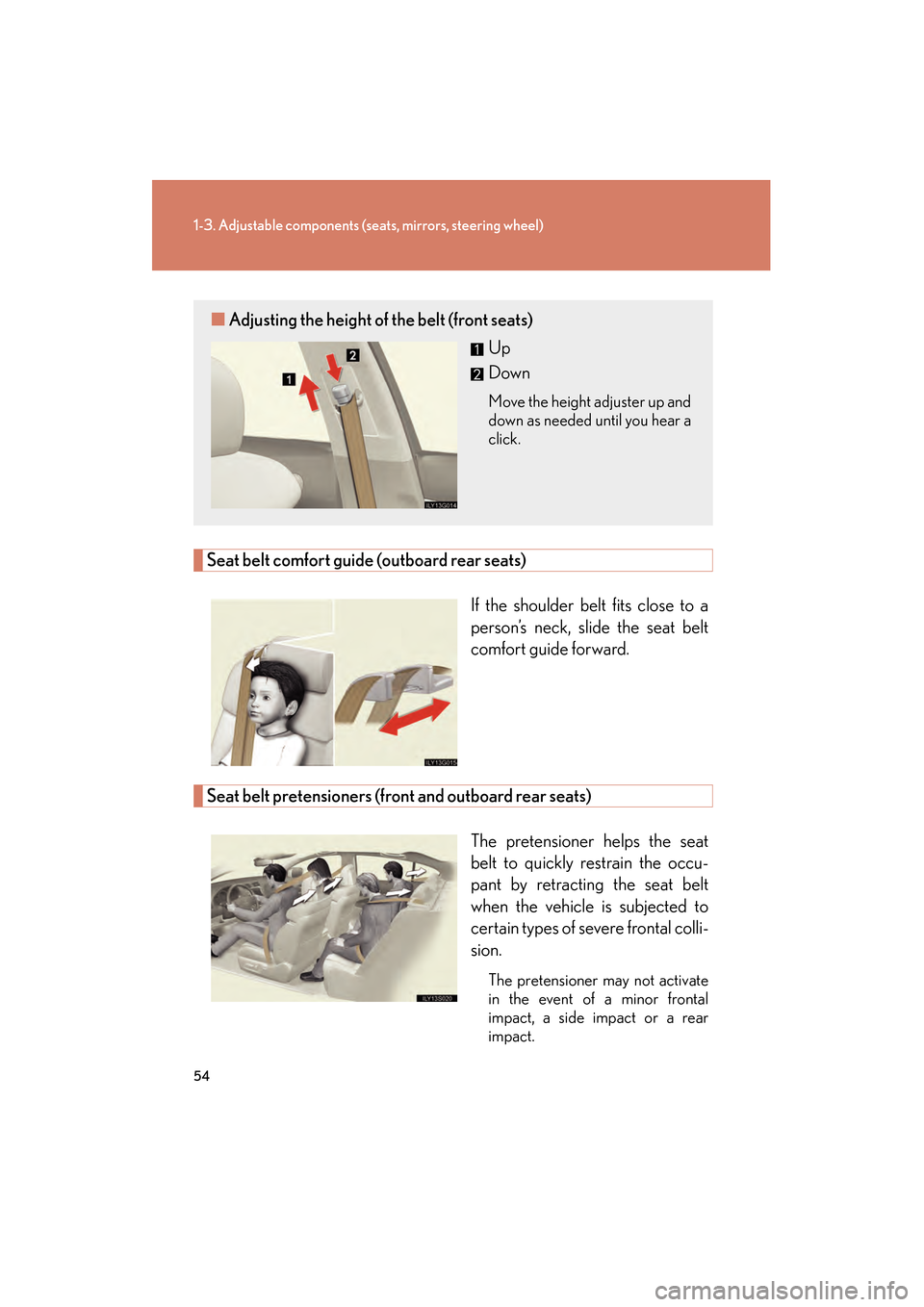
Seat belt comfort guide (outboard rear seats)
If the shoulder belt fits close to a
person’s neck, slide the seat belt
comfort guide forward.
Seat belt pretensioners (front and outboard rear seats)The pretensioner helps the seat
belt to quickly restrain the occu-
pant by retracting the seat belt
when the vehicle is subjected to
certain types of severe frontal colli-
sion.
The pretensioner may not activate
in the event of a minor frontal
impact, a side impact or a rear
impact.
■Adjusting the height of the belt (front seats)
Up
Down
Move the height adjuster up and
down as needed until you hear a
click.
GS_U_G.book Page 54 Thursday, June 19, 2008 12:54 PM
Page 62 of 598
61
1
1-3. Adjustable components (seats, mirrors, steering wheel)
Before driving
GS_G_U
June 19, 2008 12:54 pm
Inside rear view mirror
■To prevent sensor error
CAUTION
■While driving
Do not adjust the position of the mirror.
Doing so may lead to mishandling of the vehicle and an accident, or resulting in
death or serious injury.
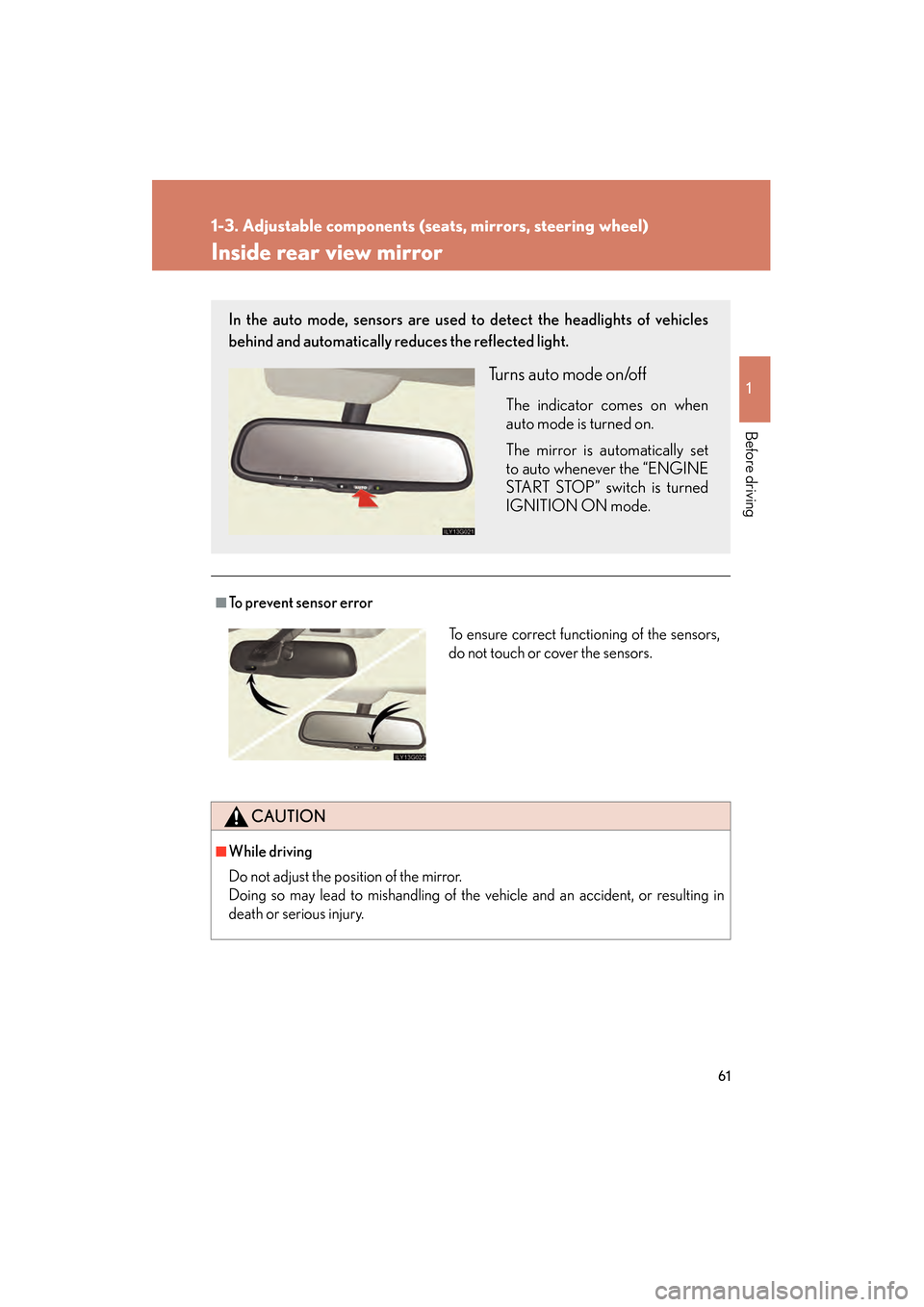
In the auto mode, sensors are used to detect the headlights of vehicles
behind and automatically reduces the reflected light.
Turns auto mode on/off
The indicator comes on when
auto mode is turned on.
The mirror is automatically set
to auto whenever the “ENGINE
START STOP” switch is turned
IGNITION ON mode.
To ensure correct functioning of the sensors,
do not touch or cover the sensors.
GS_U_G.book Page 61 Thursday, June 19, 2008 12:54 PM
Page 63 of 598
62
1-3. Adjustable components (seats, mirrors, steering wheel)
GS_G_U
June 19, 2008 12:54 pm
Outside rear view mirrors
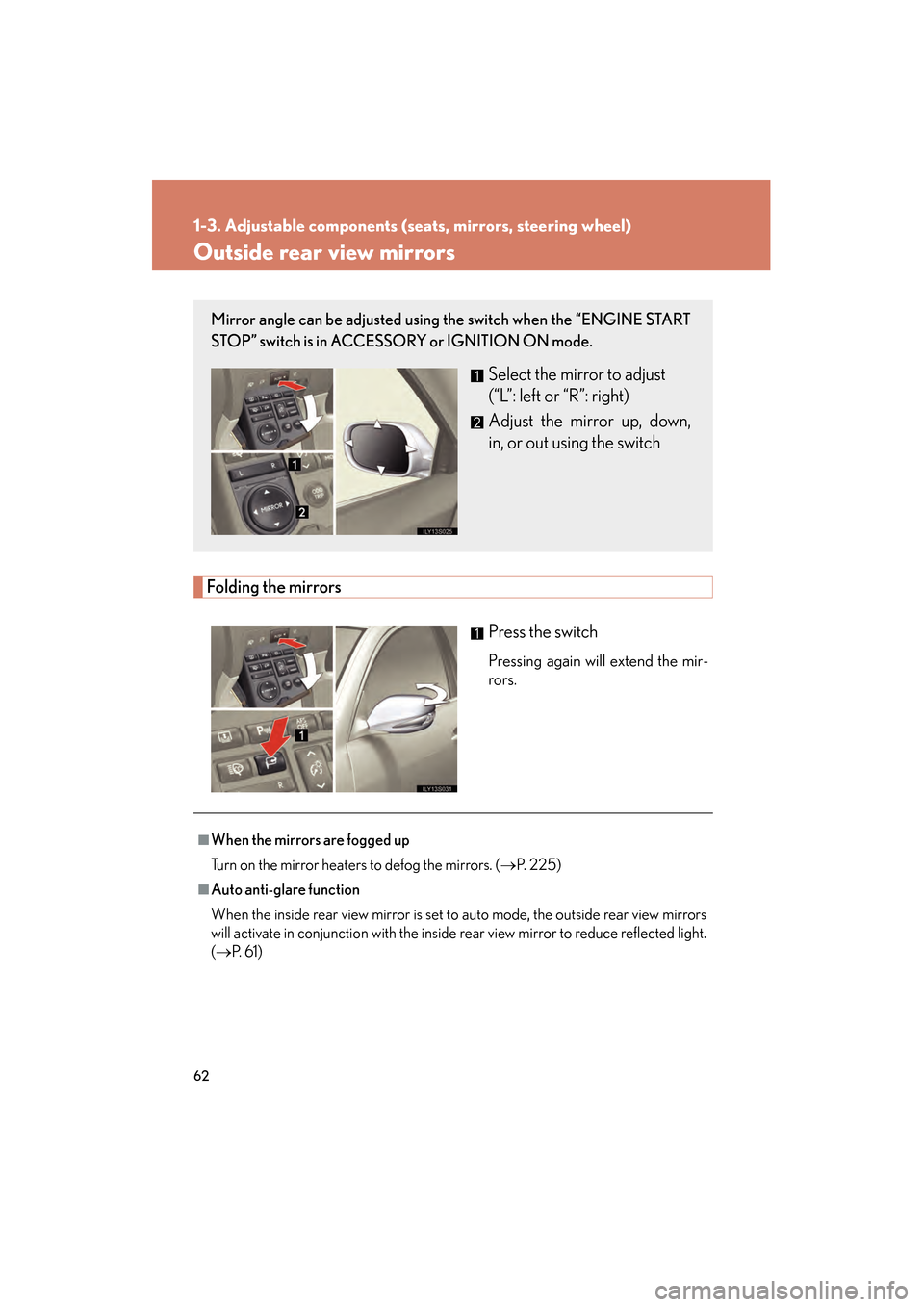
Folding the mirrorsPress the switch
Pressing again will extend the mir-
rors.
Mirror angle can be adjusted using the switch when the “ENGINE START
STOP” switch is in ACCESSORY or IGNITION ON mode.
Select the mirror to adjust
(“L”: left or “R”: right)
Adjust the mirror up, down,
in, or out using the switch
■When the mirrors are fogged up
Turn on the mirror heaters to defog the mirrors. ( →P. 225)
■Auto anti-glare function
When the inside rear view mirror is set to auto mode, the outside rear view mirrors
will activate in conjunction with the inside rear view mirror to reduce reflected light.
(→ P. 6 1 )
GS_U_G.book Page 62 Thursday, June 19, 2008 12:54 PM
Page 64 of 598
63
1-3. Adjustable components (seats, mirrors, steering wheel)
1
Before driving
GS_G_U
June 19, 2008 12:54 pm
■Linked mirror function when reversing
The outside rear view mirrors will automatically angle downwards when the vehicle
is reversing in order to give a better view of the ground. However, this function will
not operate when the mirror select switch is in the neutral position (neither “L” nor
“R” selected).
■One-touch adjustment of the mirror angle
(vehicles with driving position memory)
A desired mirror face angle can be entered to memory and adjusted with the touch
of a button. (→P. 4 7 )
CAUTION
■While driving
Observe the following precautions.
Failing to do so may result in losing control of the vehicle and cause an accident,
resulting in death or serious injury.
●Do not adjust the mirrors.
●Do not drive with the mirrors folded back.
●Before driving, be sure to extend mirrors and make an adjustment properly.
■When a mirror is moving
To avoid injury and mirror malfunction, be careful not to get your hand caught by
the moving mirror.
■When the mirror heaters are operating
Do not touch the mirror surface as the mirror surface becomes hot.
GS_U_G.book Page 63 Thursday, June 19, 2008 12:54 PM
Page 116 of 598
115
2-1. Driving procedures
2
When driving
GS_G_U
June 19, 2008 12:54 pm
CAUTION
■When driving the vehicle
●Do not shift the shift lever to “N” while the vehicle is moving.
Doing so may cause the engine brake not to operate properly and lead to an
accident.
●Do not turn the engine off while driving.
The power steering and brake actuator (GS460) or brake booster (GS350) will
not operate properly if the engine is off.
●Use engine braking (downshift) to maintain a safe speed when driving down a
steep hill.
Using the brakes continuously may cause the brakes to overheat and lose effec-
tiveness. ( →P. 1 2 7 )
●When stopped on an inclined surface, use the brake pedal and parking brake to
prevent the vehicle from rolling backward or forward and causing an accident.
●Be careful when driving on slippery surfaces, as the vehicle may spin or skid when
downshifting, rapidly accelerating, braking or turning.
●Do not adjust the position of the steering wheel, the seat, or the inside or outside
rear view mirrors while driving.
Doing so may result in a loss of vehicle control that can cause accidents that may
result in death or serious injury.
●Always check that all passengers’ arms, heads or other parts of their bodies are
not outside the vehicle, as this may result in death or serious injury.
●Do not drive in excess of the speed limit. Even if the legal speed limit permits it, do
not drive over 85 mph (140 km/h) unless your vehicle has high-speed capability
tires. Driving over 85 mph (140 km/h) may result in tire failure, loss of control and
possible injury. Be sure to consult a tire dealer to determine whether the tires on
your vehicle are high-speed capability tires or not before driving at such speeds.
GS_U_G.book Page 115 Thursday, June 19, 2008 12:54 PM
Page 207 of 598
206
GS_G_U
June 19, 2008 12:54 pm
3-1. Using the touch screen ........................... 208
Touch screen ........................... 208
Setting the touch screen ...... 212
3-2. Using the air conditioning system and
defogger........................ 217
Automatic air conditioning system ...................................... 217
Rear window and
outside rear view
mirror defoggers................. 225
GS_U_G.book Page 206 Thursday, June 19, 2008 12:54 PM
Page 208 of 598
Interior features3
207
GS_G_U
June 19, 2008 12:54 pm
3-3. Using the audio system ........................... 226
Audio system type.................. 226
Using the radio........................ 229
Using the cassette player ... 238
Using the CD player ............. 242
Playing MP3 and WMA discs............................ 247
Using the DVD player............ 251
Playing DVD video/audio............................ 254
Playing video CD ................... 266
DVD player and DVD video disc information ....... 270
Optimal use of the audio/video system ............ 282
Using the AUX adapter ....... 287
Using the steering
switches................................. 288
3-4. Using the hands-free system (for cellular
phone)............................ 291
Hands-free system (for cellular phone) .............. 291
Using the Bluetooth
®
phone ...................................... 296
Setting the hands-free system ....................................... 311 3-5. Using the interior
lights ............................. 337
Interior lights list .................... 337
3-6. Using the storage features ........................ 340
List of storage features......... 340
3-7. Other interior features ........................ 347
Sun visors ................................. 347
Vanity mirror ........................... 348
Clock ......................................... 349
Outside temperature
display..................................... 350
Ashtrays..................................... 351
Cigarette lighter .................... 352
Power outlet ............................ 353
Seat heaters/ventilators ...... 354
Armrest .................................... 356
Rear sunshade ........................ 357
Floor mats ................................ 359
Trunk features ......................... 360
Garage door opener ............ 363
Compass................................... 369
Lexus Link System ................. 373
GS_U_G.book Page 207 Thursday, June 19, 2008 12:54 PM
Page 226 of 598
225
3-2. Using the air conditioning system and defogger
3
Interior features
GS_G_U
June 19, 2008 12:54 pm
Rear window and outside rear view mirror defoggers
■Operating conditions
The “ENGINE START STOP” switch must be in the IGNITION ON mode.
CAUTION
■When the outside rear view mirror defoggers are on
Do not touch the rear view mirror surfaces, as they can become very hot and burn
you.
NOTICE
■To prevent 12 volt battery discharge
Turn the defoggers off when the engine is off.
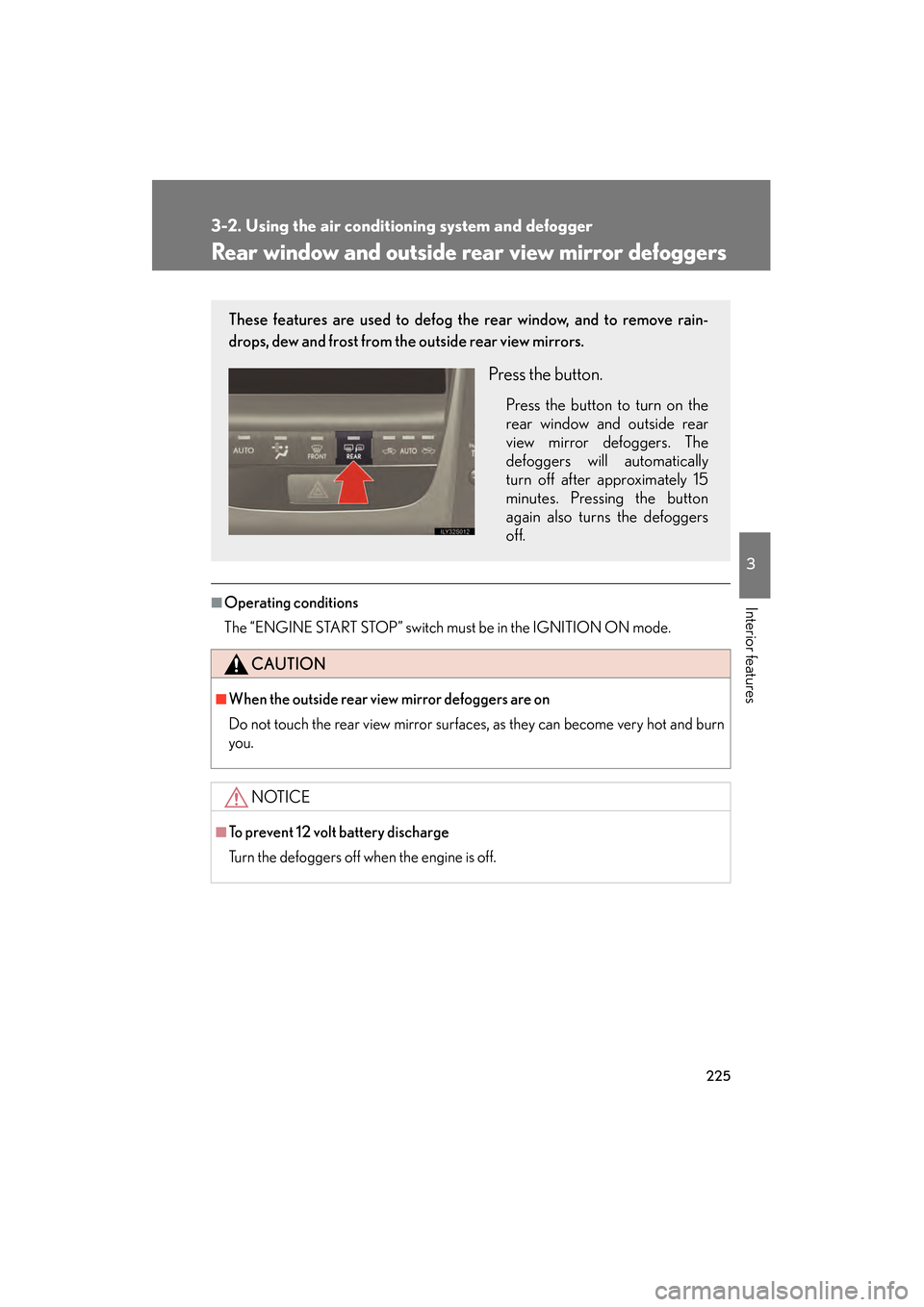
These features are used to defog the rear window, and to remove rain-
drops, dew and frost from the outside rear view mirrors.
Press the button.
Press the button to turn on the
rear window and outside rear
view mirror defoggers. The
defoggers will automatically
turn off after approximately 15
minutes. Pressing the button
again also turns the defoggers
off.
GS_U_G.book Page 225 Thursday, June 19, 2008 12:54 PM
Page 370 of 598
369
3-7. Other interior features
3
Interior features
GS_G_U
June 19, 2008 12:54 pm
Compass
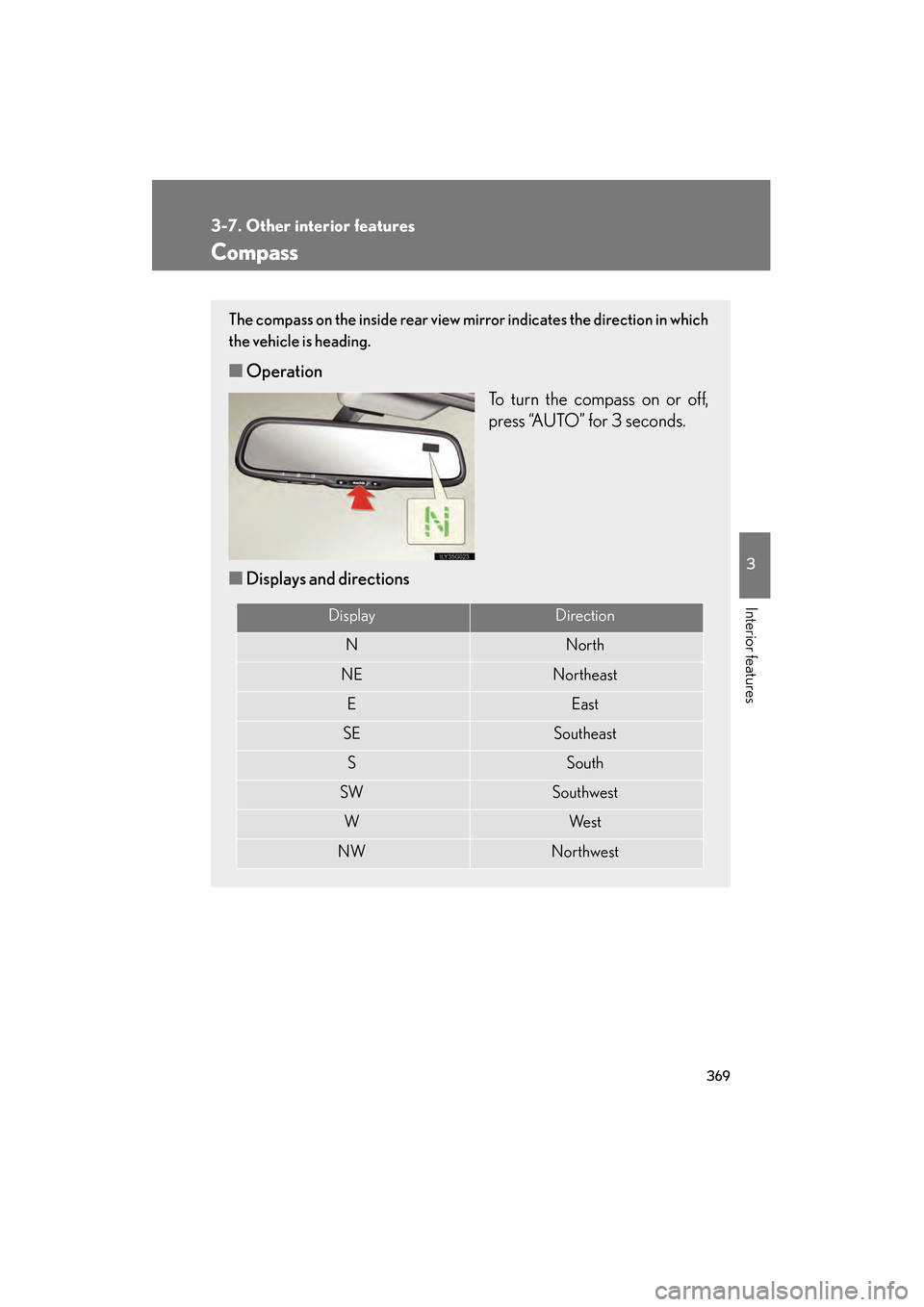
The compass on the inside rear view mirror indicates the direction in which
the vehicle is heading.
■Operation
To turn the compass on or off,
press “AUTO” for 3 seconds.
■ Displays and directions
DisplayDirection
NNorth
NENortheast
EEast
SESoutheast
SSouth
SWSouthwest
WWe s t
NWNorthwest
GS_U_G.book Page 369 Thursday, June 19, 2008 12:54 PM