CD player Lexus GS350 2008 Owner's Guide
[x] Cancel search | Manufacturer: LEXUS, Model Year: 2008, Model line: GS350, Model: Lexus GS350 2008Pages: 598, PDF Size: 14.03 MB
Page 275 of 598
274
3-3. Using the audio system
GS_G_U
June 19, 2008 12:54 pm
●Audio
This DVD player can play linear PCM, Dolby Digital and MPEG audio format
DVD. Other decoded types cannot be played.
●Title and chapter
Video and audio programs stored in DVD video discs are divided into parts by
title and chapter.
Title: The largest unit of the video and audio programs stored on DVD video discs.
Usually, one movie, one album, or one audio program is assigned as a title.
Chapter: A title is comprised of one or more chapters.
■Sound
●Dolby Digital
Manufactured under license from Dolby Laboratories.
“Dolby”, “Pro Logic”, and the double-D symbol are trademarks of Dolby Labo-
ratories. Confidential unpublished works.
©1992-1997 Dolby Laboratories. All rights reserved.
This product incorporates copyright protection technology that is protected by
method claims of certain U. S. patents and other intellectual property rights
owned by Macrovision Corporation and other rights owners. Use of this copy-
right protection technology must be authorized by Macrovision Corporation,
and is intended for home and other limited viewing uses only unless otherwise
authorized by Macrovision Corporation.
Reverse engineering or disassembly is prohibited.
●DT S
“DTS” and “DTS Digital Surround” are registered trademarks of Digital Theater
System, Inc.
GS_U_G.book Page 274 Thursday, June 19, 2008 12:54 PM
Page 279 of 598
278
3-3. Using the audio system
GS_G_U
June 19, 2008 12:54 pm
●Playback
• To play MP3 files with steady sound quality, we recommend a fixed bit rate of128 kbps and a sampling frequency of 44.1 kHz.
• CD-R or CD-RW playback may not be possible in some instances, depend- ing on the characteristics of the disc.
• There is a wide variety of freeware and other encoding software for MP3 and WMA files on the market, and depending on the status of the encoding and
the file format, poor sound quality or noise at the start of playback may result.
In some cases, playback may not be possible at all.
• When files other than MP3 or WMA files are recorded on a disc, it may take more time to recognize the disc and in some cases, playback may not be pos-
sible at all.
• Microsoft, Windows, and Windows Media are the registered trademarks of Microsoft Corporation in the U.S. and other countries.
■CD-R and CD-RW discs
●CD-R/CD-RW discs that have not been subject to the “finalizing process” (a
process that allows discs to be played on a conventional CD player) cannot be
played.
●It may not be possible to play CD-R/CD-RW discs recorded on a music CD
recorder or a personal computer because of disc characteristics, scratches or
dirt on the disc, or dirt, condensation, etc. on the lens of the unit.
GS_U_G.book Page 278 Thursday, June 19, 2008 12:54 PM
Page 280 of 598
279
3-3. Using the audio system
3
Interior features
GS_G_U
June 19, 2008 12:54 pm
●It may not be possible to play discs recorded on a personal computer depend-
ing on the application settings and the environment. Record with the correct
format. (For details, contact the appropriate application manufacturers of the
applications.)
●CD-R/CD-RW discs may be damaged by direct exposure to sunlight, high
temperatures or other storage conditions. The unit may be unable to play dam-
aged discs.
●If you insert a CD-RW disc into the MP3/WMA player, playback will begin
more slowly than with a conventional CD or CD-R disc.
●Recordings on CD-R/CD-RW cannot be played using the DDCD (Double
Density CD) system.
CAUTION
■DVD video precaution
Conversational speech on some DVDs is recorded at a low volume to emphasize
the impact of sound effects. If you adjust the volume assuming that the conversa-
tions represent the maximum volume level that the DVD will play, you may be star-
tled by louder sound effects or when you change to a different audio source.
Loud sounds may have a significant impact on the human body or pose a driving
hazard. Keep this in mind when you adjust the volume.
GS_U_G.book Page 279 Thursday, June 19, 2008 12:54 PM
Page 281 of 598
280
3-3. Using the audio system
GS_G_U
June 19, 2008 12:54 pm
NOTICE
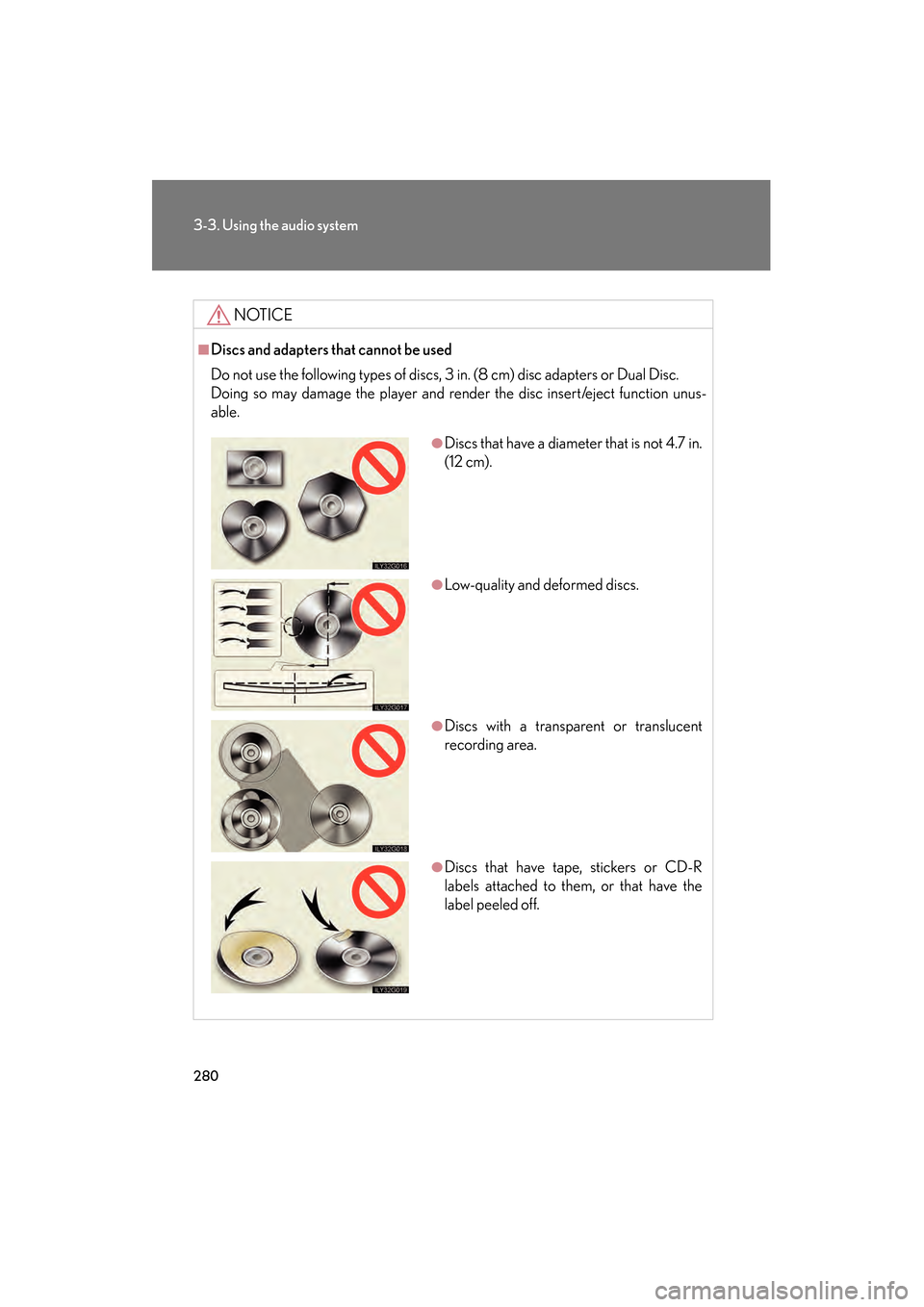
■Discs and adapters that cannot be used
Do not use the following types of discs, 3 in. (8 cm) disc adapters or Dual Disc.
Doing so may damage the player and render the disc insert/eject function unus-
able.
●Discs that have a diameter that is not 4.7 in.
(12 cm).
●Low-quality and deformed discs.
●Discs with a transparent or translucent
recording area.
●Discs that have tape, stickers or CD-R
labels attached to them, or that have the
label peeled off.
GS_U_G.book Page 280 Thursday, June 19, 2008 12:54 PM
Page 282 of 598
281
3-3. Using the audio system
3
Interior features
GS_G_U
June 19, 2008 12:54 pm
NOTICE
■Player precautions
Failure to follow the precautions below may result in damage to the discs or the
player itself.
●Do not insert anything other than discs into the disc slot.
●Do not apply oil to the player.
●Store discs away from direct sunlight.
●Never try to disassemble any part of the player.
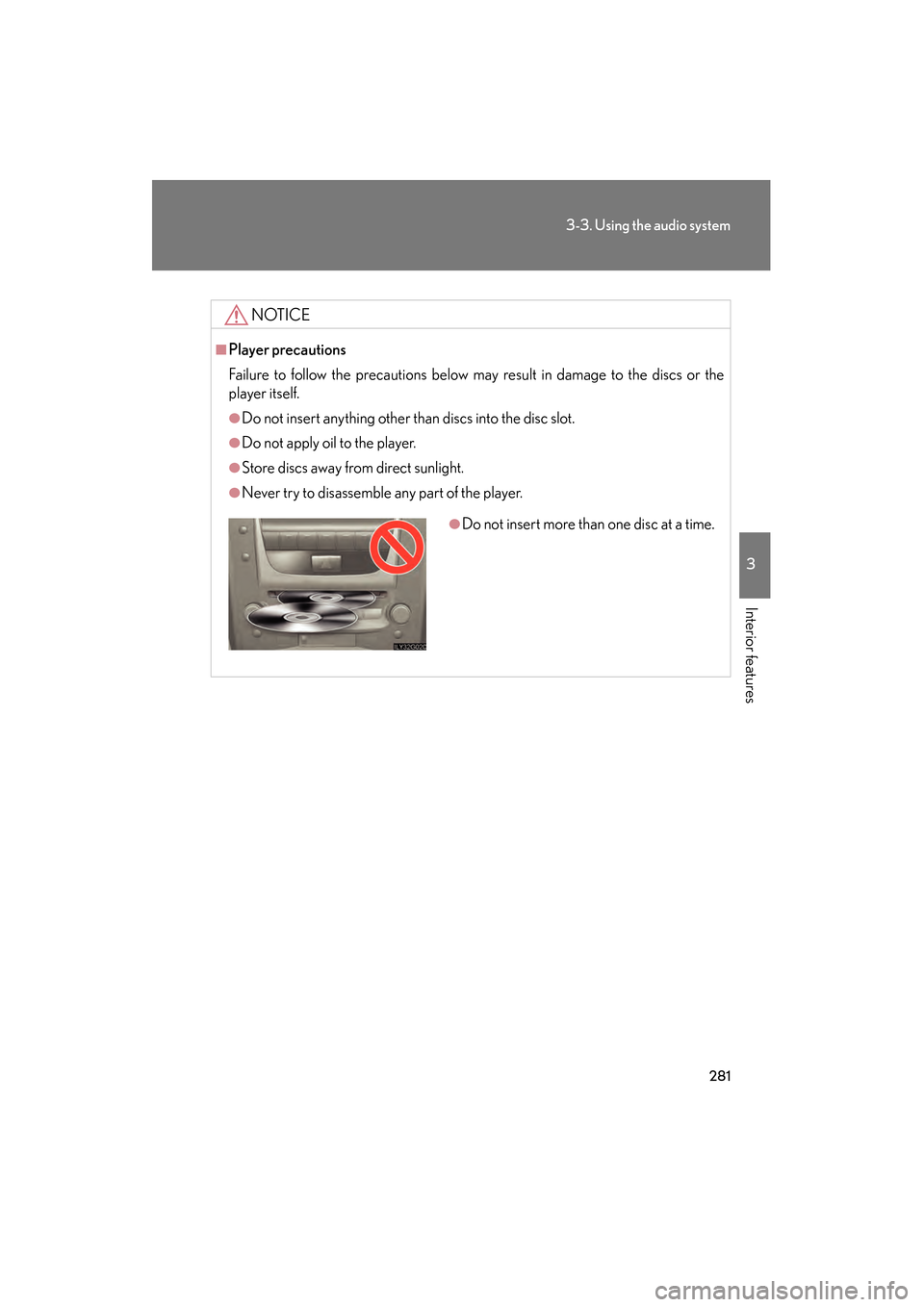
●Do not insert more than one disc at a time.
GS_U_G.book Page 281 Thursday, June 19, 2008 12:54 PM
Page 285 of 598
284
3-3. Using the audio system
GS_G_U
June 19, 2008 12:54 pm
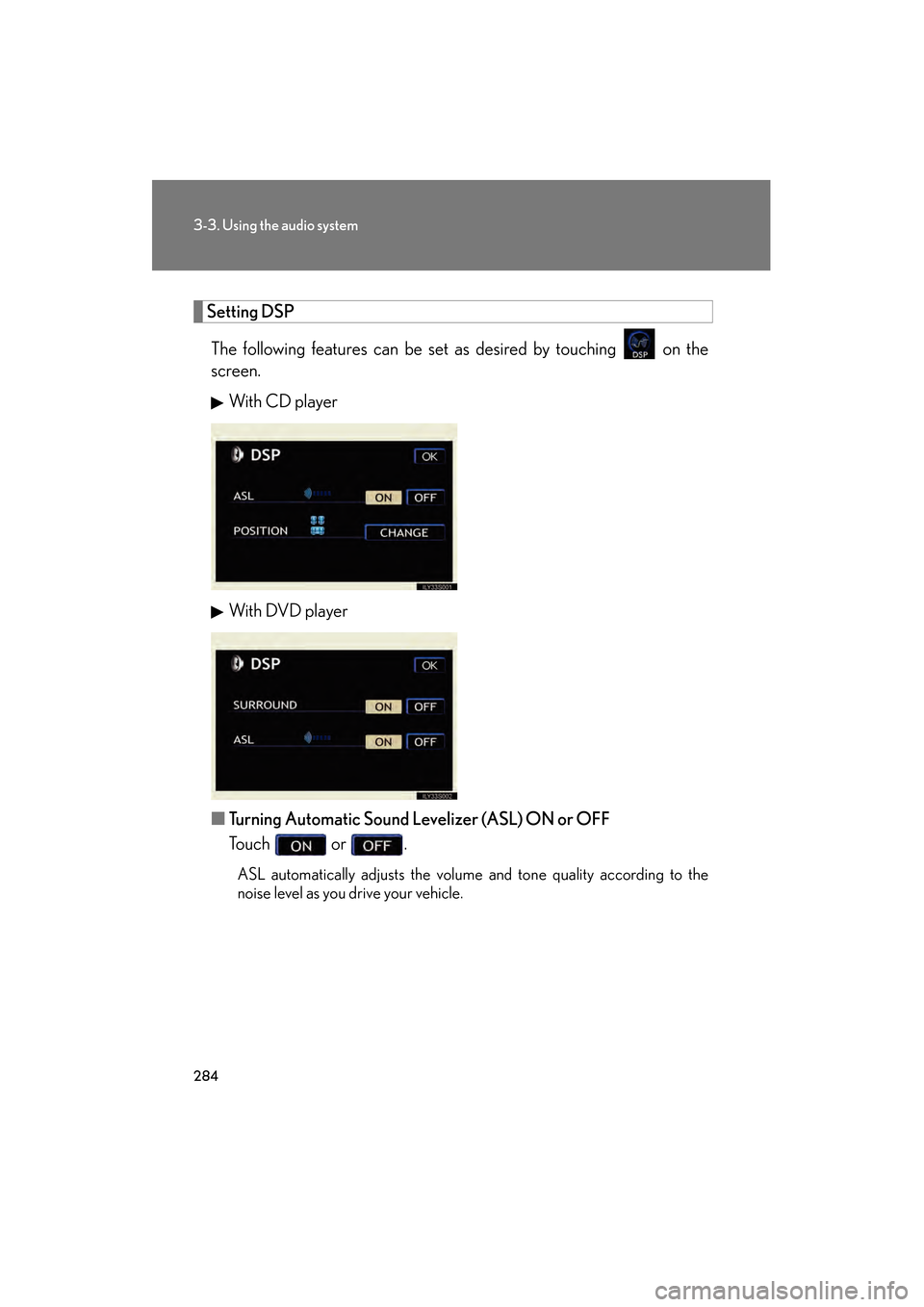
Setting DSPThe following features can be set as desired by touching on the
screen. With CD player
With DVD player
■ Turning Automatic Sound Levelizer (ASL) ON or OFF
Touch or .
ASL automatically adjusts the volume and tone quality according to the
noise level as you drive your vehicle.
GS_U_G.book Page 284 Thursday, June 19, 2008 12:54 PM
Page 286 of 598
285
3-3. Using the audio system
3
Interior features
GS_G_U
June 19, 2008 12:54 pm
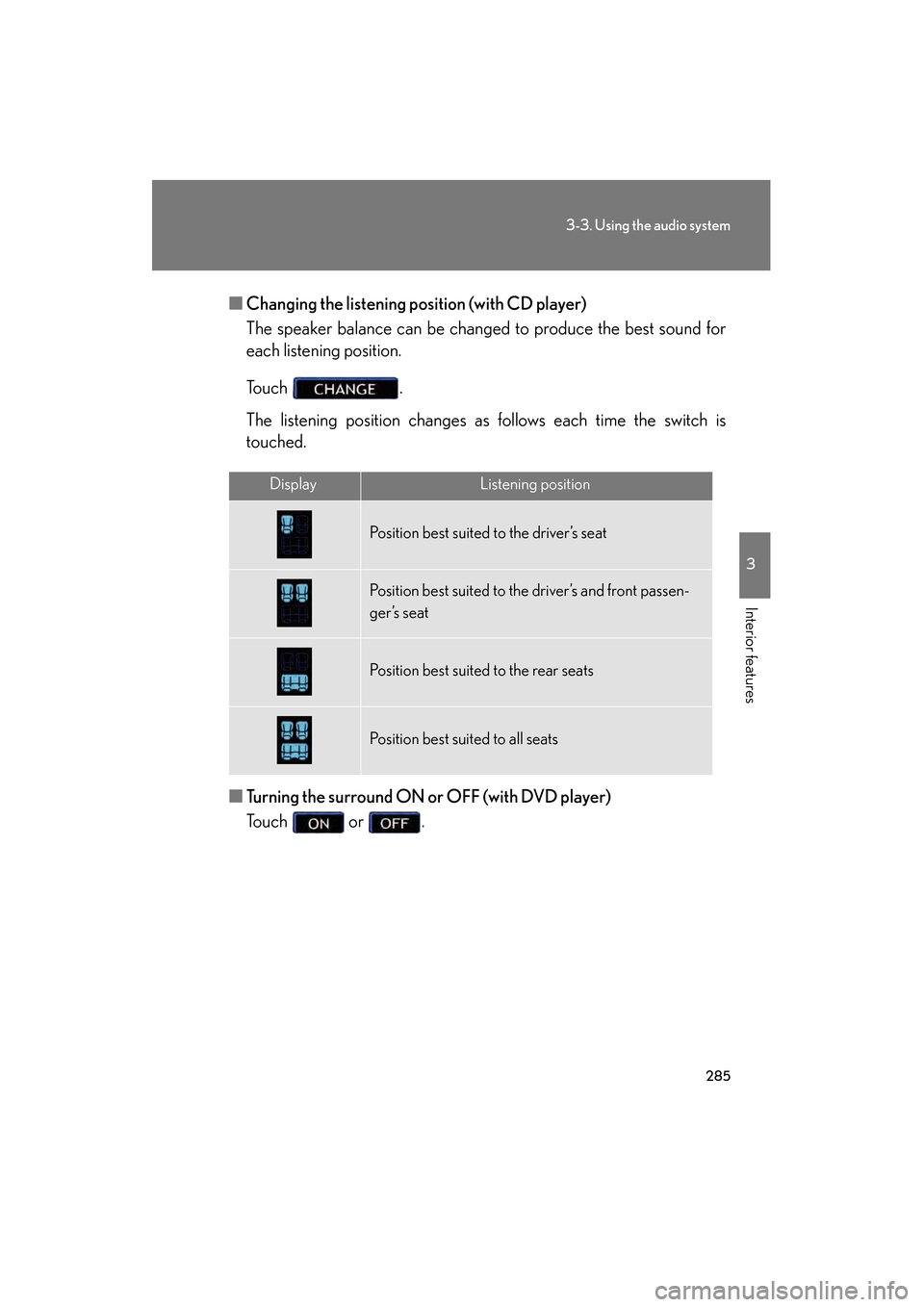
■Changing the listening po sition (with CD player)
The speaker balance can be changed to produce the best sound for
each listening position.
To u c h .
The listening position changes as follows each time the switch is
touched.
■ Turning the surround ON or OFF (with DVD player)
Touch or .
DisplayListening position
Position best suited to the driver’s seat
Position best suited to the driver’s and front passen-
ger’s seat
Position best suited to the rear seats
Position best suited to all seats
GS_U_G.book Page 285 Thursday, June 19, 2008 12:54 PM
Page 287 of 598
286
3-3. Using the audio system
GS_G_U
June 19, 2008 12:54 pm
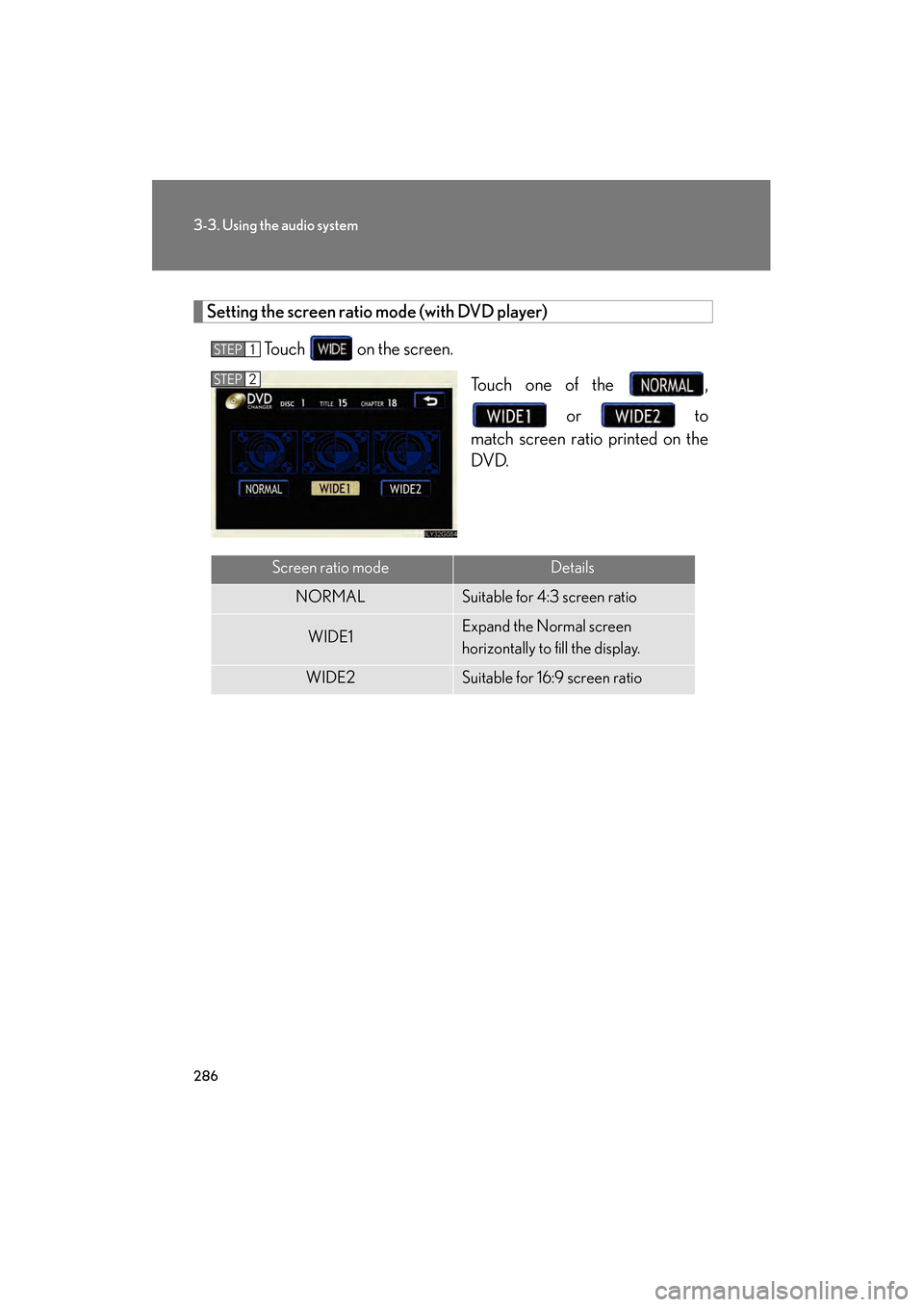
Setting the screen ratio mode (with DVD player)Touch on the screen. Touch one of the , or to
match screen ratio printed on the
DVD.
STEP1
STEP2
Screen ratio modeDetails
NORMALSuitable for 4:3 screen ratio
WIDE1Expand the Normal screen
horizontally to fill the display.
WIDE2Suitable for 16:9 screen ratio
GS_U_G.book Page 286 Thursday, June 19, 2008 12:54 PM
Page 289 of 598
288
3-3. Using the audio system
GS_G_U
June 19, 2008 12:54 pm
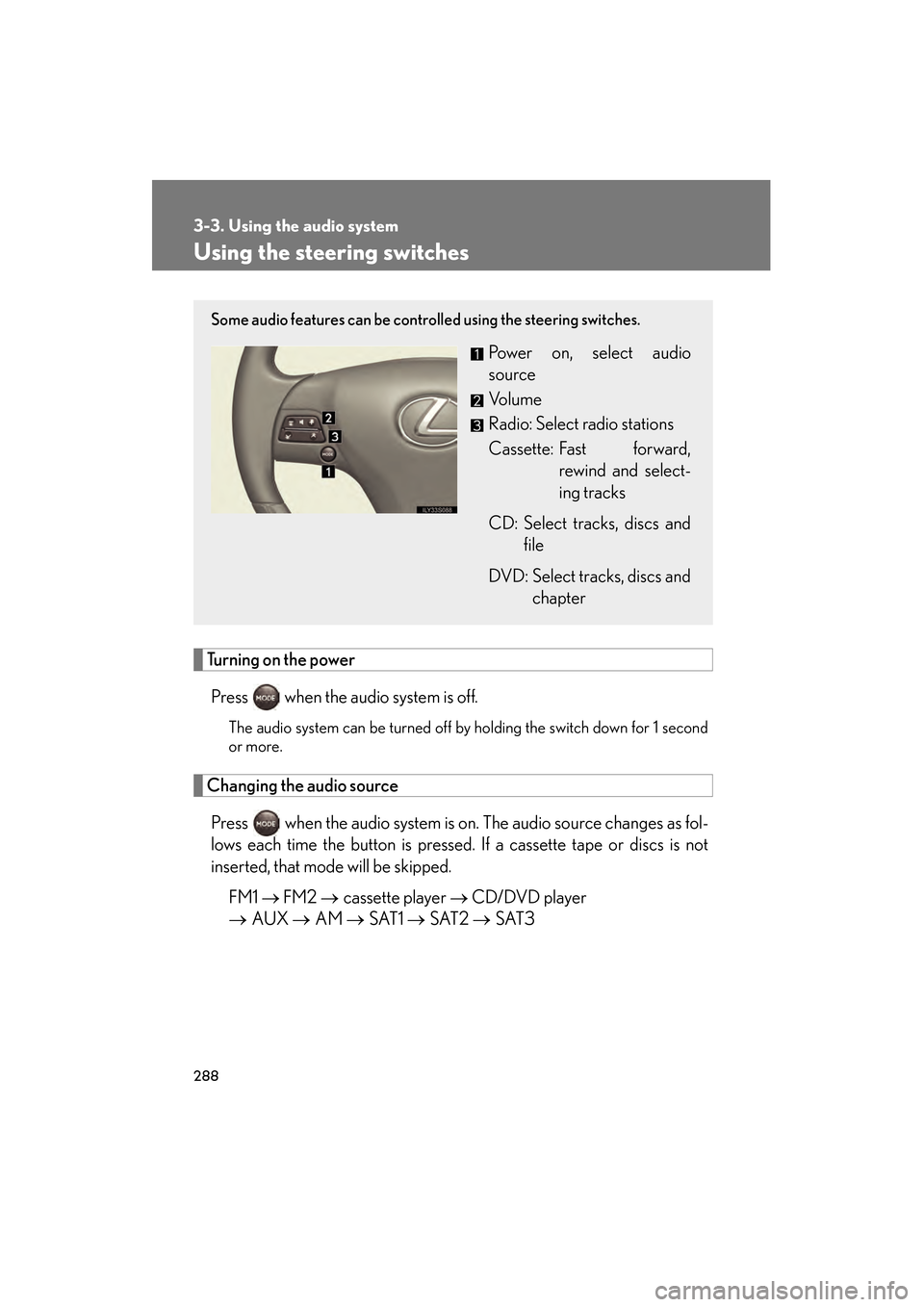
Using the steering switches
Turning on the powerPress when the audio system is off.
The audio system can be turned off by holding the switch down for 1 second
or more.
Changing the audio sourcePress when the audio system is on. The audio source changes as fol-
lows each time the button is pressed. If a cassette tape or discs is not
inserted, that mode will be skipped. FM1 → FM2 → cassette player → CD/DVD player
→ AUX → AM → SAT1 → SAT2 → SAT3
Some audio features can be controlled using the steering switches.
Power on, select audio
source
Vo l u m e
Radio: Select radio stations
Cassette: Fast forward,
rewind and select-
ing tracks
CD: Select tracks, discs and file
DVD: Select tracks, discs and chapter
GS_U_G.book Page 288 Thursday, June 19, 2008 12:54 PM
Page 291 of 598
290
3-3. Using the audio system
GS_G_U
June 19, 2008 12:54 pm
Selecting a disc in the CD or DVD player
Press to select the CD or DVD mode.
Press and hold ∧ or ∨ on until you hear a beep.
■Canceling automatic selection of a radio station
Push the same switch.
CAUTION
■To reduce the risk of an accident
Exercise care when operating the audio switches on the steering wheel.
STEP1
STEP2
GS_U_G.book Page 290 Thursday, June 19, 2008 12:54 PM