ESP Lexus GS350 2008 Owner's Guide
[x] Cancel search | Manufacturer: LEXUS, Model Year: 2008, Model line: GS350, Model: Lexus GS350 2008Pages: 598, PDF Size: 14.03 MB
Page 210 of 598
209
3-1. Using the touch screen
3
Interior features
GS_G_U
June 19, 2008 12:54 pm
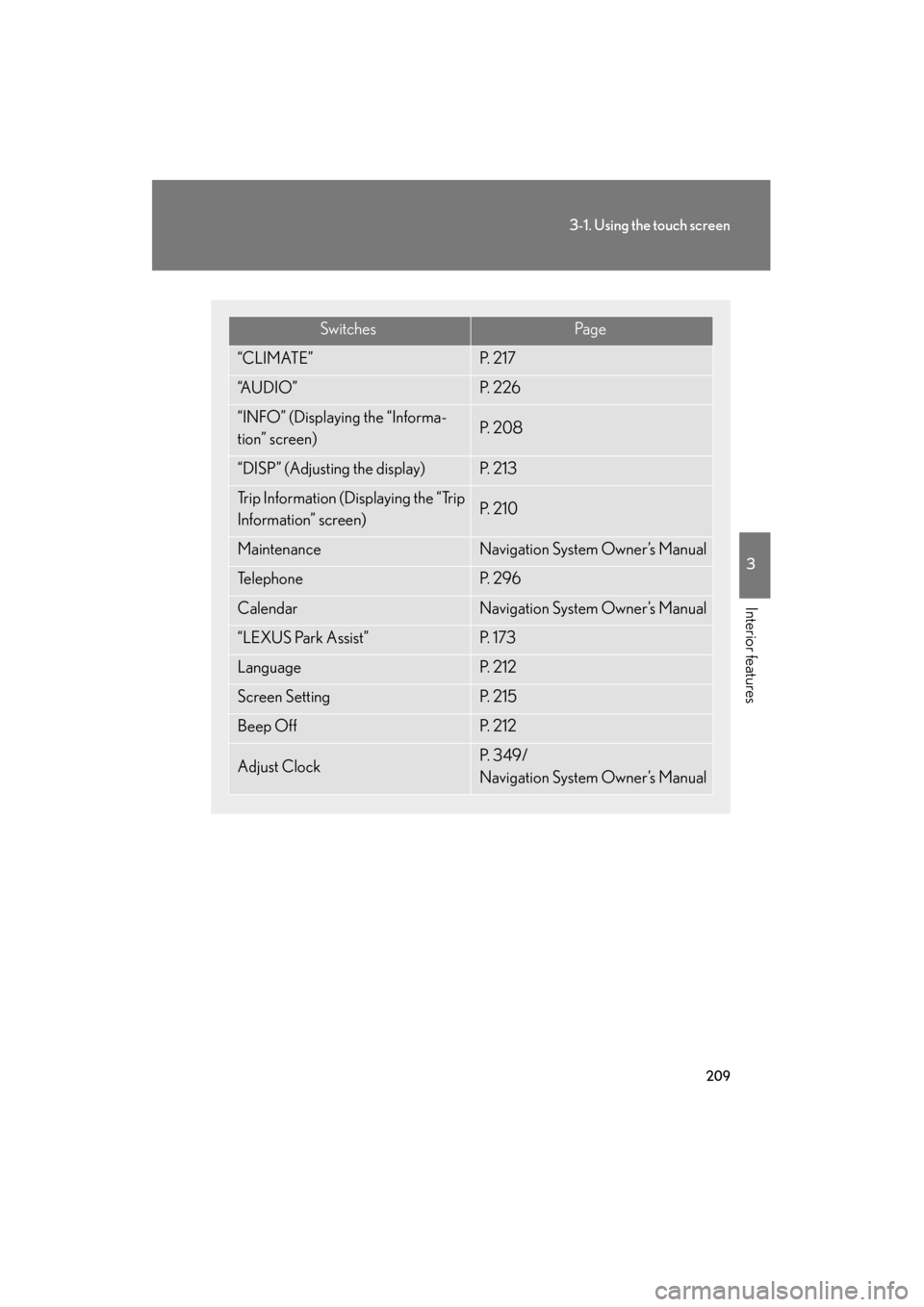
SwitchesPa g e
“CLIMATE”P. 2 1 7
“A U D I O ”P. 2 2 6
“INFO” (Displaying the “Informa-
tion” screen)P. 2 0 8
“DISP” (Adjusting the display)P. 2 1 3
Trip Information (Displaying the “Trip
Information” screen)P. 2 1 0
MaintenanceNavigation System Owner’s Manual
Te l e p h o n eP. 2 9 6
CalendarNavigation System Owner’s Manual
“LEXUS Park Assist”P. 1 7 3
LanguageP. 2 1 2
Screen SettingP. 2 1 5
Beep OffP. 2 1 2
Adjust ClockP. 3 4 9 /
Navigation System Owner’s Manual
GS_U_G.book Page 209 Thursday, June 19, 2008 12:54 PM
Page 212 of 598
211
3-1. Using the touch screen
3
Interior features
GS_G_U
June 19, 2008 12:54 pm
■Resetting the data
Touching will reset the “Average Speed” and “Distance”.
■To avoid damaging the touch screen
●Touch the screen lightly with your finger. If there is no response, remove your fin-
ger from the screen and try again.
●Remove any dirt on the screen by wiping with a soft cloth. Do not use detergent.
■When using the touch screen
●If the screen is cold, the display may be dark, or the system may seem to be
operating slightly slower than normal.
●The screen may seem dark and hard to see when viewed through sunglasses.
Change your angle of viewing, adjust the display on the “Display” screen or
remove your sunglasses.
GS_U_G.book Page 211 Thursday, June 19, 2008 12:54 PM
Page 228 of 598
227
3-3. Using the audio system
3
Interior features
GS_G_U
June 19, 2008 12:54 pm
■Using cellular phones
Interference may be heard through the audio system’s speakers if a cellular phone is
being used inside or close to the vehicle while the audio system is operating.
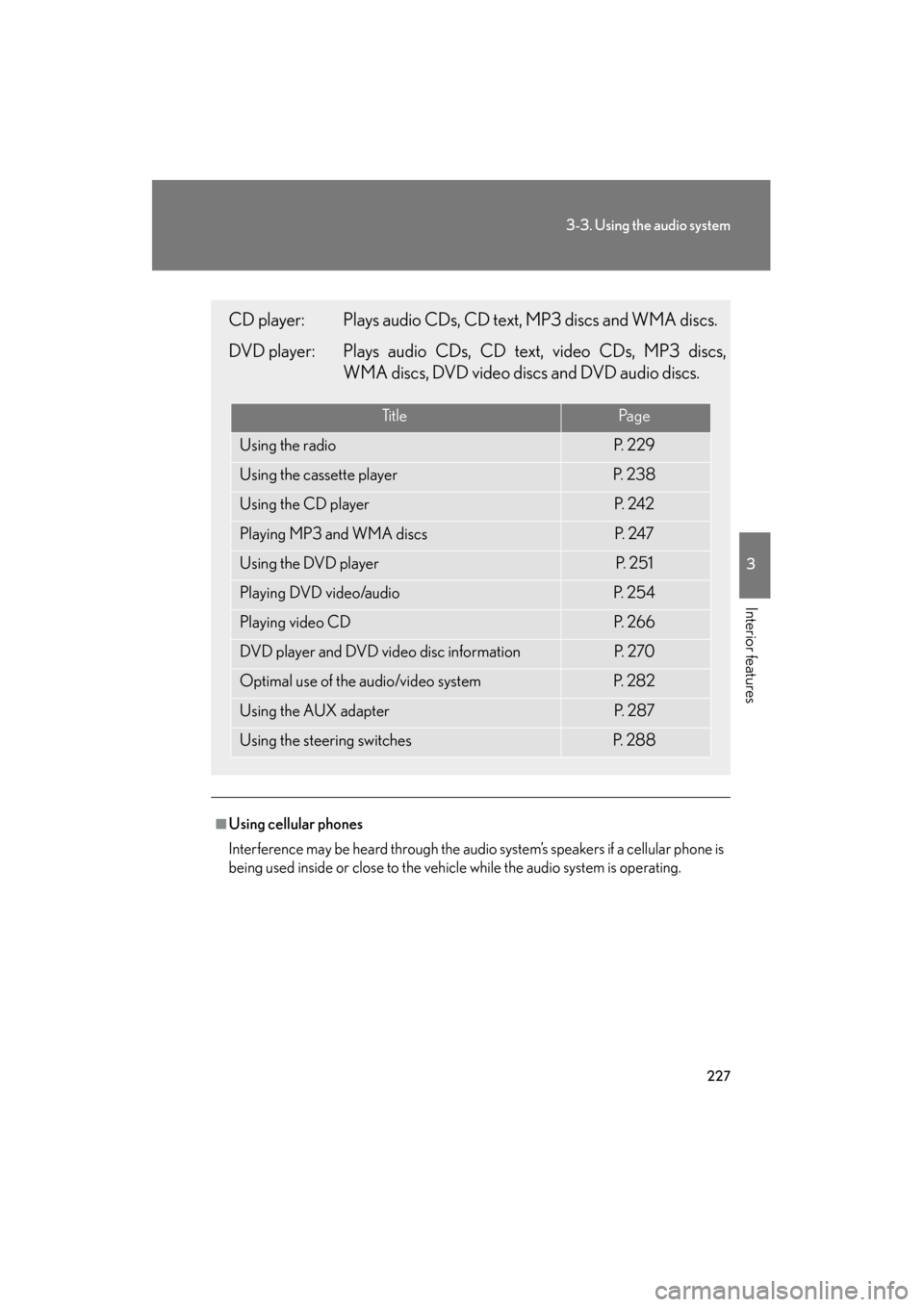
CD player: Plays audio CDs, CD text, MP3 discs and WMA discs.
DVD player: Plays audio CDs, CD text, video CDs, MP3 discs,WMA discs, DVD video discs and DVD audio discs.
Ti t l ePa g e
Using the radioP. 2 2 9
Using the cassette playerP. 2 3 8
Using the CD playerP. 2 4 2
Playing MP3 and WMA discsP. 2 4 7
Using the DVD playerP. 2 5 1
Playing DVD video/audioP. 2 5 4
Playing video CDP. 2 6 6
DVD player and DVD video disc informationP. 2 7 0
Optimal use of the audio/video systemP. 2 8 2
Using the AUX adapterP. 2 8 7
Using the steering switchesP. 2 8 8
GS_U_G.book Page 227 Thursday, June 19, 2008 12:54 PM
Page 241 of 598
240
3-3. Using the audio system
GS_G_U
June 19, 2008 12:54 pm
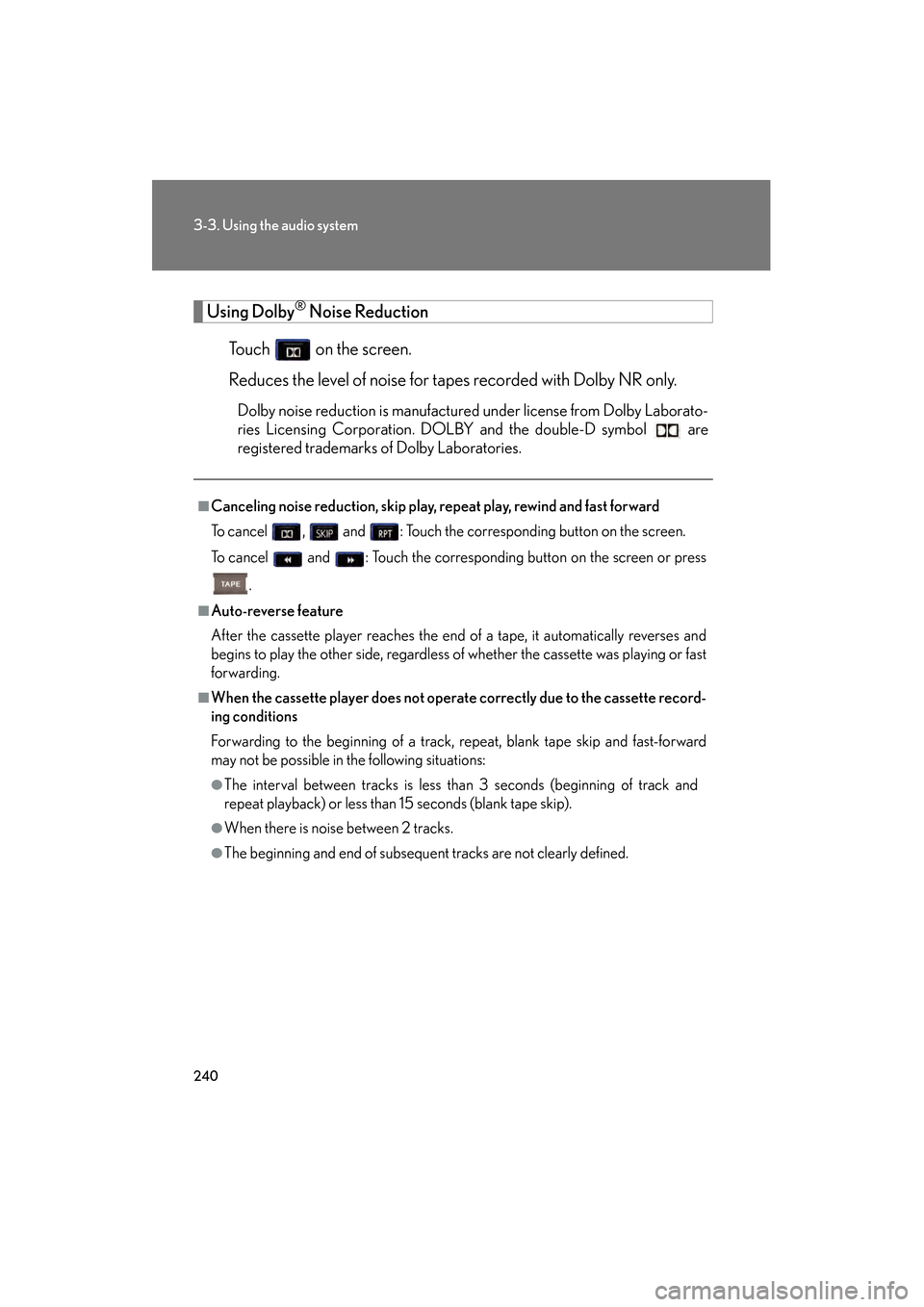
Using Dolby® Noise Reduction
Touch on the screen.
Reduces the level of noise for tapes recorded with Dolby NR only.
Dolby noise reduction is manufactured under license from Dolby Laborato-
ries Licensing Corporation. DOLBY and the double-D symbol are
registered trademarks of Dolby Laboratories.
■Canceling noise reduction, skip play, repeat play, rewind and fast forward
To cancel , and : Touch the corresponding button on the screen.
To cancel and : Touch the corresponding button on the screen or press
.
■Auto-reverse feature
After the cassette player reaches the end of a tape, it automatically reverses and
begins to play the other side, regardless of whether the cassette was playing or fast
forwarding.
■When the cassette player does not operate correctly due to the cassette record-
ing conditions
Forwarding to the beginning of a track, repeat, blank tape skip and fast-forward
may not be possible in the following situations:
●The interval between tracks is less than 3 seconds (beginning of track and
repeat playback) or less than 15 seconds (blank tape skip).
●When there is noise between 2 tracks.
●The beginning and end of subsequent tracks are not clearly defined.
GS_U_G.book Page 240 Thursday, June 19, 2008 12:54 PM
Page 264 of 598
263
3-3. Using the audio system
3
Interior features
GS_G_U
June 19, 2008 12:54 pm
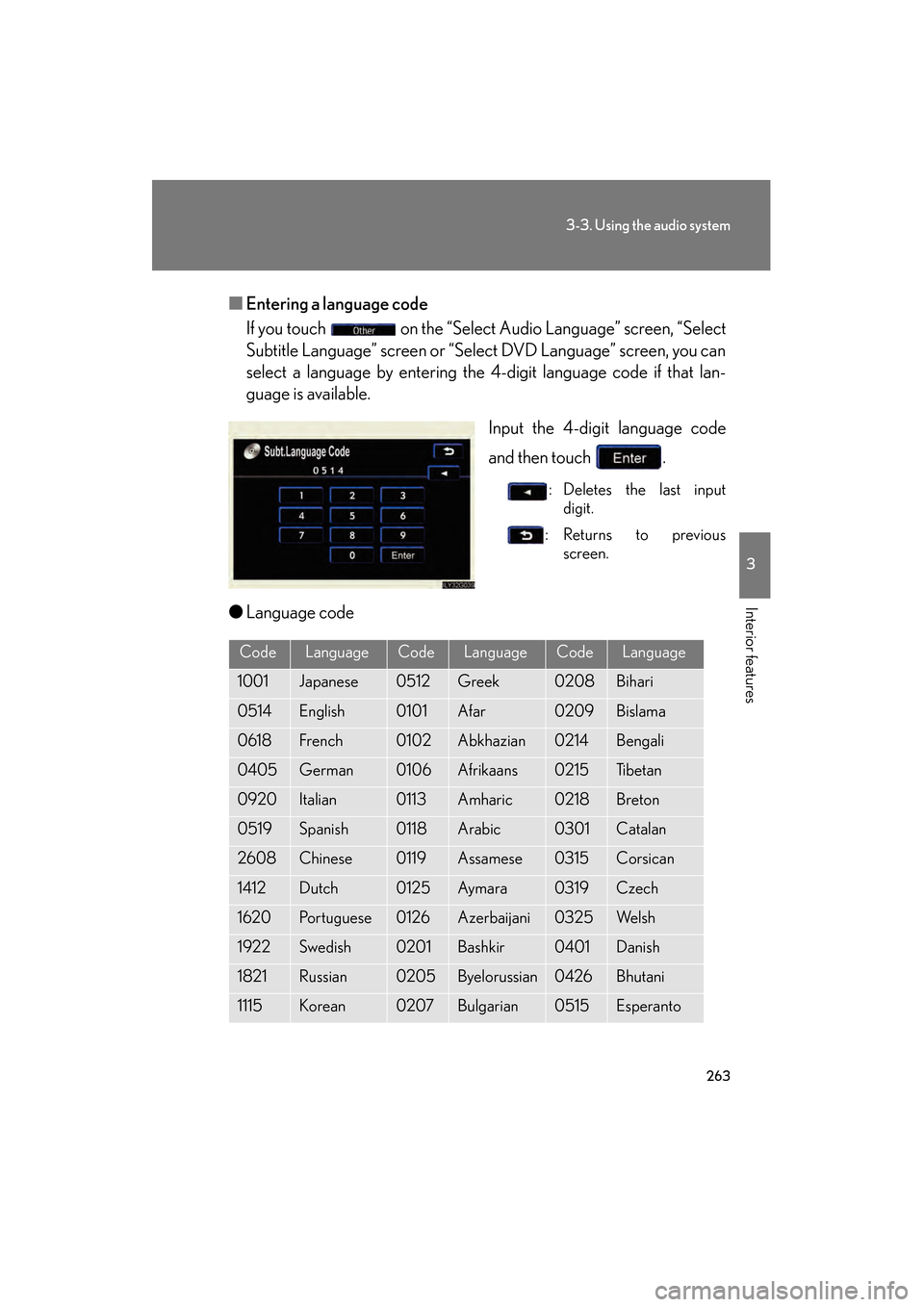
■Entering a language code
If you touch on the “Select Audio Language” screen, “Select
Subtitle Language” screen or “Select DVD Language” screen, you can
select a language by entering the 4-digit language code if that lan-
guage is available.
Input the 4-digit language code
and then touch .
: Deletes the last inputdigit.
:Returns to previous screen.
●Language code
CodeLanguageCodeLanguageCodeLanguage
1001Japanese0512Greek0208Bihari
0514English0101Afar0209Bislama
0618French0102Abkhazian0214Bengali
0405German0106Afrikaans0215Ti b e t a n
0920Italian0113Amharic0218Breton
0519Spanish0118Arabic0301Catalan
2608Chinese0119Assamese0315Corsican
1412Dutch0125Aym a ra0319Czech
1620Portuguese0126Azerbaijani0325We l s h
1922Swedish0201Bashkir0401Danish
1821Russian0205Byelorussian0426Bhutani
1115Korean0207Bulgarian0515Esperanto
GS_U_G.book Page 263 Thursday, June 19, 2008 12:54 PM
Page 295 of 598
294
3-4. Using the hands-free system (for cellular phone)
GS_G_U
June 19, 2008 12:54 pm
■Battery charge/Signal status
This display may not correspond exactly with the mobile phone itself.
■About Bluetooth®
■Compatible models
Compatible with HFP (Hands Free Profile) Ver. 1.0 and OPP (Object Push Profile)
Ver. 1.1.
If your cellular phone does not support HFP, you cannot enter the Bluetooth
®
phone, and take OPP service individually.
■Certification for the hands-free system
This device complies with Part 15 of the FCC Rules and RSS-210. Operation is sub-
ject to the following two conditions: (1) This device may not cause harmful interfer-
ence, and (2) This device must accept any interference received, including
interference that may cause undesired operation. Bluetooth is a registered trademark of
Bluetooth SIG. Inc.
FCC ID: HYQBT0501A
IC ID: 1551A-BT0501A
GS_U_G.book Page 294 Thursday, June 19, 2008 12:54 PM
Page 296 of 598
295
3-4. Using the hands-free system (for cellular phone)
3
Interior features
GS_G_U
June 19, 2008 12:54 pm
CAUTION
■FCC WARNING
Changes or modifications not expressly approved by the party responsible for
compliance could void the user’s authority to operate the equipment.
Radio Frequency Exposure. This device is approved for Mobile Application only
and, to comply with applicable FCC radio frequency exposure regulations, must be
used with a distance of at least 7.9 in. (20 cm) between the antenna and the body of
any person at all time during use.
■While driving
Do not use the mobile phone or connect the Bluetooth
® system.
NOTICE
■When leaving the vehicle
Do not leave your mobile phone in the vehicle. The inside of the vehicle may
become hot, causing damage to the phone.
GS_U_G.book Page 295 Thursday, June 19, 2008 12:54 PM
Page 318 of 598
317
3-4. Using the hands-free system (for cellular phone)
3
Interior features
GS_G_U
June 19, 2008 12:54 pm
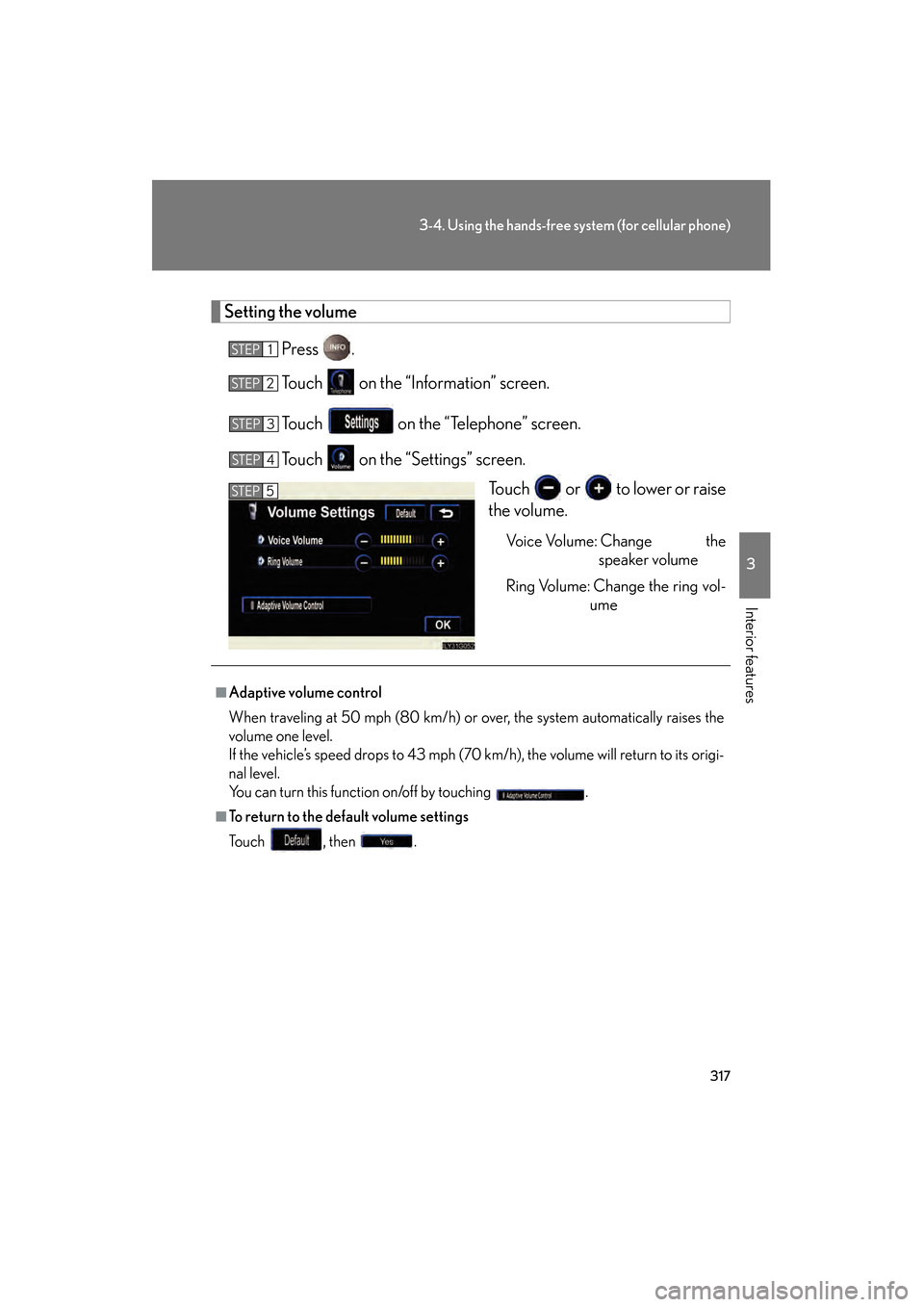
Setting the volumePress .
Touch on the “Information” screen.
Touch on the “Telephone” screen.
Touch on the “Settings” screen. Touch or to lower or raise
the volume.
Vo i c e Vo l u m e : C h a n g e t h espeaker volume
Ring Volume: Change the ring vol- ume
STEP1
STEP2
STEP3
STEP4
STEP5
■Adaptive volume control
When traveling at 50 mph (80 km/h) or over, the system automatically raises the
volume one level.
If the vehicle’s speed drops to 43 mph (70 km/h), the volume will return to its origi-
nal level.
You can turn this function on/off by touching .
■To return to the default volume settings
To u c h , t h e n .
GS_U_G.book Page 317 Thursday, June 19, 2008 12:54 PM
Page 368 of 598
367
3-7. Other interior features
3
Interior features
GS_G_U
June 19, 2008 12:54 pm
Operating the HomeLink
Press the appropriate HomeLink button. The HomeLink indicator
light on the HomeLink transceiver should turn on.
The HomeLink continues to send a signal for up to 20 seconds as long as
the button is pressed.
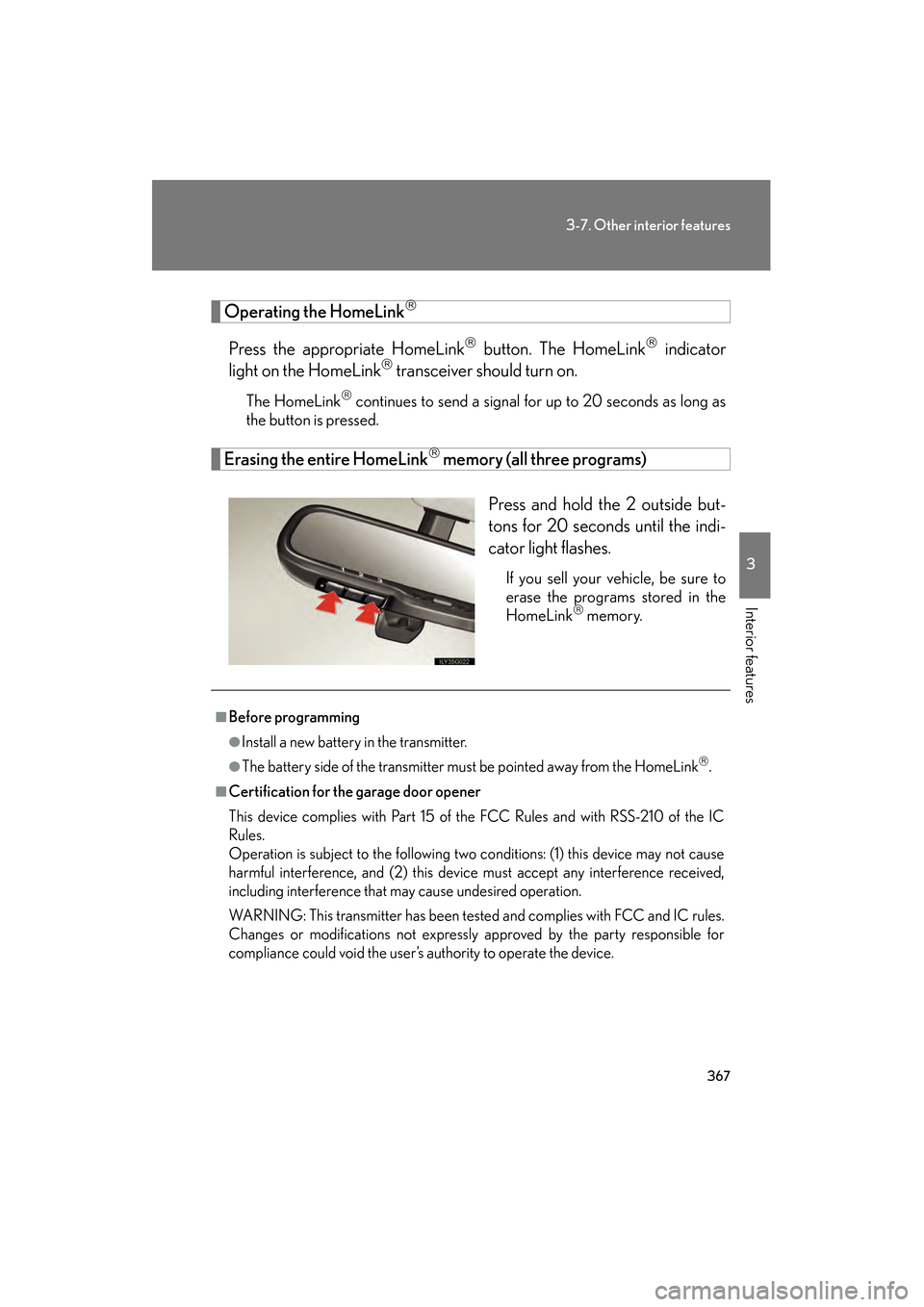
Erasing the entire HomeLink memory (all three programs)
Press and hold the 2 outside but-
tons for 20 seconds until the indi-
cator light flashes.
If you sell your vehicle, be sure to
erase the programs stored in the
HomeLink
memory.
■Before programming
●Install a new battery in the transmitter.
●The battery side of the transmitter must be pointed away from the HomeLink.
■Certification for the garage door opener
This device complies with Part 15 of the FCC Rules and with RSS-210 of the IC
Rules.
Operation is subject to the following two conditions: (1) this device may not cause
harmful interference, and (2) this device must accept any interference received,
including interference that may cause undesired operation.
WARNING: This transmitter has been tested and complies with FCC and IC rules.
Changes or modifications not expressly approved by the party responsible for
compliance could void the user’s authority to operate the device.
GS_U_G.book Page 367 Thursday, June 19, 2008 12:54 PM
Page 378 of 598
377
3-7. Other interior features
3
Interior features
GS_G_U
June 19, 2008 12:54 pm
Advisor record■ Recording a conversati on with an advisor
Press the button to record a conversation. To stop recording,
press the button again.
• Up to 2 minutes of recording time is available.
• Recording a new conversation deletes the previously recorded conversation.
■Playing the recorded conversation
Press the or button.
Say “Advisor playback”.
Press the button again to stop the playback.
To restart the playback, press the button, say “Advisor playback”
and then select either of the following methods.
• Say “Resume” to resume the playback.
• Say “Play” to start from the beginning.
Personal calling
The hands-free personal calling feature can be added to the Lexus Link
System as an option. You can purchase a package of minutes that works
best for you. As you make and receive calls, minutes are deducted from
your plan. They are easily billed to a credit card that is kept on file so no
separate phone bill is needed.
Personal calling universal voice recognition commands:
• “Help” The system will provide a list of available commands.
• “Clear ” When you are entering digits, this command will erase the last
digit entered.
• “Cancel” This command takes you from the current function to the “Lexus
Link ready” prompt. If the last response from the system was “Lexus Link
ready”, this command will exit voice mode.
STEP1
STEP2
GS_U_G.book Page 377 Thursday, June 19, 2008 12:54 PM