Radio Lexus GS350 2008 Owner's Guide
[x] Cancel search | Manufacturer: LEXUS, Model Year: 2008, Model line: GS350, Model: Lexus GS350 2008Pages: 598, PDF Size: 14.03 MB
Page 284 of 598
283
3-3. Using the audio system
3
Interior features
GS_G_U
June 19, 2008 12:54 pm
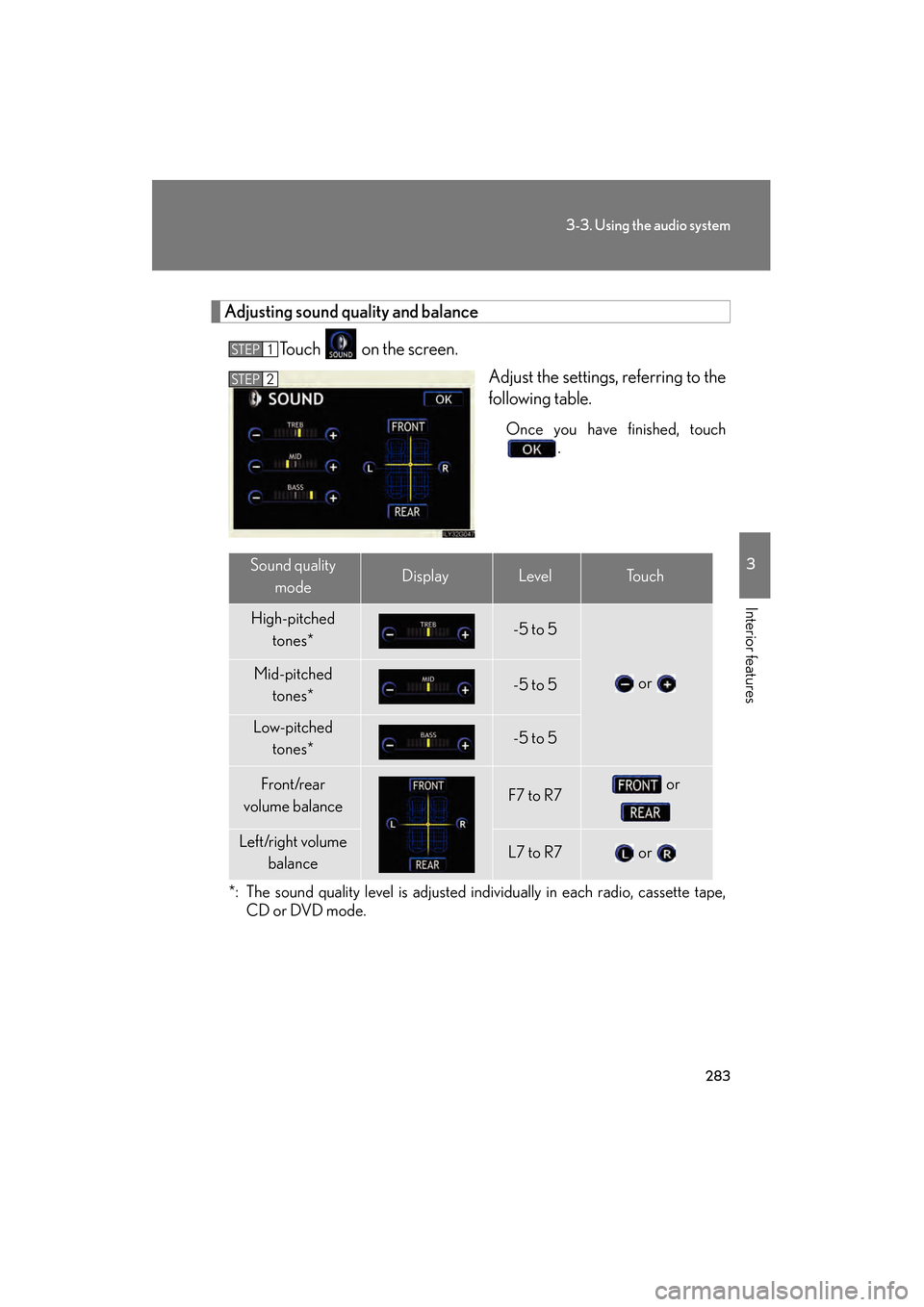
Adjusting sound quality and balanceTouch on the screen. Adjust the settings, referring to the
following table.
Once you have finished, touch.
*: The sound quality level is adjusted individually in each radio, cassette tape, CD or DVD mode.
STEP1
STEP2
Sound quality
modeDisplayLevelTo u c h
High-pitched tones*-5 to 5
or Mid-pitched tones*-5 to 5
Low-pitched tones*-5 to 5
Front/rear
volume balanceF7 to R7 or
Left/right volume balanceL7 to R7 or
GS_U_G.book Page 283 Thursday, June 19, 2008 12:54 PM
Page 289 of 598
288
3-3. Using the audio system
GS_G_U
June 19, 2008 12:54 pm
Using the steering switches
Turning on the powerPress when the audio system is off.
The audio system can be turned off by holding the switch down for 1 second
or more.
Changing the audio sourcePress when the audio system is on. The audio source changes as fol-
lows each time the button is pressed. If a cassette tape or discs is not
inserted, that mode will be skipped. FM1 → FM2 → cassette player → CD/DVD player
→ AUX → AM → SAT1 → SAT2 → SAT3
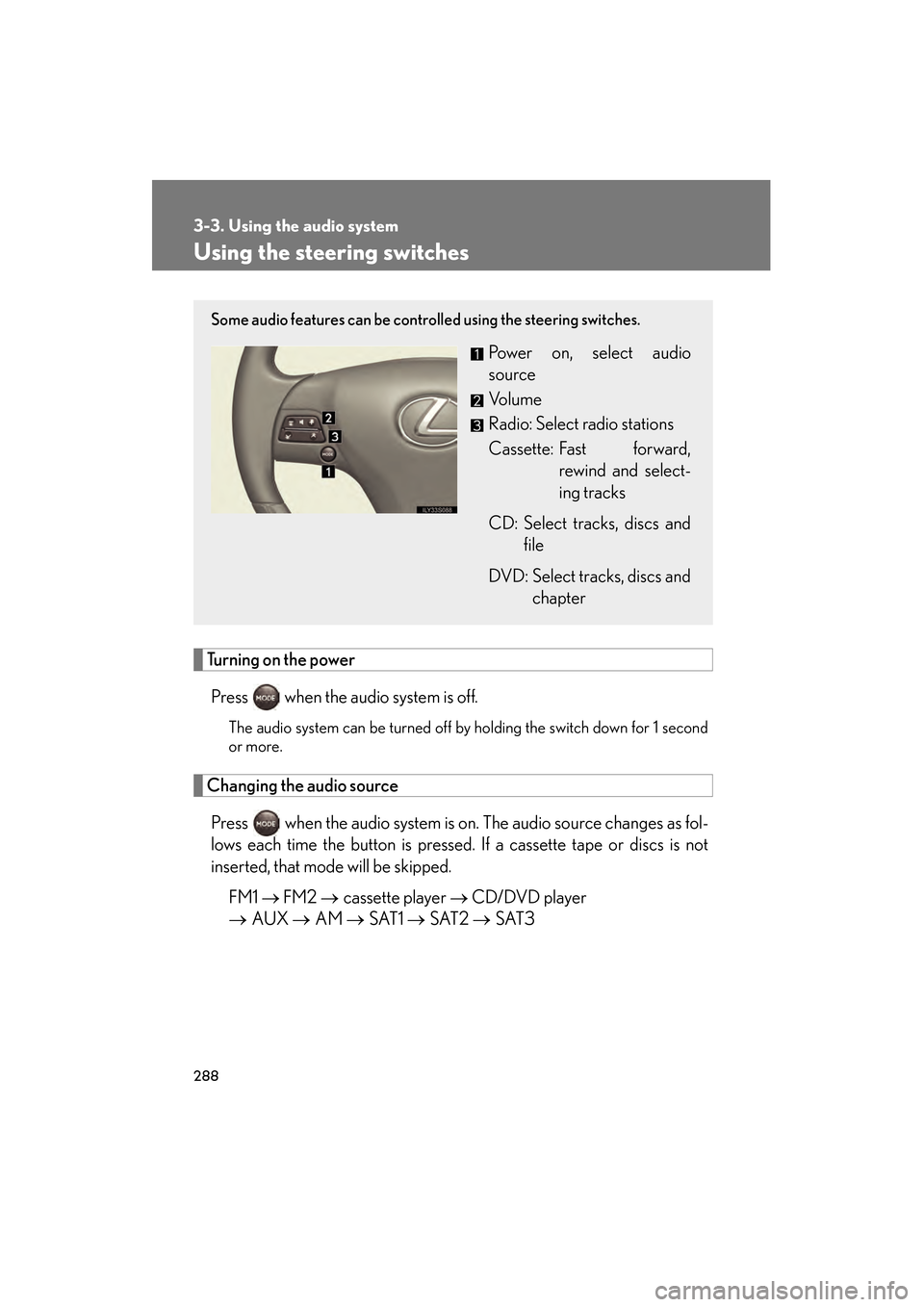
Some audio features can be controlled using the steering switches.
Power on, select audio
source
Vo l u m e
Radio: Select radio stations
Cassette: Fast forward,
rewind and select-
ing tracks
CD: Select tracks, discs and file
DVD: Select tracks, discs and chapter
GS_U_G.book Page 288 Thursday, June 19, 2008 12:54 PM
Page 290 of 598
289
3-3. Using the audio system
3
Interior features
GS_G_U
June 19, 2008 12:54 pm
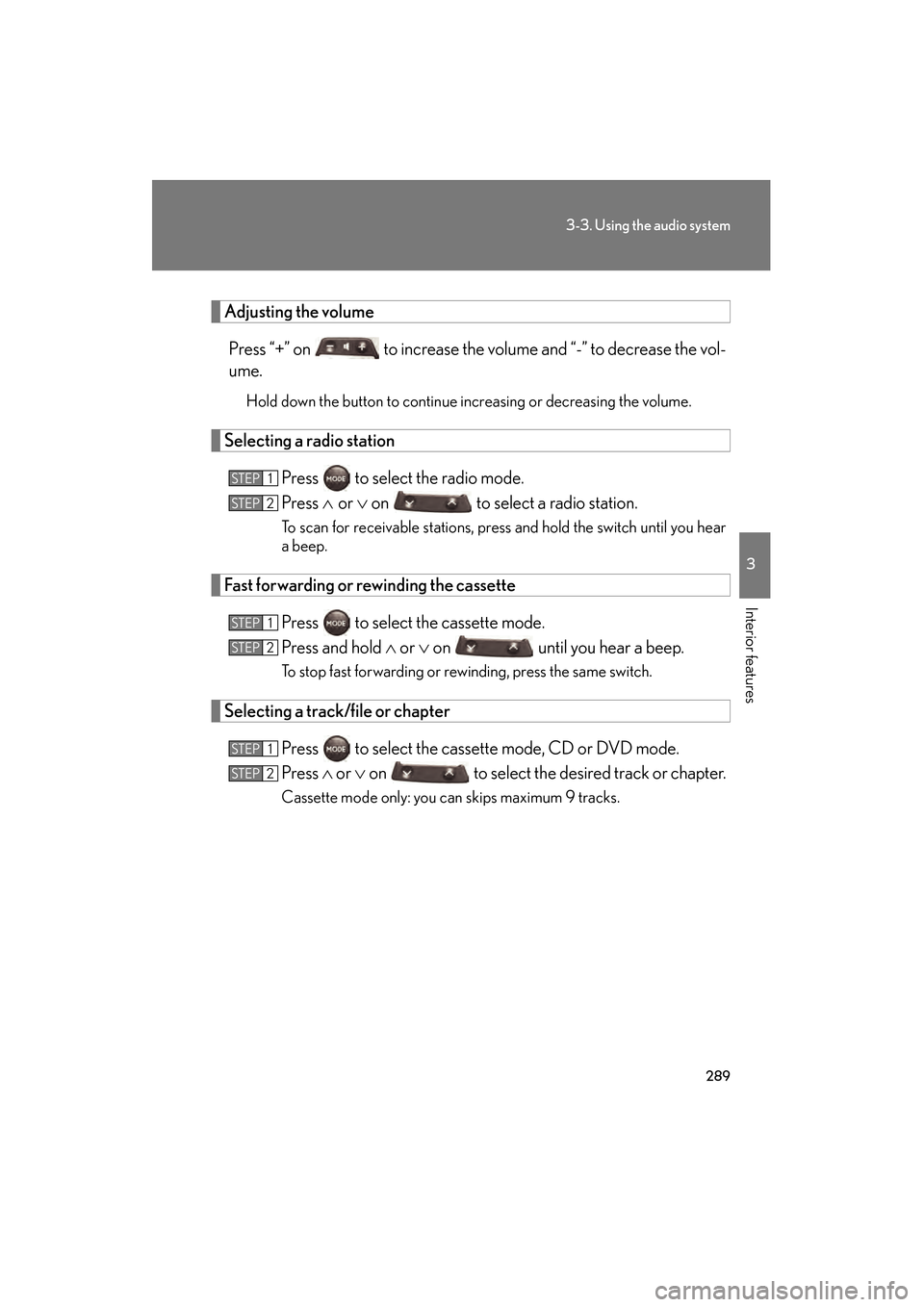
Adjusting the volumePress “+” on to increase the volume and “-” to decrease the vol-
ume.
Hold down the button to continue increasing or decreasing the volume.
Selecting a radio station Press to select the radio mode.
Press ∧ or ∨ on to select a radio station.
To scan for receivable stations, press and hold the switch until you hear
a beep.
Fast forwarding or rewinding the cassette
Press to select the cassette mode.
Press and hold ∧ or ∨ on until you hear a beep.
To stop fast forwarding or rewinding, press the same switch.
Selecting a track/file or chapter
Press to select the cassette mode, CD or DVD mode.
Press ∧ or ∨ on to select the desired track or chapter.
Cassette mode only: you can skips maximum 9 tracks.
STEP1
STEP2
STEP1
STEP2
STEP1
STEP2
GS_U_G.book Page 289 Thursday, June 19, 2008 12:54 PM
Page 291 of 598
290
3-3. Using the audio system
GS_G_U
June 19, 2008 12:54 pm
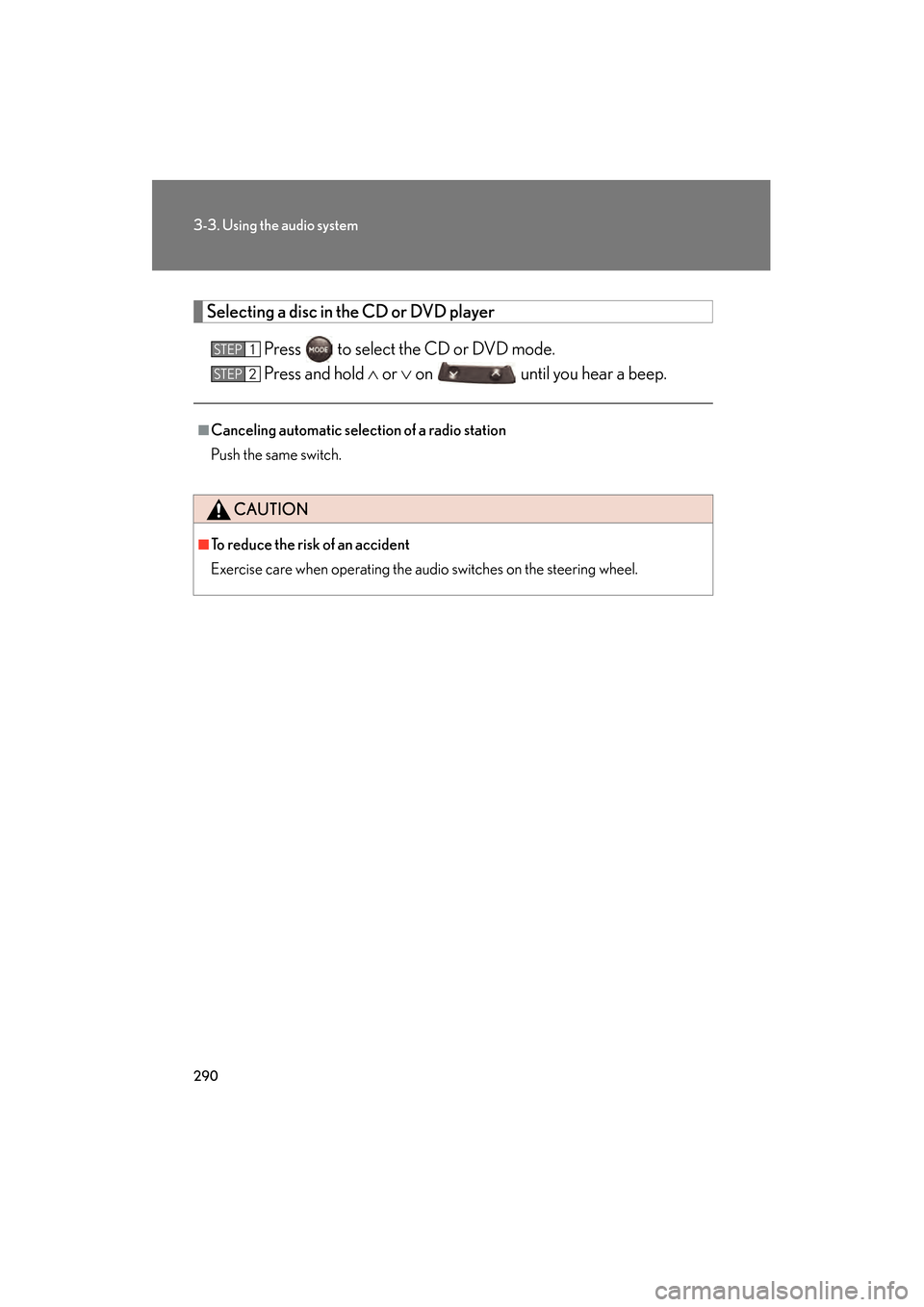
Selecting a disc in the CD or DVD player
Press to select the CD or DVD mode.
Press and hold ∧ or ∨ on until you hear a beep.
■Canceling automatic selection of a radio station
Push the same switch.
CAUTION
■To reduce the risk of an accident
Exercise care when operating the audio switches on the steering wheel.
STEP1
STEP2
GS_U_G.book Page 290 Thursday, June 19, 2008 12:54 PM
Page 296 of 598
295
3-4. Using the hands-free system (for cellular phone)
3
Interior features
GS_G_U
June 19, 2008 12:54 pm
CAUTION
■FCC WARNING
Changes or modifications not expressly approved by the party responsible for
compliance could void the user’s authority to operate the equipment.
Radio Frequency Exposure. This device is approved for Mobile Application only
and, to comply with applicable FCC radio frequency exposure regulations, must be
used with a distance of at least 7.9 in. (20 cm) between the antenna and the body of
any person at all time during use.
■While driving
Do not use the mobile phone or connect the Bluetooth
® system.
NOTICE
■When leaving the vehicle
Do not leave your mobile phone in the vehicle. The inside of the vehicle may
become hot, causing damage to the phone.
GS_U_G.book Page 295 Thursday, June 19, 2008 12:54 PM
Page 375 of 598
374
3-7. Other interior features
GS_G_U
June 19, 2008 12:54 pm
Safety information for the Lexus Link System
Important! Read this information before using the Lexus Link System. ■ Exposure to radio frequency signals
The Lexus Link System installed in your vehicle is a low power ratio trans-
mitter and receiver. When the “ENGINE START STOP” switch is in the
IGNITION ON mode, it receives and also sends radio frequency (RF)
signals.
In August 1996, the Federal Communications Commission (FCC)
adopted RF exposure guidelines with safety levels for mobile wireless
phones. Those guidelines are consistent with the safety standards previ-
ously set by both U.S. and international standards bodies.
● ANSI (American National Standards Institute) C95.1 [1992]
● NCRP (National Council on Radiation Protection and Measurement)
Report 86 [1986]
● ICNIRP (International Commission on Non-Ionizing Radiation Pro-
tection) [1996]
Those standards were based on comprehensive and periodic evaluations
of the relevant scientific literature. Over 120 scientists, engineers, and
physicians from universities, government health agencies, and industry
reviewed the available body of research to develop the ANSI Standard
(C95.1).
The design of the Lexus Link System complies with the FCC guidelines in
addition to those standards.
GS_U_G.book Page 374 Thursday, June 19, 2008 12:54 PM
Page 386 of 598
385
3-7. Other interior features
3
Interior features
GS_G_U
June 19, 2008 12:54 pm
■Certification for the Lexus Link System
NOTE:
This device complies with Part 15 of the FCC Rules. Operation is subject to the fol-
lowing two conditions: (1) this device may not cause harmful interference and (2)
this device must accept any interference received, including interference that may
cause undesired operation.
CAUTION
■FCC WARNING
Changes or modifications in construction not expressly approved by the party
responsible for compliance could void the user’s authority to operate the equip-
ment.
Radio Frequency Exposure. This device is approved for Mobile Application only
and, to comply with applicable FCC radio frequency exposure regulations, must be
used with a distance of at least 7.9 in. (20 cm) between the antenna and the body of
any person at all time during use.
FCC ID: SCWTR-423-A2
GS_U_G.book Page 385 Thursday, June 19, 2008 12:54 PM
Page 429 of 598
428
4-3. Do-it-yourself maintenance
GS_G_U
June 19, 2008 12:54 pm
■Tire pressure warning system certificationFor vehicles sold in the U.S.A.
NOTE:
This device complies with Part 15 of the FCC Rules. Operation is subject to the fol-
lowing two conditions: (1) this device may not cause harmful interference, and (2)
this device must accept any interference received, including interference that may
cause undesired operation.
NOTICE:
This equipment has been tested and found to comply with the limits for a Class B
digital device, pursuant to Part 15 of the FCC Rules. These limits are designed to
provide reasonable protection against harmful interference in a residential installa-
tion. This equipment generates, uses and can radiate radio frequency energy and, if
not installed and used in accordance with the instructions, may cause harmful inter-
ference to radio communications. However, there is no guarantee that interference
will not occur in a particular installation. If this equipment does cause harmful inter-
ference to radio or television reception, which can be determined by turning the
equipment off and on, the user is encouraged to try to correct the interference by
one or more of the following measures:
●Reorient or relocate the receiving antenna.
●Increase the separation between the equipment and receiver.
●Connect the equipment into an outlet on a circuit different from that to which
the receiver is connected.
●Consult the dealer or an experienced radio/TV technician for help.
FCC WARNING:
Changes or modifications not expressly approved by the party responsible for
compliance could void the user’s authority to operate the equipment.
GS_U_G.book Page 428 Thursday, June 19, 2008 12:54 PM
Page 494 of 598
5
When trouble arises
493
5-2. Steps to take in an emergency
GS_G_U
June 19, 2008 12:54 pm
■When the tire pressure warning light comes on
Check the tire inflation pressure and adjust to the appropriate level. Pushing the tire
pressure warning reset switch does not turn off the tire pressure warning light.
■If the tire pressure warning system is inoperative
The tire pressure warning system will be disabled in the following conditions:
(When the condition becomes normal, the system will work properly.)
●If tires not equipped with tire pressure warning valves and transmitters are used.
●If the ID code on the tire pressure warning valves and transmitters is not regis-
tered in the tire pressure warning computer.
●If the tire pressure warning select switch is set to a different tire setting.
●If the tire inflation pressure is 73 psi (500 kPa, 5.1 kgf/cm2 or bar) or higher.
The tire pressure warning system may be disabled in the following conditions:
(When the condition becomes normal, the system will work properly.)
●If electronic devices or facilities using similar radio wave frequencies are nearby.
●If a radio set at similar frequencies is in use in the vehicle.
●If a window tint that affects the radio wave signals is installed.
●If there is a lot of snow or ice on the vehicle, in particular around the wheels or
wheel housings.
●If non-genuine Lexus wheels are used. (Even if you use Lexus wheels, the tire
pressure warning system may not work properly with some types of tires.)
●If tire chains are used.
■The tire pressure warning light may turn on due to natural causes
The tire pressure warning light may turn on due to natural causes such as natural air
leaks or tire inflation pressure changes caused by temperature. In this case, adjust-
ing the tire inflation pressure will turn off the warning light (after a few minutes).
■When a tire is replaced with a spare tire
The compact spare tire is not equipped with the tire pressure warning valve and
transmitter. If a tire goes flat, the tire pressure warning light will not turn off even
though the flat tire is replaced with the spare tire. Replace the spare tire with the
repaired tire and adjust the proper tire inflation pressure. The tire pressure warning
light will turn off after a few minutes.
GS_U_G.book Page 493 Thursday, June 19, 2008 12:54 PM
Page 564 of 598
563
6-1. Specifications
6
Vehicle specifications
GS_G_U
June 19, 2008 12:54 pm
Tire related termMeaning
Accessory weight
The combined weight (in excess of those standard
items which may be replaced) of automatic transmis-
sion, power steering, power brakes, power windows,
power seats, radio and heater, to the extent that these
items are available as factory-installed equipment
(whether installed or not)
Curb weight
The weight of a motor vehicle with standard equip-
ment, including the maximum capacity of fuel, oil and
coolant, and if so equipped, air conditioning and
additional weight optional engine
Maximum loaded vehicle
weight
The sum of:
(a) Curb weight
(b) Accessory weight
(c) Vehicle capacity weight
(d) Production options weight
Normal occupant weight150 lb. (68 kg) times the number of occupants speci-
fied in the second column of Table 1* that follows
Occupant distributionDistribution of occupants in a vehicle as specified in
the third column of Table 1* below
Production options
weight
The combined weight of installed regular production
options weighing over 5 lb. (2.3 kg) in excess of the
standard items which they replace, not previously
considered in curb weight or accessory weight,
including heavy duty brakes, ride levelers, roof rack,
heavy duty battery, and special trim
RimA metal support for a tire or a tire and tube assembly
upon which the tire beads are seated
Rim diameter
(Wheel diameter)Nominal diameter of the bead seat
GS_U_G.book Page 563 Thursday, June 19, 2008 12:54 PM