Media Lexus GS350 2009 User Guide
[x] Cancel search | Manufacturer: LEXUS, Model Year: 2009, Model line: GS350, Model: Lexus GS350 2009Pages: 622, PDF Size: 17.98 MB
Page 136 of 622
135
2-1. Driving procedures
2
When driving
GS_G_U (OM30B43U)
April 27, 2009 10:48 am
■If the engine does not start
The immobilizer system may not have been deactivated. (→P. 8 4 )
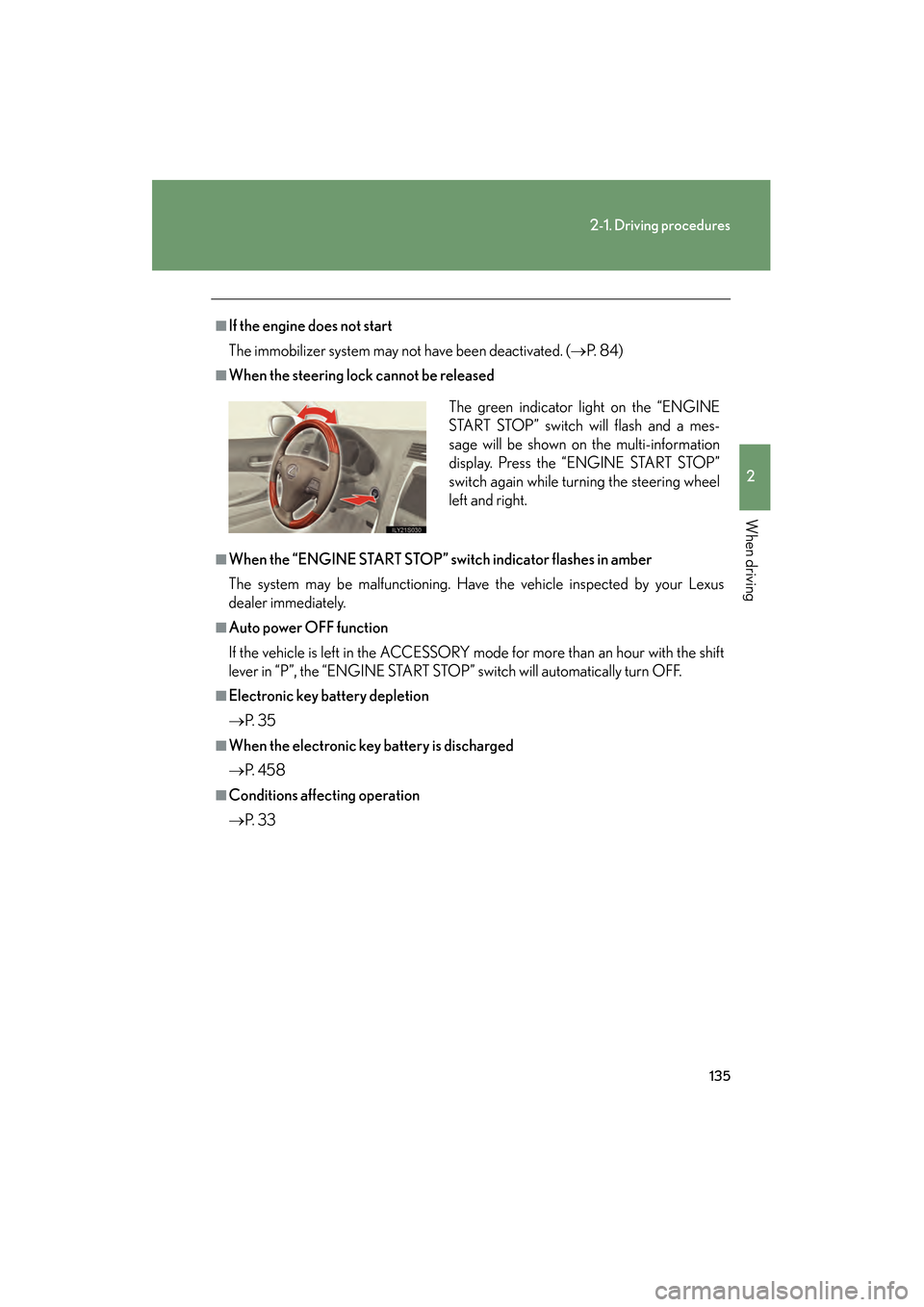
■When the steering lock cannot be released
■When the “ENGINE START STOP” switch indicator flashes in amber
The system may be malfunctioning. Have the vehicle inspected by your Lexus
dealer immediately.
■Auto power OFF function
If the vehicle is left in the ACCESSORY mode for more than an hour with the shift
lever in “P”, the “ENGINE START STOP” switch will automatically turn OFF.
■Electronic key battery depletion
→P. 3 5
■When the electronic key battery is discharged
→P. 4 5 8
■Conditions affecting operation
→P. 3 3 The green indicator light on the “ENGINE
START STOP” switch will flash and a mes-
sage will be shown on the multi-information
display. Press the “ENGINE START STOP”
switch again while turning the steering wheel
left and right.
GS_U_G.book Page 135 Monday, April 27, 2009 10:50 AM
Page 137 of 622
136
2-1. Driving procedures
GS_G_U (OM30B43U)
April 27, 2009 10:48 am
CAUTION
■When starting the engine
Always start the engine while sitting in the driver’s seat. Do not press the accelera-
tor pedal while starting the engine under any circumstances.
Doing so may cause an accident resu lting in death or serious injury.
■Stopping the engine in an emergency
If you want to stop the engine in an emergency while driving the vehicle, push and
hold the “ENGINE START STOP” switch for more than 3 seconds.
However, do not touch the “ENGINE START STOP” switch while driving except in
an emergency. If the engine stops while the vehicle is being driven, this could lead to
an unexpected accident.
NOTICE
■To prevent 12 volt battery discharge
Do not leave the “ENGINE START STOP” switch in ACCESSORY or IGNITION
ON mode for long periods if the engine is not running.
■When starting the engine
●Do not race the engine.
●If the engine becomes difficult to start or stalls frequently, have the engine
checked immediately.
GS_U_G.book Page 136 Monday, April 27, 2009 10:50 AM
Page 142 of 622
141
2-1. Driving procedures
2
When driving
GS_G_U (OM30B43U)
April 27, 2009 10:48 am
■If the indicator does not come on even after shifting the shift lever to “S”
This may indicate a malfunction in the automatic transmission. Have the vehicle
inspected by your Lexus dealer immediately.
(In this situation, the vehicle will operate as if the shift lever is in “D”.)
■AI-SHIFT
The AI-SHIFT automatically shifts the gear to the optimal position according to the
driver’s input and driving conditions.
GS460: The AI-SHIFT automatically operates when the shift lever is in the “D” or
“S” position.
GS350: The AI-SHIFT automatically operat es when the shift lever is in the “D”
position. (Shifting the shift lever to the “S” position cancels the function.)
GS_U_G.book Page 141 Monday, April 27, 2009 10:50 AM
Page 149 of 622
148
2-2. Instrument cluster
GS_G_U (OM30B43U)
April 27, 2009 10:48 am
NOTICE
■To prevent damage to the engine and its components
●The engine may be overheating if the engine coolant temperature gauge is in the
red zone (“H”). In this case, immediately stop the vehicle in a safe place. Check
the engine after it has cooled completely. (→P. 5 5 2 )
●Do not let the indicator needle of the tachometer enter the red zone, which indi-
cates the maximum engine speed.
■To activate the light sensitivity function properly
Do not affix a sticker or window tint to the rear window glass, or put an object
behind the rear seat.
GS_U_G.book Page 148 Monday, April 27, 2009 10:50 AM
Page 152 of 622
151
2-2. Instrument cluster
2
When driving
GS_G_U (OM30B43U)
April 27, 2009 10:48 am
CAUTION
■If a safety system warning light does not come on
Should a safety system light such as ABS and the SRS airbag warning light not
come on when you turn to IGNITION ON mode, this could mean that these sys-
tems are not available to help protect you in an accident, which could result in death
or serious injury. Have the vehicle inspec ted by your Lexus dealer immediately if
this occurs.
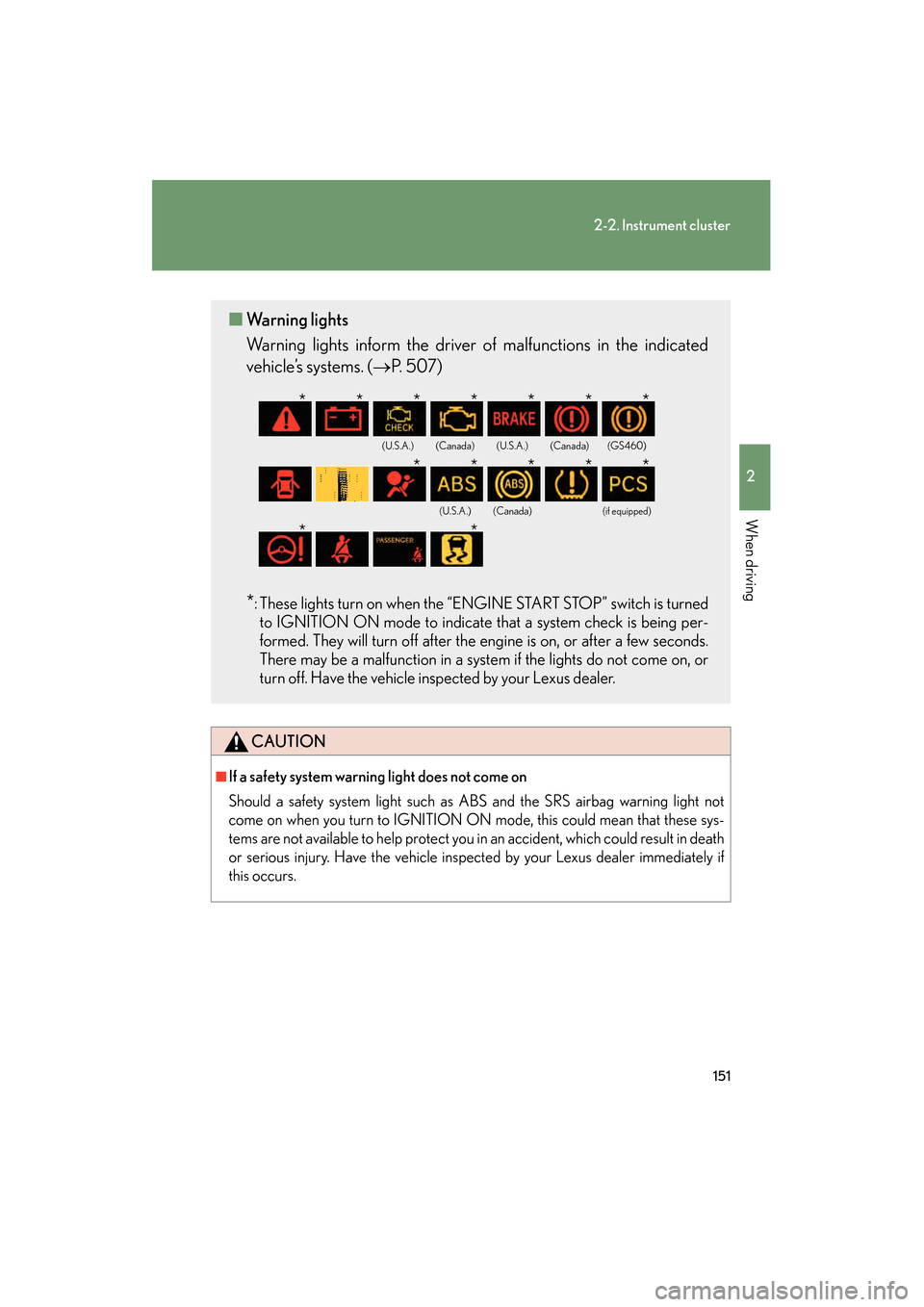
■ Warning lights
Warning lights inform the driver of malfunctions in the indicated
vehicle’s systems. ( →P. 507)
*: These lights turn on when the “ENGINE START STOP” switch is turned
to IGNITION ON mode to indicate that a system check is being per-
formed. They will turn off after the engine is on, or after a few seconds.
There may be a malfunction in a syst em if the lights do not come on, or
turn off. Have the vehicle inspected by your Lexus dealer.
(U.S.A.)(Canada)(U.S.A.)(Canada)(GS460)
(U.S.A.)(Canada)(if equipped)
*******
*****
**
GS_U_G.book Page 151 Monday, April 27, 2009 10:50 AM
Page 158 of 622
157
2-3. Operating the lights and windshield wipers
2
When driving
GS_G_U (OM30B43U)
April 27, 2009 10:40 am
■Automatic light off system
The headlights and tail lights turn off 30 seconds after all doors are closed if the
“ENGINE START STOP” switch has been switched to ACCESSORY mode or
turned OFF while the headlights are turned on. (The lights turn off immediately if
the button on the key is pressed after all doors are locked.)
To turn the lights on again, switch to IGNITION ON mode, or turn the light switch
off once and then back to the or position.
■Automatic headlight leveling system
The level of the headlights is automatically adjusted according to the number of
passengers and the loading condition of the vehicle to ensure that the headlights do
not interfere with other road users.
■If the indicator flashes...
It may indicate a malfunction in th e system. Contact your Lexus dealer.
■Customization that can be configured at Lexus dealer
Settings (e.g. light sensor sensitivity) can be changed.
(Customizable features →P. 5 9 2 )
NOTICE
■To prevent 12 volt battery discharge
Do not leave the lights on longer than necessary when the engine is off.
GS_U_G.book Page 157 Monday, April 27, 2009 10:50 AM
Page 168 of 622
167
2-4. Using other driving systems
2
When driving
GS_G_U (OM30B43U)
April 27, 2009 10:48 am
■Cruise control can be set when
●The shift lever is in the “D” or “4”, “5”, “6”, “7” or “8” (GS460) or “4”, “5”, or “6”
(GS350) range of “S”.
●Vehicle speed is between approximately 25 mph (40 km/h) and 125 mph
(200 km/h).
■Accelerating
The vehicle can be accelerated normally. After acceleration, the set speed
resumes.
■Automatic cruise control cancelation
The set speed is automatically canceled in any of the following situations.
●Actual vehicle speed falls more than 10 mph (16 km/h) below the preset vehicle
speed
At this time, the memorized set speed is not retained.
●Actual vehicle speed is below 25 mph (40 km/h)
●Enhanced VSC is activated
■If the cruise control indicator light flashes
Press the “ON-OFF” button off once, and then reactivate the system.
If the cruise control speed cannot be set or if the cruise control cancels immediately
after being activated, there may be a malfun ction in the cruise control system. Have
the vehicle inspected by your Lexus dealer.
GS_U_G.book Page 167 Monday, April 27, 2009 10:50 AM
Page 177 of 622
176
2-4. Using other driving systems
GS_G_U (OM30B43U)
April 27, 2009 10:48 am
■Vehicle-to-vehicle distance settings
Select a distance from the table below. Note that the distances shown correspond
to a vehicle speed of 50 mph (80 km/h). Vehicle-to-vehicle distance increases/
decreases in accordance with vehicle speed.
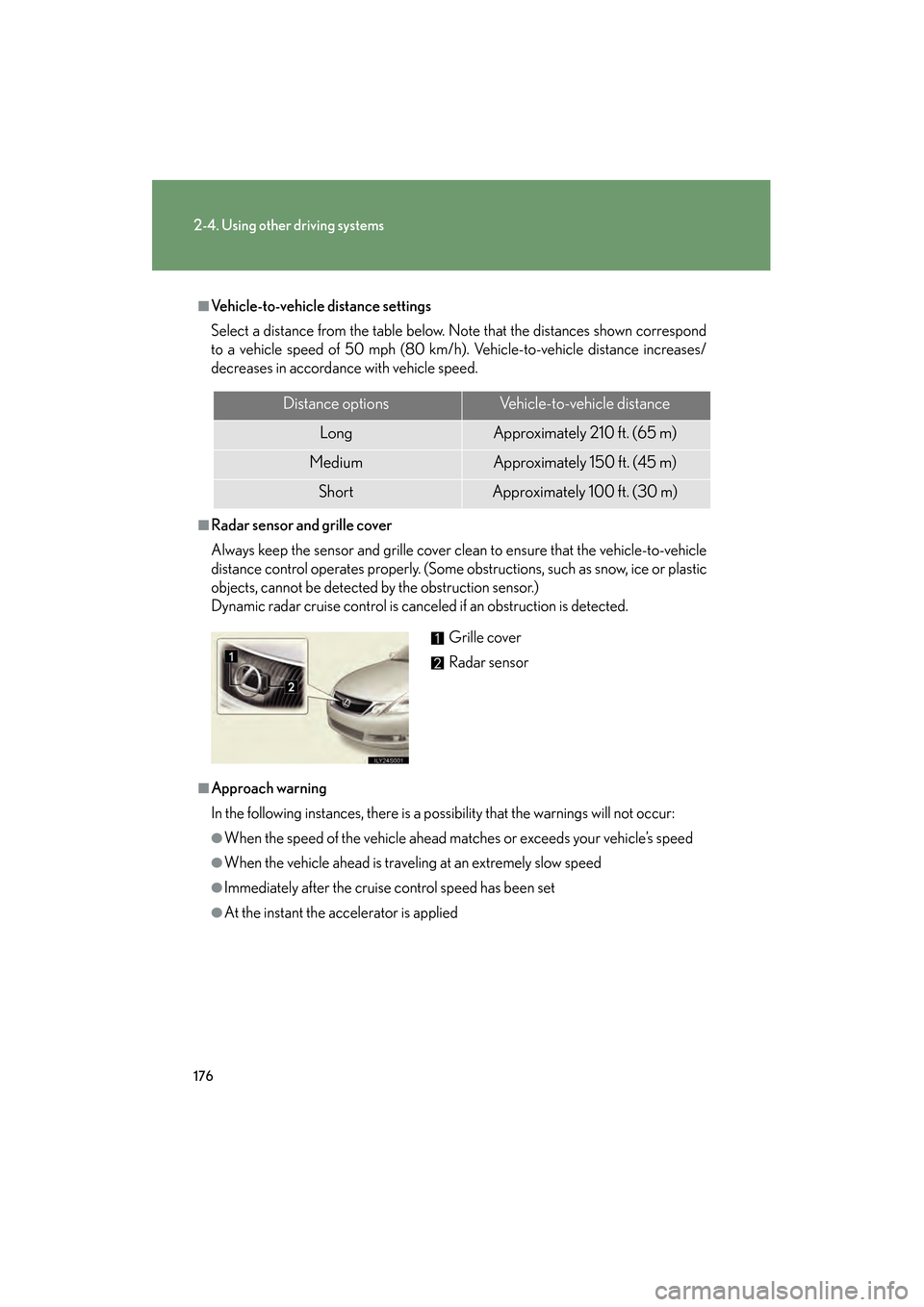
■Radar sensor and grille cover
Always keep the sensor and grille cover clean to ensure that the vehicle-to-vehicle
distance control operates properly. (Some obstructions, such as snow, ice or plastic
objects, cannot be detected by the obstruction sensor.)
Dynamic radar cruise control is canceled if an obstruction is detected.
■Approach warning
In the following instances, there is a po ssibility that the warnings will not occur:
●When the speed of the vehicle ahead ma tches or exceeds your vehicle’s speed
●When the vehicle ahead is traveling at an extremely slow speed
●Immediately after the cruise control speed has been set
●At the instant the accelerator is applied
Distance optionsVehicle-to-vehicle distance
LongApproximately 210 ft. (65 m)
MediumApproximately 150 f t. (45 m)
ShortApproximately 100 f t. (30 m)
Grille cover
Radar sensor
GS_U_G.book Page 176 Monday, April 27, 2009 10:50 AM
Page 218 of 622
217
2-5. Driving information
2
When driving
GS_G_U (OM30B43U)
April 27, 2009 10:48 am
Winter driving tips
Carry out the necessary preparations and inspections before driving the
vehicle in winter. Always drive the vehicle in a manner appropriate to the
prevailing weather conditions.
■ Pre-winter preparations
●Use fluids that are appropria te to the prevailing outside tempera-
tures.
• Engine oil
• Engine coolant
• Washer fluid
● Have a service technician inspect the level and specific gravity of
battery electrolyte.
● Have the vehicle fitted with four snow tires or purchase a set of
tire chains for the rear tires.
Ensure that all tires are the same size and brand, and that chains match
the size of the tires.
■ Before driving the vehicle
Perform the following according to the driving conditions.
● Do not try to forcibly open a window or move a wiper that is fro-
zen. Pour warm water over the frozen area to melt the ice. Wipe
away the water immediately to prevent it from freezing.
● To ensure proper operation of the climate control system fan,
remove any snow that has accumu lated on the air inlet vents in
front of the windshield.
● Remove any ice that has accumul ated on the vehicle chassis.
● Periodically check for and remove any excess ice or snow that
may have accumulated in the wheel well or on the brakes.
GS_U_G.book Page 217 Monday, April 27, 2009 10:50 AM
Page 242 of 622
241
3-2. Using the air conditioning system and defogger
3
Interior features
GS_G_U (OM30B43U)
April 20, 2009 4:34 pm
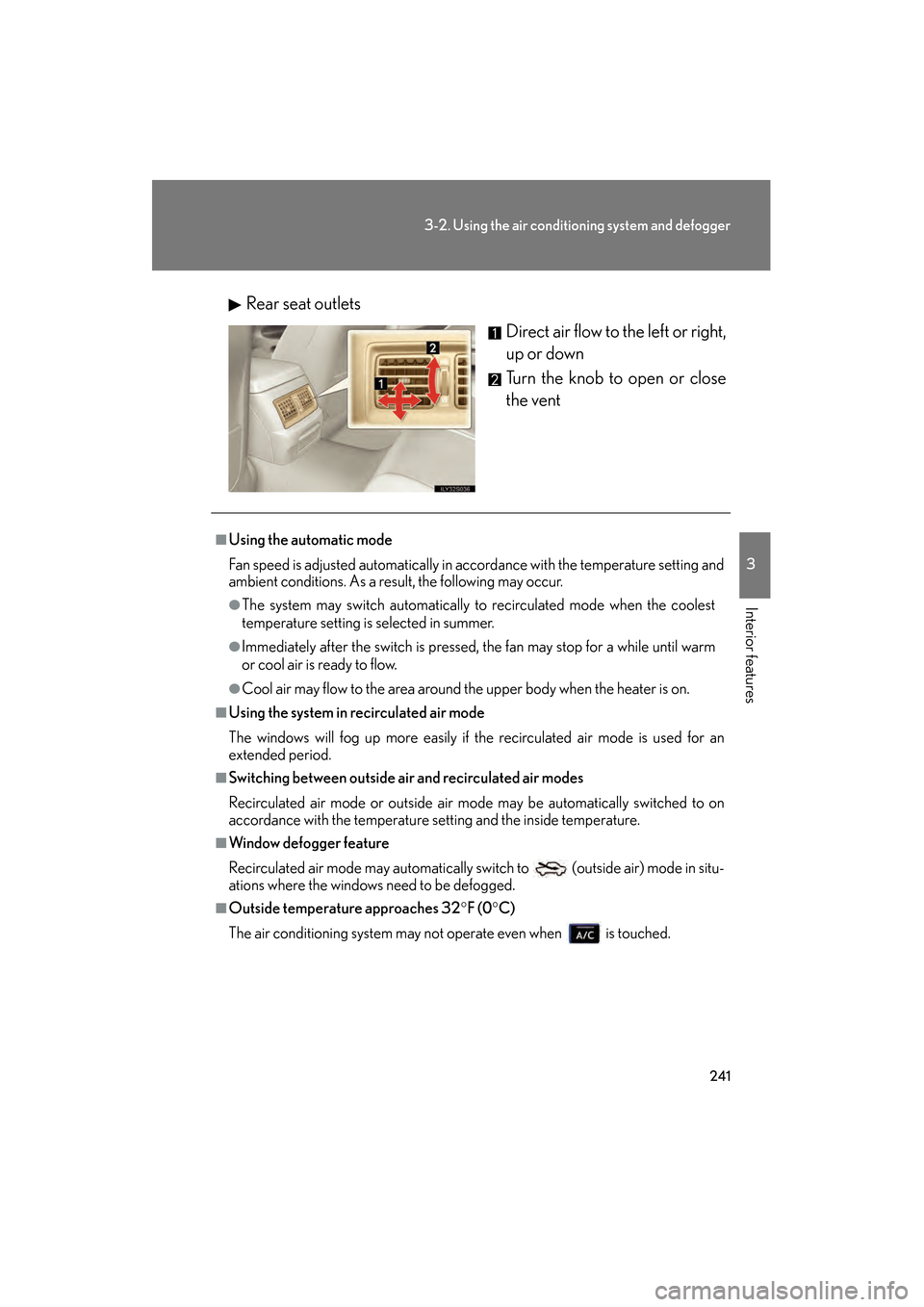
Rear seat outlets
Direct air flow to the left or right,
up or down
Turn the knob to open or close
the vent
■Using the automatic mode
Fan speed is adjusted automatically in acc ordance with the temperature setting and
ambient conditions. As a result, the following may occur.
●The system may switch automatically to recirculated mode when the coolest
temperature setting is selected in summer.
●Immediately after the switch is pressed, the fan may stop for a while until warm
or cool air is ready to flow.
●Cool air may flow to the area around the upper body when the heater is on.
■Using the system in recirculated air mode
The windows will fog up more easily if the recirculated air mode is used for an
extended period.
■Switching between outside air and recirculated air modes
Recirculated air mode or outside air mo de may be automatically switched to on
accordance with the temperature se tting and the inside temperature.
■Window defogger feature
Recirculated air mode may automatically switch to
(outside air) mode in situ-
ations where the windows need to be defogged.
■Outside temperature approaches 32 °F (0 °C)
The air conditioning system may no t operate even when is touched.
GS_U_G.book Page 241 Monday, April 27, 2009 10:50 AM